Thermostat - Powerful HVAC Landing Page Template
Thermostat is a pre-built HVAC email newsletter landing page built for contractors who need to send seasonal tune-up reminders, equipment recall alerts, and financing offers fast. Swap your logo, drop in local weather data, and send. The split-screen layout and feature comparison grid make the value immediately clear to every visitor.
by Rocket studio
Quick summary
Thermostat is a pre-built HVAC email newsletter template system delivered as a split-screen landing page. It lets heating and cooling contractors send polished seasonal campaigns without touching a design tool. Swap the logo, add local weather data, and hit send. The page is built around a feature comparison grid that turns browsing into a clear buying decision.
Who this template is for
This template is made for HVAC professionals who run real businesses and need email campaigns that actually match their trade. It fits anyone moving faster than a generic newsletter builder allows.
- Two-truck shop owners who still track jobs on a whiteboard and need a no-fuss send workflow
- Regional franchise managers pushing quarterly campaigns across dozens of locations at once
- Marketing coordinators at heating and cooling dealerships who need co-op ad compliant layouts quickly
What problem this template solves
Most HVAC contractors use generic email templates that were never built for their industry. The result is campaigns that miss the context, language, and compliance details that HVAC customers and partners expect.
- No way to include HVAC-specific details like system age, local temperature data, or warranty countdowns
- Generic layouts that fail co-op advertising compliance requirements from equipment manufacturers
- Hours lost trying to adapt a multipurpose design tool to a trade-specific campaign
What you get with this template
You get a fully structured landing page that sells the HVAC email template system through a live dashboard preview and a scrolling feature comparison grid. Every section is purpose-built for the HVAC contractor audience.
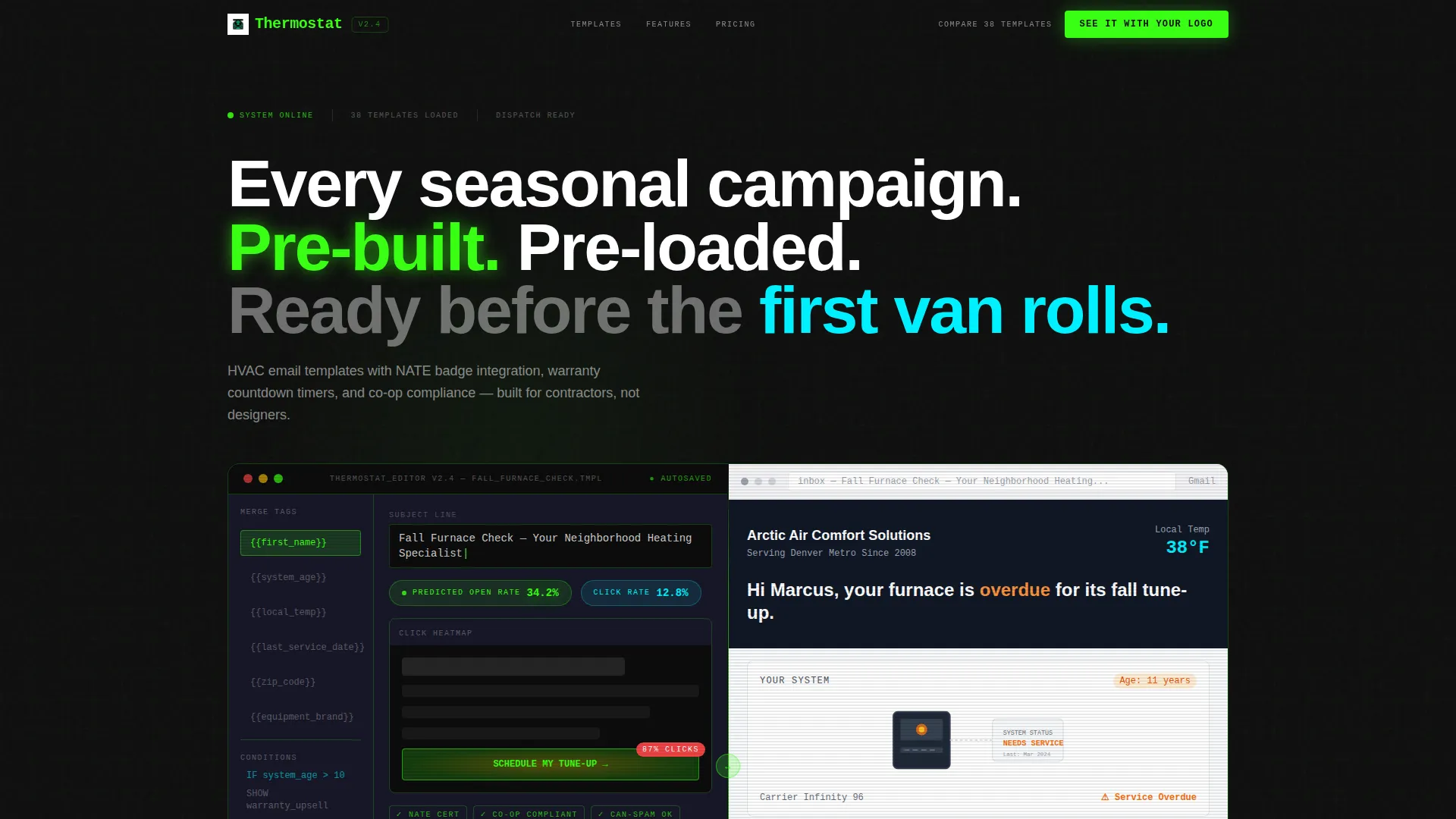
- A split-screen header showing the template editor on the left and the rendered inbox email on the right
- A scrolling feature matrix that compares this system row by row against generic alternatives
- Two conversion paths: a branded preview form and a link to a full filterable template gallery
Feature list
This template system includes several purpose-built capabilities drawn directly from the HVAC contractor workflow.
Dashboard Preview Header
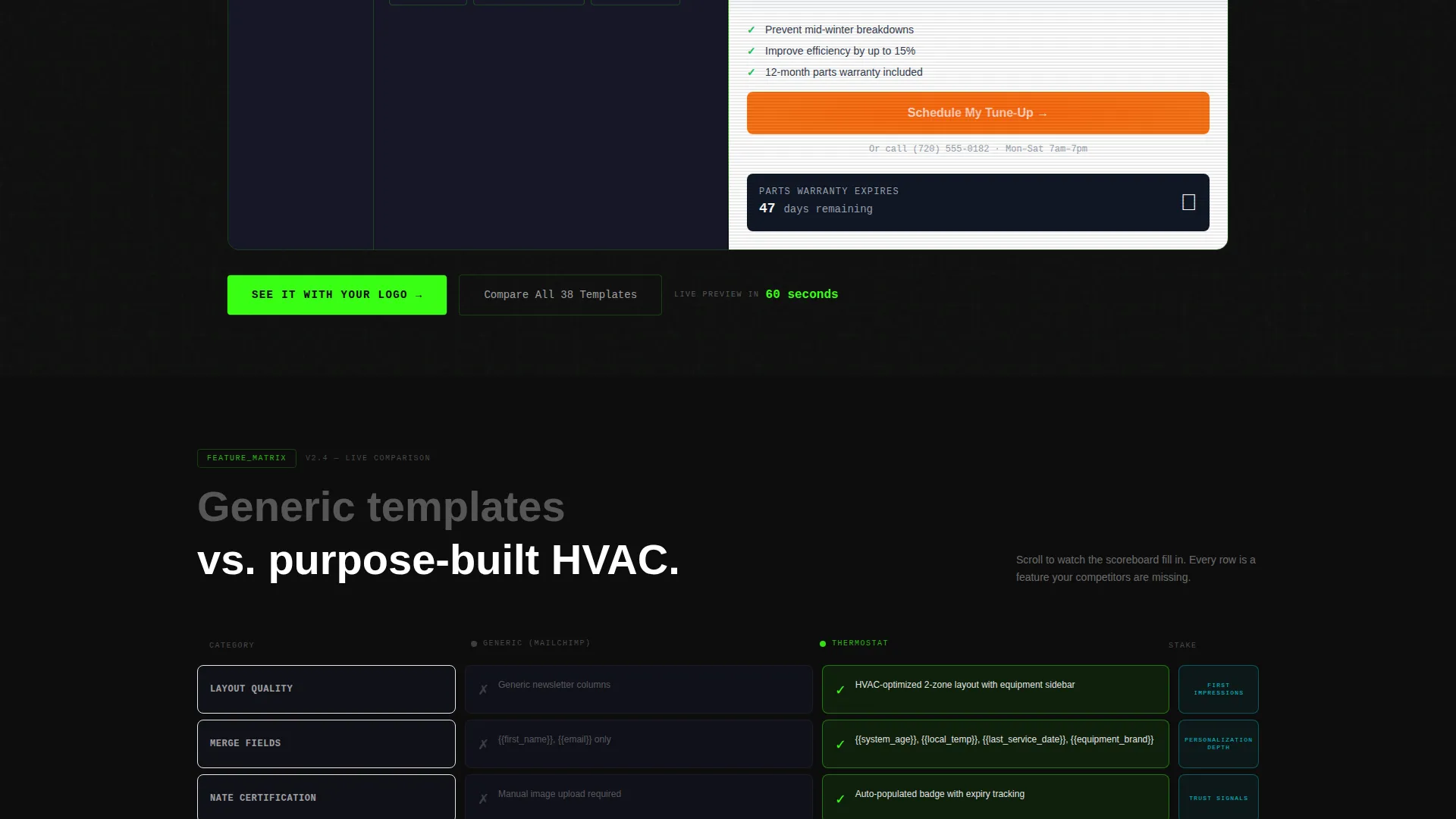
The header renders a pixel-perfect split-screen view of the template editor alongside the finished inbox email. The left panel shows a "Fall Furnace Check" campaign mid-build, complete with an open-rate prediction badge reading 34.2% and a heat-map overlay on the call-to-action button. The right panel shows the customer-facing email with a furnace diagram and a "Schedule My Tune-Up" button.
HVAC-Specific Merge Tag System
The sidebar displays merge tags built for the heating and cooling trade, including {{first_name}}, {{system_age}}, and {{local_temp}}. These fields let contractors personalize every send with data that is actually relevant to the recipient. No workarounds or custom code required.
Scrolling Feature Comparison Grid
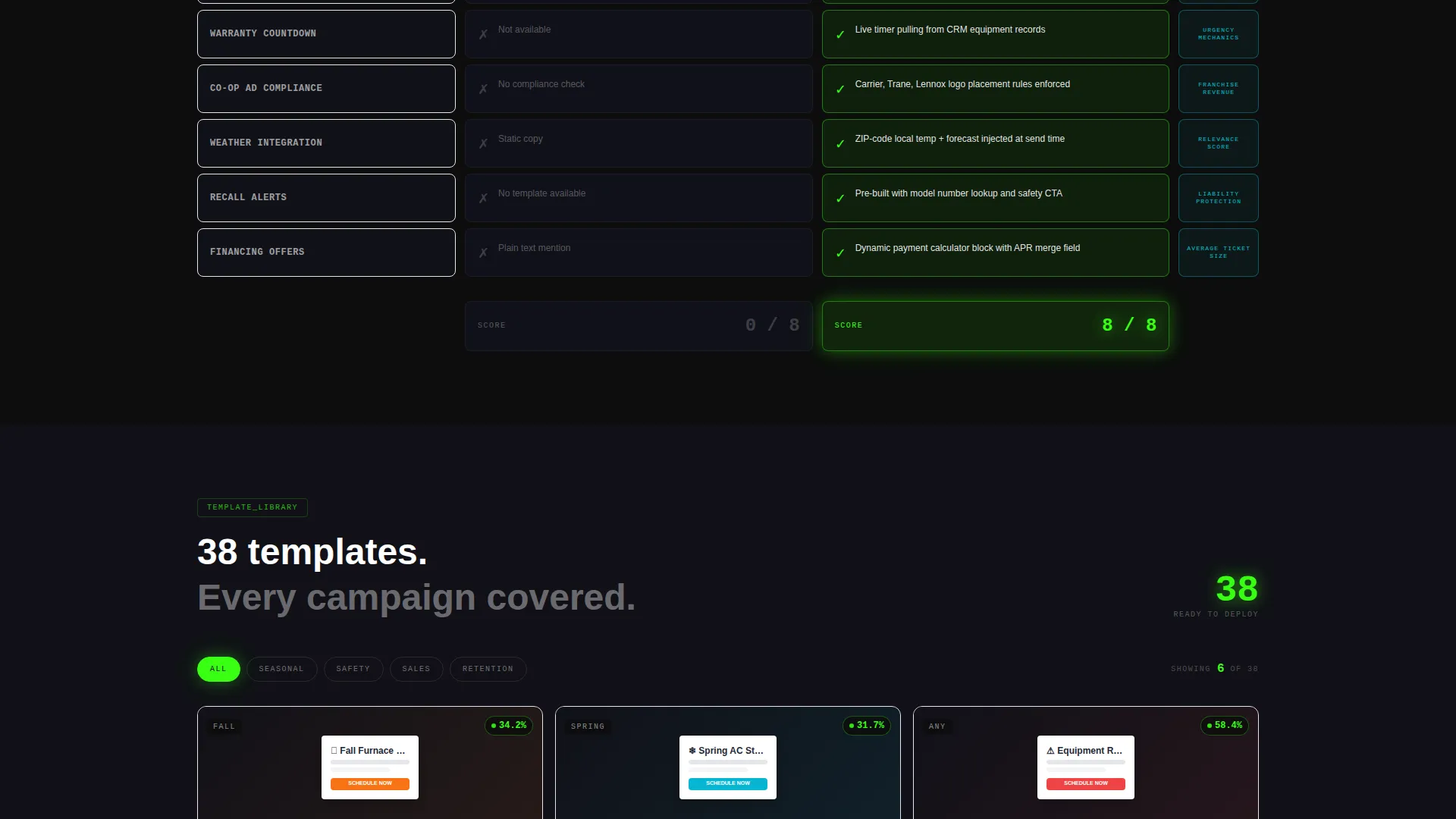
The feature matrix puts this template system side by side against generic alternatives in a row-by-row format. Each feature cell lights up in refrigerant green as it scrolls into view, while the competitor column stays dim in charcoal. The scroll feels like watching a scoreboard fill in, row by row.
Co-op Ad Compliance Layout Support
Rows in the comparison grid specifically highlight co-op advertising compliance, NATE certification badge integration, and equipment warranty countdown timers. These are features that dealership marketing coordinators and franchise managers need on deadline. The layout supports their compliance workflow without requiring a separate design step.
Live Branded Preview Generator
The primary call-to-action triggers a lightweight form that collects company name, logo upload, and primary service type. The system generates a live branded preview of the template in under sixty seconds. Visitors see themselves inside the product before they commit.
Filterable Template Gallery Path
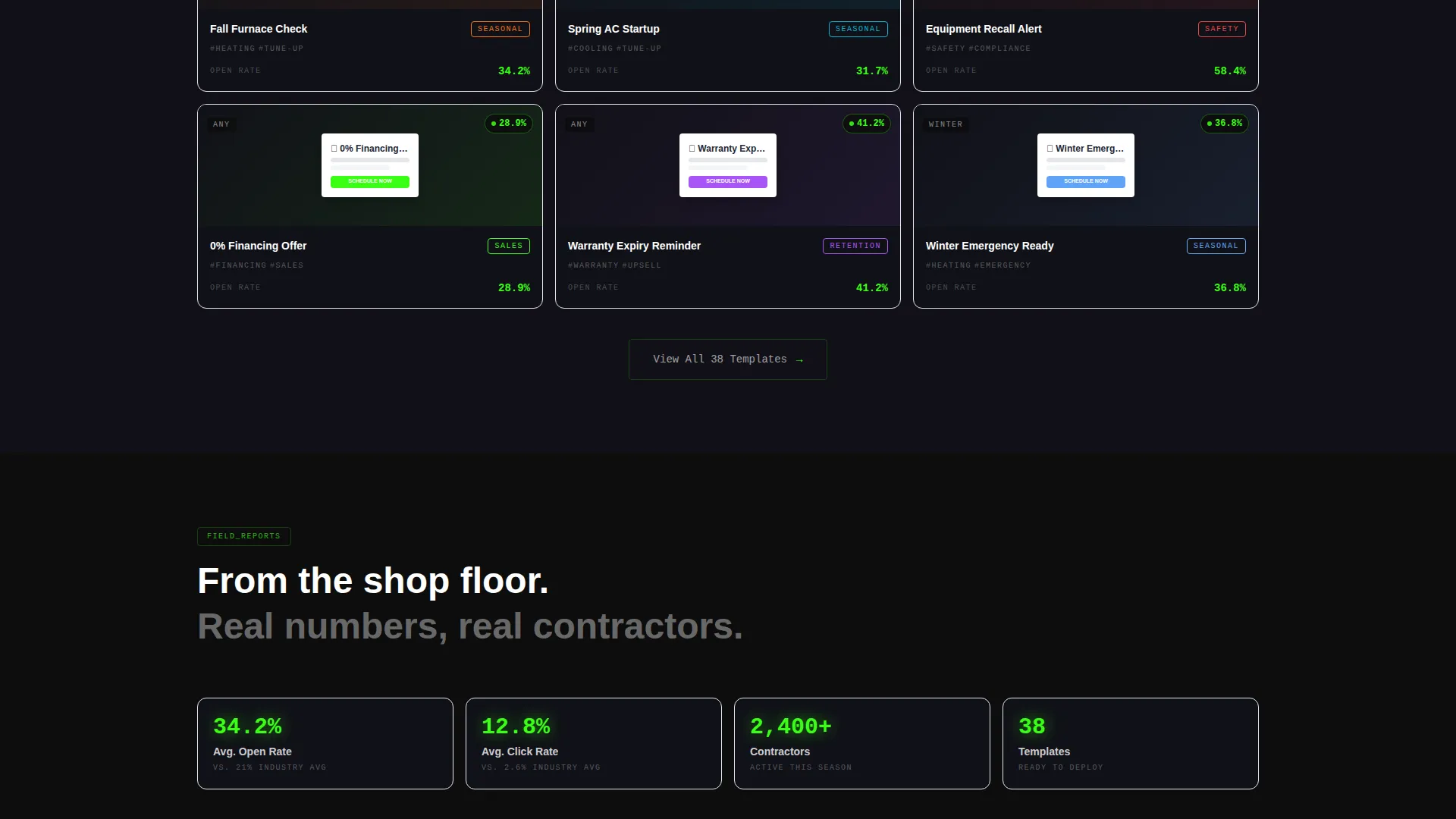
A secondary conversion path links to a gallery of 38 templates with filtering options. This gives comparison-minded buyers a way to explore the full system at their own pace. Both paths feed into the same conversion goal without competing for attention.
Page sections overview
| Section | Purpose |
|---|---|
| Split-Screen Header | Show editor and rendered email side by side |
| Open Rate Badge | Signal campaign performance at a glance |
| Heat Map Overlay | Highlight click zones on the call-to-action |
| Merge Tag Sidebar | Display HVAC-specific personalization fields |
| Feature Comparison Grid | Compare this system against generic alternatives |
| Green Highlight Rows | Animate feature wins on scroll into view |
| Branded Preview Form | Collect logo and service type for live preview |
| Template Gallery Link | Route comparison buyers to all 38 templates |
Design & branding system
The visual identity follows a Data Command theme using an Acid Digital color system. The palette feels like the glow of a diagnostic gauge in a dark mechanical room: electric, clinical, and impossible to misread.
- Terminal black
(#0D0D0D)dominates backgrounds; refrigerant green(#39FF14)drives calls-to-action and data highlights - Compressor charcoal
(#1A1A2E)separates content blocks and keeps the competitor column visually suppressed - Alert cyan
(#00F0FF)fires on hover states and active toggles, rewarding every interaction with a pulse of light
Mobile & speed optimization
The split-screen layout is designed to communicate clearly on any screen size. The dispatch-screen visual language stays readable whether a contractor pulls it up on a tablet in the truck or a monitor in the office.
- The 50/50 split adjusts to stack vertically on smaller screens so neither panel loses its content
- The lightweight branded preview form keeps the primary conversion path accessible on mobile without friction
How this template helps you convert
The page is structured around a Comparison/Versus conversion strategy. Every scroll builds the case, and the call-to-action simply asks visitors to see the product with their own branding applied.
- The feature comparison grid does the persuasion by making the gap between generic and purpose-built HVAC templates visible row by row as the visitor scrolls.
- The "See It With Your Logo" call-to-action lowers commitment by offering a live branded preview in under sixty seconds, removing the need to imagine the result.
Other information about this template
This template sits at the intersection of HVAC digital presence and email marketing technology. It is especially relevant for contractors and dealerships navigating co-op advertising guidelines from major equipment manufacturers.
- The template system covers seasonal use cases including furnace tune-up reminders, equipment recall alerts, and financing offers
- The gallery includes 38 templates, giving buyers a wide range of campaign types to browse and filter
- The design theme draws from dispatch and diagnostic screen aesthetics, making it feel native to the trade rather than borrowed from a generic marketing tool
Theme
Data Command
Creative direction
Feature Matrix
Color system
Acid Digital
Style
Split Screen (50/50)
Direction
Comparison/Versus
Page Sections
Dashboard Preview Header
HVAC Merge Tag Personalization
Scrolling Feature Comparison Grid
Co-op Compliance and Certification Support
Live Branded Preview Generator
Filterable Template Gallery
Related questions
Do I need design experience to use this template?
Can I preview the template with my own branding before committing?
Is this template suitable for multi-location franchise operations?
What types of HVAC email campaigns does this template support?
How many templates are included in the full system?



