Subgrade - Trusted Basementcleaning Landing Page Template
Subgrade is a split-screen landing page template built for basement cleaning and remediation specialists. It pairs high-impact before-and-after case study storytelling with a seven-question quiz that delivers a live Basement Health Score. The Forest Trust color system and Corporate Precision layout give every section the grounded authority this kind of work demands.
by Rocket studio
Quick summary
Subgrade is a single-page template designed for basement remediation professionals. It opens with a 50/50 split-screen hero, unfolds as a scrolling case study narrative, and drives conversions through a seven-question Basement Health Score quiz. The page speaks directly to worried homeowners and realtors who need a credible, competent answer fast.
Who this template is for
This template is built for basement cleaning and remediation specialists who need to turn first-time visitors into booked inspections. It serves businesses that rely on documented proof and clear process, not just service descriptions.
- Basement remediation contractors targeting suburban homeowners who have discovered mold, moisture, or odor
- Realtors or home-service businesses helping clients prepare a listing that needs to pass inspection
- Basement waterproofing and cleaning companies ready to showcase real project results with before-and-after evidence
What problem this template solves
Most home-services pages describe what a business does but fail to prove it. Homeowners dealing with mold or standing water are scared and skeptical. A generic service page does not move them to act. Subgrade solves this by replacing vague claims with documented case studies, hard statistics, and an interactive quiz that names the problem clearly and offers a next step immediately.
- Visitors leave pages that feel vague or untrustworthy before reading past the hero
- Homeowners need to see evidence of solved problems, not just a list of services
- Realtors and buyers want a fast, credible assessment before committing to a call
What you get with this template
You get a fully structured landing page with every section already planned and built around conversion. The layout guides the visitor from discovery to decision using real evidence and an interactive scoring tool. Nothing is filler; every section has a job.
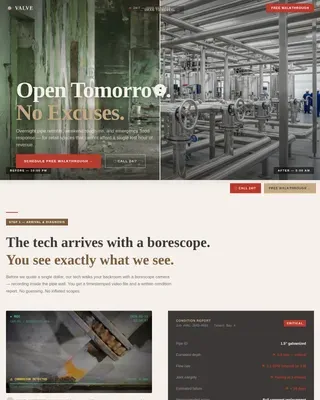
- A 50/50 split-screen hero with a professional basement photo on the left and the "Rate My Basement" quiz call to action on the right
- Three escalating case study chapters with timestamped before-and-after split panels and hard-number stat callout bars between each chapter
- A seven-question interactive quiz with a live amber progress bar, an A-to-F Basement Health Score output, a calendar embed for booking, and a downloadable PDF checklist as a secondary conversion path
Feature list
This section highlights the core built-in capabilities of the Subgrade template.
50/50 Split-Screen Hero Layout
The header divides equally between a high-resolution basement photo and the quiz call to action. The left panel shows a professionally lit, transformed basement space. The right panel carries the headline and the primary amber call-to-action button with a gentle pulse animation.
Seven-Question Basement Health Quiz
The quiz is the conversion engine of this page. It asks seven focused questions covering odor, visible water, finished or unfinished condition, home age, dehumidifier use, prior waterproofing work, and a photo upload field. Each answer moves a visible amber progress bar forward. On completion, the visitor receives a scored rating from A to F with a one-paragraph assessment.
Scrolling Case Study Narrative
Three before-and-after project chapters unfold as the visitor scrolls. Each chapter escalates in severity, from surface cleaning through mold remediation to full waterproofing and drainage correction. Left panels show documented problems with timestamped photos; right panels show the intervention and result.
Evergreen Stat Callout Bars
Between case study chapters, full-width bars on a deep evergreen background display hard project numbers. Stats like "2,300 sq ft cleared in 11 hours" and mold spore count reductions are displayed as standalone statements. These bars build a data-backed argument without requiring the visitor to read long paragraphs.
Sticky Amber Call-to-Action Button
The "Rate My Basement" call to action does not disappear on scroll. It floats as a sticky button throughout the page, keeping the primary conversion action accessible at every stage of the visitor's reading journey.
Downloadable PDF Lead Magnet
At the midpoint of the page, a secondary conversion path offers visitors a downloadable PDF titled "The Homeowner's Basement Red Flag Checklist." This targets visitors who are not yet ready to book but are willing to engage with useful content.
Page sections overview
| Section | Purpose |
|---|---|
| Split-Screen Hero | Introduce the brand and present the primary quiz call to action |
| Case Study Chapter 1 | Show surface-level cleaning work with before-and-after evidence |
| Stat Callout Bar 1 | Reinforce credibility with a hard project completion number |
| Case Study Chapter 2 | Document mold remediation work with timestamped photo panels |
| Stat Callout Bar 2 | Display mold spore count reduction as a standalone data point |
| Case Study Chapter 3 | Present full waterproofing and drainage correction work |
| Stat Callout Bar 3 | Close the case study sequence with a final hard metric |
| Quiz and Assessment | Deliver the seven-question Basement Health Score experience |
| Trust and Credentials | Display service area, credentials, and PDF checklist download |
| Footer | Single-row linear footer with essential links |
Design & branding system
The visual identity follows a Corporate Precision theme using the Forest Trust color palette. Every color has a specific role, and the system feels grounded, dry, and handled by professionals. Typography uses DM Sans for headlines and Manrope for body copy, both delivering high readability at all sizes.
- Deep evergreen (#1B4332) anchors section backgrounds and header overlays; granite (#3D3D3D) carries body text and case study captions; birch white (#F5F1EB) opens breathing room between dense evidence panels
- Safety amber (#E09F3E) is reserved exclusively for calls to action, the quiz progress bar, and the sticky scroll button, drawing the eye precisely where decisions happen
Mobile & speed optimization
The template is built desktop-first to honor the 50/50 split-screen layout, but it includes a mobile stack fallback so every section remains readable and usable on smaller screens. Static content sections are structured as Server Components, while the interactive quiz runs as a Client Component to keep load behavior efficient.
- On mobile, the split-screen panels stack vertically so photo panels appear above text panels
- GSAP ScrollTrigger animations handle section reveals and the amber call-to-action pulse, keeping motion purposeful rather than decorative
How this template helps you convert
Conversion on this page is not left to chance. The layout applies a deliberate sequence: establish authority, prove results, then invite action at the exact moment trust is highest.
- The sticky "Rate My Basement" button keeps the primary booking action visible at every scroll position, reducing the friction between interest and action.
- The quiz delivers a personalized A-to-F Basement Health Score, which replaces a generic contact form with a result the visitor actually wants to see, making completion feel worthwhile.
- The mid-page PDF download captures visitors who are researching rather than deciding, giving the business a second conversion path without requiring an immediate booking commitment.
Other information about this template
Subgrade is a focused, single-purpose landing page template designed for one outcome: turning a concerned homeowner or realtor into a booked inspection. It is not a multi-page site. All content, evidence, and conversion tools live in one scrollable flow.
- The template is built for the United States market, using imperial measurements, USD pricing context, and suburban homeowner language throughout
- Animation is set to a medium intensity level, using GSAP ScrollTrigger for scroll-based reveals and an amber pulse effect on the primary call-to-action button
- The quiz component is interactive and high-engagement, with live progress bar animation and a calculated score output; the calendar booking embed connects directly to the final quiz result screen
- The footer uses a Pattern 1 Linear Single-Row layout, keeping the page close cleanly without extra visual weight


Theme
Corporate Precision
Creative direction
Case Study Narrative
Color system
Forest Trust
Style
Split Screen (50/50)
Direction
Quiz/Assessment
Page Sections
Split-screen Hero with Quiz Call to Action
Seven-question Interactive Quiz
Escalating Case Study Chapters
Hard-number Stat Callout Bars
Sticky Amber Conversion Button
Mid-page PDF Lead Magnet
Related questions
Who is this landing page template designed for?
What does the Basement Health Score quiz do?
Is the PDF checklist lead magnet included in the template?
Does the template work on mobile devices?
How many case study sections are included?