Stripe Documentation Specialist Professional Website Template
A split-screen landing page template built for developer community forums. It pairs a live-feel forum feed against lonely alternatives in a side-by-side comparison layout. The Tech Glass visual theme, iridescent color accents, and a tabbed header switcher create an immersive first impression. One sign-up field and a scrolling glass call-to-action bar keep conversion friction low throughout.
by Rocket studio
Quick summary
This is a single-page, split-screen landing page template designed for developer community forums. It uses a Feature Tab Switcher header, a versus-frame scroll structure, and a floating glass sign-up bar to move visitors from curiosity to commitment. The Tech Glass aesthetic and AI Iridescent color system give it a distinct, modern identity.
Who this template is for
This template is built for anyone launching or promoting a developer-focused community forum. It works best when the goal is to convert skeptical technical visitors into active members.
- Solo founders who need a credible community page to support their first product launch
- Engineering teams or developer relations groups promoting a peer-to-peer support forum
- Community builders who want to show clear value over scattered documentation and static help channels
What problem this template solves
Developers searching for answers rarely stop at a single source. They bounce between documentation pages, abandoned forum threads, and unanswered chat messages. This template addresses that frustration directly by showing visitors what a focused, active community feels like before they ever sign up.
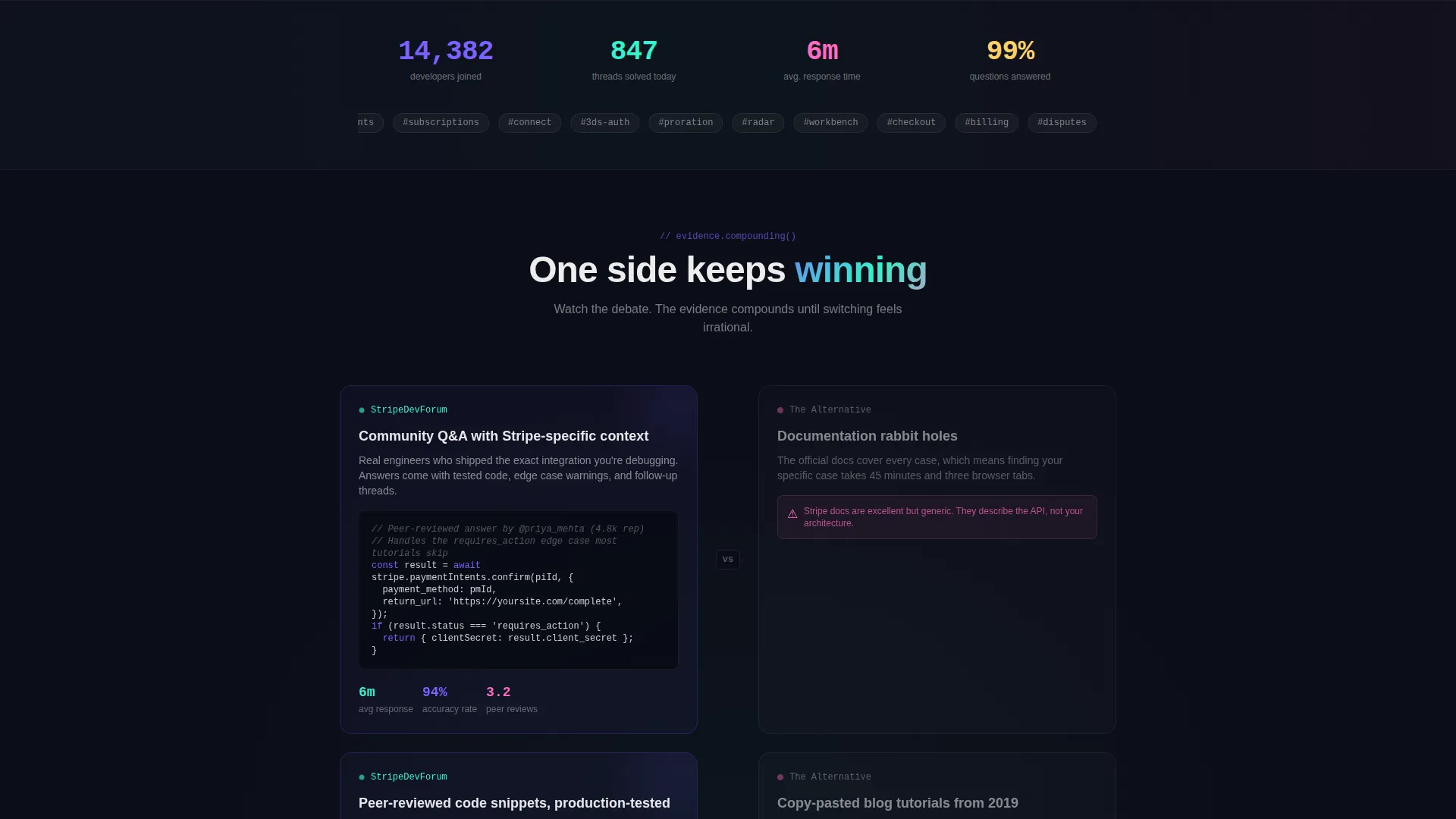
- It replaces vague community claims with side-by-side evidence, putting the forum experience next to the alternatives in every section
- It removes the "is this worth joining?" hesitation by surfacing live member counts, resolved thread totals, and average response times at the top of the page
- It handles skeptics with a soft re-engagement modal that appears after a few minutes of reading, turning passive browsers into participants
What you get with this template
The template delivers a fully structured, single-page layout with distinct sections, a defined visual system, and conversion-focused interactive components. Every element is grounded in the prompt brief.
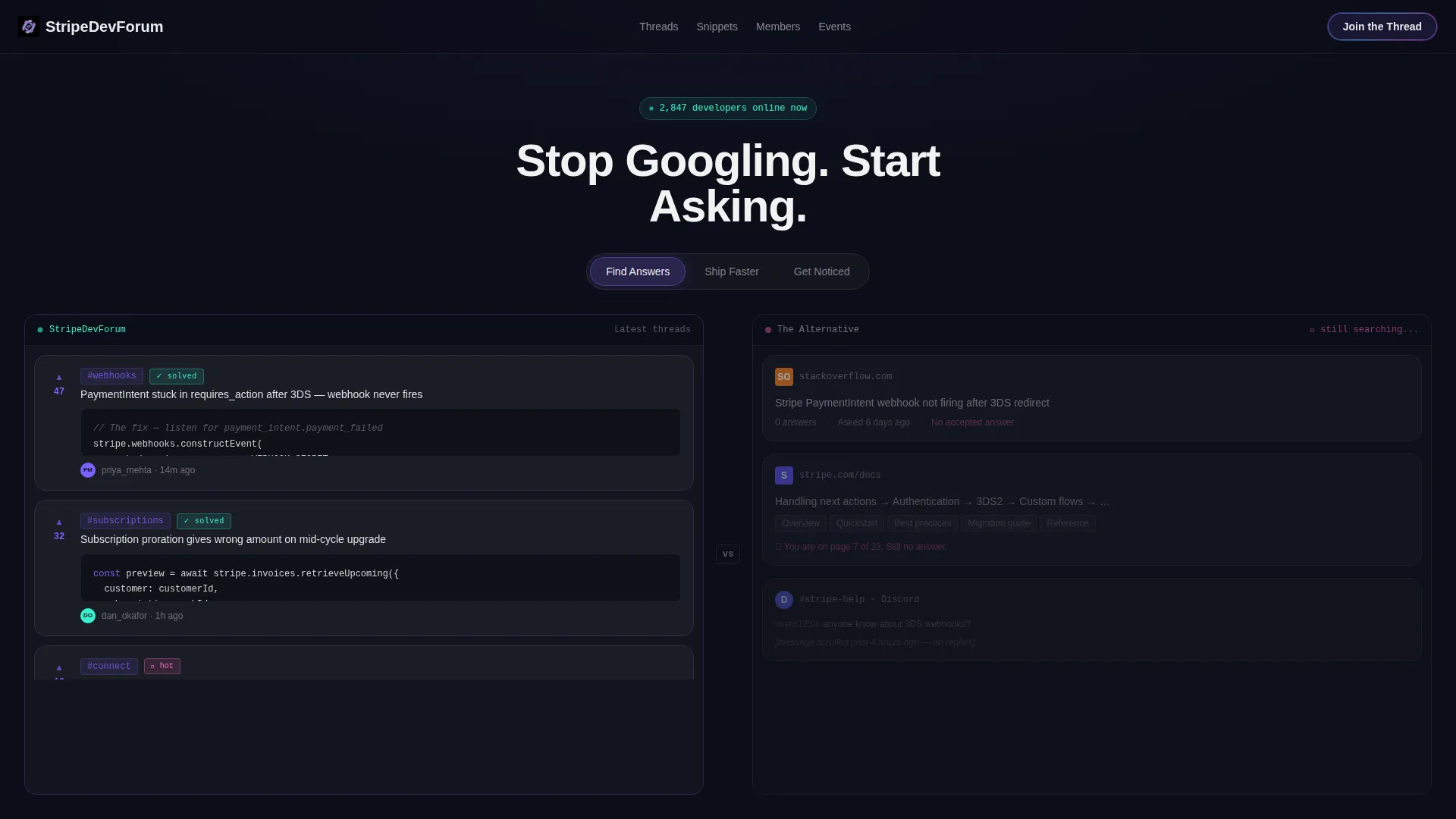
- A Feature Tab Switcher header with three clickable tabs that each swap the split-screen comparison and the headline copy
- A floating glass call-to-action bar with a single GitHub handle input field and an iridescent border that intensifies on scroll
- A soft modal re-engagement prompt that appears after a set reading window with a contextual message for passive visitors
Feature list
This section covers the core built-in components and design capabilities included in the template.
Feature Tab Switcher Header
Three clickable tabs sit centered above the split viewport. Each tab swap changes the left-versus-right comparison and fades the headline to match the selected context. The three tab states are "Find Answers," "Ship Faster," and "Get Noticed."
Split-Screen Comparison Layout
The page divides every section into a 50/50 left-right frame. The left panel always shows the forum experience. The right panel always shows the alternative, whether that is a static documentation page, an unanswered Stack Overflow thread, or a scrolled-past Discord message.
Live Social Proof Strip
The page opens with a social proof block showing live member count, threads resolved today, and average response time in minutes. These figures create immediate credibility before the visitor reaches the first comparison section.
Floating Glass Sign-Up Bar
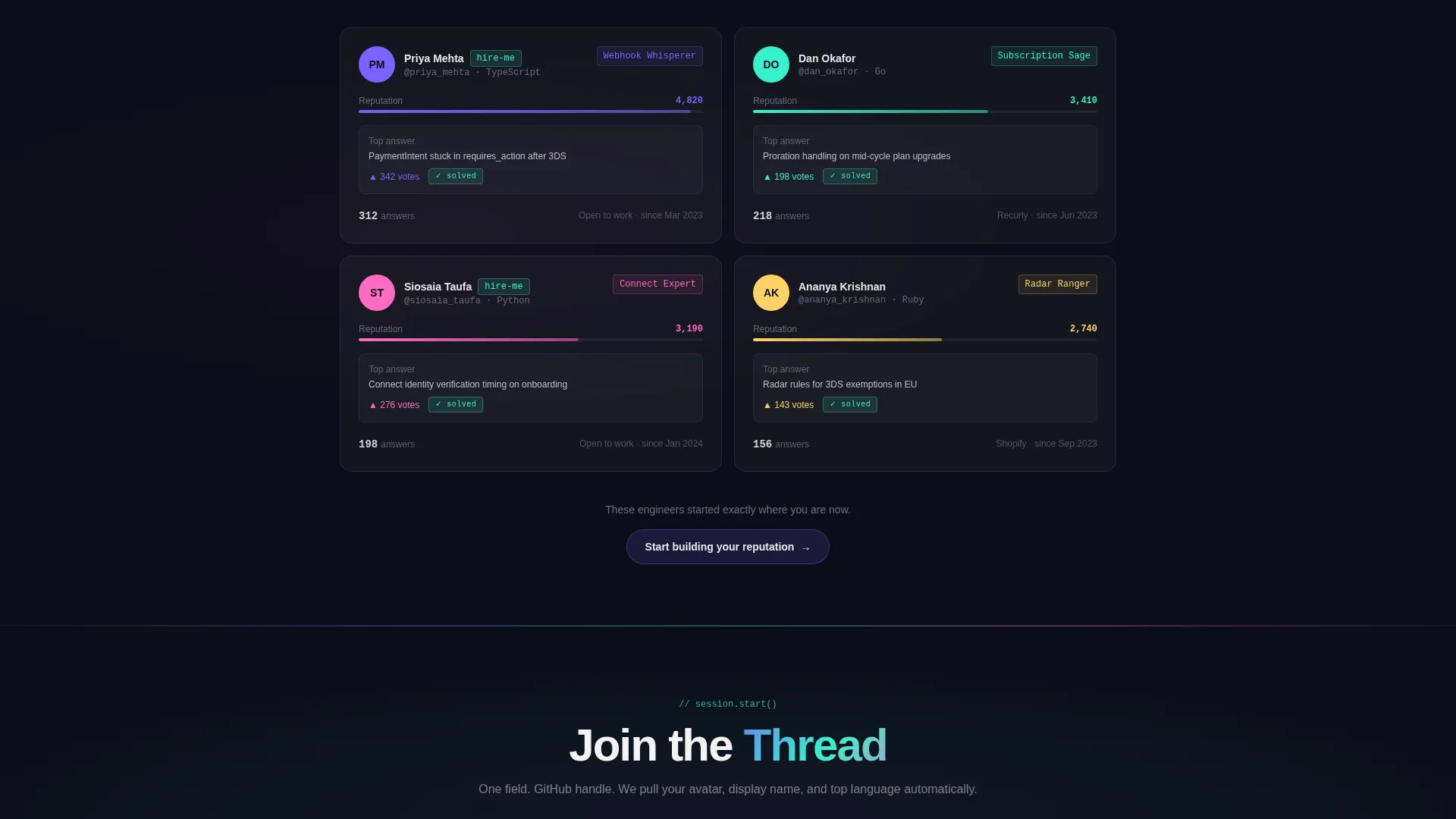
A persistent call-to-action bar stays visible as the visitor scrolls. It holds a single input field for a GitHub handle and is designed to auto-pull avatar, display name, and top language. The bar's iridescent border glow intensifies the deeper the visitor scrolls.
Soft Re-Engagement Modal
After a visitor has been reading for approximately four minutes without joining, a glass modal rises with a contextually written prompt. It acknowledges the reading behavior and connects the visitor to the community through a low-pressure message.
Syntax-Highlighted Code Feed
The left panel of the header section displays a live-updating feed of forum threads. Threads include syntax-highlighted code snippets, upvote counts, and green "solved" badges to signal an active and responsive community.
Page sections overview
| Section | Purpose |
|---|---|
| Tab Switcher Header | Introduces forum value through three swappable comparison views |
| Social Proof Strip | Anchors trust with live member count and response stats |
| Community versus. Docs | Compares forum Q&A quality against documentation rabbit holes |
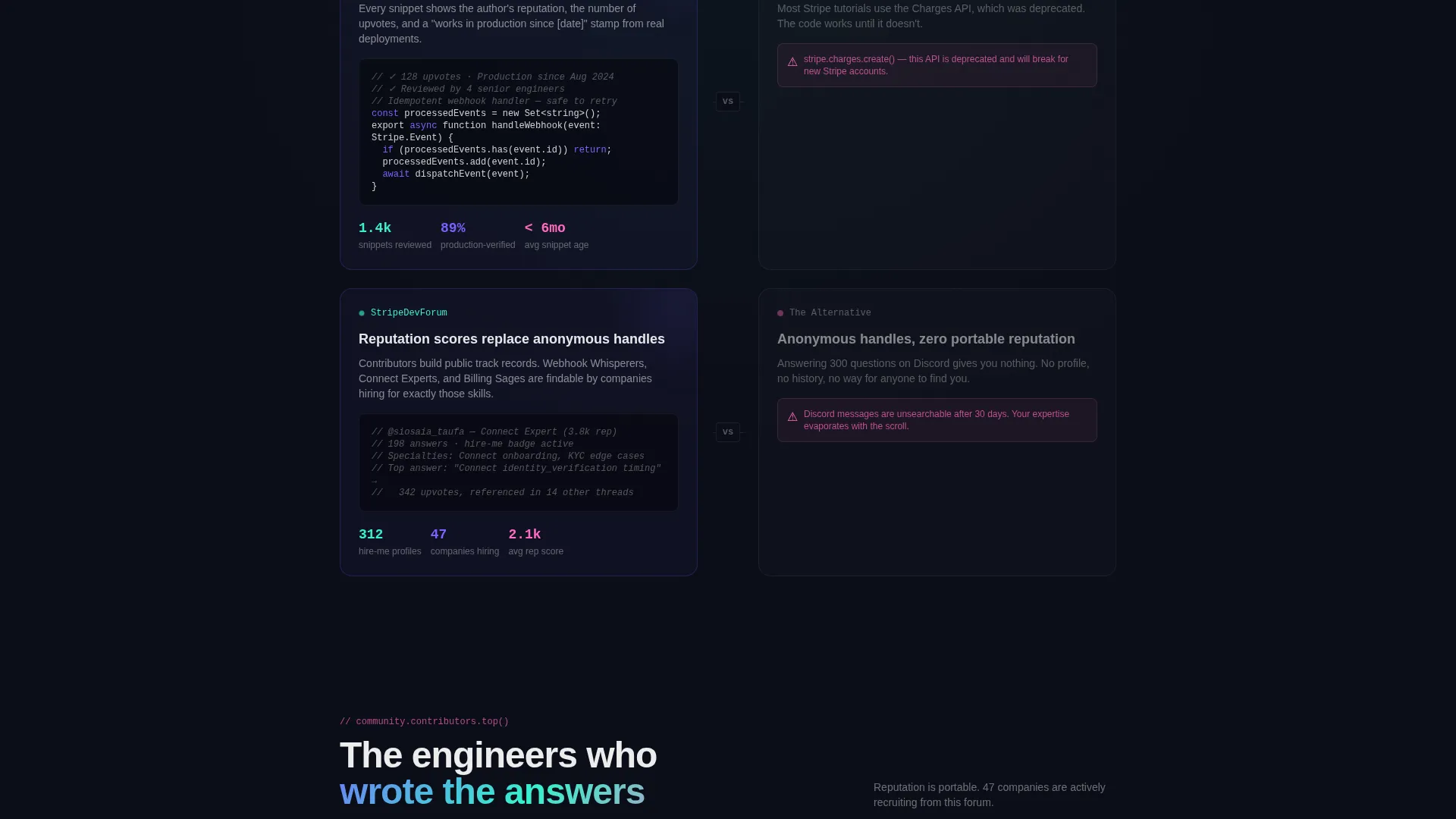
| Snippets versus. Tutorials | Shows peer-reviewed code against copy-pasted blog content |
| Reputation versus. Anonymous | Contrasts contributor profiles and reputation scores with anonymous handles |
| Floating call to action Bar | Keeps sign-up action visible throughout the full scroll |
| Re-Engagement Modal | Recaptures passive readers after a timed reading threshold |
Design & branding system
The visual identity uses a Tech Glass theme built on the AI Iridescent color system. Backgrounds stay deep and dark. Cards and panels float on frosted glass layers. Color appears at edges and on interaction, not in flat fills.
- Core palette: void black (#0B0D17) for backgrounds, frosted glass panels at 4% opacity with blur, iridescent violet (#7B61FF) and holographic teal (#36F1CD) for gradients and borders, and soft signal pink (#FF6AC1) reserved for notification pings and live indicators
- Glass card aesthetic: panels layer transparency and blur to create depth without adding visual weight, letting content feel weightless against the dark background
- Iridescent accents: gradient borders and hover states shift across violet and teal tones, with the floating call to action bar glow intensifying as the visitor scrolls deeper into the page
Mobile & speed optimization
The template is structured with a single-page, section-led layout that keeps the component hierarchy clean and predictable across screen sizes.
- The split-screen sections are built to reflow gracefully on narrower viewports, stacking the left and right panels vertically
- The floating glass call to action bar is designed to remain accessible and visible on mobile without overlapping critical content
- Glass panel effects use CSS-level blur and opacity rather than image-heavy backgrounds, keeping the visual style achievable without large asset loads
How this template helps you convert
The entire page is designed around a single conversion logic: make the forum feel inevitable and the alternatives feel isolating. Every scroll reinforces that message.
- The Feature Tab Switcher opens the page with three distinct value angles. Visitors self-select the framing that matters most to them, whether that is answer quality, integration speed, or community visibility, before they read a single paragraph.
- The versus-frame scroll structure compounds evidence with each section. By the time a visitor reaches the floating call to action bar, they have seen the forum win the comparison across multiple categories, making the sign-up decision feel rational rather than impulsive.
- The soft re-engagement modal catches passive readers at a natural inflection point. Instead of a hard interrupt, it uses a low-friction, empathetic message to reconnect browsers who have been reading long enough to be genuinely interested.
Other information about this template
This template is categorized under Documentation and Support, specifically within the Stripe community forum niche. It is designed to work as a dedicated landing page for developer communities built around payment integration topics.
- The template is part of the broader Stripe Documentation subcategory, making it well-suited for forums where members discuss webhooks, checkout flows, payment APIs, and platform migrations
- The creative direction is Launch Energy, meaning the page is paced like a product release, opening with high-signal social proof and building momentum through each comparison section
- The comparison-focused layout direction means the template is most effective when there is a clear alternative to position against, such as official documentation, generic Stack Overflow threads, or passive chat channels
- The "Browse Without Joining" secondary path is a built-in opt-out that reduces bounce by giving skeptical visitors a low-commitment way to explore content before committing
Theme
Tech Glass
Creative direction
Launch Energy
Color system
AI Iridescent
Style
Split Screen (50/50)
Direction
Comparison/Versus
Page Sections
Feature Tab Switcher Header
Split-screen Comparison Layout
Live Social Proof Strip
Floating Glass Call to Action Bar
Soft Re-engagement Modal
Syntax-highlighted Code Feed
Related questions
What type of page is this template?
Who is the primary audience for this template?
Can the tab switcher content be customized?
What does the Browse Without Joining path do?
Does the template include the GitHub handle auto-pull logic?



