Charity & Fundraiser Profile Portfolio & Case Study Website Template
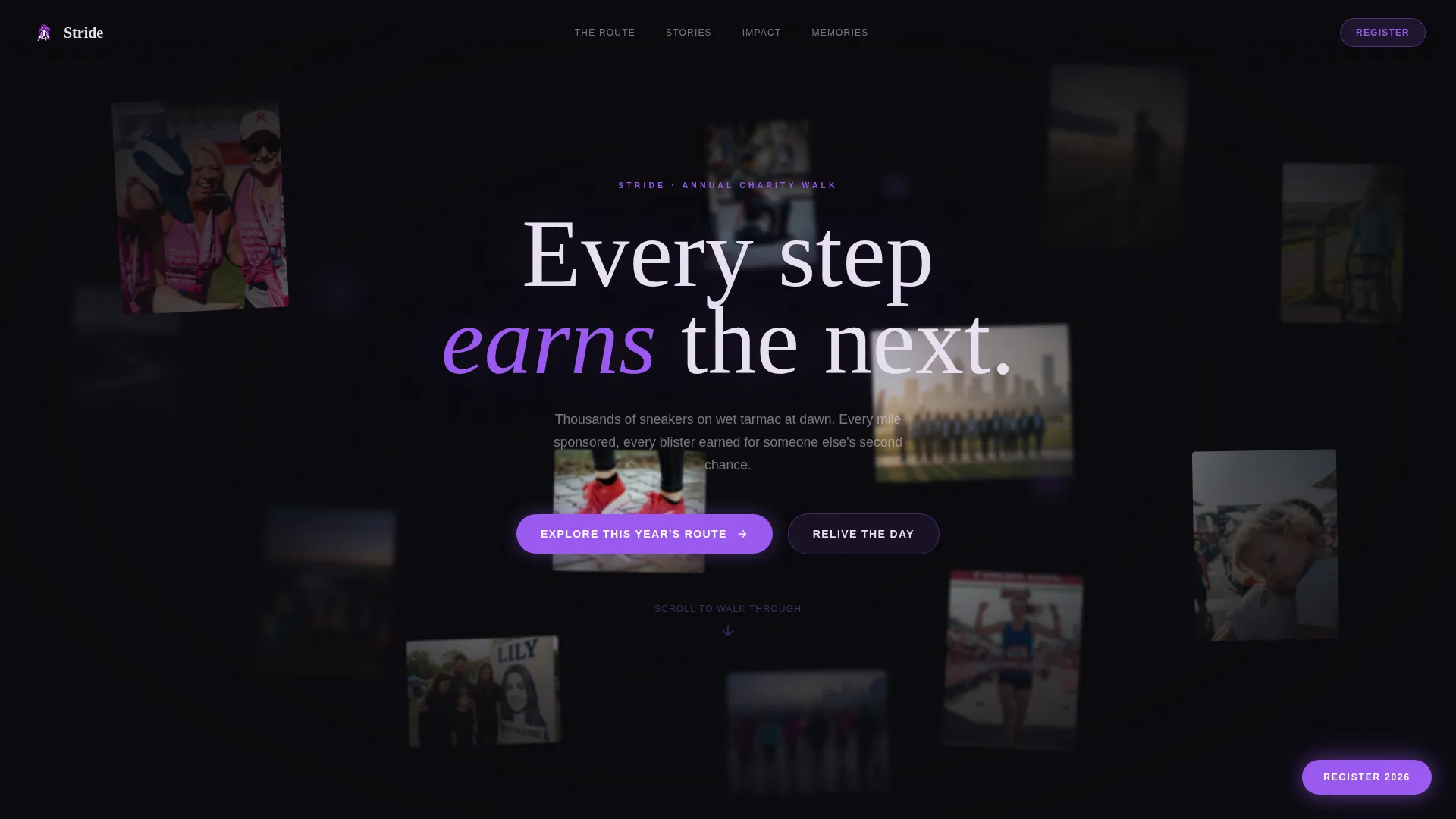
Stride is a dark, immersive charity walk landing page built on a horizontal scroll layout. A Void and Violet color system, parallax floating photo header, and gallery-style sections pull visitors through the emotional story of past events. Every scroll stop earns the final click to register, donate, or relive the day.
by Rocket studio
Quick summary
Stride is a single-page horizontal scroll template designed for charity walk events. It uses a dark immersive visual style, a parallax floating photo header, and four gallery-style content chapters to draw visitors into the atmosphere of the walk. The primary calls to action guide users toward a route map, a photo gallery, and event registration.
Who this template is for
This template suits charity organizers and nonprofit teams who want their event page to feel as powerful as the event itself. It works best when real participant photography and human stories are at the heart of the campaign.
- Charity walk coordinators promoting an annual sponsored event
- Nonprofit communications teams building a post-event recap and registration hub
- Fundraising teams who want emotional storytelling to drive sign-ups for the next year
What problem this template solves
Most charity event pages feel transactional. They list dates, distances, and donation links without ever capturing why the walk matters. Stride solves the emotional gap between a supporter landing on the page and actually committing to take part.
- Static layouts fail to communicate the atmosphere and scale of a live charity walk
- Generic templates cannot hold a visitor long enough to build the emotional investment that leads to registration
- Teams lack a ready-made structure that organizes route details, testimonials, impact numbers, and photo memories into one immersive flow
What you get with this template
You get a complete horizontal scroll landing page with four distinct content chapters, each separated by a slow fade-to-black transition. The layout is pre-structured and ready to receive your event photography, participant stories, impact data, and route assets.
- A parallax floating photo header with mouse-responsive drift across layered walker portraits
- Four scroll-stop chapters: The Route, The Stories, The Impact, and The Memories
- A persistent floating registration button and two primary content calls to action
Feature list
A single focused paragraph introduces the feature set as a whole: every component in Stride was designed to replace the passive browsing experience with something closer to walking the route yourself.
Parallax Floating Photo Header
The header places dozens of walker portraits and candid mid-route shots on independent parallax layers against a true void black background. Images drift subtly in response to mouse movement, creating a breathing, gallery-like opening that draws visitors in before a single word is read.
Horizontal Scroll Chapter Layout
Four named chapters sit along the horizontal scroll axis, each functioning as a self-contained visual room. Slow fade-to-black transitions between chapters reinforce the feeling of moving through a nighttime exhibition rather than scrolling a standard web page.
Illustrated Route Map Section
The Route chapter features a glowing violet illustrated map set against black. It anchors the primary call to action, inviting visitors to explore the year's route and download the illustrated route map and training guide as a PDF.
Full-Bleed Testimonial Portraits
The Stories chapter presents participant testimonials as full-bleed portrait photographs with pull-quote text rendered in pale phantom white. The layout foregrounds real voices and individual journeys rather than organizational messaging.
Animated Impact Counters
The Impact chapter displays animated counters for miles walked, funds raised, and lives changed. The counters give weight and scale to the collective achievement, turning abstract totals into felt numbers.
Participant Photo Mosaic Wall
The Memories chapter shows a mosaic of hundreds of participant-submitted photographs. When a visitor pulls back, the individual images resolve into a single composite picture, creating a visual payoff that rewards exploration.
Page sections overview
| Section | Purpose |
|---|---|
| Floating Photo Header | Opens the page with layered parallax walker portraits drifting against void black |
| The Route Chapter | Displays the illustrated glowing map and links to the downloadable route PDF |
| The Stories Chapter | Shows full-bleed testimonial portraits with phantom white pull-quotes |
| The Impact Chapter | Presents animated counters for miles, funds raised, and lives changed |
| The Memories Chapter | Hosts the participant photo mosaic wall with composite zoom-out effect |
| Persistent Register Button | Floats in electric orchid throughout the entire scroll journey |
Design & branding system
The Void and Violet color system is built around maximum contrast and emotional atmosphere. Every color choice references the pre-dawn setting of the walk itself, from the darkness of the road to the glow of charity-branded light bands.
- True void black (#0B0B0F) as the base background across all chapters
- Deep ultraviolet (#2D1B69) for structural depth, section fills, and the illustrated map
- Electric orchid (#9B59F0) on all interactive elements, accent lines, and the persistent floating button
- Pale phantom white (#E8E0F0) for all body text and pull-quotes, giving type a luminous, floating quality
Mobile & speed optimization
The horizontal scroll and parallax layers are designed to adapt to smaller viewports while preserving the immersive feel of the original layout. The template structure supports responsive behavior across device sizes.
- Horizontal scroll behavior adapts to touch-swipe navigation on mobile devices
- Parallax layers scale and simplify on smaller screens to maintain visual clarity
- Font sizes and button targets are set to remain readable and usable on phone-sized displays
How this template helps you convert
Stride does not ask for a commitment on the first screen. Instead, it earns each click by moving visitors through a complete emotional journey before a registration prompt appears.
- The floating photo header creates immediate atmosphere, replacing a cold call to action with an invitation to explore.
- The Stories and Impact chapters build credibility and emotional weight, so the persistent registration button feels like a natural conclusion rather than a sales push.
- Two clearly differentiated calls to action, route exploration and gallery replay, give hesitant visitors a lower-commitment entry point that keeps them engaged.
Other information about this template
Stride sits within the Personal and Resume category under the Charity and Fundraiser Profile subcategory, making it suitable for individual organizers as well as small nonprofit teams. The template follows the Gallery Walk creative direction, which treats each scroll-stop as a chapter in a curated exhibition rather than a section on a standard web page. The Content and Resource landing page direction means the template is structured to deliver value through downloadable assets and media before asking for a sign-up. The Dark Immersive theme and Horizontal Scroll template style are relatively uncommon in the charity sector, which makes Stride visually distinctive in a category that typically relies on bright, high-energy designs.
- Built on a Horizontal Scroll template style with Gallery Walk creative direction
- Uses the Floating Photos header concept with mouse-responsive parallax behavior
- Designed for the Charity Walk Page niche within the Charity and Fundraiser Profile subcategory
- Primary call to action links to a downloadable illustrated route map and training guide PDF
- Secondary call to action opens a curated photo and video gallery
- Persistent floating button in electric orchid handles registration throughout the scroll journey



Theme
Dark Immersive
Creative direction
Gallery Walk
Color system
Void & Violet
Style
Horizontal Scroll
Direction
Content/Resource
Page Sections
Parallax Floating Photo Header
Horizontal Scroll Chapter Layout
Illustrated Route Map Section
Full-bleed Testimonial Portraits
Animated Impact Counters
Participant Photo Mosaic Wall
Related questions
Who is the Stride template designed for?
Can I use my own participant photos and event images?
What are the two main calls to action in this template?
Does the horizontal scroll layout work on mobile devices?
Can I adapt this template for a future event, not just a recap?