Stream — Intelligent AutoML Landing Page Template
Pipeline is a comparison table landing page template built for AutoML platforms. It pairs a glassmorphic visual system with an interactive explorer layout, letting data teams demonstrate time-to-deploy and cost advantages at a glance. The template targets engineering leads, solo data scientists, and product managers who need to convert skeptics into free-trial signups fast.
by Rocket studio
Quick summary
Pipeline is a single-page comparison table landing page template for AutoML platforms. It combines a glassmorphic dark-space design with an interactive explorer layout and a freemium conversion flow. Visitors compare deployment speed, cost, and monitoring side by side, then try the product on their own data before ever creating an account.
Who this template is for
This template is built for data-focused software companies that need to prove technical value quickly. It works best when your audience is skeptical, busy, and ready to run a benchmark before they read a case study.
- Series A engineering leads who cannot justify expanding the machine learning team right now
- Solo data scientists at enterprise companies who are overwhelmed managing notebooks and manual pipelines
- Product managers who need a working prediction model live within days, not sprints
What problem this template solves
Most AutoML landing pages ask visitors to read claims and trust them. This template flips that dynamic. It puts an interactive comparison tool in front of visitors immediately, so they measure the gap themselves.
- Visitors struggle to see the real cost difference between a platform and hiring a dedicated machine learning engineer
- Long signup flows kill conversion before skeptics have seen any proof of speed or accuracy
- Static feature lists do not show deployment time compression the way a live animation or interactive table can
What you get with this template
You get a fully structured single-page layout that moves visitors from social proof at the top to personal proof at the bottom. Every section is designed to reduce friction and build confidence progressively.
- A scrolling logo bar, animated product window, and three-column interactive comparison table in the above-the-fold area
- A dynamic stack selector that recalculates projected savings based on the visitor's own environment and dataset size
- A staged freemium conversion flow: work email first, optional details second, and a live model-training demo that requires no account at all
Feature list
This section covers the core template components described in the source brief.
Animated Product Window Card
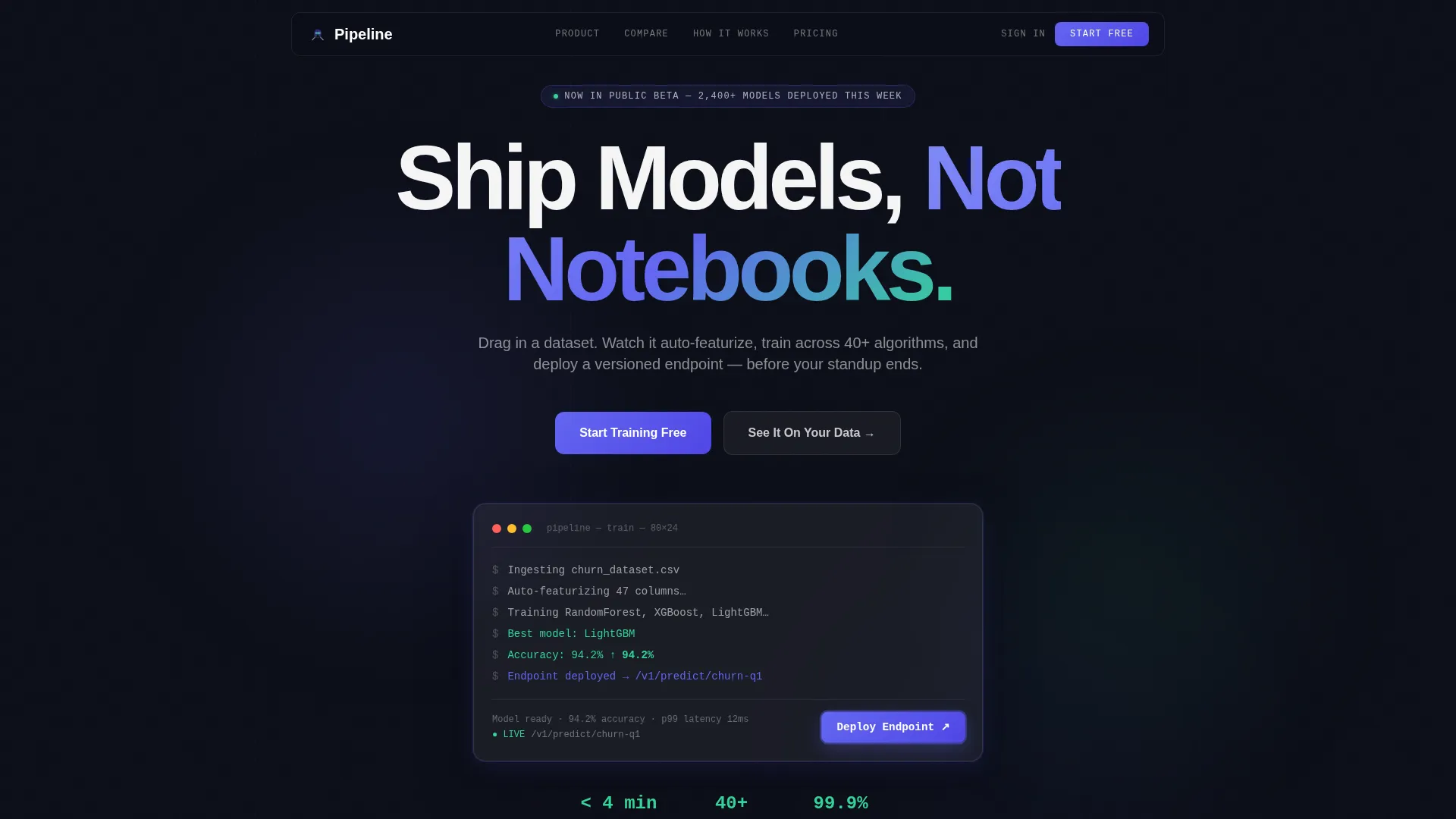
A frosted glass card sits below the logo bar and simulates the platform running in real time. A dataset drops in, columns auto-type, an accuracy score ticks upward in mint green, and a deploy button pulses in electric indigo. It gives visitors a visceral sense of speed before they scroll.
Interactive Comparison Table
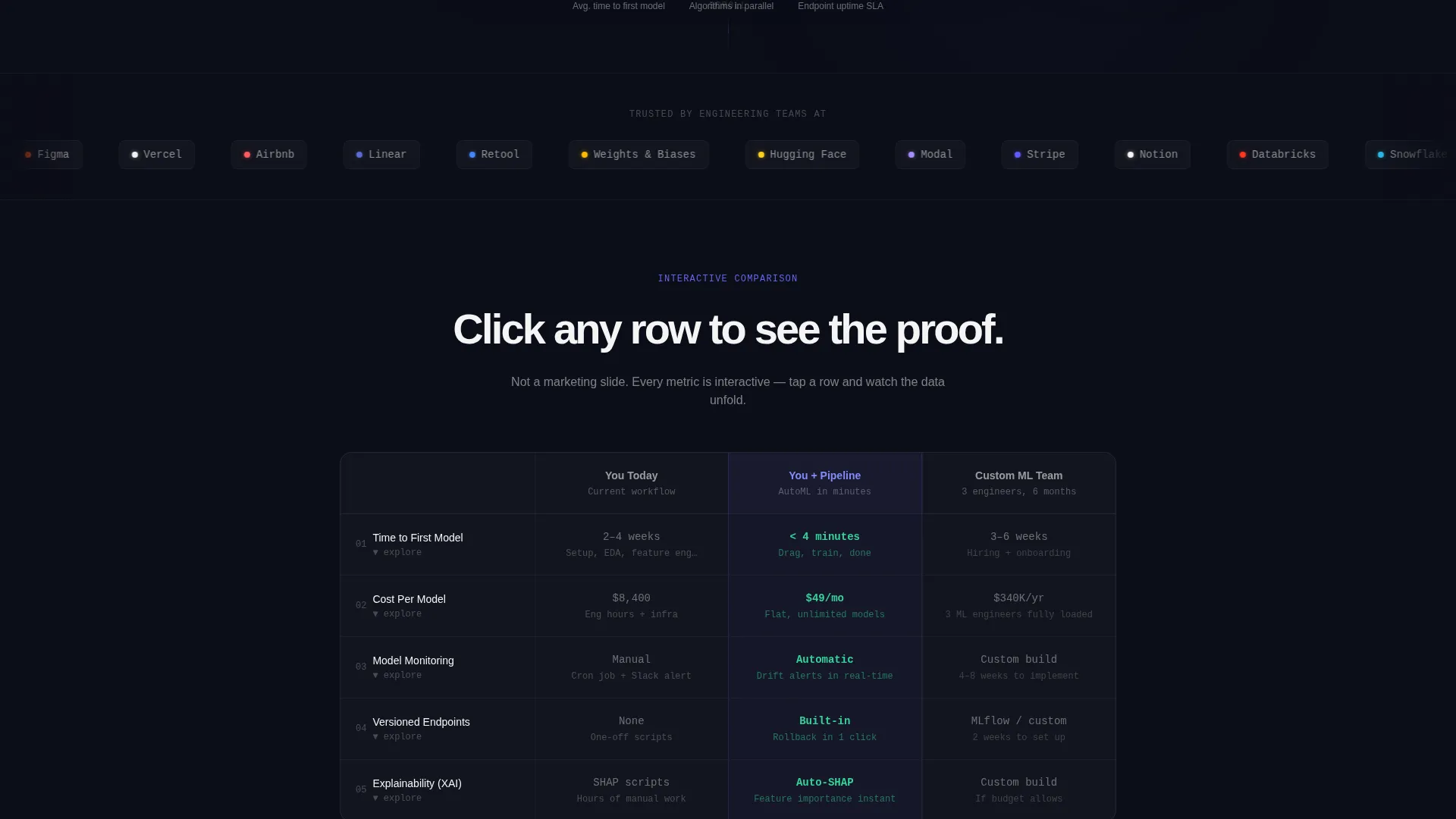
The three-column table compares "You Today," "You + Pipeline," and "Custom ML Team" across rows for time-to-deploy, cost-per-model, monitoring, and drift detection. Each row is clickable. Selecting a metric slides open a frosted drawer with a mini-visualization specific to that row, such as a compressing timeline or a self-correcting drift chart.
Dynamic Stack and Dataset Selector
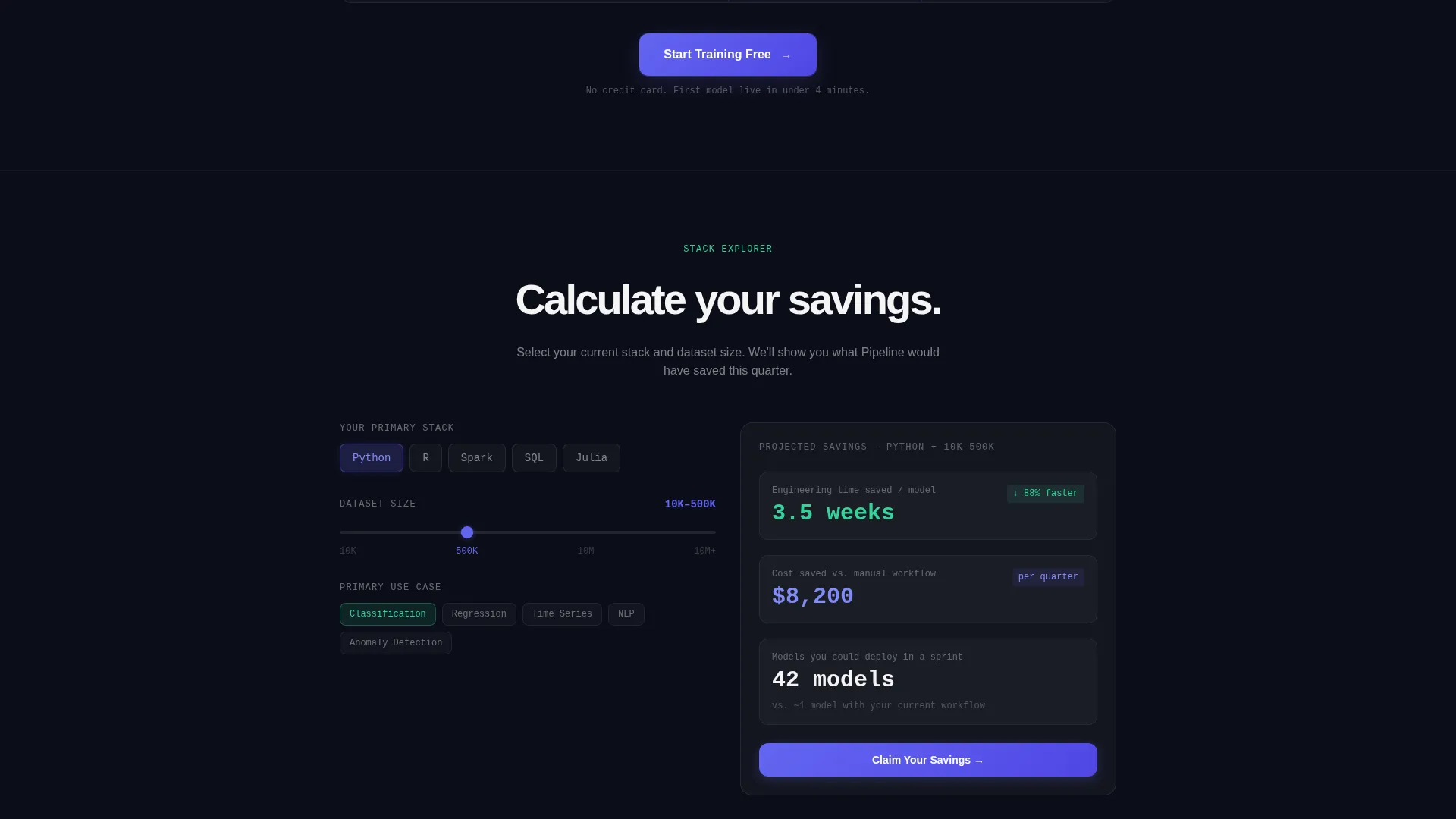
Below the main table, visitors choose their current environment (Python, R, or Spark) and their typical dataset size. The page recalculates projected deployment speed and cost savings based on those inputs. Every interaction reinforces the platform's core promise with the visitor's own numbers.
"See It On Your Data" Demo Path
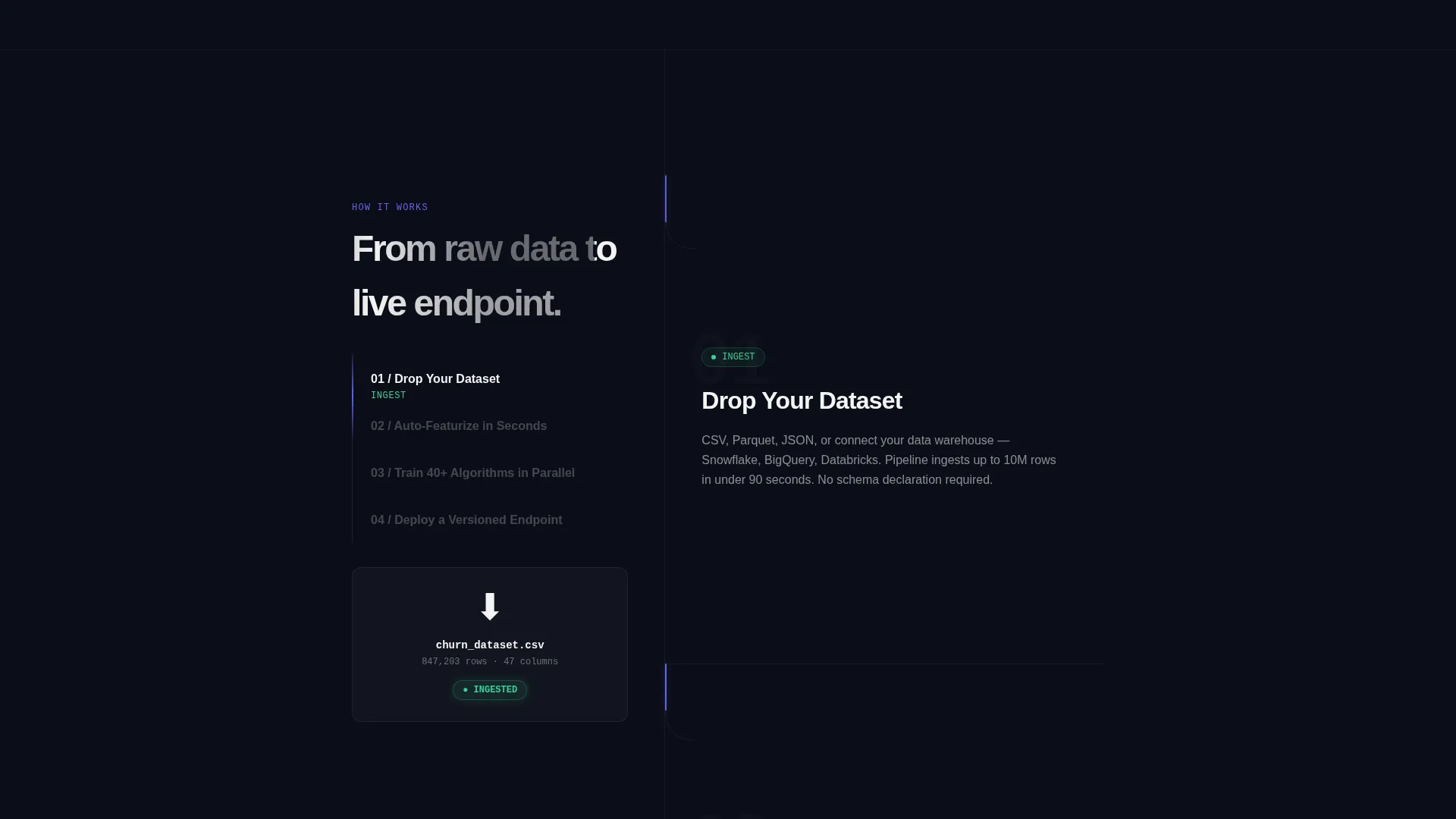
A secondary conversion path lets visitors upload a sample CSV file directly on the landing page. The template presents this as a live model-training experience that completes in under sixty seconds. It converts skeptics through direct evidence before any credentials are requested.
Staged Freemium Signup Flow
The primary call to action, "Start Training Free," appears three times: inside the header card, as a sticky bottom bar after the comparison table, and as a full-width closing section. The first step asks only for a work email. Team size and primary use case appear as an optional second step after account creation.
Persistent Sticky Conversion Bar
After visitors scroll past the comparison table, a sticky bar anchors to the bottom of the viewport. It keeps the primary call to action visible without interrupting the reading flow. This ensures the signup option is always one tap or click away.
Page sections overview
| Section | Purpose |
|---|---|
| Scrolling Logo Bar | Builds instant credibility above the fold with recognizable company logos |
| Hero Headline Block | Sets the core value proposition against the void background |
| Animated Glass Card | Shows the product running live with a dataset-to-deploy animation |
| Comparison Table | Lets visitors measure speed and cost differences interactively |
| Metric Drawer Panels | Deepen each table row with mini-visualizations on click |
| Stack and Dataset Selector | Personalizes projected savings based on visitor inputs |
| CSV Demo Upload | Trains a live model on visitor data before any signup |
| Sticky call to action Bar | Keeps the primary signup action visible after the table |
| Full-Width call to action Section | Closes the page with a high-contrast freemium conversion block |
Design & branding system
The visual identity follows a Startup Velocity theme built on a glassmorphic color system. Panels feel like a heads-up display floating above deep space, with translucent surfaces layered over near-black backgrounds.
- Core palette: deep void black (#0B0D17) as the base, frosted glass panels at 8% white opacity with a 12-pixel blur, electric indigo (#6366F1) for primary actions and hover states, and mint signal green (#34D399) reserved for success confirmations and metric highlights
- Typography uses a large mono-geometric sans-serif for the headline, with crisp white (#F4F4F5) body text on glass cards and indigo appearing on hover states
- Mint green appears only when something succeeds, such as a trained model completing, a benchmark being beaten, or a deployment going live, reinforcing positive feedback loops visually
Mobile & speed optimization
The layout is designed to stay readable and interactive on smaller viewports. Glass panels and table columns reflow cleanly so the comparison remains usable without horizontal scrolling.
- The three-column comparison table adapts to a stacked single-column view on mobile, keeping each metric row and its drawer panel accessible with a tap
- The sticky conversion bar is sized for thumb reach on mobile screens, maintaining conversion access throughout the scroll
How this template helps you convert
The conversion architecture is built around proof before commitment. Every design and layout decision is intended to move a skeptical technical buyer toward the freemium signup.
- The animated product card and logo bar establish speed and credibility before the visitor reads a single feature claim, reducing early bounce.
- The interactive comparison table and dynamic calculator let visitors generate their own proof, which is far more persuasive to engineering leads than any written benchmark.
- The CSV demo path removes the final barrier: visitors see a real model train on their own data in under sixty seconds, making the signup feel like a formality rather than a gamble.
Other information about this template
This template is well suited for any AutoML platform or machine learning infrastructure product that competes on deployment speed and cost efficiency. The interactive explorer layout works especially well when your audience includes technical buyers who distrust marketing claims and respond better to hands-on evidence.
- The template style is a comparison table layout, making it straightforward to adapt row labels for different competitive positioning or different model types such as classification, regression, natural language processing, or time series
- The freemium and trial conversion direction means the page is structured to remove friction at every step rather than push visitors toward a sales call
- Teams building on top of platforms in the broader automated machine learning space will find the layout adaptable to their own benchmarks and use-case messaging
Theme
Startup Velocity
Creative direction
Interactive Explorer
Color system
Glassmorphic
Style
Comparison Table
Direction
Freemium/Trial
Page Sections
Animated Product Window Card
Interactive Three-column Comparison Table
Dynamic Stack and Dataset Selector
CSV Demo Upload Path
Staged Freemium Signup Flow
Persistent Sticky Conversion Bar
Related questions
Can I customize the comparison table rows for my own metrics?
Do I need a developer to set up the interactive stack selector?
How does the CSV demo upload section work in this template?
Is this template suitable for a product that supports multiple model types?
Can the sticky call to action bar be hidden or repositioned?



