Stocklot - Powerful Inventory Landing Page Template
Stocklot is a dashboard-style automotive inventory landing page template built for dealer principals, used car managers, and operations directors. It follows a Problem-to-Solution scroll arc that turns raw lot pain into a clear case for action. The dark teal-and-lime visual system makes critical metrics impossible to ignore, and every section break drives toward a free-trial conversion.
by Rocket studio
Quick summary
Stocklot is a single-page automotive inventory management landing page template. It combines a dark dashboard aesthetic with a Problem-to-Solution scroll narrative and a Comparison/Versus conversion strategy. The design targets dealer groups managing multiple rooftops, aged inventory pressure, and floor plan exposure. Every visual element reinforces urgency, and every call to action moves the visitor toward a 30-day free trial.
Who this template is for
This template is built for teams selling or showcasing automotive inventory management software. It speaks directly to the professionals who live inside dealership operations every day.
- Dealer principals running multi-rooftop groups who need a unified view of lot health across locations
- Used car managers tracking aged inventory and floor plan costs at the 45-day mark
- Operations directors reconciling stock counts across disconnected dealer management systems every week
What problem this template solves
Automotive inventory software is a crowded space. The real challenge is convincing a skeptical dealer that your platform solves problems they already feel in their gut. Generic feature pages do not do that job.
- Visitors arrive with real pain: aged units bleeding floor plan budget, mismatched stock counts, and no single source of truth
- The template structures those pain points visually before presenting the solution, so the case builds itself as the visitor scrolls
- A side-by-side comparison table closes the argument against manual processes and competing tools without requiring a sales call
What you get with this template
You get a fully structured, single-page landing page layout designed to carry a visitor from problem recognition to free-trial signup without a single dead end.
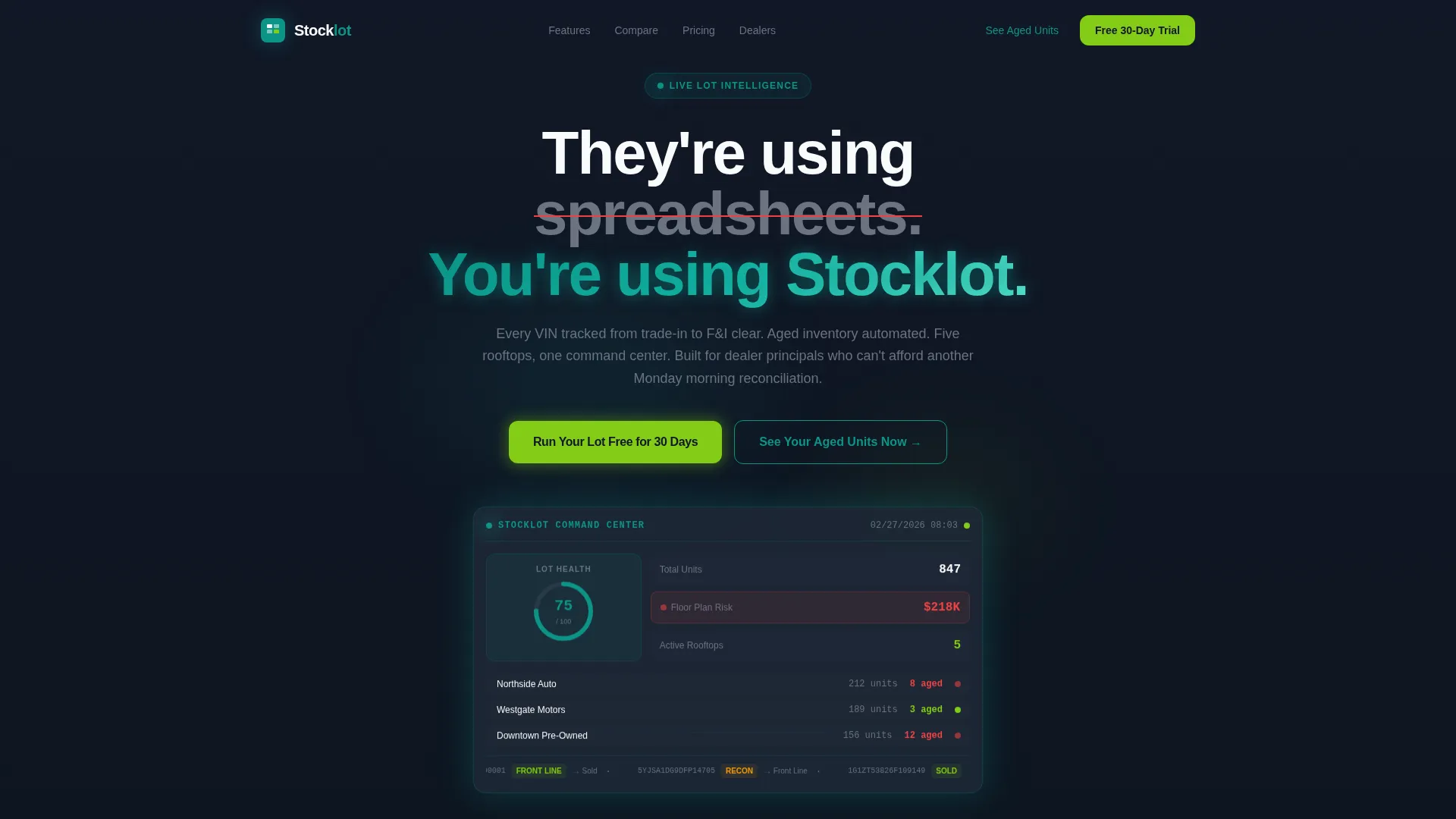
- A dark full-bleed hero section with a glowing dashboard mockup and a real-time VIN ticker animation concept
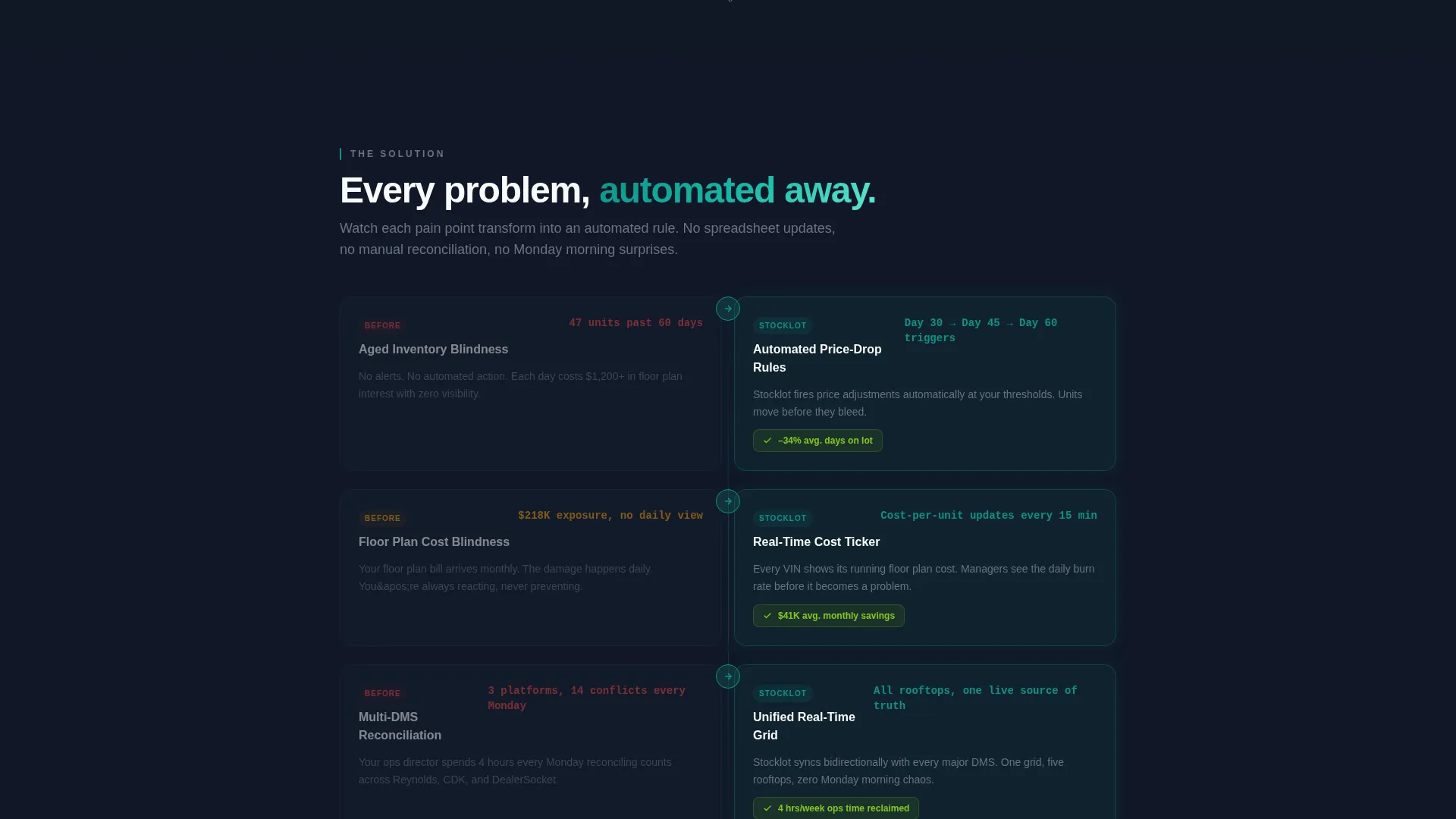
- A scrollable Problem-to-Solution arc section that transforms "before" pain rows into solution states as the visitor moves down the page
- A sticky bottom comparison bar, a primary call to action in electric lime, and a secondary audit-tool path asking only three qualifier questions
Feature list
This template delivers a tightly scoped set of layout and interaction features grounded in the source brief.
Glowing Hero Dashboard Mockup
The header section centers a simulated lot health dashboard rendered in deep charcoal and operational teal. Key indicators including a lot health score, aged-unit alerts, and a scrolling VIN ticker are styled to appear as live data. The glow effect originates from the user interface elements themselves, reinforcing the idea that the data is the light source.
Problem-to-Solution Scroll Arc
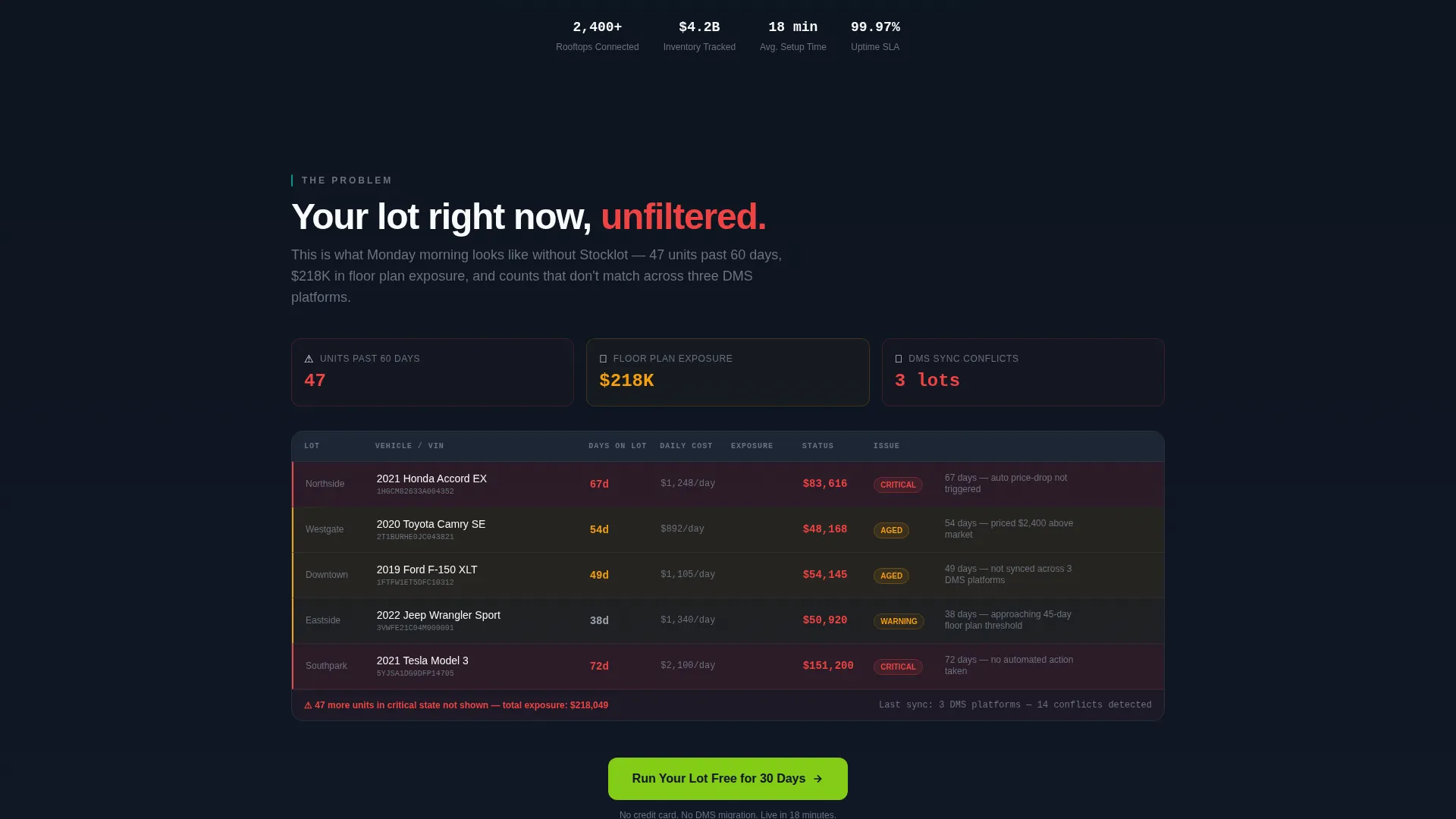
The first content section displays a simulated "before" dashboard showing 47 units past 60 days, $218,000 in floor plan exposure, and three lots with mismatched counts. Each problem row is designed to visually transform into its solution state as the visitor scrolls: aged inventory gets automated price-drop rule callouts, floor plan bleed gets a daily cost ticker, and multi-rooftop chaos resolves into a unified real-time grid.
Competitor Comparison Table
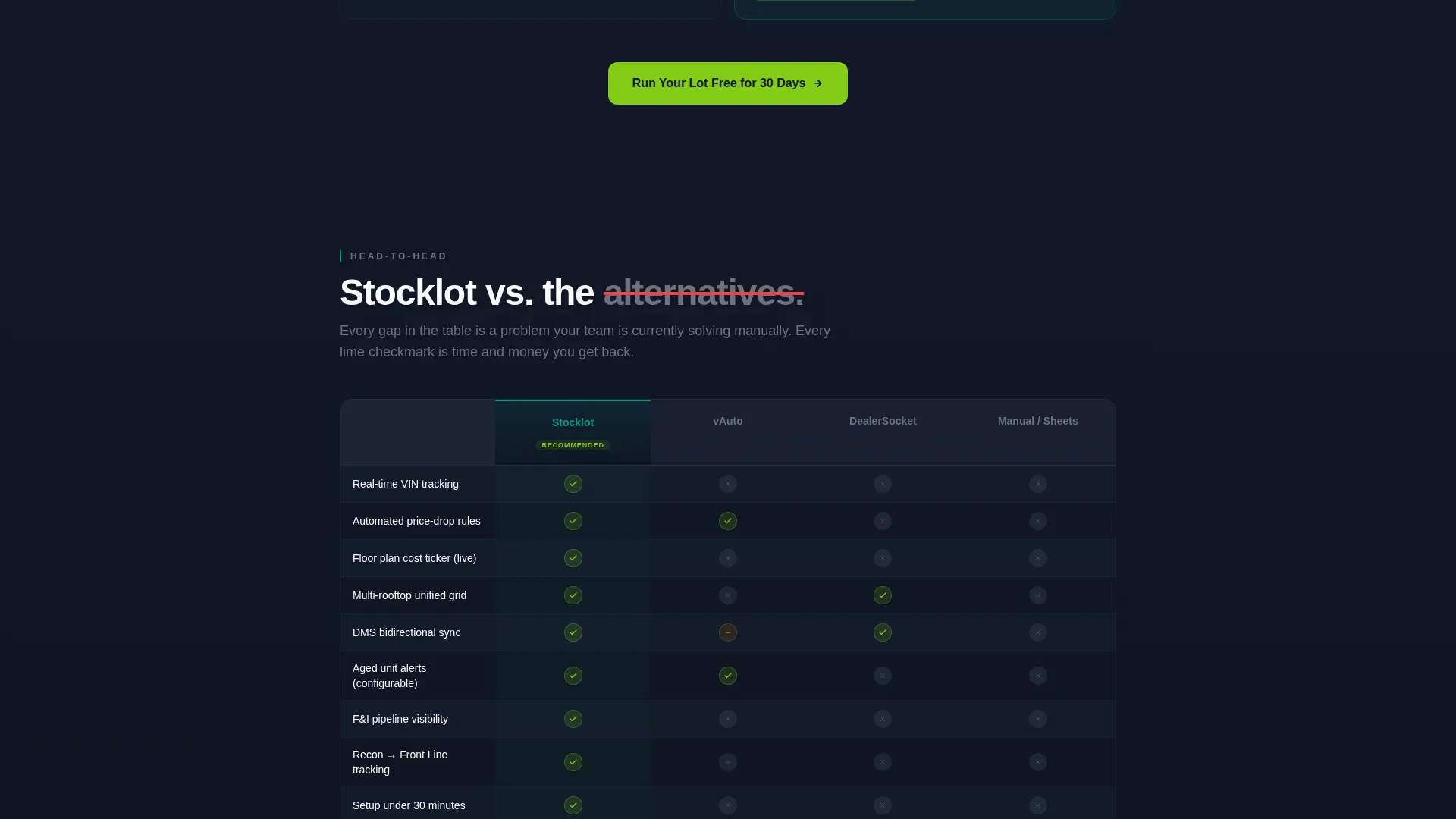
A structured side-by-side table compares the featured platform against manual spreadsheet workflows and other inventory tools. Checkmarks appear in electric lime for supported capabilities and flat gray for gaps. This section does the persuasion work before any call to action is clicked.
Sticky Bottom Comparison Bar
A compressed comparison row anchors to the bottom of the viewport. It updates contextually as the visitor scrolls past each competitor section, keeping the platform's advantages visible without interrupting the reading flow.
Electric Lime call to action System
The primary call to action reads "Run Your Lot Free for 30 Days" and repeats in electric lime at every section break. The secondary path, labeled "See Your Aged Units Now," links to a quick-audit flow that asks only for dealer management system provider, rooftop count, and average monthly volume.
Dark Full-Bleed Header Scene
The header is built in deep lot-after-dark charcoal (#111827) with a headline that fades in above the dashboard mockup. The opening line, "They're using spreadsheets. You're using Stocklot," sets the competitive tone immediately and anchors the visitor's attention before the scroll arc begins.
Page sections overview
| Section | Purpose |
|---|---|
| Dark Hero Header | Establish brand tone, show live-style dashboard mockup, introduce headline |
| VIN Ticker Strip | Animate unit status flow from Recon to Front Line to Sold |
| Before State Grid | Show "before" pain data: aged units, floor plan exposure, mismatched counts |
| Solution Transform Arc | Reveal each solution row as the visitor scrolls past its problem counterpart |
| Comparison Table | Side-by-side platform comparison with lime checkmarks and gray gaps |
| Sticky Comparison Bar | Persistent bottom bar updating by competitor context as visitor scrolls |
| Free Trial call to action | Primary conversion section with 30-day trial offer in electric lime |
| Quick Audit Tool | Secondary path collecting DMS provider, rooftop count, and monthly volume |
Design & branding system
The visual identity follows the Dashboard Pro theme using the Teal Catalyst color system. Every color choice has an assigned role, and the palette reads like a dealership lot at midnight under LED pole lights.
- Deep charcoal (#111827) for all page backgrounds and the full-bleed hero, cool asphalt gray (#374151) for card surfaces and data rows, and operational teal (#0D9488) for active status indicators and accent elements
- Electric lime (#84CC16) is reserved exclusively for positive metrics and primary calls to action, making every conversion trigger visually unmistakable
- The overall system avoids decorative flourishes; every glow, pulse, and color choice serves a functional data-communication role
Mobile & speed optimization
The template layout is structured with responsive stacking in mind. The data-grid and comparison sections are designed to reflow cleanly at smaller viewport widths.
- The sticky bottom comparison bar collapses gracefully on narrow screens so it does not obscure primary content
- The comparison table is built to scroll horizontally on mobile rather than compress column content into unreadable widths
- The hero dashboard mockup and VIN ticker are positioned for centered display on both desktop and mobile viewports
How this template helps you convert
Every structural decision in this template is built to reduce friction and build conviction before the visitor reaches a call to action.
- The Problem-to-Solution scroll arc builds emotional investment early. Visitors recognize their own pain in the simulated "before" data, which makes the solution feel earned rather than pitched.
- The competitor comparison table handles the most common objection, "why not just use what we already have," visually and without requiring a sales conversation.
- The secondary audit-tool path lowers commitment for visitors who are not yet ready for a trial. Asking only three questions keeps the entry point frictionless and qualifies the lead at the same time.
Other information about this template
This template is categorized under Technology, specifically within the Automotive Software and Software-as-a-Service subcategory. It is purpose-built for the automotive inventory management niche and carries an intersection match score of 13, indicating strong alignment between the template style and the target use case.
- The Dashboard Pro theme and Teal Catalyst color system are the named visual identity frameworks applied throughout this template
- The template style is classified as Dashboard and Data Grid, which means layout decisions prioritize scannable rows, metric callouts, and comparison structures over editorial or narrative-first layouts
- This template is suitable for showcasing platforms that compete in the dealer inventory software space, including contexts where buyers are evaluating options against tools commonly used in dealership technology stacks
Theme
Dashboard Pro
Creative direction
Problem→Solution Arc
Color system
Teal Catalyst
Style
Dashboard/Data Grid
Direction
Comparison/Versus
Page Sections
Problem-to-solution Scroll Arc
Glowing Hero Dashboard Mockup
Side-by-side Competitor Comparison Table
Sticky Bottom Comparison Bar
Dual Call to Action Conversion Path
Teal Catalyst Dark Visual System
Related questions
What type of business is this template designed for?
Can I update the comparison table for different competitors?
Does the template include real data or live platform connections?
How does the secondary audit-tool path work?
Is this a single-page layout or a multi-page template?



