Iridescent Actor Portfolio Landing Page Template
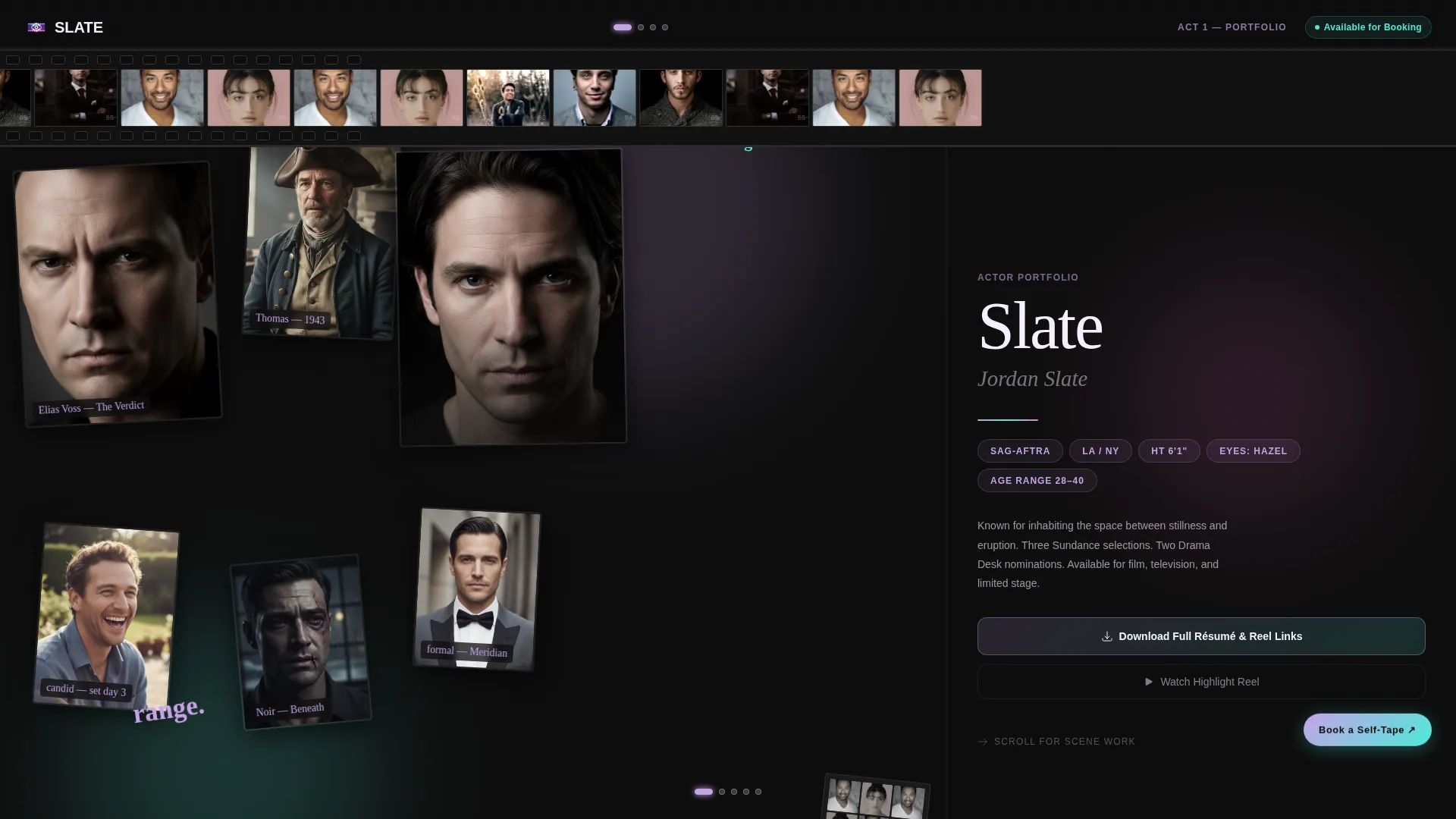
Slate is a horizontal scroll actor landing page built for performers who need to impress casting directors, agents, and indie filmmakers fast. It layers headshots, scene reels, behind-the-scenes stills, and credits across a cinematic sequence layout. An iridescent dark palette and collage-style header make every scroll feel like flipping through a director's lookbook.
by Rocket studio
Quick summary
Slate is a single-page actor portfolio landing page built around horizontal scroll. It opens with a collage header of overlapping headshots and film strips, then moves through four acts: castable stats, scene reels, behind-the-scenes stills with testimonials, and a résumé section. An iridescent dark color palette shifts hue as you scroll, matching the performer's range.
Who this template is for
This template is built for working actors who want their portfolio to feel like a piece of craft, not a plain document. It speaks directly to the people on both sides of the audition table.
- Actors building a professional online presence to share with casting directors and talent agents
- Performers who want to showcase headshots, scene reels, and credits in one scrollable space
- Indie or emerging actors who need a visually striking landing page without a custom build
What problem this template solves
Most actor portfolio pages look like résumés uploaded to a website. They list credits but fail to show range, personality, or presence. Casting directors scanning between auditions need proof fast, not paragraph blocks.
- No structure to show progression from headshot to reel to résumé in a single visual flow
- Disconnected assets scattered across links, PDFs, and social profiles with no central hub
- Generic layouts that look identical to every other performer's page and leave no impression
What you get with this template
Slate packages every asset a working actor needs into one horizontal-scroll landing page. Nothing is locked behind a signup wall except the downloadable résumé bundle, so visitors see all the work before committing an email.
- A four-act horizontal scroll layout covering headshots, scene reels, behind-the-scenes content, and credits
- A collage-style scrapbook header with overlapping headshots, a 35mm film strip, and handwritten character labels
- Two conversion touchpoints: a gated résumé and reel download form and a floating "Book a Self-Tape" scheduling button
Feature list
This section walks through the core components built into the Slate template and what each one delivers.
Horizontal Scroll Cinematic Sequence
The page moves laterally like a tracking shot through four distinct acts. Each swipe reveals a new layer of the actor's range, keeping visitors engaged from first impression to full résumé.
Collage Scrapbook Header
The opening section stacks overlapping headshots at varied scales and rotations. Torn-edge contact sheets, a curling 35mm film strip, and handwritten character names in a marker font give the header a tactile, pinboard energy.
Muted Autoplay Scene Reels
Act two features short scene clips that autoplay silently. A single click activates sound. Each clip is capped at twelve seconds, keeping the reel tight and castable.
Iridescent Hue-Shifting Palette
The color accents shift across the scroll journey using deep film-black, holographic lilac, shifting teal, and prismatic rose. The palette transforms like a character arc, darkening and blooming as the visitor moves through each act.
Gated Résumé and Reel Download
A primary call to action prompts visitors to enter one email address to download a packaged PDF of the actor's résumé and reel links. All content remains visible before the form, so the download earns the click rather than demanding it.
Floating Self-Tape Booking Button
A secondary button floats persistently across the page and links to a scheduling calendar. Industry contacts can book a self-tape session without losing their place in the scroll.
Page sections overview
| Section | Purpose |
|---|---|
| Collage Header | Opens with overlapping headshots, film strip, and character name labels |
| Act One: Headshots | Presents clean headshots and vital stats in a castable format |
| Act Two: Scene Reels | Autoplays muted scene clips with single-click sound activation |
| Act Three: BTS & Testimonials | Layers behind-the-scenes stills with director and producer quotes |
| Act Four: Credits & Skills | Displays training, screen credits, and special skills like rolling end credits |
| Résumé Download call to action | Offers a gated PDF download behind a single email field |
| Floating Booking Button | Persistent button linking to a self-tape scheduling calendar |
Design & branding system
The visual identity is built around a Lens and Frame theme that feels like light refracting through a camera lens. The palette stays dark and grounded, then breaks into color when motion or hover catches the eye.
- Color palette: deep film-black (#0D0D0D) as the base, with holographic lilac (#C8A2E8), shifting teal (#4EEADB), and prismatic rose (#FF6FD8) applied to hover states and transitions
- Typography mixes a clean sans-serif for stats and credits with a handwritten marker style for character name labels in the header
- The iridescent accents shift hue progressively across the horizontal scroll, so the palette itself acts as a visual storytelling device
Mobile & speed optimization
The horizontal scroll layout is designed to translate across screen sizes without losing the cinematic feel. Touch swipe gestures replace mouse drag on mobile, keeping the lateral navigation intuitive.
- Scene clips autoplay muted by default, reducing initial load impact and keeping the experience clean on slower connections
- The collage header uses layered image assets at scaled sizes so smaller screens still communicate the scrapbook depth without requiring all elements at full resolution
How this template helps you convert
Slate is structured to remove every reason a casting director or agent might leave before they see the full picture. The conversion logic is built into the scroll order itself.
- All content is freely visible before any form appears, so visitors build confidence in the actor's range before they are asked for anything.
- The gated résumé download captures a verified email from every industry contact who engages deeply enough to want a packaged file, creating a contact list of genuinely interested professionals.
- The floating self-tape booking button stays visible throughout the entire scroll, giving agents and directors a direct action they can take the moment they decide they want more.
Other information about this template
Slate is part of a wider collection of creative portfolio templates built around intersection themes like Cinematic Sequence, Lens and Frame, and the AI Iridescent color system. It sits within the Personal and Résumé category under the Actor Profile subcategory, making it directly relevant to searches for actor portfolio website templates.
- The template style is Horizontal Scroll, a layout approach that mirrors the lateral logic of a film edit rather than a traditional vertical webpage
- The header concept is Collage and Scrapbook, a deliberate break from grid-based portfolio layouts common in the category
- The landing page direction is Content and Resource, meaning the page functions as a self-contained portfolio hub rather than a simple promotional page
- This template is well-suited to actors who already have a reel, a set of professional headshots, and a list of screen or stage credits ready to populate



Theme
Lens & Frame
Creative direction
Cinematic Sequence
Color system
AI Iridescent
Style
Horizontal Scroll
Direction
Content/Resource
Page Sections
Horizontal Scroll Cinematic Sequence
Collage Scrapbook Header
Muted Autoplay Scene Reels
Iridescent Hue-shifting Palette
Gated Résumé and Reel Download
Floating Self-tape Booking Button
Related questions
Can visitors see my work without signing up?
How does the horizontal scroll work on a phone or tablet?
Can I update my credits, headshots, and reel clips myself?
What is the purpose of the floating Book a Self-Tape button?
Is this template only for film actors?