Expert Costume Design Portfolio Landing Page Template
Stitch is a full-width immersive landing page built for costume designers who want to earn attention before asking for a signup. It leads with three production video reels, a collage hero with Polaroids and fabric swatches, and a monochrome steel design system that makes every garment detonate with color. The waitlist call to action appears only after the visitor has already fallen in love with the work.
by Rocket studio
Quick summary
Stitch is the stitch immersive costume designer video portfolio landing page template built to prove mastery through moving image first. It pairs a scrapbook collage hero, three behind-the-scenes production reels, and a frosted-glass Tech Glass design system with a focused waitlist signup flow. The monochrome palette keeps the fashion design front and center, so costumes do the persuading.
Who this template is for
This template is built for costume designers who work across film, theater, and streaming productions. It suits anyone whose fashion design portfolio needs to go beyond static images and share the full story of a garment's creation.
- Indie film and theater costume designers building a video-led designer portfolio
- Streaming-era costume professionals targeting directors, producers, agents, and press as clients
- Fashion designers ready to create an immersive online presence while their full website is under construction
What problem this template solves
Most costume design portfolios bury the best work under slow navigation or static gallery grids. Employers and clients never get to view the process, the craft, or the person behind the garment. The result is a forgettable first impression that risks failing to convert interest into a real conversation.
- Directors and showrunners leave before they understand the designer's full range
- A static fashion design portfolio gives no sense of how a costume performs under camera or stage light
- There is no structured way to share process, inspiration, and finished garments in a single scrolling experience
What you get with this template
You get a full-width single-page layout that guides visitors from a mood-board hero all the way to a waitlist signup. The design philosophy is visual-first: let the fashion design work speak before any call to action appears.
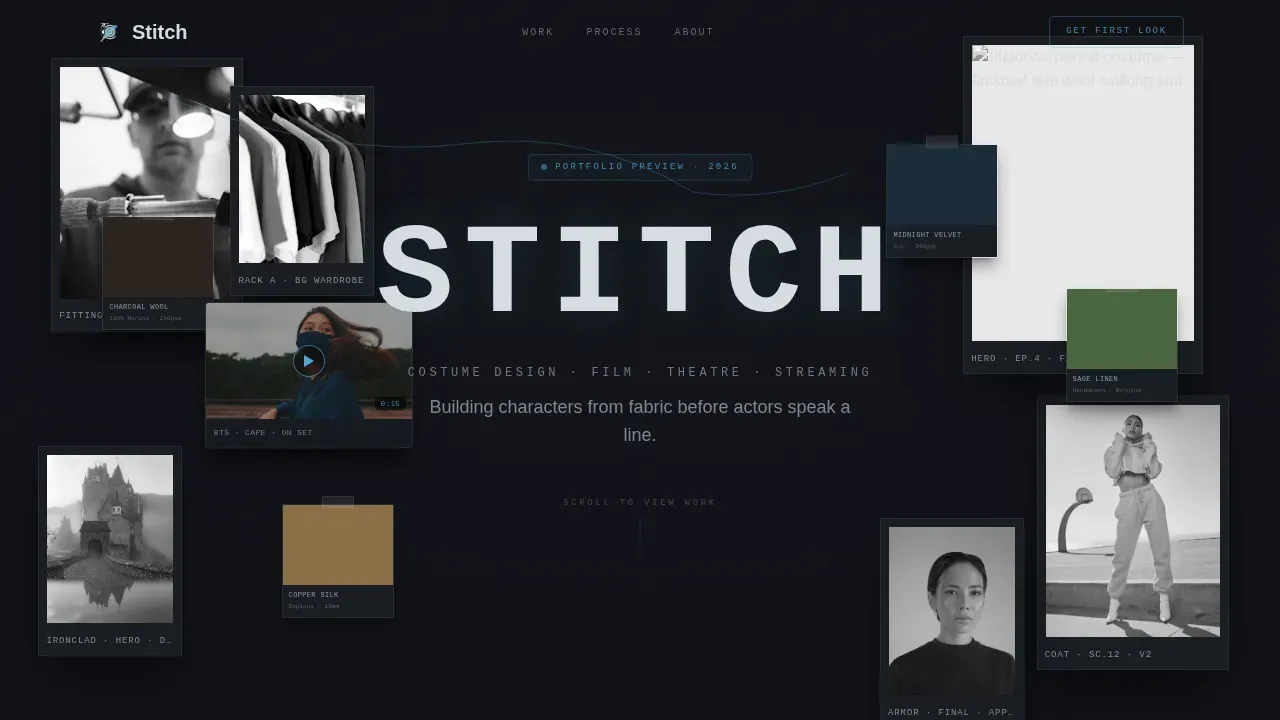
- A collage hero with Polaroids, fabric swatches, a looping video thumbnail, and a typewriter name reveal
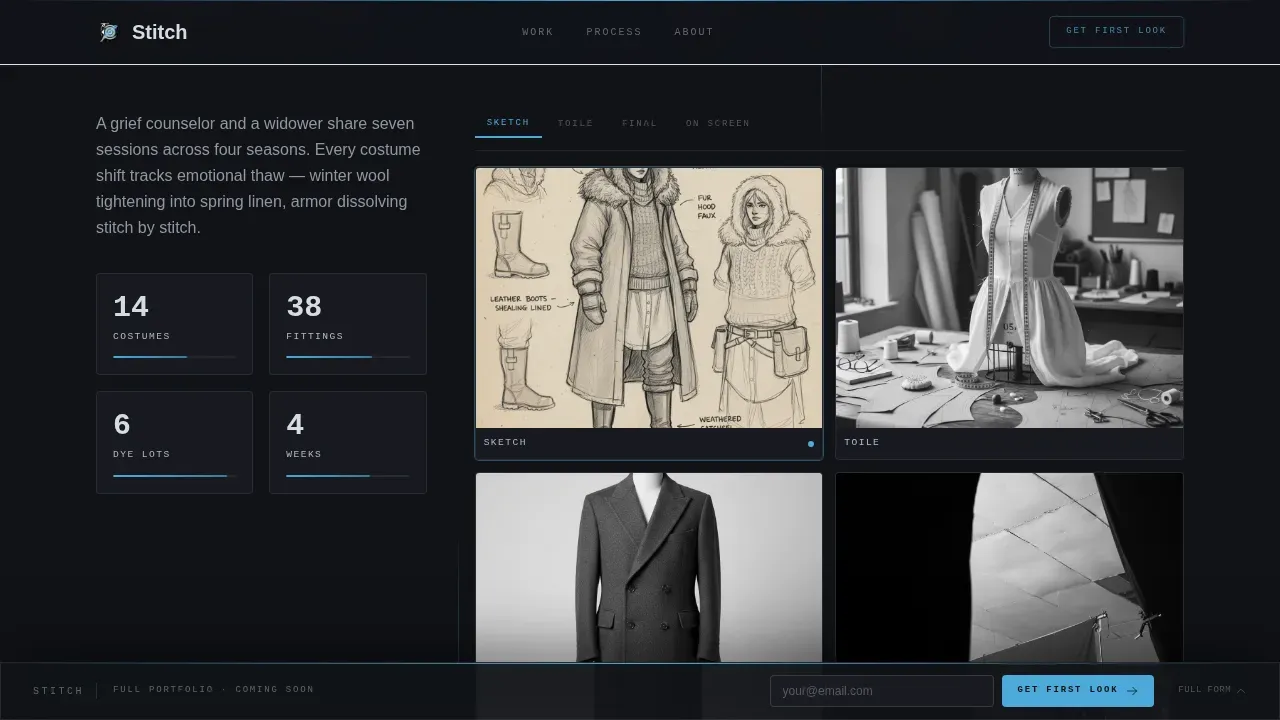
- Three production spotlight sections, each with a behind-the-scenes reel and a glass-panel sketch-to-screen breakdown
- A sticky bottom-rail email capture and an expanded final signup with role dropdown and optional project inquiry field
Feature list
This section highlights the core capabilities built into the template.
Collage Scrapbook Hero
The full-viewport header layers overlapping Polaroids, torn fabric swatches with handwritten fiber notes, and a looping video thumbnail onto a frosted-glass surface. Depth-of-field blur creates a three-dimensional vitrine effect. The designer's name stamps in letter by letter using a monospaced font, like a garment tag being printed.
Three-Reel Production Spotlights
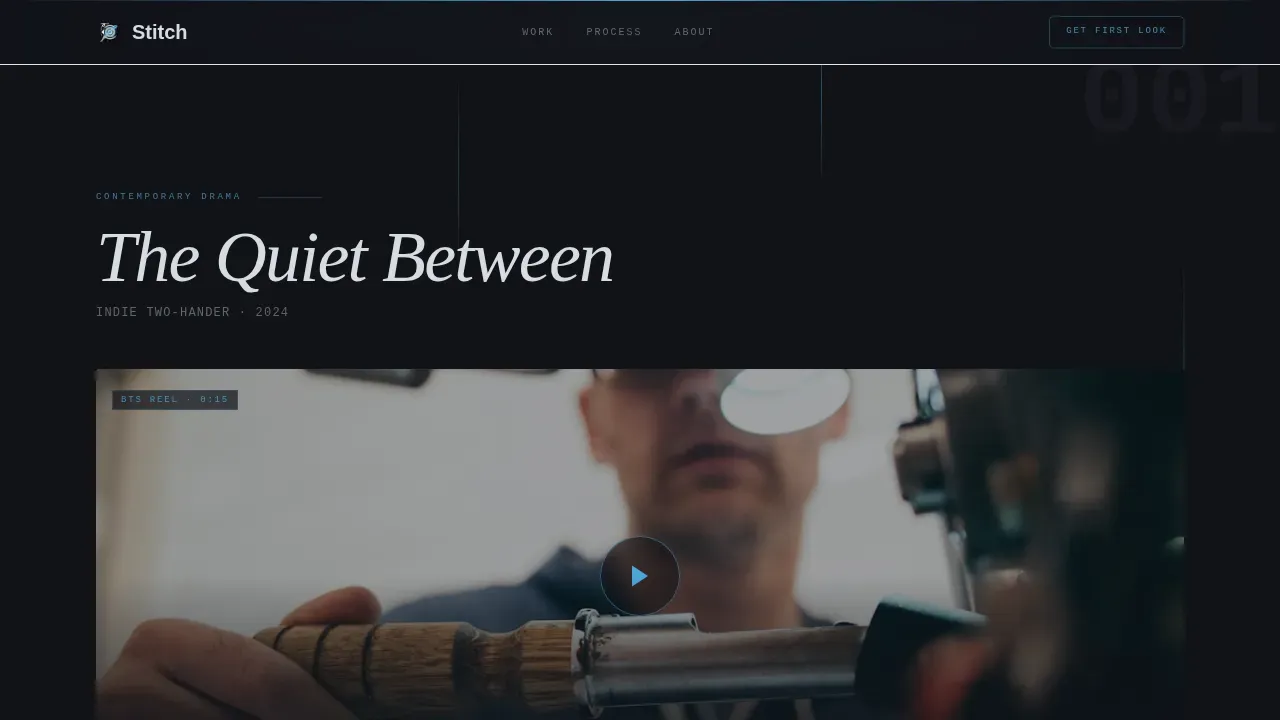
Each production spotlight opens with a fifteen-second behind-the-scenes video reel showing hands at work, racks in motion, and the finished costume under camera. The reel expands into a glass-panel breakdown displaying sketch, toile, final garment, and screen capture. Contextual details cover the project name, the designer's role, and a description of the immersive experience. The three productions escalate in scale: a quiet indie two-hander, a period drama with thirty background costumes, and a genre tentpole with prosthetic integration.
Frosted Glass Scroll Transitions
Between each production spotlight, a frosted-glass divider wipes across the viewport and briefly reflects the visitor's scroll position. This reinforces the Tech Glass motif and gives the page a cinematic, gallery-quality feel that keeps attention moving forward naturally.
Director Pull-Quote Cards
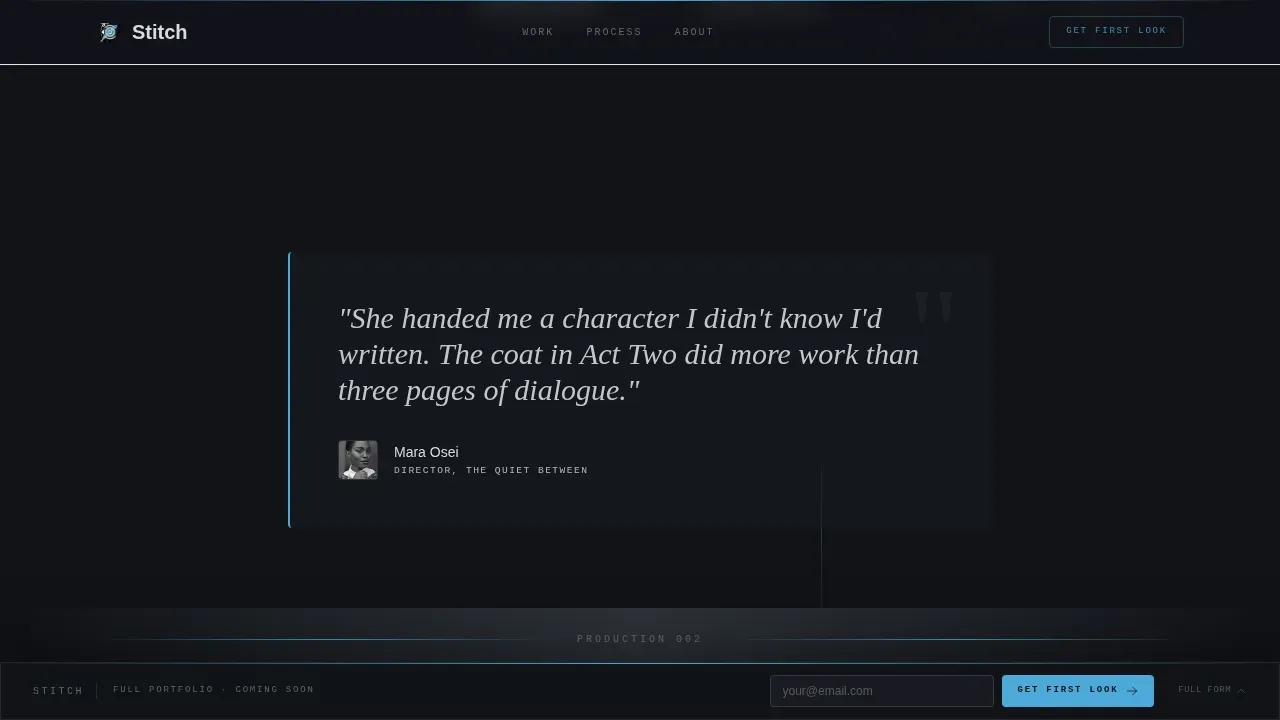
Between production spotlights, director quotes appear on steel-gray cards. These short testimonials bring social proof and credibility to the portfolio without interrupting the visual flow. Client testimonials ground the craft in collaboration and highlight the designer's professionalism.
Sticky Waitlist Bottom Rail
After the visitor scrolls past the hero, a slim frosted-glass bar follows them down the page. It holds a single-field email input and a "Get First Look" call-to-action button placed prominently so visitors can sign up at any moment. The cursor blink uses the arc-weld blue accent to draw the eye.
Expanded Final Signup Section
Below the third production reel, a larger waitlist moment expands with three fields: email address, a role dropdown (director, producer, agent, press, or other), and an optional field labeled "What's your next project?" This inquiry form sparks a real conversation and captures the project name, timeline context, and contact information in one place.
Page sections overview
| Section | Purpose |
|---|---|
| Collage Hero | Full-viewport mood board with Polaroids, fabric swatches, looping video thumbnail, and typewriter name reveal |
| Production Spotlight One | "The Quiet Between" indie reel plus glass-panel breakdown |
| Director Quote Card | Steel-gray pull-quote between spotlights one and two |
| Production Spotlight Two | "The Cartographer's Daughter" period drama reel plus breakdown |
| Director Quote Card | Steel-gray pull-quote between spotlights two and three |
| Production Spotlight Three | "Ironclad Protocol" tentpole reel with prosthetic integration breakdown |
| Expanded Waitlist Section | Email, role dropdown, and optional project field for waitlist signup |
| Minimal Footer | Ultra-minimal horizontal flow footer |
Design & branding system
The visual identity follows a Tech Glass theme built on a Monochrome Steel color system. The industrial palette acts like a neutral cage so that the fashion and costume colors inside each video reel explode against it.
- Colors: deep forge black (#111318), brushed chromium (#B0B8C1), frosted panel gray (#D6DCE1), and arc-weld blue (#4DA8DA) reserved for hover states, progress bars, and the waitlist cursor blink
- Typography: JetBrains Mono for labels and interface chrome, Fraunces for editorial headlines, DM Sans for body copy
- Minimalist layout with frosted-glass panels, depth-of-field blur layers, and scroll-linked divider transitions that keep design clean and costumes dominant
Mobile & speed optimization
The template is designed desktop-first for a cinematic experience, with a responsive mobile fallback so the fashion design portfolio remains viewable on any device.
- Video thumbnails are lazy-loaded to reduce initial page weight, and CSS scroll-driven animations handle transitions without heavy JavaScript
- IntersectionObserver triggers each reel autoplay only when the section enters the viewport, keeping the experience smooth on lower-bandwidth connections
How this template helps you convert
The page earns the signup by delivering proof of craft before asking for anything. By the time a visitor reaches the waitlist form, they have already watched three video reels and viewed a full sketch-to-screen breakdown for each production.
- The collage hero creates an immediate, inspired emotional pull and positions the designer's value proposition in a clear, visual headline before the visitor scrolls
- Three escalating production spotlights build trust progressively, letting employers, directors, and collaborators view the full range of fashion design techniques from period drama to prosthetic-integrated genre work
- The sticky bottom-rail email capture and the expanded final form create two natural conversion moments without ever feeling like a hard sell
Other information about this template
This template is one of the more distinctive portfolio templates available for costume and fashion designers. It is built to share the making-of process as clearly as the finished garment, drawing inspiration from the behind-the-scenes rhythms of a real costume shop. The things that make a fashion design portfolio compelling are exactly the things this layout puts first: process video, material detail, and the words of collaborating directors.
- Fashion designers can use digital sketching tools and illustrations alongside reel content to show the full design process from concept to completion; the glass-panel breakdown section is the right place to bring those assets together
- Mood boards and sources of inspiration sit naturally in the hero collage, giving context to the fashion work without needing a separate page
- The template can be updated day to day as new productions wrap; swap reels, add a new pull-quote card, or update the inquiry dropdown to reflect your current role focus
- Platforms like YouTube can host the behind-the-scenes video files that feed into the reel sections, keeping the page itself light while the video experience stays high quality
- Trust badges or logos of companies and productions the designer has worked with can be added to the footer or near the director quote cards to further boost portfolio credibility
Theme
Tech Glass
Creative direction
Creator Spotlight
Color system
Monochrome Steel
Style
Full-Width Immersive
Direction
Waitlist/Coming Soon
Page Sections
Collage Scrapbook Hero with Typewriter Reveal
Three Escalating Production Video Spotlights
Frosted Glass Scroll Dividers
Director Pull-quote Social Proof Cards
Sticky Bottom-rail Email Capture
Expanded Waitlist Signup with Role Dropdown
Related questions
Is this template suitable for a costume designer who is not yet well known?
Can I use this as my full fashion design portfolio website?
What video content works best in the production spotlight sections?
How does the inquiry form help me connect with potential clients?
Do I need to replace the placeholder production spotlights with my own work?