Specialist Pharmaceutical Software & SaaS Professional Website Template
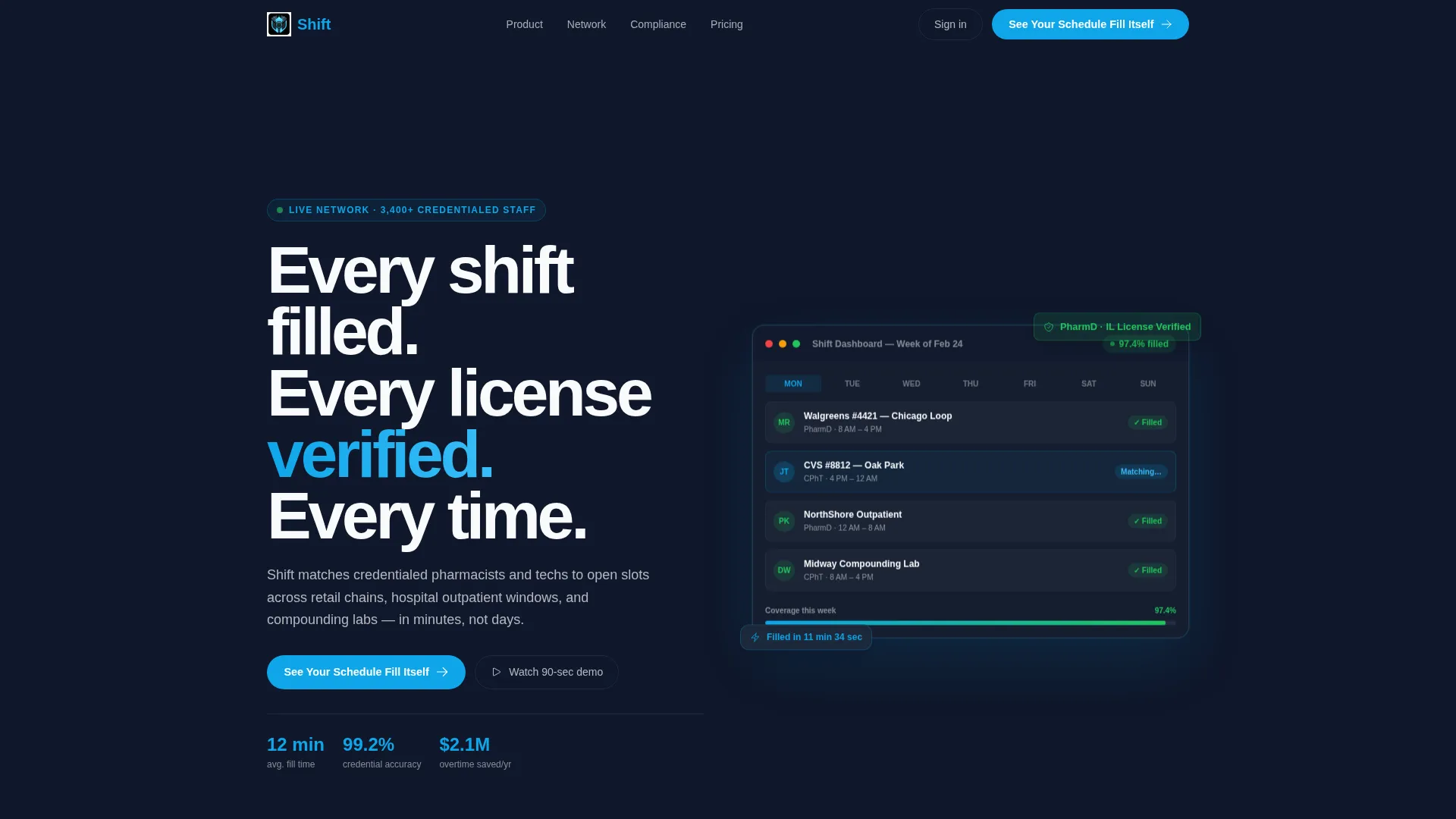
Shift is a bento grid landing page template built for pharmaceutical staff scheduling platforms. It pairs a bold dashboard screenshot header with stat-driven grid sections, credential-verification callouts, and a sticky call-to-action bar. The result is a high-trust, conversion-ready page designed for pharmacy directors, district managers, and staffing coordinators who need to fill shifts fast.
by Rocket studio
Quick summary
Shift is a single-page bento grid landing page template designed for pharmaceutical staff scheduling software. It opens with a product screenshot header, moves through animated metric tiles and evidence-led grid cells, and closes every scroll with a clear call to action. The layout is built for credibility and momentum from the first pixel to the final form.
Who this template is for
This template speaks directly to operations-focused buyers in pharmacy workforce management. It is built for teams that feel the daily pressure of uncovered shifts and manual scheduling processes.
- Regional pharmacy directors managing staff across multiple locations
- District managers responsible for weekend and overnight shift coverage
- Staffing coordinators who currently handle scheduling through spreadsheets
What problem this template solves
Manual shift scheduling in pharmacy environments is slow, error-prone, and costly. This template gives scheduling software companies a landing page that mirrors the urgency their buyers feel every morning.
- Communicating fill speed and credential accuracy to skeptical operations buyers
- Replacing vague software claims with hard proof metrics and visual evidence
- Converting high-intent visitors into demo bookings without friction
What you get with this template
You get a fully designed, section-rich landing page that leads with product evidence and builds trust through every scroll. The layout is dense with purpose and light on decoration.
- A product screenshot header featuring a live-look scheduling dashboard with color-coded shifts and a credential badge
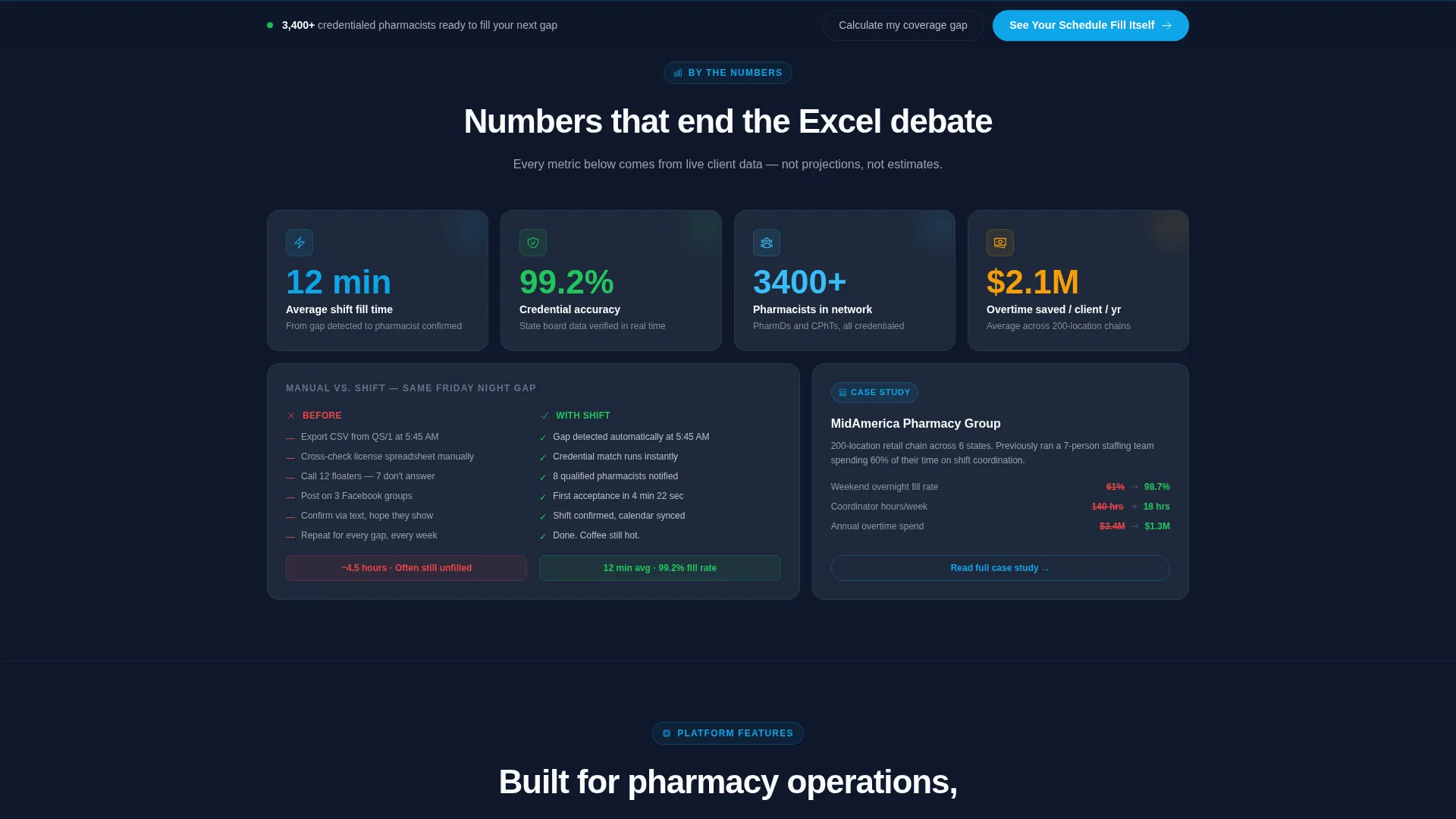
- Four animated metric tiles counting up on entry with real performance numbers
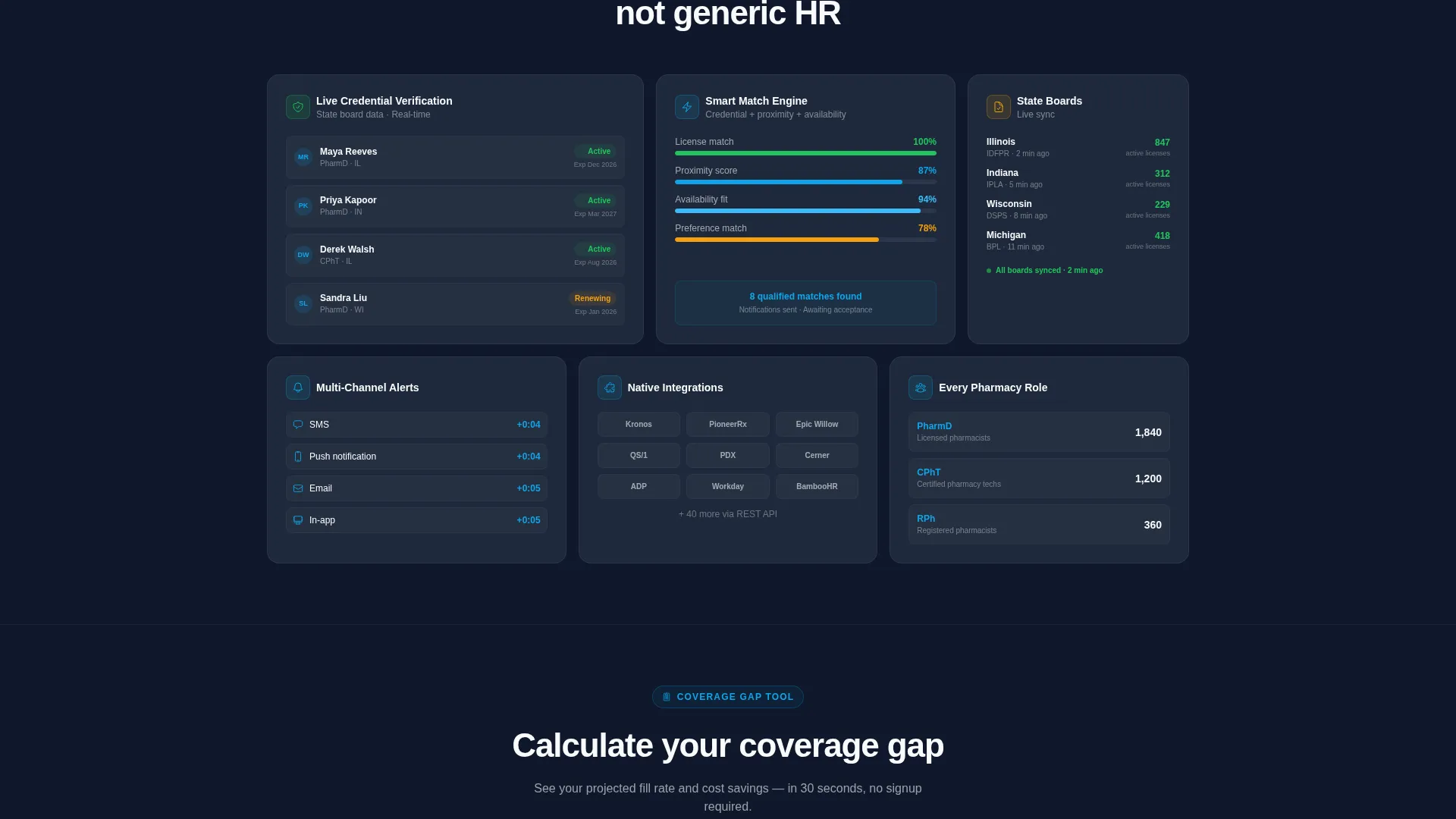
- A bento grid body with before/after panels, a case study card, an integration logo cluster, and a compliance module
- A sticky bottom call-to-action bar that follows the visitor after the second grid row
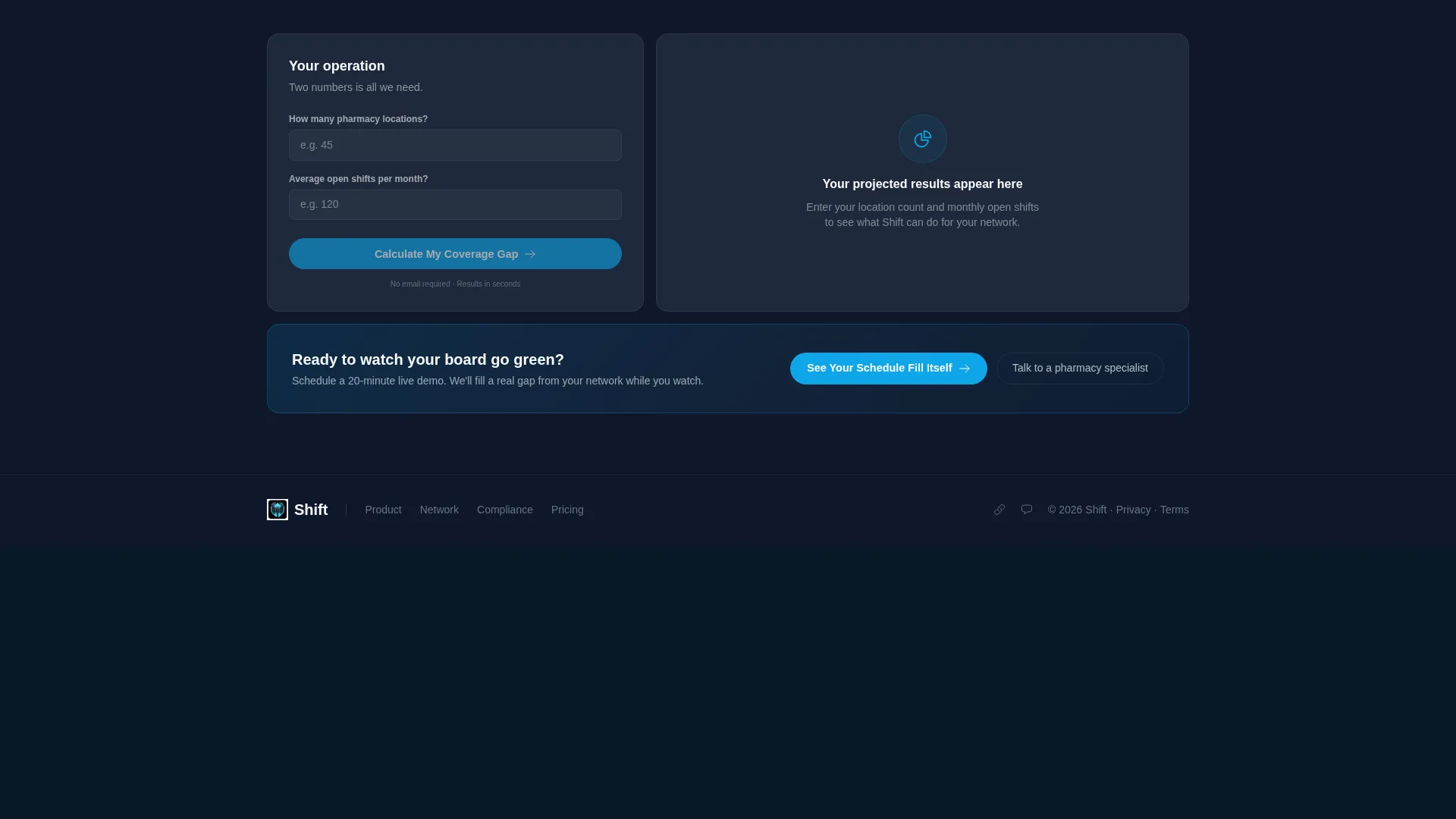
- An embedded interactive coverage gap calculator for soft lead capture
Feature list
This section covers the core built-in components that make the Shift template work as a conversion tool.
Animated Metric Tiles
Four oversized stat cards open the bento grid below the hero. Each number counts up on entry, displaying figures like average fill time, credential accuracy, network size, and overtime savings. The animation draws the eye and anchors credibility before the visitor reads a single word of body copy.
Product Screenshot Header
The header centers a pixel-perfect user interface capture of the scheduling dashboard. It shows a week view across four pharmacy locations, a green-verified credential badge, and a live fill-rate counter. The screenshot floats on the dark slate background with a subtle parallax depth effect.
Sticky Call-to-Action Bar
The primary call to action appears inside the header and again as a sticky bottom bar that locks into view after the second grid row. Both instances route visitors to a personalized demo booking page, keeping the conversion path visible throughout the scroll.
Interactive Coverage Gap Calculator
One bento cell houses an embedded tool that asks for location count and average monthly open shifts. It outputs a projected fill rate, giving the visitor a personalized result. This acts as a soft lead-capture mechanism built naturally into the page experience.
Before/After Scheduling Comparison
A dedicated grid cell contrasts manual scheduling against automated scheduling side by side. This visual comparison quickly validates the platform's value without requiring the visitor to read long paragraphs.
Compliance and Case Study Cells
A compliance module cell shows state board license tracking in action. A separate mini case study card references a 200-location chain, providing social proof at the scale that regional and district-level buyers recognize immediately.
Page sections overview
| Section | Purpose |
|---|---|
| Hero Header | Showcases dashboard screenshot with headline and primary call to action |
| Metric Tiles Row | Displays four animated performance stats to establish immediate credibility |
| Before/After Cell | Compares manual versus automated scheduling workflows visually |
| Case Study Card | Delivers social proof from a large multi-location pharmacy chain |
| Integration Logo Cluster | Shows platform compatibility with existing pharmacy operations tools |
| Compliance Module Cell | Highlights state board license tracking and credential verification |
| Coverage Gap Calculator | Captures leads through an interactive fill-rate projection tool |
| Sticky call to action Bar | Keeps the demo booking call to action visible after second grid row |
Design & branding system
The Shift template uses a Slate and Sky color system that feels like a control tower dashboard: dark, readable, and calm. Every color choice serves a functional role in guiding the visitor's eye.
- Deep operational slate (#1E293B) anchors card backgrounds and the hero section
- Clinical mid-gray (#64748B) handles secondary text and dividers without competing for attention
- Open-sky blue (#0EA5E9) marks every call-to-action element and live-data accent
- Sharp white (#F8FAFC) provides breathing space across the bento grid layout
Mobile & speed optimization
The bento grid layout is structured to reflow cleanly on smaller screens. Dense stat cards and comparison cells retain their hierarchy without losing the impact of the numbers.
- Grid cells stack vertically on mobile while preserving visual weight and headline prominence
- The sticky call-to-action bar remains fixed at the bottom of the screen across all viewport sizes
- Typography is set in a tight, bold sans-serif that stays legible at every scale
How this template helps you convert
Every design and layout decision in Shift pushes the visitor toward a single next step: booking a demo. The page uses a rhythm of evidence, proof, and trust to build momentum before the ask.
- Animated stat tiles establish platform credibility in the first scroll, reducing skepticism before the visitor reaches any feature description.
- The interactive coverage gap calculator gives visitors a personalized result tied to their own operation, making the demo booking feel like a logical follow-up rather than a cold ask.
Other information about this template
Shift is built specifically for the pharmaceutical software and SaaS space, where buyers are detail-oriented and trust is earned through data. The template is designed to feel native to that world.
- Template style is Bento Grid, following a Startup Velocity theme with a Stats-First Impact creative direction
- The header concept is a Product Screenshot, chosen to show the product in context rather than describe it abstractly
- The landing page direction is Click-Through, with every section designed to move visitors toward a demo booking
- The color palette and layout rhythm are deliberately calibrated to resemble an operational dashboard, reinforcing the platform's identity
- This template is well suited for pharmaceutical staff scheduling platforms that serve retail pharmacy chains, hospital outpatient windows, and compounding labs
Theme
Startup Velocity
Creative direction
Stats-First Impact
Color system
Slate & Sky
Style
Bento Grid
Direction
Click-Through
Page Sections
Animated Entry Metric Tiles
Product Screenshot Hero Header
Sticky Demo Booking Bar
Interactive Coverage Gap Calculator
Before and After Scheduling Comparison
Compliance and Social Proof Cells
Related questions
Who is this landing page template designed for?
Can I replace the placeholder metrics with my own platform data?
What is the coverage gap calculator and how does it work?
Does the sticky call-to-action bar require separate configuration?
Is this template suitable for a SaaS product serving multiple pharmacy settings?



