Space & Advanced Aerospace Pricing & Packages Website Template
Shield is a hub-and-spoke anchor-nav landing page template built for a space radiation shielding company. It presents composite panel data, material layer specs, and mission heritage in a structured spec-sheet layout. The design uses a carbon fiber color system and a full-screen video header, giving mission architects and defense program managers the technical depth they need before requesting a data package.
by Rocket studio
Quick summary
Shield is a single-page, anchor-nav landing page template for a materials engineering lab specializing in radiation barrier systems for crewed spacecraft, orbital habitats, and lunar surface modules. Five spoke sections read like genuine spec sheets. A full-screen video header and carbon fiber visual identity set the engineering tone from the first frame.
Who this template is for
This template is built for organizations that need to communicate deep technical credibility to an engineering audience. Generic marketing layouts do not serve that goal. Shield does.
- Mission architects and systems engineers at aerospace prime contractors evaluating radiation shielding vendors for Artemis-era crew vehicles
- NewSpace startup teams designing commercial low Earth orbit stations who need to assess shielding mass budgets quickly
- Defense program managers hardening satellite electronics against solar particle events and requesting formal technical data packages
What problem this template solves
Most landing page templates are built for consumer products or software. They rely on emotional storytelling, large lifestyle imagery, and vague benefit statements. None of that earns trust from a spacecraft systems engineer reviewing a radiation shielding vendor.
- Engineers and mission architects need material thicknesses, areal density values, and test facility data before they will engage a vendor
- A generic page forces technical buyers to look elsewhere for the data they actually need, costing the vendor a qualified lead
- Shield replaces the sales pitch with a structured spec-sheet layout so the page itself qualifies the vendor before the click
What you get with this template
Shield delivers a fully structured anchor-navigation landing page organized around five technical spoke sections. Every section is laid out as a data sheet, not a brochure panel.
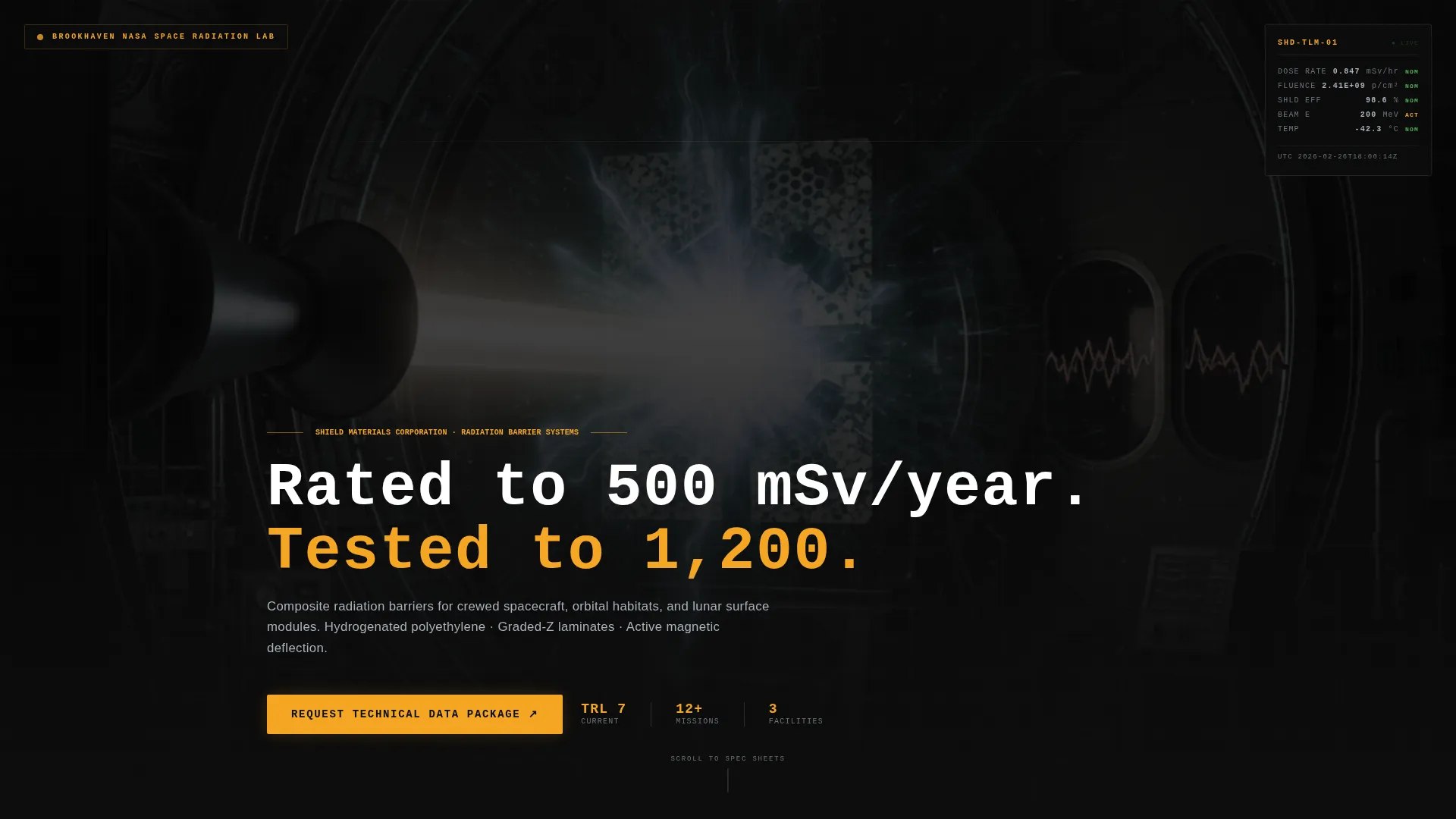
- A full-screen video background header with a monospaced headline and a live-style dosimetry readout ticking in the corner
- Five anchor-nav spokes labeled MATERIALS, PERFORMANCE, TESTING, INTEGRATION, and HERITAGE, each presenting data in engineering layout format
- A primary call to action rendered in caution-amber on composite black, positioned at the hub center and repeated at the base of every spoke
Feature list
This template includes a precise set of built-in sections and visual components drawn directly from the engineering brief.
Full-Screen Cyclotron Video Header
The header uses slow-motion footage of a particle beam striking a shielding sample inside a cyclotron test chamber. A thin dosimetry readout ticks down in the corner, and a monospaced headline phases in after four seconds. The effect reads like telemetry, not advertising.
Anchor Navigation Hub
A sticky anchor navigation bar locks to the top of the page. Five spoke labels in engineering shorthand let technical readers jump directly to the data section most relevant to their evaluation stage. The hub center hosts the primary call-to-action button.
Exploded Cross-Section Materials Spoke
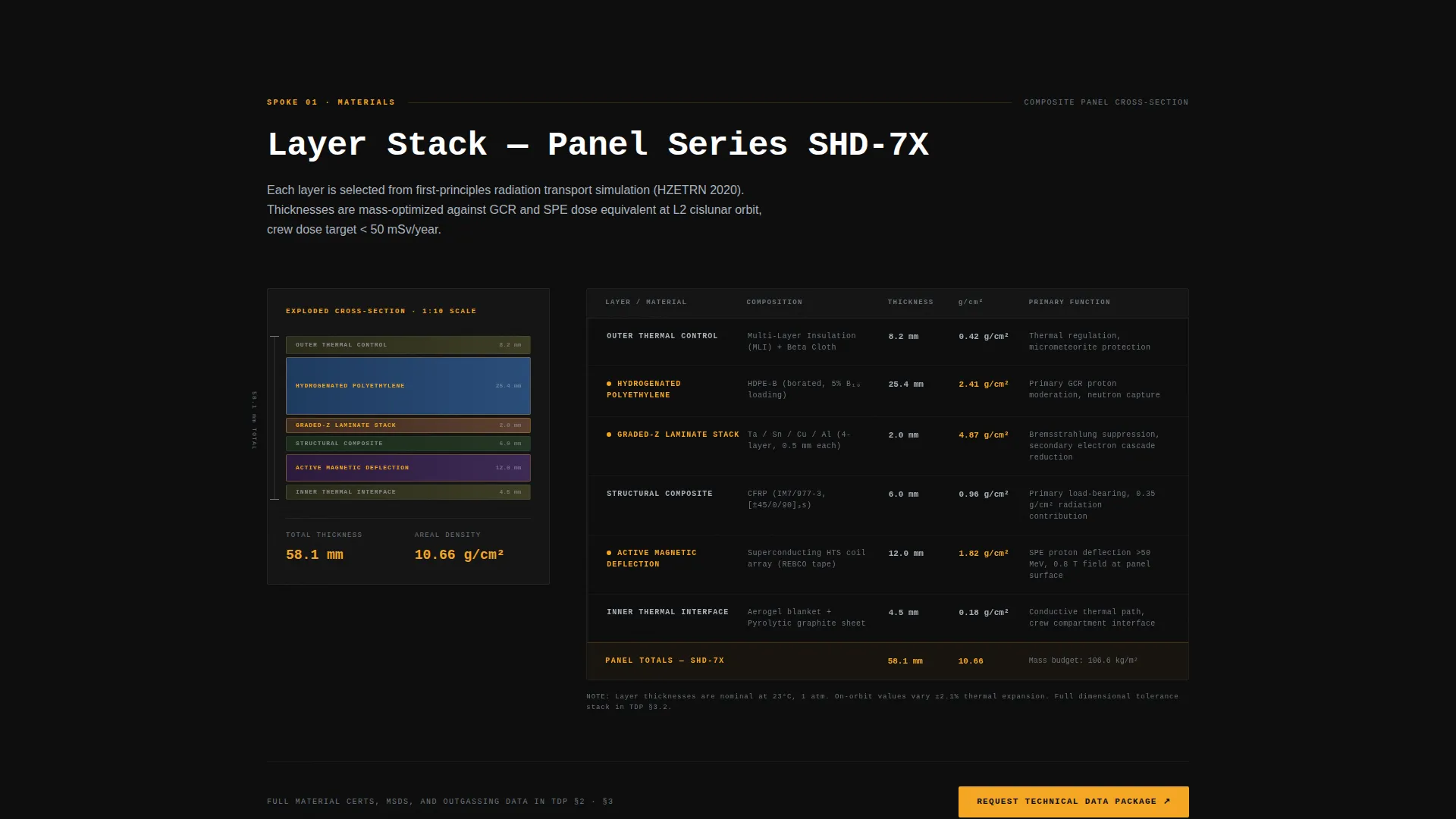
The MATERIALS spoke presents an exploded cross-section diagram showing each composite layer. Hydrogenated polyethylene, graded-Z laminates, and active magnetic deflection components are shown with layer thicknesses in millimeters and areal density in grams per square centimeter.
Performance Data Curves Spoke
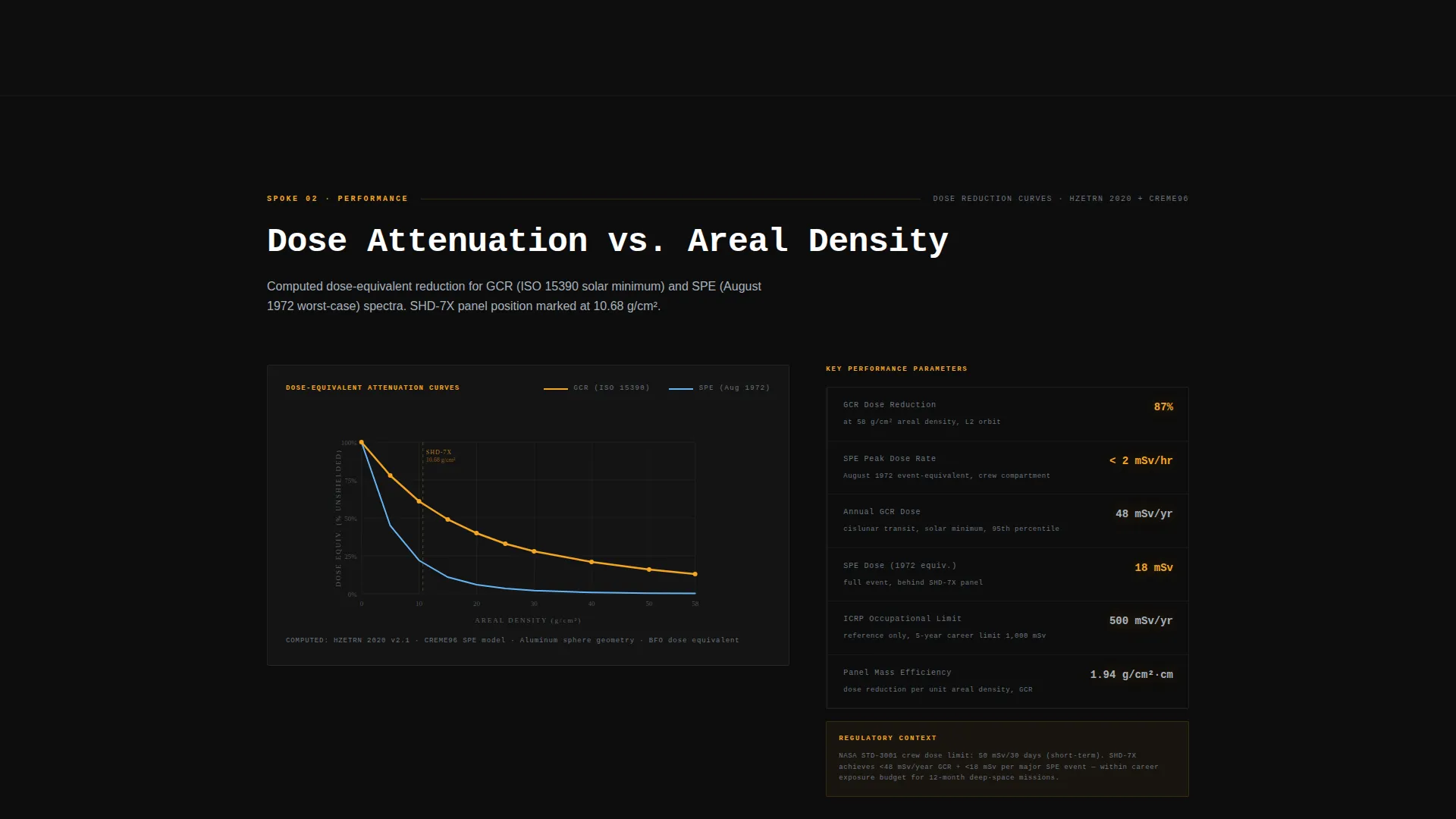
The PERFORMANCE spoke displays dose-reduction curves plotted against galactic cosmic ray (GCR) and solar particle event (SPE) spectra. The layout is structured as a technical data table and curve chart rather than a marketing benefit block.
Testing and Heritage Spokes
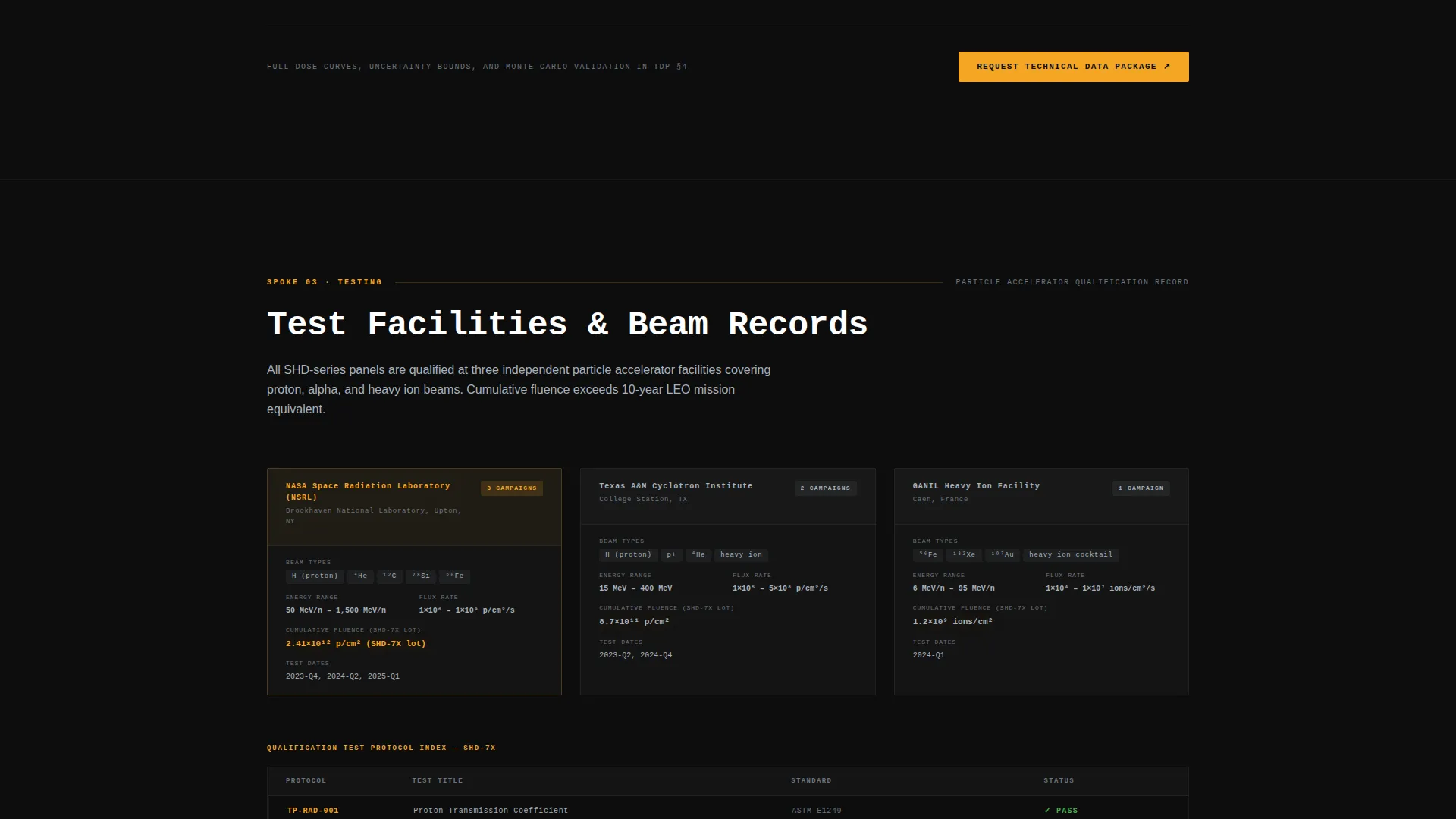
TESTING lists facility names, beam energies, and cumulative fluence from particle accelerator testing campaigns. HERITAGE catalogs mission patches and technology readiness level (TRL) ratings. Both spokes give procurement and program management audiences the qualification evidence they need.
Amber Click-Through call to action System
The primary call to action, "Request Technical Data Package," is styled in caution-amber on composite black. It appears at the hub center and at the base of each spoke. The click routes to a gated portal where visitors select mission profile and enter organization credentials to receive a downloadable PDF spec sheet.
Page sections overview
| Section | Purpose |
|---|---|
| Video Header | Establish technical credibility and display threshold headline |
| Anchor Nav Hub | Central navigation and primary call to action placement |
| Materials Spoke | Layer cross-section with thickness and areal density data |
| Performance Spoke | Dose-reduction curves for GCR and SPE spectra |
| Testing Spoke | Facility names, beam energies, and fluence records |
| Integration Spoke | Mass-per-square-meter tables and thermal interface specs |
| Heritage Spoke | Mission patches and TRL level catalog |
| Spoke-Base call to action | Repeated action prompt at the base of each spoke |
Design & branding system
The visual identity follows an Engineering Blueprint theme using a Carbon Fiber color system. Every palette choice is functional, not decorative.
- Background layers stay in the deep composite black (#0D0D0D) to woven graphite mid-tone (#3A3A3A) range, giving the page the feel of a carbon fiber layup table under cleanroom fluorescents
- Body text is set in titanium annotation gray (#A8B2BD) for maximum legibility against dark backgrounds without introducing warm or soft tones
- Caution-amber (#F5A623) is reserved exclusively for data highlights, hover states, dosimetry values exceeding thresholds, and the primary call-to-action button, keeping the color meaningful every time it appears
Mobile & speed optimization
The template is structured for fast loading and functional readability across device sizes. Technical data tables and cross-section diagrams are formatted to remain scannable on smaller screens.
- The anchor navigation bar collapses cleanly on mobile, keeping spoke access available without obscuring content
- Data tables in the Integration and Testing spokes are built to scroll horizontally on narrow viewports rather than breaking layout
- The full-screen video header is structured to support a static poster fallback image on devices where autoplay video is restricted
How this template helps you convert
Shield is designed so that technical reading is the conversion path. By the time a visitor reaches the fifth spoke, they have already verified the vendor's material stack, test pedigree, and mission heritage.
- Each spoke section delivers the specific data a mission architect would request in a formal Request for Information, building vendor confidence through content rather than through persuasion
- The amber "Request Technical Data Package" call to action appears at logical decision points throughout the page, so the click feels like the natural next step rather than a sales prompt
- The gated portal flow routes qualified leads directly to a mission-profile-specific PDF spec sheet, ensuring that the follow-up document matches the visitor's actual program context
Other information about this template
This template is categorized under Aerospace and Defense, within the Space and Advanced Aerospace subcategory, specifically targeting the Space Radiation Shielding niche.
- The template style is Hub and Spoke with anchor navigation, a format well suited to technical audiences who scan by data category rather than reading top to bottom
- The creative direction is Spec Sheet, meaning each section is laid out to resemble a genuine engineering data document rather than a marketing panel
- The landing page direction is Click-Through, with all conversion energy focused on a single primary action rather than on-page form capture
- The header concept is Full-Screen Video Background, a high-impact format that communicates active testing and material performance before a single line of copy is read
Theme
Engineering Blueprint
Creative direction
Spec Sheet
Color system
Carbon Fiber
Style
Hub & Spoke (Anchor Nav)
Direction
Click-Through
Page Sections
Full-screen Cyclotron Video Header
Sticky Anchor Navigation Hub
Exploded Cross-section Materials Spoke
Performance Dose-reduction Curves
Testing and Heritage Data Spokes
Amber Click-through Call to Action System
Related questions
What audience is this template built for?
Does the page include an on-page contact form?
What are the five anchor-nav spokes in this template?
Can the color system be adjusted for a different brand identity?
What is the purpose of the dosimetry readout in the video header?



