Secure — MDM Platform Landing Page Template
Provision is a white-label mobile device management (MDM) landing page template built for managed service providers (MSPs) and IT resellers. It features a dashboard-style data grid layout, a pixel-perfect product screenshot header, animated market-stat sections, a feature comparison table, tiered pricing cards, and a frictionless three-field trial signup form.
by Rocket studio
Quick summary
Provision is a single-page landing page template designed for white-label MDM platforms. It opens with a live-looking admin dashboard screenshot, escalates through industry-report-style scroll sections, and closes with a low-friction free tenant signup. The layout is dark, iridescent, and built to convert MSPs and IT resellers on first scroll.
Who this template is for
This template is built for teams selling mobile device management software under their own brand. It speaks directly to buyers who need to show a polished product before a prospect asks hard questions.
- Managed service providers (MSPs) tired of stitching together open-source MDM solutions
- Channel partners and IT resellers who need a credible branded device console to demo
- SaaS resellers looking to add a recurring-revenue MDM line item before their next funding round
What problem this template solves
Most MDM resellers lose deals not because their product is weak, but because their front door looks unfinished. A generic sign-up page or a raw open-source fork dashboard kills trust before a demo ever gets booked.
- Prospects can't visualize the product they're being asked to buy
- There is no clear path from "I'm interested" to "I'm trying it right now"
- Market credibility is hard to establish without industry data presented alongside the offer
What you get with this template
You get a fully structured, single-page landing page that moves a visitor from skepticism to signup in one scroll session. Every section is designed to remove friction and build evidence.
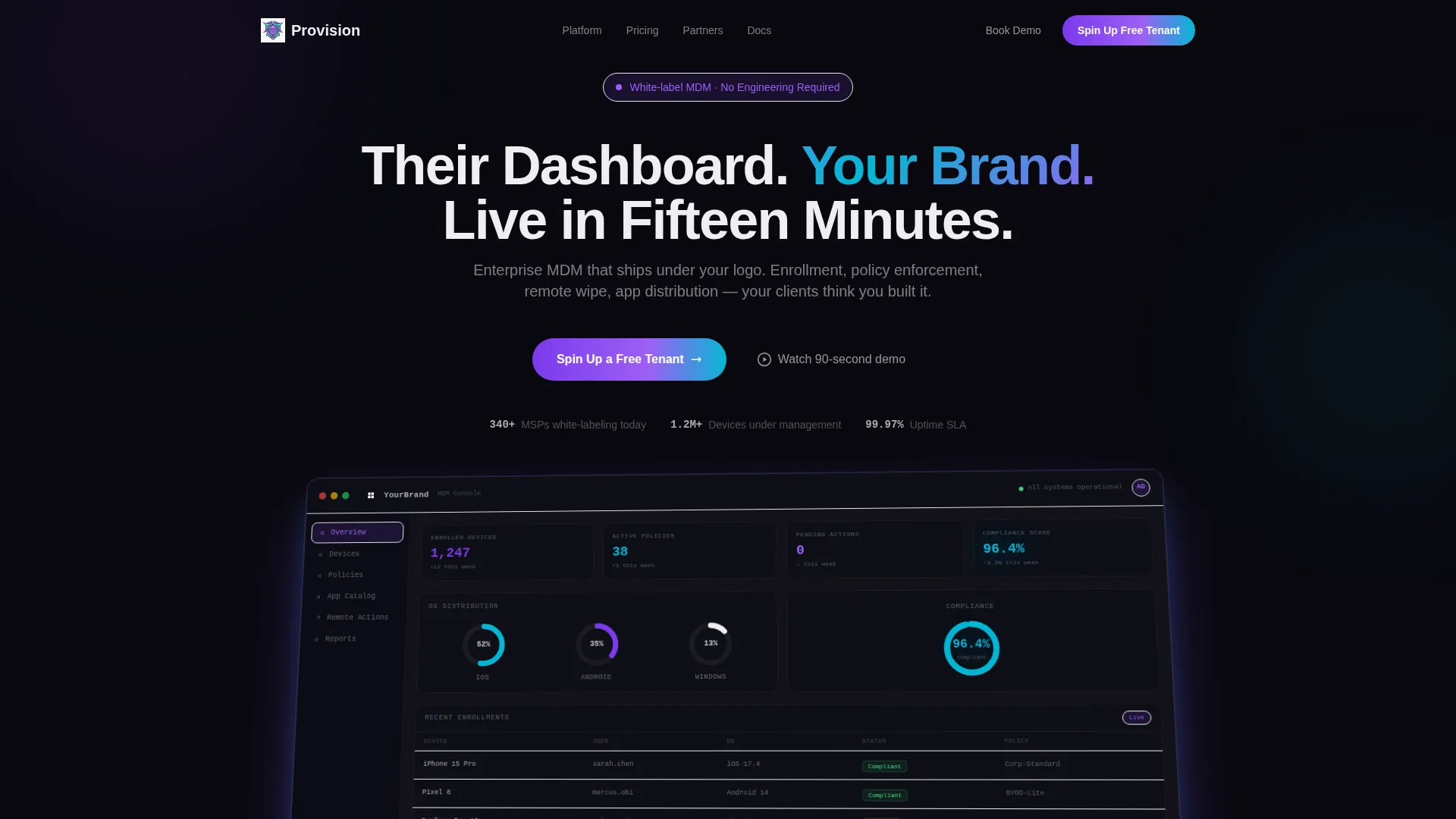
- A full-width product screenshot header showing a working white-label tenant dashboard with device counts, policy stats, and compliance scores
- An industry-report scroll flow with animated bar charts, a feature comparison data grid, and three pricing tier cards
- A sticky bottom bar with a primary call-to-action (call to action) and a three-field sequential signup form requiring no credit card
Feature list
This template includes the following built-in components and design features, all drawn directly from the source brief.
Pixel-Perfect Dashboard Header
The header is a full-width product screenshot showing a white-label tenant overview grid. It displays 1,247 enrolled devices, 38 active policies, three operating system breakdowns in donut charts, and a compliance score of 96.4% glowing in cyan. A placeholder logo reading "YourBrand" sits in the top-left corner. The screenshot is rendered on a slight three-dimensional tilt with a soft iridescent shadow beneath it, and the headline overlays it in pearlescent white.
Animated Industry-Stat Sections
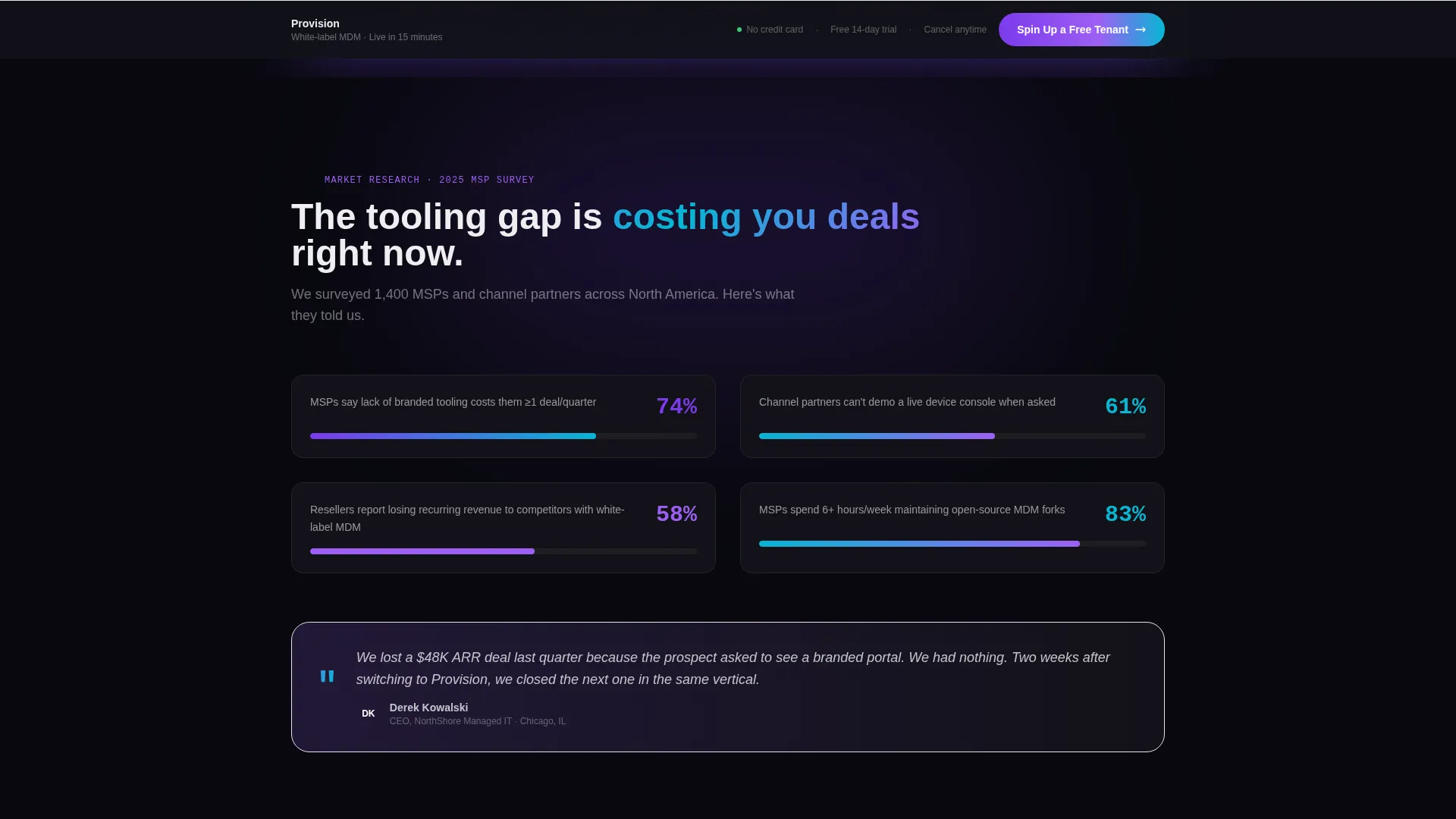
The first scroll section presents a hard market finding: 74% of MSPs report that a lack of branded tooling costs them at least one deal per quarter. This stat is paired with a horizontal bar chart that animates on scroll entry, giving the page the feel of a data-backed Series A deck slide rather than a standard sales page.
Feature Comparison Data Grid
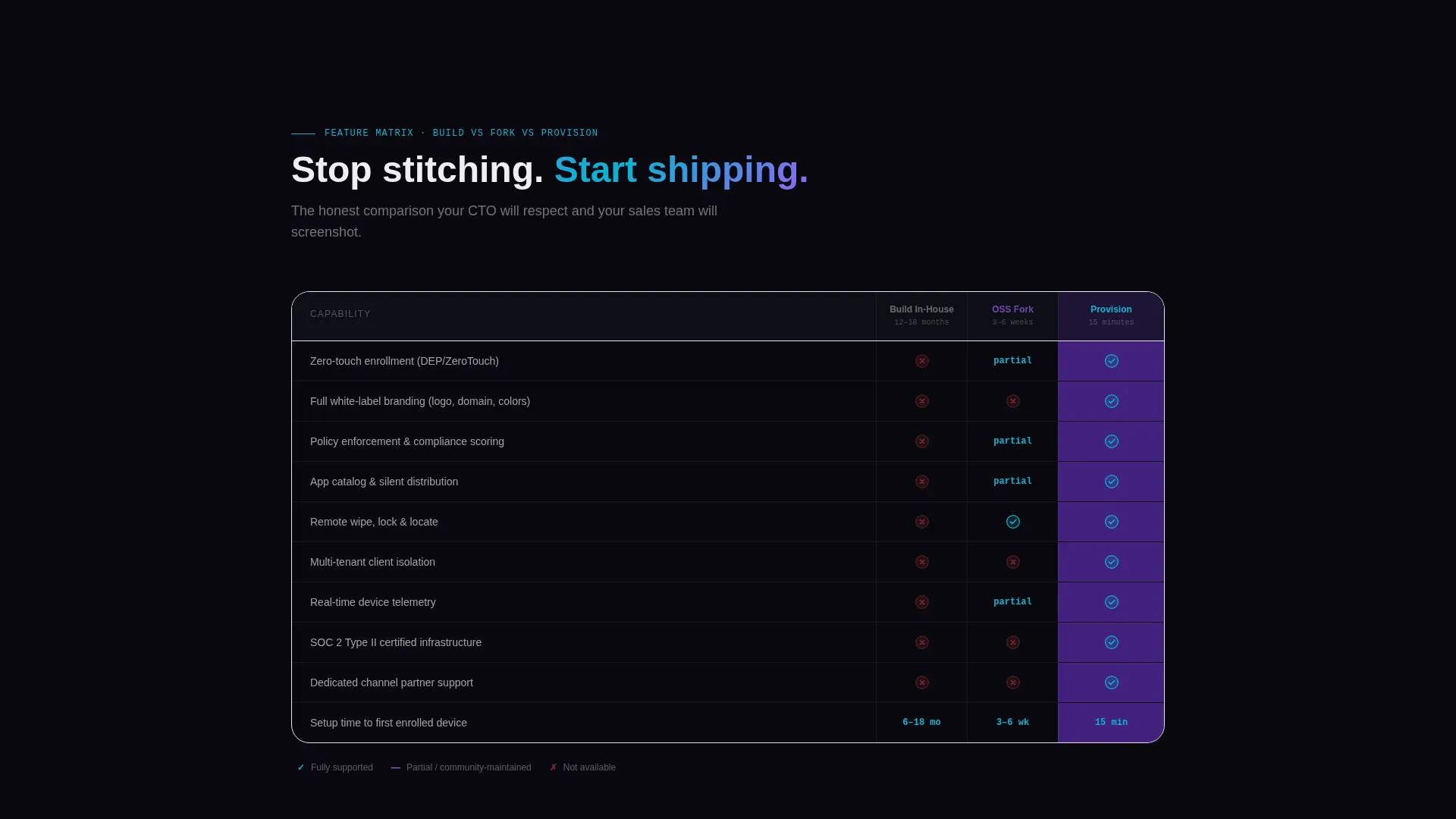
A scrollable feature grid is laid out like a data table. Rows cover enrollment, policy management, app catalog, and remote actions. Columns compare "Build," "Open Source Fork," and "Us." Checkmarks and cross-marks fill each cell as the section scrolls into view, making the competitive case without a single paragraph of body text.
Three-Tier Pricing Dashboard Cards
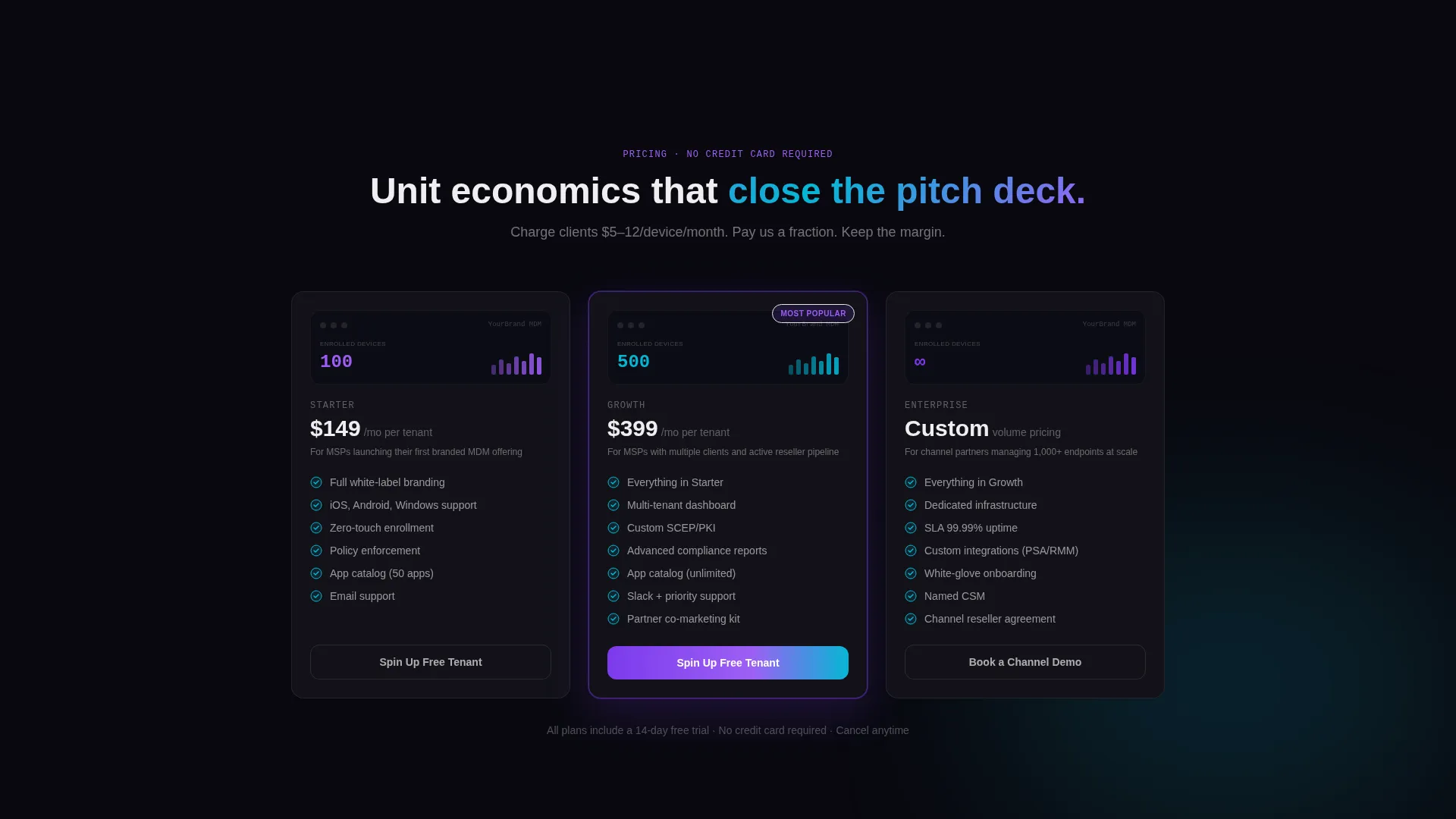
Pricing is displayed as three dashboard-style cards with ascending device counts. The card format mirrors the product's own interface, reinforcing the brand identity while presenting unit economics in a clear, scannable way.
Sticky Trial Conversion Bar
After the first scroll, a sticky bottom bar appears with the primary call to action: "Spin Up a Free Tenant." The bar persists through every subsequent section. The signup form runs three fields in sequence: work email, company name, and estimated device count via dropdown (1 to 100, 101 to 500, or 500 or more). No credit card is required.
Channel Partner Demo Path
Below the pricing cards, a secondary call to action offers "Book a Channel Demo" for partners managing 1,000 or more endpoints. This path captures high-volume leads who need a guided walkthrough rather than a self-serve trial.
Page sections overview
| Section | Purpose |
|---|---|
| Dashboard Screenshot Header | Shows the white-label admin console before any copy is read |
| Headline Overlay | Delivers the core value proposition over the product screenshot |
| Market Stat Section | Validates the business pain with an animated bar chart and hard industry data |
| Feature Comparison Grid | Compares build, open-source fork, and the platform across four capability rows |
| Pricing Tier Cards | Presents three device-count tiers as dashboard-style cards |
| Sticky call to action Bar | Keeps the free tenant signup accessible throughout the full scroll |
| Trial Signup Form | Captures work email, company name, and device count in three sequential fields |
| Channel Demo call to action | Offers a guided demo path for high-volume channel partners |
Design & branding system
The visual identity runs on an AI Iridescent color system over a Startup Velocity theme. The palette is designed to feel like a high-performance interface: dark enough for extended screen time, vivid enough to screenshot for a pitch deck.
- Primary canvas is deep void black (#09090F) with card backgrounds floating above it at (#121218); primary actions and data highlights use holographic violet (#7C3AED); secondary metrics and chart accents use shifting cyan (#06B6D4); text and card surfaces use pearlescent off-white (#EEEEF0)
- Gradients bleed violet-to-cyan on hover states and progress bars, reinforcing the iridescent identity across interactive elements
- The overall creative direction follows an Industry Report format, where each scroll section presents data or evidence structured like a slide from a Series A presentation
Mobile & speed optimization
The template is structured with a dashboard-first visual hierarchy that adapts across screen sizes. The data grid, donut charts, and comparison table are all designed for clear presentation at varied viewport widths.
- The sticky call to action bar remains accessible on mobile, keeping the primary conversion action visible throughout the scroll
- Sequential form fields reduce input friction on smaller screens by presenting one field at a time
- Card-based pricing and comparison grid layouts are designed to reflow cleanly without breaking the data-table visual metaphor
How this template helps you convert
The page is engineered to earn the click by showing the finished product first. A visitor sees the dashboard they will own before they type a single character.
- The product screenshot header removes abstraction immediately, letting prospects visualize the exact interface their clients will see under their own brand name
- The animated stat sections and feature comparison grid build a layered evidence stack, moving from market pain to feature proof to unit economics in a single scroll session
- The no-credit-card free trial form lowers commitment to near zero, and the sticky call to action bar ensures the signup option is never more than one glance away
Other information about this template
This template is categorized under Technology, specifically within the White-Label Enterprise Software subcategory, with a focused niche in white-label MDM platforms. It is a strong fit for any team packaging mobile device management capabilities as a branded, resellable product.
- The template style is Dashboard and Data Grid, meaning the visual language of the page mirrors the product it is selling
- The header concept is Product Screenshot, a proven approach for software landing pages where showing the interface is more persuasive than describing it
- The landing page direction is Freemium and Trial, meaning every design decision points toward a no-barrier first signup rather than a sales-qualified lead form
- The intersection match across theme, creative direction, color system, template style, landing page direction, and header concept is tightly aligned, scoring 13 out of the available match criteria
Theme
Startup Velocity
Creative direction
Industry Report
Color system
AI Iridescent
Style
Dashboard/Data Grid
Direction
Freemium/Trial
Page Sections
White-label Dashboard Screenshot Header
Animated Market-stat Scroll Sections
Feature Comparison Data Grid
Tiered Pricing Dashboard Cards
Sticky Free Trial Conversion Bar
Channel Partner Demo Call to Action
Related questions
Who is this landing page template designed for?
Does this template require a credit card to try?
Can I replace the placeholder branding in the dashboard screenshot?
What sections does this landing page include?
Is there a path for high-volume partners who want a guided demo?



