AI for Veterinary Cost Calculator Website Template
Scribe is a veterinary AI landing page template built for one purpose: showing busy DVMs exactly how much time they save. It combines a live stats dashboard, spec-sheet comparison tables, a side-by-side accuracy diff view, and a time-savings calculator into a single anchor-nav landing page that earns the click before asking for it.
by Rocket studio
Quick summary
Scribe is a hub-and-spoke landing page template for a veterinary AI writing engine. It opens with animated metric counters, moves through data-rich spec sections, and closes with a primary call to action tied to a live side-by-side trial. Every section is built to let numbers do the persuading.
Who this template is for
This template is built for teams selling AI documentation tools to the veterinary industry. It speaks directly to three audiences who feel the pain of clinical writing every single day.
- Solo practice owners finishing charts at 10 PM who need to see the time savings instantly
- Multi-location hospital groups that need consistent clinical communication across many DVMs
- Veterinary marketing agencies managing content calendars for dozens of clinic clients
What problem this template solves
Veterinary professionals spend a disproportionate amount of their day writing. SOAP notes, client discharge summaries, and clinic blog posts pile up after every shift. The core problem is not skill, it is volume and repetition. This template solves the conversion problem on the sales side: how do you convince a skeptical DVM that an AI tool is worth trusting with clinical language?
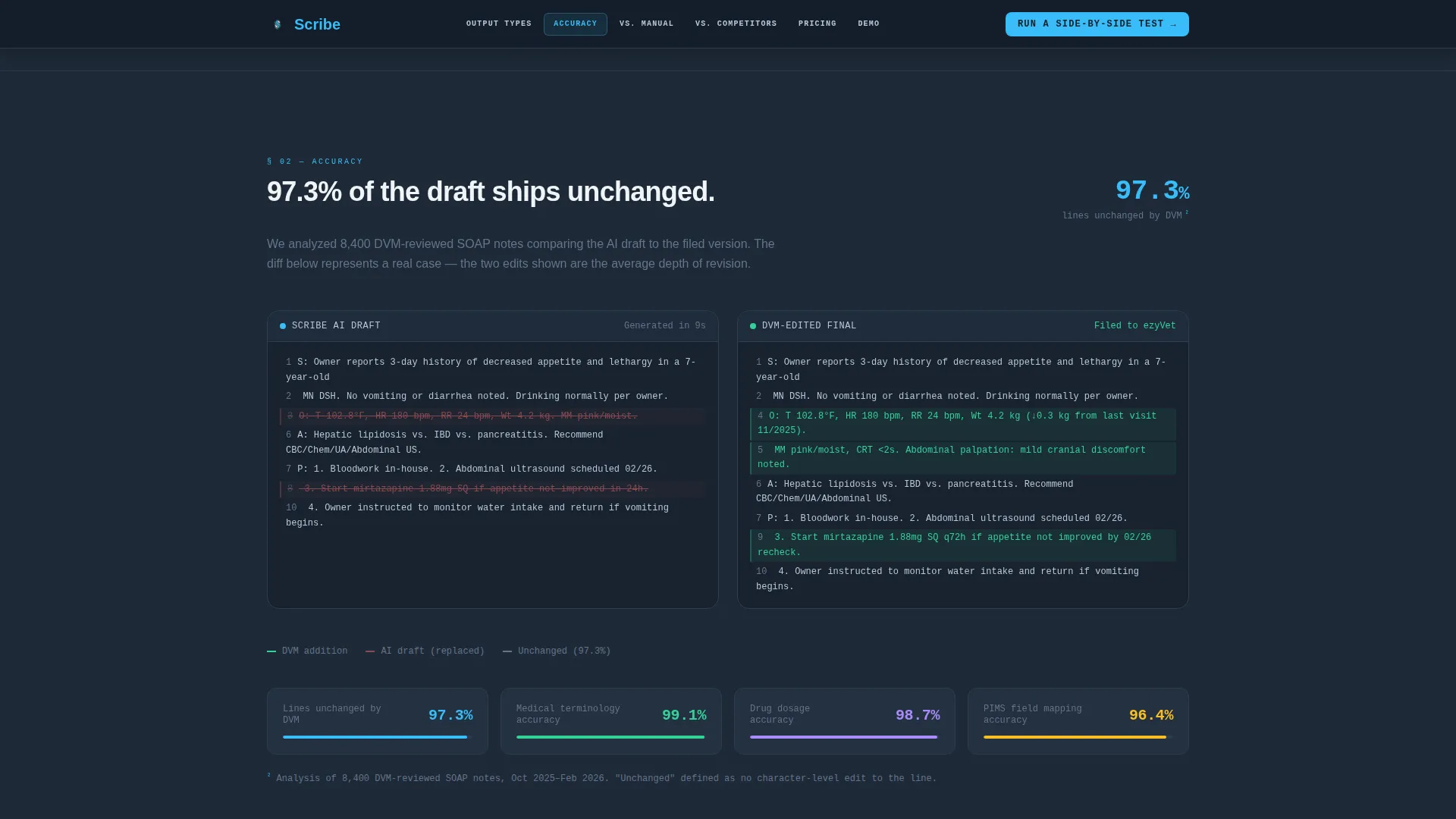
- It proves accuracy before asking for trust, using a diff view showing 97.3% of AI-drafted text left unchanged by reviewers
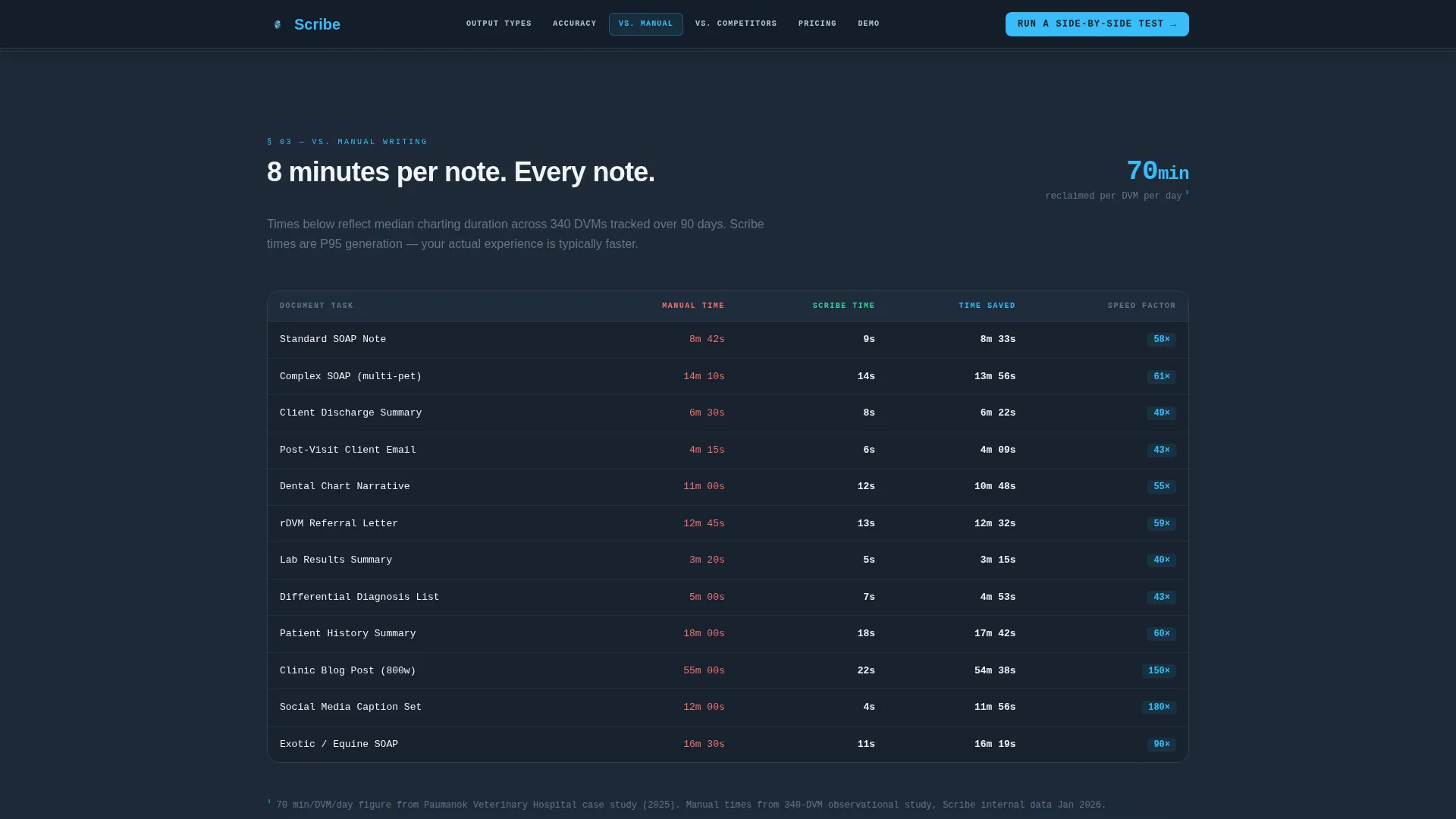
- It quantifies the time cost of manual charting across twelve common document types, making the value case impossible to ignore
What you get with this template
You get a fully structured, single-page layout with a fixed anchor navigation bar and six spoke sections. Each section is self-contained and data-forward, following the Spec Sheet creative direction from the brief.
- A live stats dashboard header with animated counters, a headline, and anchor nav links to Output Types, Accuracy, versus. Manual Writing, versus. Competitors, Pricing, and Demo
- A side-by-side accuracy diff view, a time-per-task comparison table, a scored competitor matrix, and a time-savings calculator widget
- Transparent pricing tier cards and a primary call-to-action block tied to a free live trial experience
Feature list
This template ships with purpose-built components designed around the veterinary AI use case. Each one is described below.
Animated Live Stats Dashboard Header
The header displays simulated real-time counters: SOAP notes generated, an 11-second average draft time beside an 8-minute-42-second manual comparison clock, and a 94.6% DVM satisfaction score. Numbers count up on load with eased motion, creating an immediate, data-driven first impression.
Fixed Anchor Navigation Bar
A persistent top navigation bar links visitors directly to each spoke section: Output Types, Accuracy, versus. Manual Writing, versus. Competitors, Pricing, and Demo. It keeps long-scroll pages navigable and reduces drop-off before the comparison sections.
Output Types Spec Table
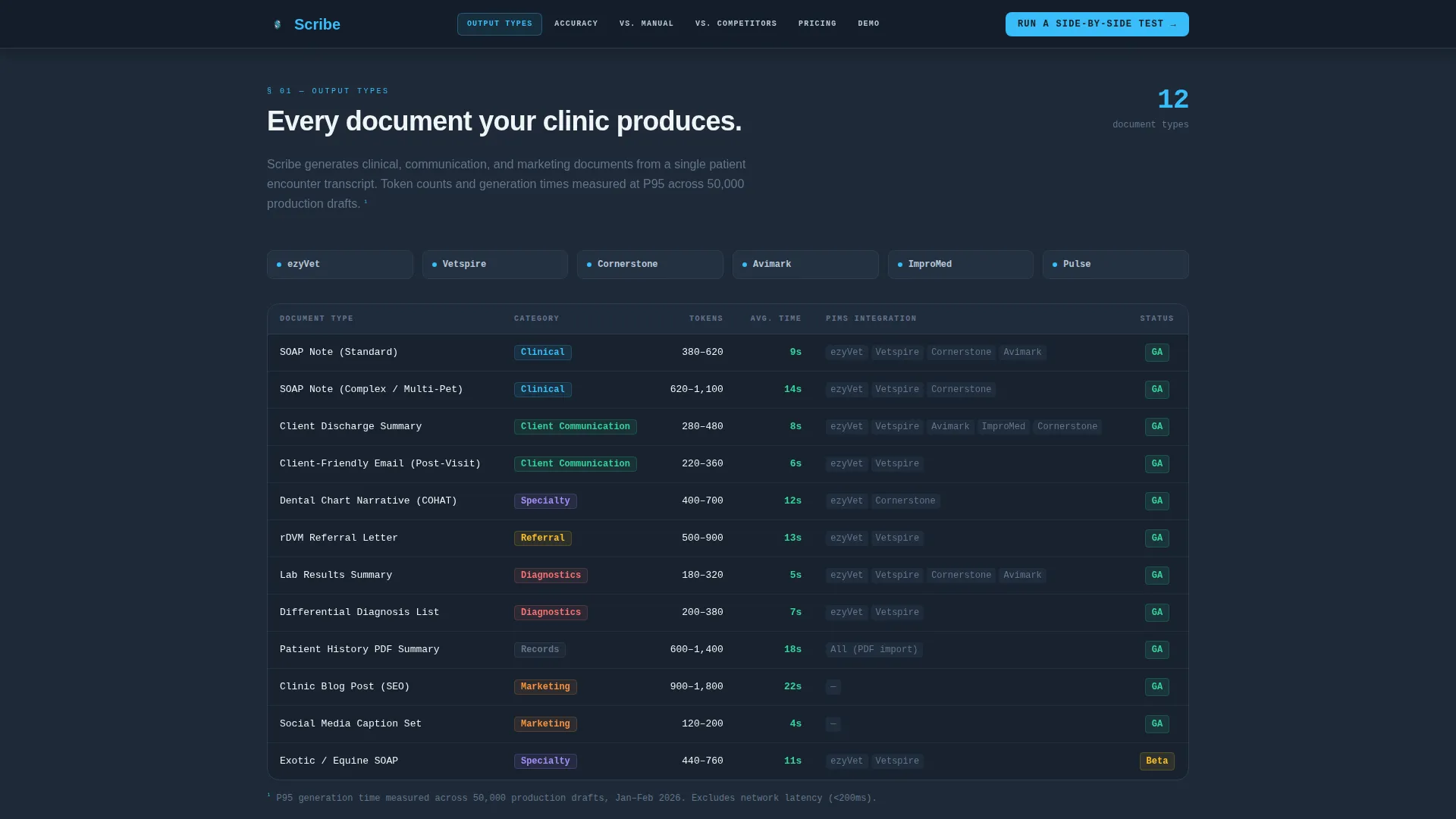
A clean data-table section lists every document the AI generates, with token counts, average generation times, and supported practice information management system integrations displayed in structured rows. It reads like a product data sheet, not a brochure.
Accuracy Diff View Component
A side-by-side panel shows an AI draft on the left and a DVM-edited final on the right. The 97.3% unchanged rate is highlighted in sky blue. Scroll-triggered reveal animation draws attention to the comparison at the right moment.
Time Savings Calculator Widget
An interactive calculator asks for the number of DVMs, average cases per day, and current charting method. It then outputs projected hours reclaimed per month. This widget gives each visitor a personalized reason to act.
Competitor Scored Matrix Table
A structured comparison table scores Scribe against three named competitors across vocabulary depth, practice information management system integration count, turnaround speed, and veterinary-specific training corpus size. Every column has a number. Every number has a source footnote.
Page sections overview
| Section | Purpose |
|---|---|
| Hero Stats Dashboard | Opens with live animated counters, headline, and anchor nav |
| Output Types Spec | Lists every document type with generation data in table rows |
| Accuracy Diff View | Side-by-side AI versus. DVM-edited draft with 97.3% unchanged rate |
| versus. Manual Writing | Time-per-task table across twelve document types with calculator |
| versus. Competitors | Scored matrix comparing four products across five criteria |
| Pricing and Demo | Tier cards with primary and secondary call-to-action blocks |
Design & branding system
The visual identity follows a Dashboard Pro theme built on the Slate and Sky color system. Every color decision reinforces the clinical precision of the product being sold.
- Deep charcoal slate (#1E2A38) for primary backgrounds, clinical mid-gray (#64748B) for secondary panels and data tables, clear-sky blue (#38BDF8) for active states and interactive highlights, and soft cloud white (#F0F4F8) for content surfaces and text
- Plus Jakarta Sans handles headings for a modern SaaS feel, while JetBrains Mono renders all data and metrics, reinforcing the spec-sheet aesthetic with monospaced precision
Mobile & speed optimization
The template is designed desktop-first, reflecting the practice management software context its users live in. Responsive behavior scales the layout cleanly to tablet and mobile viewports.
- Static sections use server component architecture for fast initial render, while counter animations and the calculator widget are handled client-side for interactivity without blocking the page
- Scroll-triggered reveal animations and diff view highlights are optimized to fire at the right viewport position, keeping the experience smooth as visitors move through the spec sections
How this template helps you convert
The conversion strategy is built around letting the data persuade before the call to action appears. By the time a visitor reaches the primary button, they have already watched Scribe win every comparison on the page.
- The primary call to action, "Run a Side-by-Side Test," appears after each versus table and links to a free trial where the visitor pastes a real patient history and watches the AI draft a SOAP note live against a timer.
- The secondary path, "See Your Clinic's Time Savings," routes visitors into the calculator widget, producing a personalized hours-reclaimed figure that makes the value proposition concrete and specific to their practice size.
Other information about this template
This template is built for the veterinary AI content writer niche inside the broader AI for veterinary technology category. It is well-suited for teams positioning a product at the intersection of clinical accuracy and documentation efficiency.
- The template style is Hub and Spoke with Anchor Navigation, making it straightforward to extend or reorder spoke sections as the product evolves
- Social proof elements include metric counters, a DVM satisfaction score, case study data points, and partnership badge placements for institutional credibility
- Localization defaults are English (US), USD pricing, and 12-hour time format
- Animation intensity is high throughout: counter animations on load, scroll-triggered section reveals, and diff view highlight animation all combine to give the page a live, dashboard-like energy
- The footer follows a linear single-row pattern, keeping the bottom of the page clean and uncluttered

Theme
Dashboard Pro
Creative direction
Spec Sheet
Color system
Slate & Sky
Style
Hub & Spoke (Anchor Nav)
Direction
Comparison/Versus
Page Sections
Animated Live Stats Dashboard Header
Fixed Anchor Navigation Bar
Accuracy Side-by-side Diff View
Interactive Time Savings Calculator
Competitor Scored Matrix Table
Output Types Spec Data Table
Related questions
What types of documents does the Output Types section cover?
Can I customize the calculator widget for different practice sizes?
How does the accuracy diff view work?
Is this template suitable for multi-location veterinary hospital groups?
Does the template include a pricing section?



