Schedule - Powerful Roofing Landing Page Template
The Schedule roofing landing page template is a hub-and-spoke, single-page dispatch board designed for roofing contractors. It features a live interactive preview above the fold, a spoke-based navigation linking five core capability sections, a free-tier signup form, and a franchise-level walkthrough booking path, all wrapped in a dark, high-contrast Dashboard Pro visual theme.
by Rocket studio
Quick summary
Schedule is a roofing booking and scheduling landing page template built for contractor operations of every size. It opens with a functioning micro-dashboard visitors can interact with before scrolling. A hub-and-spoke left-rail navigation connects five capability sections, each paired with a feature tier comparison. The free signup form asks for just three fields, no credit card required.
Who this template is for
This template is built for roofing professionals who manage real crew logistics every day. It speaks directly to the people who deal with dispatch complexity at scale.
- Owner-operators running up to three crews across multiple counties
- Office managers handling storm-season surge with dozens of open work orders
- Regional franchise owners who need a single live view across every job type
What problem this template solves
Roofing operations break down when job status lives in phone calls, sticky notes, and memory. This template addresses the scheduling friction that slows crews and frustrates customers.
- Double-booked crews and missed customer callbacks cost time and revenue
- Storm-season volume spikes overwhelm manual tracking and verbal dispatching
- Franchise owners have no unified view of tear-offs, re-decks, and material deliveries
What you get with this template
You get a fully designed, single-page landing page template with interactive components, structured content sections, and a clear conversion flow. Everything is ready to build on and deploy.
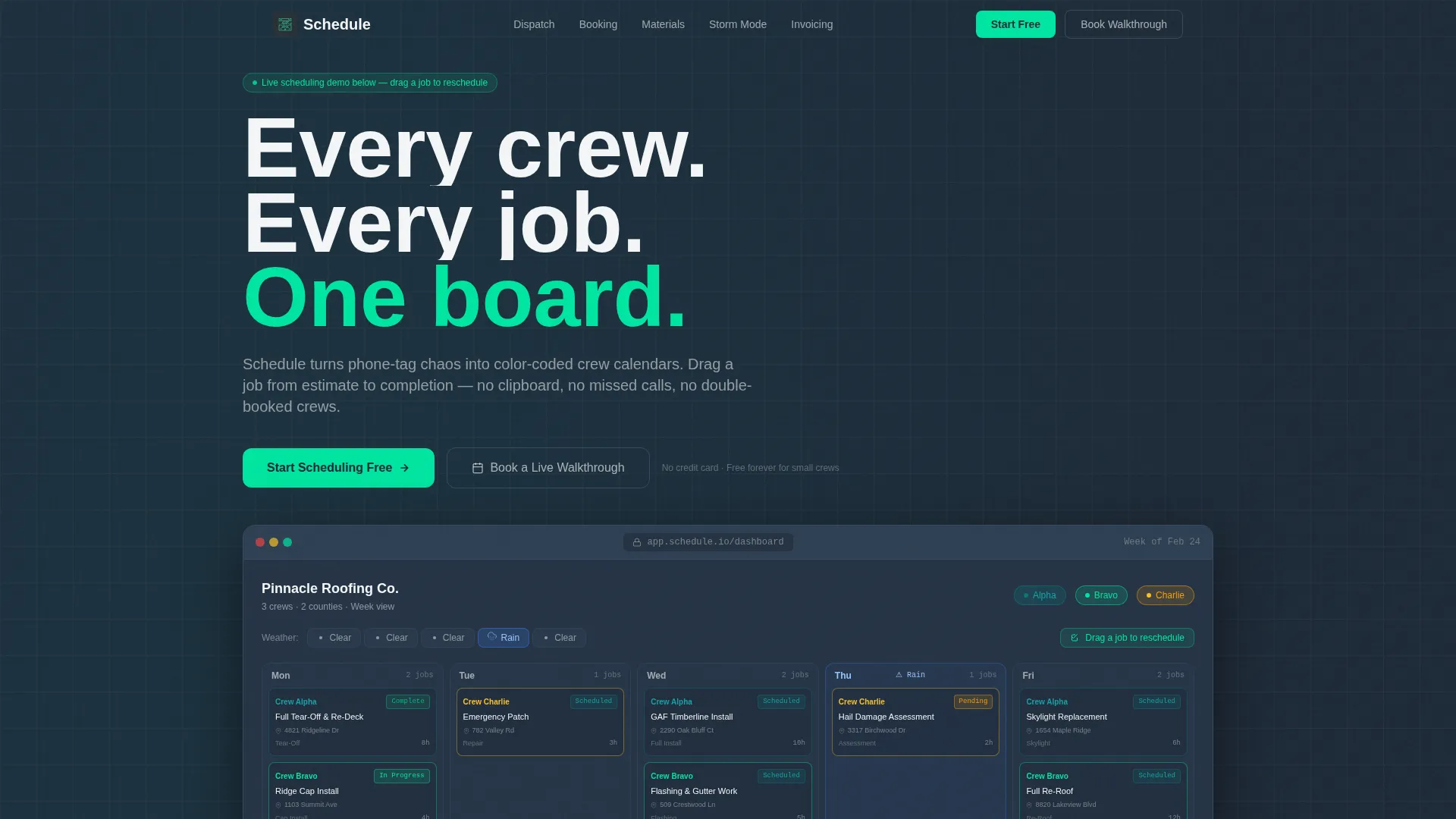
- An interactive micro-dashboard header showing color-coded crews, a map thumbnail, a weather bar, and a draggable job card
- A hub-and-spoke anchor navigation rail linking five spoke sections, each with a three-column Free, Pro, and Enterprise feature grid
- Two conversion paths: a three-field free signup form and a calendar-embed walkthrough booking for franchise prospects
Feature list
This template covers five core capability spokes and a range of supporting design and conversion components.
Interactive Dispatch Header
The header embeds a functioning micro-dashboard above the fold. Visitors see a fictional roofing company's live week with three color-coded crews, job pins on a map thumbnail, a weather bar flagging a rain day, and a drag handle to reschedule a job. The headline fades in after interaction.
Hub-and-Spoke Anchor Navigation
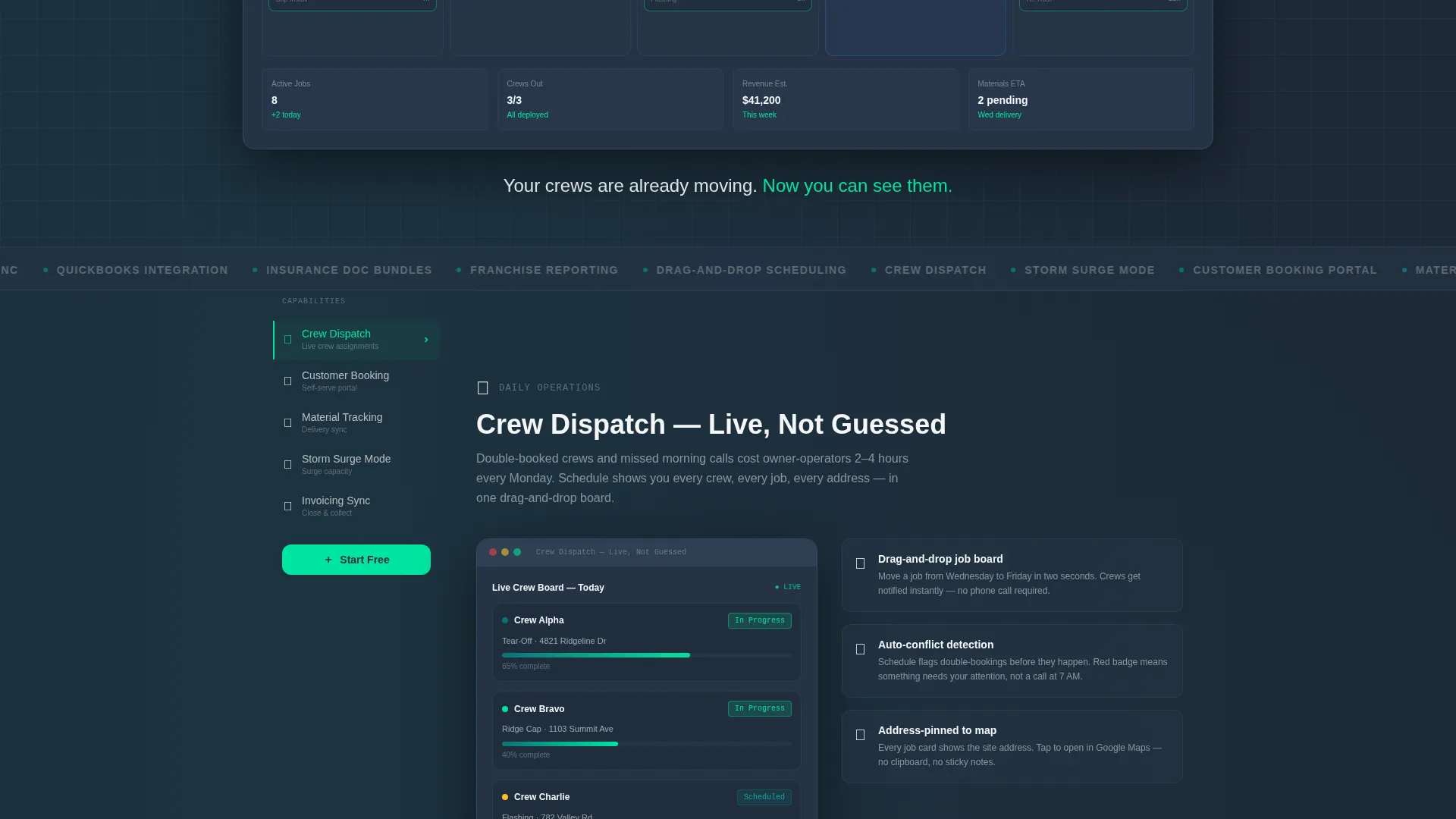
A sticky left-rail navigation lists five capability spokes: Crew Dispatch, Customer Booking Portal, Material Tracking, Storm-Season Surge Mode, and Invoicing Sync. Clicking any spoke smooth-scrolls to the matching section. The primary call-to-action button repeats at the nav rail and after every spoke section.
Tiered Feature Comparison Grids
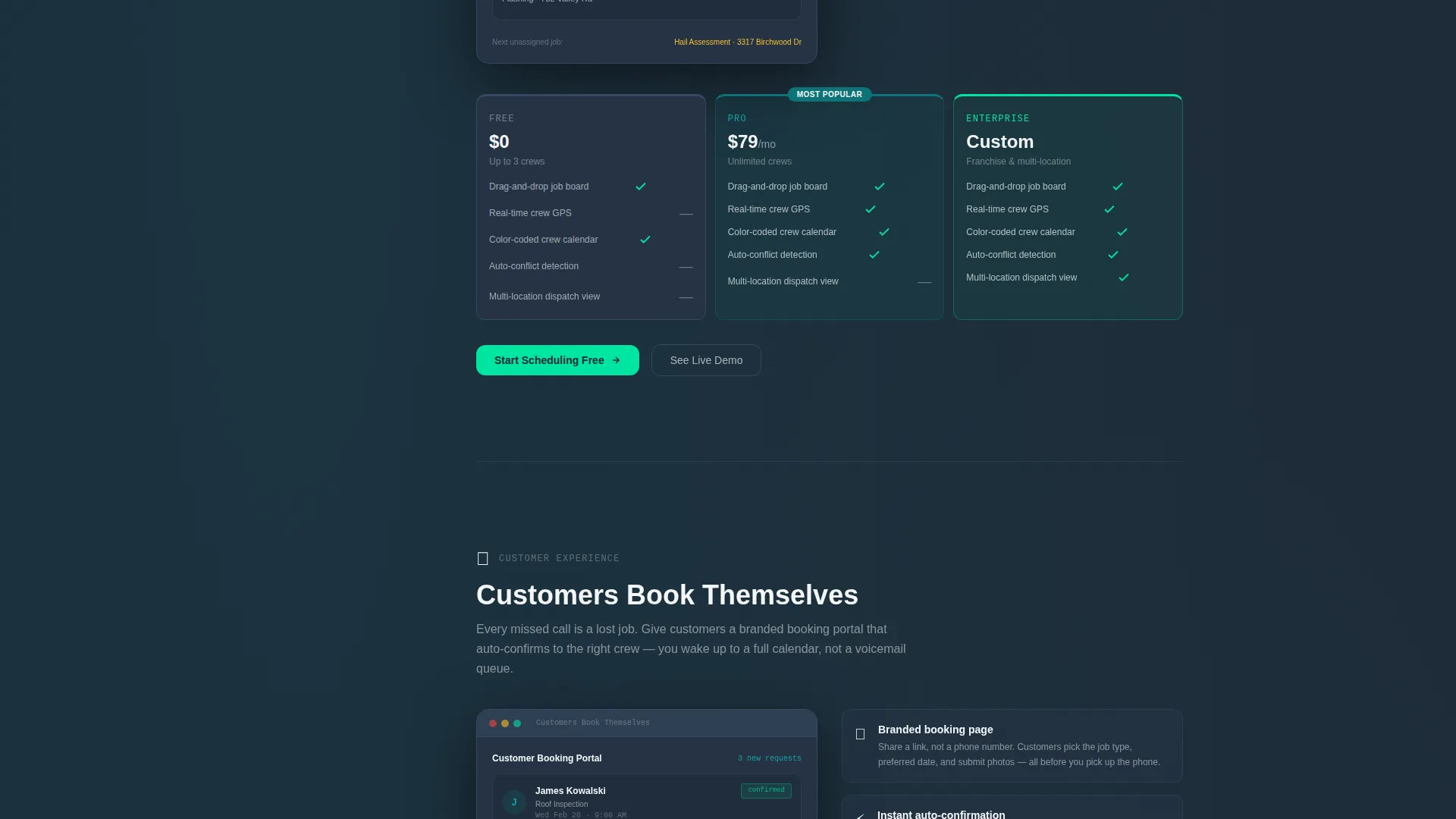
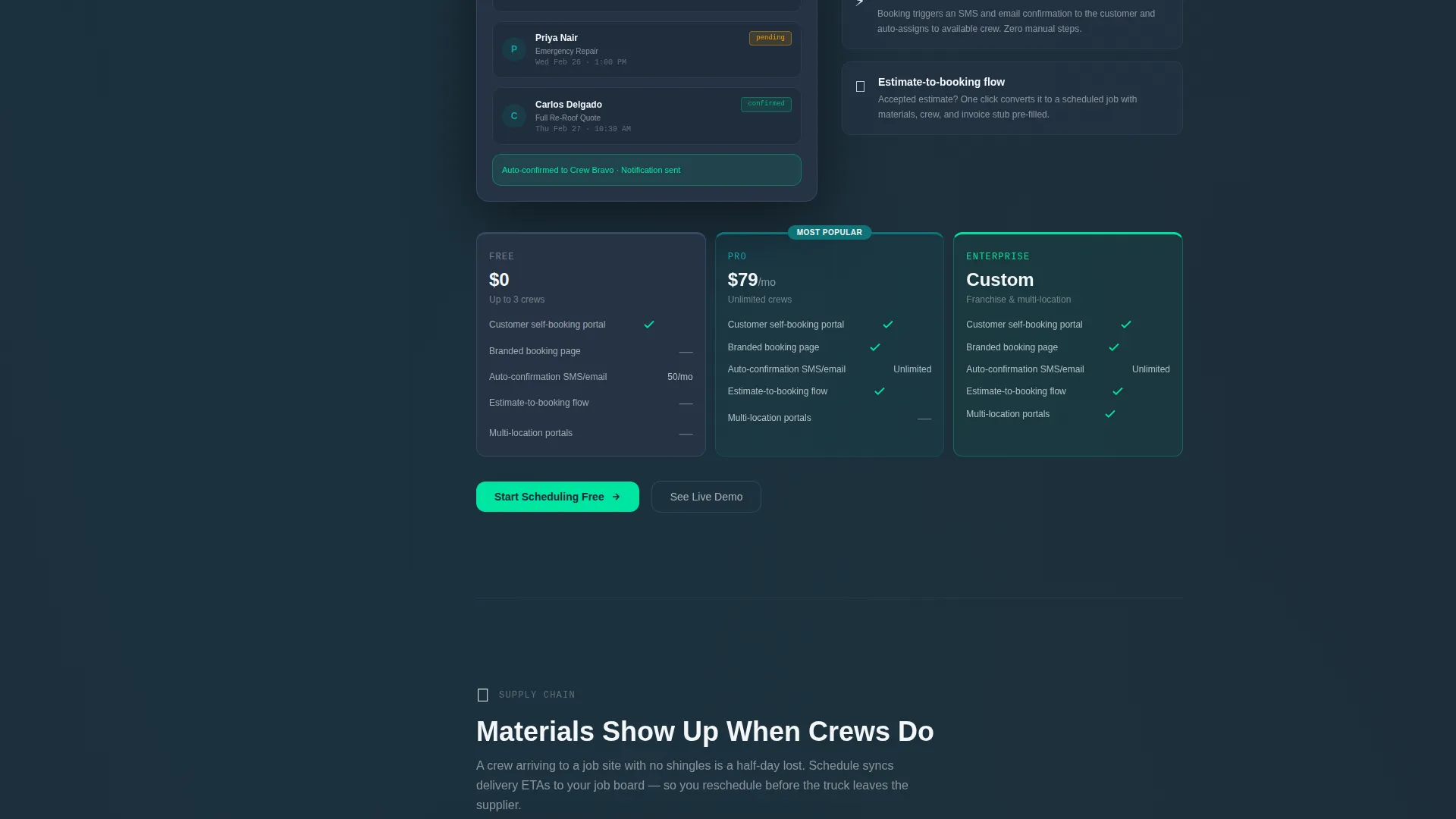
Each spoke section includes a three-column comparison grid covering Free, Pro, and Enterprise tiers. The grids show exactly what each plan unlocks per capability area, helping visitors self-qualify without needing a sales call.
Storm-Season Surge Mode Section
A dedicated spoke section addresses the high-volume demand spike roofing businesses face after major weather events. The section demonstrates how the scheduling view handles surge capacity with forty or more open work orders in a single live screen.
Freemium Signup Form
The primary conversion form collects company name, crew count via a dropdown (1 to 3, 4 to 10, or 10 or more crews), and email address. No credit card is required. The form sits below the hub nav and repeats after each spoke section.
Franchise Walkthrough Booking
A secondary conversion path targets regional franchise operators. A "Book a Live Walkthrough" button opens a calendar embed for scheduling a guided product demo, no form fill required beyond calendar selection.
Page sections overview
| Section | Purpose |
|---|---|
| Interactive Header Dashboard | Shows live crew scheduling before scroll |
| Hub Nav Rail | Anchors visitors to five capability spokes |
| Crew Dispatch Spoke | Demonstrates real-time crew assignment flow |
| Customer Booking Spoke | Shows the client-facing booking portal view |
| Material Tracking Spoke | Covers shingle delivery and supply status |
| Storm Surge Mode Spoke | Addresses high-volume season scheduling |
| Invoicing Sync Spoke | Connects job completion to billing workflow |
| Free Tier Signup Form | Captures leads with a three-field form |
| Walkthrough Booking Path | Converts franchise prospects via calendar embed |
Design & branding system
The visual identity follows the Dashboard Pro theme using the Teal Catalyst color system. Every color decision serves operational clarity, the palette is built to read fast in bright light and on small screens.
- Deep operational teal (#0D7377) for primary action buttons and interactive controls
- Asphalt charcoal (#1E2A38) across main background panels to reduce glare and ground the dark layout
- Bright catalyst green (#00E5A0) on confirmation states, progress indicators, and the primary call-to-action button; estimate-paper white (#F4F6F8) on card surfaces and input fields
Mobile & speed optimization
The template is designed with field use in mind. Roofing professionals check job status from trucks and job sites, not just office desktops.
- The dark color palette and high-contrast badge system remain legible in outdoor light conditions
- The hub-and-spoke navigation collapses cleanly for smaller screen widths, keeping spoke access a single tap away
- The interactive header micro-dashboard is sized and structured to function on touch screens without requiring a mouse drag
How this template helps you convert
The conversion strategy works in two layers: it earns trust through interaction first, then makes the signup decision easy.
- Visitors interact with a live scheduling demo before they see a single form field, which builds confidence that the product handles real roofing complexity.
- The three-field free signup form (company name, crew count, email) removes friction for owner-operators and office managers who are ready to start immediately.
- The secondary walkthrough booking path gives franchise-tier prospects a direct route to a human conversation without forcing them through the free tier flow.
Other information about this template
This template is built specifically for the roofing booking and scheduling niche. It combines a functional demo experience with structured commercial messaging.
- The spoke rhythm escalates from daily pain points, such as missed calls and double-booked crews, up to quarterly power features like franchise-wide reporting and insurance documentation bundles
- The template style is Hub and Spoke with Anchor Navigation, the header concept is Interactive Preview, and the creative direction is Feature Matrix, all designed to keep a roofing contractor engaged through a long-scroll page
- The page is built on the Dashboard Pro theme with the Teal Catalyst color system, making it a strong visual fit for operations-focused roofing digital presence pages in the Technology category
Theme
Dashboard Pro
Creative direction
Feature Matrix
Color system
Teal Catalyst
Style
Hub & Spoke (Anchor Nav)
Direction
Freemium/Trial
Page Sections
Interactive Micro-dashboard Header
Hub-and-spoke Anchor Navigation
Three-tier Feature Comparison Grids
Storm-season Surge Mode Section
Frictionless Freemium Signup Form
Franchise Walkthrough Booking Path
Related questions
Who is this landing page template designed for?
Do visitors need to create an account to try the scheduling demo?
What are the five spoke sections included in this template?
Can this template support franchise-level roofing businesses?
Is a credit card required to sign up through this template?



