Financial Services Software Specialist Professional Website Template
This landing page template is built for financial services route optimization platforms targeting field rep teams. It combines a Feature Tab Switcher header, a full twelve-row comparison table, and three spec cards into a single lead generation flow. The dark Dashboard Pro design and electric teal calls to action give it the precise, data-driven feel that regional managers trust immediately.
by Rocket studio
Quick summary
This is a single-page lead generation template for a financial services route optimization platform. It opens with a Feature Tab Switcher showcasing three dashboard views, then drives scroll through a twelve-row comparison table and three module spec cards. The Monochrome Steel palette and teal calls to action keep the experience sharp, credible, and conversion-ready.
Who this template is for
This template is built for operations leaders and product marketers selling intelligent field routing software to financial services teams. It speaks directly to the people who manage mobile advisors, loan officers, and compliance-driven field reps.
- Regional managers at insurance brokerages who oversee multi-county field rep schedules
- Wealth management firms with mobile advisors covering dense metro territories
- Fintech lenders whose loan officers run a high volume of daily face-to-face client meetings
What problem this template solves
Field rep teams in financial services waste significant time each week manually plotting client visits. Sticky-note itineraries, gut-feel scheduling, and territory overlap quietly drain productivity, fuel budgets, and compliance records. This template gives the platform a structured page that makes that waste visible and quantified before the first call to action appears.
- No clear way to show prospects the compounding cost of manual route planning
- Comparison data buried in pitch decks instead of surfaced in a scannable, public format
- Lead capture forms that ask for commitment before showing visitors the math
What you get with this template
You get a complete, ready-to-customize lead generation landing page that stacks evidence before it asks for anything. Every section is purpose-built to move a skeptical regional manager from recognition to action.
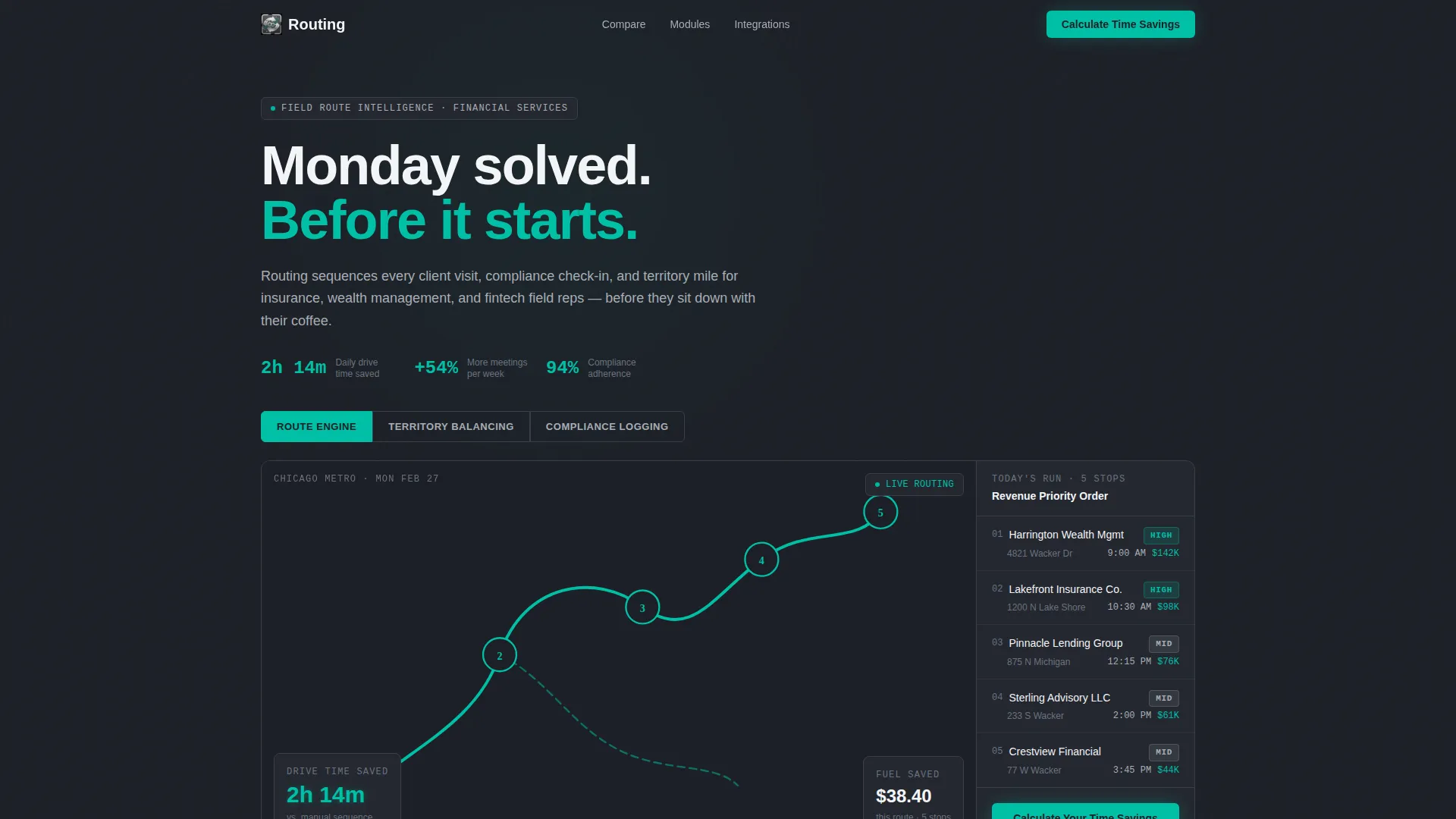
- A three-tab Feature Tab Switcher header with live dashboard screenshots for Route Engine, Territory Balancing, and Compliance Logging
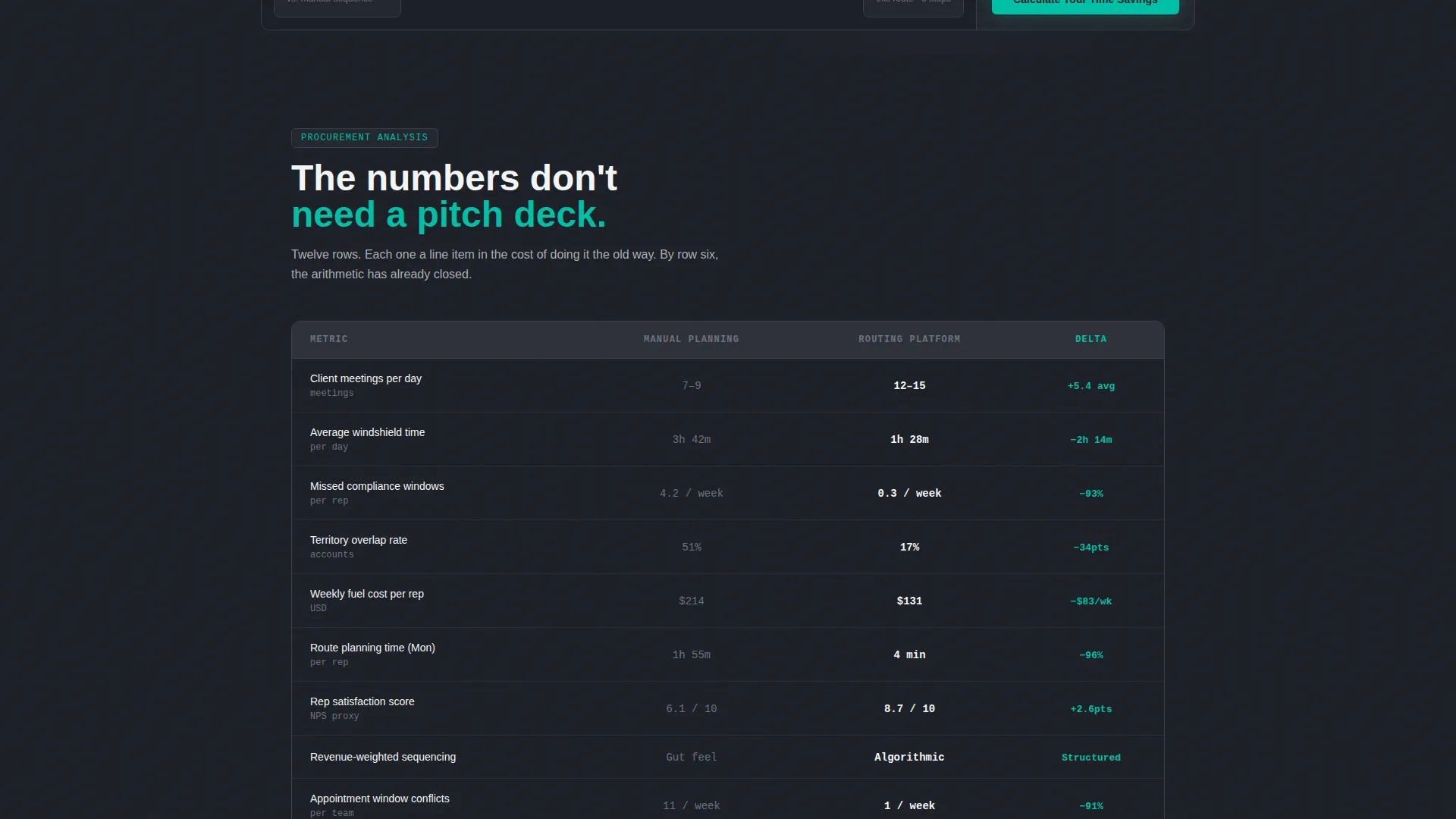
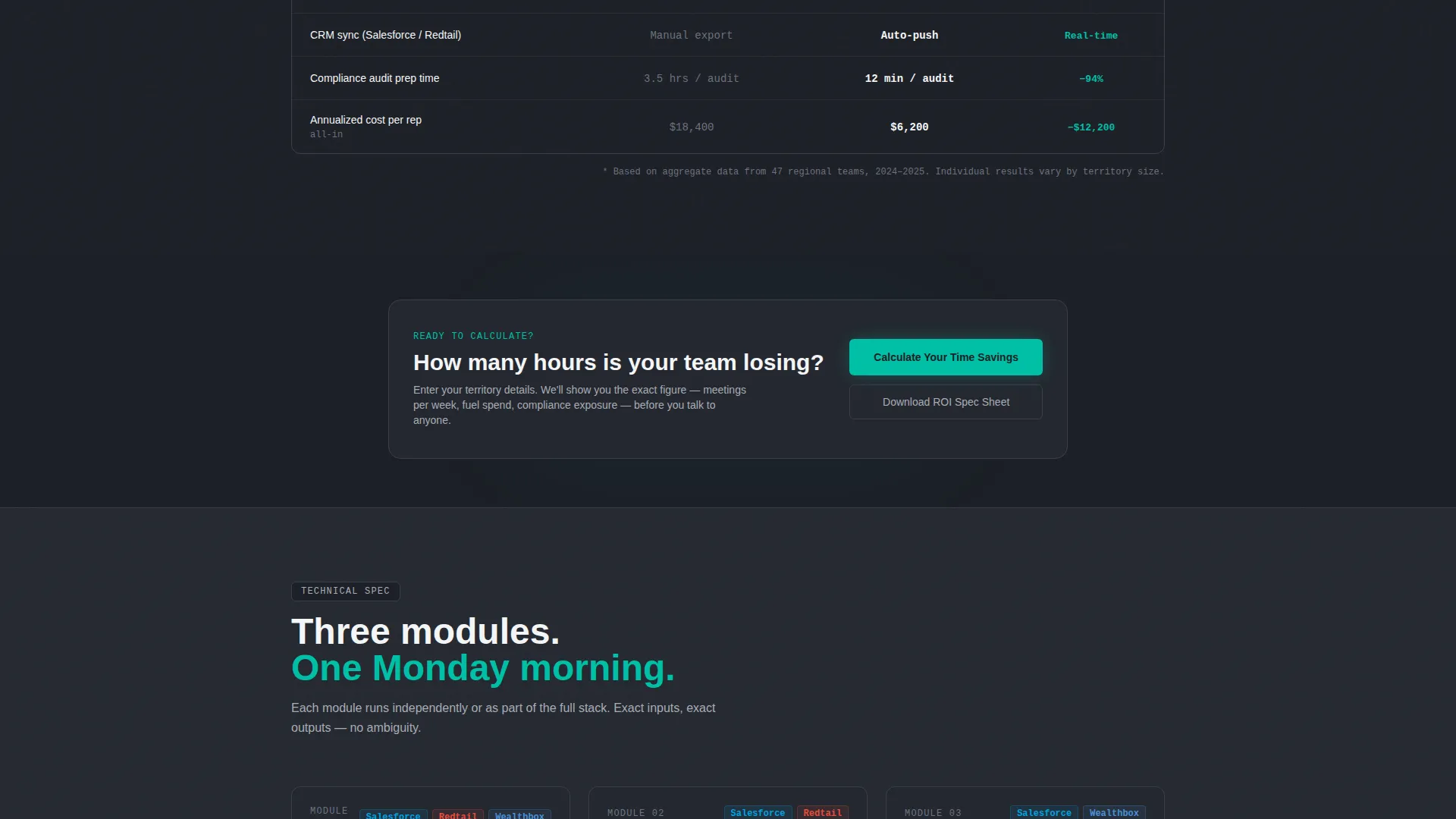
- A full-width twelve-row comparison table contrasting Manual Planning against the Routing Platform across metrics like meetings per day, windshield time, fuel cost, and rep satisfaction score
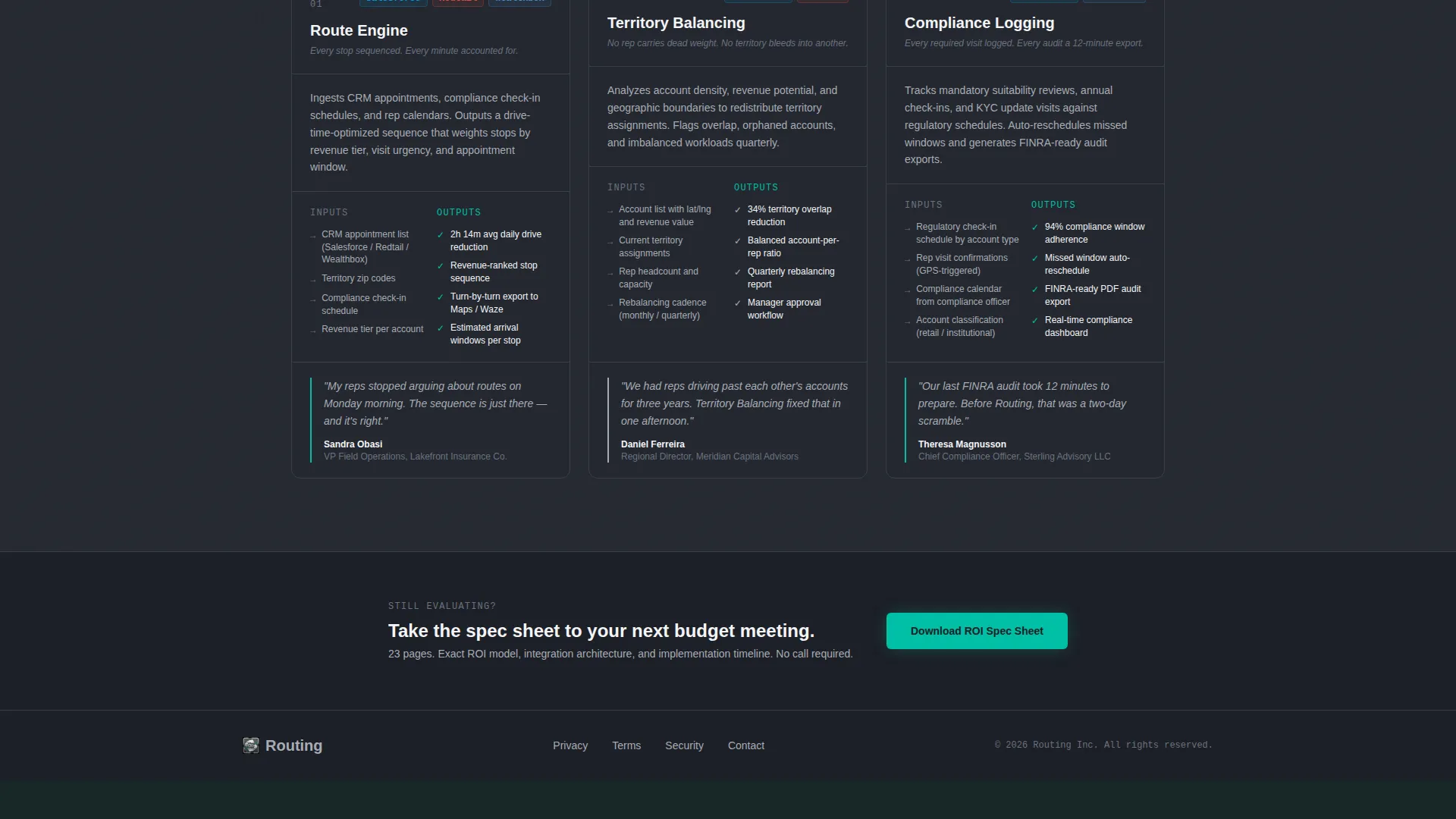
- Three vertical spec cards covering each core module with input/output metrics, integration logos, and a named client quote from an operations director
- A slide-in lead capture panel requesting territory zip codes, number of field reps, current CRM platform, and work email
- A secondary email-only gate for downloading the ROI Spec Sheet for visitors still in evaluation mode
Feature list
This template is built around components that do real work. Each one is designed to compress a prospect's evaluation cycle by putting measurable evidence on screen.
Three-Tab Feature Switcher Header
The header displays three clickable tabs: Route Engine, Territory Balancing, and Compliance Logging. Each tab reveals a different dashboard screenshot. The default Route Engine view shows optimized multi-stop map paths in teal, a sidebar with estimated drive time saved, and a revenue-weighted client priority list. The experience feels like toggling between instrument panels.
Twelve-Row Comparison Table
A full-width table puts Manual Planning side by side with the Routing Platform across twelve specific rows. Metrics include meetings per day, average windshield time, missed compliance windows, territory overlap, fuel cost, and rep satisfaction score. Each row surfaces a quantified delta that compounds the case without a single persuasive sentence.
Module Spec Cards
Three vertical cards unpack each core platform module in procurement-document style. Each card includes exact input and output metrics, integration logo slots, and a direct quote from a named operations director. The cards maintain the evidence-first tone established by the comparison table.
Slide-In Lead Capture Panel
The primary call to action opens a slide-in panel rather than redirecting visitors to a new page. The form collects territory zip codes via a multi-entry field, number of field reps, current CRM platform via dropdown, and a work email. Keeping the capture lightweight reduces friction without reducing data quality.
Secondary ROI Spec Sheet Gate
Visitors who are not yet ready to engage with the primary form can download the ROI Spec Sheet by entering only their work email. This secondary path captures evaluation-stage leads who have already absorbed the comparison table data and need an offline document to share internally.
Revenue-Weighted Priority Display
The Route Engine tab view includes a ranked client list with revenue-weighted priority badges. This component translates abstract algorithmic logic into a visual output that a regional manager immediately recognizes. It shows the platform's output in the exact format a field rep would see on Monday morning.
Page sections overview
| Section | Purpose |
|---|---|
| Feature Tab Header | Showcase three dashboard views with live data |
| Route Engine Tab | Display optimized map paths and drive time savings |
| Territory Balancing Tab | Illustrate even territory distribution logic |
| Compliance Logging Tab | Surface compliance check-in tracking view |
| Comparison Table | Quantify the delta between manual and platform planning |
| Module Spec Cards | Detail each core module with metrics and client quotes |
| Primary call to action Block | Trigger slide-in lead capture after table evidence |
| Slide-In Capture Panel | Collect zip codes, rep count, CRM type, and email |
| ROI Spec Sheet Gate | Offer email-only download for evaluation-stage visitors |
Design & branding system
The visual identity follows a Dashboard Pro theme built on the Monochrome Steel color system. The palette is engineered to surface data clearly and suppress visual noise, giving the page the feel of a precision instrument display rather than a marketing site.
- Deep gunmetal (#1C1F26) for primary backgrounds, brushed chrome (#A8ADB5) for secondary surfaces and table borders, and clinical white (#F4F5F7) for data cells and content panels
- Electric teal (#00BFA6) is reserved exclusively for calls to action, active tab states, and performance-positive metric highlights
- Typography and layout follow Dashboard Pro conventions, keeping the page dense with scannable data while remaining legible at a glance
Mobile & speed optimization
The template is structured for fast, readable rendering across screen sizes. A lead generation page in financial services needs to perform on a tablet in a conference room as well as a desktop in a home office.
- The slide-in panel and tab switcher are designed to function cleanly on touch interfaces without losing form usability
- The comparison table uses a layout approach that keeps rows legible on smaller viewports without horizontal scrolling
- Heavy visual components like dashboard screenshots are placed in tab-controlled containers, loading only the active view to keep the page responsive
How this template helps you convert
This template is built around the principle that the best conversion path shows visitors the cost of inaction before presenting the solution. By the time the call to action appears, the visitor has already done the math.
- The comparison table makes the cost of manual planning visible in twelve concrete, quantified rows before any call to action is shown, reducing the persuasion work the form has to do.
- The slide-in panel captures high-intent leads with a low-friction, context-specific form that feels like a natural next step rather than an interruption.
- The secondary ROI Spec Sheet download creates a parallel capture path for evaluation-stage visitors, ensuring no engaged prospect leaves without exchanging contact details.
Other information about this template
This template is built specifically for the financial services route optimization niche, where procurement decisions involve multiple stakeholders and offline review cycles. The design and copy structure reflect that reality.
- The Spec Sheet creative direction mirrors the tone of an internal procurement document, which helps the page feel credible to operations directors and regional managers reviewing it alongside vendor comparisons
- The integration logo slots in each spec card are sized and positioned for CRM platforms commonly used in wealth management and insurance brokerage workflows
- The named client quote format in each spec card follows conventions that B2B buyers trust: a specific title, a real claim, and no vague endorsement language
- The ROI Spec Sheet secondary gate is designed for sharing inside procurement teams, extending the page's reach beyond the initial visitor session
Theme
Dashboard Pro
Creative direction
Spec Sheet
Color system
Monochrome Steel
Style
Comparison Table
Direction
Lead Generation
Page Sections
Three-tab Feature Switcher Header
Twelve-row Comparison Table
Module Spec Cards
Slide-in Lead Capture Panel
Secondary ROI Spec Sheet Gate
Revenue-weighted Priority Display
Related questions
Who is this landing page template designed for?
Can I customize the comparison table rows for my platform's specific metrics?
How does the slide-in lead capture panel work?
Is the ROI Spec Sheet download a separate page?
Can the tab switcher header be adapted to show different platform features?



