Roster - HR Software Landing page Template
Roster is a card grid landing page template built for HR software platforms. It showcases a living company directory with searchable employee profiles, org-chart views, and skill mapping. Designed for People Ops leads and CHROs at growing startups, it drives freemium sign-ups through a mosaic headshot hero, scroll-driven network storytelling, and a two-field signup form.
by Rocket studio
Quick summary
Roster is a modular card grid landing page template for HR directory software. It maps employees, skills, and reporting lines into one searchable view. The design follows a Soft Mist color system with Scandinavian co-working warmth. Every scroll section adds more people and connections, showing visitors exactly how the product grows with their team.
Who this template is for
This template is built for teams launching or marketing an HR directory or people-operations platform. It speaks directly to the real frustrations of growing organizations.
- People Ops leads at startups with 50 to 500 employees who are still managing headcount in spreadsheets
- IT admins who spend significant time answering "who handles what?" questions across internal messaging tools
- CHROs at scaling companies who need org-wide visibility and want to move prospects from hesitation to a free trial
What problem this template solves
Growing companies lose people visibility fast. When headcount scales, spreadsheets break down and nobody can quickly answer who does what, who reports to whom, or who owns a skill set. This template gives your marketing page the structure to show that your product solves exactly that problem.
- No single place to search employees, roles, departments, and skills at once
- Org charts that live in static files and fall out of date within days of a new hire
- New employees or cross-functional collaborators spending weeks learning the company structure
What you get with this template
You get a fully structured, scroll-driven landing page that tells your product story through the visual language of people and connections. The layout moves from a single employee card to a full, clustered department grid as visitors scroll, making the product's value self-evident before they read a single sentence of copy.
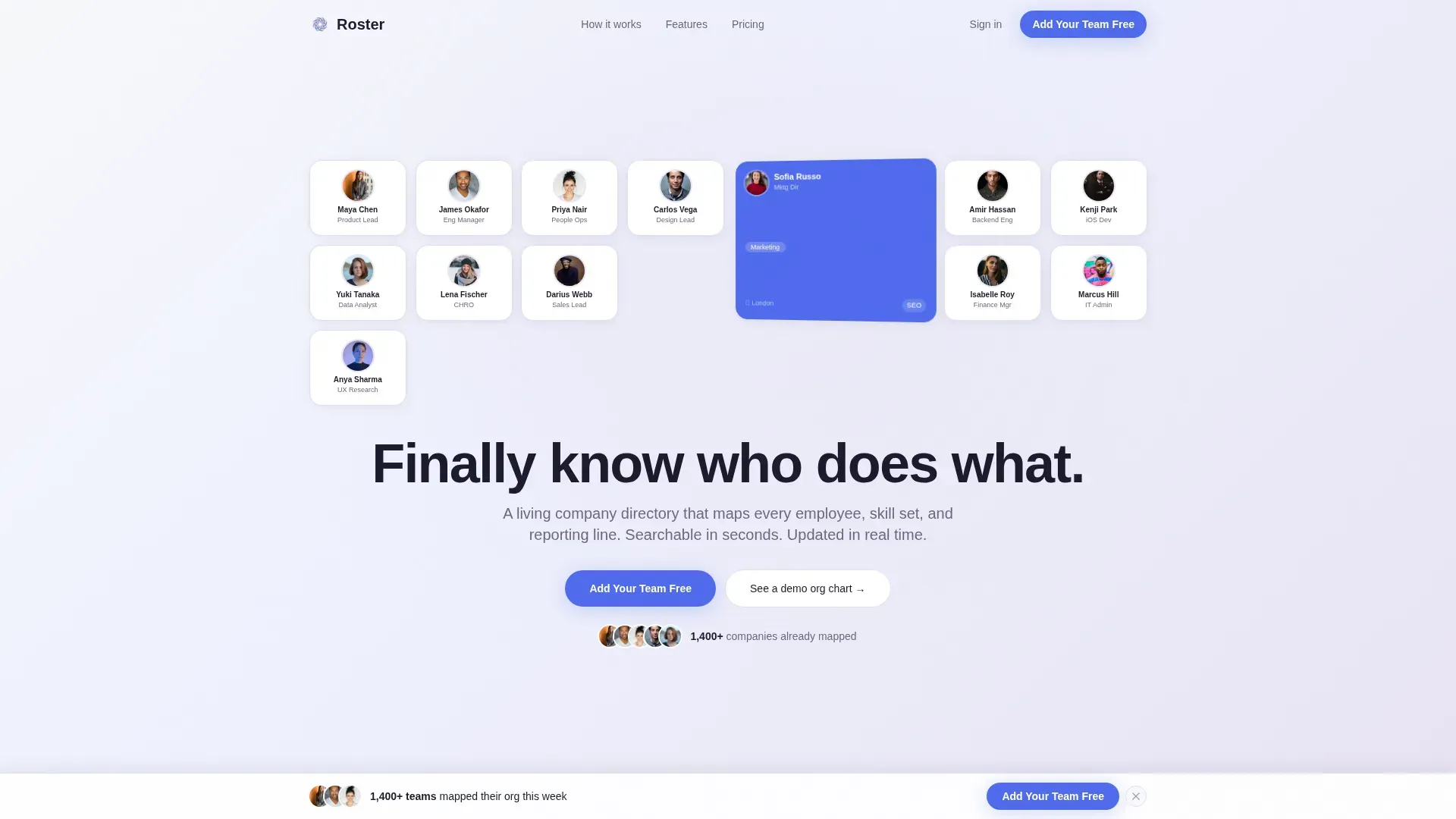
- A mosaic hero section with a headshot grid, a flip-card profile reveal, and a self-typing headline
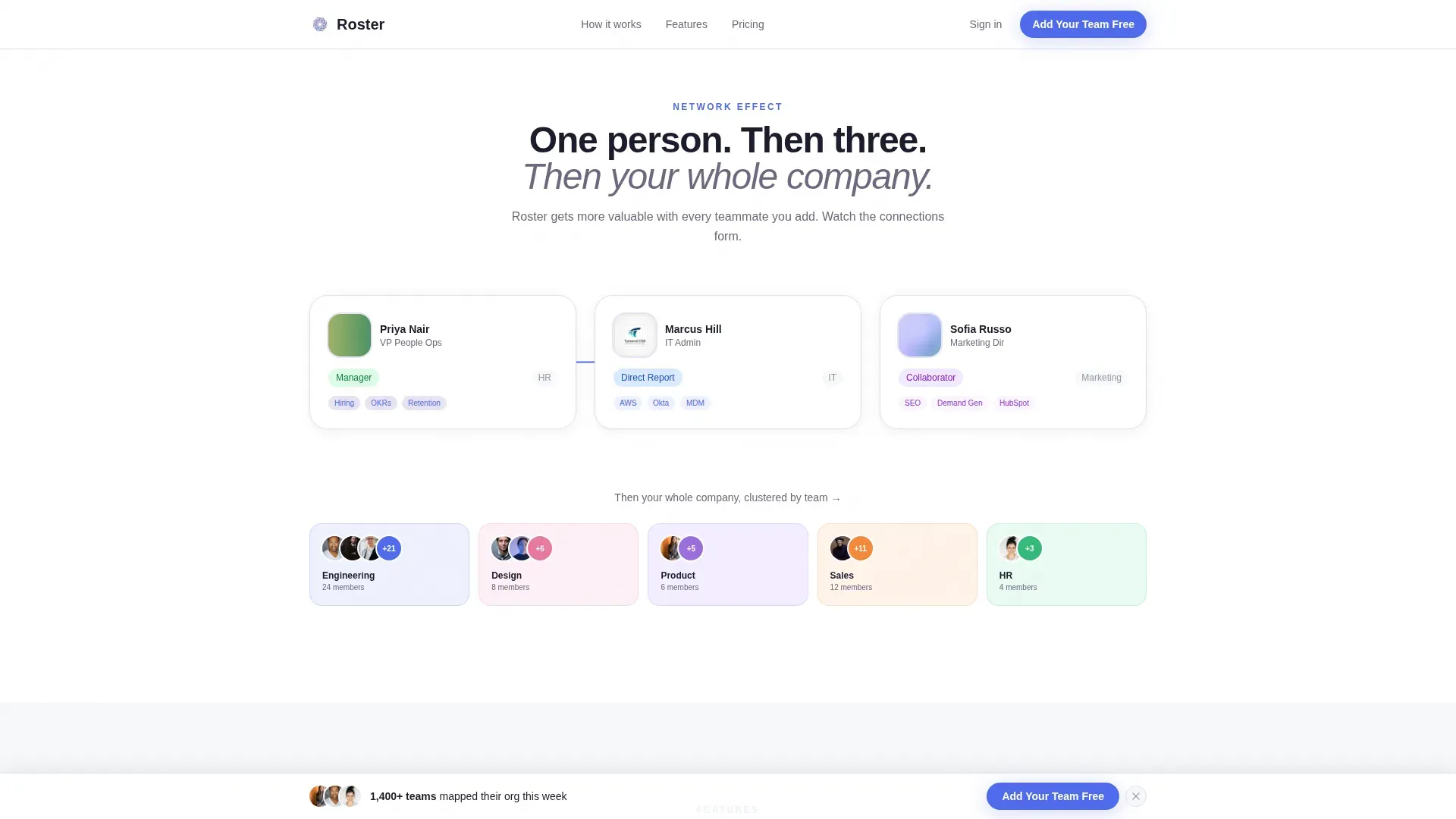
- A network-effect scroll narrative that builds from one card to an interconnected department view
- A freemium sign-up form requiring only a work email and company size, plus a demo sandbox path for hesitant visitors
Feature list
This template includes prompt-backed components and layout decisions designed to move visitors toward signup.
Mosaic Headshot Hero
The header opens with dozens of soft-rounded employee cards drifting into view like tiles loading in a real directory search. One card at the center flips to reveal a mini-profile showing name, role, department, location, and a skill tag. A self-typing headline appears below the grid.
Scroll-Driven Network Narrative
As visitors scroll, the layout begins with a single card and multiplies section by section. Dotted lines connect a manager, a direct report, and a cross-functional collaborator in section two. By section three, cards cluster by department with filterable skill tags animating into place.
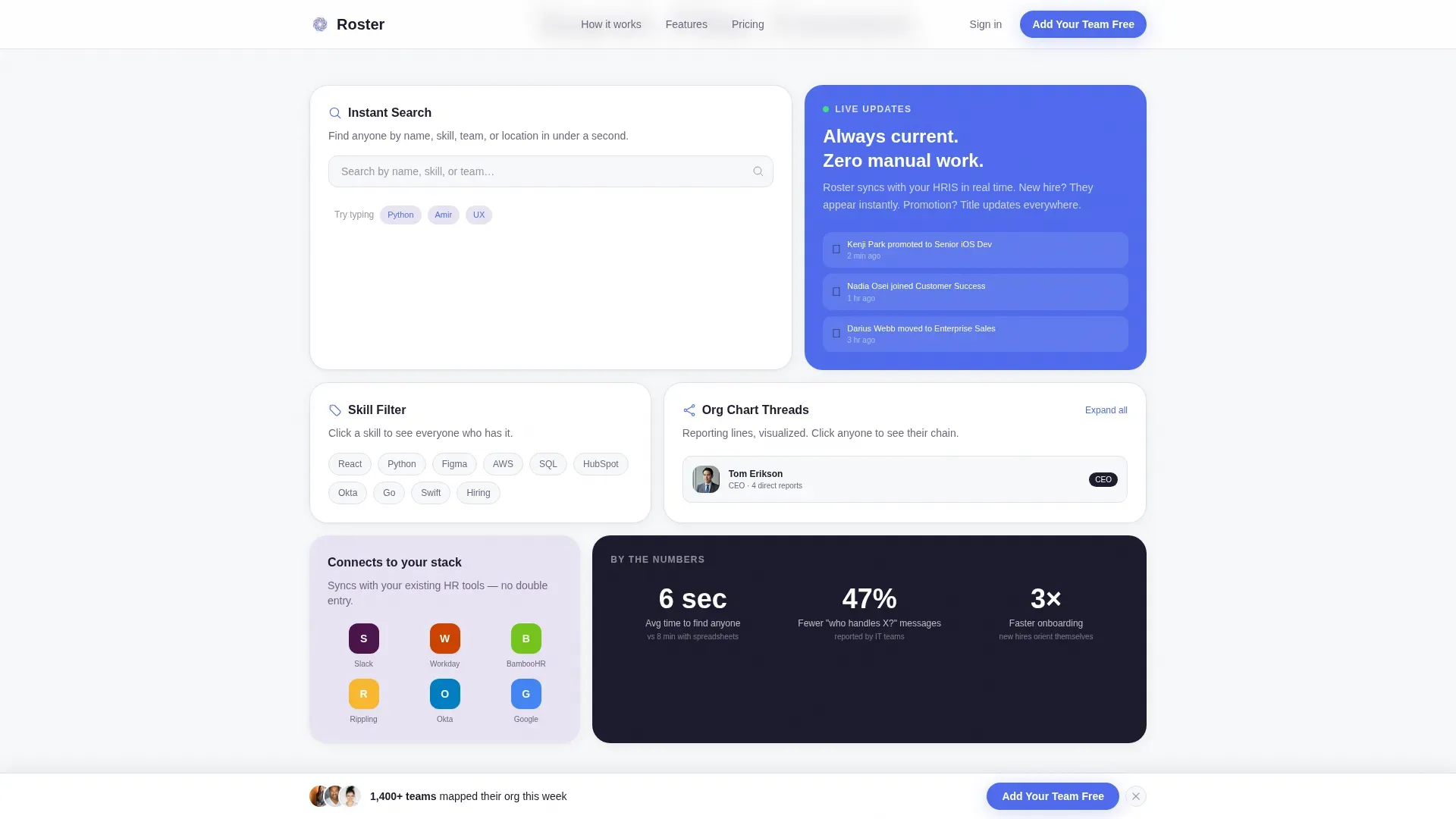
Modular Card Grid Layout
The template uses a card grid system with varied card sizes in a bento-style asymmetric arrangement. Each card is self-contained and hoverable, making it easy for visitors to scan and mentally place themselves inside the product.
Freemium Signup Form
The conversion form asks for just two inputs: work email and company size using a dropdown with four ranges. After submitting, the visitor lands in an empty directory with one prompt to invite their first teammate, reducing friction at the most critical drop-off point.
Demo Sandbox Path
A secondary call-to-action labeled "See a demo org chart" routes hesitant visitors into a sandbox populated with fictional employees. They can experience search and filtering firsthand before entering any personal information.
Sticky Call-to-Action Bar
The primary call-to-action "Add Your Team Free" appears first beneath the hero section, then re-emerges as a sticky bottom bar after the visitor passes the third scroll section, keeping conversion always within reach.
Page sections overview
| Section | Purpose |
|---|---|
| Hero Headshot Grid | Anchors attention with a mosaic of employee cards and a typed headline |
| Network Effect Story | Shows the product growing from one card to an interconnected team view |
| Features Bento Grid | Highlights department clustering, skill tags, and search in varied card sizes |
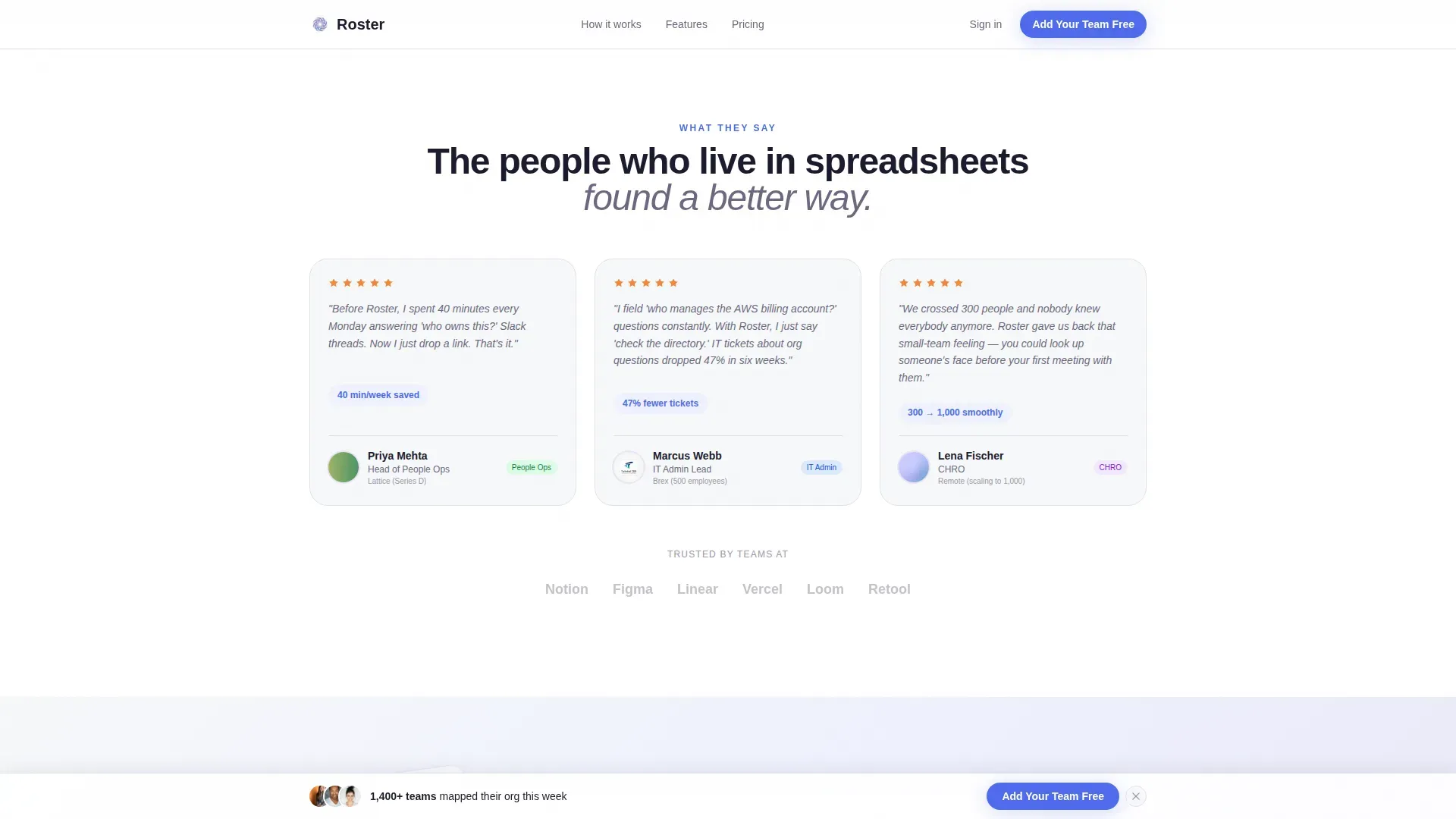
| Social Proof Testimonials | Builds trust with role-specific quotes from People Ops, IT, and CHRO personas |
| Freemium Signup Form | Converts visitors with a two-field form and sticky bottom call-to-action bar |
| Footer | Closes with a horizontal flow layout |
Design & branding system
The visual identity follows a Directory and Discovery theme. The Soft Mist palette keeps the layout breathable and warm, letting employee faces and card content carry the visual weight rather than competing interface chrome.
- Color palette: cloud white (#F7F8FA) for backgrounds, diffused lavender (#E8E3F3) for card fills, warm fog gray (#B0ADBA) for secondary text and borders, and signal blue (#4F6BED) reserved for links, interactive states, and call-to-action buttons
- Typography: DM Sans for headings and Manrope for body text, both chosen for clean legibility at display and small sizes
- Motion and interaction: mosaic card drift on load, flip-card animation on the hero, stagger reveals on scroll, dotted org-line drawing between linked cards, and hover states on every employee card
Mobile & speed optimization
The template is architected desktop-first, reflecting how HR tools are most often used at a desk. A strong mobile fallback ensures the core story remains clear on smaller screens.
- Static sections use server-side rendering for fast initial load, while animated and interactive components are isolated as client-side elements
- The card grid reflows cleanly from a wide desktop mosaic to a vertically stacked mobile layout without losing the people-first visual hierarchy
How this template helps you convert
Every design and layout decision in this template is oriented toward one goal: getting a visitor to click "Add Your Team Free" before they leave the page.
- The demo sandbox path removes the biggest objection by letting visitors explore a pre-populated org chart with real search and filter interactions before they commit to signing up
- The two-field signup form (work email plus company size) keeps the ask so small that the barrier to starting feels close to zero, dropping visitors directly into the product with a single next step
Other information about this template
This template suits any team building or relaunching a people-directory or org-chart product in the HR technology space. It is equally useful for product marketers, founders, and growth teams who need a launch-ready page without starting from scratch.
- Template style: Card Grid (Modular), ideal for people-centric software with repeatable data units like employee profiles
- Theme: Directory and Discovery, designed to make organizational clarity feel visual and immediate
- The Soft Mist color system and Scandinavian co-working aesthetic translate across industries beyond HR, including professional services and internal tool platforms
- The Network Effect creative direction makes this template particularly strong for any product whose value increases as more users join
Theme
Directory & Discovery
Creative direction
Network Effect
Color system
Soft Mist
Style
Card Grid (Modular)
Direction
Freemium/Trial
Page Sections
Mosaic Headshot Hero with Flip Card
Scroll-driven Network Effect Layout
Bento-style Features Grid
Two-field Freemium Signup Form
Demo Sandbox with Pre-populated Data
Sticky Primary Call-to-action Bar
Related questions
Who is this template designed for?
Can I use this template without the animated headshot grid?
What does the freemium sign-up flow look like?
Does the template include a demo or sandbox experience?
Is this template suitable for a product that is not yet launched?



