Roster — District Staffing Landing Page Template
The Roster Smart District Staffing HR landing page template is a split-screen, single-page layout built for education HR software. It guides district HR directors, charter school founders, and superintendents through a persona-driven quiz experience, turning compliance chaos into clarity. The design uses a warm Soft Mist palette and editorial typography to make staffing management feel approachable and human.
by Rocket studio
Quick summary
The Roster Smart District Staffing HR landing page template is a 50/50 split-screen landing page built for education HR software platforms. It pairs illustrated personas with an interactive quiz flow, guiding each visitor toward a personalized "See Your District's HR Score" call to action. The template is designed for desktop-first HR teams managing complex staffing responsibilities across school districts.
Who this template is for
This landing page template speaks directly to the people who carry the heaviest staffing responsibilities in K-12 education. It was shaped around three real-world users who understand what it means to manage employee shifts, track certifications, and keep a team running before the first bell rings.
- District HR directors who juggle teacher certifications, paraprofessional background checks, substitute pools, and union contract renewals across the organization
- Charter school founders building their first team from scratch with no existing human resources infrastructure, needing straightforward scheduling support from day one
- Superintendents focused on retention and culture, watching good employees leave because the onboarding process felt punishing rather than welcoming
What problem this template solves
Managing employee shifts across a school district is not like managing shifts in a retail company. The compliance requirements are different. The staff roster carries legal weight. And every scheduling conflict can ripple into the classroom. This landing page template addresses the specific chaos that district HR teams face daily.
- Fragmented staffing data scattered across spreadsheets, email threads, and binders, making it hard to track employee details, work hours, or absences in one place
- Onboarding at scale that feels disorganized, leaving new employees without clear duties, end times, or a structured schedule from day one
- Retention and culture gaps caused by unpredictable shifts, poor transparency, and a lack of feedback loops that support employee satisfaction over time
What you get with this template
This template delivers a complete, ready-to-launch landing page experience that functions as both a staffing management showcase and a lead-generation tool. Every section is built to educate, qualify, and convert visitors without relying on a traditional form.
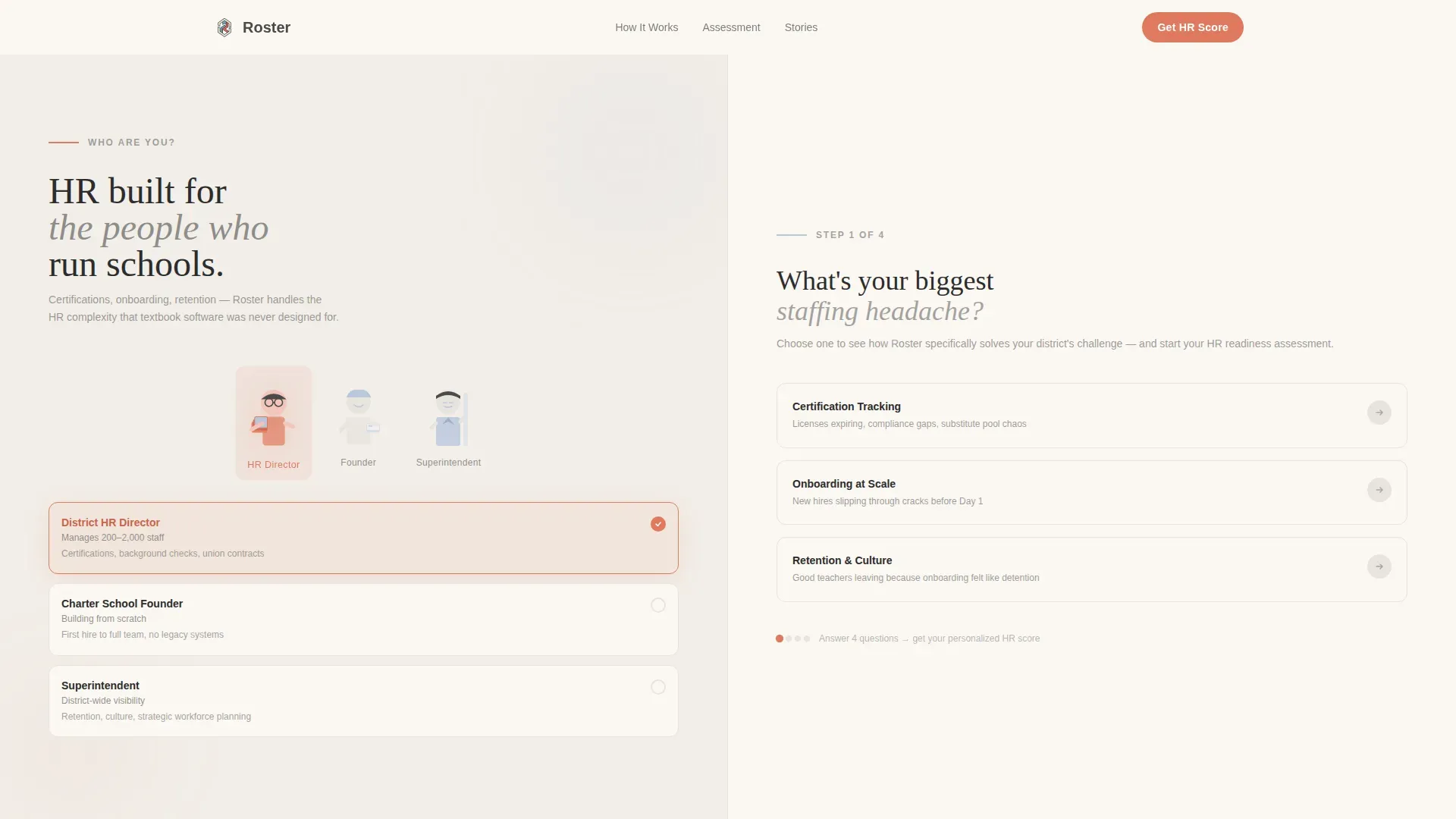
- A 50/50 split-screen layout with illustrated persona cards and dynamic pain-point selectors that reshape the page based on visitor choice
- An embedded quiz flow that collects staffing context across four to five scroll sections, ending with a coral call-to-action button that compiles answers into a personalized district readiness report
- A full set of page sections covering the hero, human story panels, assessment sliders, a before-and-after staffing comparison, social proof, and a linear single-row footer
Feature list
This landing page template includes several purpose-built components. Each one supports a specific moment in the visitor's decision journey, from first impression to final conversion.
Persona Selector Hero
The hero section presents three illustrated figures side by side on the left panel. Each figure represents a distinct user role in school district staffing. The right panel asks "What's your biggest staffing headache?" and offers three clickable cards: Certification Tracking, Onboarding at Scale, and Retention and Culture. Selecting a card reshapes the sections below, creating a landing page that feels personally relevant rather than generic.
Human Story Panels
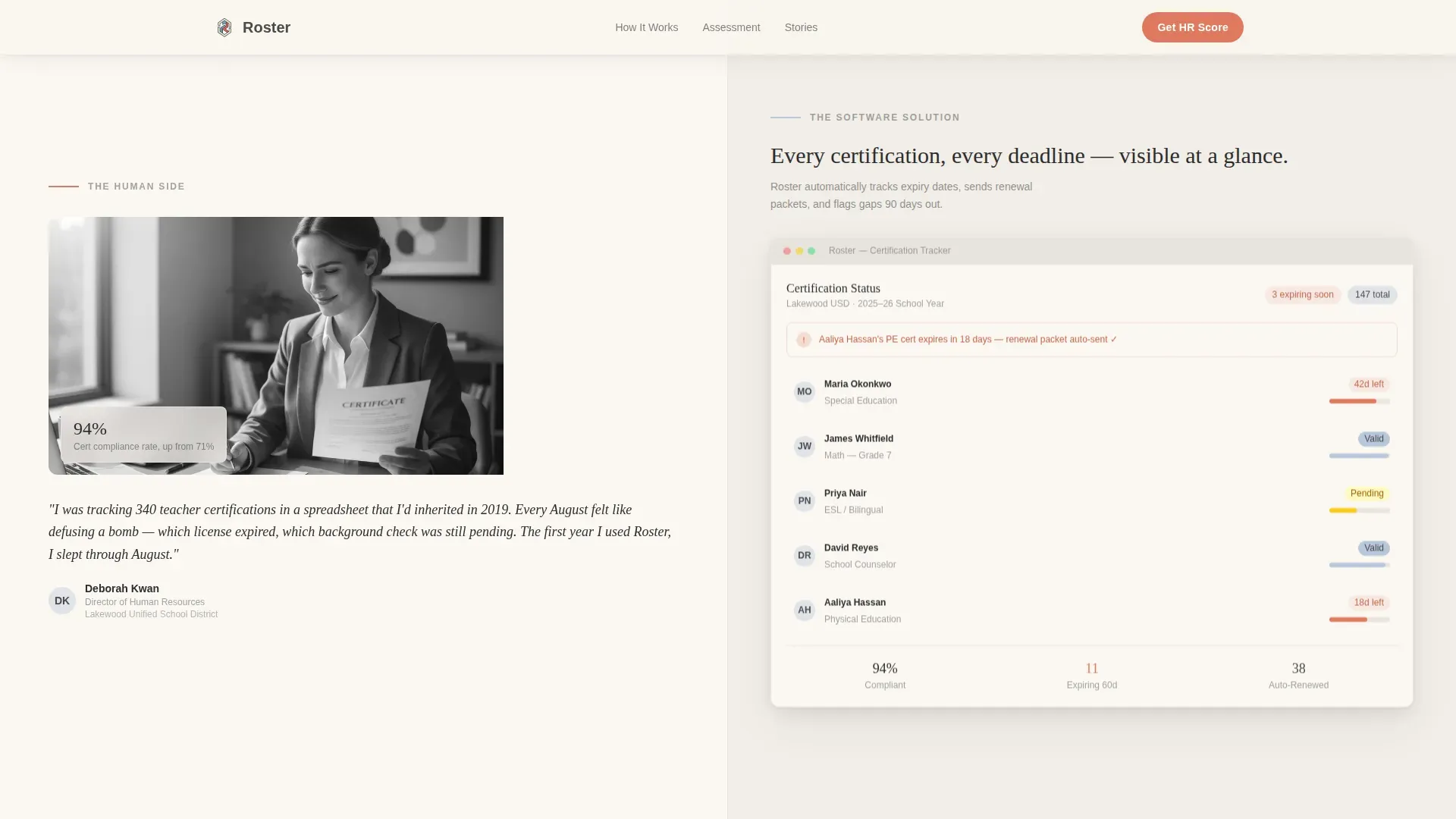
Once a persona is selected, each scroll section pairs a human moment on the left with a software solution on the right. A real quote from a district coordinator sits beside a screenshot of the certification dashboard. A photo of a first-year teacher on orientation day mirrors the automated onboarding checklist. This Team and People creative direction builds trust by showing both the struggle and the relief.
Inline Assessment Quiz
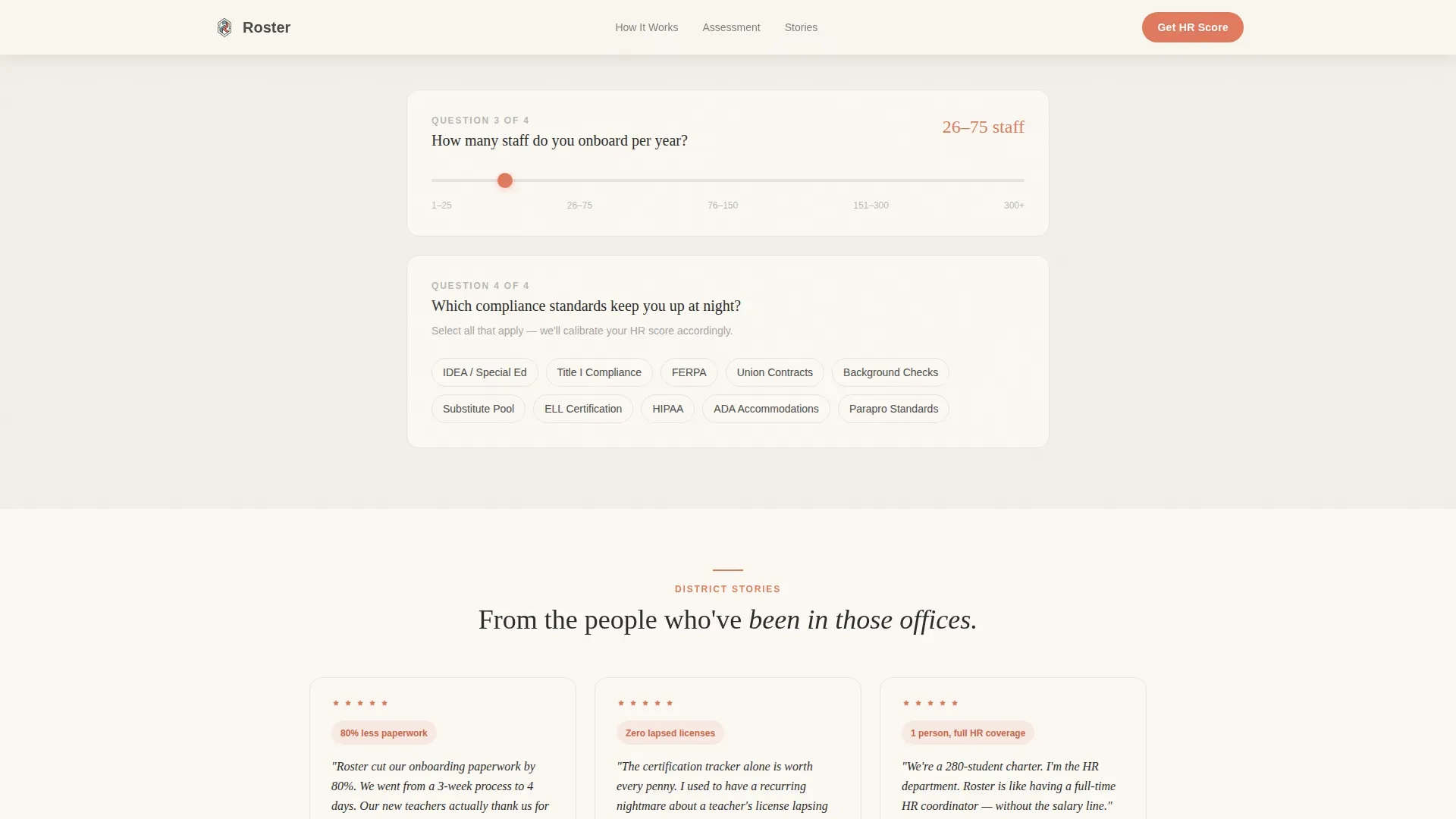
The template includes an embedded assessment that collects staffing context without feeling like a form. An inline slider asks how many employees the district onboards per year. A tag-selector lets users flag which compliance standards create the most pressure. By the final section, visitors have answered four to five questions and feel guided rather than interrogated.
Before-and-After Staffing Comparison
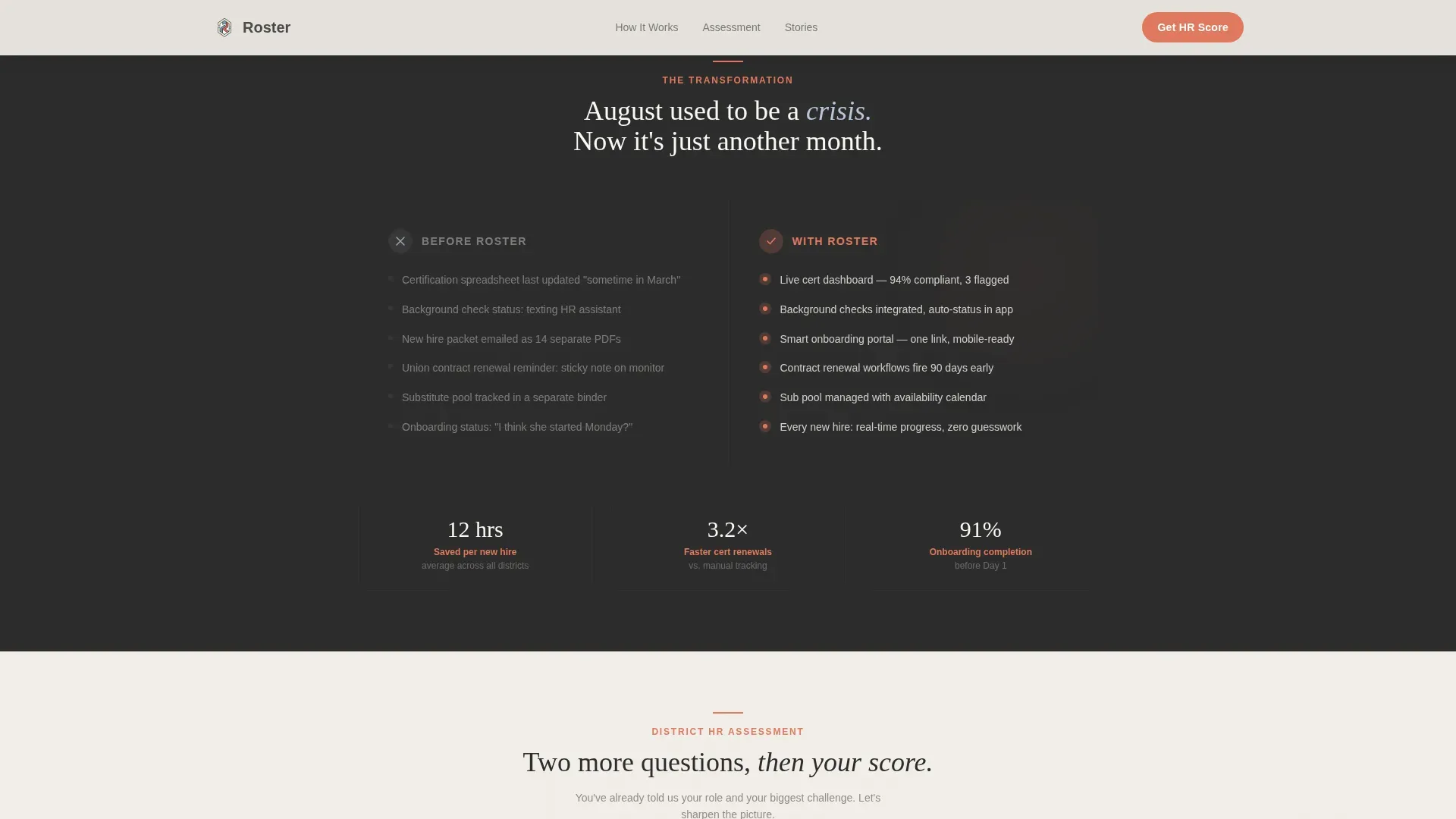
A dedicated split section shows what organizing employee shifts looks like before the platform and what it looks like after. The left side depicts onboarding chaos: scattered tasks, missing employee details, and unresolved scheduling conflicts. The right side shows Roster's automated checklist, clean roster templates, and a clear schedule with assigned duties and end times.
Social Proof and Final Call to Action
The bottom of the landing page features district coordinator quotes and specific outcome metrics alongside school logos. The final call to action is a coral button labeled "See Your District's HR Score." Visitors provide only a work email address and district name to receive a personalized staffing readiness report, lowering the barrier to conversion while capturing meaningful data.
Linear Single-Row Footer
The footer follows a clean, single-row linear pattern that keeps the page tidy without adding unnecessary visual weight. It supports essential company links, access to legal pages, and a consistent brand close that matches the warm, editorial tone of the overall landing page.
Page sections overview
| Section | Purpose |
|---|---|
| Persona Selector Hero | Opens with illustrated HR personas and three pain-point cards that reshape the page |
| Human Story Panel | Pairs a real staff quote with a software dashboard screenshot to build trust |
| Assessment Slider | Collects onboarding volume data through an interactive inline slider |
| Compliance Tag Selector | Lets visitors flag their biggest compliance concerns using a tag-based input |
| Before and After Split | Shows the contrast between staffing chaos and a clean automated roster |
| Social Proof Strip | Displays district coordinator quotes, outcome metrics, and school logos |
| Final call to action Section | Delivers the coral "See Your District's HR Score" button and email capture |
| Linear Footer | Closes the page with a single-row footer holding company and access links |
Design & branding system
The visual identity follows an Educational Guide theme using the Soft Mist color system. The palette feels like a well-loved classroom at golden hour: warm light across cream paper, nothing harsh, everything designed to make you lean in rather than squint. Typography pairs Fraunces serif headlines with DM Sans body text for editorial warmth and clear readability.
- Soft Mist color palette: chalkboard-erased gray (#E8E4DF), morning-fog blue (#B8C6DB), composition-notebook cream (#FAF7F2), soft pencil-lead graphite (#4A4A4A) for body text, and quiet encouragement coral (#E07A5F) reserved for interactive elements and active states
- Illustration style: editorial, muted-tone figures rendered in Soft Mist tones for a human, approachable visual representation of each HR persona across the landing page
- Animation approach: medium-high interactivity with spring fade-ups, persona selector state transitions, scroll reveals, and slider interactions that make the page feel alive without overwhelming the reader
Mobile & speed optimization
The template is built desktop-first, reflecting the reality that district HR directors and managers spend most of their workday at a desk reviewing reports, managing employee details, and handling daily tasks in their human resources systems. Responsive behavior is included to ensure the landing page remains usable across devices.
- Server component shell: the page architecture separates static content from interactive client components, keeping the initial landing load fast while enabling the quiz, slider, and persona selector to function smoothly
- Responsive layout: the 50/50 split-screen adjusts gracefully for smaller screens, ensuring that employees and managers accessing the page from a mobile device still receive a clear and functional experience
How this template helps you convert
This landing page template is built around conversion by design, not as an afterthought. The quiz flow turns passive scrolling into active engagement, and every section moves the visitor one step closer to submitting their district name and email address for a personalized report.
- Progressive qualification through the quiz: each scroll section adds one low-friction question, so visitors self-segment by role, onboarding volume, and compliance concerns before they ever hit the call-to-action button, making the final report feel earned and relevant
- Human-story trust building: the Team and People creative direction pairs real staffing struggles with clear platform solutions, so visitors recognize their own organization in the page before they are asked to take any action
- Low-barrier final conversion: the "See Your District's HR Score" call to action requires only a work email address and district name, removing the friction of a long form while still capturing the data needed to deliver a meaningful, personalized staffing readiness report
Other information about this template
This template is a strong fit for education HR software businesses that need a landing page capable of handling complex audience segmentation without a complicated build process. It is also relevant for staffing agencies, Recruitment Process Outsourcing (RPO) providers, and human resources consulting firms serving the K-12 market. The landing page structure supports organizations that serve anywhere from small businesses with a handful of employees to large district operations managing staff across multiple locations.
- The template's quiz-driven structure is suitable for platforms that offer services across multiple locations or multiple employees with varied roles and schedule needs
- Roster management software solutions can integrate with existing platforms to streamline scheduling, and this landing page design is built to reflect that kind of operational depth through its before-and-after section and compliance tag selector
- Ready-made templates like this one allow teams to launch a fully customizable, high-quality landing page without needing to write code, consistent with how no-code platforms enable users to create scheduling solutions without extensive programming knowledge
- The color-coded tags in the compliance tag-selector section provide a visual representation of each visitor's unique staffing concerns, making the assessment feel organized and clear rather than overwhelming
- Transparent scheduling practices build trust within organizations, and the landing page design reflects this by making the platform's process open, step-by-step, and easy to follow for any admin or manager reviewing the page
- Smart HR, Inc. and SMART Staffing Group represent the kind of comprehensive HR solutions providers, including recruitment consulting and digital branding, that this landing page template is well-suited to serve
- "Smart Resources™" on-site strategists focus on enhancing efficiency and decreasing employee turnover, which aligns with the retention-and-culture section of this landing page's persona flow
Theme
Educational Guide
Creative direction
Team & People
Color system
Soft Mist
Style
Split Screen (50/50)
Direction
Quiz/Assessment
Page Sections
Persona Selector with Dynamic Page Reshaping
Inline Quiz and Assessment Flow
Human Story Split-screen Panels
Before-and-after Staffing Comparison
Social Proof Strip with District Metrics
Coral Call-to-action and Readiness Report
Related questions
Who is this landing page template designed for?
Can I customize the persona cards and quiz questions?
How does the quiz-to-report conversion flow work?
Does this template work for organizations outside K-12 education?
What makes this different from a standard HR landing page template?



