Rooms — Dynamic Hospitality Landing Page Template
Occupancy is a dark-themed hospitality analytics landing page built for revenue managers, general managers, and regional VPs. It leads with a live-styled dashboard screenshot, stat ticker, and modular data sections that walk visitors through RevPAR metrics, comp-set benchmarking, and rate recommendations, all before a single app download is requested.
by Rocket studio
Quick summary
Occupancy is a single-page hospitality analytics landing page template built around a Dashboard Pro theme with a Carbon Fiber color system. It opens with a full-width product screenshot, leads with platform stats, and walks visitors through revenue grids, sentiment heatmaps, and comp-set benchmarking modules, each teaching one concept before driving an app download.
Who this template is for
This template is designed for hospitality technology products targeting data-driven hotel operators. It speaks directly to professionals who make rate decisions under time pressure and need to trust a platform instantly.
- Revenue managers toggling rate strategies across online travel agencies at early hours
- General managers scanning competitive-set performance before owner calls
- Regional vice presidents benchmarking multiple properties simultaneously on a single screen
What problem this template solves
Hotel revenue teams work with fragmented data. Property management system feeds, channel manager outputs, and guest sentiment scores rarely appear in one place. This template shows how a hospitality analytics platform can present that complexity as a single, readable command center.
- Decision-makers need confidence before downloading an unfamiliar app
- A static marketing page fails to convey a live, data-rich interface
- Generic landing pages do not speak the language of revenue per available room metrics and comp-set analysis
What you get with this template
You get a fully structured, single-page layout that mirrors the rhythm of a professional analytics dashboard. Every section is designed to reduce hesitation and build trust through visible data before asking for anything.
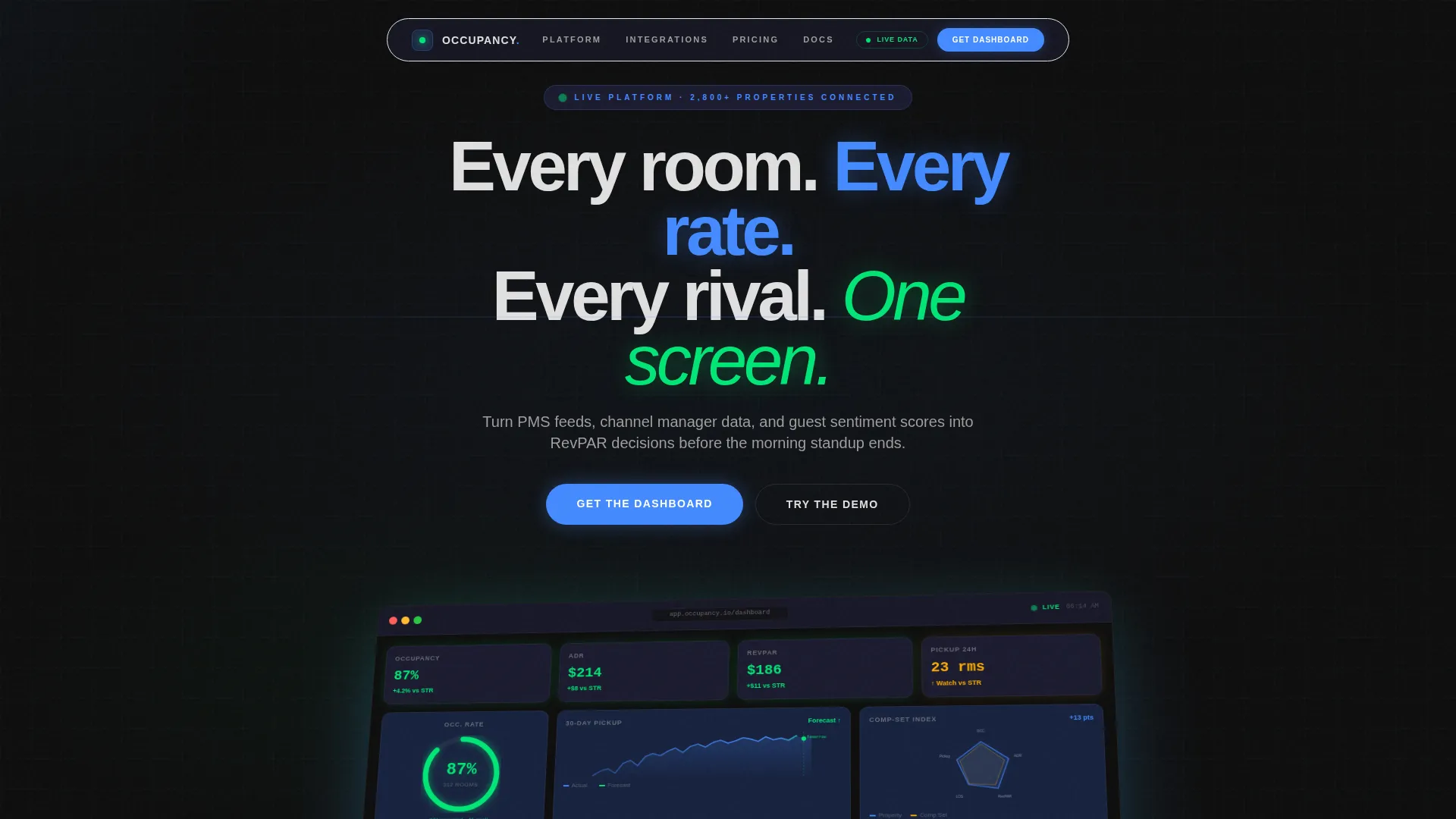
- A full-width product screenshot header showing a live-style hotel dashboard at 87% occupancy with active KPI indicators
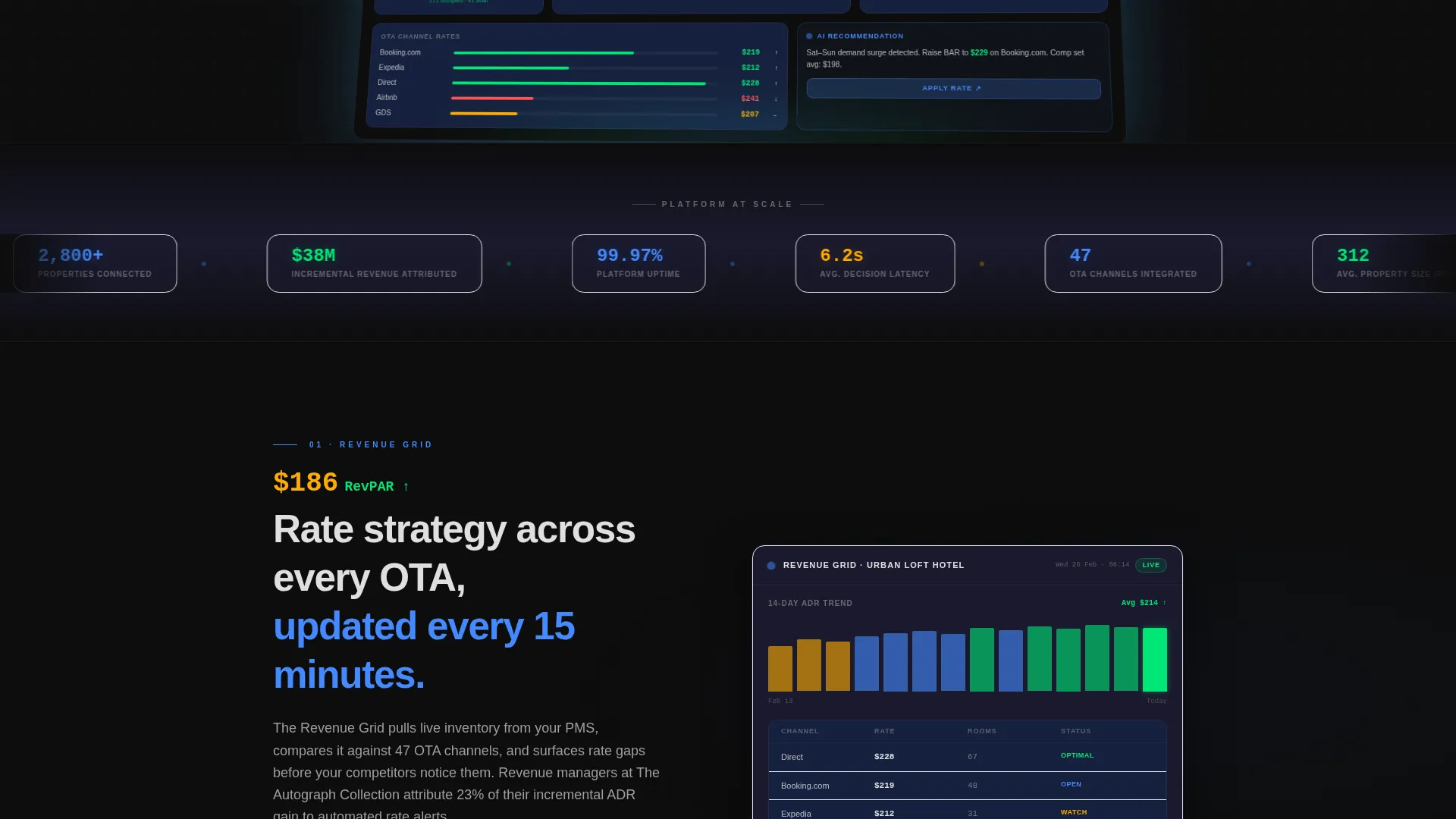
- A scrolling stat ticker strip with aggregate platform numbers and modular screenshot sections for each dashboard feature
- A primary app download call-to-action block with App Store badges, Google Play badges, and a QR code alongside a secondary demo link
Feature list
This template delivers six purposeful sections that build from first impression to final conversion. Each section is constructed around one clear idea.
Full-Width Dashboard Screenshot Header
The header renders a pixel-perfect, isometric-tilted product screenshot of a live hotel dashboard. An ambient glow beneath the screen makes the interface feel active. The headline "Every room. Every rate. Every rival. One screen." fades in above it, setting the product's value in eight words.
Live-Styled Stat Ticker Strip
The first section below the fold opens with a horizontal ticker strip showing platform-scale numbers: 14.2 million room-nights analyzed, 2,800-plus properties connected, and 38 million dollars in incremental revenue attributed. The format signals credibility before any feature is described.
Modular Dashboard Feature Sections
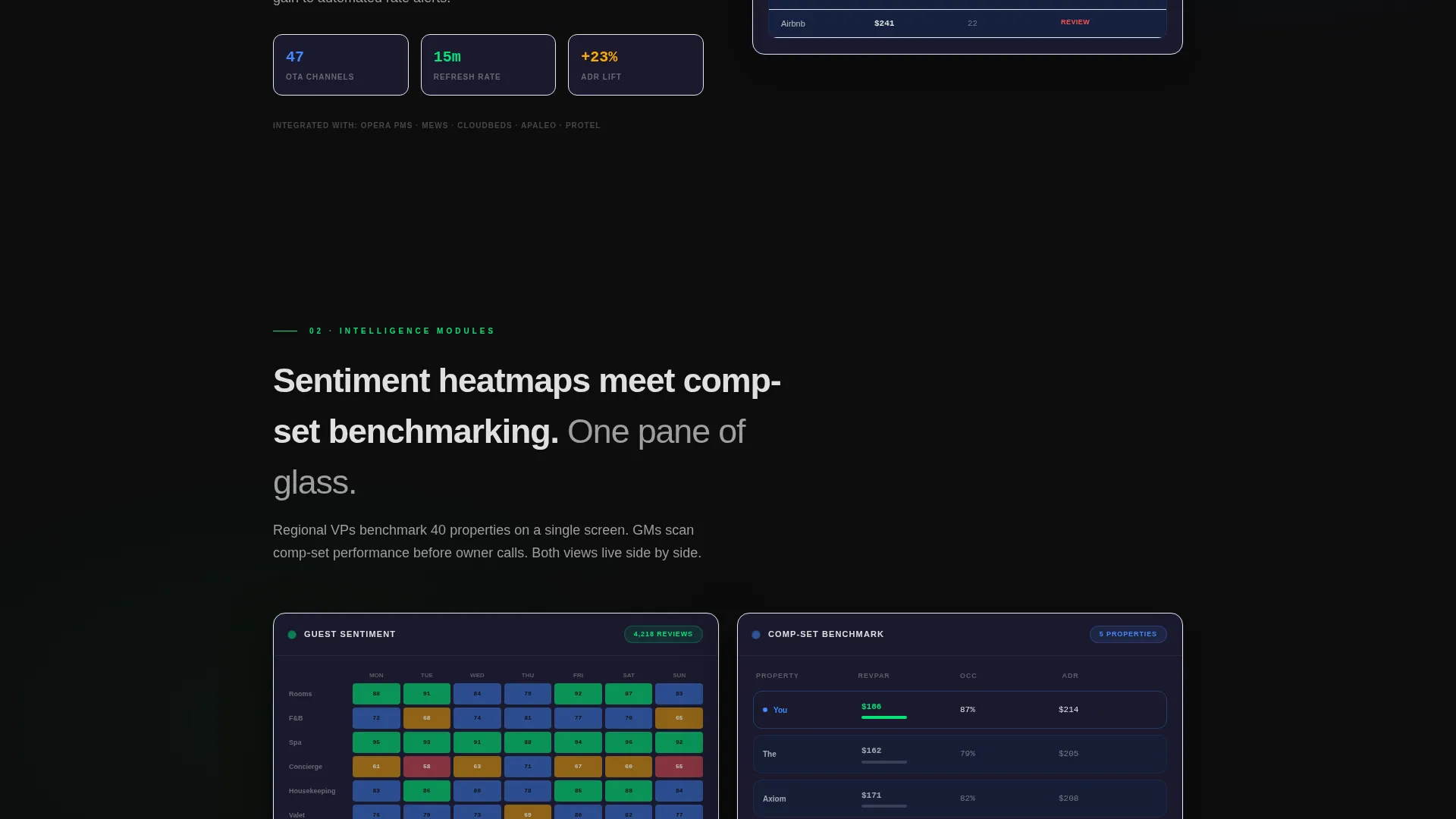
Four sequential sections each present one dashboard module as a cropped screenshot paired with a single stat callout and a one-line explanation. The modules cover the revenue grid, guest sentiment heatmaps, comp-set benchmarking, and automated rate recommendations. Complexity builds gradually while cognitive load stays flat.
Comp-Set Benchmarking Visual
The comp-set section features a spider chart layout that shows competitive positioning at a glance. This mirrors the kind of analysis a general manager would review before an owner call, making the feature immediately recognizable and relevant.
Sentiment and Pickup Curve Displays
Guest sentiment score visualizations and a 30-day pickup curve with a highlighted tomorrow forecast are presented as standalone dashboard crops. These give revenue managers a concrete preview of the operational intelligence the platform provides.
App Download Conversion Block
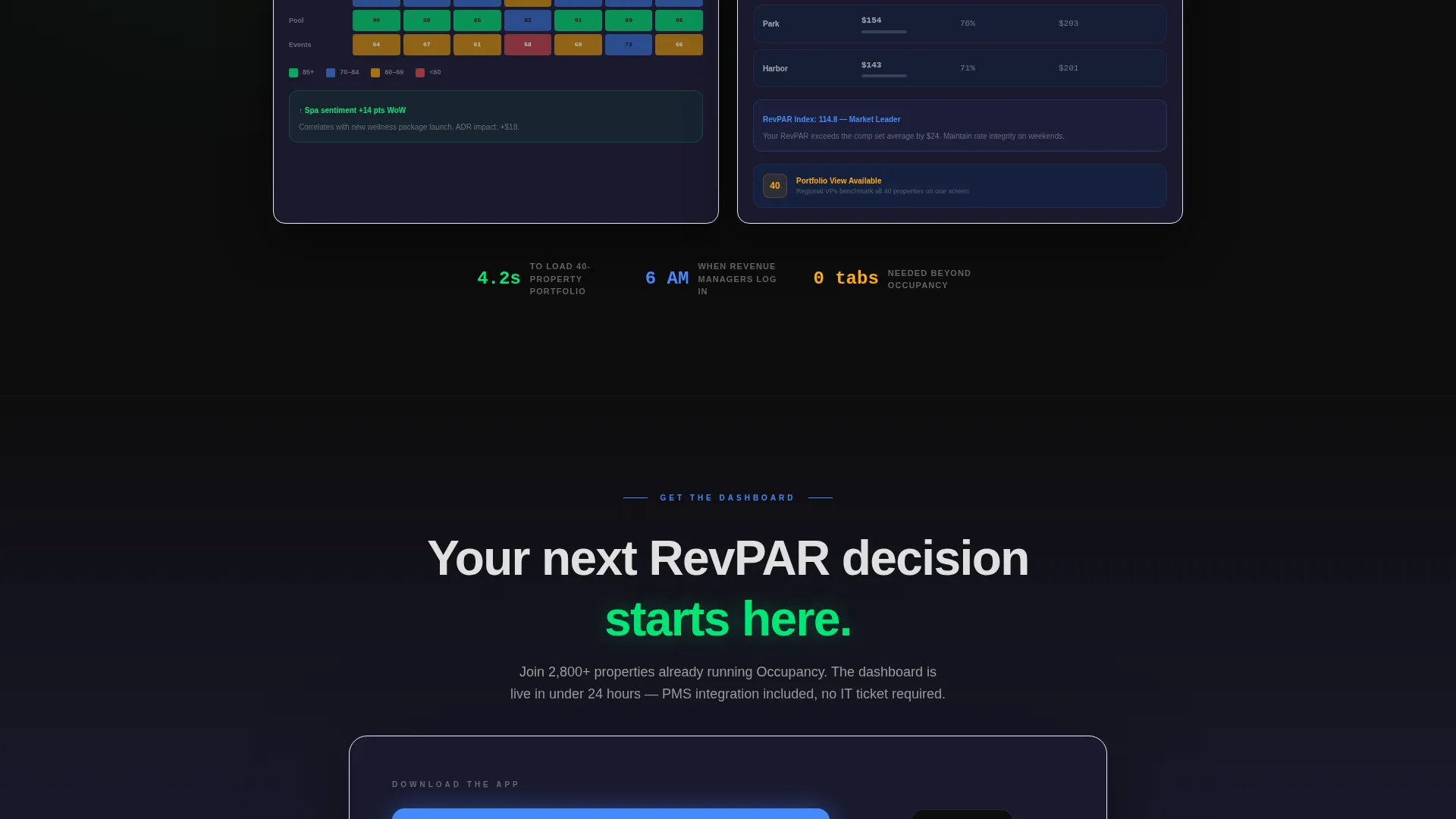
The closing section pairs a primary "Get the Dashboard" call-to-action with App Store and Google Play download badges plus a QR code for instant mobile install. A secondary "Try the Demo" link offers a browser sandbox path for visitors who want to explore before committing.
Page sections overview
| Section | Purpose |
|---|---|
| Header Screenshot | Establish product credibility with a live-style dashboard visual and headline |
| Stat Ticker Strip | Open below the fold with platform-scale proof numbers |
| Revenue Grid Module | Show the core revenue data layer as a cropped dashboard screenshot |
| Sentiment Heatmap Module | Visualize guest feedback scores as an operational intelligence layer |
| Comp-Set Benchmarking | Demonstrate competitive positioning through a spider chart visual |
| Rate Recommendations Module | Present automated rate suggestions as the final dashboard capability |
| App Download Block | Drive installs with badges, a QR code, and a secondary demo path |
Design & branding system
The visual identity follows a Carbon Fiber color system built around deep cockpit black and instrument-panel charcoal backgrounds. Color appears only where data demands attention, keeping every illuminated number feel urgent and trustworthy.
- Background surfaces use deep cockpit black (#0D0D0D) to instrument-panel charcoal (#1A1A2E), with silver-white (#E0E0E0) for body text
- Status-green (#00E676) marks positive KPIs such as rising average daily rate; alert amber (#FFAB00) flags watch metrics; data-blue (#448AFF) highlights interactive elements and selected states
- The overall palette references the center console of a long-haul aircraft at cruise altitude, where dark surfaces give every glowing number maximum contrast and weight
Mobile & speed optimization
The template is structured to load and perform on mobile devices, reflecting the use case of a regional VP reviewing benchmarks while boarding a flight. The layout prioritizes fast visual impact over decorative complexity.
- The isometric header screenshot and ambient glow are designed for visual impact without blocking content readability on smaller screens
- Each modular section presents one stat and one visual, keeping scroll depth manageable and thumb-friendly on a phone
- The QR code and app badge block are positioned for easy tap interaction on mobile, matching the app download conversion goal
How this template helps you convert
This template earns the download before it asks for one. By the time a visitor reaches the call-to-action, they have already seen their industry's data on screen and recognized their own workflow in the product.
- The stat ticker and modular screenshots build trust progressively, so the download request arrives after the product has already proved its value through visible data.
- The dual conversion path, primary app download plus secondary demo link, captures both ready-to-install visitors and those who prefer to explore the browser sandbox first.
Other information about this template
This template is categorized under Technology and specifically targets the Hospitality Software and Software as a Service subcategory. It is built on the Dashboard Pro theme and was designed to match the Hospitality Analytics Dashboard niche.
- The template style is a Dashboard and Data Grid layout, optimized for platforms that need to communicate analytical depth without overwhelming a first-time visitor
- The creative direction is Stats-First Impact, meaning numbers appear before narrative at every scroll depth
- The header concept is a Product Screenshot, the strongest trust signal for analytics software because it shows the actual interface rather than abstract illustrations
- The landing page direction is App Download, meaning all design and copy decisions serve the goal of driving mobile installs through App Store and Google Play badges alongside a QR code
Theme
Dashboard Pro
Creative direction
Stats-First Impact
Color system
Carbon Fiber
Style
Dashboard/Data Grid
Direction
App Download
Page Sections
Full-width Product Screenshot Header
Live-styled Stat Ticker Strip
Modular Dashboard Feature Sections
Comp-set Spider Chart Visual
Dual Conversion Call-to-action Block
Related questions
Who is this template designed for?
Can I customize the dashboard screenshot and stat numbers?
Does the template support both app download and demo conversion paths?
What makes the dark color system suitable for a hospitality analytics product?
How many sections does this landing page include?



