Thailand Travel Pricing Website Template
Roam is a gallery and detail landing page built for Thailand budget travel guides. It uses a Day-in-the-Life scroll structure to walk visitors through a real day across Chiang Mai, Koh Lanta, and Bangkok. A full-width destination search box leads the experience, while price-tagged gallery cards and two clear calls to action move visitors toward a route-builder tool.
by Rocket studio
Quick summary
Roam is an immersive, single-page travel guide template built for budget backpacker experiences in Thailand. It opens with a destination search box set against a drone-shot header, then guides visitors through a Day-in-the-Life scroll across three Thai locations. Every gallery card shows real prices, pulling hesitant visitors toward the primary "Plan Your Route" call to action.
Who this template is for
This template is built for creators and publishers running Thailand budget travel content. It suits anyone who needs to present location-specific costs, itineraries, and travel tips in a visually compelling format.
- Travel bloggers and content creators publishing Thailand budget guides
- Digital nomads or freelancers building a resource hub for slow-travel audiences
- Independent travel brands or guide publishers targeting backpackers and budget-conscious adventurers
What problem this template solves
Most travel landing pages bury the practical details. Visitors arrive curious but leave without a clear sense of what a destination actually costs or how a real day unfolds. Roam fixes that by leading with numbers and structure instead of vague inspiration.
- Price tags feel abstract until they appear beside a bowl of boat noodles or a night in a fan room
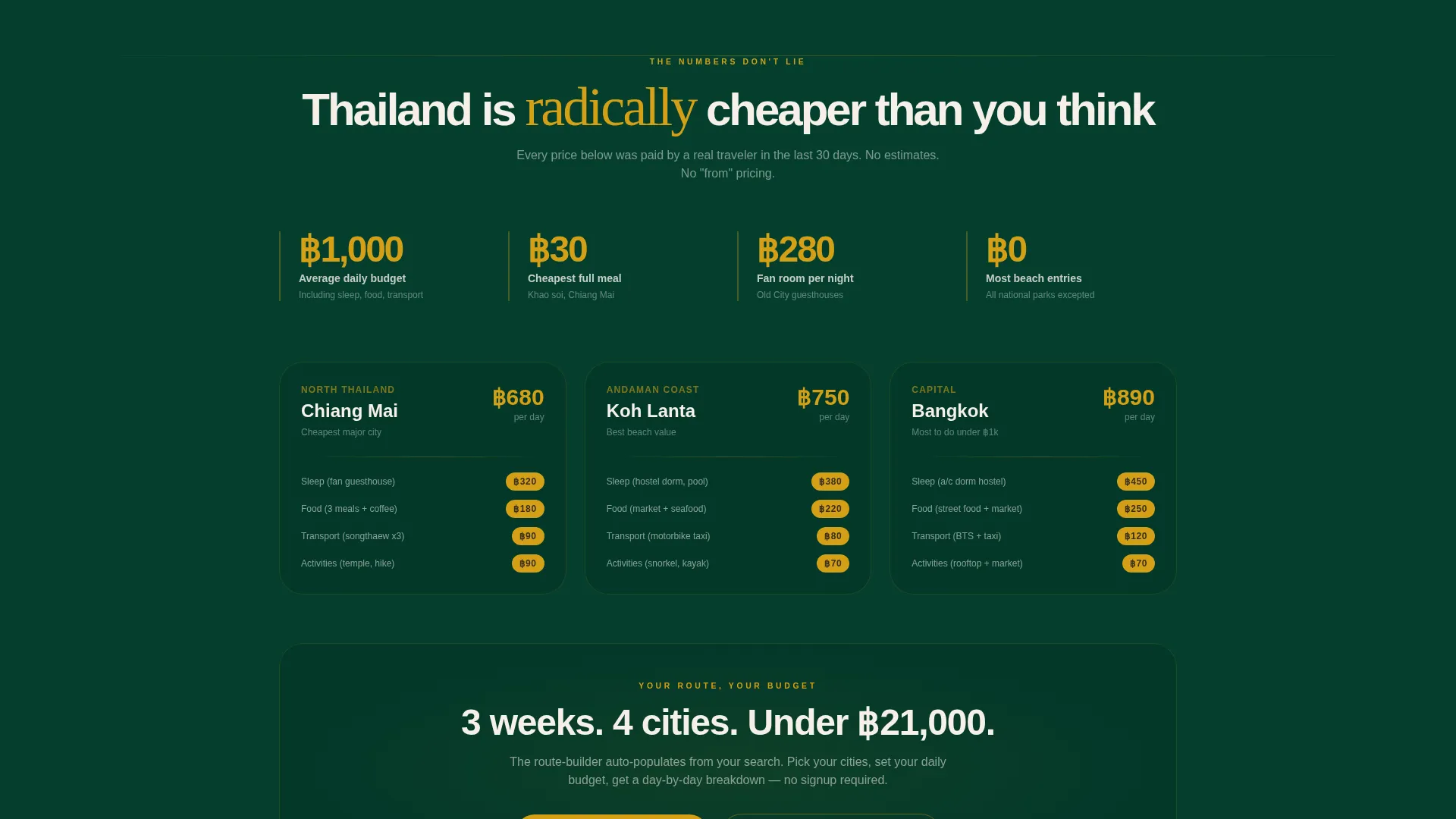
- Visitors struggle to trust a destination's affordability without seeing real, itemized cost examples
- Generic hero layouts waste valuable above-the-fold space on aesthetics rather than usefulness
What you get with this template
You get a fully structured, single-page layout designed around a Day-in-the-Life narrative flow. The template includes every section needed to take a visitor from first glance to confident click.
- A full-width header with a destination search box and auto-completing city suggestions with daily budget estimates
- Three horizontal gallery rows covering morning, afternoon, and evening timeblocks across distinct Thai locations
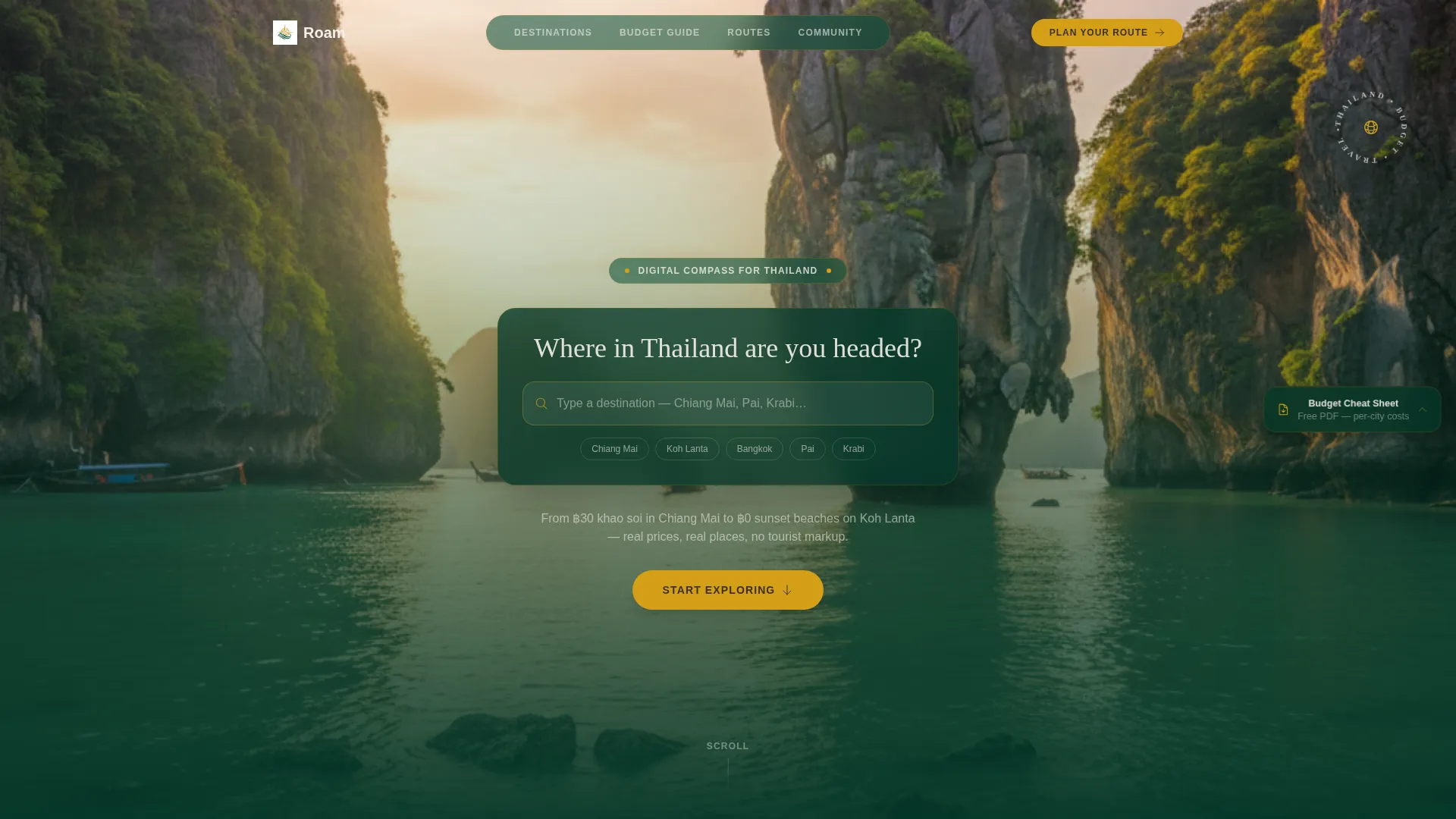
- Two primary call-to-action placements and a floating secondary email-capture badge for a budget cheat sheet download
Feature list
This template is built around components that prove value through real pricing and place-specific storytelling. Each feature works together to create a scroll that earns the visitor's trust before asking for any action.
Destination Search Header
The header fills the full viewport with a slowly panning drone shot above a karst coastline at golden hour. A centered search box reads "Where in Thailand are you headed?" and surfaces auto-completing city suggestions. Each suggestion displays a daily budget estimate beside the destination name, making affordability tangible from the first second on the page.
Day-in-the-Life Gallery Rows
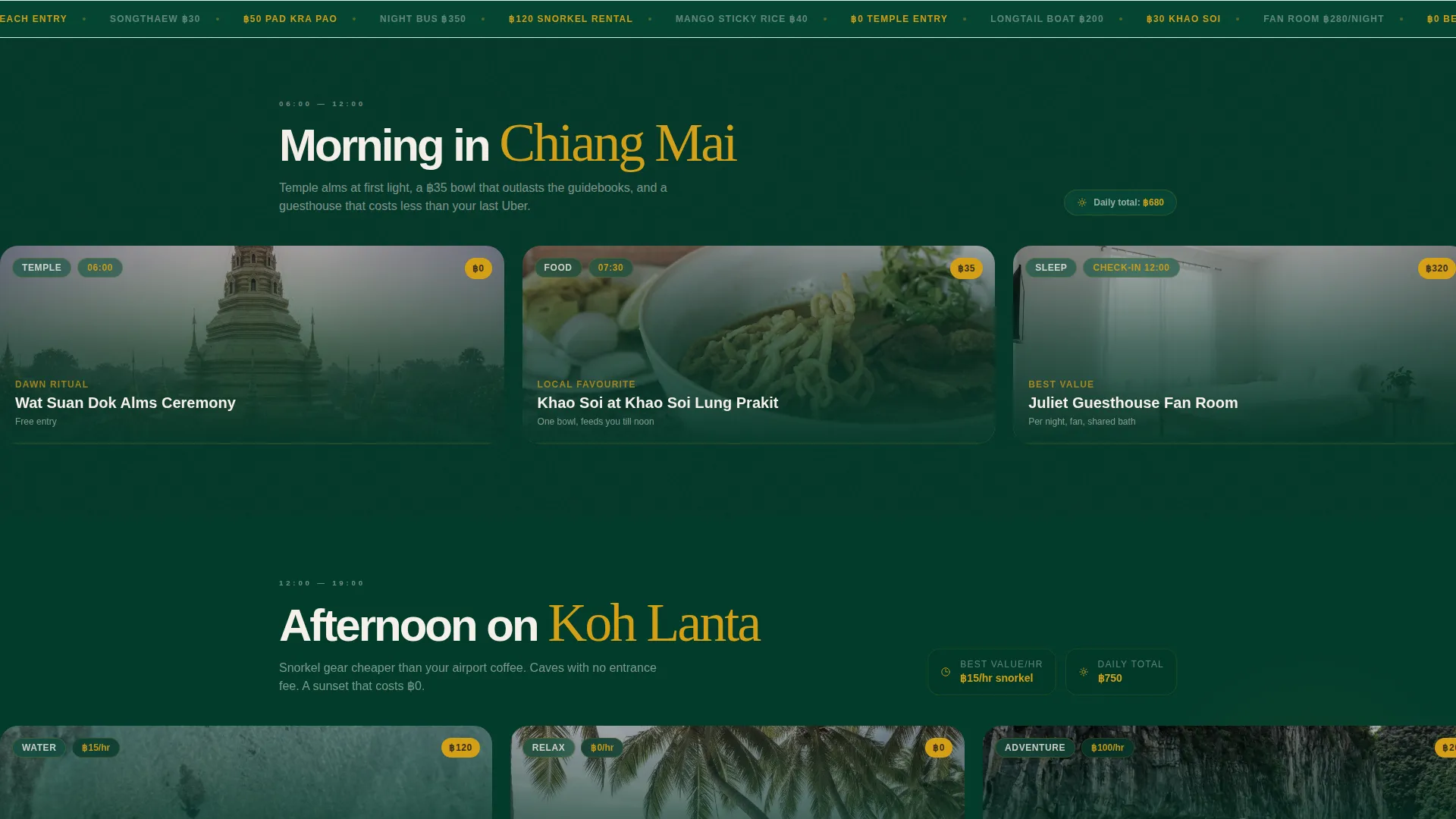
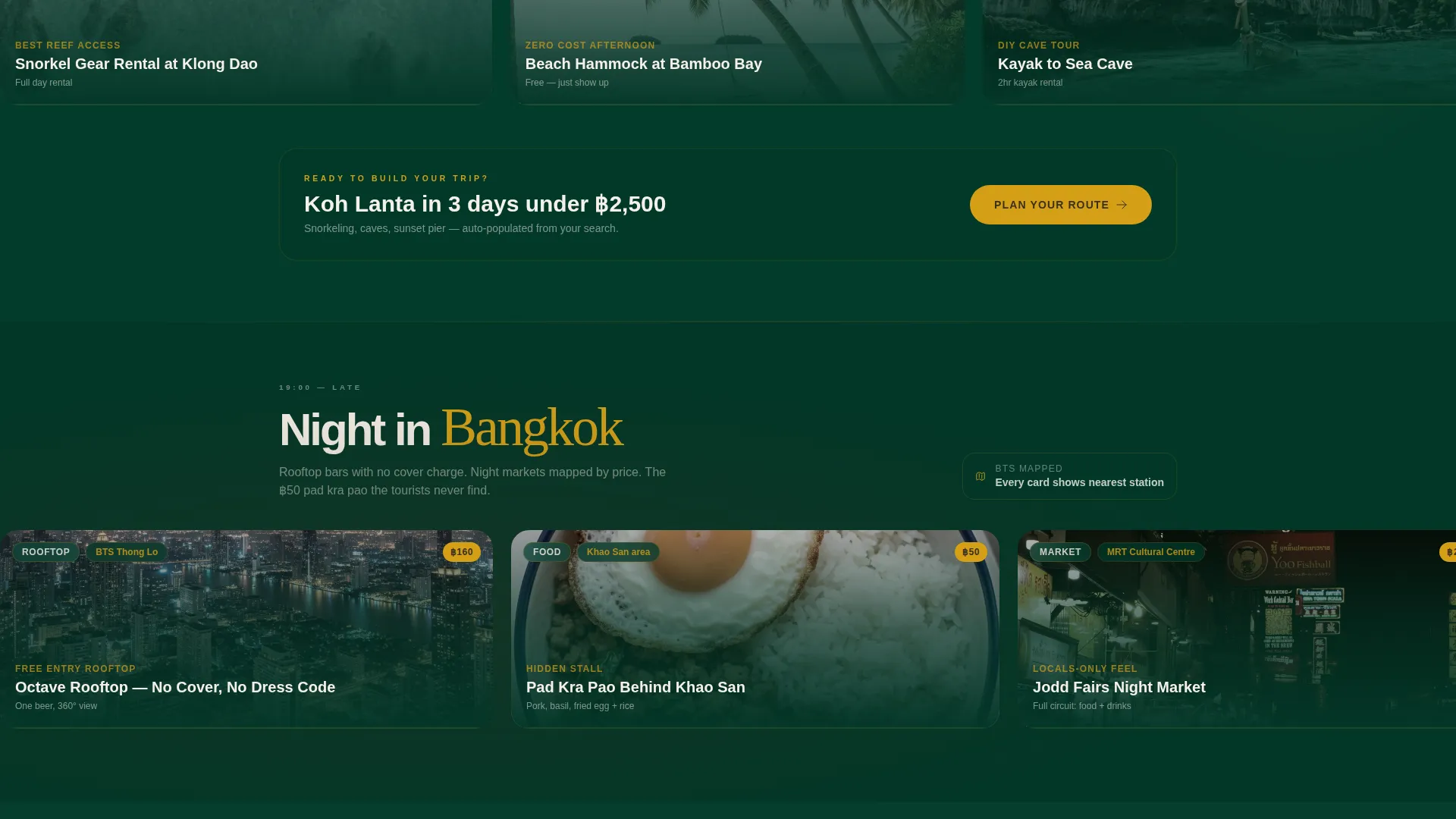
Three horizontal gallery rows divide the page into morning, afternoon, and night timeblocks. Morning covers Chiang Mai with temple alms, a 30-baht khao soi card, and guesthouse listings under 400 baht. Afternoon shifts to Koh Lanta with snorkel rental breakdowns and cost-per-hour beach comparisons. Night lands in Bangkok with rooftop bars, night-market price circuits, and mapped routes.
Expandable Price-Tagged Detail Cards
Each gallery card is tappable. A card showing a bowl of boat noodles expands to reveal the stall's location, the exact price, and the nearest transit stop. This granular detail layer turns every image into a mini travel brief, giving visitors the specific information they actually need.
Dual Call-to-Action Placement
The primary call to action, "Plan Your Route," appears first beneath the header search results. It reappears as a sticky bottom bar after the visitor scrolls past the second gallery row. This two-stage placement keeps the conversion path visible without interrupting the browsing experience.
Floating Budget Cheat Sheet Badge
A secondary conversion path sits as a floating sidebar badge throughout the scroll. It offers a downloadable single-page PDF of per-city daily costs in exchange for an email address. This lightweight capture mechanic runs parallel to the primary click-through path without obstructing the gallery content.
Dark Emerald Visual System
The color palette uses deep jungle green for backgrounds, weathered teak tones for typography, temple gold for every interactive element, and chalky limestone white for text and card breathing space. This system creates a cohesive Adventure Terrain aesthetic that feels specific to the Thai landscape rather than generic travel branding.
Page sections overview
| Section | Purpose |
|---|---|
| Drone Shot Header | Introduces destination search with auto-completing city and budget suggestions |
| Morning Gallery Row | Showcases Chiang Mai timeblock with guesthouse cards and food prices |
| Afternoon Gallery Row | Presents Koh Lanta costs including snorkel rentals and beach comparisons |
| Night Gallery Row | Maps Bangkok rooftop bars and night-market price circuits |
| Sticky call to action Bar | Keeps "Plan Your Route" visible after the second gallery row |
| Floating Sidebar Badge | Captures email in exchange for a per-city budget PDF download |
Design & branding system
The template uses a Dark Emerald color system that draws directly from the Thai landscape. Every design choice reinforces an Adventure Terrain mood without veering into clichéd travel aesthetics.
- Deep jungle canopy green (#064E3B) dominates backgrounds; weathered teak brown (#3B2F1E) grounds all typography
- Temple gold (#D4A017) marks every tappable element, from search suggestions to call-to-action buttons
- Chalky limestone white (#F5F0E8) provides text contrast and opens up each gallery card like a forest clearing
Mobile & speed optimization
The gallery-and-detail format is designed to work fluidly on the devices that budget travelers actually use. Horizontal gallery rows and expandable cards are built for touch-first interaction.
- Tappable detail cards expand inline, keeping navigation within a single scroll rather than forcing page jumps
- The sticky bottom call-to-action bar adapts to smaller screens so the conversion path stays accessible throughout the scroll
- The floating sidebar badge repositions gracefully on narrow viewports to avoid blocking gallery content
How this template helps you convert
Every design and content decision in Roam is built to reduce hesitation and move visitors toward a single clear action. The page earns the click rather than demanding it.
- The search box header personalizes the experience immediately. Visitors see their destination with a real daily budget estimate before they scroll a single pixel, replacing vague curiosity with concrete confidence.
- Price-tagged gallery cards function as tiny proof points. Each specific number on each card quietly dismantles the assumption that Thailand travel is complicated or expensive, lowering the psychological barrier to clicking "Plan Your Route."
Other information about this template
Roam is a template built for the Thailand budget travel guide niche, and it is designed to feel at home within the Travel and Hospitality category. The Day-in-the-Life creative direction gives the page a narrative rhythm that feels editorial rather than promotional.
- The template style is Gallery plus Detail, meaning visitors move between broad visual overviews and granular location-specific information within the same scroll
- The Click-Through landing page direction means there is no form wall or signup friction on the main experience; the primary goal is routing visitors to a route-builder tool
- The Adventure Terrain theme and Dark Emerald palette are designed to evoke a specific sense of place rather than a generic tropical travel mood
Theme
Adventure Terrain
Creative direction
Day-in-the-Life
Color system
Dark Emerald
Style
Gallery + Detail
Direction
Click-Through
Page Sections
Destination Search Header with Budget Previews
Day-in-the-life Gallery Rows
Expandable Price-tagged Detail Cards
Two-stage Call-to-action Placement
Floating Budget Cheat Sheet Badge
Dark Emerald Adventure Terrain Palette
Related questions
Does this template include a working route-builder tool?
Can I update the destination names, prices, and gallery images?
Is there a signup form blocking the main page content?
Who is the floating budget cheat sheet badge designed for?
Can this template be adapted for budget travel guides outside Thailand?