IT Services & Consulting Pricing & Packages Website Template
Resolve is a scroll-reveal landing page template built for IT help desk and support services. It uses a terminal-inspired visual identity to communicate speed, competence, and 24/7 availability. The page guides visitors through animated capability reveals and directs them toward a pricing page with near-zero friction, making it ideal for IT service providers targeting small and mid-size businesses.
by Rocket studio
Quick summary
Resolve is a single-page, scroll-reveal landing page template for IT help desk and support services. It pairs a live-typing terminal header with progressive section animations to build trust and momentum. Every design choice signals speed and reliability. The page ends with a clear path to pricing, keeping the visitor journey focused and low-friction.
Who this template is for
This template is built for IT service providers who need a landing page that communicates urgency, competence, and round-the-clock availability at a glance.
- Managed service providers and IT consultancies targeting small-to-mid-size businesses without in-house IT teams
- Independent IT support professionals serving office managers, operations leads, and growth-stage companies
- IT help desk teams at multi-site organizations who need to clearly present their service capabilities to internal stakeholders
What problem this template solves
Many IT support providers struggle with landing pages that look generic or slow. Potential clients arrive with real urgency and leave if the page does not immediately signal speed and expertise.
- There is no visual proof of competence, so visitors do not trust the service before reading a word
- Pricing and next steps are buried, creating friction for buyers who already know what they need
- The page feels like a brochure rather than a live operations environment, which undercuts the 24/7 support message
What you get with this template
You get a fully designed, scroll-reveal landing page with a distinct terminal aesthetic and a structured flow built to move visitors toward a pricing decision.
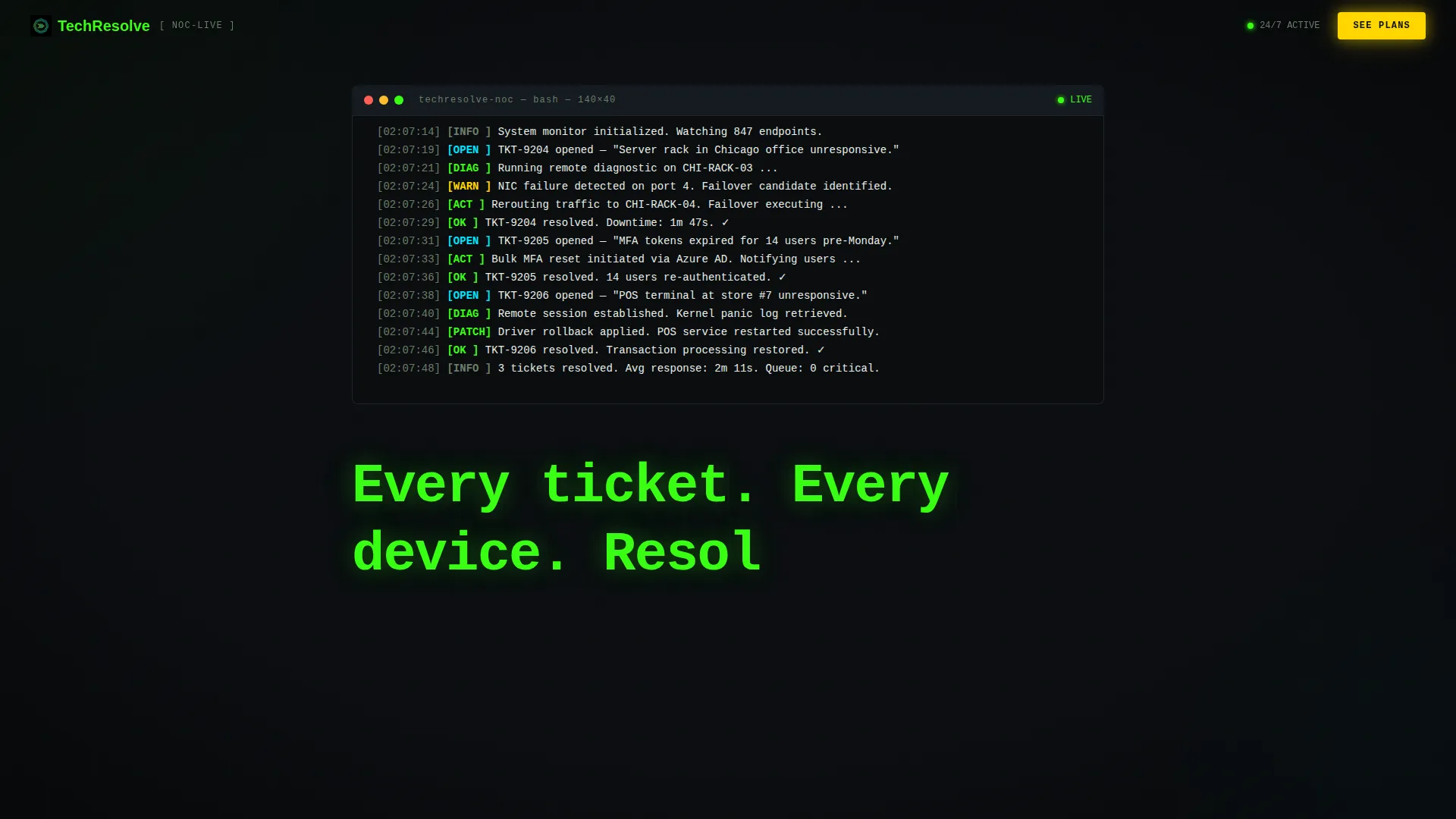
- A full-viewport terminal header with real-time typing animations, scan-line effects, and a character-by-character headline reveal
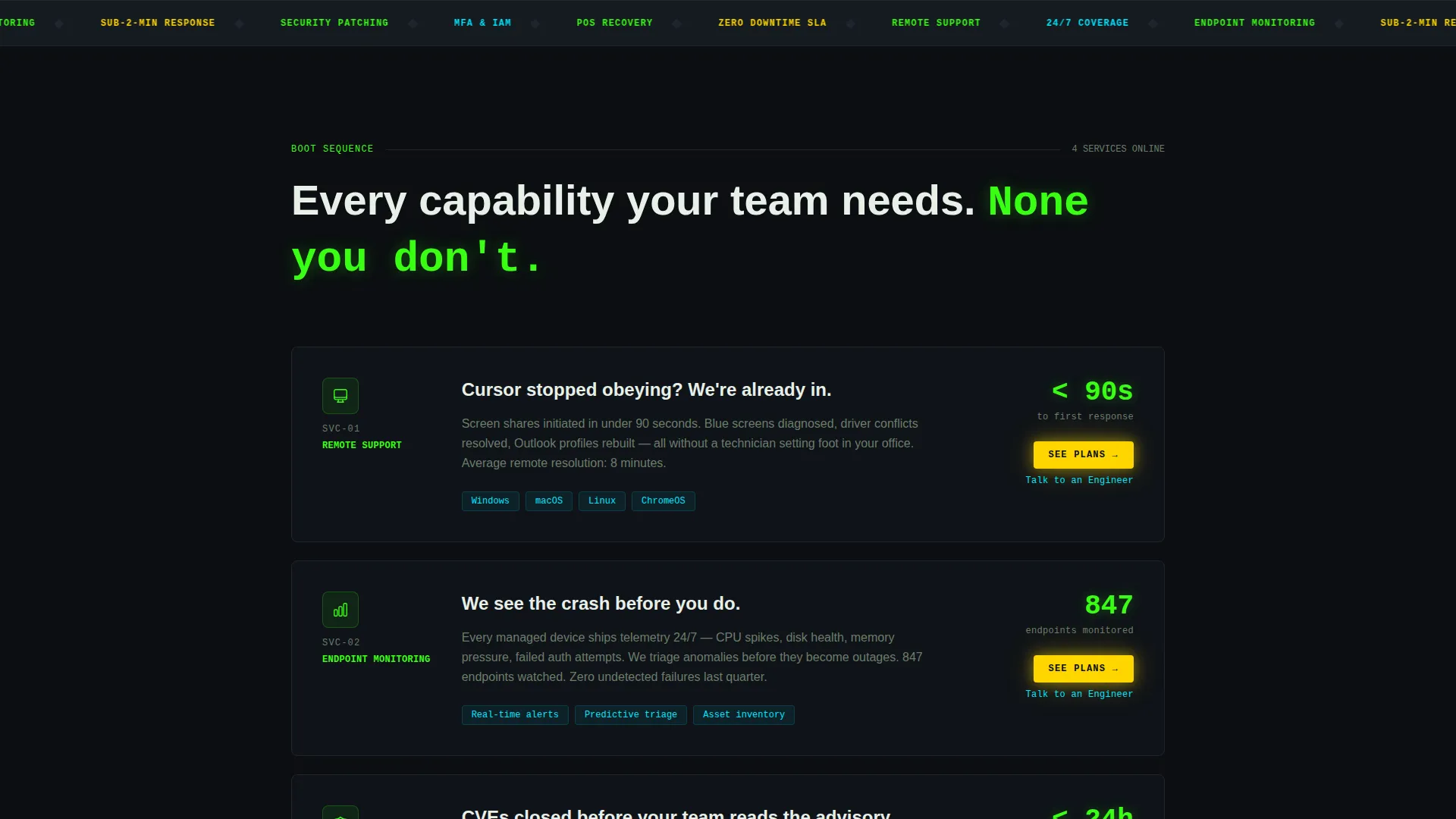
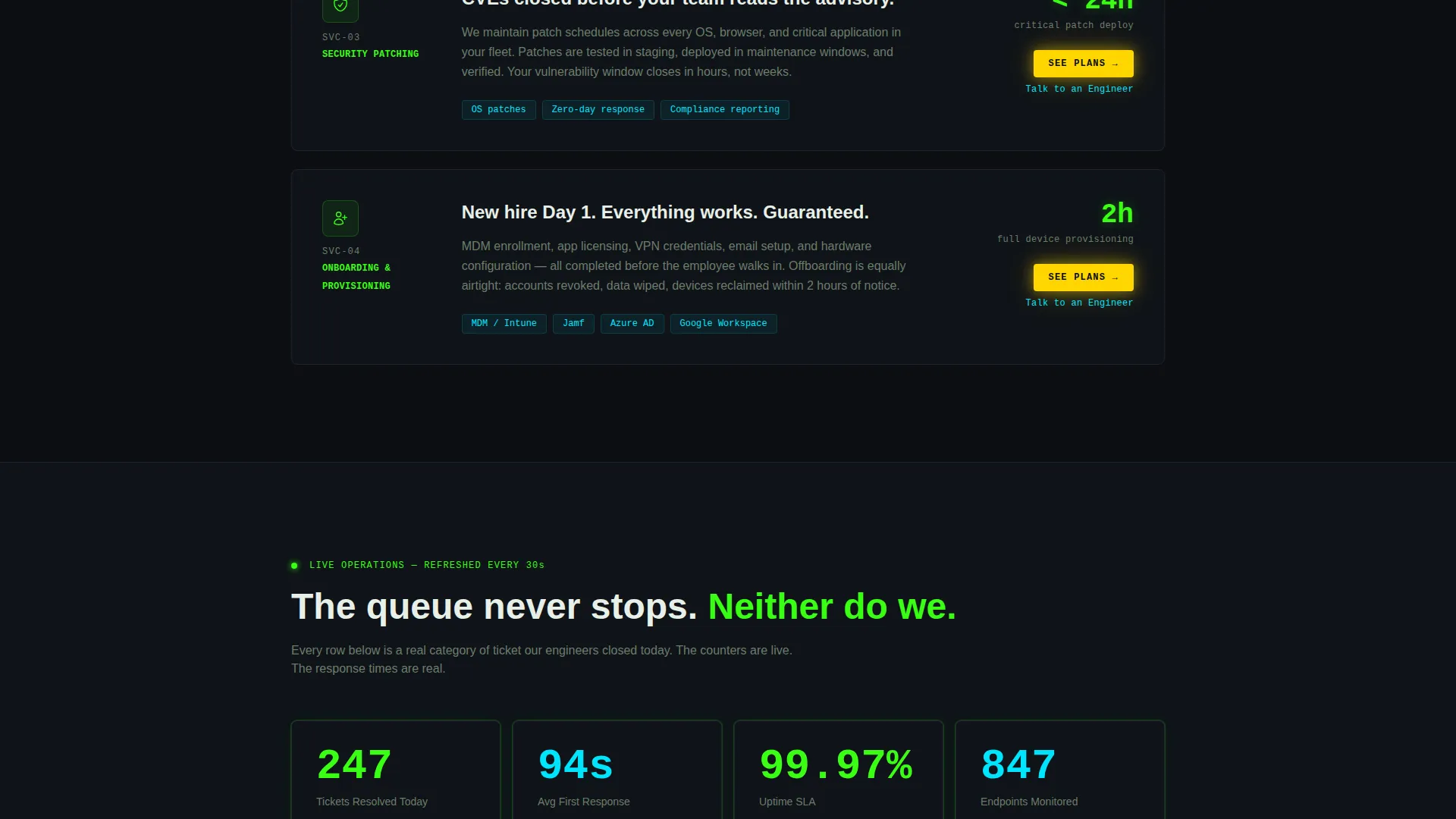
- Progressively animated capability sections covering remote support, endpoint monitoring, security patching, and onboarding provisioning
- Strategically placed call-to-action buttons and secondary text links that repeat throughout the page without adding any form friction
Feature list
This template delivers a focused set of visual and structural features drawn directly from its Data Command design brief.
Live Terminal Header Animation
The header fills the full viewport with a black terminal screen. Realistic support log lines type themselves in phosphor green in real time, complete with a blinking cursor and a subtle scan-line effect. After the sequence completes, the headline renders character by character.
Progressive Scroll Reveal Sections
Each capability section slides up from darkness as the visitor scrolls, as if systems are coming online one by one. The pacing accelerates through the page, reinforcing a sense of momentum and operational readiness.
Animated Response Counters
Response-time statistics animate to real numbers as each section enters the viewport. This gives visitors a concrete, visual sense of service speed without requiring them to read dense copy.
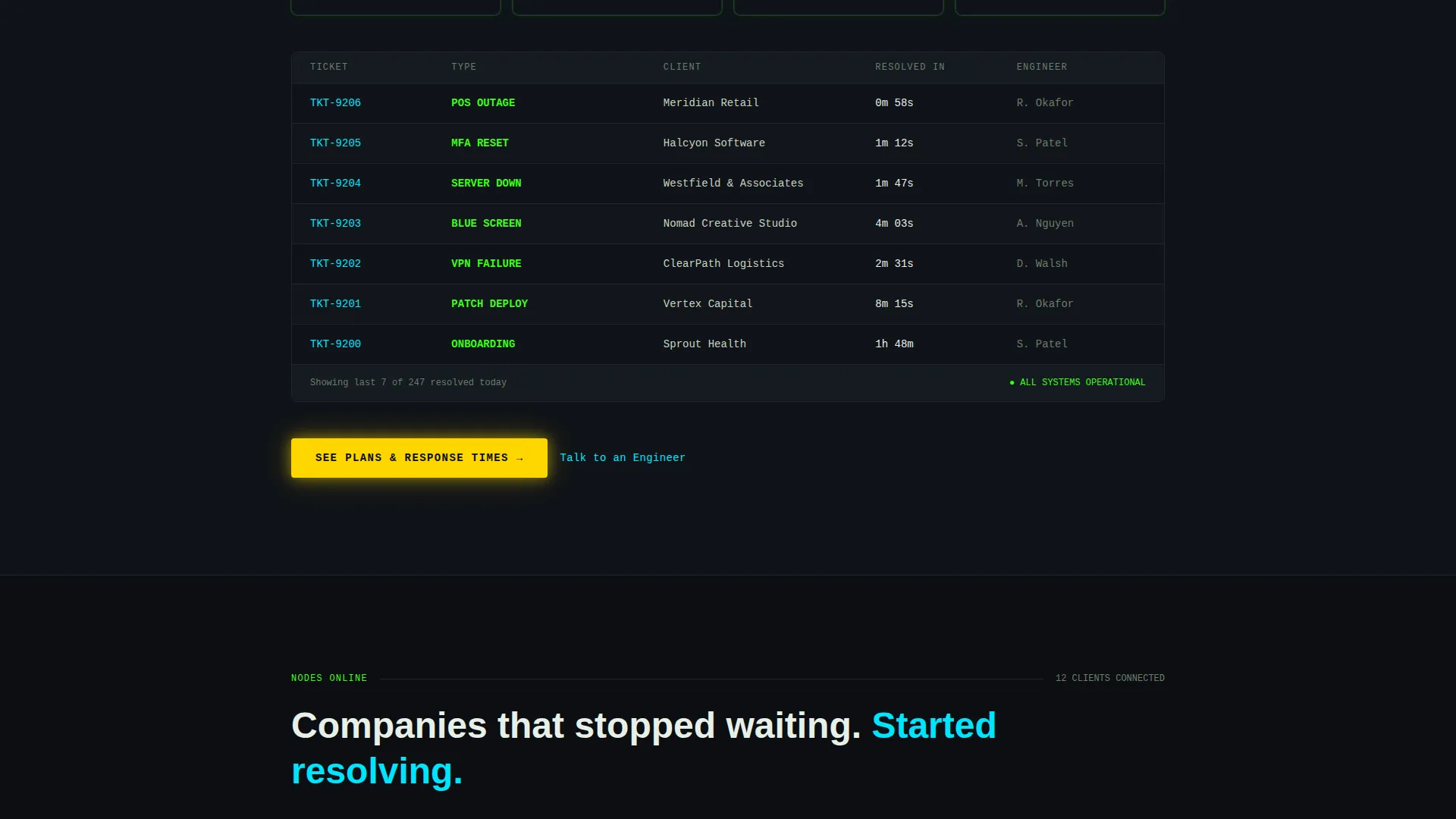
Live-Style Ticket Dashboard Block
A simulated ticket dashboard populates with resolved items as the visitor scrolls past it. The visual effect communicates throughput and reliability more directly than any text claim could.
Pulsing Amber Call-to-Action System
The primary call-to-action button, labeled "See Plans & Response Times," uses hazard amber and a gentle pulse animation to draw the eye at every decision point. It reappears anchored at the bottom of each revealed section.
Secondary Engineer Contact Link
A text link labeled "Talk to an Engineer" sits beneath every primary call-to-action. It gives high-intent visitors a fast path forward without disrupting the main conversion flow.
Page sections overview
| Section | Purpose |
|---|---|
| Terminal Header | Establishes brand tone with live-typing support log animation and headline reveal |
| Remote Support Block | Introduces remote troubleshooting capability with scroll-reveal entrance |
| Endpoint Monitoring Block | Highlights continuous device monitoring as a key service pillar |
| Security Patching Block | Communicates proactive patching coverage to security-minded buyers |
| Onboarding Provisioning Block | Showcases device and account provisioning for growing teams |
| Response Time Counters | Animates real response metrics to reinforce speed credibility |
| Ticket Dashboard Visual | Populates simulated resolved tickets to demonstrate service throughput |
| Client Logo Row | Materializes client logos node-by-node to build social proof |
| Primary call to action Section | Delivers the final "See Plans & Response Times" push with amber pulse |
Design & branding system
The template uses an Acid Digital color system built around four functional hues, each assigned a specific role so nothing feels decorative.
- Void black (#0B0E11) dominates all backgrounds, creating the network operations center atmosphere that anchors the terminal theme
- Terminal phosphor green (#39FF14) marks active states, healthy system indicators, and all body text against dark backgrounds
- Electric cyan (#00E5FF) highlights interactive elements such as links and hover states, while hazard amber (#FFD600) is reserved exclusively for call-to-action buttons and alert pulses
Mobile & speed optimization
The template is designed with a mobile-first layout so the scroll-reveal animations and terminal visuals translate cleanly to smaller screens.
- Monospaced typography and high-contrast color ratios keep the terminal aesthetic legible on all screen sizes
- Scroll-triggered animations are structured to fire at natural breakpoints, preserving the staged reveal effect on both desktop and mobile viewports
How this template helps you convert
The page is a click-through design with a single conversion goal: get the visitor to the pricing and plan comparison page. Every structural choice supports that goal.
- The terminal header sequence builds immediate credibility before the visitor reads a single marketing claim, so trust is earned visually before it is asked for verbally.
- The pulsing amber call-to-action reappears at the bottom of every section, meaning the visitor always has a clear next step without having to scroll back up or hunt for a button.
- The secondary "Talk to an Engineer" text link captures high-intent visitors who are ready to skip the pricing page entirely and speak directly with the team.
Other information about this template
This template is part of a broader library of professionally designed landing page templates suited to technology service businesses.
- The template style is Scroll Reveal (Progressive), meaning sections animate into view sequentially rather than loading all at once
- The header concept is classified as a Code Snippet execution, referencing the realistic support log syntax that drives the opening animation
- The creative direction follows a Launch Energy principle, pacing the page like a countdown sequence to build urgency through the scroll
- The theme is Data Command, a visual and structural framework that treats every design element as functional rather than decorative
- The landing page direction is Click-Through, meaning there is no lead capture form on this page and the sole goal is earning the click to the next step
Theme
Data Command
Creative direction
Launch Energy
Color system
Acid Digital
Style
Scroll Reveal (Progressive)
Direction
Click-Through
Page Sections
Live Terminal Header Animation
Progressive Scroll Reveal Sections
Animated Response Time Counters
Live-style Ticket Dashboard
Pulsing Amber Call-to-action System
Secondary Engineer Contact Link
Related questions
Does this template include a contact form?
Can I update the animated ticket log lines with my own service details?
Is this template suitable for a managed service provider?
What visual style does this template use?
Does the page work as a standalone entry point?



