Policy Automation Landing Page Template | Dashboard Pro
The Refund Automated Policy landing page template is built for operations, finance, and e-commerce teams who need to turn messy refund and cancellation workflows into clean, automated processes. With an interactive scroll-reveal structure, a bold Dashboard Pro visual identity, and a lead generation flow centered on a low-friction audit form, this template makes a complex product immediately tangible.
by Rocket studio
Quick summary
This single-page template helps refund and cancellation policy platforms speak directly to operations managers, e-commerce directors, and finance teams. It opens with a full-width dashboard screenshot, guides visitors through an interactive scroll experience, and converts them with a lead generation form before they leave the page.
Who this template is for
This template is designed for teams selling or showcasing automated refund and cancellation policy tools. It speaks the language of people who live inside queues, dashboards, and dispute workflows every day.
- SaaS operations managers dealing with a high volume of chargeback and subscription cancellation requests
- E-commerce directors tracking refund rates that chip away at margins each month
- Finance teams at mid-stage startups who are still managing cancellation data manually in spreadsheets
What problem this template solves
Refund and cancellation policy tools are powerful but notoriously hard to explain to busy buyers. The template removes that friction by letting visitors experience the product logic rather than just read about it.
- Visitors often abandon policy-tool pages because they cannot picture how the platform handles edge cases
- Conventional landing pages list features without showing the workflow in action, which slows trust-building
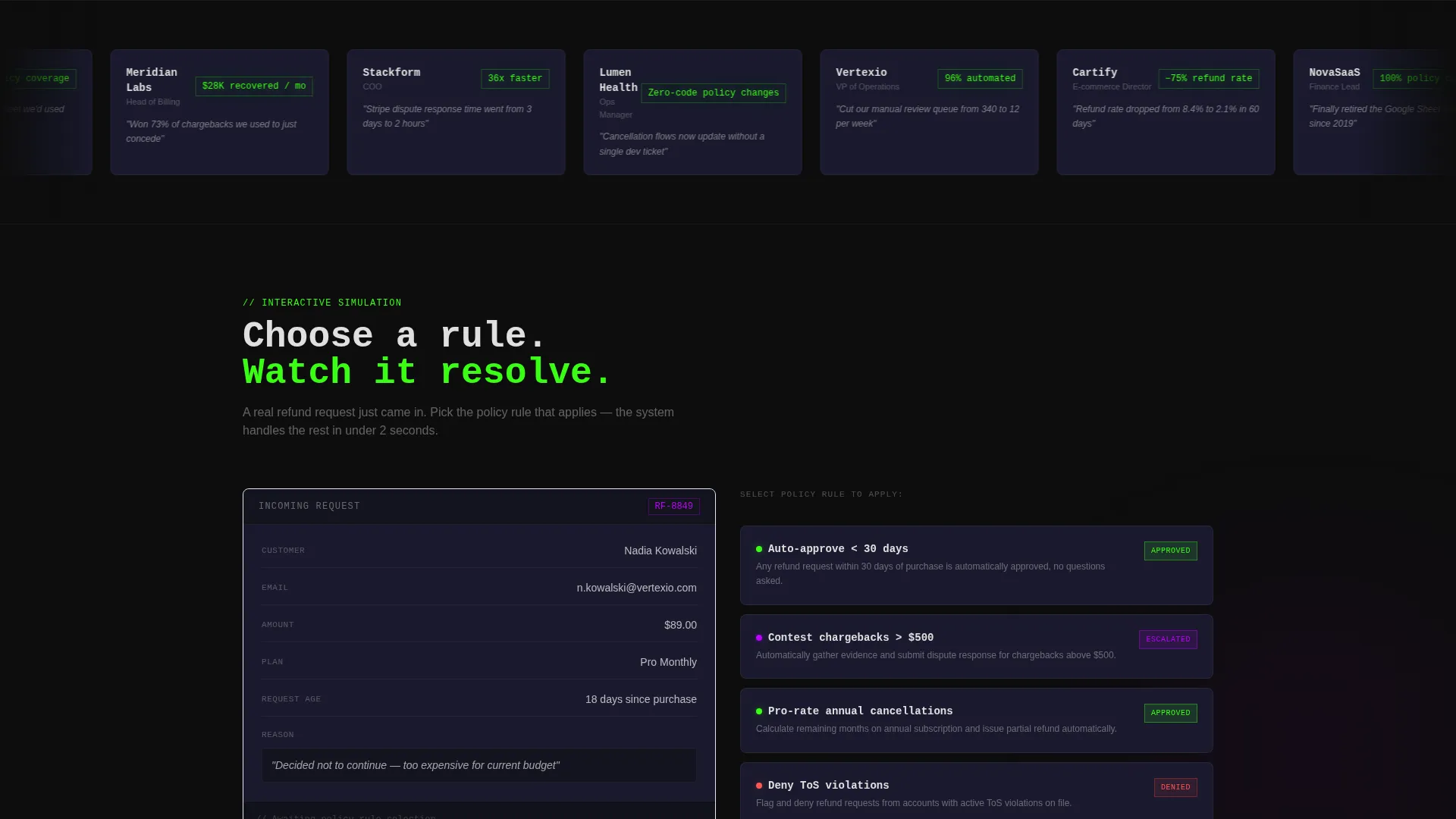
- This template makes the product behavior visible through interactive scroll sections that simulate real policy decisions
What you get with this template
You get a fully structured, scroll-reveal landing page ready to present an automated refund and cancellation policy platform to a high-intent technical audience. Every section is purposeful and tied to a specific stage of the buyer journey.
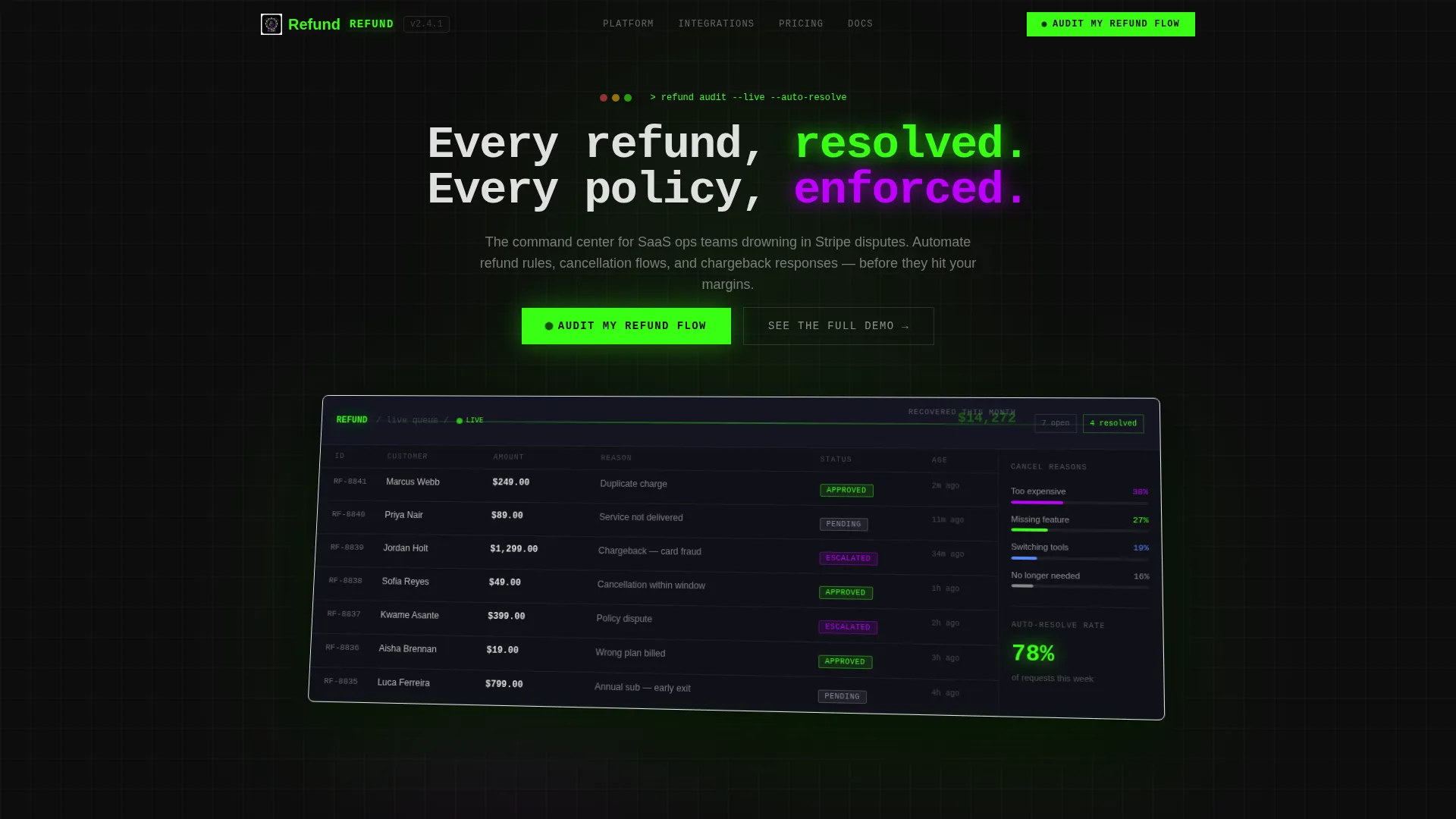
- A full-width product screenshot header showing a live refund queue with color-coded status indicators and a real-time savings ticker
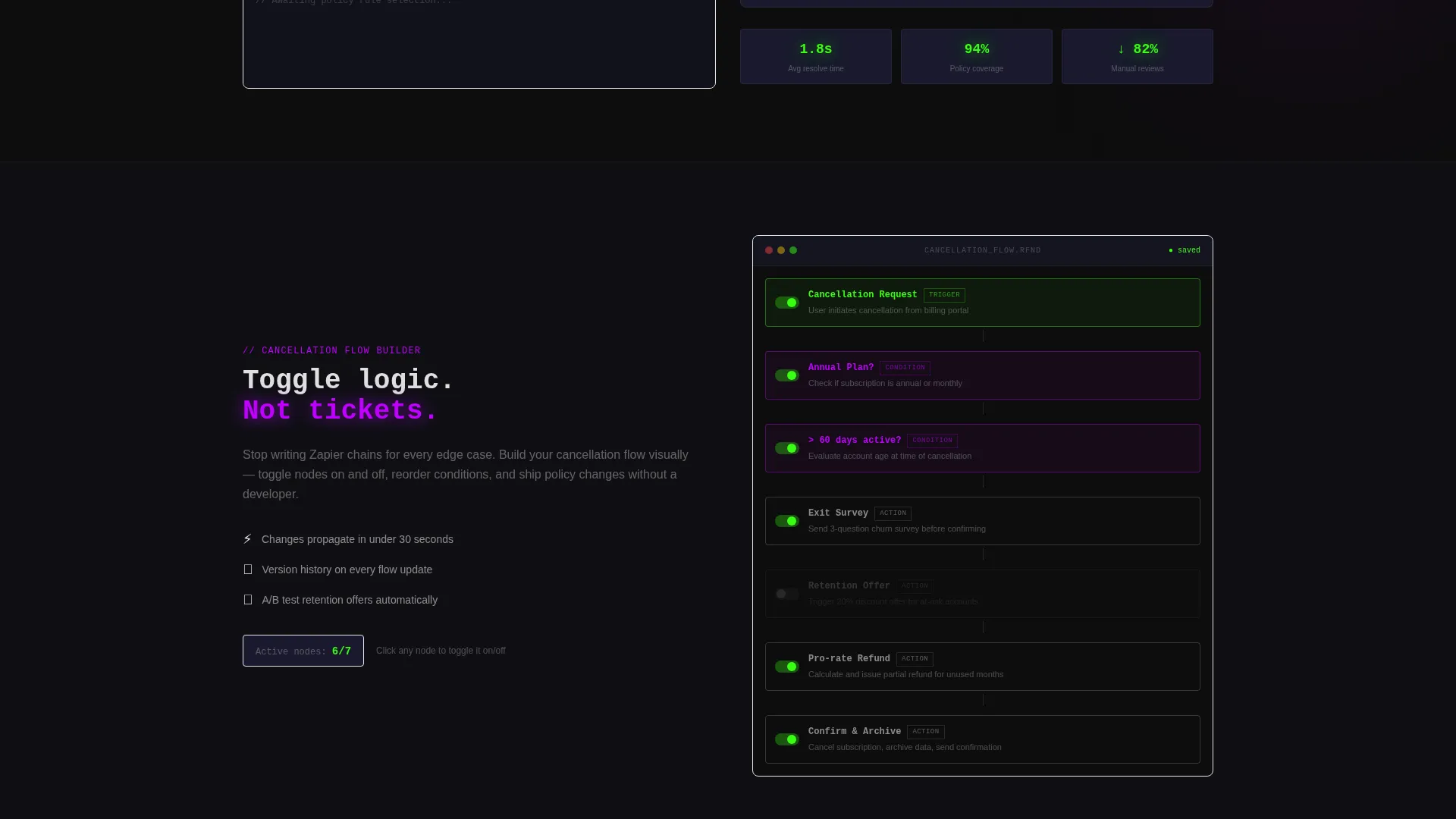
- An interactive scroll flow that lets visitors simulate policy rule choices and toggle cancellation logic like a node editor
- A lead generation form with a friction-reducing field order and a secondary ghost-button path for visitors who want to see a demo first
Feature list
This section covers the core capabilities built into the template as described in the source brief.
Interactive Scroll Simulation
As visitors scroll, the page activates rather than just reveals. The first scroll drops the visitor into a simulated refund request where they select a policy rule and watch the system auto-resolve it. This approach teaches the product through interaction rather than description.
Live Refund Queue Header
The header opens with a pixel-perfect dashboard screenshot showing seven requests in various triage states. Color-coded status pills use terminal green for approved, electric violet for escalated, and interface gray for pending. A real-time savings ticker reading "$14,230 recovered this month" anchors the value proposition immediately.
Cancellation Flow Node Editor
A dedicated scroll section lets visitors toggle cancellation flow logic in a visual node-editor style interface. This gives technical buyers a hands-on sense of how policy rules connect without requiring them to sign up first.
Friction-Reducing Lead Form
The primary call to action, "Audit My Refund Flow," uses a carefully ordered form. It leads with monthly transaction volume, then current refund platform, and finally work email. This order reduces psychological friction by asking for anonymous data before personal identity.
Sticky Call-to-Action Bar
After the interactive simulation section, the primary call to action persists as a sticky bar throughout the rest of the page. This keeps the conversion path visible without interrupting the scroll experience.
Secondary Demo Path
A ghost button labeled "See the Full Demo" links to a recorded product walkthrough. This catches visitors who are curious but not yet ready to submit contact details, extending the conversion window without adding form friction.
Page sections overview
| Section | Purpose |
|---|---|
| Dashboard Screenshot Header | Opens with a full-width product screenshot showing a live refund queue, status pills, and a savings ticker to anchor value instantly |
| Interactive Refund Simulation | Lets visitors choose a policy rule and watch the system auto-resolve a request, making the product tangible before any reading |
| Cancellation Flow Editor | Presents a node-editor-style toggle section for cancellation logic, deepening product understanding through hands-on interaction |
| Churn Prediction Charts | Adds a layer of platform depth by revealing churn analytics as the visitor continues scrolling |
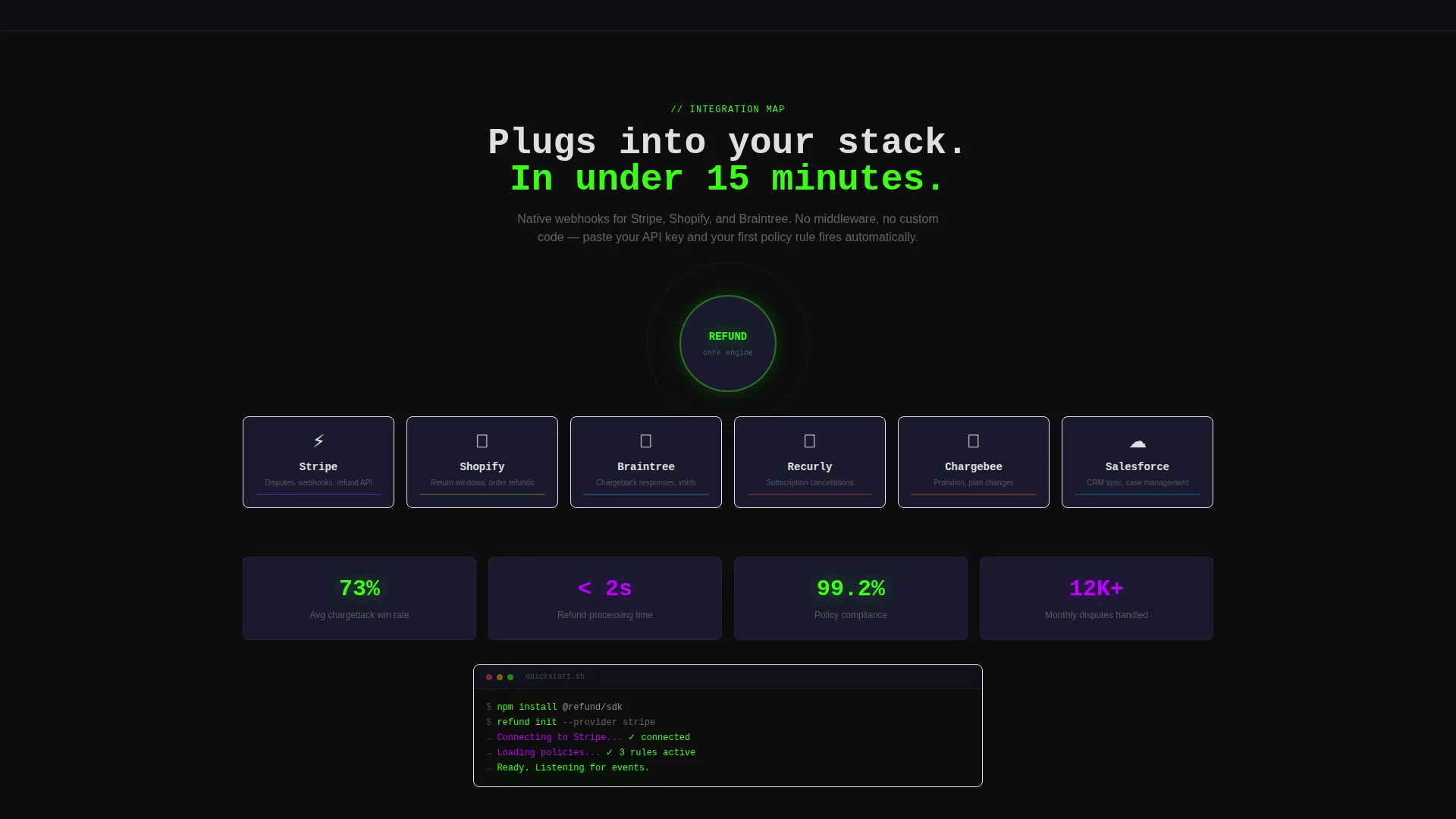
| Integration Map Section | Shows how the platform connects to payment and commerce tools, visualized as a network map |
| Lead Generation Form | Collects transaction volume, current refund platform, and work email in a friction-reducing sequence |
| Sticky call to action Bar | Persists the "Audit My Refund Flow" call to action across lower sections of the page |
| Secondary Demo Button | Offers a ghost-button path to a recorded walkthrough for visitors not ready to submit the form |
Design & branding system
The visual identity follows a Dashboard Pro theme built on an Acid Digital color system. The overall aesthetic is intentionally technical, evoking a hacker's workstation rather than a polished marketing page.
- Core palette: void black (#0D0D0D) for backgrounds, terminal green (#39FF14) for approved states and active highlights, electric violet (#BF00FF) for escalated states and accent moments, and interface gray (#1A1A2E) for containers
- Typography uses data-white (#E0E0E0) against dark surfaces, creating phosphorescent-style contrast that emphasizes every signal
- The header screenshot floats above the void-black background with a slight Z-axis rotation and a soft shadow, giving it a holographic quality
Mobile & speed optimization
The template is designed to carry its interactive, data-dense experience across device sizes without losing the visual impact of the Dashboard Pro aesthetic.
- The scroll-reveal progressive structure is built to activate sections cleanly on mobile, keeping the simulation interactions functional on touch screens
- Color-coded status elements and the sticky call-to-action bar are sized and spaced for thumb-friendly interaction on smaller viewports
How this template helps you convert
The entire page is architected around lead generation, not just awareness. Every design and interaction decision points toward getting a qualified prospect to submit the audit form or engage with the demo path.
- The interactive simulation creates product familiarity before asking for anything, so the visitor already trusts the platform logic by the time the form appears
- The form field order (transaction volume first, then platform, then email) is deliberately sequenced to lower the perceived cost of engagement at each step
- The sticky call-to-action bar and the ghost-button demo link together cover two distinct buyer readiness levels, capturing both high-intent and research-phase visitors in a single scroll
Other information about this template
This template sits within the Documentation and Support category, specifically the Policy and Legal Documentation subcategory, with a niche focus on refund and cancellation policy platforms. It is a strong fit for teams building or marketing tools that handle Stripe disputes, Shopify return workflows, or Braintree transaction management. The Interactive Explorer creative direction means the scroll itself serves as a product tour, which reduces the need for lengthy explainer copy. The template style is Scroll Reveal (Progressive), and the header concept is a Product Screenshot.
- Compatible use cases include SaaS billing platforms, subscription management tools, and e-commerce operations dashboards
- The template is well-suited for teams already using Stripe, Shopify, or Braintree who want to show buyers a familiar integration map
- The intersection match score of 13 reflects a tightly focused niche, making this template especially relevant for policy automation products targeting mid-stage startup finance and operations audiences
Theme
Dashboard Pro
Creative direction
Interactive Explorer
Color system
Acid Digital
Style
Scroll Reveal (Progressive)
Direction
Lead Generation
Page Sections
Interactive Refund Simulation on Scroll
Full-width Dashboard Screenshot Header
Cancellation Flow Node Editor Section
Friction-reducing Audit Form
Persistent Sticky Call to Action Bar
Secondary Ghost-button Demo Path
Related questions
Who is this landing page template designed for?
Can I customize the color palette and branding?
How does the interactive scroll experience work?
What does the lead generation form collect?
Is there an option for visitors who are not ready to submit the form?



