AI & Machine Learning Specialist Reviews Website Template
Promptforge is a scroll-reveal landing page template built for AI image generator products. It leads with a live prompt playground, a dashboard preview header, and a progressive section layout that deepens as visitors scroll. The Void and Violet color system, ultraviolet call-to-action buttons, and a two-field sign-up form make this template a strong fit for AI tool launches targeting founders, e-commerce teams, and developers.
by Rocket studio
Quick summary
Promptforge is a single-page, scroll-reveal landing page template for AI image generator tools. It opens with an isometric dashboard preview mid-generation, then guides visitors through a live prompt playground, style preset directory, aspect-ratio calculator, cost comparison slider, and a community gallery, all before asking for a single detail.
Who this template is for
This template is built for teams and individuals launching an AI image generation product to a technically curious audience. It speaks directly to people who want to show their tool in action rather than describe it.
- Solo founders who need to mock up and validate an AI product quickly
- E-commerce managers who require scalable visual content without a design team
- Creative directors and developers exploring or integrating AI image generation into existing workflows
What problem this template solves
Most AI product landing pages lead with marketing copy and bury the actual tool behind a sign-up wall. Visitors leave before they ever feel what the product can do. This template flips that order entirely.
- Visitors experience the tool before they read a headline, reducing bounce from disbelief
- The progressive reveal structure keeps attention moving forward, section by section
- A minimal two-field sign-up form removes friction at the exact moment curiosity peaks
What you get with this template
You get a fully structured, scroll-reveal landing page built around a clear lead-generation goal. Every section is designed to earn the next scroll before asking for commitment.
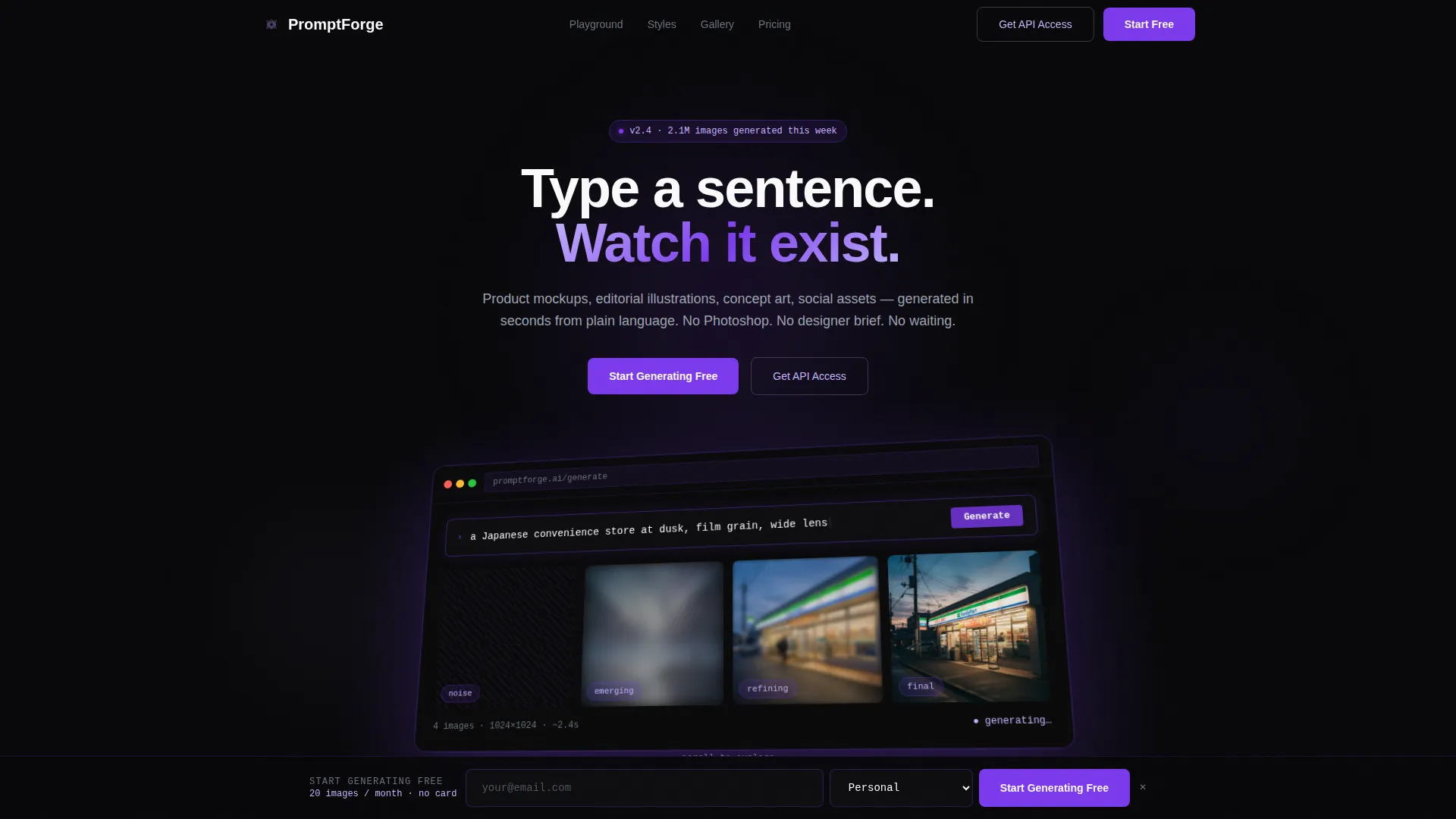
- An isometric dashboard header showing the generator mid-render with four diffusion-stage image tiles
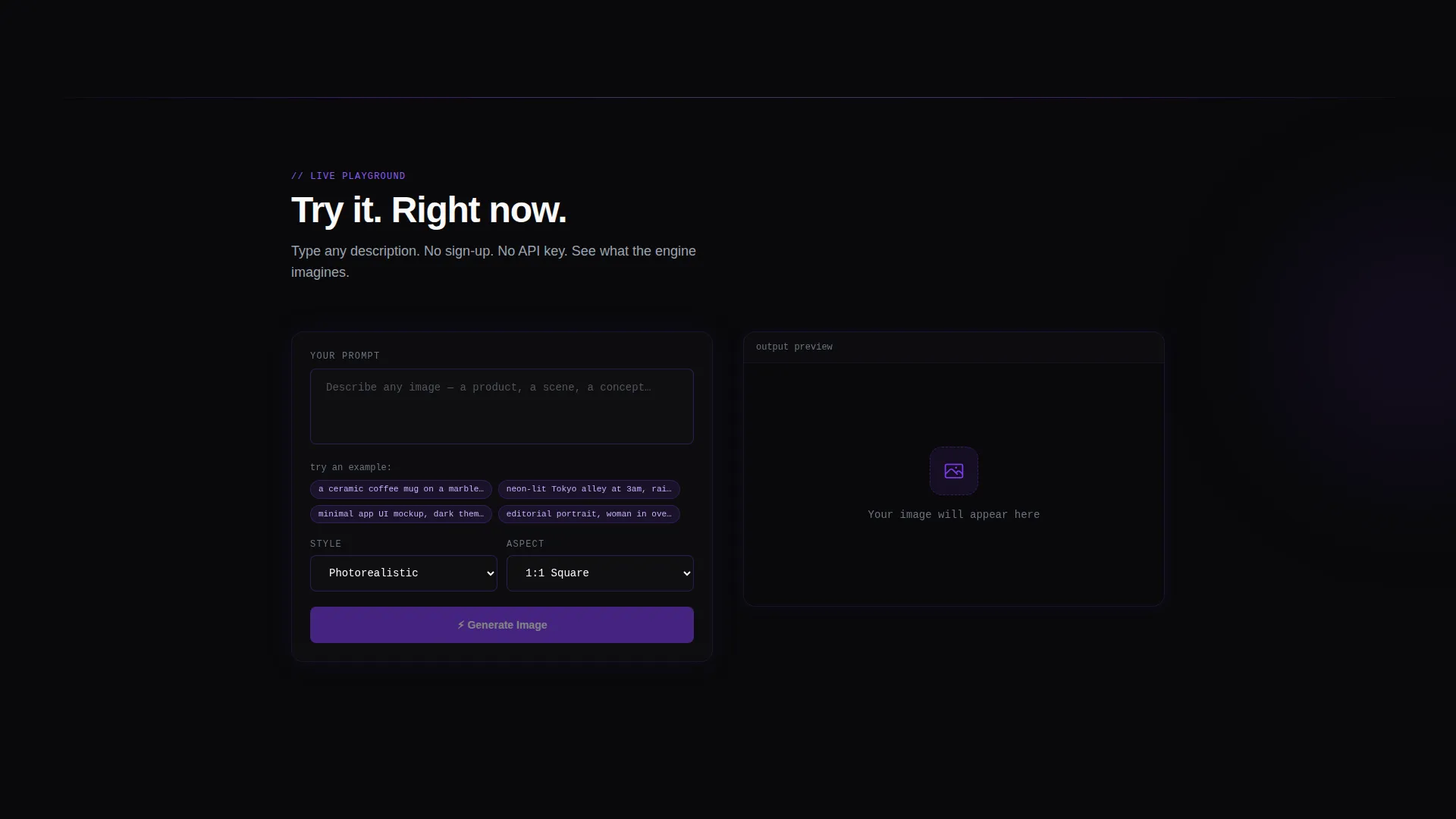
- A live in-browser prompt playground with an inline call-to-action that appears after the preview renders
- A sticky sign-up bar, style preset grid, aspect-ratio calculator, cost-per-image slider, and community gallery wall
Feature list
This template includes a focused set of purpose-built sections and interactive components. Each one is designed to communicate capability through demonstration rather than description.
Isometric Dashboard Header
The header places a pixel-perfect recreation of the generator interface in isometric perspective against a void-black background. The prompt bar shows mid-type text with a blinking cursor, and four image tiles display the diffusion process from pure noise to final render. A subtle parallax effect pulls the dashboard closer as the visitor begins to scroll.
Live Prompt Playground
Immediately below the header, visitors can type a plain-text description and watch a low-resolution preview generate directly in the browser. No account is required. The inline "Start Generating Free" button appears only after the preview renders, tying the call-to-action to a real moment of delivered value.
Style Preset Directory Grid
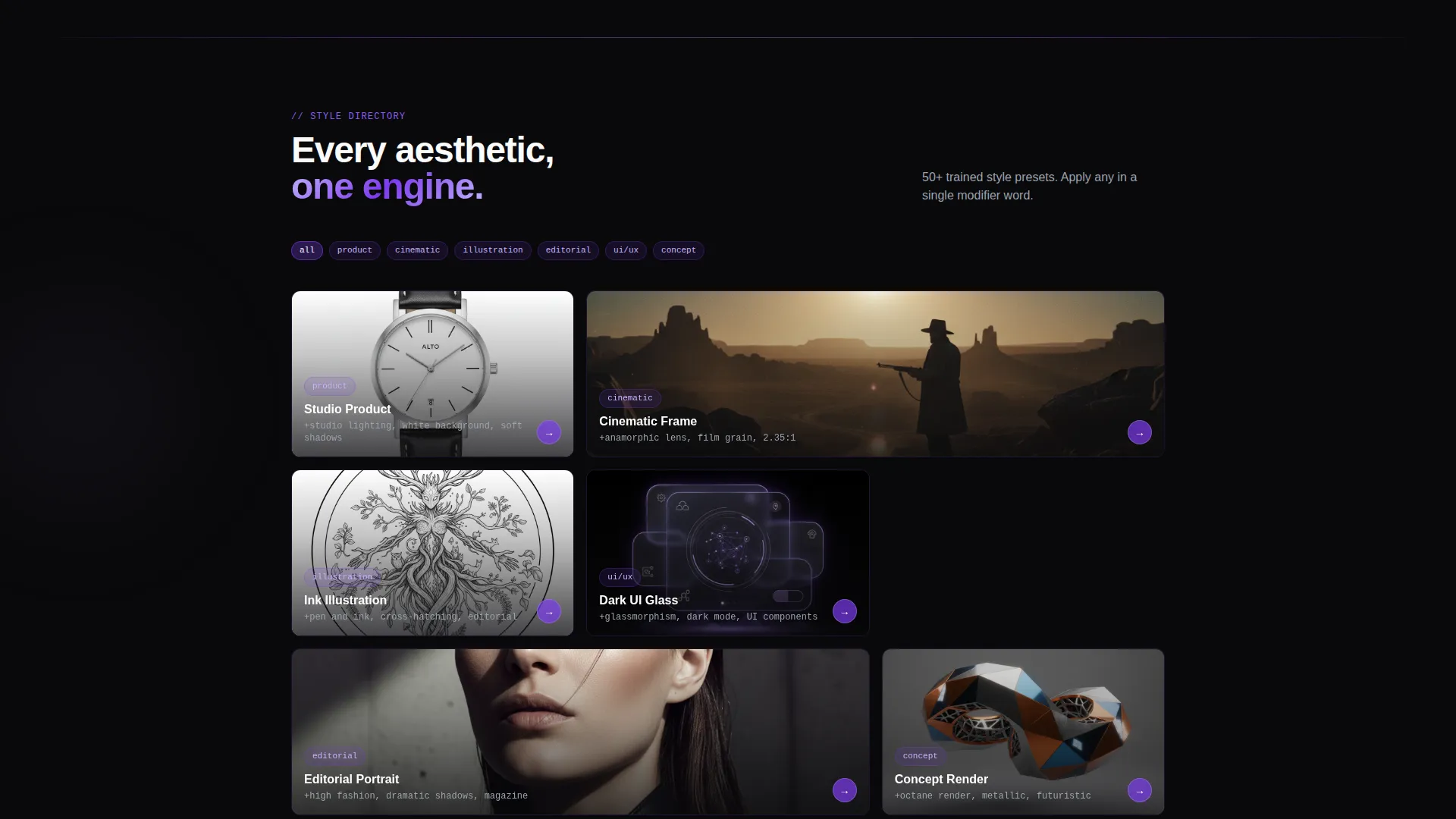
A filterable grid displays the generator's available style presets in a directory-style layout. Visitors can explore categories such as editorial illustration, concept art, and product mockup before committing. The layout reinforces the Directory and Discovery theme of the template.
Aspect-Ratio Calculator
This interactive section lets visitors select output dimensions and see how the final image will be framed in real time. It answers a practical question buyers ask early: will this tool produce the right format for my use case?
Cost-Per-Image Comparison Slider
A slider compares the cost of generating images using API credits against the equivalent spend on a stock photo subscription. The comparison is interactive and adjusts as the visitor moves the slider, making the value proposition concrete rather than abstract.
Community Gallery Wall
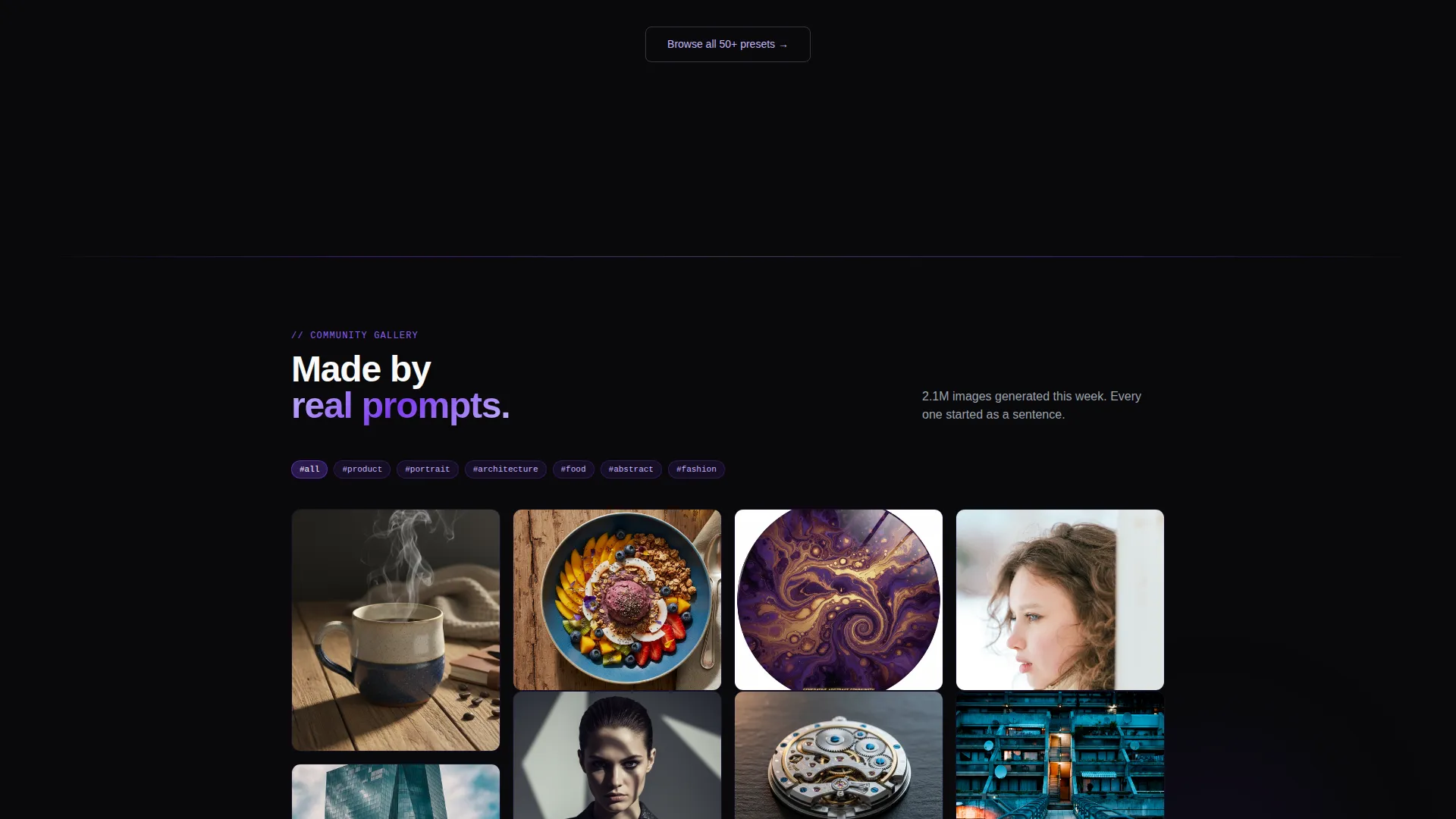
A curated gallery of community-generated images is organized by category tags and loads progressively as the visitor scrolls. It demonstrates creative range and builds social proof without requiring testimonials or written reviews.
Page sections overview
| Section | Purpose |
|---|---|
| Dashboard Preview Header | Show the tool mid-render before any copy loads |
| Live Prompt Playground | Let visitors experience generation without signing up |
| Style Preset Grid | Browse output styles in a filterable directory layout |
| Aspect-Ratio Calculator | Visualize output dimensions interactively |
| Cost Comparison Slider | Compare API credit cost to stock photo pricing |
| Community Gallery Wall | Display generated image range by category tags |
| Sticky Sign-Up Bar | Capture leads after the third scroll section |
| Sign-Up Form | Collect email and intended use case in two fields |
| Developer API Path | Route technical users to a deeper integration brief |
Design & branding system
The visual identity uses a Void and Violet color system. The palette is built around absolute void black as the base, with ultraviolet and lavender layered in progressively as the visitor scrolls deeper into the page.
- Core palette: void black (#09090B), deep ultraviolet (#7C3AED), spectral lavender (#C4B5FD), and interface white (#FAFAFA) for text and input fields
- Cards and containers carry a faint violet border that activates on hover, while primary action buttons burn in full ultraviolet against the dark background
- The overall aesthetic references a powered-down monitor slowly waking with bioluminescent light, with each section introducing more violet glow
Mobile & speed optimization
The scroll-reveal structure loads each section only when the visitor reaches it. This progressive loading pattern supports the designed experience of the page rendering itself into existence as the user scrolls.
- Sections load on demand as the viewport reaches them, keeping the initial page weight low
- The sticky sign-up bar materializes after the third scroll section, adapting naturally to both mobile and desktop viewports
- The two-field sign-up form is minimal by design, reducing input friction on smaller touch screens
How this template helps you convert
The conversion strategy is built on demonstrated value before any ask. Each section moves the visitor one step closer to signing up by showing them something real.
- The live prompt playground delivers a genuine product moment before the call-to-action appears, so the "Start Generating Free" button feels earned rather than pushed
- The sticky sign-up bar appears only after three sections of engagement, targeting visitors who have already invested attention in the page
- A secondary "Get API Access" path routes developers to a technical brief, capturing a second audience segment without diluting the primary lead-generation flow
Other information about this template
This template is categorized under Technology, specifically within the AI and Machine Learning subcategory, with a niche focus on AI image generation. It is built on the Scroll Reveal (Progressive) template style and follows the Directory and Discovery theme with a Calculator and Tool First creative direction.
- The header concept is a Dashboard Preview, a pattern suited to tools where showing the interface is more persuasive than describing it
- The landing page direction is Lead Generation, optimized for email capture with minimal form friction using only two fields: email and intended use case
- The intended use case field offers three options: personal use, commercial use, and API integration, helping the product team qualify leads at the point of capture
Theme
Directory & Discovery
Creative direction
Calculator/Tool First
Color system
Void & Violet
Style
Scroll Reveal (Progressive)
Direction
Lead Generation
Page Sections
Isometric Dashboard Preview Header
No-sign-up Prompt Playground
Filterable Style Preset Grid
Interactive Aspect-ratio Calculator
Cost-per-image Comparison Slider
Progressive Scroll-reveal Layout
Related questions
Who is this landing page template designed for?
Does the prompt playground require a back-end connection to work?
Can I update the color system to match my own brand?
What does the sign-up form collect?
Is this template suitable for a developer-focused product launch?



