Pledge - High-Impact Donation Landing Page Template
Pledge is a dark-mode donation landing page template built for technical teams who need to embed giving into their product fast. It uses a Problem→Solution Arc, a live stats header, and a glowing comparison table to show why building in-house is the wrong call. One click drops visitors straight into a live sandbox, no form, no friction.
by Rocket studio
Quick summary
Pledge is a single-page donation engine template designed for developer-led teams. It opens with a live metrics wall, moves through a blunt pain-point section, pivots into a feature comparison table, and closes with a direct sandbox call to action. The Acid Digital color system makes every section feel like a real-time dashboard that only moves in one direction: up.
Who this template is for
This template is built for product and commercial teams who need to ship a giving feature quickly, without rebuilding payment infrastructure from scratch.
- SaaS founders adding social impact to close enterprise deals before a board cycle
- E-commerce directors who need a credible corporate social responsibility story ahead of a quarterly review
- Fintech product managers integrating round-up donations into existing payment flows on a tight sprint timeline
What problem this template solves
Building donation functionality in-house is slow, expensive, and full of compliance dead ends. Most teams underestimate what it takes until they are already three sprints behind.
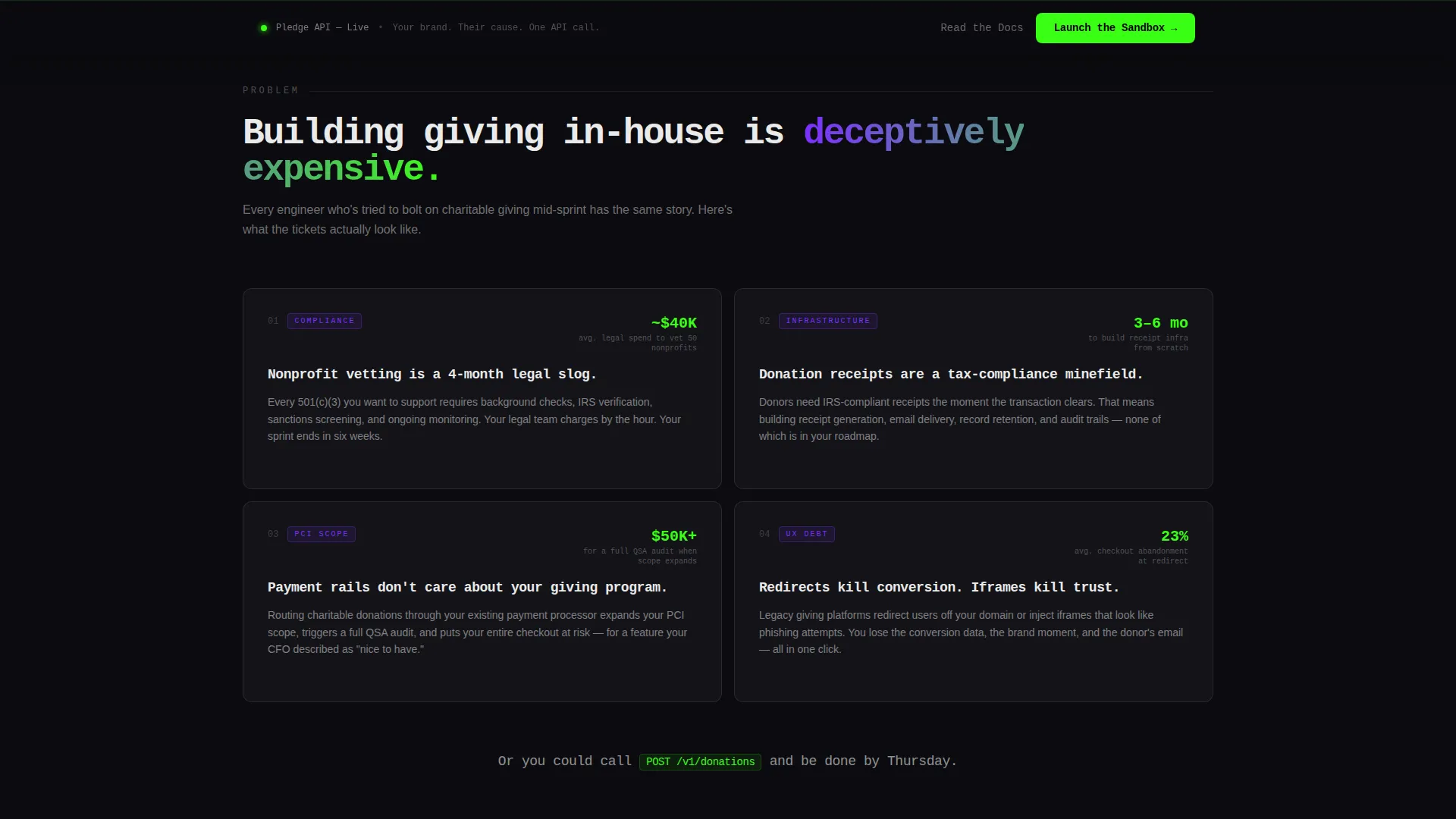
- Compliance and nonprofit vetting take months that most roadmaps do not have
- Donation receipt infrastructure is unglamorous work that no engineering team volunteers for
- Legacy charity platforms impose redirects and broken user experiences that kill checkout conversion
What you get with this template
This template gives you a complete, conversion-focused landing page ready to customize for your white-label donation platform. Every section is pre-built and logically sequenced to move a skeptical technical buyer from problem awareness to sandbox trial.
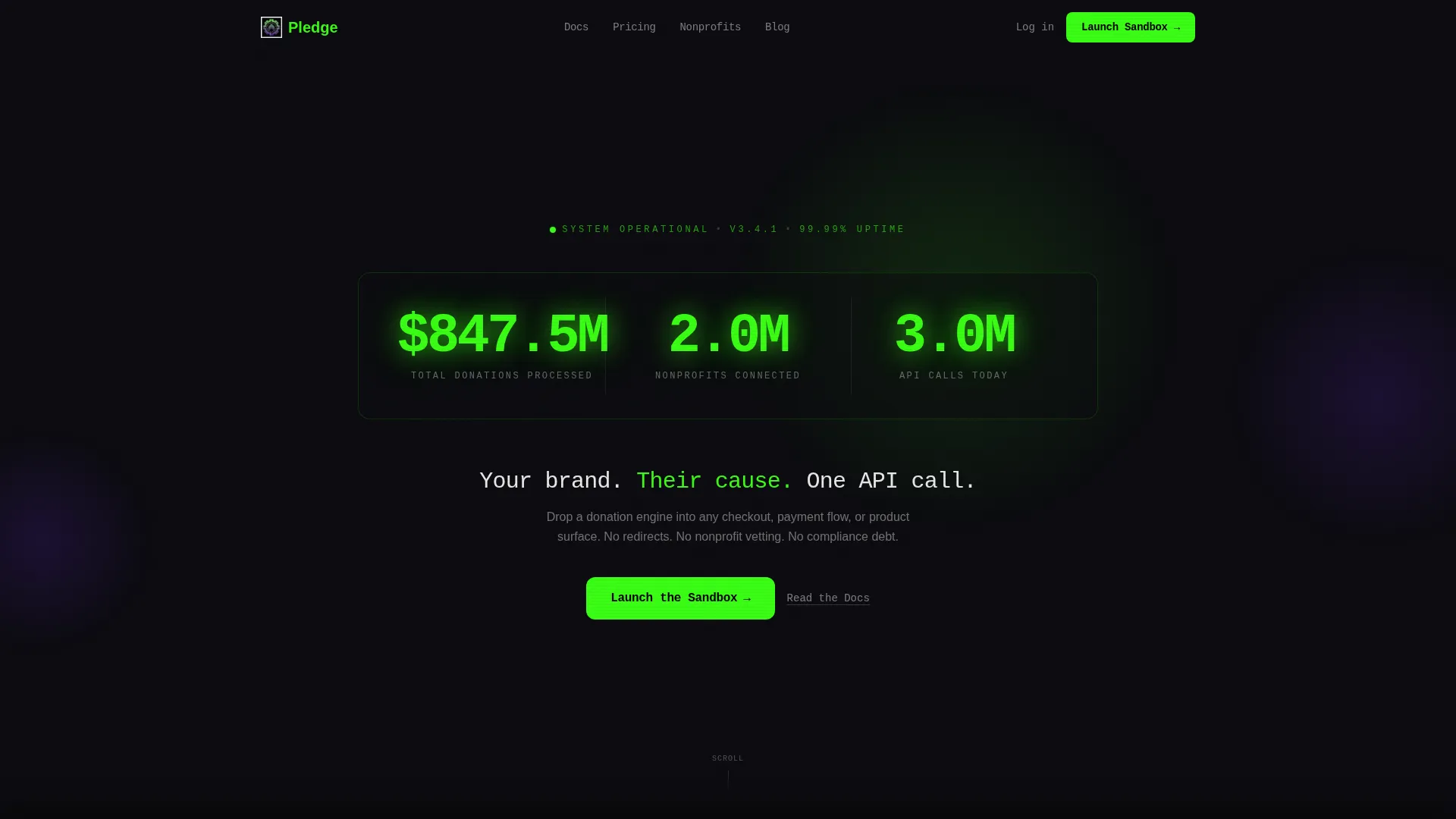
- A live-scrolling stats header with three animated counters covering donations processed, nonprofits connected, and application programming interface calls handled
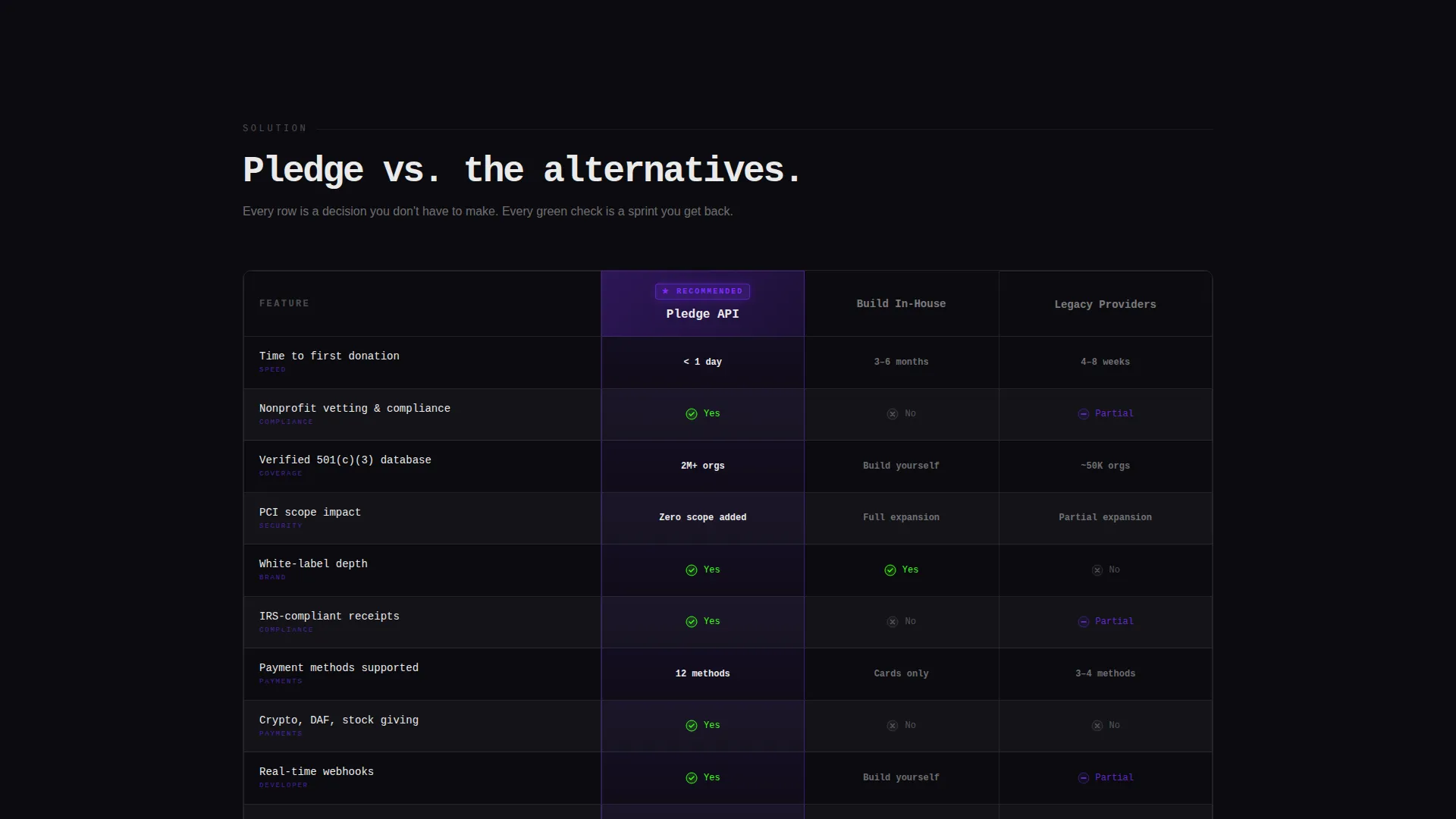
- A side-by-side comparison table stacking your platform against in-house builds and legacy providers across rows like integration time, charity network size, payment card industry scope, and white-label depth
- A sticky bottom bar and a post-table primary call to action both pointing to the same sandbox environment
Feature list
This template ships with six purposeful components, each earning its place in the conversion arc.
Live Stats Header Wall
Three monospaced counters tick upward in terminal green against a void black background. They show total donations processed, nonprofits connected, and application programming interface calls handled today. The numbers flicker softly like a stock ticker, making the platform's scale feel immediate and real.
Problem Section with Honest Copy
The first scroll section lays out integration pain in direct, developer-honest language. Compliance nightmares, vetting timelines, and receipt infrastructure all land as separate, weighted pain points before the page pivots. No softening, no marketing spin, just the cost of building it yourself.
Glowing Comparison Table
The comparison table is the commercial heart of the page. The recommended column header glows in ultraviolet, and rows alternate between pure black and a barely-there charcoal to keep the eye moving. Integration time, charity network size, payment card industry scope, and white-label depth are all stacked for a direct side-by-side read.
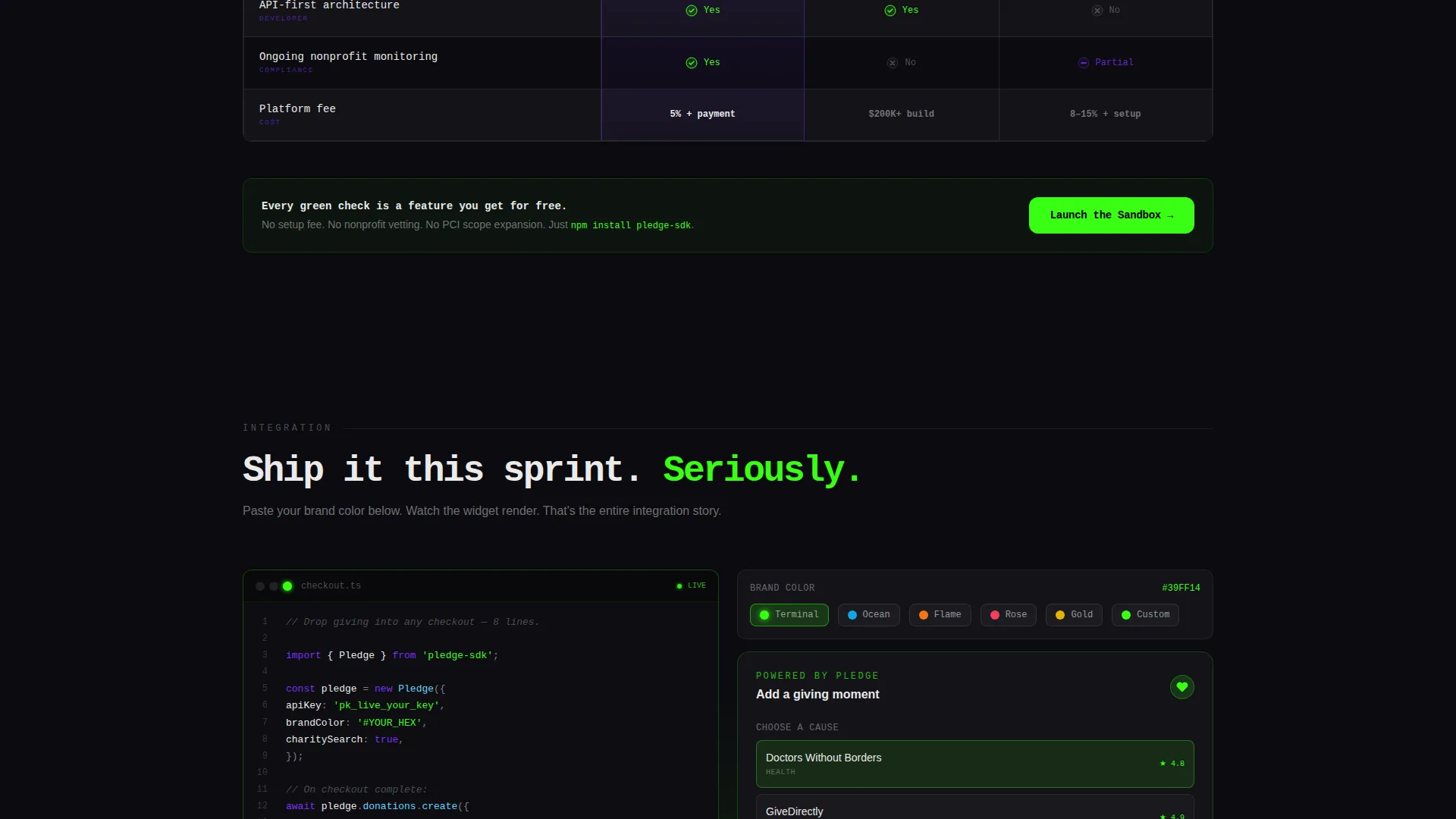
Live Sandbox Color Preview
Below the comparison table, visitors can paste a brand color and watch a donation widget render in real time. This interactive moment removes the "will it fit our brand?" objection before it is ever spoken out loud.
Integration Snippet Display
Code snippets sit alongside the sandbox preview to show exactly how the platform drops into an existing checkout flow. Technical buyers see endpoints before they ever click a call to action, which dramatically shortens evaluation time.
Sticky Sandbox Call to Action Bar
A bottom bar follows the visitor on scroll, always surfacing the primary "Launch the Sandbox" action in acid green. A secondary "Read the Docs" text link sits beside it for buyers who want reference material before a live demo.
Page sections overview
| Section | Purpose |
|---|---|
| Live Stats Header | Show real-time scale with three animated counters |
| Pain Point Section | Surface integration costs in blunt developer language |
| Comparison Table | Stack platform against alternatives across key criteria |
| Sandbox Color Preview | Let visitors render a branded widget live |
| Integration Snippets | Give technical buyers endpoint context before the click |
| Primary call to action Block | Drive clicks to the sandbox after the comparison arc |
| Sticky Bottom Bar | Repeat sandbox and docs links throughout the scroll |
Design & branding system
The visual identity follows a Startup Velocity theme rendered through an Acid Digital color system. Every color choice has a job: void black holds backgrounds, terminal green owns positive signals and call to action surfaces, and ultraviolet marks the recommended column like a stage spotlight.
- Core palette: void black (#0B0B0F) for backgrounds, terminal green (#39FF14) for counters and calls to action, ultraviolet (#7B2FFF) for the recommended highlight, and interface white (#EAEAEA) for body text and table borders
- Table rows alternate between pure black and charcoal (#131318) so the comparison grid stays readable without breaking the dark-mode feel
- Typography uses a monospaced style in the header to reinforce the real-time dashboard aesthetic throughout the page
Mobile & speed optimization
The layout is built to carry the dark-mode dashboard feel cleanly across screen sizes. The stats wall, comparison table, and sticky call to action bar are all designed to remain legible and functional on smaller viewports.
- The comparison table is structured for horizontal scroll on mobile so no data column is hidden or truncated
- The sticky bottom bar anchors consistently at the base of the screen regardless of device width, keeping the sandbox action always within thumb reach
How this template helps you convert
Every design and copy decision in this template is aimed at one outcome: getting a skeptical technical buyer to click "Launch the Sandbox" before doubt can form.
- The live stats header establishes platform credibility in the first three seconds, before a visitor reads a single line of body copy.
- The Problem→Solution Arc earns trust by naming the real cost of alternatives honestly, so the comparison table lands as a logical conclusion rather than a sales pitch.
- The real-time sandbox color preview closes the final objection by letting visitors experience the product before they commit to a demo call or a signup form.
Other information about this template
This template is categorized under Technology and the Consumer App and Platform subcategory, with a niche focus on white-label charity and donation platforms. It is designed as a click-through landing page, meaning there is no on-page form, the entire page funnels toward a single sandbox interaction.
- The template is built for teams who move fast: the six-week sprint timeline referenced in the brief reflects how the layout prioritizes speed-to-decision over depth of explanation
- The page type is a single-page landing page, not a multi-page website, so every section feeds sequentially into the next without navigation menus or branching paths
- The "Read the Docs" secondary link is included by design to serve technical buyers who evaluate endpoints before experiences, reducing drop-off among engineering decision makers
Theme
Startup Velocity
Creative direction
Problem→Solution Arc
Color system
Acid Digital
Style
Comparison Table
Direction
Click-Through
Page Sections
Live Animated Stats Header
Honest Problem Framing Section
Ultraviolet Comparison Table
Real-time Brand Color Preview
Inline Integration Snippets
Sticky Sandbox Call to Action Bar
Related questions
Does this template include an actual working donation integration?
Can I change the color palette to match my own brand?
Is there a signup form anywhere on this landing page?
Who does the comparison table measure the platform against?
Can the sticky call to action bar be hidden on certain screen sizes?



