Data & Analytics Professional Website Template
Pixel is a split-screen landing page template built for web analytics and attribution platforms. It pairs animated data visuals with a dark, high-contrast design system to show exactly where conversions come from. Designed for performance marketers and growth teams, it drives visitors toward a free interactive demo without a single form field.
by Rocket studio
Quick summary
Pixel is a single-page, split-screen landing page template for attribution and web analytics platforms. It uses a dark Acid Digital color system, animated metric panels, and a Stats-First content flow to make multi-touch attribution feel immediate and credible. Every section is built to move growth-minded visitors toward one action: exploring the demo.
Who this template is for
This template is built for teams that need to justify marketing spend with real data, not gut instinct. It speaks directly to people who live inside campaign dashboards and report up to leadership.
- Growth leads at early-stage startups who are scaling paid channels and need clearer attribution signals
- Performance marketers managing multiple campaign sources across UTM-tagged traffic
- Chief Marketing Officers preparing board-level spend reviews who need proof, not approximations
What problem this template solves
Marketing teams waste budget when they cannot trace a conversion back to its origin. The cost compounds when multiple channels are running simultaneously and each claims credit. This template addresses that credibility gap head-on.
- No clear connection between ad spend and revenue, making budget decisions feel like guesswork
- Multi-touch attribution models are hard to explain to non-technical stakeholders without a visual anchor
- Analysts lose trust in platforms that lead with forms before proving their value
What you get with this template
You get a fully structured, single-page layout that pairs live-feel data visuals with persuasive conversion copy. Every section is designed to escalate the stakes and guide visitors toward the interactive demo.
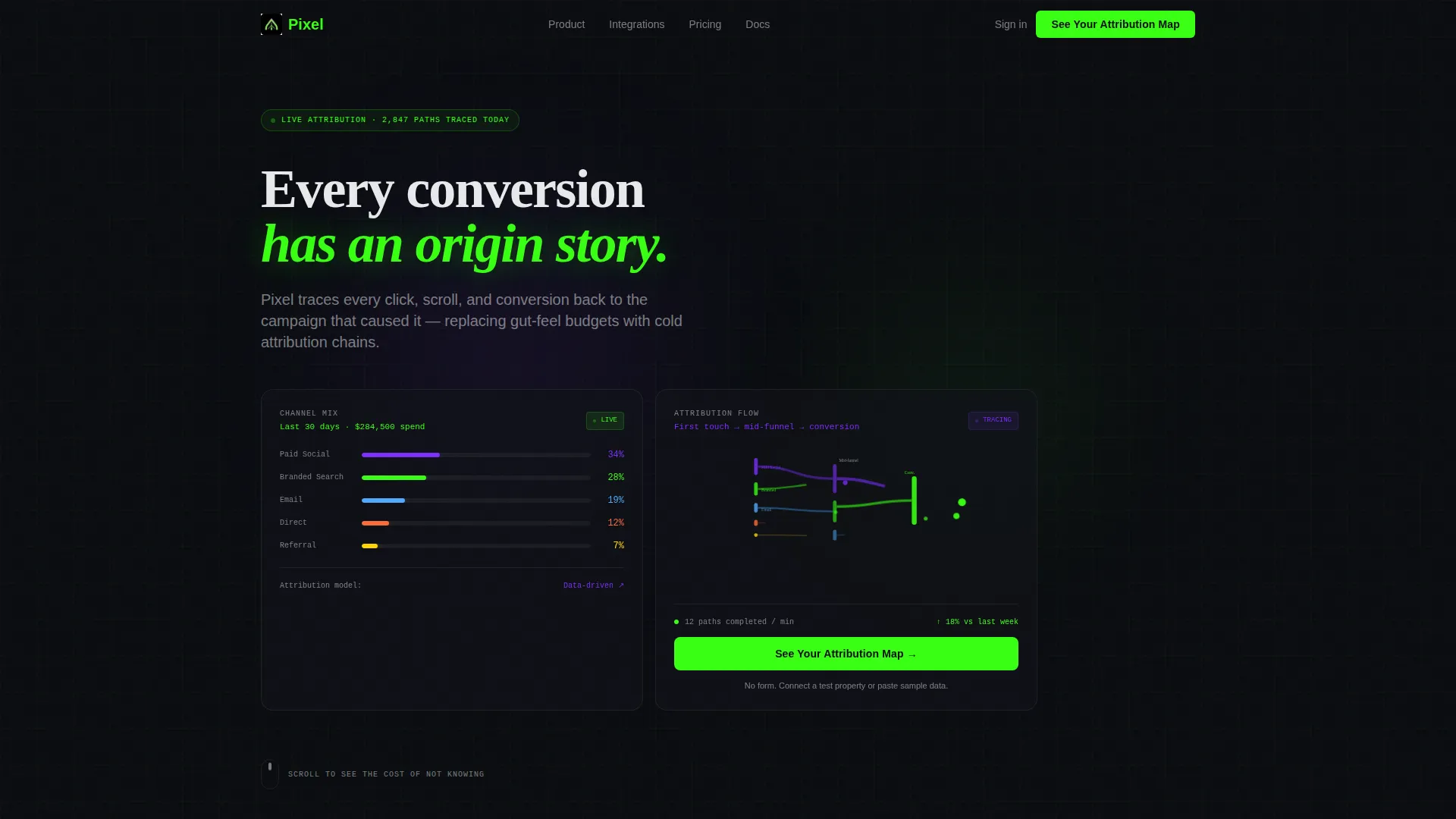
- A 50/50 split-screen layout with two frosted Dark Glass Panel header cards showing real-time metric clusters
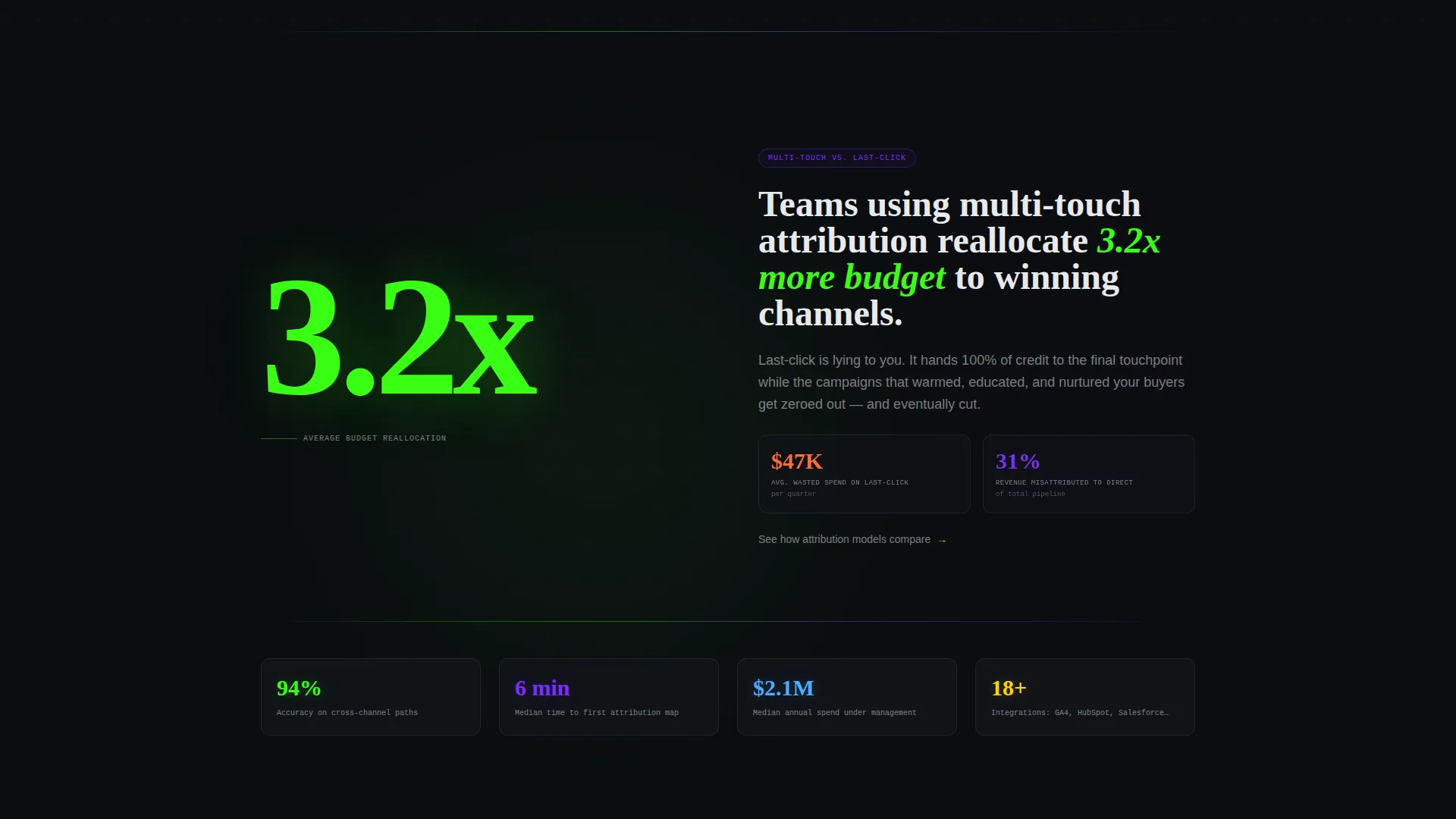
- A Stats-First scroll cadence where oversized statistics open each section before context is revealed
- A sticky bottom call-to-action bar that anchors after the second scroll, keeping the primary action always visible
Feature list
This template includes a purposeful set of visual and structural components, each grounded in what attribution buyers need to see before they trust a platform.
Animated Channel Mix Panel
The left header panel displays a live-feel channel breakdown with animated bar segments ticking upward. Paid Social, Branded Search, Email, Direct, and Referral are shown with percentage values that feel like a real-time feed, not a static graphic.
Sankey-Style Attribution Flow Panel
The right header panel renders a Sankey-inspired flow diagram where colored threads braid from first touch through mid-funnel to conversion. Nodes pulse softly in phosphor green each time a path completes, making attribution chains feel tangible.
Stats-First Section Cadence
Each content section opens with a single oversized statistic on the left half of the split screen. The right half then unfolds the context, creating a reveal rhythm that builds curiosity and keeps readers scrolling.
Toggleable Attribution Model Display
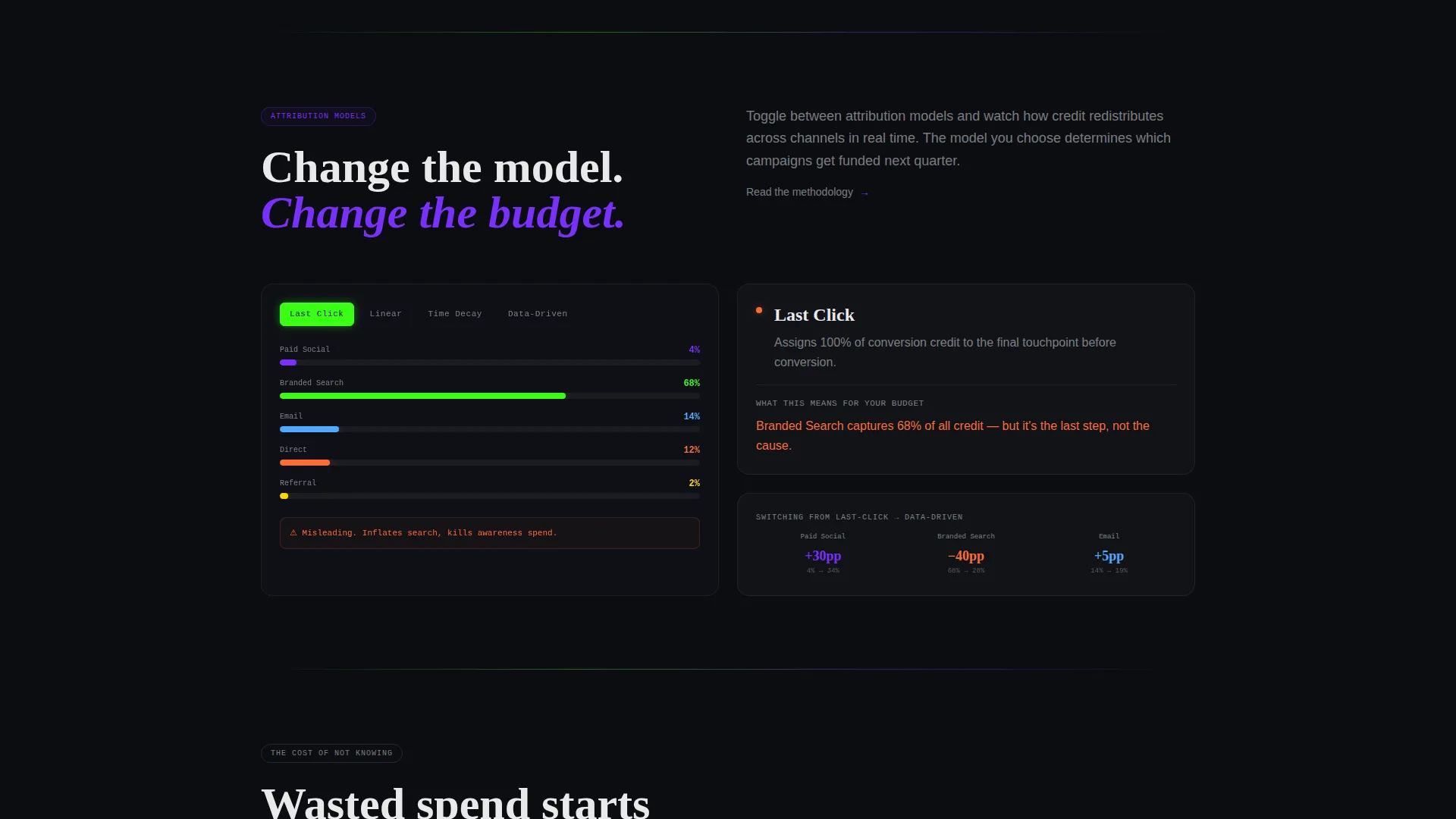
A simulated dashboard section presents four switchable attribution models: last-click, linear, time-decay, and data-driven. The right panel narrates what changes across each model and why the difference matters to budget decisions.
Sticky Demo Call-to-Action Bar
After the second scroll, a bottom bar locks into place carrying the primary call to action. It stays visible throughout the rest of the page, reducing friction for visitors who decide to act at any point.
Secondary Analyst Escape Hatch
A plain text link reading "Read the methodology" sits alongside the primary call to action. It routes skeptical analysts to deeper technical content without disrupting the main conversion flow.
Page sections overview
| Section | Purpose |
|---|---|
| Dark Glass Header | Display two live metric panels with headline copy |
| Channel Mix Panel | Show animated paid channel breakdown by percentage |
| Attribution Flow Panel | Visualize multi-touch paths from first touch to conversion |
| Stats-First Block One | Open with "3.2x" statistic and budget reallocation context |
| Dashboard Toggle Section | Let visitors switch between four attribution models |
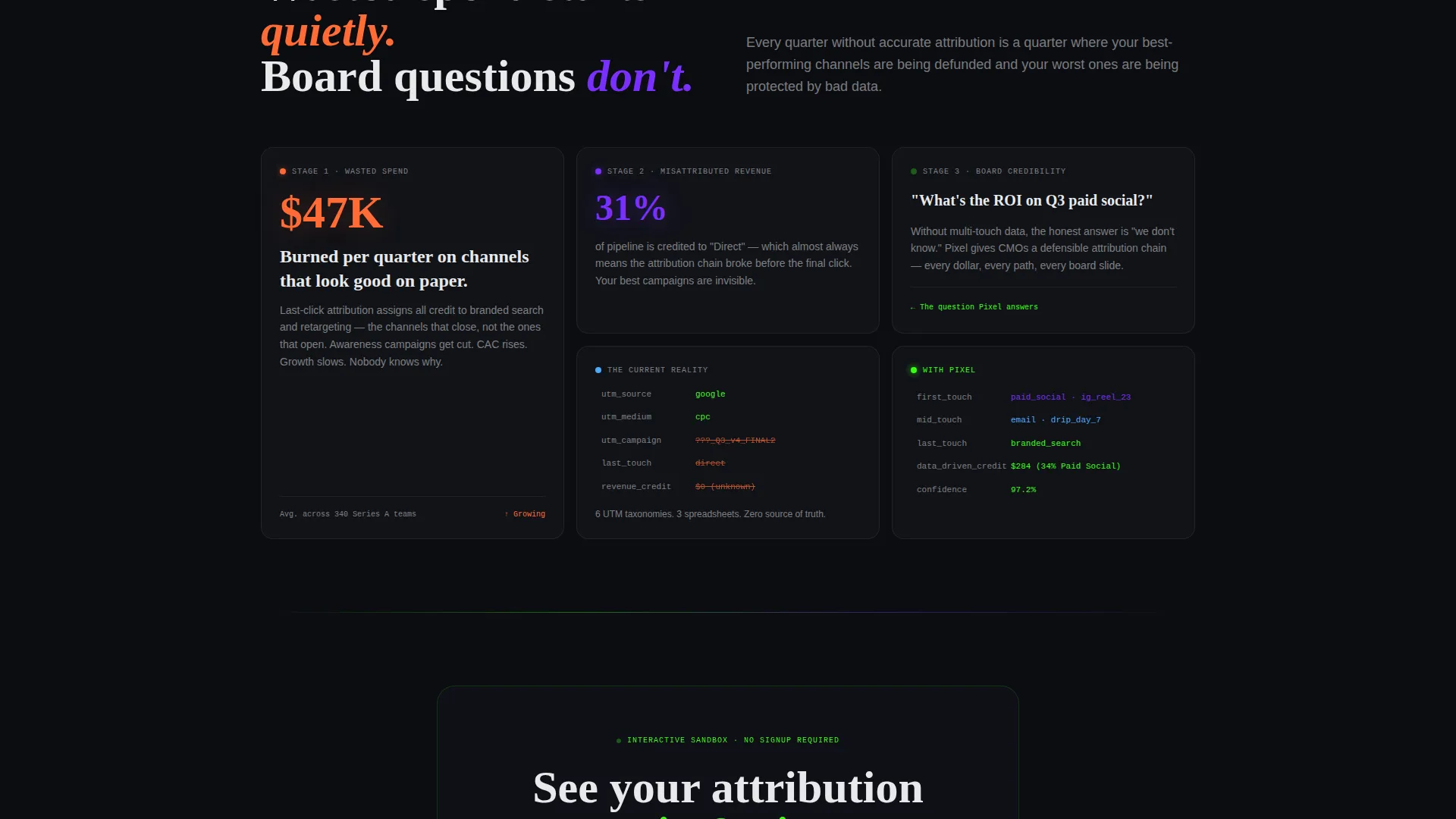
| Stakes Escalation Section | Escalate cost of misattribution from spend to board credibility |
| Sticky call to action Bar | Anchor primary demo call to action after second scroll |
Design & branding system
The visual identity follows a Startup Velocity theme built on the Acid Digital color system. The palette is designed to feel like a terminal window: dark enough that data glows, with every accent color carrying clear meaning.
- Void black (#0B0D11) fills all backgrounds; phosphor green (#39FF14) marks live data, conversion events, and primary calls to action; ultraviolet (#7B2FFF) traces attribution paths and hover states; signal white (#E8E9EB) carries body text
- Typography stays in signal white for warmth and readability against dark backgrounds, avoiding the sterile feel of pure white
- Frosted, semi-transparent Dark Glass Panel cards float over the pure black field, giving depth without decoration
Mobile & speed optimization
The split-screen layout is structured to reflow cleanly at smaller breakpoints, keeping the data panels readable and the sticky call-to-action bar functional on touch screens.
- The 50/50 split columns stack vertically on mobile so metric panels and narrative copy each get full-width treatment
- Animated elements such as bar segments and pulsing nodes are scoped to visual regions, keeping layout reflow predictable
- The sticky bottom bar remains anchored on mobile, ensuring the primary call to action is never more than a scroll away
How this template helps you convert
The page is designed as a Click-Through landing page with one destination: the free interactive demo. Every structural decision reduces the distance between arrival and action.
- The header places the primary call to action "See Your Attribution Map" inside the right panel immediately on page load, so visitors encounter it before they scroll
- The Stats-First cadence builds progressive urgency by opening each section with a hard number, making the cost of inaction concrete before the explanation arrives
- The sticky bottom bar reintroduces the call to action after each scroll depth, so late-converting visitors never have to hunt for where to go next
Other information about this template
This template is built within the Technology category under the Data and Analytics subcategory, targeting the Web Analytics and Attribution niche. It is designed for a Click-Through conversion pattern with no form fields on the page itself.
- The primary call to action routes visitors to a sandbox environment where they can paste a sample dataset or connect a test property, lowering the commitment barrier before any sign-up
- The "Read the methodology" secondary link provides an exit path for detail-oriented buyers without competing with the main conversion goal
- The template uses an Intersection Match Score of 13, reflecting a tight alignment between the Startup Velocity theme, Acid Digital color system, Stats-First creative direction, and the attribution platform use case
- No hero image or illustration is used in the header; the animated data panels serve as the visual anchor, reinforcing the platform's core value proposition through the design itself
Theme
Startup Velocity
Creative direction
Stats-First Impact
Color system
Acid Digital
Style
Split Screen (50/50)
Direction
Click-Through
Page Sections
Animated Channel Mix Breakdown
Sankey-style Attribution Flow
Stats-first Scroll Cadence
Toggleable Attribution Models
Sticky Bottom Call to Action Bar
Analyst-focused Secondary Link
Related questions
Does this template include a sign-up form?
Can I change the attribution model labels in the dashboard section?
How does the sticky call-to-action bar behave on scroll?
Is this template suited for a B2B software audience?
Can the animated metric panels be updated with real data?



