Pipeline - Revenuedriven CRM Landing Page Template
Pipeline is a revenue-driven CRM landing page template built for lean sales teams that need a real system fast. It opens with a live, draggable deal board, walks visitors through five anchor-nav sections styled like a competitive intelligence report, and closes with a frictionless single-email download flow. Everything on the page earns the conversion before asking for it.
by Rocket studio
Quick summary
Pipeline is a single-page CRM landing page template designed for SaaS sales tools. It leads with a fully interactive deal board, guides visitors through five anchor-linked sections in an industry report format, and drives app downloads through a no-password, single-email install flow. The template is built for speed, clarity, and credibility.
Who this template is for
This template speaks directly to the people who feel the cost of a broken pipeline every morning. It is built for small but serious sales operations that have outgrown spreadsheets and need something that looks and works like a real product from day one.
- Small sales teams of roughly two to five people who track deals manually and are ready for a structured system
- Series A founders who just brought on their first dedicated sales hire and need a credible CRM presence before the week ends
- Growth-stage sales leaders who are tired of forecasts built on instinct rather than live deal data
What problem this template solves
Most SaaS CRM landing pages ask visitors to trust a product they cannot touch. They show a polished screenshot, list a few bullet points, and then demand a credit card. That gap between claim and proof is where conversions die.
- Visitors have no way to feel the product before committing, so they leave without downloading
- Sales messaging is often generic, leaving small teams unsure whether the tool was built for their situation
- Long sign-up forms create friction at exactly the moment a visitor is ready to act
What you get with this template
You get a complete, ready-to-use landing page layout that doubles as a product demo. Every section is built to move a skeptical visitor from curiosity to confidence to download without a single unnecessary step.
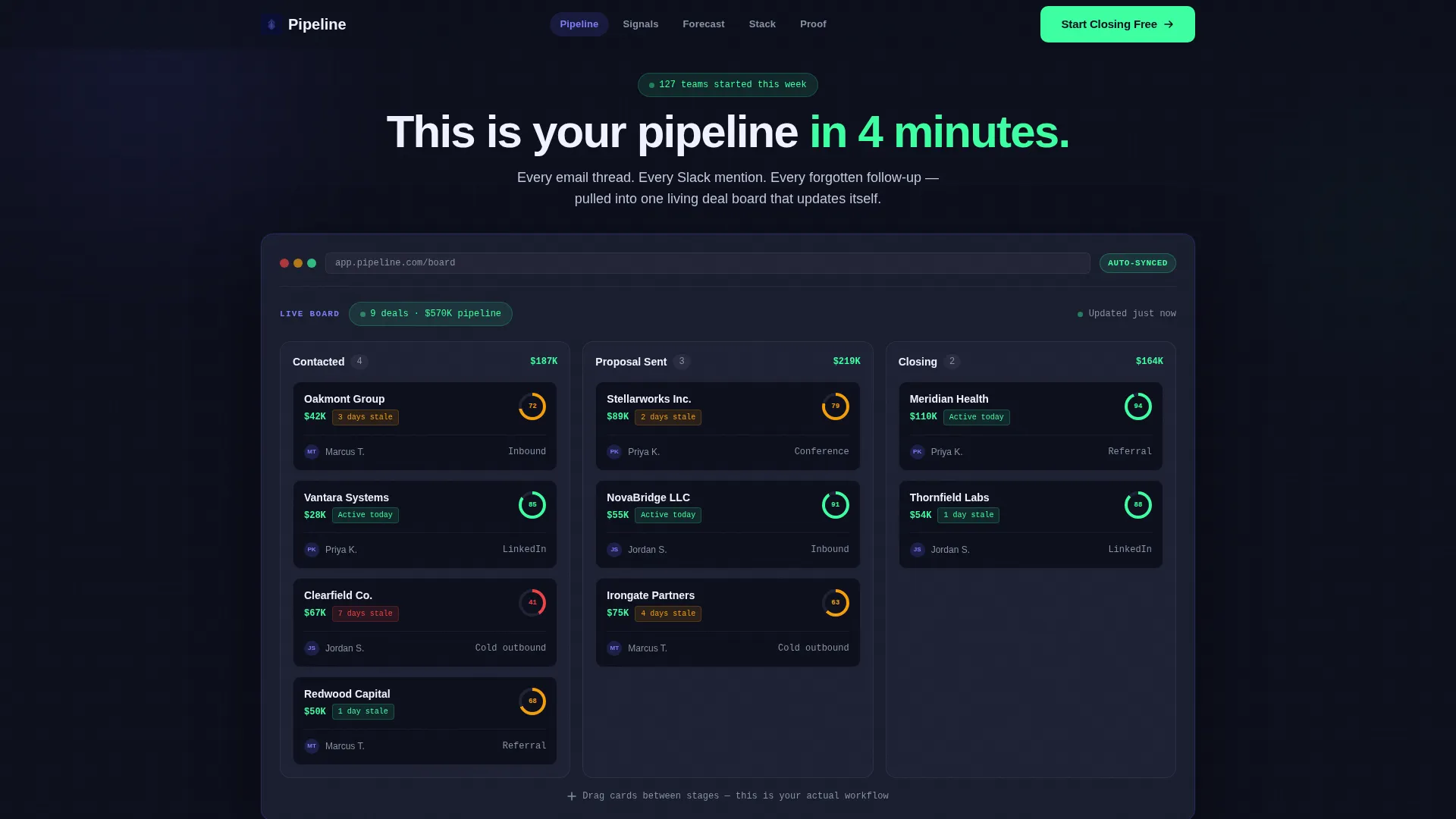
- An interactive deal pipeline board in the header that visitors can drag and explore before reading a single word of copy
- Five anchor-navigated content sections styled as a research report, each opening with a bold data callout and closing with a persistent call-to-action counter
- An inline download module that collects only a work email and delivers a magic link, with no password and no credit card required
Feature list
This section covers the core built-in capabilities that ship with the Pipeline template as described in the source brief.
Draggable Deal Board Header
The header is a fully interactive pipeline board rendered at full fidelity. It shows three columns: Contacted, Proposal Sent, and Closing. Visitors can drag deal cards between stages and hover any card to reveal a mini activity timeline with realistic fictional data.
Hub and Spoke Anchor Navigation
A sticky anchor navigation bar pins to the top of the page with five labeled spokes: Pipeline, Signals, Forecast, Stack, and Proof. This lets visitors jump to the section most relevant to them without losing their place in the page flow.
Industry Report Section Structure
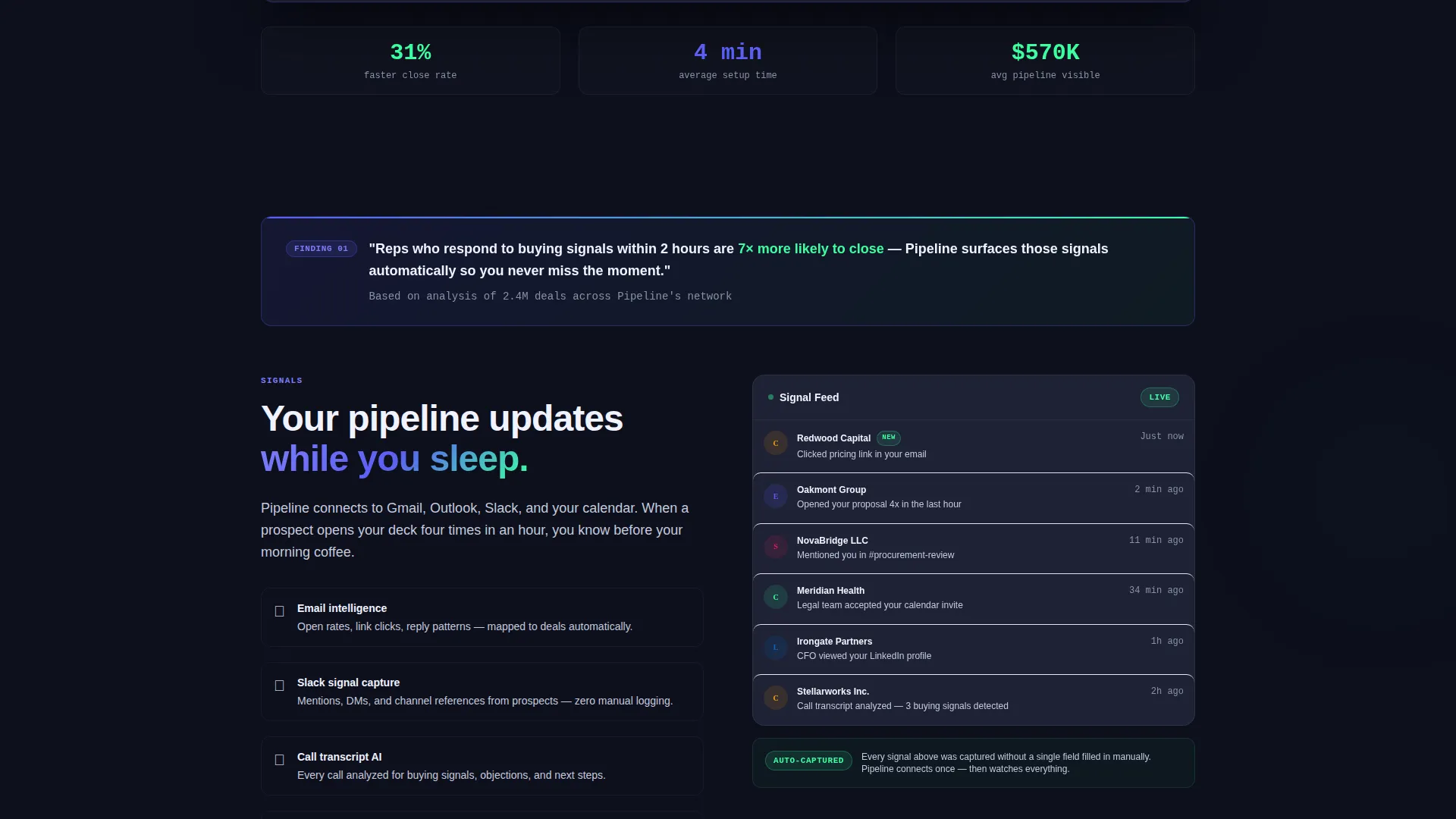
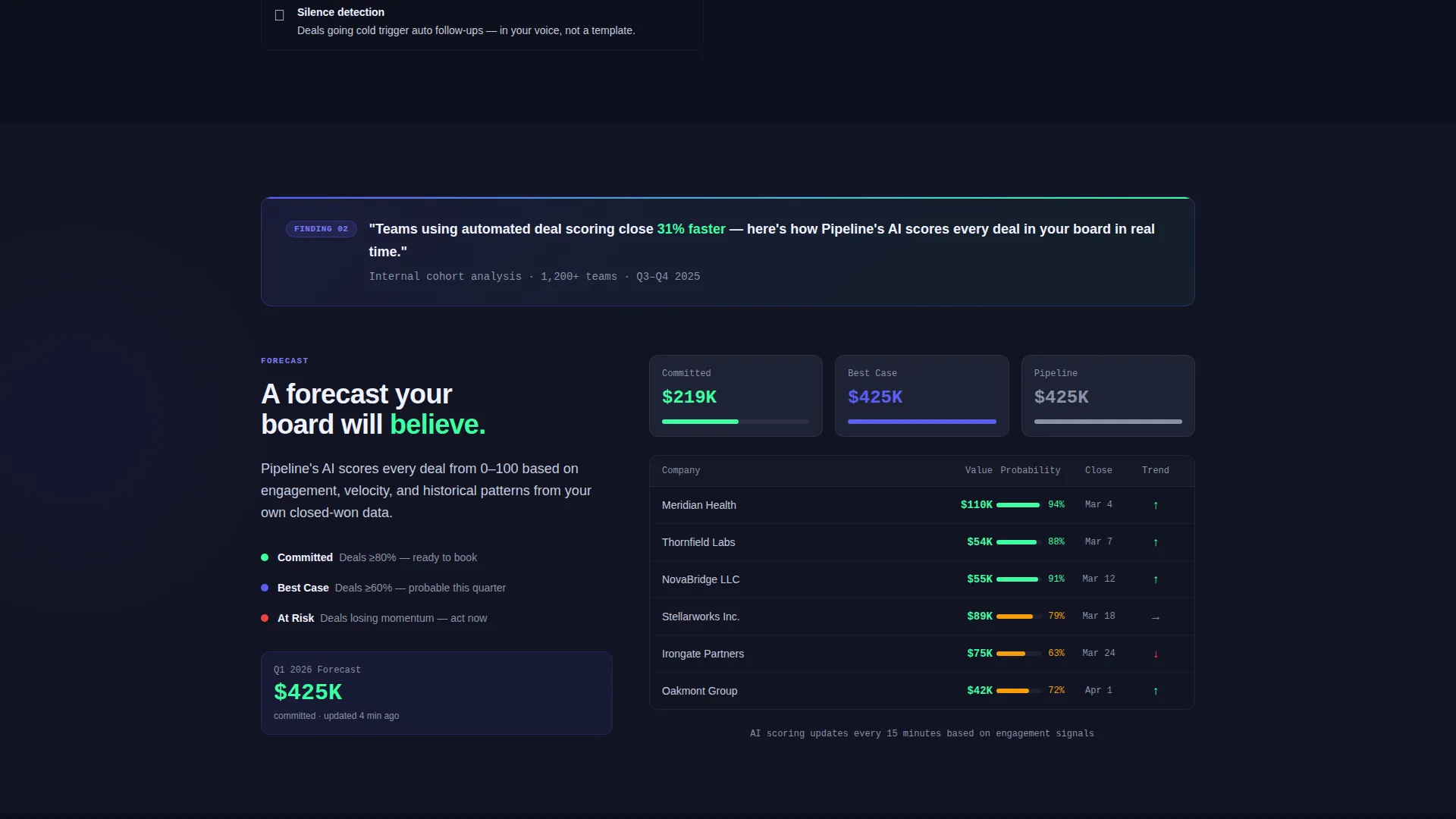
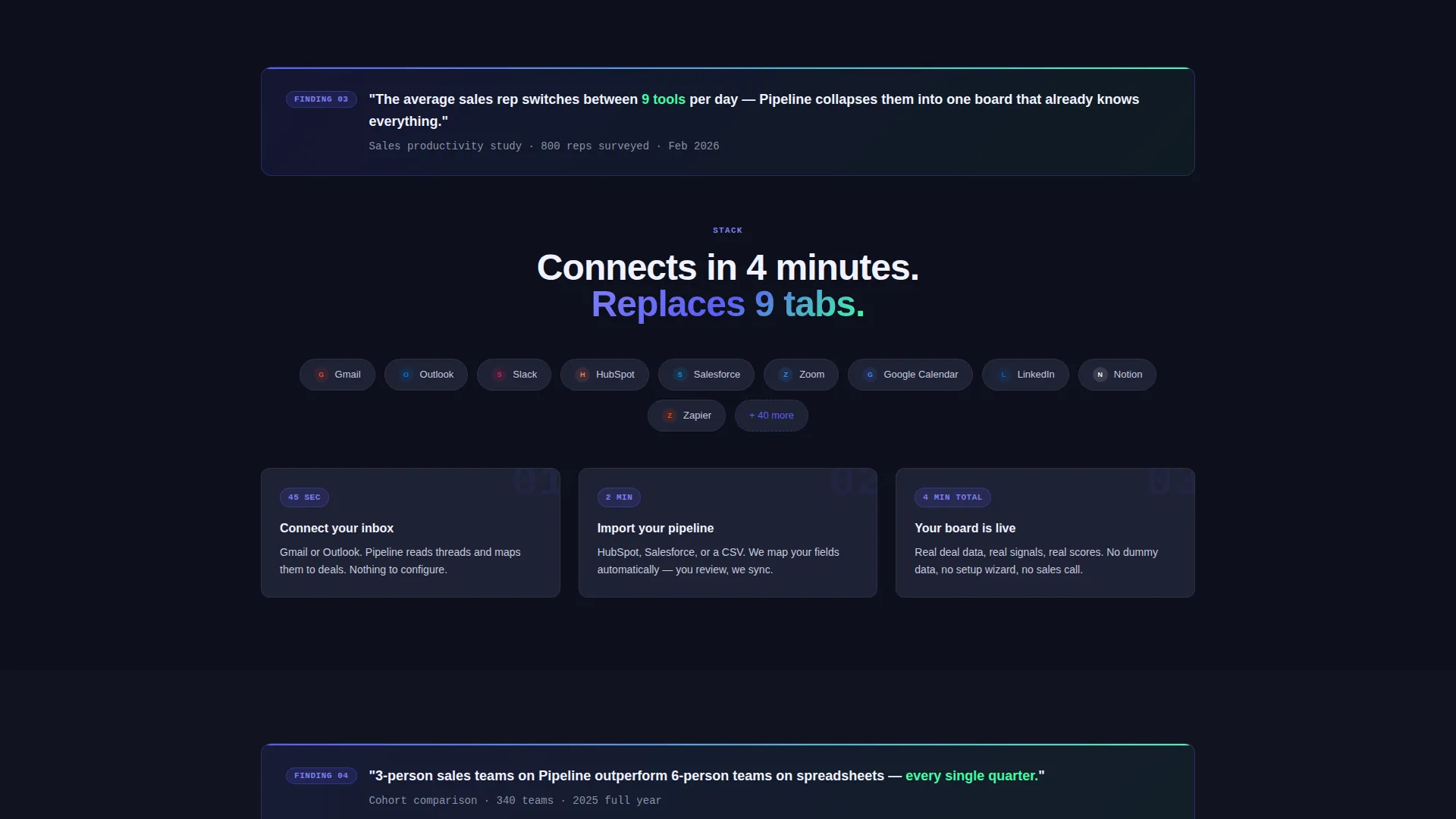
Each of the five anchor sections opens with a bold, research-style data callout before presenting the feature through annotated product screenshots and micro-interactions. The format feels like reading a competitive intelligence brief, which steadily raises the stakes from individual productivity to board-level forecasting.
Persistent Floating Call-to-Action Counter
A floating call-to-action button stays visible as visitors scroll. It displays a live-counting number showing how many teams have downloaded the product today, adding real-time social proof without interrupting the reading flow.
Frictionless Inline Download Module
Clicking the primary call-to-action expands an inline module rather than redirecting to a separate page. Visitors choose their platform, enter a work email, and receive a magic link. There is no password creation and no credit card field.
Guided Data Import Path
A secondary conversion path labeled "See It With Your Data" gives hesitant visitors an alternative entry point. It supports guided import from a connected CRM or a CSV file, reducing the barrier for teams with existing deal data.
Page sections overview
| Section | Purpose |
|---|---|
| Interactive Board Header | Lets visitors drag live deal cards and build immediate trust in the product user interface |
| Pipeline Spoke | Introduces core deal-tracking features through annotated screenshots |
| Signals Spoke | Shows how automated deal scoring surfaces priority opportunities |
| Forecast Spoke | Demonstrates board-level revenue visibility and data-driven forecasting |
| Stack Spoke | Covers how the tool fits into an existing sales workflow |
| Proof Spoke | Delivers social proof and outcome evidence to close remaining doubt |
| Download Module | Converts visitors with a single-email, platform-choice inline install flow |
Design & branding system
The visual identity follows a Startup Velocity theme built on an Electric Indigo color system. The palette is intentionally dark and focused, designed to feel like a professional sales dashboard rather than a marketing brochure.
- Core colors include deep dashboard black (#0D0F1C) for backgrounds, primary indigo (#5B5EF4) for interactive elements, and cool slate (#1E2235) for card surfaces
- Volt green (#3DFFA2) is reserved strictly for positive metrics, active deal states, and call-to-action elements so it carries consistent meaning throughout the page
- The overall aesthetic references a dark-mode development environment, where every color that appears has a specific purpose and earns its presence on screen
Mobile & speed optimization
The template is structured to work cleanly across device sizes without degrading the interactive experience. The layout adapts the desktop-first deal board into a touch-friendly format for smaller screens.
- The primary call-to-action shifts from a floating bottom-right button on desktop to a full-width sticky bar on mobile, keeping it accessible at all scroll depths
- The inline download module is designed to remain functional and compact on smaller viewports, so the single-email install path stays frictionless on any device
How this template helps you convert
The conversion logic in Pipeline is built on a specific sequence: let visitors experience the product, then explain the thinking behind it, then make the next step trivially easy.
- The interactive deal board in the header acts as a live product demo, so visitors arrive at the first line of copy already convinced the interface works
- The industry report format raises the cost of inaction section by section, moving from individual deal loss to missed team targets to inaccurate board forecasts before presenting the download
- The single-email magic link removes every traditional sign-up barrier, so the moment a visitor decides to act, nothing stands between them and the product
Other information about this template
This template is categorized under Technology and specifically within the SaaS Software and SaaS subcategory, targeting the SaaS CRM niche. It was designed with a high intersection match for its theme, creative direction, and conversion goal.
- The template style is Hub and Spoke with anchor navigation, making it suitable for CRM tools that need to address multiple buyer personas in a single scroll experience
- The Industry Report creative direction makes it a strong fit for SaaS products that compete in crowded categories and need to lead with insight rather than features
- Teams migrating from tools like spreadsheets or basic contact managers will find the guided import path particularly useful as a low-friction entry point
- The template supports a secondary conversion path for visitors who want to import existing data before committing, which is especially relevant for teams currently using a separate CRM platform
Theme
Startup Velocity
Creative direction
Industry Report
Color system
Electric Indigo
Style
Hub & Spoke (Anchor Nav)
Direction
App Download
Page Sections
Draggable Interactive Deal Board
Sticky Hub and Spoke Navigation
Industry Report Section Format
Live-counting Floating Call to Action
Single-email Inline Download Flow
Guided Import Secondary Path
Related questions
Can I customize the deal card data in the interactive header?
Does the download module work across different platforms?
What does the anchor navigation include?
What is the 'See It With Your Data' path for?
What kind of sales teams is this template designed for?



