SaaS Email Marketing Booking Website Template
Ping is a glassmorphic SaaS landing page template built for appointment reminder platforms. It features an interactive mock-dashboard hero, five anchor-nav spokes covering channels, sequences, integrations, analytics, and pricing, plus a progressive lead-capture form. The template targets dentists, med-spa owners, and salon operators who want to stop losing revenue to no-shows.
by Rocket studio
Quick summary
Ping is a hub-and-spoke landing page template designed for SaaS appointment reminder products. It opens with a live-feeling mock-dashboard, guides visitors through five interactive spoke sections, and collects leads through a two-step form. The dark glassmorphic design feels like a real product dashboard, not a brochure, making the template a strong fit for B2B SaaS demos and sign-up campaigns.
Who this template is for
This template is built for SaaS founders, product marketers, and agencies launching or promoting an appointment reminder platform. It speaks directly to the pain points of service businesses drowning in no-shows. If your product helps people automate appointment reminders across SMS, email, or voice, this template was designed around your exact use case.
- Solo practitioners such as dentists, med-spa owners, and salon operators who lose real revenue every time a client does not show up
- Multi-location business operators and clinic managers who need a scalable reminder system that works without extra front-desk effort
- SaaS marketers and developers who want a high-interactivity landing page that demonstrates the product before asking for a sign-up
What problem this template solves
A missed appointment is not just an inconvenience. Each missed appointment represents a block of time that was allocated for revenue generation but produced nothing. No-shows create a disruptive ripple effect throughout business operations, impacting staff morale and efficiency. The problem is familiar: a client forgets, and no one sends a timely reminder in time to fill the slot. Standard landing pages describe this problem in text. Ping shows the solution in motion.
- Service businesses forget to follow up consistently, leaving appointment slots empty and revenue on the table when a simple reminder would have confirmed the booking
- Front-desk staff spend valuable time on manual phone tag instead of focusing on higher-value activities, because there is no system to automate appointment reminders reliably
- Generic SaaS landing pages fail to demonstrate the actual product interaction, so visitors leave without understanding the value of the reminder workflow
What you get with this template
Ping delivers a fully structured, single-page layout with five named spoke sections linked by a sticky anchor navigation bar. Every section is designed to let the visitor interact with something before they fill in a form. The template ships with all layout components, animation states, and form logic described below.
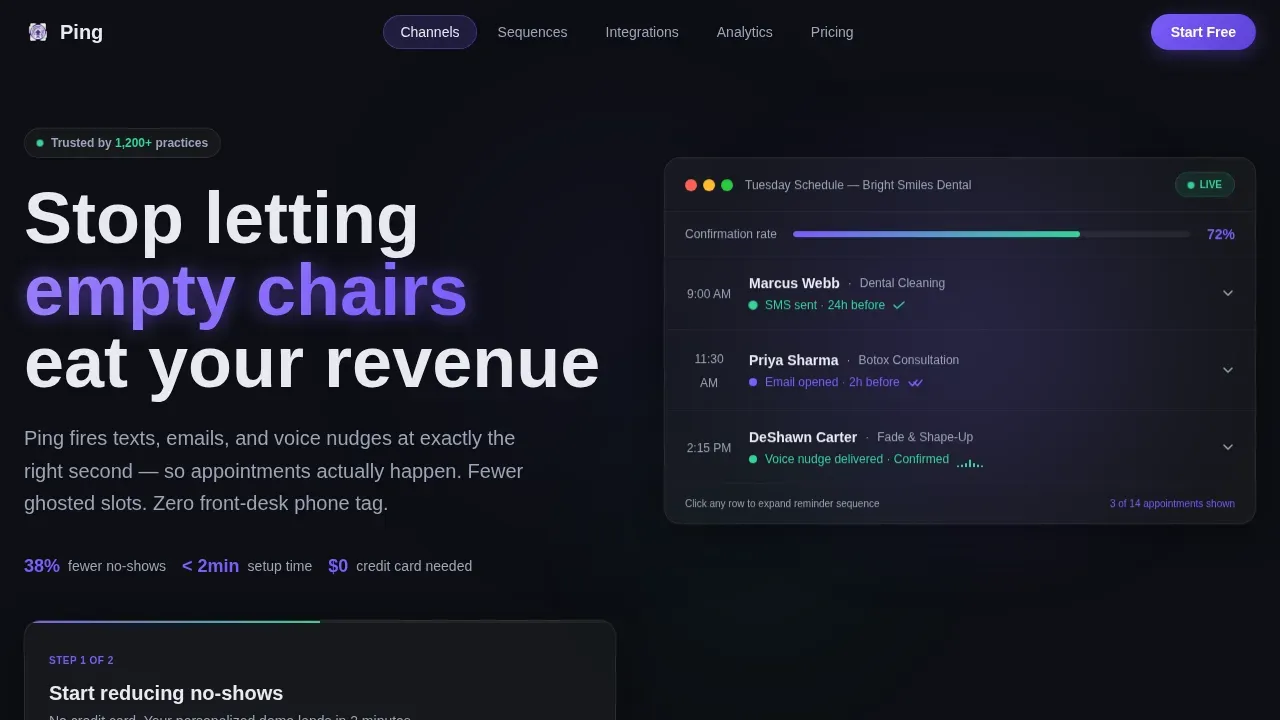
- A hero section featuring an interactive mock-dashboard that shows three appointment reminder lifecycle states in real time, complete with pulsing status indicators and expandable rows
- Five spoke sections covering Channels, Sequences, Integrations, Analytics, and Pricing, each with distinct interactive elements such as toggles, drag timelines, mock-sync animations, a cost calculator, and frosted glass pricing cards
- A two-step progressive lead-capture form that first asks for a business email, then slides in a practice-type selector and appointment volume slider before promising a personalized demo environment
Feature list
This section walks through the core capabilities built into the Ping template. Every feature listed here is grounded directly in the template brief.
Interactive Hero Dashboard
The header places a functioning mock-dashboard front and center. Visitors see a fictional clinic's Tuesday schedule with three appointments cycling through their reminder lifecycle. One row shows "SMS sent 24h before" with a confirmation green checkmark. Another shows "Email opened 2h before" with a read-receipt animation. A third shows "Voice nudge delivered, confirmed" with a waveform ripple. Clicking any row expands the full reminder sequence for that appointment, letting visitors toggle channels on and off and watch confirmation rates shift. The product IS the hero image.
Five-Spoke Anchor Navigation
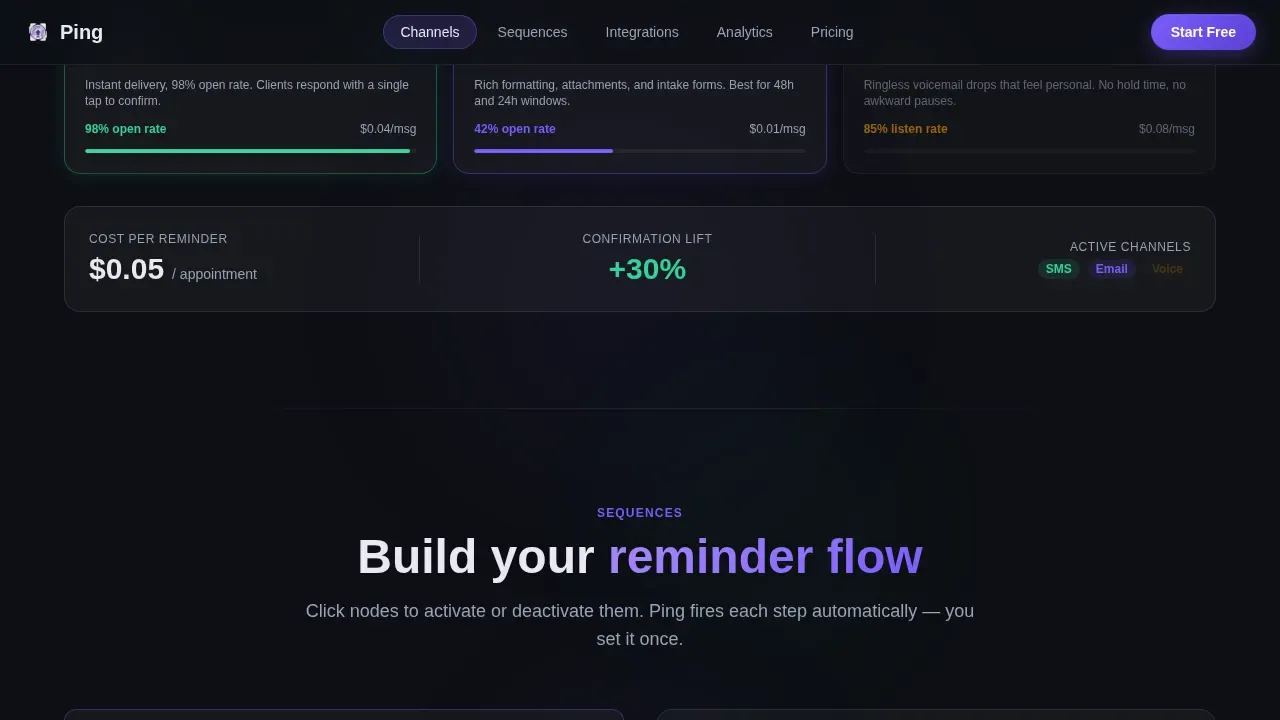
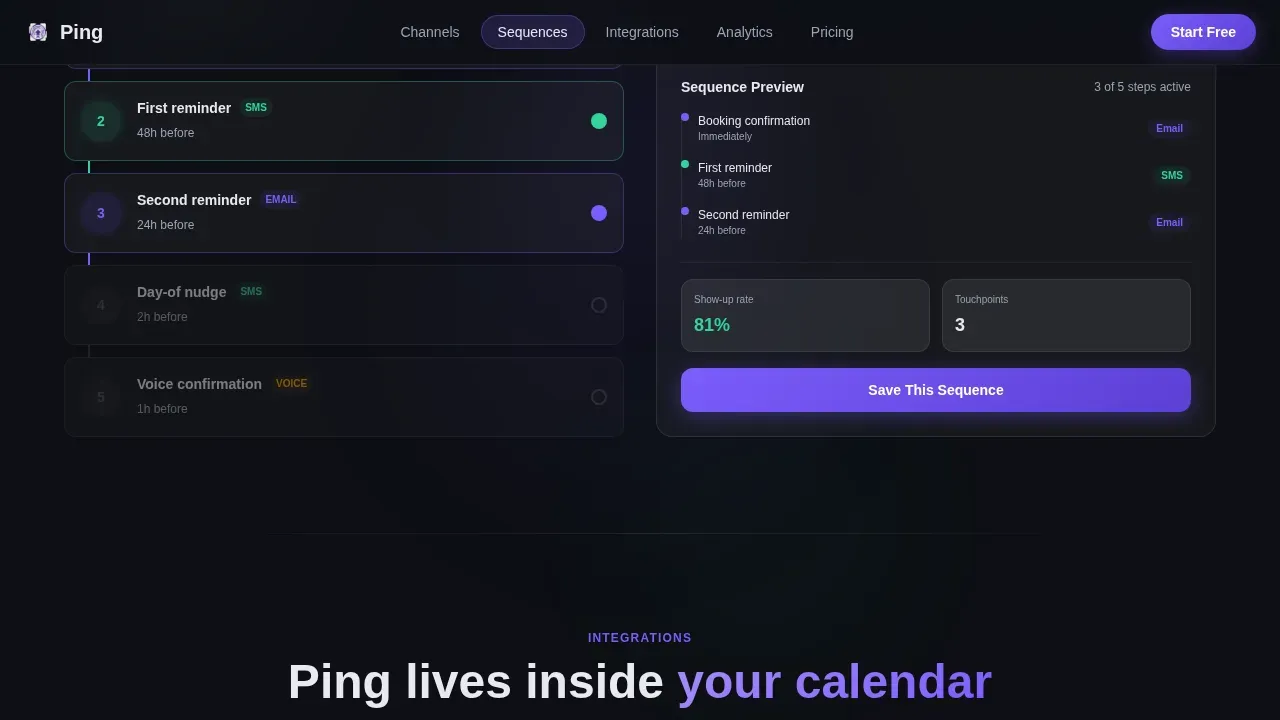
A frosted-glass navigation bar fixes to the top of the page with five tabs: Channels, Sequences, Integrations, Analytics, and Pricing. Each tab scrolls to its dedicated spoke section. The Channels spoke lets visitors toggle SMS, email, and voice to see cost-per-reminder figures shift live. The Sequences spoke provides a drag-timeline builder where visitors construct a reminder sequence from scratch. The Integrations spoke shows mock-sync animations when visitors click calendar logos. The Analytics spoke houses the no-show cost calculator. The Pricing spoke displays credit-based plans on frosted glass cards.
Progressive Two-Step Lead Form
The primary call-to-action floats as a frosted button after the header interaction. It asks only for a business email first, reducing friction at the critical first step. Once the email is entered, a second step slides in requesting practice type, chosen from dental, medspa, salon, clinic, or other, and monthly appointment volume via a simple slider. No credit card is required. The form promises a personalized demo environment seeded with the visitor's practice type, delivered to their inbox in under two minutes.
No-Show Cost Calculator
Inside the Analytics spoke sits a micro-tool that turns raw numbers into a compelling case for action. Visitors enter their average appointment value and their weekly no-show count. The template produces a glowing annual-loss figure. A call-to-action reading "See How Ping Fixes This" appears directly beneath the result. This tool makes the cost of inaction concrete and immediate, turning an abstract business problem into a specific dollar amount the visitor cannot easily ignore.
Glassmorphic Dark Design System
The entire template uses a consistently applied glassmorphic visual language. Deep void black (#0D0F14) forms the base. Frosted translucent panels float above it at 12 to 18 percent opacity blur. Iris purple (#7C5CFC) marks active states and glowing accents. Cool mist white (#E8EAF0) carries body text. Confirmation green (#34D399) appears exclusively on success states and sent-message indicators. Borders glow faintly at one pixel using rgba white values. The result feels like a control room that is elegant enough to serve as a product demo and functional enough to pass as a real dashboard.
Page sections overview
| Section | Purpose |
|---|---|
| Hero Dashboard | Show live reminder lifecycle states and invite visitors to interact with appointment rows before reading a word of copy |
| Channels Spoke | Let visitors toggle SMS, email, and voice delivery to see how channel mix affects cost per reminder |
| Sequences Spoke | Provide a drag-timeline builder where visitors design a multi-step reminder sequence visually |
| Integrations Spoke | Display mock-sync animations when visitors click calendar logos to demonstrate scheduling connectivity |
| Analytics Spoke | House the no-show cost calculator that converts weekly loss numbers into a glowing annual revenue figure |
| Pricing Spoke | Present credit-based plan cards in frosted glass format with clear feature breakdowns per tier |
| Footer | Deliver brand links, contact details, and supporting navigation in a horizontal flow layout |
Design & branding system
Ping's visual identity is built around a glassmorphic dark aesthetic that communicates precision and calm authority. The palette and typography are specific, intentional, and fully documented in the template.
- Color system uses four roles: deep void black (#0D0F14) for backgrounds, iris purple (#7C5CFC) for active accents, cool mist white (#E8EAF0) for readable body text, and confirmation green (#34D399) strictly for success states and sent-message indicators
- Typography pairs Plus Jakarta Sans for headings with DM Sans for body text, creating a modern, clean hierarchy that is easy to scan at any section depth
- Panel surfaces use 12 to 18 percent opacity blur with one-pixel rgba-white border glow, giving every card and modal a floating, layered quality that reinforces the product-dashboard feel
Mobile & speed optimization
Ping is designed desktop-first, reflecting the dashboard-heavy nature of the interactive spokes. The template includes a responsive mobile fallback so visitors on smaller screens still receive a coherent and functional experience.
- Interactive components such as the dashboard rows, channel toggles, and sequence builder are built as client-side components, while the page shell uses a server component structure to keep initial load lean
- The mobile layout collapses spoke sections into scrollable card stacks, preserving the core interaction logic while fitting narrower viewports without breaking the glassmorphic design language
How this template helps you convert
Ping is structured to move a skeptical visitor from curiosity to lead submission by letting them experience the product rather than just read about it. Every section is designed around a specific conversion moment.
- The interactive hero dashboard creates immediate engagement by making the visitor a participant, not a reader. Watching appointment reminder states pulse through their lifecycle in real time demonstrates value faster than any headline could. The floating call-to-action button appears after this interaction, when intent is at its peak.
- The progressive two-step form reduces drop-off by asking for the minimum viable commitment at each stage. Entering a business email is low friction. The second step, which captures practice type and appointment volume, qualifies the lead while feeling like personalization rather than interrogation.
- The no-show cost calculator inside the Analytics spoke converts abstract frustration into a specific number. Visitors who see their own annual loss figure are far more likely to click "See How Ping Fixes This" than visitors who only read a statistic. The call-to-action appears at the exact moment motivation is highest.
Other information about this template
Ping is a purpose-built template for a specific problem space: reducing appointment no-shows through automated, multi-channel reminders. Several practical details are worth noting for buyers evaluating this template.
- Appointment reminder templates in this layout are designed to be customized to fit any business name, provider name, and brand voice, so the messaging feels native to the company using the product
- The template supports the full range of reminder message types: a 24-hour advance notice acting as just a friendly reminder, a same-day message serving as a quick reminder, and a final reminder sent one to two hours before the appointment time to minimize last-minute cancellations
- Each appointment reminder email template included in the spoke sections is structured to carry essential appointment details: appointment date, appointment time, location or address, a reschedule link, and a cancel option, giving the client everything they need to confirm or reschedule without a phone call
- The Sequences spoke demonstrates reminder logic that mirrors real-world appointment communication: starting with an important reminder sent days ahead, following with a just a reminder message the day before, and closing with a just a quick reminder on the morning of the session
- Personalizing appointment reminders with the client's name, the provider name, and the business name is shown as a core capability throughout the mock-dashboard and sequence builder, reflecting evidence that personalized appointment reminders improve engagement and response rates
- The Channels spoke illustrates how SMS text messages, email, and voice nudges serve different client preferences; SMS appointment reminders in particular carry high open rates, making them an effective communication method for time-sensitive appointment confirmation
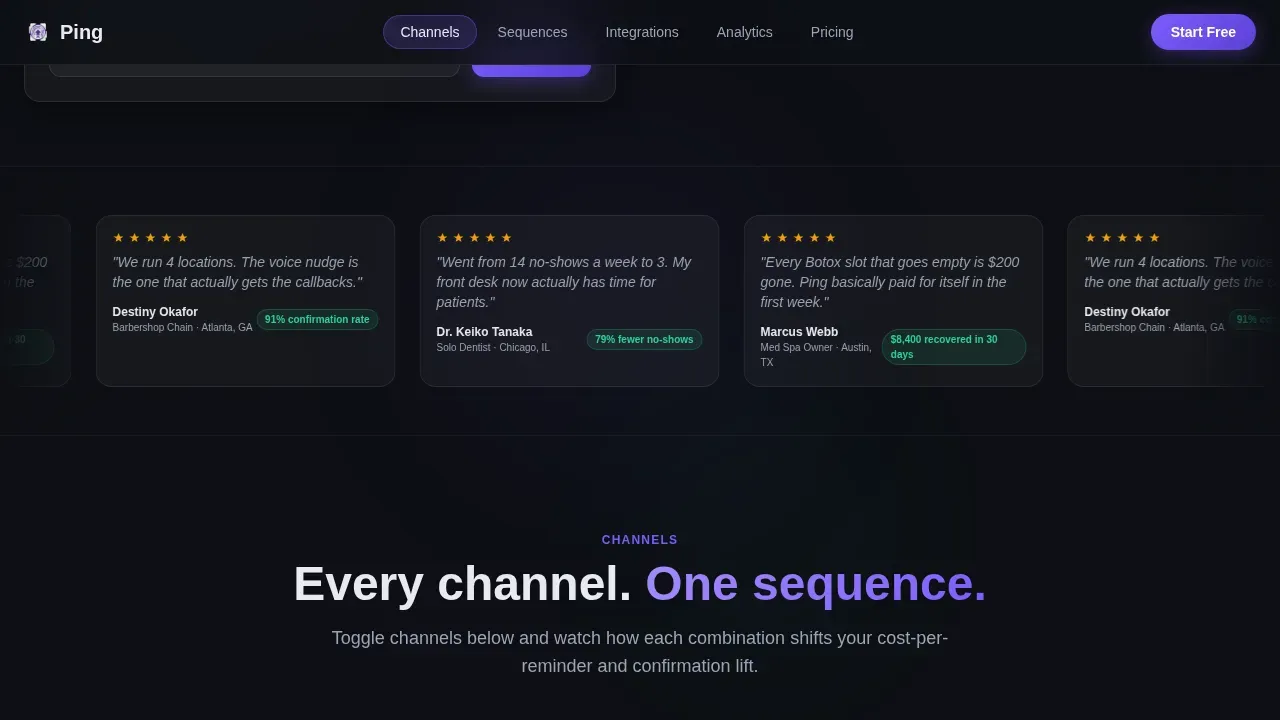
- The template includes inline social proof metrics such as 38 percent fewer no-shows and $2.6 million recovered, alongside testimonial quotes from dental, medspa, and salon personas, giving visitors from those industries a sense of relevant, industry-specific evidence
- Appointment reminder templates built on this layout can address a wide range of service verticals: dental cleanings, medspa treatments, salon services like a fade or color session, and general wellness appointments, reflecting that different industries have unique expectations for reminder messaging
- The analytics section demonstrates how a business can follow up after an appointment, gather feedback, and remind a client about their next appointment, supporting the full client communication lifecycle beyond the initial reminder
- Effective reminders, as shown throughout the template, are concise and focused: they include the appointment date, the appointment time, the location with a Google Maps link when relevant, free parking notes if applicable, and a clear option to reschedule or cancel at the client's earliest convenience
- The Ping smart appointment reminder SaaS landing page template is the reference implementation for teams building in this niche, and it is available as the starting point for any SaaS team wanting to automate appointment reminders and present that capability clearly to prospective business clients
- The footer follows a horizontal flow layout and includes links to contact information, the online scheduling link, and supporting site pages, giving visitors a path to take action even after scrolling past the primary call-to-action
Theme
Directory & Discovery
Creative direction
Interactive Explorer
Color system
Glassmorphic
Style
Hub & Spoke (Anchor Nav)
Direction
Lead Generation
Page Sections
Interactive Hero Mock-dashboard
Five-spoke Anchor Navigation
Progressive Two-step Lead Form
No-show Cost Calculator
Glassmorphic Dark Design System
Inline Social Proof and Testimonials
Related questions
Who is this landing page template designed for?
Can I customize the reminder message copy inside the template?
Does the template handle both SMS and email reminder formats?
What happens after a visitor submits the lead form?
Is the template suitable for mobile visitors?



