Space & Advanced Aerospace Portfolio & Case Study Website Template
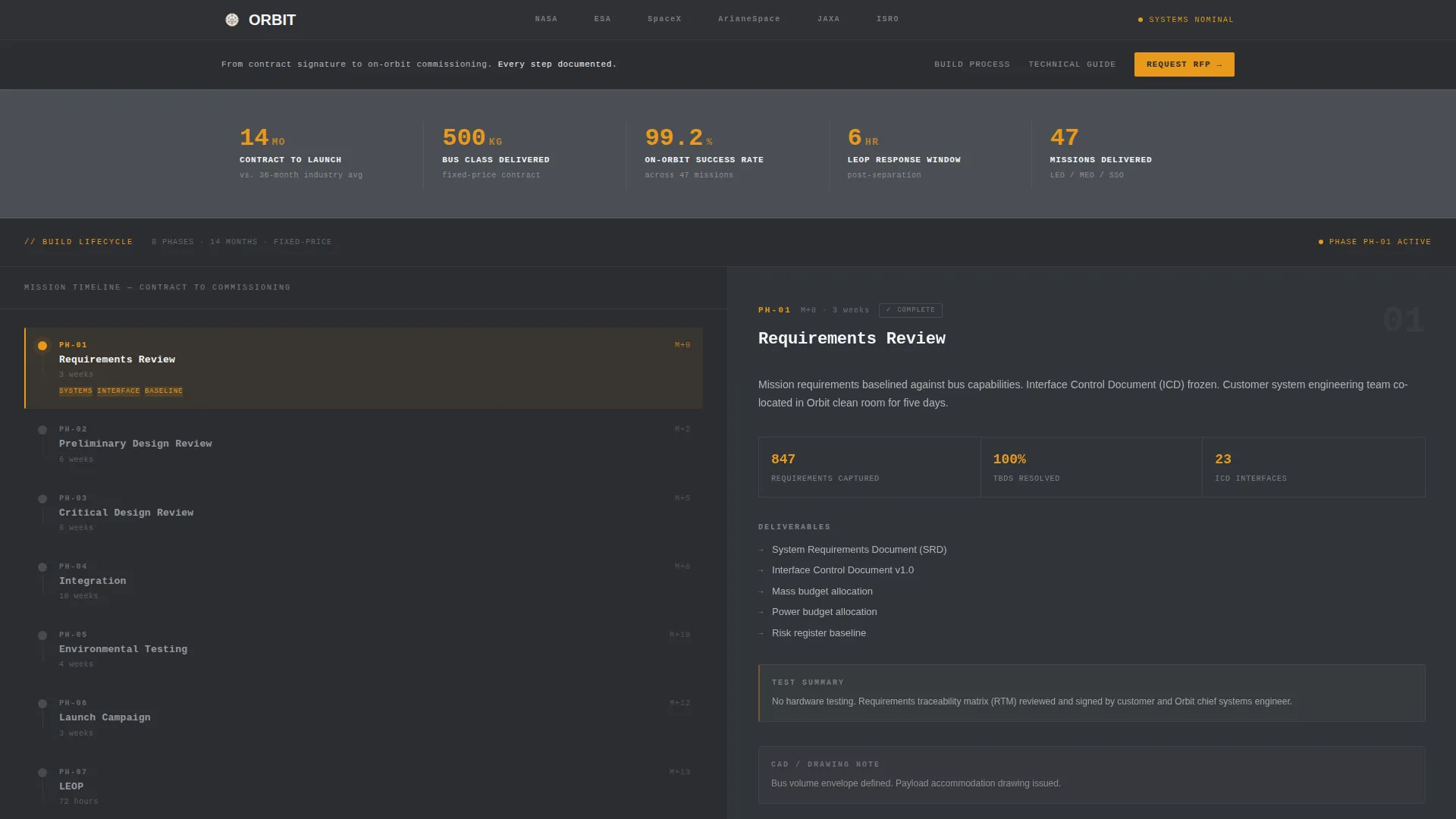
Orbit is a split-screen landing page template built for satellite manufacturers. It pairs a fixed build-lifecycle timeline on the left with scrollable phase content on the right, creating a transparent process showcase that speaks directly to government program managers, commercial operators, and defense procurement teams evaluating a responsive-space partner.
by Rocket studio
Quick summary
Orbit is a single-page template designed for satellite manufacturers who need to earn trust before they earn a contract. The left panel holds a fixed vertical timeline of the full satellite build lifecycle. The right panel scrolls through phase-specific content, briefs, test summaries, CAD cross-sections, and time-lapse clips. The layout makes the entire build process visible and traceable at a glance.
Who this template is for
This template is built for satellite manufacturers and space-hardware suppliers who sell into long-cycle, high-scrutiny procurement environments. If your buyer needs to justify a vendor selection to a committee, this template gives them the evidence they need.
- Government program managers writing Earth-observation constellation RFPs
- Commercial satellite operators sourcing a fixed-price 500 kg-class bus
- Defense primes evaluating a responsive-space partner for compressed build cycles
What problem this template solves
Procurement officers avoid unfamiliar vendors not because of technical gaps, but because of visibility gaps. They cannot see inside your process, so they default to names they already know. This template removes that barrier by making every build phase visible and every milestone traceable.
- No clear way to show build-cycle transparency to risk-averse buyers
- Lengthy written proposals fail to convey process credibility at a glance
- Casual visitors leave without engaging; serious prospects have no clear path to deeper content
What you get with this template
You get a fully structured split-screen landing page that doubles as a content delivery system. The layout teaches the visitor how a satellite gets built while simultaneously qualifying them for a gated resource download.
- A fixed left-panel timeline covering eight build phases from requirements review through on-orbit commissioning
- A scrollable right panel with phase-specific content including downloadable one-pagers, test-report summaries, time-lapse clips, and annotated CAD cross-sections
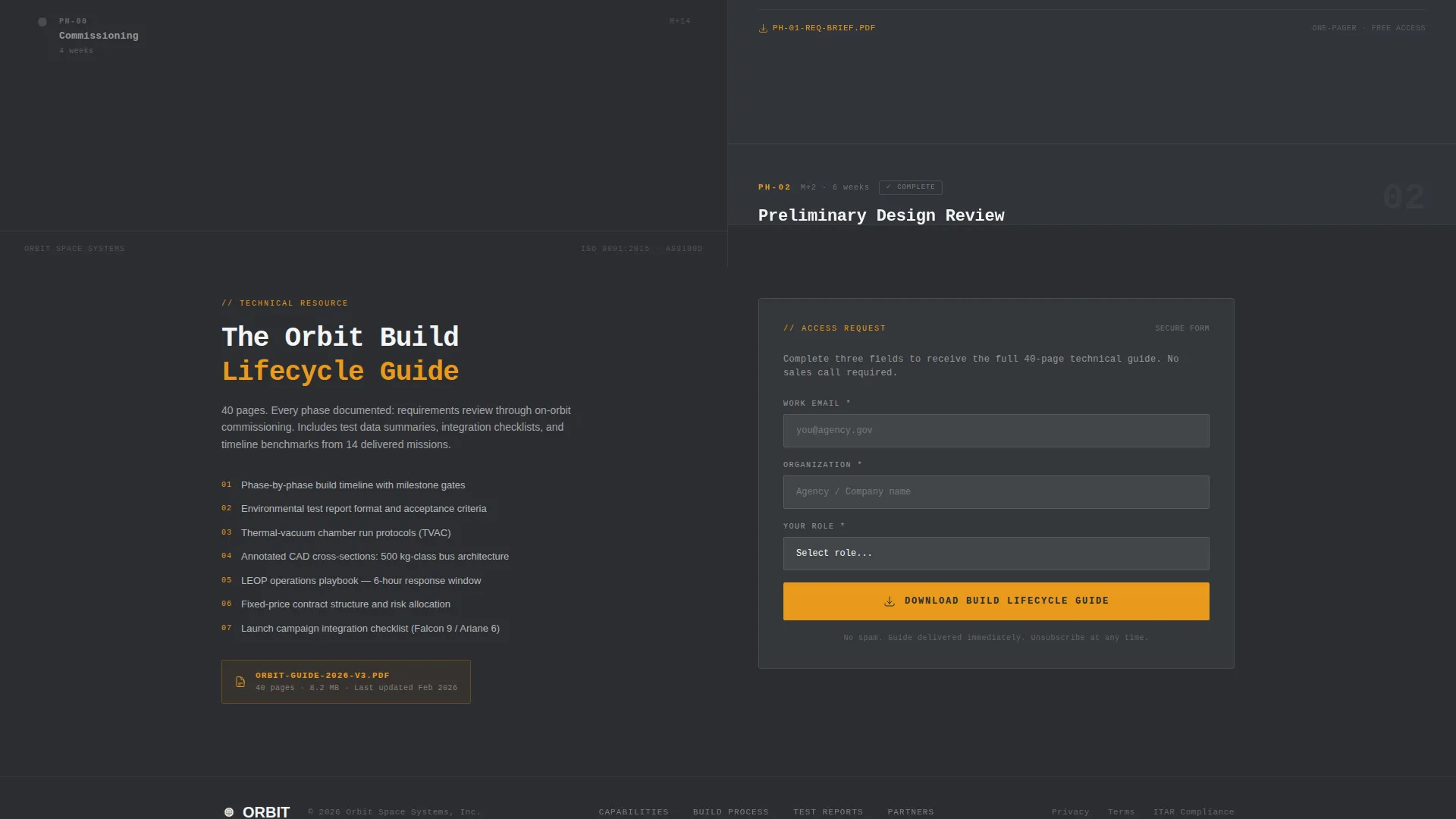
- A gated three-field lead-capture form for the full 40-page Build Lifecycle Guide, plus ungated PDF links for self-serve visitors
Feature list
This section covers the core functional components included in the Orbit template.
Split-Screen Scroll Architecture
The page uses a 50/50 split layout. The left panel locks in place while the right panel scrolls. This keeps the build timeline always in view, so visitors always know which phase they are reading about.
Amber-Pulsing Timeline Nodes
Each phase node on the vertical timeline pulses in signal amber when its corresponding content section enters the viewport. This live status cue makes the scroll feel like a live mission console rather than a static brochure.
Phase-Synced Content Panels
Every timeline phase maps to a dedicated right-panel content block. Each block can include downloadable capability briefs, test-report summaries, time-lapse video clips, and annotated CAD cross-sections of the satellite bus structure.
Dual-Path Conversion Design
The page offers two distinct paths. Casual visitors access individual phase one-pagers as direct PDF links below each timeline node. Serious prospects fill out a three-field gated form to download the complete 40-page Build Lifecycle Guide.
Institutional Logo Bar Header
The header displays mission-partner and launch-provider insignias rendered in monochrome charcoal, sitting above a single line of monospaced typography. No hero image, no gradient. Just institutional proof and a positioning statement.
Gated Lead-Capture Form
The form captures work email, organization name, and a role selector with four options: program manager, systems engineer, procurement, and executive. The role field helps qualify leads without adding friction.
Page sections overview
| Section | Purpose |
|---|---|
| Logo Bar Header | Establishes institutional credibility through partner insignias and a single positioning statement |
| Fixed Timeline Panel | Anchors the eight build phases in permanent view on the left side of the screen |
| Requirements Review Phase | Opens the lifecycle scroll with the first phase content block and PDF one-pager link |
| PDR Phase Block | Covers preliminary design review content and phase-specific downloadable brief |
| CDR Phase Block | Presents critical design review materials including annotated CAD cross-sections |
| Integration Phase Block | Shows integration milestone content with supporting visual documentation |
| Environmental Testing Phase | Displays thermal-vacuum chamber time-lapse clips and test-report summaries |
| Launch Campaign Phase | Covers launch campaign preparation content and phase documentation |
| LEOP and Commissioning | Closes the lifecycle with launch and early orbit phase and commissioning content |
| Gated Download Form | Captures work email, organization, and role in exchange for the full technical guide |
Design & branding system
The visual identity follows a Service Utility theme. Every design choice prioritizes function over decoration, creating a layout that feels at home in a mission operations environment.
- Deep graphite (#2B2D31) for primary backgrounds, mid-charcoal (#4A4E54) for card surfaces and section dividers, and clean-room white (#F4F5F7) for body text and data labels
- Signal amber (#E8991C) reserved exclusively for interactive elements, status indicators, and pulsing timeline nodes, the only color on the page that signals something is live and actionable
- Monospaced engineering typography used in the header for functional, instrument-panel legibility with zero decorative styling
Mobile & speed optimization
The split-screen layout adapts for smaller viewports so the timeline and content panels remain usable on a range of devices. The overall design philosophy keeps the page lean and purposeful.
- The fixed left-panel timeline collapses gracefully so phase navigation remains accessible on narrower screens
- Content blocks are structured to load progressively, keeping phase detail visible without overwhelming the initial view
- Minimal decoration and a dark-palette base reduce visual noise and keep the reading experience focused on technical content
How this template helps you convert
The Orbit template converts by earning trust through visibility before asking for anything in return. The page structure is designed to move a cautious procurement audience from skepticism to action.
- The scrollable build lifecycle teaches visitors your process in detail, so the gated guide feels like a natural extension of what they have already found valuable rather than a cold ask.
- The ungated PDF one-pagers let self-serve visitors take something away immediately, keeping low-intent visitors warm while serious prospects self-select into the lead-capture form.
- The role-selector field in the gated form gives your team qualified lead data from the first touchpoint, removing the need for a follow-up discovery call just to confirm job function.
Other information about this template
The Orbit template is built specifically for the Aerospace and Defense category, targeting the Space and Satellite subcategory and the Satellite Manufacturer niche. It is designed for teams that need to compress procurement trust-building from a lengthy proposal cycle into a single, well-structured page visit.
- Template style: Split Screen 50/50, with a Content and Resource hub as the primary landing-page direction
- Header concept: Logo Bar, designed to carry institutional weight through recognized partner insignias rather than imagery
- Creative direction: Transparent Process, structured to demystify a complex hardware build cycle for non-technical procurement audiences
- Color system: Charcoal and Amber, engineered to read like a mission operations console
- The template supports eight discrete lifecycle phases: requirements review, preliminary design review, critical design review, integration, environmental testing, launch campaign, launch and early orbit phase (LEOP), and commissioning


Theme
Service Utility
Creative direction
Transparent Process
Color system
Charcoal & Amber
Style
Split Screen (50/50)
Direction
Content/Resource
Page Sections
Split-screen Scroll Architecture
Amber-pulsing Timeline Nodes
Phase-synced Content Panels
Dual-path Conversion Design
Institutional Logo Bar Header
Role-qualified Lead Capture
Related questions
Who is the primary audience for this landing page template?
Can I customize the number of timeline phases shown?
How does the dual-path conversion system work?
What makes the amber color meaningful in this layout?
Is this template suitable for a defense subcontractor rather than a prime manufacturer?



