Notary Review & Comparison Landing Page Template
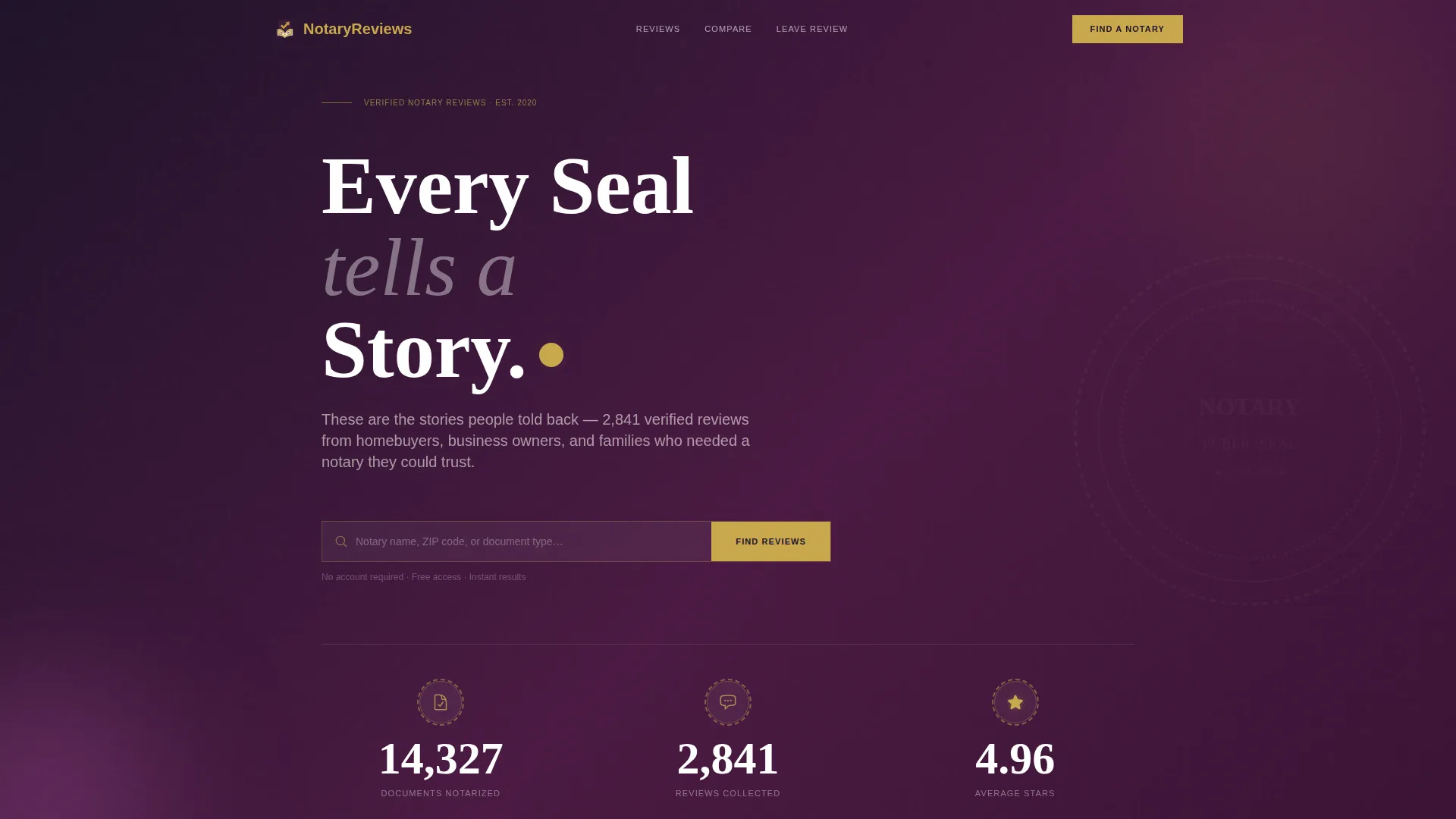
Notarize is a single-page notary review and comparison landing page built for professional credibility. It leads with animated trust statistics, a scrolling logo wall, and side-by-side service comparison tables. Real review excerpts and video testimonial cards build the case progressively. Visitors can search for a notary by name, ZIP code, or document type, or submit their own review in three steps.
by Rocket studio
Quick summary
Notarize is a notary public review and comparison landing page designed to earn visitor trust fast. Animated stats open the page, a logo wall establishes ecosystem authority, and structured comparison tables break down notary services by key dimensions. Real review excerpts and testimonial cards close the argument. Two clear calls to action let visitors search for reviews or leave their own.
Who this template is for
This template suits anyone who needs to build or host a credible notary review resource. It is designed for professionals and resource publishers who serve real people navigating complex documents.
- Notary public professionals who want a centralized, trustworthy review presence
- Legal service directories and professional networks collecting notary feedback
- Real estate platforms and title companies directing clients to verified notary resources
What problem this template solves
Finding a trustworthy notary is genuinely stressful for people in high-stakes moments. First-time homebuyers, small business owners, and families updating legal documents need proof that the notary they choose is competent and reliable. Generic business listing pages do not answer that question. This template solves the credibility gap by organizing verifiable review data into a format visitors can read and act on immediately.
- No clear way to compare notary services side by side on a single page
- Review data scattered across platforms with no unified, authoritative source
- Potential clients leaving without confidence because proof is missing or hard to find
What you get with this template
You get a fully structured single-page layout purpose-built for notary reviews and service comparisons. Every section is designed to move a hesitant visitor toward a confident decision.
- An animated stats header cluster with document count, review count, and average star rating
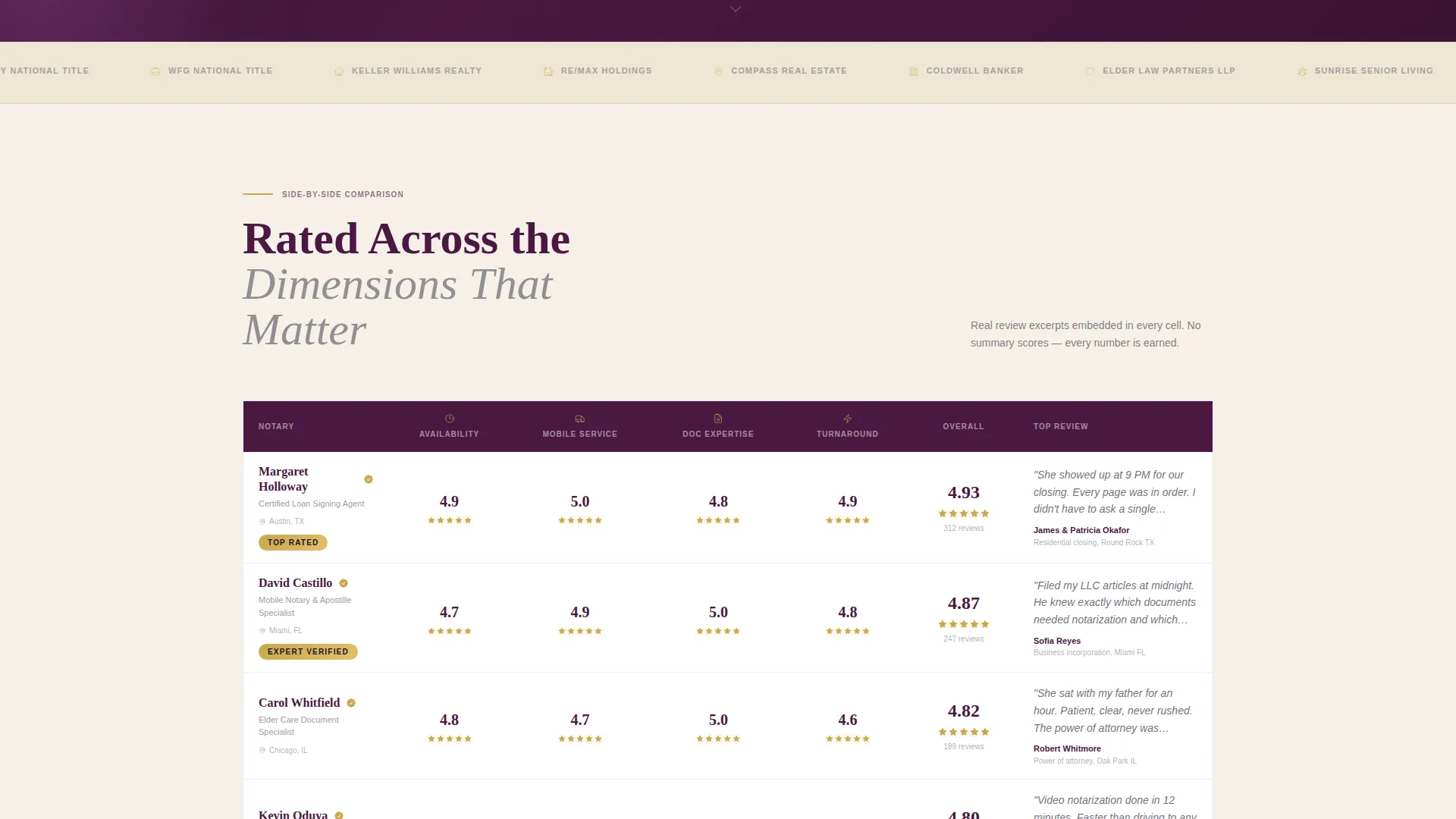
- A horizontal scrolling logo wall featuring title companies, law firms, and related institutions
- Side-by-side service comparison tables with embedded review excerpts per cell
- A primary search bar accepting notary name, ZIP code, or document type
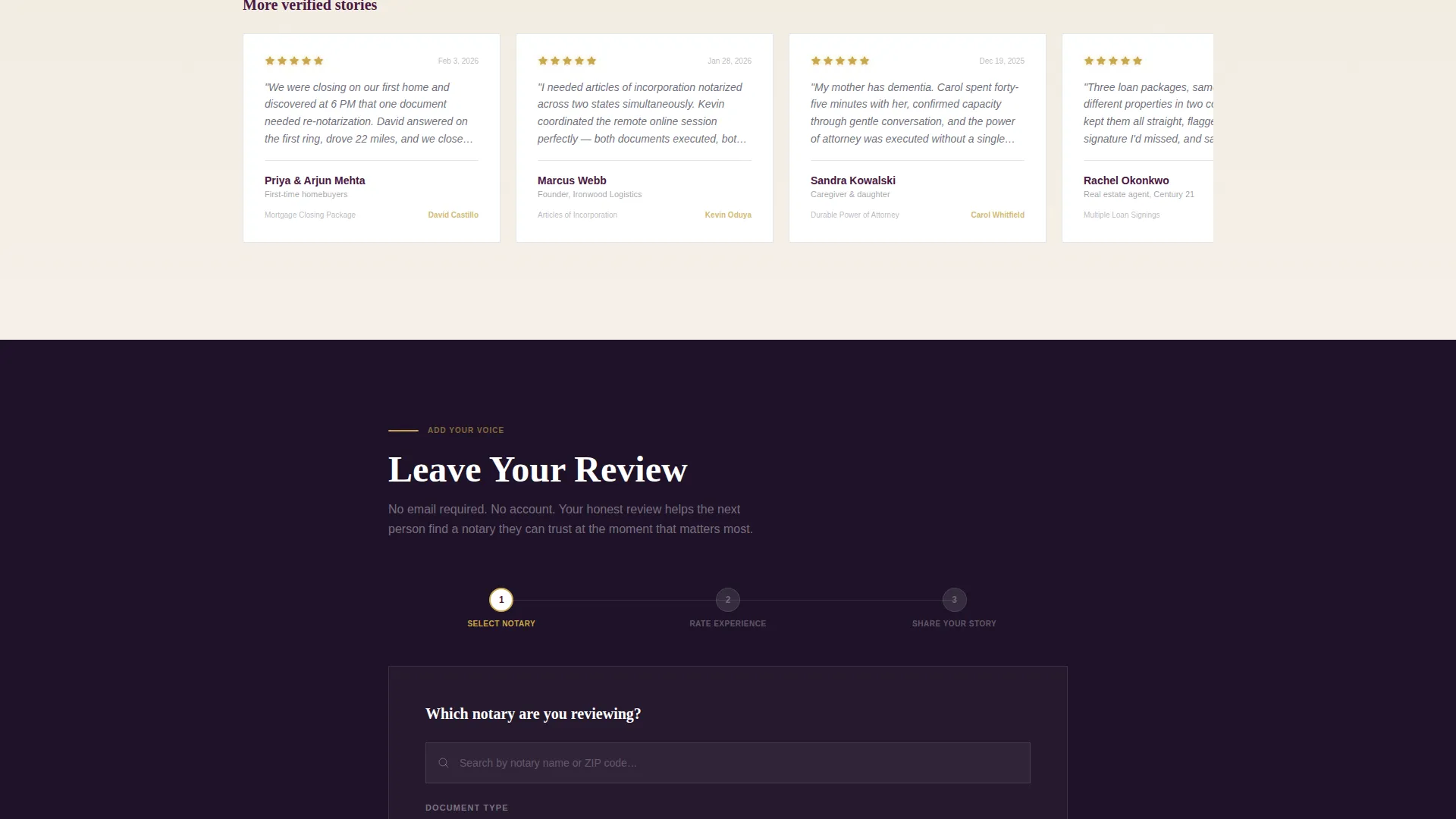
- A secondary three-step review submission form with no email gate
Feature list
A paragraph of context before the feature blocks: each component in this template was chosen to build trust progressively, moving from aggregate data down to individual human stories.
Animated Stat Counter Header
Three key figures count upward from zero on page load: documents notarized, reviews collected, and average star rating. Each number is paired with a micro-icon. The opening section delivers immediate, data-backed authority before a visitor reads a single word.
Scrolling Logo Wall
A continuous horizontal ticker displays company and institution names, including title companies, law firms, real estate agencies, and elder care facilities. It signals that this resource represents a verified ecosystem, not a single notary's self-promotion.
Service Comparison Tables
Side-by-side tables rate notary services across dimensions including availability, mobile service, document expertise, and turnaround time. Real review excerpts are embedded directly in each table cell, connecting data points to human experience.
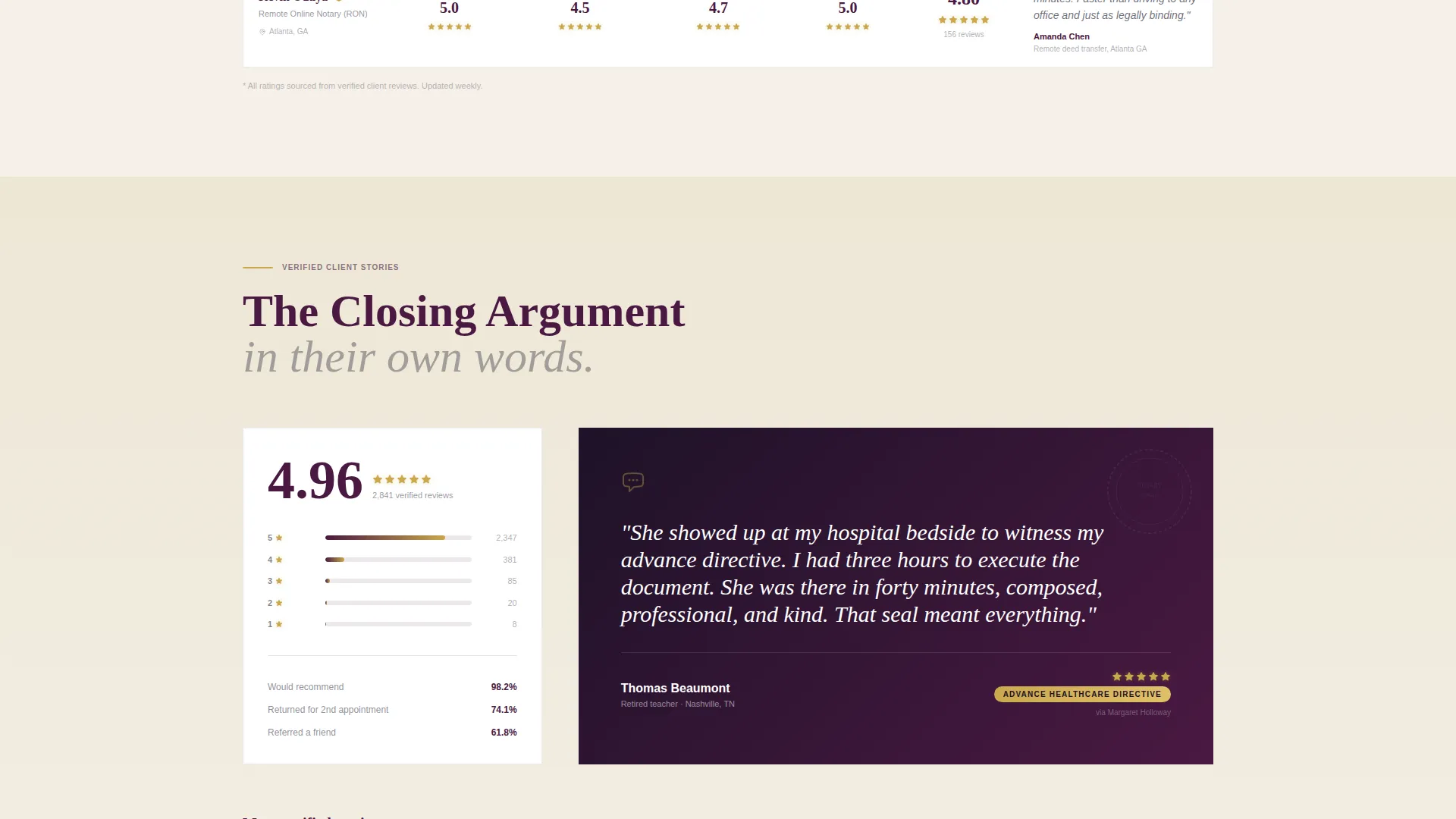
Star Rating and Testimonial Cards
Star distributions narrow into specific five-star quotes, then expand into full video testimonial card blocks. The escalating structure mirrors a closing argument, layering proof until the case is complete.
Dual Call-to-Action System
The primary call to action pairs a search bar with the prompt "Find Your Notary's Reviews." The secondary path is "Leave Your Review," leading into a three-step form. Both paths are ungated, requiring no email address before access.
Legal Shield Visual Identity
The page uses deep plum section headers, charcoal body text, parchment cream backgrounds, and burnished gold reserved for star ratings, trust badges, and seal iconography. The palette signals authority without feeling cold.
Page sections overview
| Section | Purpose |
|---|---|
| Animated Stats Header | Opens with three counting figures to establish immediate data-backed trust |
| Scrolling Logo Wall | Layers institutional proof from recognized organizations across the industry |
| Service Comparison Tables | Rates notaries side by side with embedded real review excerpts per cell |
| Star Rating Distributions | Narrows aggregate data down to specific high-scoring review highlights |
| Video Testimonial Cards | Presents individual human stories as the final layer of social proof |
| Review Search Bar | Lets visitors find a specific notary by name, ZIP code, or document type |
| Review Submission Form | Guides visitors through a three-step ungated process to leave a review |
Design & branding system
The design follows a Legal Shield theme using the Plum Executive color system. It feels like a leather-bound law journal left open on a mahogany desk, authoritative without being cold.
- Deep plum (#4A1942) dominates section headers and sidebar accents; charcoal (#2D2D3F) carries all body text; parchment cream (#F5F0E8) grounds the background
- Burnished gold (#C9A84C) appears only for star ratings, trust badges, and seal iconography to signal verified status
- No stock photography or faces appear anywhere on the page; data and typography carry the visual weight
Mobile & speed optimization
The layout is built for visitors who arrive mid-task, often on a mobile device while sitting at a closing table or waiting outside a business. Every section is structured to be readable and actionable at any screen size.
- The animated stat counter, scrolling logo wall, and comparison tables are designed to stack cleanly on smaller screens
- The search bar and three-step review form are positioned for easy thumb access and minimal input friction
How this template helps you convert
This landing page converts by earning trust before asking for anything. Every section adds a layer of proof, and both calls to action are frictionless.
- The animated stats header establishes credibility in the first three seconds, reducing the likelihood a visitor bounces before engaging with the comparison content
- The ungated search and review paths remove the most common reason potential contributors and searchers leave: the demand for an email address before they get value
Other information about this template
This template is categorized under Professional Services with a focus on notary public online presence. It is built as a single landing page, not a multi-page website, making it straightforward to deploy as a standalone resource or embed within a larger directory.
- The template style uses a zigzag and alternating section layout, keeping the scroll dynamic and visually varied
- The header concept is built around stats and metrics, following a data storytelling approach rather than photography or illustration
- The creative direction centers on institutional proof rather than individual faces, which suits regulated professional service contexts
- The Corporate Precision theme and Click-Through landing page direction mean every section flows toward one of the two defined action paths
Theme
Corporate Precision
Creative direction
Team & People
Color system
Arctic White
Style
Zigzag/Alternating
Direction
Click-Through
Page Sections
Animated Stat Counter Header
Scrolling Institutional Logo Wall
Side-by-side Comparison Tables
Escalating Testimonial Architecture
Dual Ungated Action Paths
Legal Shield Visual Identity
Related questions
Who is this landing page template built for?
Does the review submission form require an email address?
Can visitors search for a notary by document type?
What kind of proof does the page use to build trust?
Can I customize the color palette and branding?



