Nexus — Intelligent Machine Learning Infrastructure Landing Page Template
Federate is a bento grid landing page template built for federated learning research labs. It leads with an interactive privacy budget calculator, then layers in comparison tiles, architecture diagrams, and published benchmark data. The Data Command visual theme combines void black and deep violet to communicate technical authority, precision, and the kind of trust that regulated industries require before they ever sign anything.
by Rocket studio
Quick summary
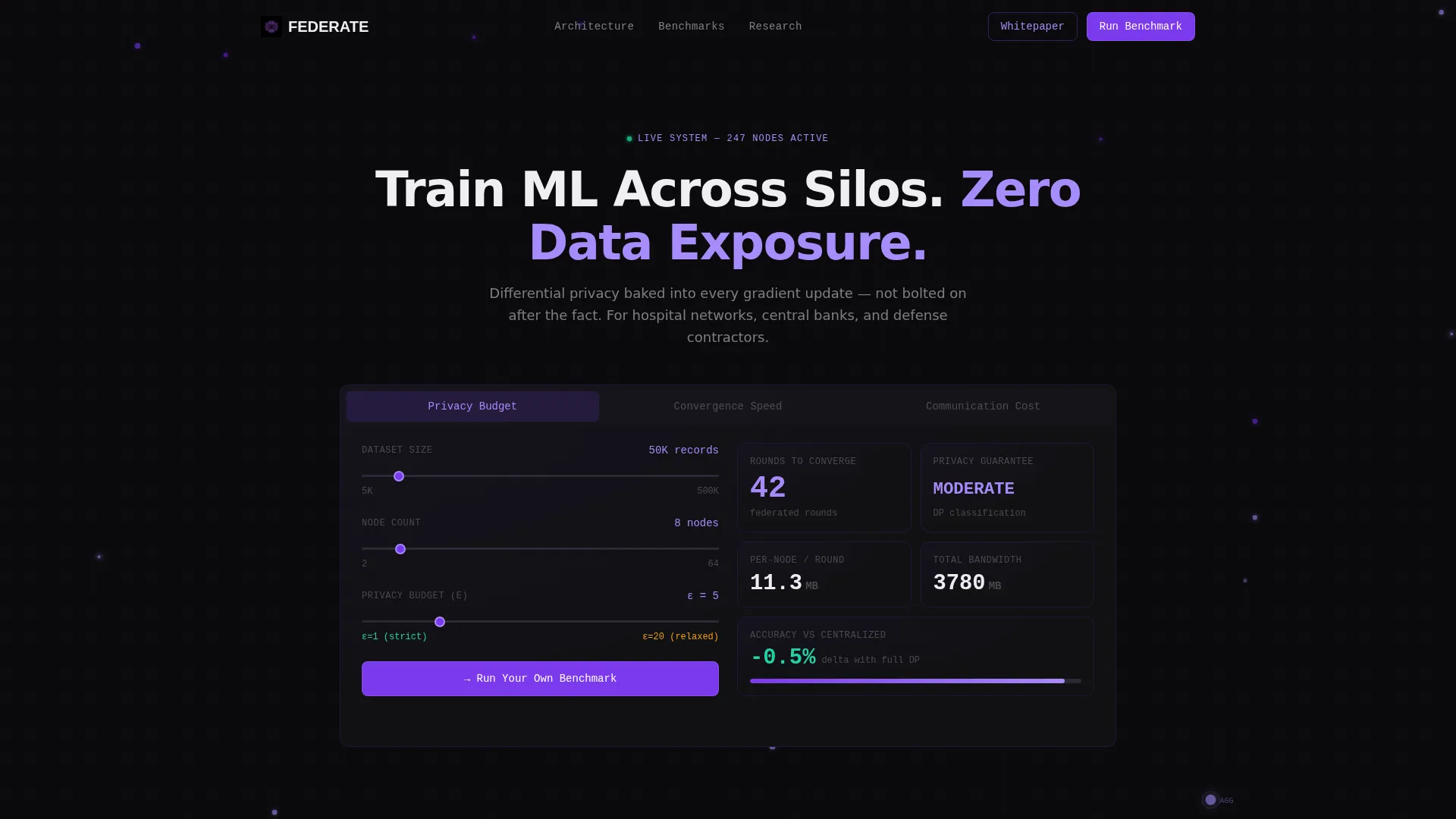
Federate is a single-page bento grid template designed for a federated learning research lab. The hero is a live-styled calculator, not an illustration. Visitors adjust dataset size, node count, and epsilon target, then instantly see estimated rounds-to-convergence and per-node communication overhead. Every scroll layer adds more evidence, ending with a persistent benchmark-driven call to action.
Who this template is for
This template is built for technically rigorous organizations that need to earn trust before asking for a meeting. It speaks the language of compliance-driven buyers who evaluate tools by reading the numbers first.
- Hospital network technology leaders merging imaging models across jurisdictions with data residency constraints
- Central bank quantitative teams and financial risk groups that cannot pool raw portfolio data across institutions
- Defense and intelligence contractors running classification on edge devices that must never transmit raw data externally
What problem this template solves
Most technology landing pages ask visitors to trust a headline. Regulated buyers in healthcare, finance, and defense cannot afford that. They need proof: verifiable metrics, clear architecture, and a way to model their own scenario before handing over contact details.
- Visitors have no way to test the value proposition without scheduling a demo, which creates friction for technical evaluators
- Generic hero sections and stock imagery fail to communicate differential privacy or distributed node architecture credibly
- Comparison information is usually buried in a PDF, making it hard for buyers to build an internal business case quickly
What you get with this template
You get a fully structured bento grid landing page where the interactive calculator is the centerpiece. Every tile and section is designed to move a skeptical technical buyer from curiosity to conviction without relying on marketing language.
- A feature tab switcher header with three tabs: Privacy Budget, Convergence Speed, and Communication Cost, each showing a live-styled metric dashboard
- Six-axis comparison tiles in the first bento row covering privacy guarantees, data residency compliance, model accuracy delta, bandwidth cost, time-to-deploy, and audit trail depth
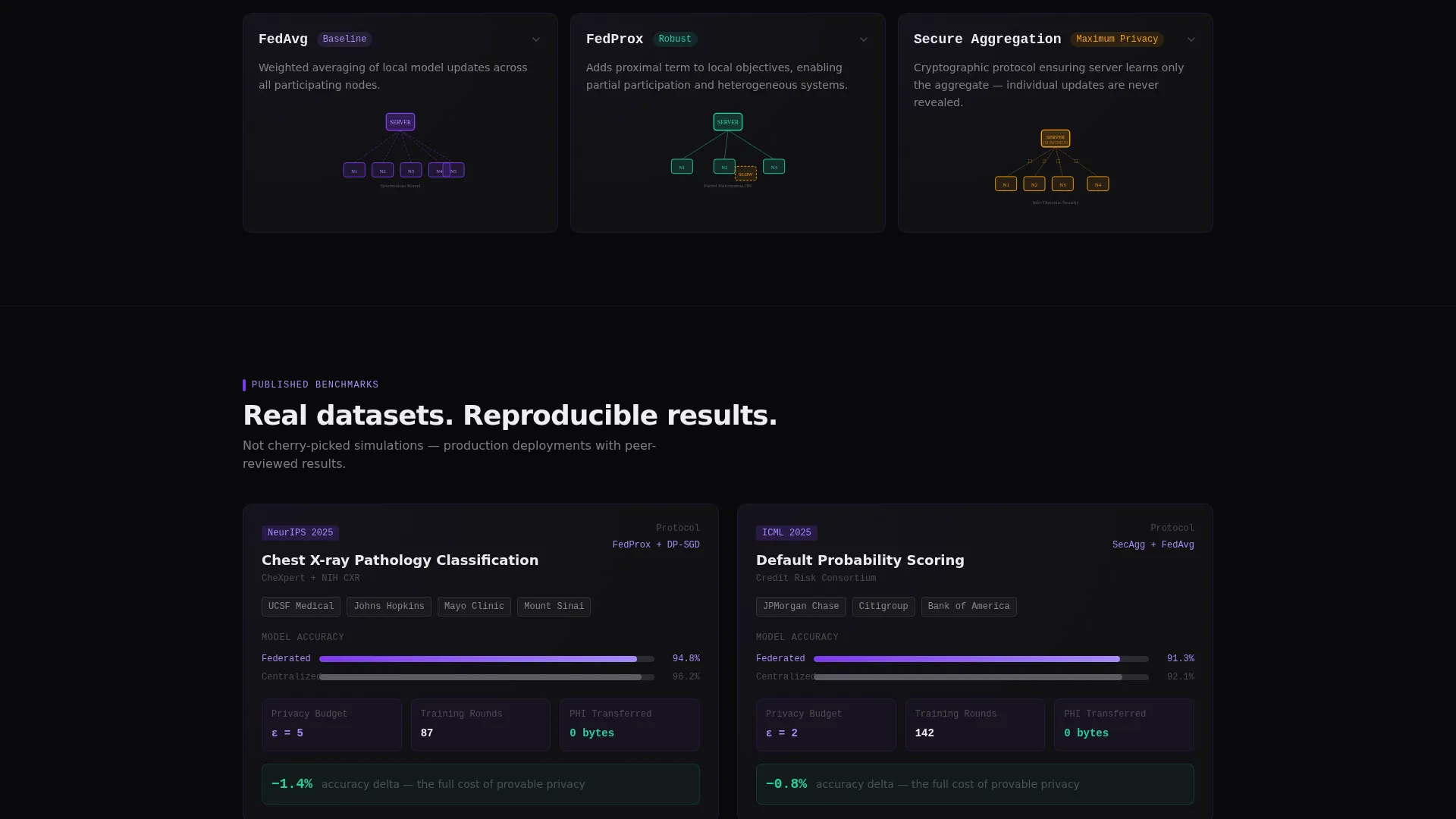
- Architecture diagram tiles for FedAvg, FedProx, and secure aggregation protocols, each expandable on click, plus a benchmark row showing real dataset results from chest X-ray and credit scoring scenarios
Feature list
This template packs a dense set of purpose-built components into a single cohesive page. Each feature is grounded in what a regulated-industry buyer needs to see and do before committing.
Interactive Privacy Budget Calculator
The header calculator accepts three visitor inputs: dataset size, node count, and epsilon target, which is the privacy loss parameter in differential privacy. Sliders update estimated rounds-to-convergence and per-node communication overhead in real time. Numbers render in monospaced violet type against void black, making the output feel like a live diagnostic readout rather than a marketing estimate.
Feature Tab Switcher Header
Three tabs sit at the top of the page labeled Privacy Budget, Convergence Speed, and Communication Cost. Each tab reveals a different dashboard tile comparing federated and centralized training approaches. The default tab loads the calculator immediately, ensuring every visitor is doing something useful within the first few seconds of arrival.
Six-Axis Federated versus. Centralized Comparison
The first bento row presents six side-by-side comparison tiles. Each tile covers one axis: privacy guarantees, data residency compliance, model accuracy delta, bandwidth cost, time-to-deploy, and audit trail depth. Each axis has its own miniature animated chart, so the comparison reads like a technical audit rather than a feature checklist.
Expandable Architecture Diagram Tiles
The second bento row contains selectable tiles for three aggregation protocols: FedAvg, FedProx, and secure aggregation. Clicking any tile expands it to reveal the full architecture diagram for that protocol. This lets technical evaluators inspect the approach that matches their infrastructure before speaking to anyone.
Published Benchmark Data Blocks
The third bento row presents real-world benchmark results. Chest X-ray classification across four hospitals and credit scoring across three banks are displayed with accuracy and privacy metrics side by side. Benchmarks are laid out as dense, scannable evidence tiles rather than prose summaries.
Dual Conversion Path Design
The primary call to action, "Run Your Own Benchmark," appears inside the calculator and again as a persistent bottom bar once a visitor scrolls past forty percent of the page. A secondary path, "Read the Whitepaper," gates a technical document behind email capture only. The two paths serve different buyer readiness levels without competing for attention.
Page sections overview
| Section | Purpose |
|---|---|
| Feature Tab Switcher | Loads the calculator as default hero; tabs reveal metric comparisons |
| Privacy Budget Calculator | Lets visitors input parameters and receive real-time federated estimates |
| Convergence Speed Tab | Shows tab-specific dashboard comparing training speed across approaches |
| Communication Cost Tab | Displays per-node overhead comparison in a live-styled tile |
| Six-Axis Comparison Row | Compares federated versus. centralized training across six measurable axes |
| Architecture Diagram Tiles | Expandable protocol diagrams for FedAvg, FedProx, and secure aggregation |
| Benchmark Results Row | Presents real dataset accuracy and privacy metrics from hospital and bank scenarios |
| Run Your Own Benchmark call to action | Primary conversion form with three fields for infrastructure type, silo count, and compliance framework |
| Whitepaper Gate | Secondary email-capture path for visitors who prefer a technical PDF |
| Persistent Bottom Bar | Reappears after forty percent scroll depth to keep the primary call to action visible |
Design & branding system
The visual identity follows a Data Command theme. The palette is built around four values that together feel like a GPU server rack viewed through a violet diagnostic overlay: clinical, classified, and precise.
- Void black (#09090B) dominates every tile background; deep orbital violet (#7C3AED) pulses on active states, selected tabs, and live metric indicators
- Cathode phosphor (#A78BFA) traces connection lines between nodes in diagrams and renders secondary text and graph lines; terminal white (#EEEEF0) handles all primary type
- Monospaced violet type is used exclusively for calculator outputs and live metric numbers, reinforcing the mission control aesthetic throughout the page
Mobile & speed optimization
The bento grid layout is structured to remain readable and functional on smaller screens. Interactive components like the calculator and expandable diagram tiles are designed to work within the page's responsive structure without requiring desktop-only interactions.
- Bento tiles reflow into single-column stacks on mobile viewports, preserving the logical reading order from calculator to comparison to benchmark
- Persistent bottom bar positioning is retained on scroll across device sizes, keeping the primary call to action reachable without forcing a scroll back to the top
- The tab switcher header collapses gracefully so all three tabs remain accessible without horizontal overflow on narrow screens
How this template helps you convert
Federate is built around a Comparison/Versus conversion strategy. Every layout decision is designed to reduce the distance between a visitor's first question and their decision to act.
- The interactive calculator removes the need for a demo as a first step. Visitors model their own scenario using their actual dataset size, node count, and compliance target, which means the value proposition is proven before any form appears.
- The layered bento structure moves from tool to comparison to architecture to benchmarks in a single scroll. Each row adds a denser layer of evidence, so the visitor's confidence builds progressively rather than relying on a single persuasive paragraph.
- The dual conversion path matches buyer readiness. Technical evaluators who want depth choose the whitepaper with only an email required. Decision-makers ready to act complete the three-field benchmark form, and the persistent bottom bar ensures neither path is missed.
Other information about this template
This template is built specifically for the federated learning research lab niche, where buyers are sophisticated and distrust generic technology marketing. A few additional details are worth noting for teams evaluating fit.
- The benchmark row references chest X-ray classification across four hospitals and credit scoring across three banks, providing specific real-world framing rather than synthetic or anonymized examples
- The three-field benchmark form collects infrastructure type (cloud, on-prem, or hybrid), number of data silos, and primary compliance framework, covering HIPAA, GDPR, DORA, and ITAR as selectable options
- The template's aesthetic intentionally avoids stock imagery and hero illustrations; the tool itself is the visual anchor, which aligns with how technical buyers evaluate credibility in distributed machine learning contexts
- The page structure supports the full buyer journey from first interaction with the calculator through architecture review and benchmark validation to conversion, all within a single scrollable bento layout


Theme
Data Command
Creative direction
Calculator/Tool First
Color system
Void & Violet
Style
Bento Grid
Direction
Comparison/Versus
Page Sections
Interactive Privacy Budget Calculator
Feature Tab Switcher Header
Six-axis Comparison Bento Row
Expandable Architecture Diagram Tiles
Real-world Benchmark Data Row
Dual Conversion Path System
Related questions
Who is the primary audience for this landing page template?
Does the calculator actually run computations, or is it a visual mockup?
Can I add or remove bento tiles without breaking the layout?
What compliance frameworks does the benchmark form reference?
Is this template suitable for a product outside of federated learning?



