Muster - Trusted Emergency Landing Page Template
Muster is a masonry-style landing page built for community emergency response team recruitment. It combines a full-screen video hero, a scrolling photo gallery with volunteer captions, civic metrics, and a frictionless zip-code modal to turn curious neighbors into signed-up volunteers. The Forest Trust color system and utilitarian design give it quiet, credible authority.
by Rocket studio
Quick summary
Muster is a single-page volunteer recruitment template for community emergency response programs. It uses real faces, real neighborhoods, and honest social proof to make signing up feel normal rather than heroic. The full-screen video header, masonry community gallery, and persistent bottom bar work together to move visitors from curiosity to commitment without friction.
Who this template is for
This template is built for organizations that train ordinary neighbors to respond before professional emergency services arrive. It fits programs that rely on community trust rather than institutional authority to recruit.
- Community emergency response team coordinators looking to grow local volunteer rosters
- Nonprofit emergency relief organizations running neighborhood training programs
- Local emergency managers and community organizers seeking a low-barrier recruitment tool
What problem this template solves
Volunteer recruitment pages often feel either too bureaucratic or too dramatic. They either load visitors with forms and liability language up front, or they position volunteering as something only exceptional people do. Both approaches lose the people most likely to show up.
- Potential volunteers feel unqualified or intimidated before they even read the requirements
- Programs struggle to show that real, ordinary neighbors are already participating
- Long sign-up flows create drop-off before a lead is ever captured
What you get with this template
You get a complete, single-page layout built around social proof and frictionless lead capture. Every section is designed to reduce hesitation and build the quiet confidence that converts a curious visitor into a registered volunteer.
- A full-screen video hero with a grain overlay and an amber call-to-action button
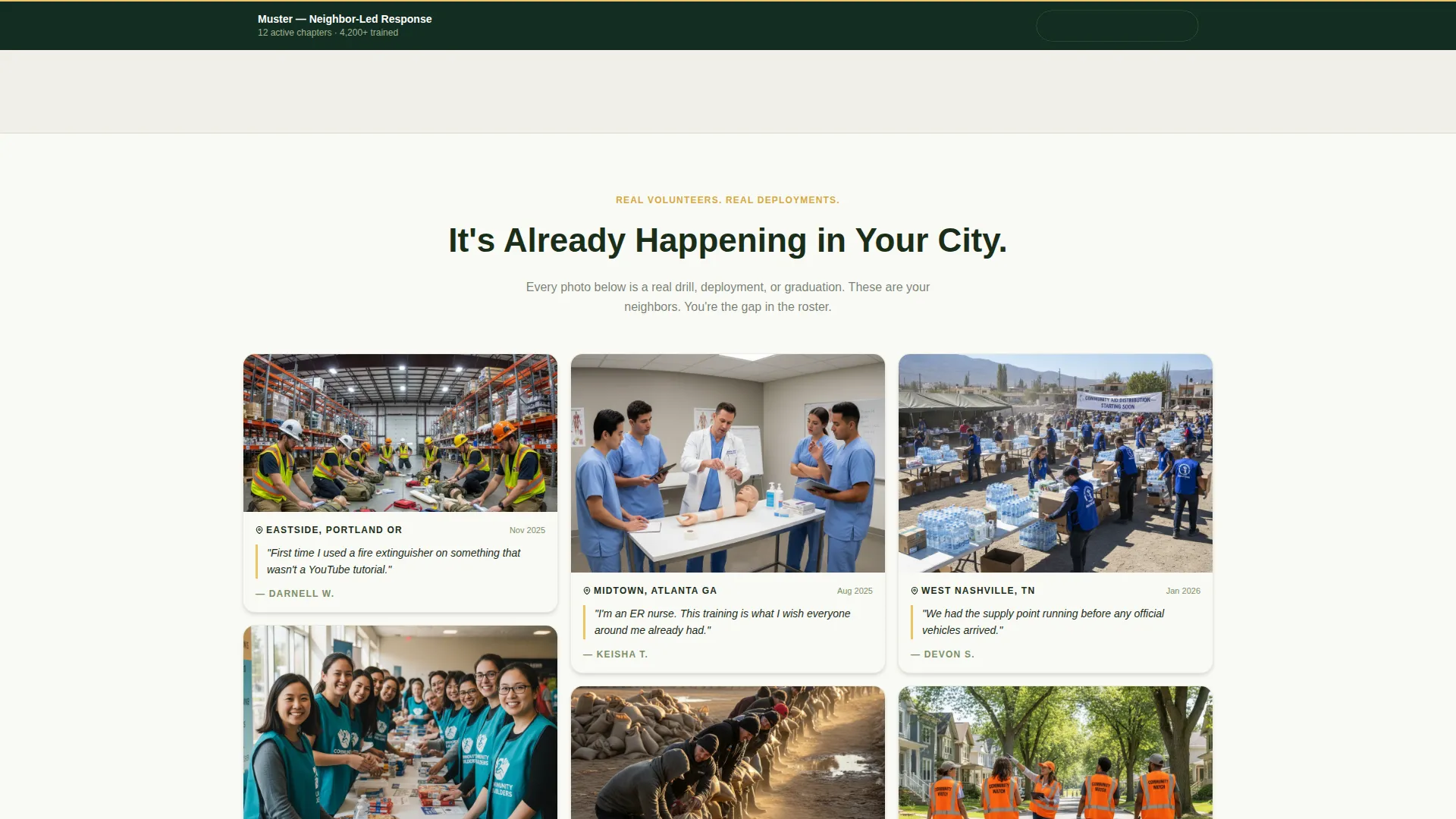
- A scrolling masonry photo gallery with location tags, dates, and volunteer-written captions
- A persistent bottom bar and zip-code-first modal for low-friction lead capture
Feature list
This template includes purpose-built sections and interactions designed specifically for volunteer recruitment in civic and nonprofit contexts.
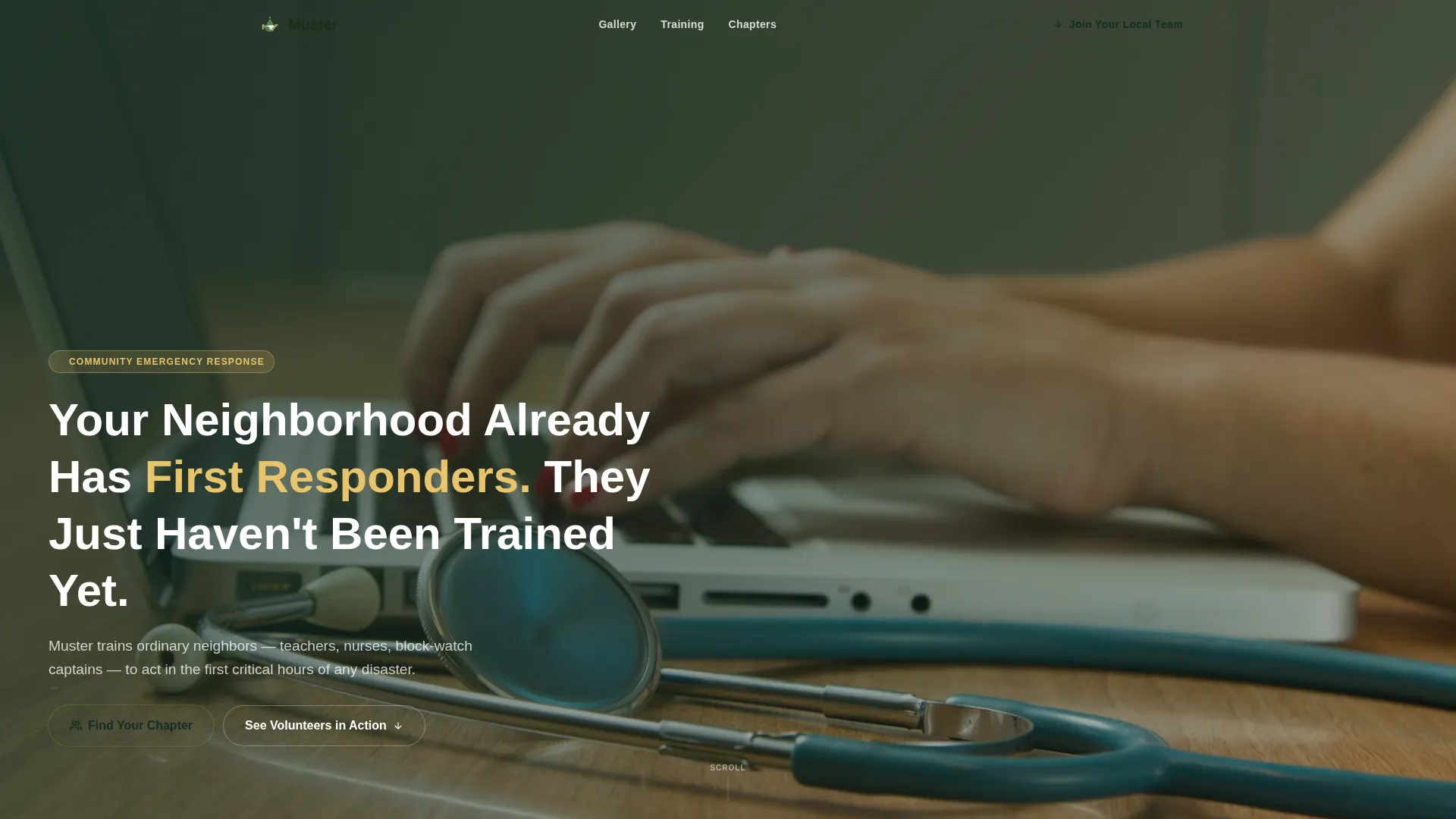
Full-Screen Video Hero
The header plays handheld-style footage of real training moments at participant height. A single headline fades in over the video, and an amber call-to-action button sits at the bottom left. A grain overlay keeps the footage grounded and non-cinematic.
Masonry Community Gallery
A scrolling Pinterest-style photo grid fills with location-tagged, date-stamped cards, each carrying a one-sentence caption in the volunteer's own voice. As the visitor scrolls, the grid thickens visually, building the argument that this is already happening in neighborhoods like theirs.
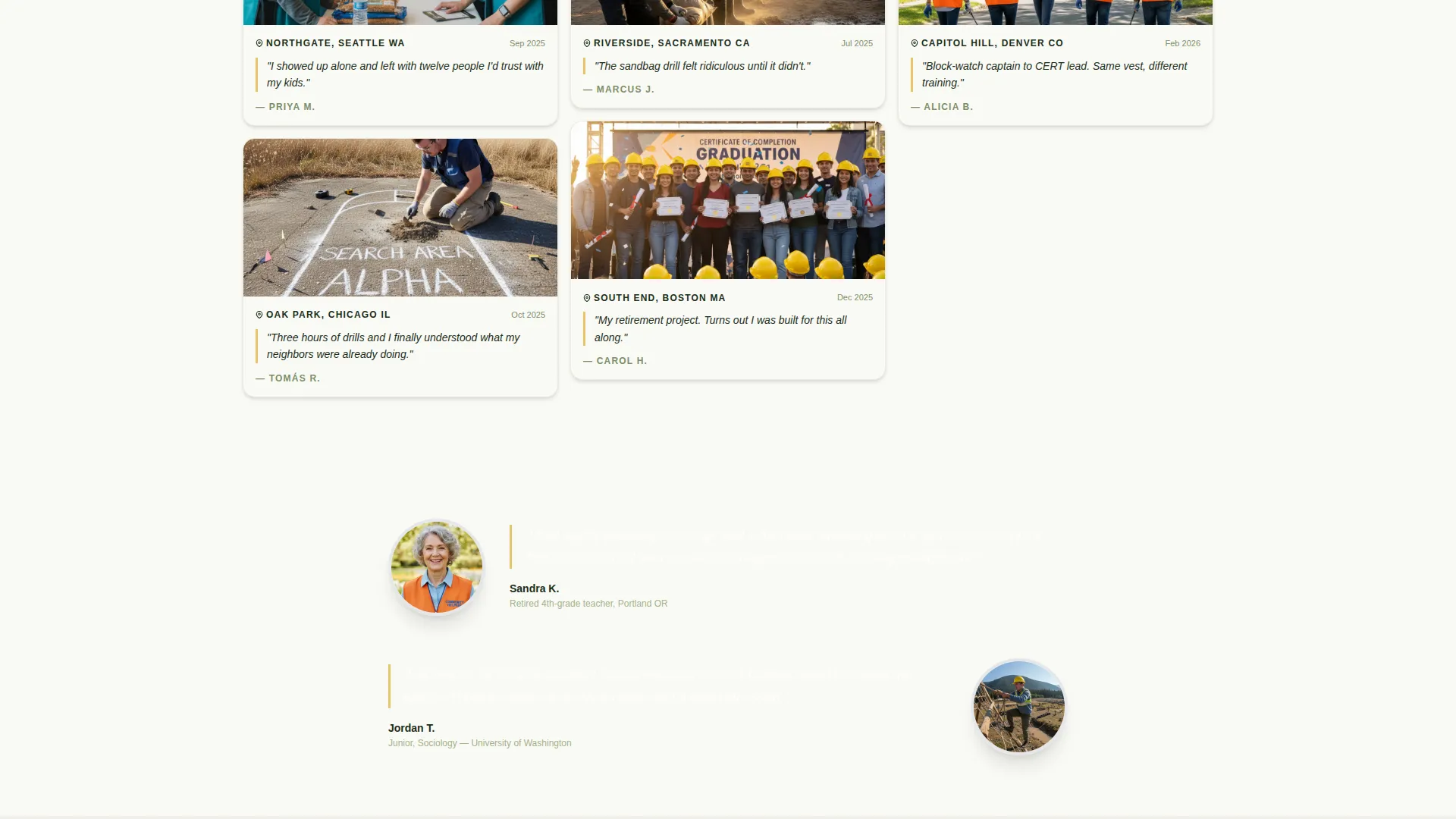
Testimony Strip Breaks
Between gallery clusters, single-column testimony strips interrupt the grid with a volunteer portrait, their day job, and a brief reason they joined. These strips shift the rhythm and make the social proof feel personal rather than promotional.
Civic Metrics Stats Bar
A four-metric bar displays volunteers trained, neighborhoods covered, deployments completed, and active chapters. The numbers give the program institutional weight without requiring outside credentials.
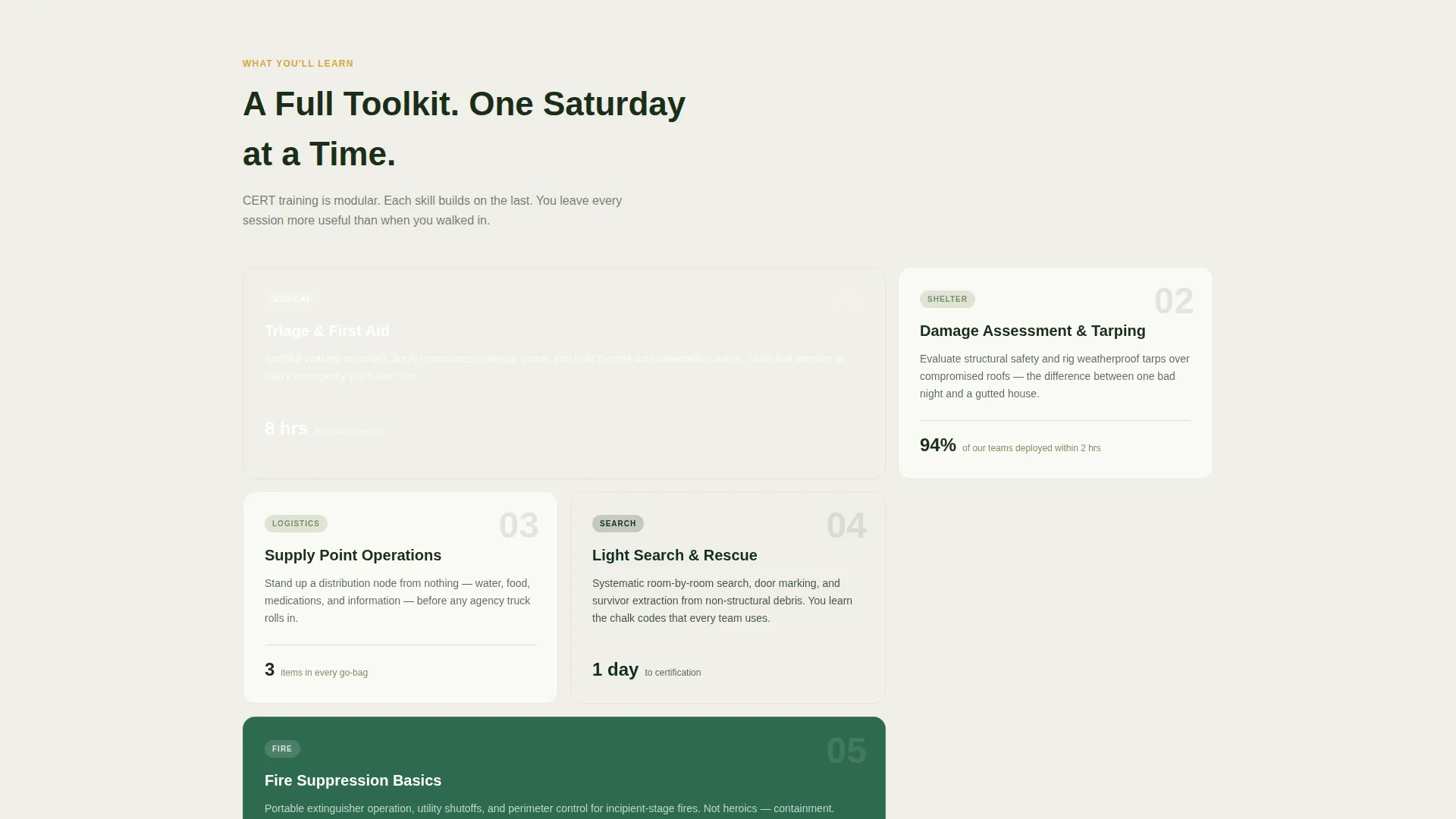
Asymmetric Skills Bento Grid
The "What You'll Learn" section presents trainable skills in an asymmetric bento-style grid layout. It communicates practical value and scope without overwhelming the visitor with a text-heavy list.
Zip-Code Lead Capture Modal
Clicking the persistent bottom bar opens a short modal. Visitors enter their zip code first to match to the nearest chapter, then provide their name, email, phone number, and a single checkbox confirming Saturday availability. No lengthy application and no upfront legal language.
Page sections overview
| Section | Purpose |
|---|---|
| Video Hero | Establish atmosphere and headline |
| Stats Bar | Display civic credibility metrics |
| Community Gallery | Build social proof through real photos |
| Testimony Strips | Add personal volunteer voices |
| Skills Bento Grid | Communicate training value |
| Join Call-to-Action | Drive sign-up with persistent bar |
| Footer | Close with split-pattern layout |
Design & branding system
The visual identity follows a Civic Service theme expressed through the Forest Trust color system. The palette feels utilitarian and trustworthy, like a well-organized go-bag rather than a polished marketing site.
- Deep ranger green (#1B4332) dominates section backgrounds and the navigation bar; emergency signal amber (#E9C46A) marks every interactive element and call-to-action button
- Worn khaki (#A3B18A) softens dividers and secondary text; clean cotton white (#FAFAF5) fills masonry card backgrounds so photo tiles pop cleanly
- Typography uses DM Sans for headlines and Manrope for body text, both sturdy and legible without feeling corporate
Mobile & speed optimization
This template is built with a mobile-first priority, reflecting how volunteers often browse on their phones at community events or between shifts. Layout and interaction choices support that behavior directly.
- The masonry grid reflows cleanly for smaller screens, and the persistent bottom bar remains accessible without obscuring content
- Scroll-reveal animations use the Intersection Observer approach for smooth performance without relying on heavy third-party libraries
- Images are optimized for fast loading, and the page uses native CSS smooth scroll throughout
How this template helps you convert
The template is structured to lower resistance at every scroll point. Visitors are never asked to commit before they understand what they are committing to.
- The video hero and headline reframe volunteering as a normal neighborhood act, not an exceptional one, so visitors arrive at the gallery already open rather than skeptical.
- The masonry gallery and testimony strips stack real-world evidence continuously, so by the time a visitor sees the call-to-action, they have already seen dozens of people like themselves who signed up.
- The zip-code-first modal asks for location before personal details, which feels helpful rather than intrusive and connects the visitor to a chapter near them before asking for a name or email.
Other information about this template
This template is categorized under Community and Nonprofit, within the Disaster and Emergency Relief subcategory, and is specifically designed for the Community Emergency Response team niche. It is a strong fit for programs modeled on or aligned with established civic volunteer frameworks in the United States.
- The footer uses a Pattern 7 Arc Browser Split layout, providing a clean and structured close to the page
- The template is built with medium animation intensity: scroll reveals, masonry hover effects, and video crossfade transitions are included
- The design language prioritizes folding-table solidarity over polished nonprofit aesthetics, which makes it especially credible to the audiences most likely to volunteer
Theme
Civic Service
Creative direction
Community Gallery
Color system
Forest Trust
Style
Masonry/Pinterest
Direction
Lead Generation
Page Sections
Full-screen Video Hero with Grain Overlay
Masonry Photo Gallery with Volunteer Captions
Persistent Bottom Bar with Zip-code Modal
Civic Metrics Stats Bar
Testimony Strip Breaks
Asymmetric Skills Bento Grid
Related questions
Who is the ideal visitor this landing page is designed to attract?
How does the lead capture process work?
Can I replace the gallery photos with images from my own program?
What sections are included in this template?
Is this template suitable for a program that is just getting started?



