Decentralized MES Landing Page Template
Mesh is a Bold Brutalist landing page template built for a decentralized manufacturing execution system. It opens with an auto-typing YAML terminal, moves directly into an interactive Downtime Cost Calculator, and guides plant managers, manufacturing CTOs, and operational technology engineers toward a three-field pilot deployment form. Every card earns its place by answering one question: how does this shrink your downtime cost?
by Rocket studio
Quick summary
Mesh is a single-page, modular card grid template for a distributed manufacturing execution system. The page opens with a live-typed YAML code snippet, immediately follows with an interactive Downtime Cost Calculator, and flows through architecture cards, a compliance matrix, and a lead capture form. The visual language is Bold Brutalist meets Glassmorphic: deep black, frosted panels, electric arc blue, and molten amber.
Who this template is for
This template is built for industrial B2B software teams who need to speak credibly to a technically demanding audience. It is the right fit when your buyer reads configuration files before marketing copy.
- Operational technology engineers who need latency proof and firewall-safe deployment evidence before they will engage
- Discrete manufacturing CTOs who have survived at least one failed MES migration and need ROI clarity fast
- Plant managers running lights-out shifts who care about uptime figures and real deployment snapshots, not abstract pitch decks
What problem this template solves
Most industrial software landing pages treat every visitor the same. They lead with brand claims and bury the technical evidence. The Mesh template flips that order. It puts the visitor's own data at the center of the page before asking for anything in return.
- Visitors leave before engaging because the page never proves it understands their operational context
- Sales teams waste discovery calls because prospects arrive without having calculated their own downtime exposure
- Technical buyers distrust pages that show stock photography instead of real configuration artifacts
What you get with this template
You get a fully structured, modular card grid landing page ready to adapt for a decentralized manufacturing execution system product. Every section is deliberately sequenced to build technical credibility and move visitors toward a pilot deployment conversation.
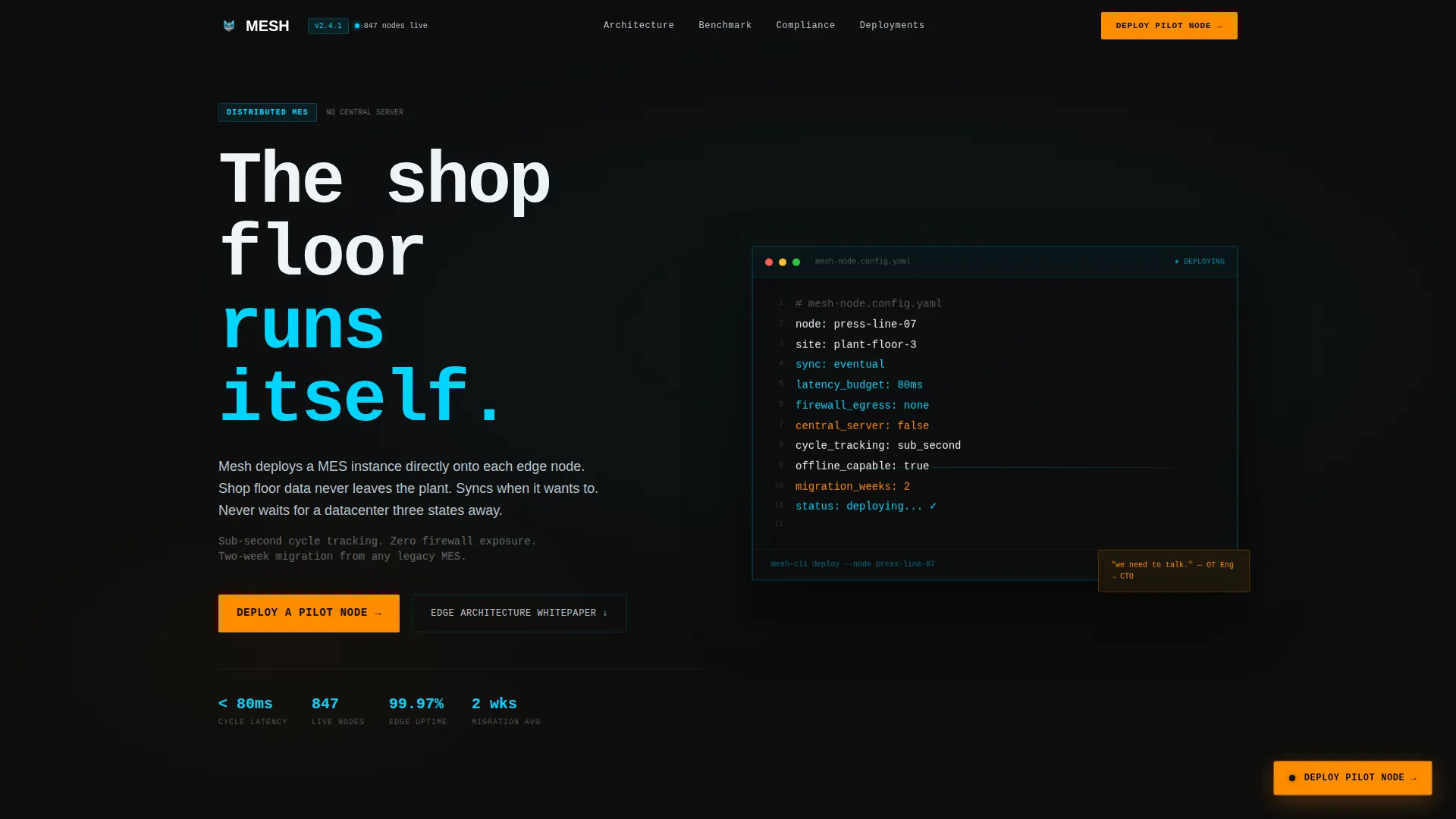
- A hero section with an eleven-line auto-typing YAML terminal block and brutalist headline typography
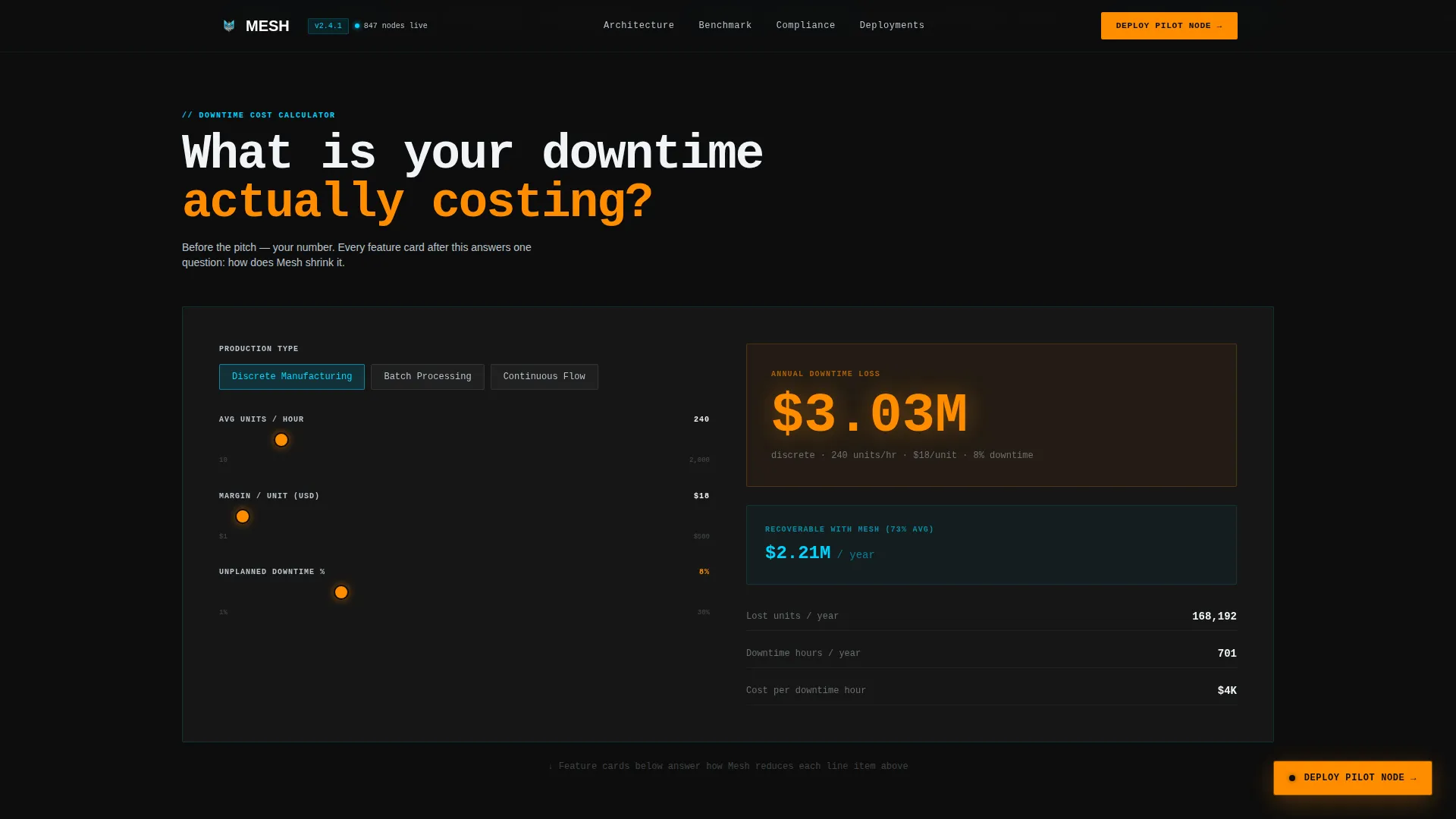
- An interactive Downtime Cost Calculator with production type selector, units-per-hour input, margin input, and a draggable downtime percentage slider that renders an annual loss figure in molten amber
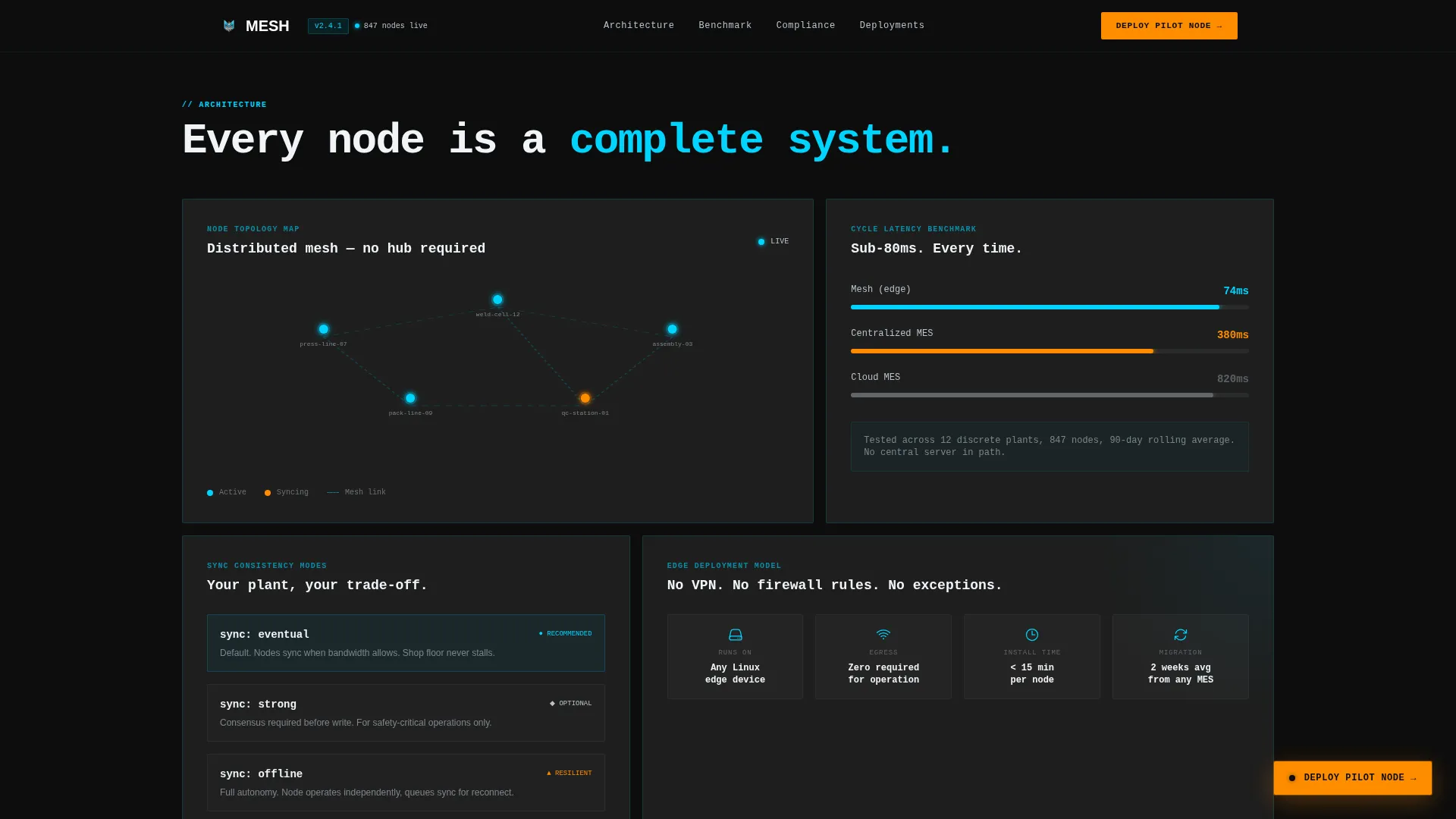
- An architecture bento grid featuring node topology, latency benchmark, and sync mode cards, followed by a compliance matrix card, customer deployment snapshots, and a three-field lead capture form with a secondary whitepaper download path
Feature list
This template covers every layer a manufacturing execution system landing page needs, from the first technical signal to the final conversion moment.
Auto-Typing YAML Hero Terminal
The hero block displays an eleven-line YAML node-configuration snippet that types itself on load, cursor blinking. Lines like node: press-line-07, sync: eventual, and latency_budget: 80ms reveal how straightforward edge deployment is. No stock imagery, just the kind of artifact an operational technology engineer would forward to their CTO.
Interactive Downtime Cost Calculator
The second viewport is a live calculator. Visitors choose their production type (discrete, batch, or continuous), enter average units per hour and margin per unit, then drag a slider for their current unplanned downtime percentage. A card instantly renders their annual loss figure in molten steel amber. The result anchors every subsequent section to a number the visitor calculated themselves.
Architecture Bento Grid Cards
An asymmetric card grid presents the platform's technical architecture across three focused cards: node topology, latency benchmarks compared against centralized manufacturing execution systems, and available synchronization modes. The asymmetric sizing gives visual hierarchy without adding complexity to the layout.
Compliance and Deployment Matrix
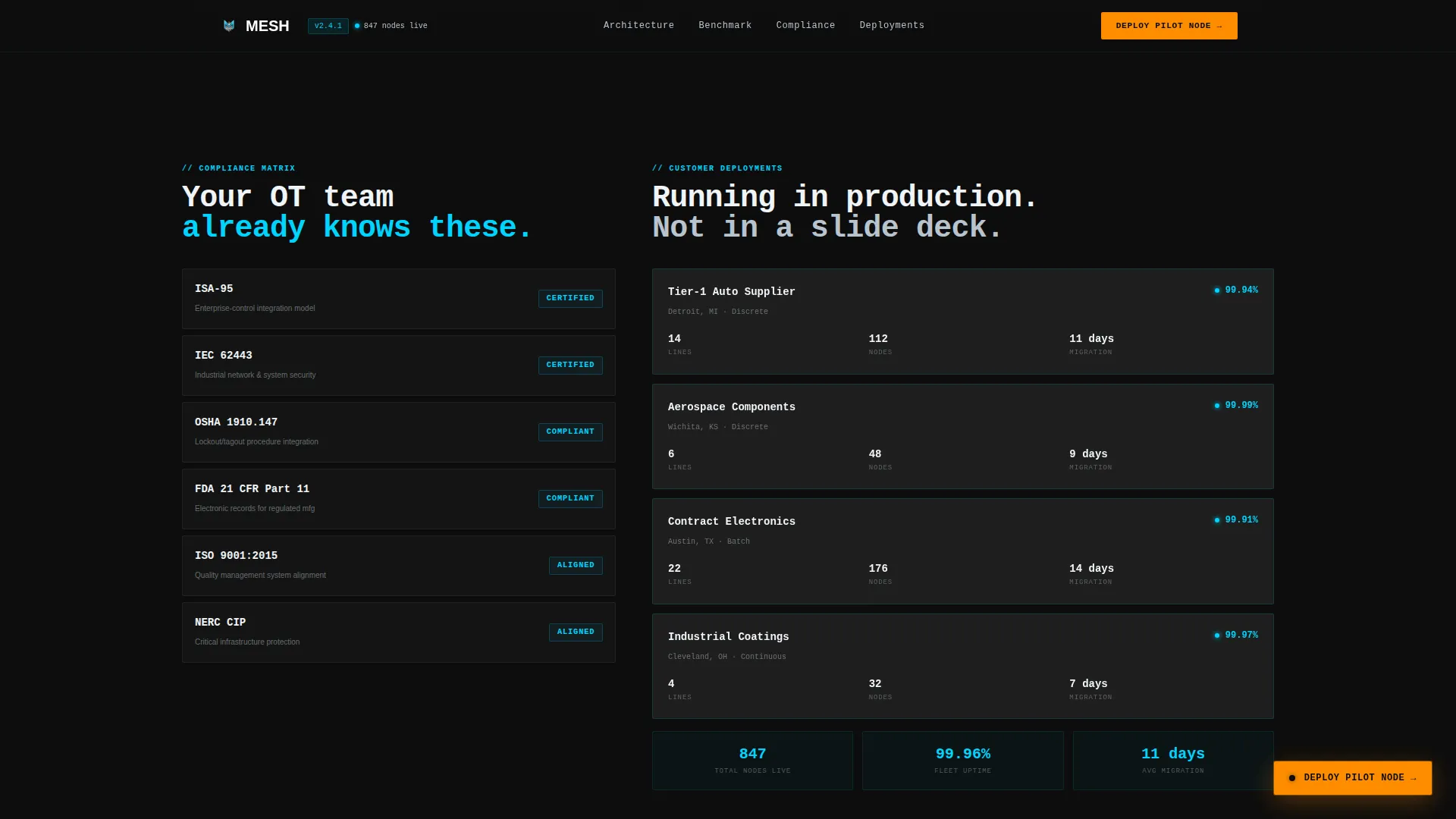
A dedicated card section presents a compliance matrix alongside real customer deployment snapshots. Each snapshot includes plant type, node count, and uptime percentage, giving prospects social proof in a format that matches how operational technology teams evaluate vendors.
Three-Field Pilot Deployment Form
The final card in the grid is a minimal lead capture form with exactly three fields: plant type, number of production lines, and work email. No phone field, no company size dropdown. The calculator result is designed to carry forward into the lead record, so sales context arrives before the first conversation.
Secondary Whitepaper Download Path
Visitors not ready to request a pilot deployment can access an edge architecture whitepaper gated behind email-only capture. This secondary conversion path keeps lower-intent visitors in the funnel without adding friction to the primary call to action.
Page sections overview
| Section | Purpose |
|---|---|
| Hero Terminal Block | Opens with auto-typing YAML and brutalist headline typography |
| Downtime Cost Calculator | Lets visitors calculate their annual unplanned downtime loss |
| Architecture Bento Grid | Shows node topology, latency benchmarks, and sync modes |
| Compliance Matrix Card | Presents compliance coverage and customer deployment snapshots |
| Pilot Deployment Form | Captures plant type, production lines, and work email |
| Whitepaper Download Card | Offers edge architecture whitepaper via email-only gate |
| Developer Minimal Footer | Closes the page with a clean, minimal footer pattern |
Design & branding system
The visual identity is built on a Bold Brutalist structure layered with a Glassmorphic color system. The result feels like peering through a smoked welding shield at white-hot machinery: frosted panels floating over pure black, with every accent color earning its brightness against the dark.
- Color palette: deep forge black (#0D0D0D) as the base, frosted translucent panels at 12% white opacity, electric arc blue (#00D4FF) for live-state indicators and interactive borders, molten steel amber (#FF8C00) reserved for calls to action and alert states, and machined aluminum (#B8C4CE) for secondary text and dividers
- Typography: Cabinet Grotesk for headings, JetBrains Mono for code blocks and data output, DM Sans for body copy
- Animation and interactivity: GSAP ScrollTrigger powers scroll-linked card reveals and parallax effects; the auto-type terminal and live calculator output use GPU-accelerated transforms for smooth rendering
Mobile & speed optimization
The template is designed desktop-first, reflecting how plant managers and manufacturing CTOs work on workstations during operational reviews. It scales responsively to tablet viewports for on-floor decision makers reviewing the page away from their desks.
- Desktop-first layout prioritizes the wide bento grid and full calculator interaction at workstation screen sizes
- Responsive tablet breakpoints ensure the calculator, card grid, and form remain usable on larger portable screens
- GPU-accelerated transforms and Server Components for static sections keep heavy animation from degrading the interactive calculator experience
How this template helps you convert
The conversion architecture is built around the calculator-first principle: once visitors have seen their own downtime cost in amber, every card that follows reads as a direct answer to that number.
- The auto-typing YAML terminal establishes technical credibility in the first viewport, earning the attention of operational technology engineers before a single marketing claim appears
- The Downtime Cost Calculator anchors the visitor's financial exposure to a specific figure they calculated, making every subsequent feature card feel like a direct response to their own situation
- The three-field pilot deployment form removes friction at the decision point, while the secondary whitepaper path retains visitors who need more time before committing to a conversation
Other information about this template
The Mesh template is a purpose-built tool for teams launching or repositioning a distributed manufacturing execution system product. It combines high-interactivity components with a technically credible visual language that respects the intelligence of industrial software buyers.
- The template style is Card Grid (Modular), making individual sections easy to reorder or extend as the product evolves
- The lead generation flow is sequenced: calculator interaction first, persistent floating call to action second, final form card last
- The footer follows a GitHub Developer Minimal pattern, keeping the close of the page clean and code-adjacent without adding visual noise
- The page is localized for English-language audiences using United States Dollar formatting and US date conventions
- This template suits teams in the OT/IT convergence space, industrial B2B software-as-a-service, and manufacturing technology categories
Theme
Bold Brutalist
Creative direction
Calculator/Tool First
Color system
Glassmorphic
Style
Card Grid (Modular)
Direction
Lead Generation
Page Sections
Auto-typing YAML Hero Terminal
Interactive Downtime Cost Calculator
Architecture Bento Grid
Compliance and Deployment Matrix
Minimal Three-field Lead Form
Secondary Whitepaper Download Path
Related questions
Who is the primary audience for this template?
Can I customize the calculator inputs for my production context?
Does the template include a secondary conversion path for visitors not ready to request a pilot?
What makes this template suitable for a decentralized manufacturing execution system?
What is the visual style of this template?



