Retail Software & SaaS Comparison Website Template
Storefront is a retail landing page template built for independent sellers who need a clean, shoppable web presence fast. It combines a data-forward dashboard header, a scroll-driven competitor comparison table, and three strategically placed free-trial calls to action into one high-intent, single-page layout that guides visitors from first impression to signup.
by Rocket studio
Quick summary
Storefront is a single-page retail website builder landing page template with a Data Command visual identity. It opens with a live-analytics dashboard preview, scrolls through an industry-report-style comparison table, and closes every key moment with a frictionless free-trial signup. The layout is built for independent sellers who need to look serious and convert fast.
Who this template is for
This template is designed for independent retail entrepreneurs who have outgrown informal selling channels and need a professional, data-confident web presence to match their ambition.
- Etsy sellers and craft-market vendors ready to own their storefront outside a marketplace
- Direct-to-consumer founders managing pre-orders without a proper retail platform
- Boutique owners who need to build and update product pages outside business hours
What problem this template solves
Most independent retailers lose potential customers not because their products are weak, but because their online presence looks unfinished or creates checkout friction. This template positions the platform as the direct fix to that problem using hard statistics and side-by-side evidence.
- Visitors arrive with skepticism, and the comparison table answers objections before they form
- The three-placement call to action strategy ensures no motivated visitor leaves without a clear next step
- The demo video path lowers commitment anxiety for visitors who are not yet ready to sign up
What you get with this template
You get a complete, conversion-focused single-page layout ready for a retail website builder platform. Every section is purposeful, every visual choice reinforces trust, and the signup flow asks only for an email and store name.
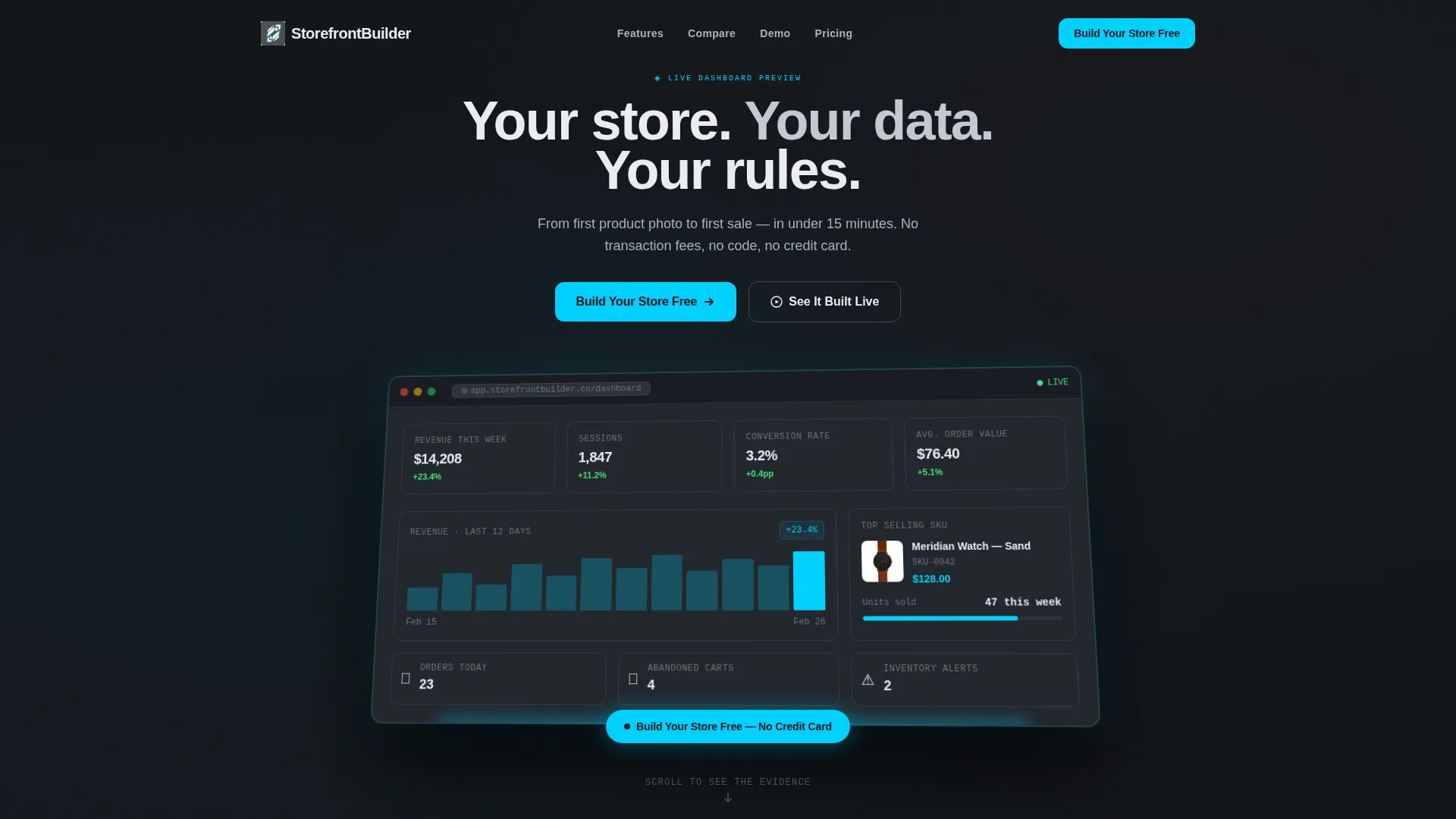
- A full-width dashboard header with real revenue and session metrics rendered in a 3D-tilted frame
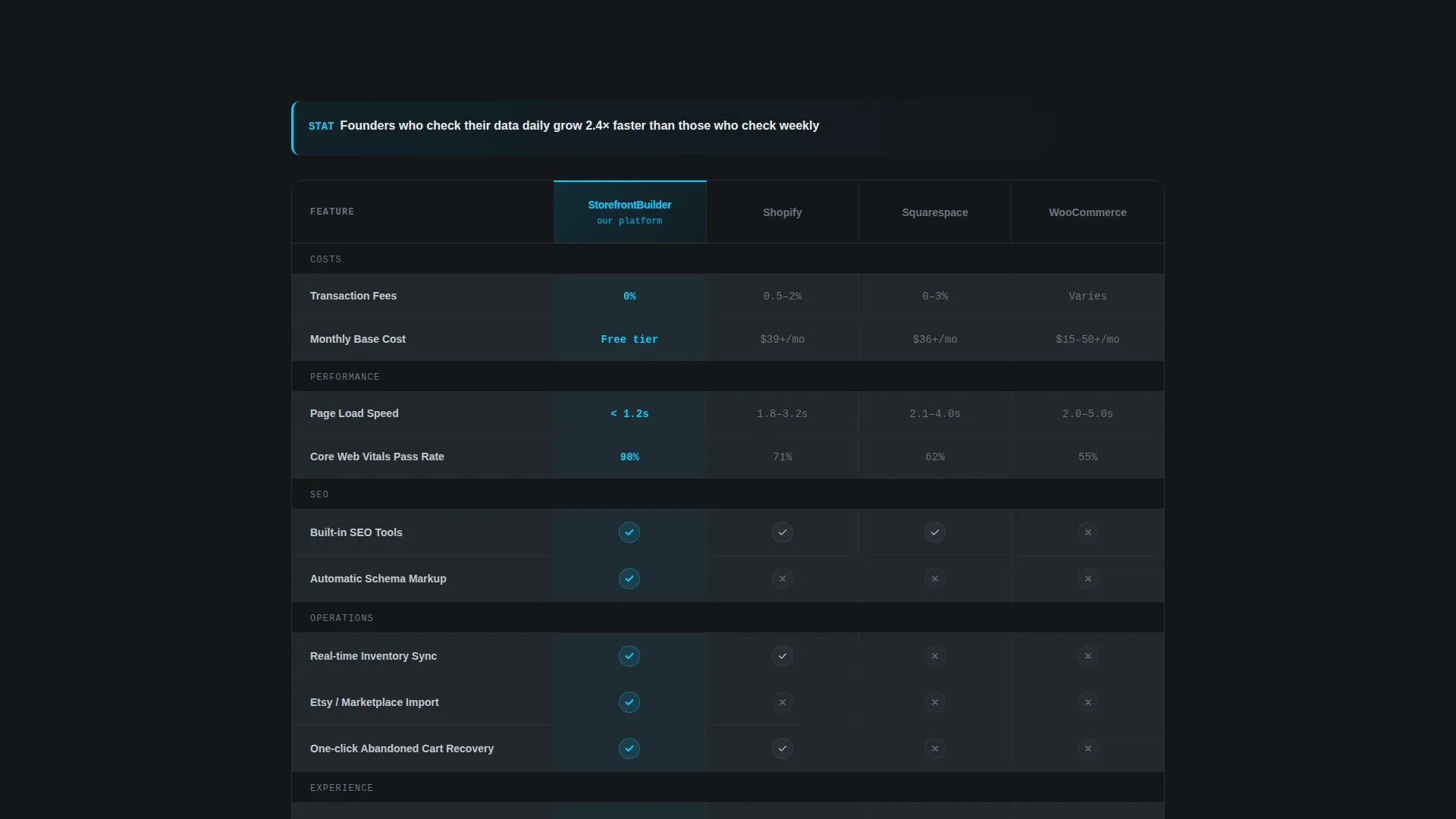
- A scroll-animated competitor comparison table with cyan checkmarks building an evidence wall row by row
- A sticky bottom call to action bar that activates after 40 percent scroll depth, keeping the offer always visible
Feature list
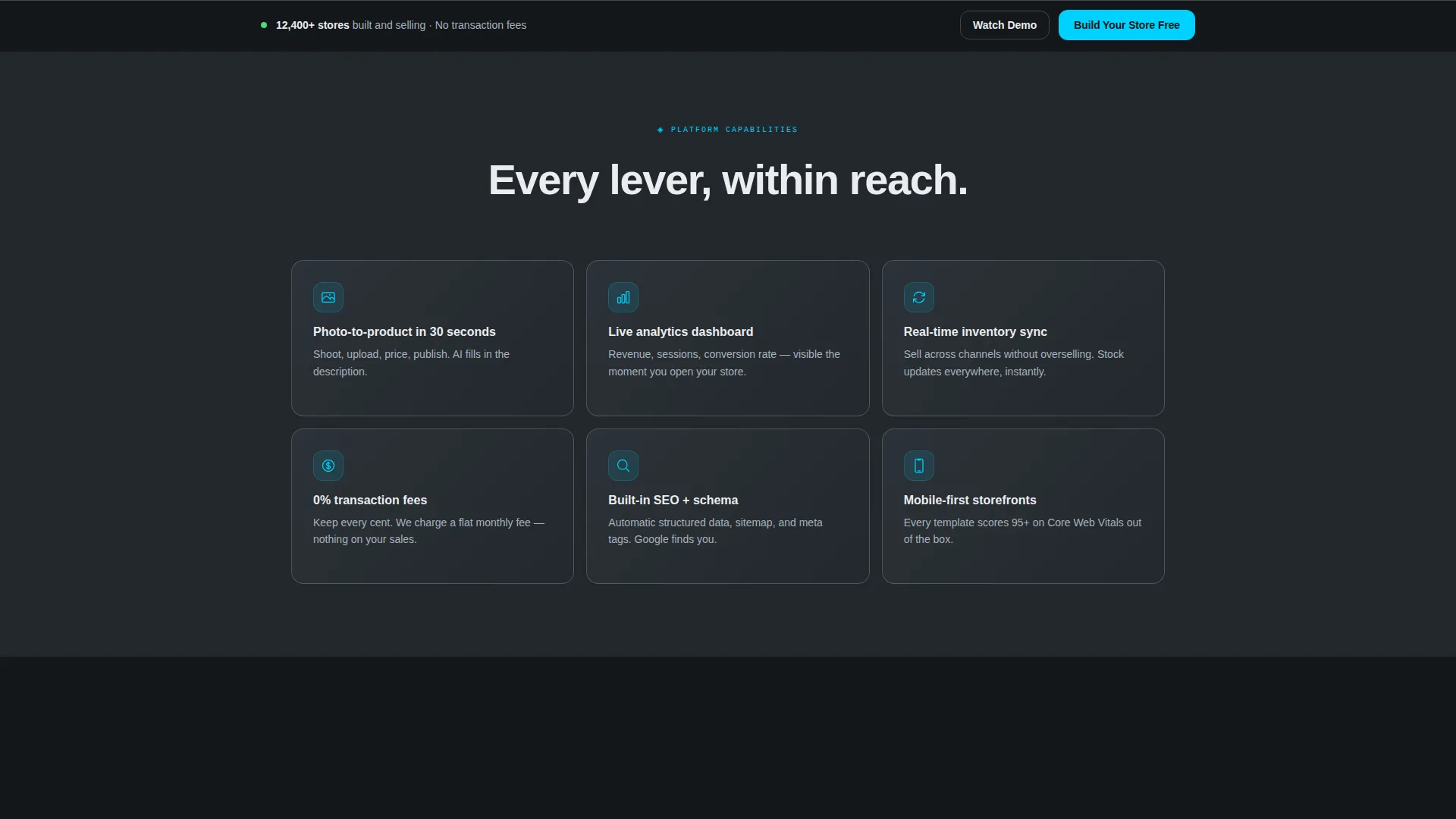
This template is built around a small number of high-impact components, each serving a specific conversion or trust-building function.
Full-Width Dashboard Header
The header renders a pixel-perfect analytics dashboard showing real figures: $14,208 weekly revenue, 1,847 sessions, a 3.2 percent conversion rate, and a top-selling product thumbnail. The dashboard floats on a subtle 3D plane against a deep gunmetal background, with a soft cyan glow along its bottom edge. A single cold-white headline sits above it: "Your store. Your data. Your rules."
Scroll-Animated Comparison Table
The comparison table stacks the platform against three well-known alternatives across key retail criteria including transaction fees, page load speed, built-in SEO tools, and inventory sync. Each table row animates in on scroll, with cyan checkmarks appearing in real time against steel-gray competitor indicators. The effect reads like a due-diligence briefing, not a sales pitch.
Three-Placement Free-Trial call to action
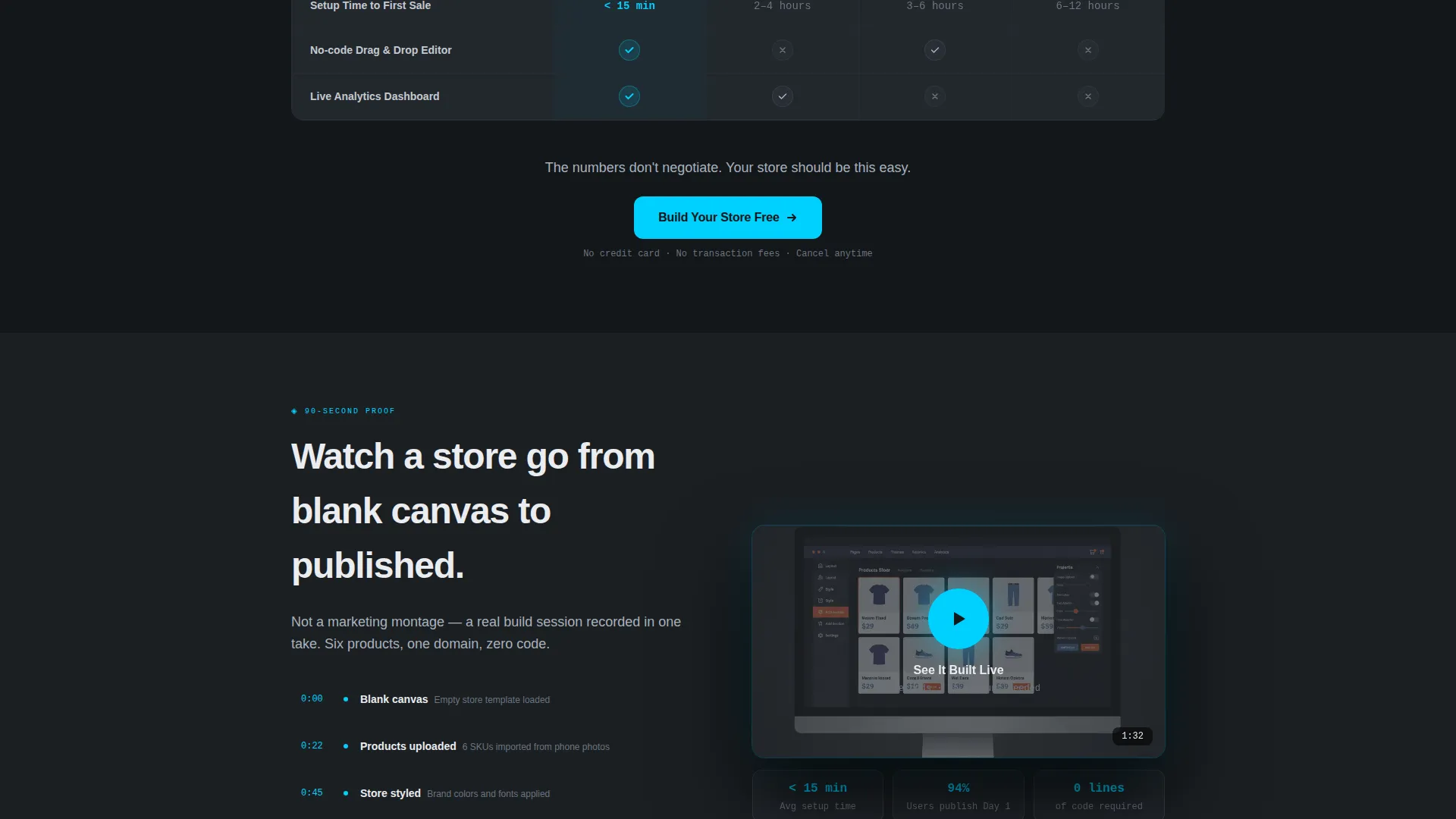
The primary call to action, "Build Your Store Free," appears in the header dashboard, immediately after the comparison table, and in a sticky bottom bar. The sticky bar activates only after 40 percent scroll depth to avoid interrupting early exploration. Each call to action placement links to the same lightweight signup form requiring only an email address and store name.
Embedded Demo Video Path
A secondary conversion path labeled "See It Built Live" triggers a 90-second embedded video showing a store built from blank canvas to published. This path reduces the commitment barrier for visitors who want to see the product work before they interact with it. It sits alongside the primary call to action without competing for visual priority.
Industry Report Content Layout
Every major content section opens with a hard statistic about independent retail pain points, then immediately pivots to platform solutions. This editorial rhythm mirrors a state-of-ecommerce briefing, making the page feel like informed research rather than promotional copy. The format builds credibility with data-literate buyers who distrust generic marketing language.
Page sections overview
| Section | Purpose |
|---|---|
| Dashboard Header | Opens with live analytics metrics and the primary headline to establish platform credibility immediately |
| Headline and Sub-copy | Frames the core value proposition below the dashboard in cold white against the gunmetal background |
| Stat-Led Intro Block | Opens the body scroll with a hard industry statistic to establish problem urgency |
| Comparison Table | Animates row by row to compare the platform against alternatives across key retail criteria |
| Post-Table call to action | Places the second "Build Your Store Free" signup prompt directly after the evidence wall |
| Demo Video Block | Hosts the 90-second embedded walkthrough triggered by the "See It Built Live" secondary call to action |
| Sticky Bottom Bar | Activates at 40 percent scroll depth and persists with the primary call to action until signup |
Design & branding system
The visual identity follows a Data Command theme built on a Monochrome Steel color system. The palette is deliberately cold and engineered, making data and interactive elements the only things with visual color.
- Deep gunmetal (#1B1F23) for primary backgrounds, brushed chromium (#A8B2BD) for surfaces and divider lines, and cold white (#EAECEF) for card faces and data cells
- Electric cyan (#00D1FF) reserved exclusively for interactive elements, toggle states, and every primary call to action button
- The overall aesthetic resembles the brushed-metal interior of a server rack: no warmth, no decoration, just clean engineered surfaces
Mobile & speed optimization
The template is designed so its visual complexity does not compromise the mobile experience. The scroll-trigger animations and sticky call to action bar are built to function cleanly across screen sizes.
- The 3D-tilted dashboard header scales responsively so the key metrics remain readable on smaller screens
- The comparison table adapts to a vertically scrollable format on mobile to preserve row-by-row readability
- The sticky bottom call to action bar is sized for thumb-friendly interaction and maintains its 40 percent scroll trigger on all devices
How this template helps you convert
The conversion architecture is layered deliberately so each scroll milestone either reduces doubt or creates a clear next action.
- The dashboard header delivers instant credibility with real numbers, making the platform's value tangible before a visitor reads a single word of body copy.
- The animated comparison table builds an evidence wall in real time, turning objection handling into a visual experience that feels like discovery rather than persuasion.
- Three call to action placements with a frictionless two-field signup form (email and store name only, no credit card required) remove every procedural barrier between intent and action.
Other information about this template
This template is built specifically for the retail website builder and software-as-a-service category, where buyers compare platforms carefully before committing. The Industry Report creative direction and Data Command theme are intentional choices for that audience.
- The template style is a comparison table landing page, making it well suited for platform-versus-platform positioning in the retail software space
- The Freemium/Trial conversion direction means the page is optimized for zero-friction signups, not direct purchase
- The embedded demo video supports use cases where visitors need to see the builder in action before they trust it enough to enter their email
Theme
Data Command
Creative direction
Industry Report
Color system
Monochrome Steel
Style
Comparison Table
Direction
Freemium/Trial
Page Sections
Live Analytics Dashboard Header
Scroll-animated Comparison Table
Three-placement Call to Action Architecture
Embedded Demo Video Block
Frictionless Two-field Signup Form
Related questions
Does this template require any coding to customize?
What does the signup form ask for?
Can I replace the demo video with my own footage?
Is the comparison table content editable?
Who is this template best suited for?



