Adventure Photography Tour Company Website Template
Shutter is a masonry-style photography tour landing page built for adventure-led photography companies. It pairs a full-screen aerial video header with an interactive destination grid, sticky terrain filters, and per-tour booking cards that show real guest photography. The Sunset Gradient palette and desert-to-alpine visual system make every scroll feel like stepping into the field.
by Rocket studio
Quick summary
Shutter is a single-page photography tour landing page template designed around the Adventure Terrain theme. It uses a masonry destination grid, a full-screen video header, and a warm Sunset Gradient color system to pull visitors straight into the experience. Each tour card shows guest photography, remaining availability, and a "Reserve Your Spot" call to action.
Who this template is for
This template is built for photography tour operators who guide clients into extraordinary natural terrain. It suits solo guides and small companies that want a polished, conversion-ready page without building from scratch.
- Photography tour companies offering landscape, adventure, or expedition trips
- Tour operators serving hobbyists, retired professionals, and semi-pro shooters
- Guides who sell spot-based departures and need clear booking visibility per tour
What problem this template solves
Most photography tour pages look like generic travel catalogs. They bury the experience under walls of text and never show real proof that the destination delivers. Shutter solves that by leading with visual evidence first.
- Visitors see actual guest photographs on every tour card before they read a single word of copy
- The interactive grid and terrain filters help visitors find relevant tours quickly, reducing decision fatigue
- Remaining availability and next departure dates on each card create honest, low-pressure urgency
What you get with this template
You get a fully structured single-page layout built specifically for a photography tour marketplace. Every section has a clear job, and the visual system does the heavy lifting for brand trust.
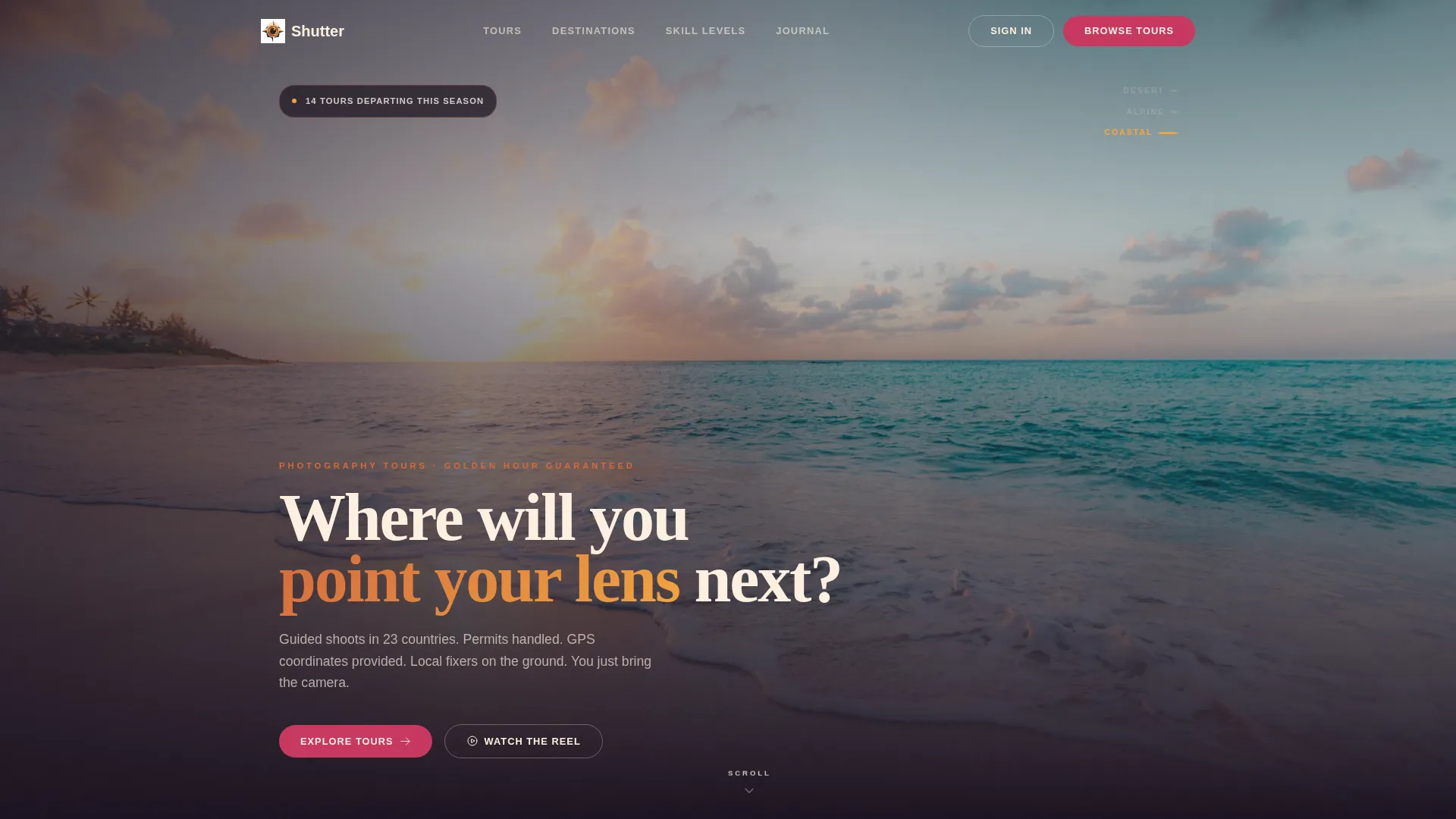
- A full-screen aerial video header with a shutter-click biome transition and a single headline
- A living masonry destination grid with hover-reveal tour details and per-card booking buttons
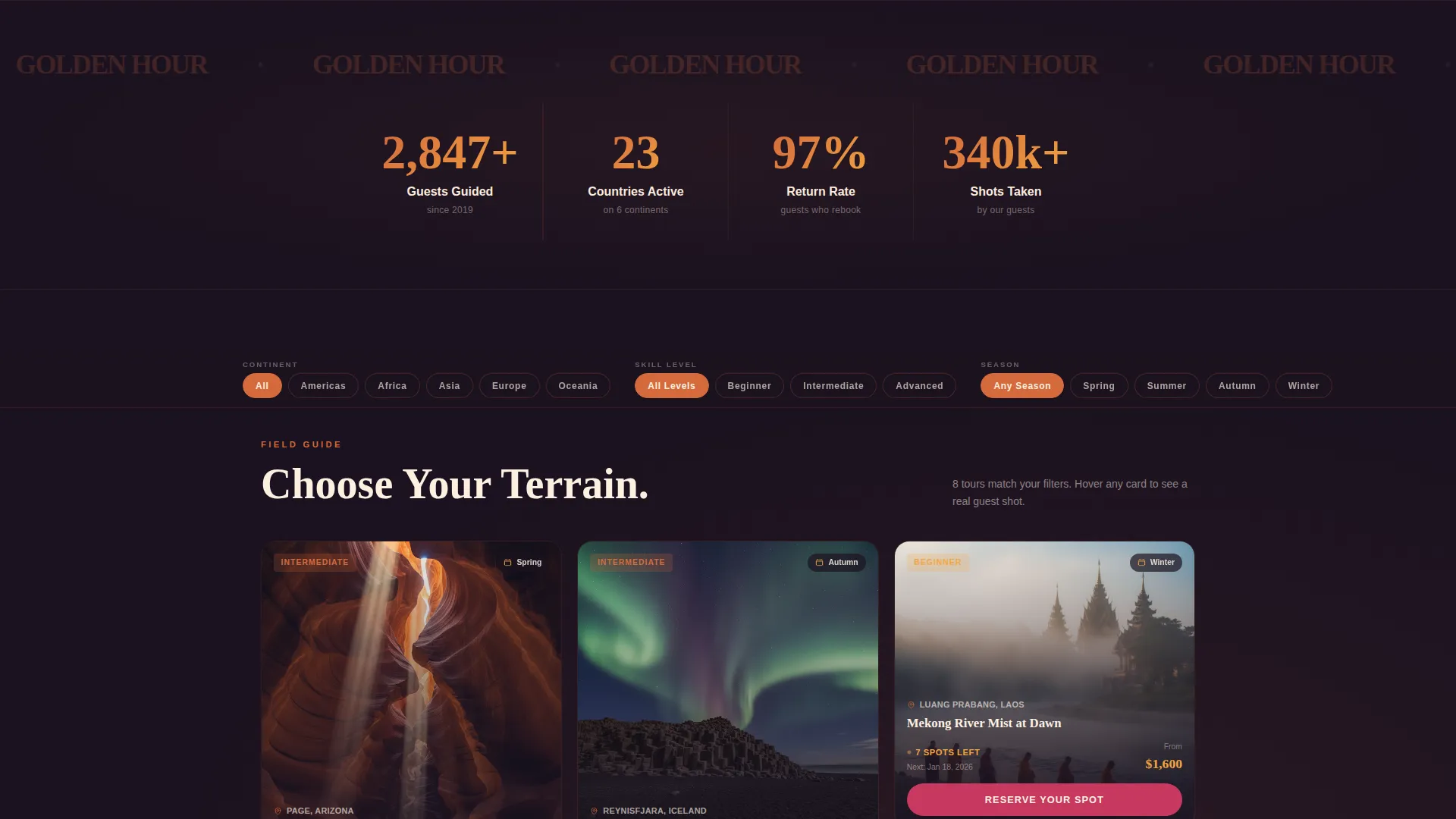
- A sticky filter bar for sorting by continent, skill level, and season
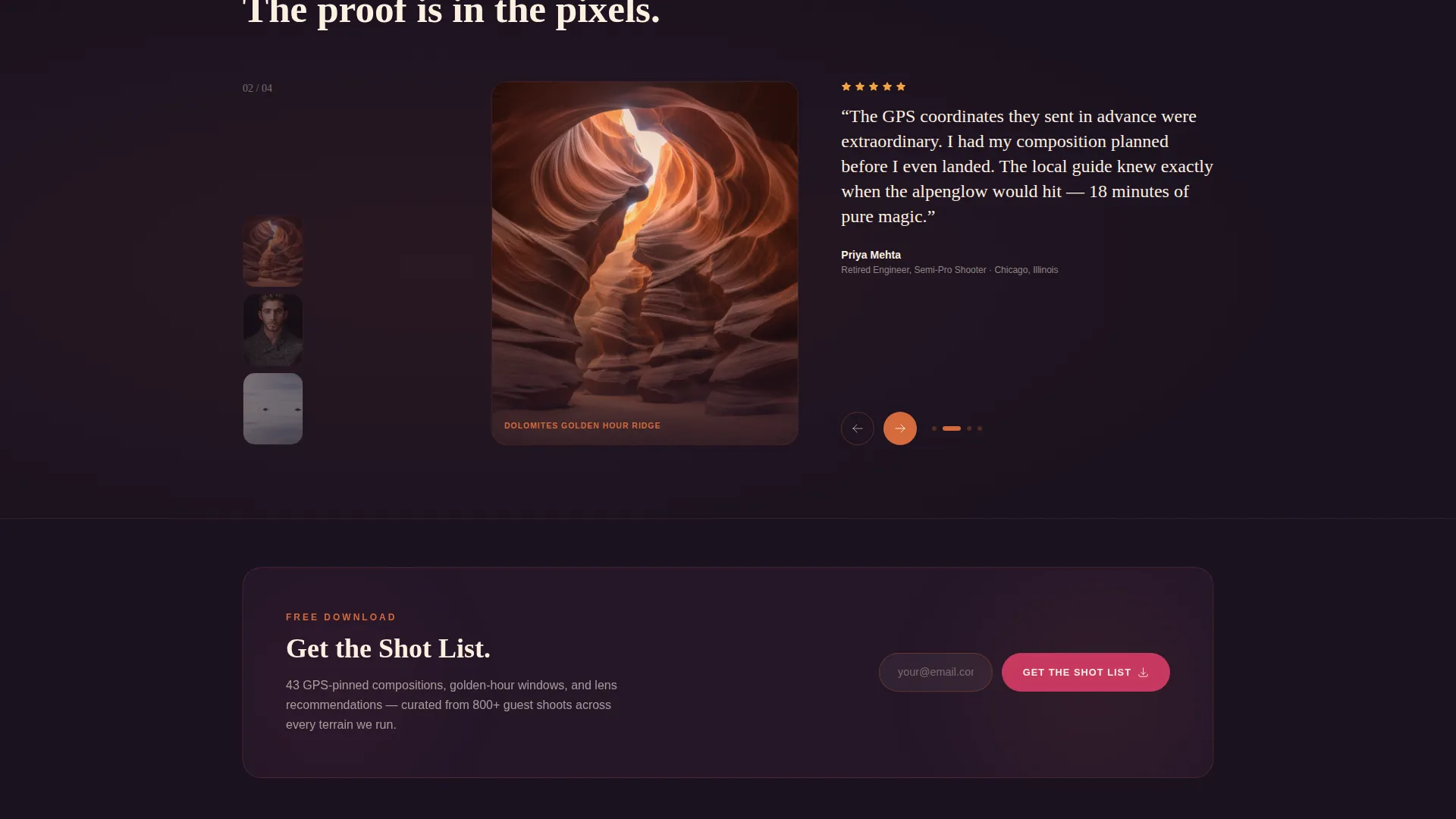
- A footer email capture section gated around a downloadable shot list PDF
Feature list
This template packages every visual and structural element a photography tour operator needs to present and sell multiple departure spots from one page.
Full-Screen Video Header
A slow aerial drone push over ridgeline terrain plays at golden hour. The footage cycles through desert, alpine, and coastal biomes in twelve seconds, each dissolving through a shutter-click transition. A single quiet headline sits low on the screen: "Where will you point your lens next?"
Interactive Masonry Destination Grid
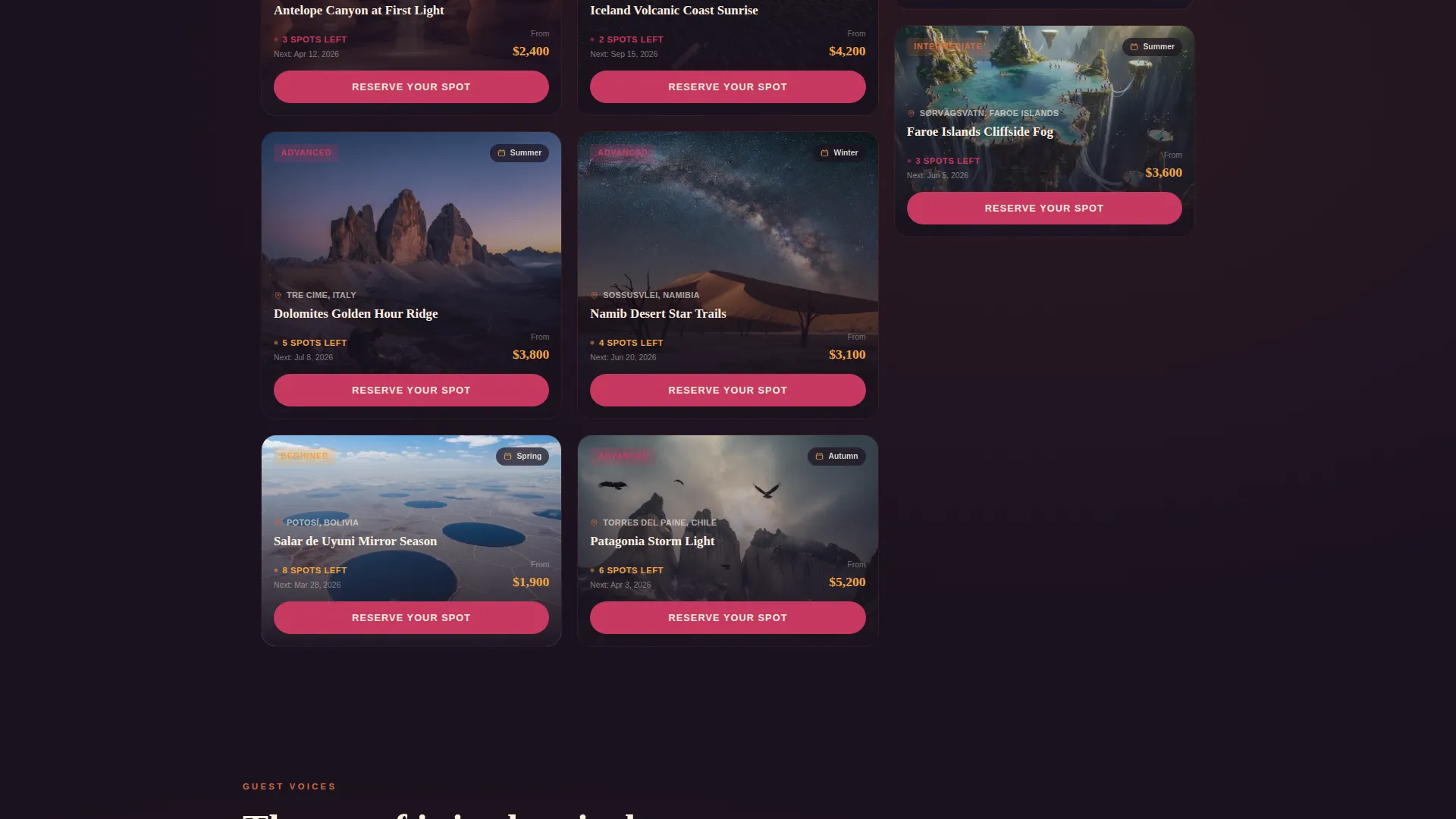
The grid below the header is the core of the page. Each card represents a tour, and hovering over a card reveals the season, difficulty rating, and a sample shot taken by a past guest. The layout feels like navigating a field guide rather than scrolling a catalog.
Terrain-Responsive Gradient Scroll
As visitors scroll deeper into the grid, the background gradient temperature shifts with the terrain type. Desert and savanna sections warm toward amber and saffron tones. Alpine and arctic sections cool to steel blue. The page itself becomes part of the visual storytelling.
Per-Tour Booking Cards
Every card in the masonry grid carries its own "Reserve Your Spot" button. Each button shows remaining availability and the next departure date alongside it, giving visitors the context they need to act without hunting for information.
Sticky Terrain Filter Bar
A persistent filter bar stays visible as the visitor scrolls. It lets them sort the grid by continent, skill level, and season. Filtering feels immediate and visual, keeping the browsing experience active rather than static.
Footer Shot List Email Capture
The page closes with a secondary conversion path. A "Get the Shot List" prompt gates a free downloadable shot list PDF behind an email capture field. It earns the submission by being genuinely useful to the target audience.
Page sections overview
| Section | Purpose |
|---|---|
| Video Header | Establishes adventure atmosphere and tone |
| Headline Overlay | Delivers the single anchor question |
| Sticky Filter Bar | Sorts tours by continent, skill, season |
| Masonry Tour Grid | Shows all destinations with guest photography |
| Tour Booking Cards | Presents availability and next departure per tour |
| Gradient Scroll Zone | Shifts visual temperature by terrain type |
| Footer Email Capture | Collects emails via shot list PDF offer |
Design & branding system
The Sunset Gradient color system is the backbone of the visual identity. Every tone has a specific role, and together they recreate the feeling of watching a desert sunset compress into five minutes.
- Deep canyon shadow (#1B1220) anchors the grid and dark sections; burnt amber (#D46A3C) and warm saffron (#F2A541) activate hover states and card edges
- Pale dawn sky (#FDF0E0) breathes between masonry blocks as open space; hot magenta (#C7385F) is reserved strictly for call-to-action buttons and interactive pins
- The Adventure Terrain theme drives layout decisions, keeping the page raw and textured rather than polished and minimal
Mobile & speed optimization
The masonry layout is structured to reflow cleanly across screen sizes. Card content and hover interactions adapt to touch-friendly formats on smaller devices.
- Tour cards stack into a readable single-column view on mobile without losing the guest photography or booking button
- The sticky filter bar remains accessible on mobile, keeping sort controls within thumb reach as the visitor scrolls
- The video header is designed to degrade gracefully, ensuring the headline and atmosphere hold without relying on full video playback
How this template helps you convert
Every design and layout decision on this page is aimed at reducing hesitation and moving visitors toward a booking or an email submission.
- Guest photographs appear directly on each tour card, providing real proof of what the destination looks like before the visitor reaches any sales copy or pricing.
- Remaining availability and next departure dates sit next to each "Reserve Your Spot" button, giving the visitor concrete context to act on without pressure tactics.
- The shot list PDF email capture in the footer offers genuine value to the target audience, turning browsers who are not ready to book into warm contacts.
Other information about this template
Shutter is built within the Travel and Hospitality category, specifically at the intersection of Adventure and Eco Tourism and the photography tour niche. It is designed as a marketplace-style single-page layout, meaning it can present multiple tour products from one scrollable page without requiring separate destination pages.
- The template style is Masonry or Pinterest layout, suited for image-heavy product inventories where visual scanning is the primary browsing behavior
- The Interactive Explorer creative direction makes the page feel like an active field guide rather than a passive brochure
- The Full-Screen Video Background header concept sets the emotional tone immediately, before the visitor reads a single word
- This template fits operators who offer departures to locations such as canyon terrain, volcanic highlands, salt flat environments, and coastal landscapes
Theme
Adventure Terrain
Creative direction
Interactive Explorer
Color system
Sunset Gradient
Style
Masonry/Pinterest
Direction
Marketplace/Multi
Page Sections
Full-screen Aerial Video Header
Interactive Masonry Tour Grid
Terrain-responsive Scroll Gradient
Per-tour Availability Cards
Sticky Terrain Filter Bar
Shot List PDF Email Capture
Related questions
Can this template show multiple tours on one page?
How does the sticky filter bar work?
What is the shot list email capture in the footer?
Is this template suited for tours at different difficulty levels?
What color system does this template use?