Ledger - Powerful Insuranceaccounting Landing Page Template
Ledger is a split-screen landing page template built for insurance accounting software. It pairs a live API code snippet with an animated reserve dashboard to show working software, not marketing promises. Designed for CFOs, accounting managers, and controllers at carriers, MGAs, and Lloyd's coverholders, it drives demo bookings through focused lead capture and a technical download path.
by Rocket studio
Quick summary
Ledger is a single-page, split-screen landing page template purpose-built for insurance accounting platforms. It opens with a code snippet alongside a live dashboard result, then walks visitors through automated bordereaux ingestion, multi-state surplus lines tax calculation, and reserve adequacy reporting. Every section is designed to earn trust by showing software in action before asking for a commitment.
Who this template is for
This template is built for insurance accounting software companies that need to reach senior finance professionals in highly regulated environments. It speaks directly to buyers who have lived with spreadsheet workarounds and are ready for something better.
- Chief Financial Officers at managing general agents (MGAs) managing surplus lines taxes across dozens of states
- Accounting managers at insurance carriers closing monthly books days behind schedule
- Controllers at Lloyd's coverholders preparing for Solvency II reporting cycles
What problem this template solves
Insurance accounting teams lose time to manual reconciliation, late closes, and compliance anxiety. A generic software landing page cannot communicate the precision these buyers demand. This template solves the credibility gap by showing the product working, not just describing it.
- Premium bordereaux reconciliation, claims reserve tracking, and statutory filing automation are all demonstrated visually on the page
- Buyers can self-qualify through a company-type selector and current-platform dropdown before ever speaking to sales
- A secondary technical download path captures evaluators who want to review API documentation before booking a call
What you get with this template
You get a fully structured lead generation landing page that mirrors the experience of working software. Every visual element is drawn from the brief, and every conversion point is intentional.
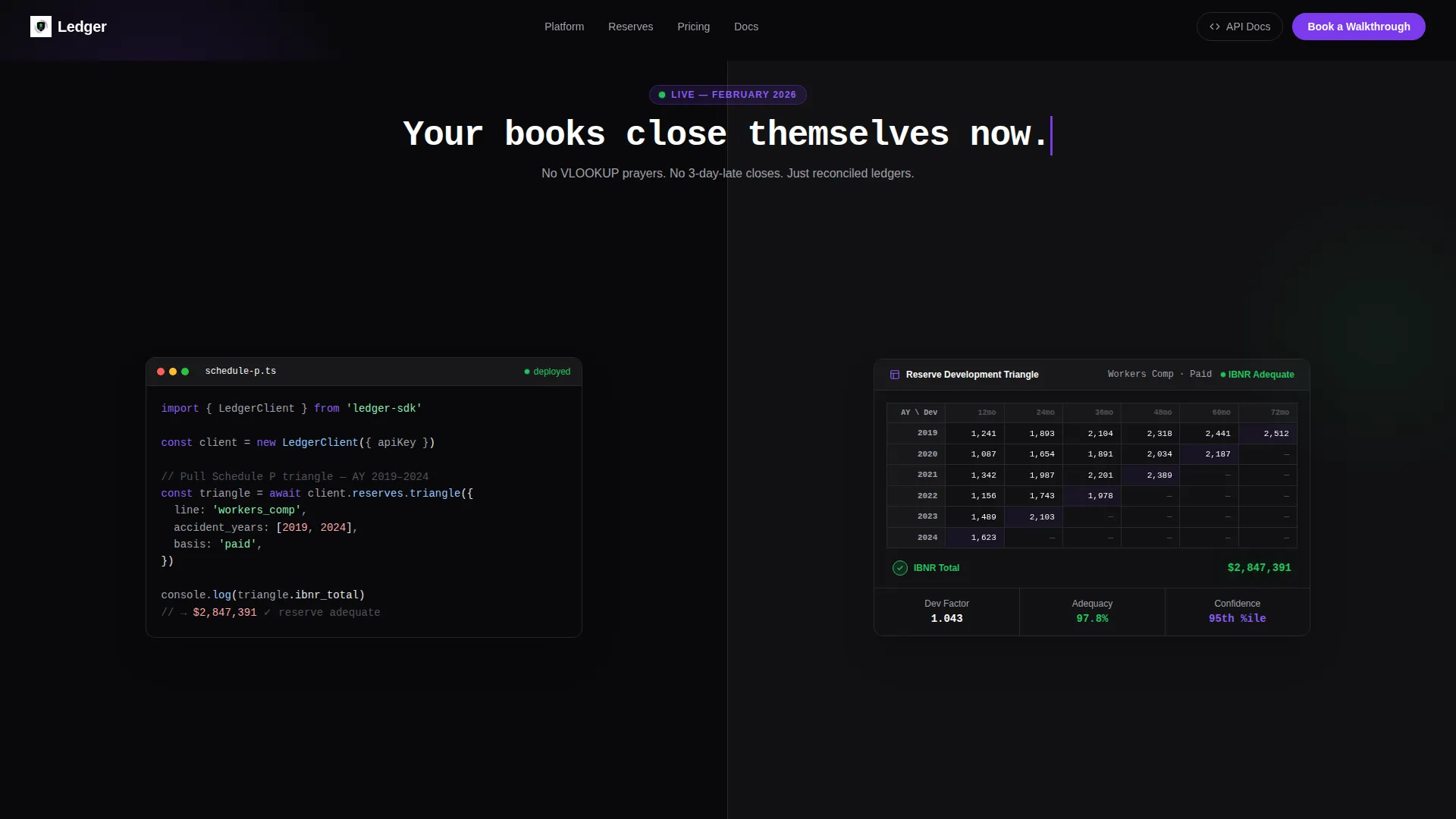
- A split-screen header pairing a syntax-highlighted API code snippet with an animated reserve development triangle
- Three escalating capability sections covering bordereaux ingestion, jurisdiction tax mapping, and real-time reserve dashboards
- Two conversion paths: a primary "Book a Walkthrough" form and a secondary "Download the API Docs" email gate
Feature list
This section covers the core functional and visual components built into the Ledger template.
Split-Screen Header with Live Code and Dashboard
The header divides the viewport equally. The left panel displays a real API call pulling Schedule P triangle data, syntax-highlighted in violet and green against void black with a blinking cursor. The right panel shows the animated dashboard result, with reserve triangle cells populating in a cascade as if the call just resolved.
Self-Typing Headline Animation
A headline types itself between the two panels reading "Your books close themselves now." It appears mid-split, creating a moment of pause between the code and its output. The animation reinforces the product's core promise without relying on stock imagery or abstract metaphors.
Automated Bordereaux Ingestion Section
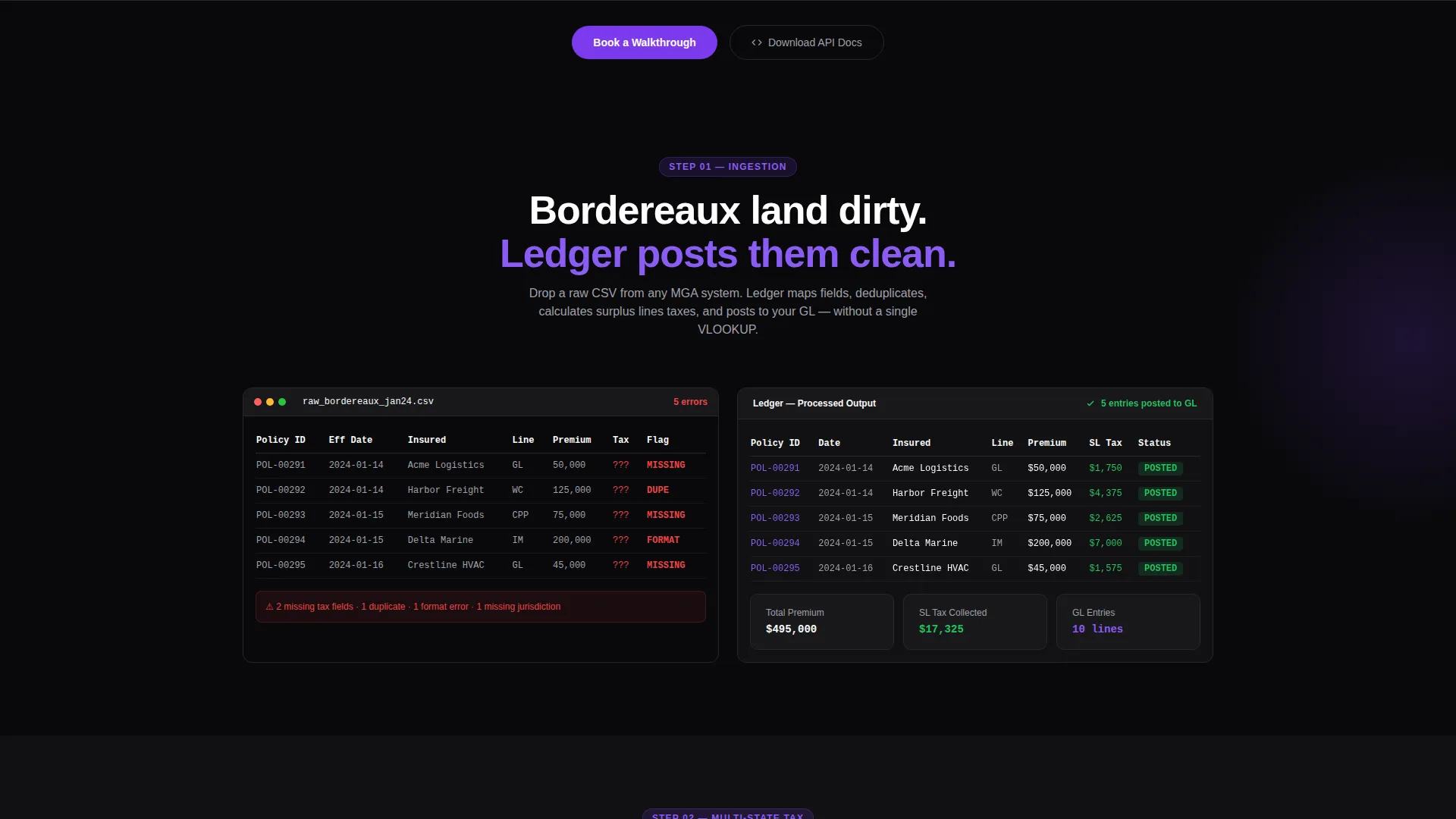
This scroll section presents a raw CSV on the left and cleaned, mapped ledger entries on the right. The transformation is visible in the layout itself, making the ingestion capability immediately legible to accounting professionals who have done this work by hand.
Multi-State Jurisdiction Tax Map
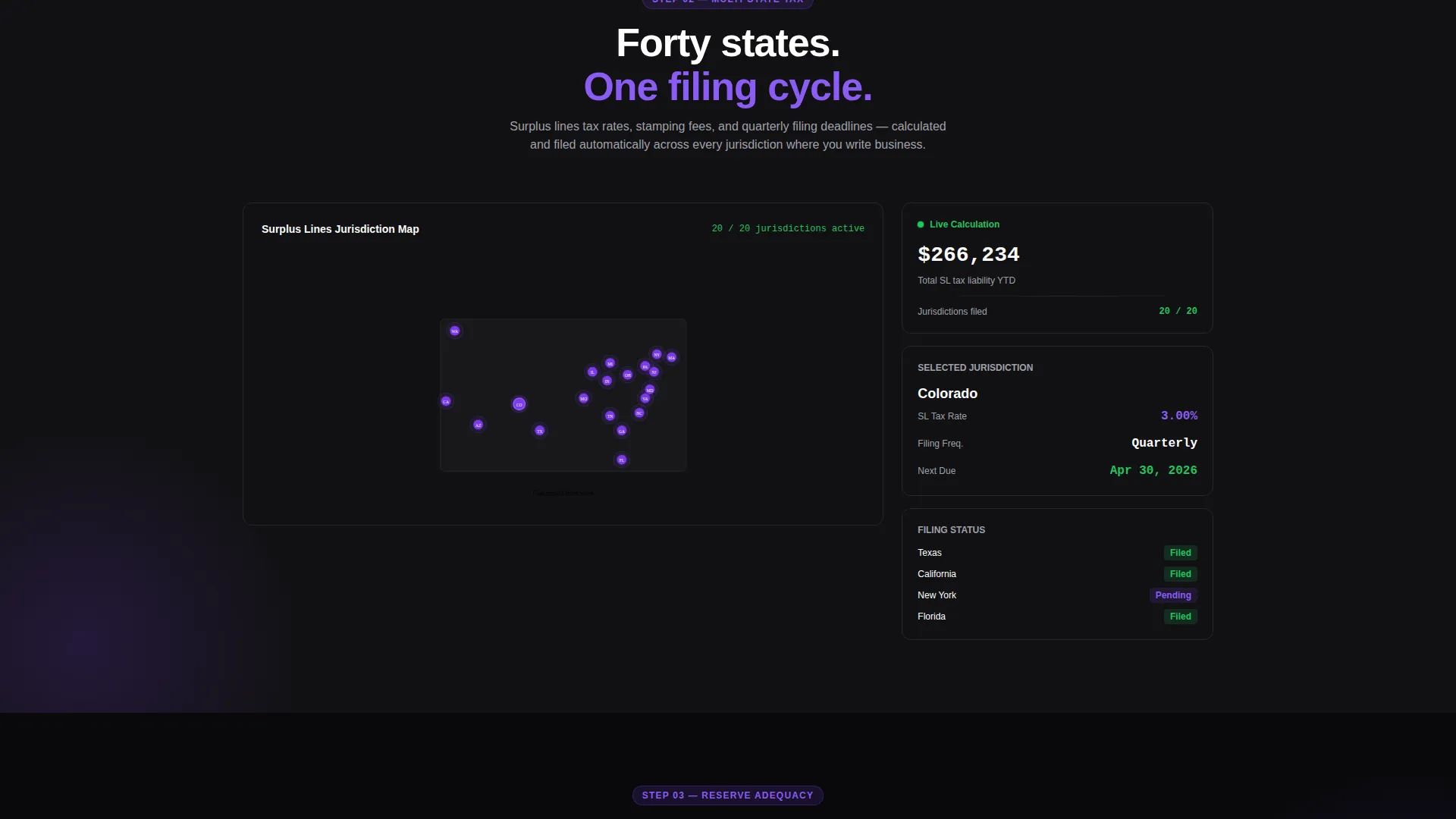
A jurisdiction map lights up state by state in deep violet as the section scrolls into view. This visual directly addresses the pain of managing surplus lines taxes across forty or more states, showing coverage rather than claiming it.
Reserve Adequacy Dashboard with IBNR Animation
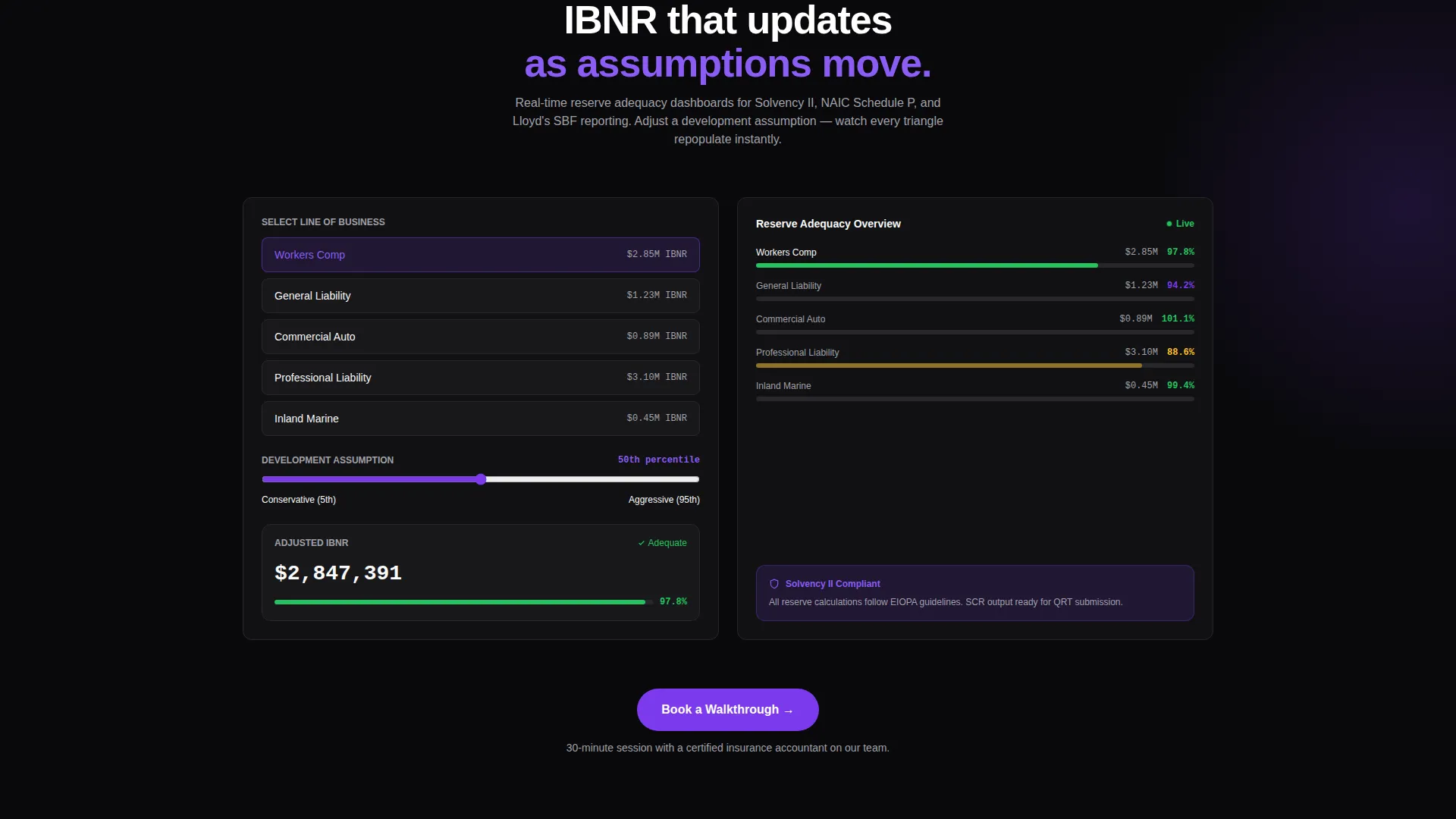
Incurred but not reported (IBNR) triangles animate in real time as assumptions adjust on screen. This section demonstrates reserve development reporting in motion, giving actuaries and controllers a concrete preview of the tool's output.
Dual Conversion Form System
The primary form captures work email, company type (carrier, MGA, coverholder, or third-party administrator), and current accounting platform (with a dropdown including common platforms and a manual entry option). A secondary email gate offers API documentation for technical evaluators who prefer to self-serve before booking.
Page sections overview
| Section | Purpose |
|---|---|
| Split-screen header | Anchor attention with code and live dashboard |
| Self-typing headline | Bridge the two panels with the core promise |
| Bordereaux ingestion demo | Show raw-to-clean data transformation |
| Jurisdiction tax map | Visualize multi-state surplus lines coverage |
| Reserve dashboard with IBNR | Animate reserve development assumptions live |
| Primary call to action form | Capture leads via walkthrough booking |
| Secondary API download gate | Convert technical evaluators by email |
Design & branding system
The template uses a Dashboard Pro theme built on the Void & Violet color system. It is designed to be stared at during long close cycles without causing eye strain, while making every action item impossible to miss.
- Core palette: absolute void black (#09090B) as the base, deep interstellar violet (#7C3AED) for accents and interactive elements, muted ledger gray (#A1A1AA) for secondary text, and electric confirmation green (#22C55E) reserved strictly for success states and live data pulses
- The visual language avoids stock photography entirely, relying on code snippets, data visualizations, and micro-interactions including a deploy button, a processing spinner, and a green checkmark
- Typography and spacing follow the Dashboard Pro theme, keeping the layout dense and information-rich without feeling cluttered
Mobile & speed optimization
The Ledger template is built with responsive layout behavior so the split-screen structure adapts gracefully on smaller viewports. The page does not sacrifice the visual story on mobile.
- Split panels stack vertically on narrow screens so the code snippet and dashboard remain readable without horizontal scrolling
- Micro-interactions and scroll-triggered animations are scoped to section transitions to keep the layout stable as content loads
- Form fields for the walkthrough booking and API documentation gate are sized for touch input and legible on mobile displays
How this template helps you convert
The Ledger template is structured as a progressive trust-building sequence. Each section earns the next click by showing more of the product before asking for anything.
- The header immediately demonstrates working software through the code-and-dashboard split, establishing credibility before the visitor reads a single feature claim.
- Each scroll section escalates a specific capability, from bordereaux ingestion to tax mapping to reserve dashboards, so buyers recognize their own workflow problems in the page.
- Two distinct conversion paths, the walkthrough form and the API documentation download, ensure that both business decision-makers and technical evaluators have a low-friction entry point.
Other information about this template
The Ledger template sits at the intersection of financial technology presentation and insurance industry specificity. It is a strong fit for any insurance accounting software company entering the market or refreshing its go-to-market presence.
- The template style is Split Screen (50/50) with a Dashboard Pro theme, making it well suited for platforms competing in the insurance software and broader insurtech space
- The creative direction is Launch Energy, meaning the scroll experience builds momentum from capability demonstration toward a clear call to action
- The header concept is a Code Snippet, which signals technical maturity to engineering-led buyers evaluating insurance accounting platforms alongside business stakeholders
- This template supports insurance accounting software positioning across carrier, MGA, coverholder, and third-party administrator (TPA) segments without requiring separate page builds
Theme
Dashboard Pro
Creative direction
Launch Energy
Color system
Void & Violet
Style
Split Screen (50/50)
Direction
Lead Generation
Page Sections
Split-screen Header with Code and Dashboard
Automated Bordereaux Ingestion Visual
Multi-state Jurisdiction Tax Map
IBNR Reserve Adequacy Dashboard
Dual Conversion Path System
Scroll-triggered Micro-interactions
Related questions
Who is this landing page template designed for?
Does the template include the lead capture form?
Can I update the jurisdiction map and reserve dashboard sections for my product?
What makes this template different from a generic software landing page?



