Launchpad - Powerful Wix Guide Landing Page Template
Launchpad is a scroll reveal landing page template built for first-time site builders who need a clear, step-by-step path from blank canvas to published site. It pairs a striking Tech Glass visual identity with a Spec Sheet layout that guides visitors through each build phase, capturing leads through a smart inline form and a gated checklist download.
by Rocket studio
Quick summary
Launchpad is a single-page guide template designed to walk total beginners through the site-building process with confidence. Its progressive scroll reveal unfolds four numbered phase cards in sequence, mirroring the actual build journey. A sticky call-to-action button and a lightweight lead form keep conversion opportunities always within reach.
Who this template is for
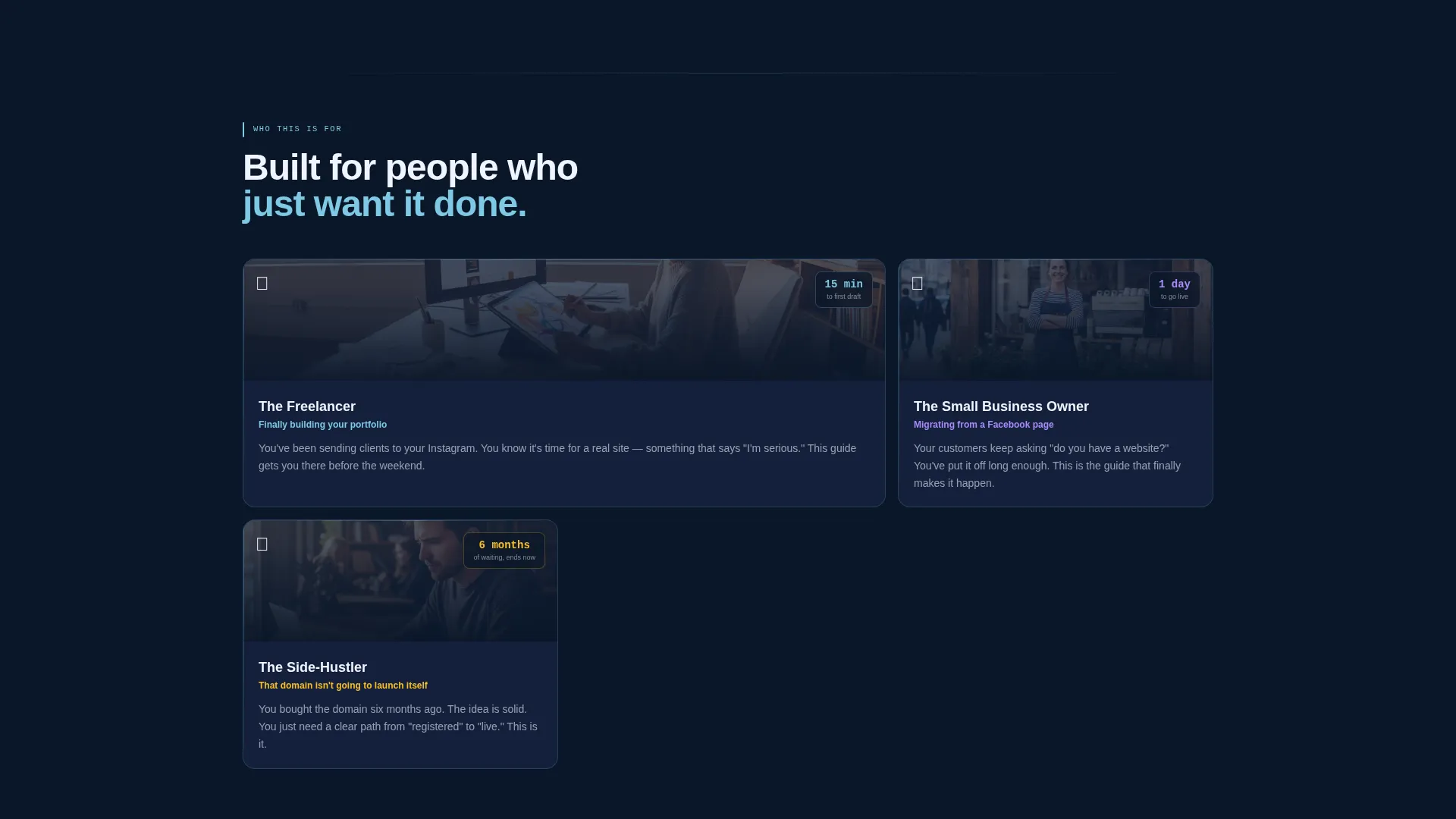
This template is built for people who have a domain and a dream but have not yet taken the first step. It removes the overwhelm of staring at a blank editor by turning the process into a clear, visual sequence anyone can follow.
- Freelancers finally building their first portfolio site
- Small-business owners moving away from a social media profile page
- Side-hustlers who registered a domain months ago and have not launched yet
What problem this template solves
Many first-time site builders stall not because the tools are too hard, but because no one shows them the order of operations. This template solves that orientation gap by presenting the build process as a structured, scrollable walkthrough.
- Drag-and-drop confusion replaced by a confident, step-by-step visual flow
- Decision paralysis removed through a guided phase sequence with one focus per card
- Hesitant visitors converted before they leave, through a low-commitment checklist download
What you get with this template
You get a fully styled, single-page lead generation landing page built around a progressive scroll reveal structure. Every section loads with purpose, and the visual system feels polished from the first pixel to the final call to action.
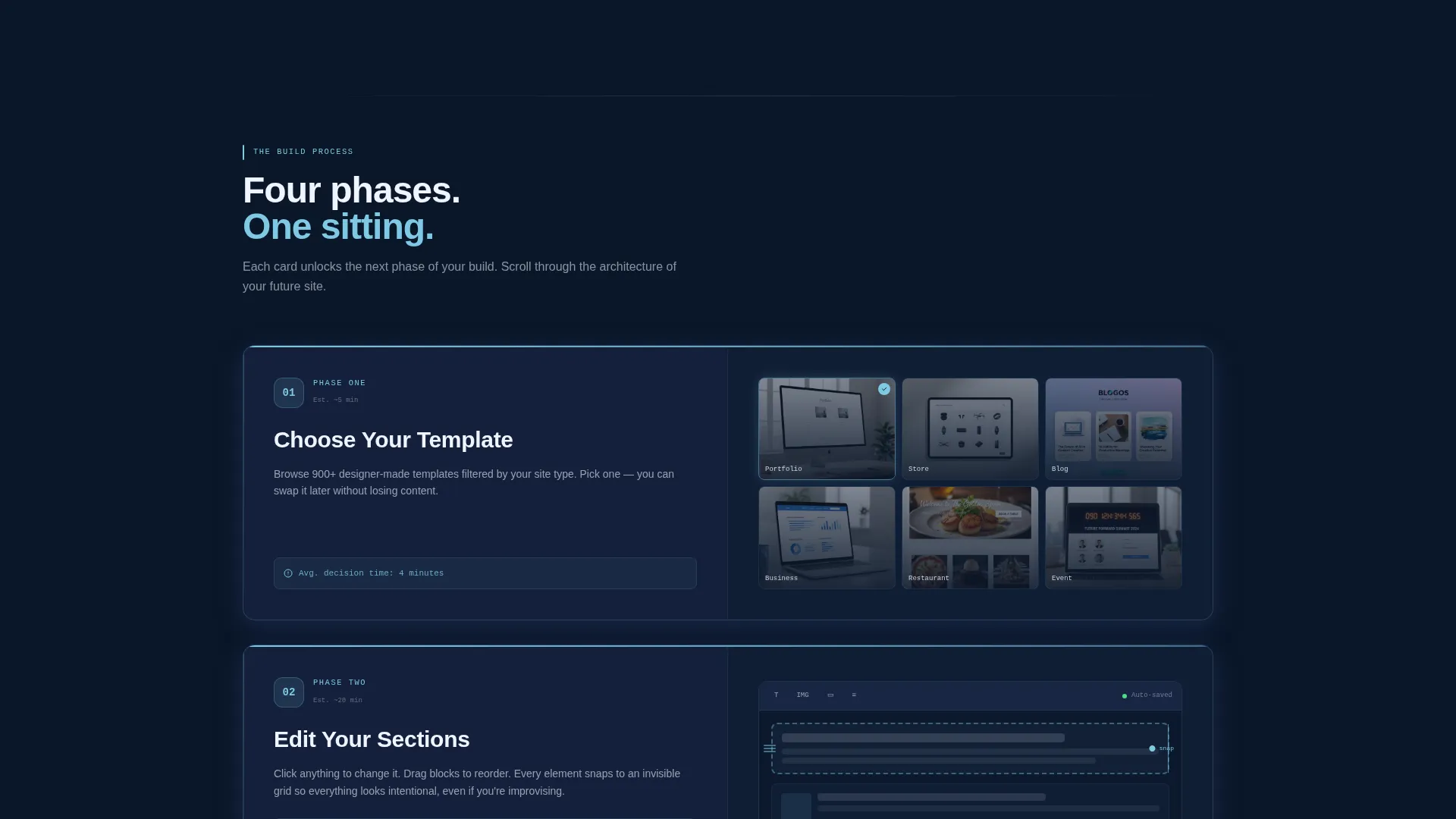
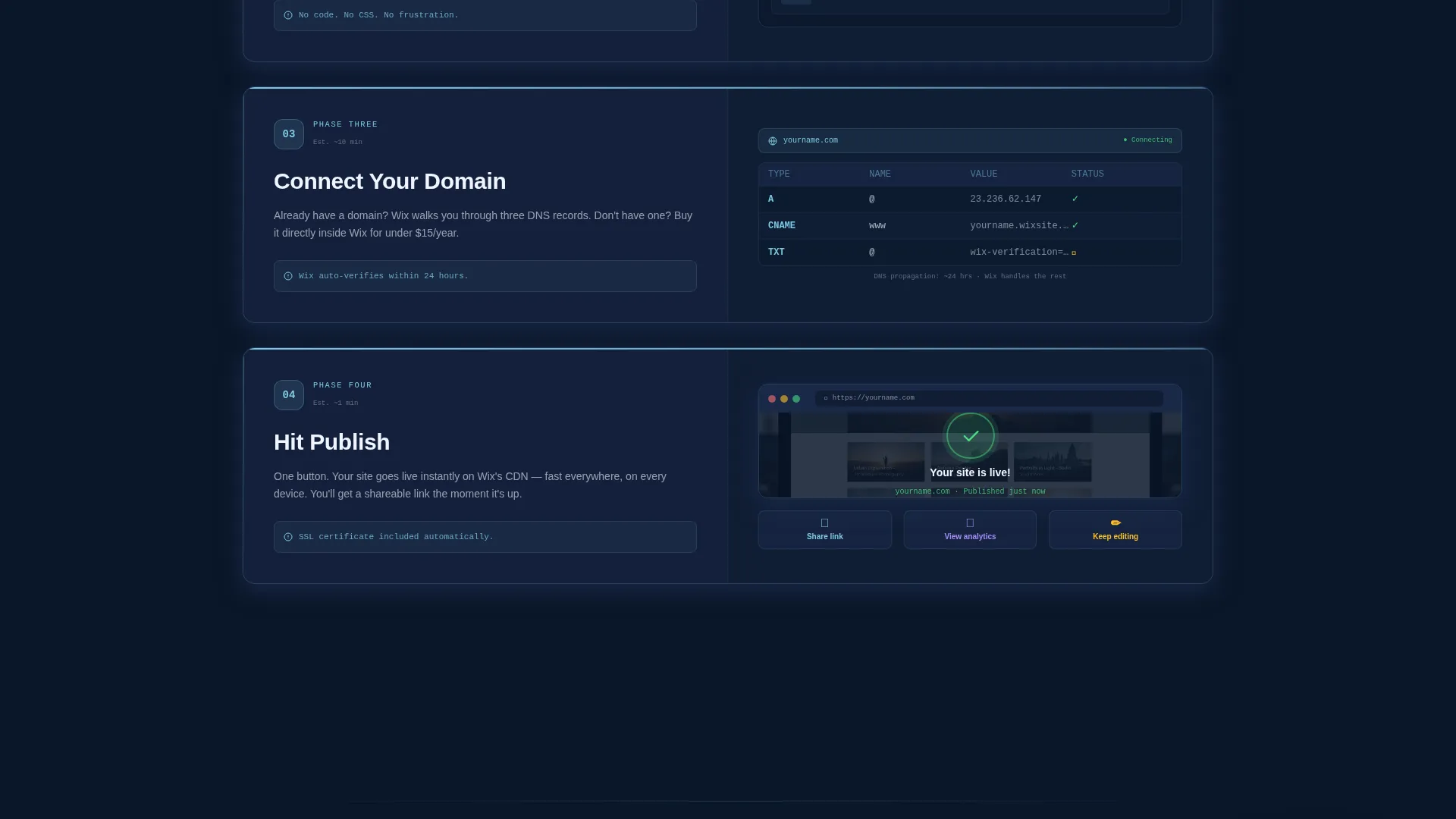
- A four-phase Spec Sheet layout covering template selection, section editing, domain connection, and publishing
- A sticky primary call-to-action button that pins to the viewport after the second phase card
- A secondary gated download path offering a setup checklist in exchange for an email address
Feature list
This template includes purpose-built components matched to each stage of the visitor journey. Every feature serves either the education flow or the lead capture goal.
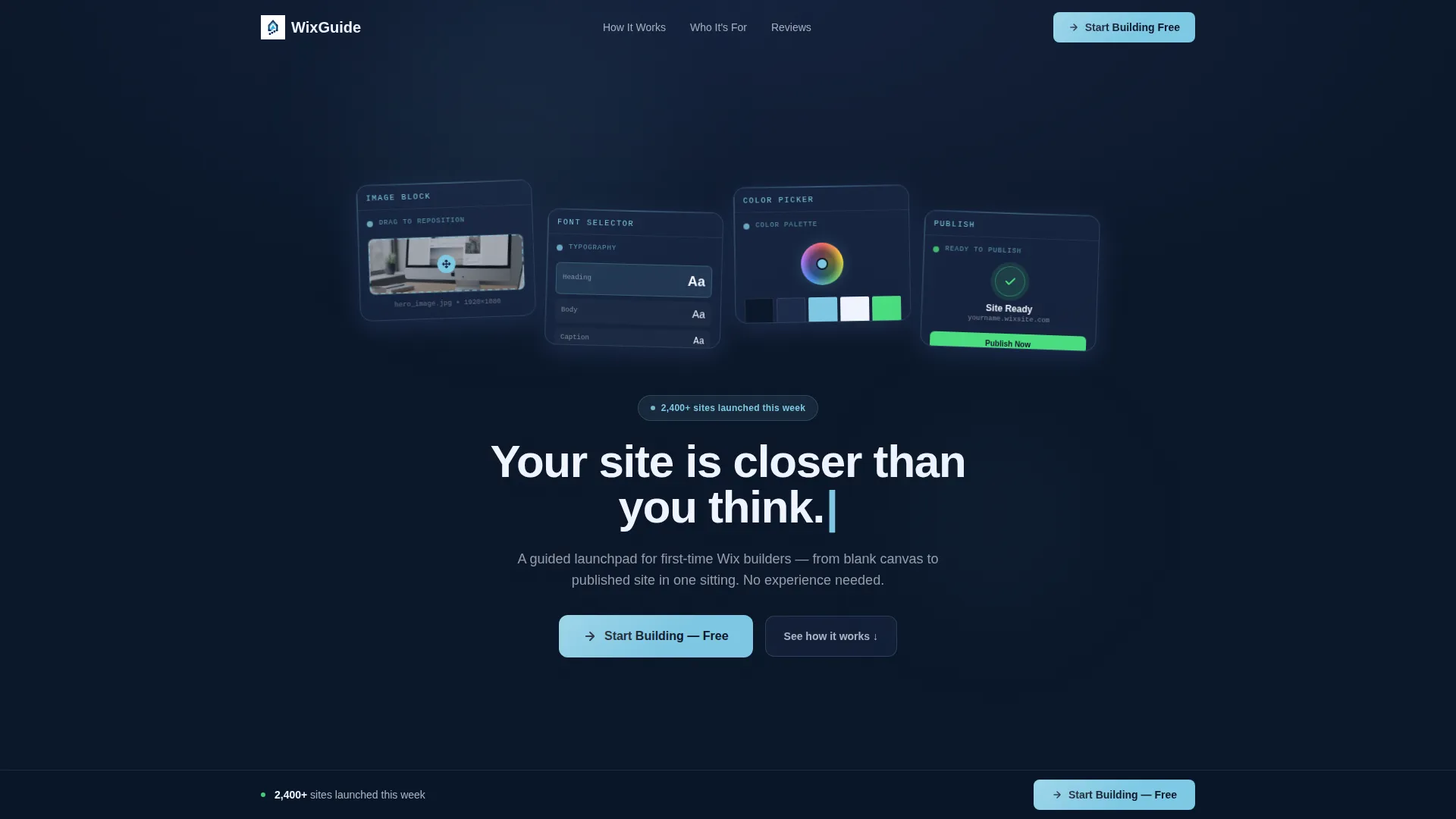
Animated Typing Headline
The hero headline types itself letter by letter across a dark glass panel header. This single motion creates immediate intrigue and signals to visitors that the experience ahead is intentional and interactive.
Four Progressive Phase Cards
Each build phase arrives as a numbered specification card that slides up from the dark background into a frosted glass treatment. Cards reveal only after the previous one is fully visible, so the scroll cadence mirrors the real build sequence and keeps attention focused.
Staggered Dark Glass Panel Header
Four translucent, frosted-glass rectangles arrange in a staggered grid against the deep navy background. Each panel holds a single interface element frozen mid-action, giving the header the visual weight of a premium product reveal.
Sticky Lead Capture Button
After the second phase card, the primary call-to-action button pins to the bottom of the viewport and remains visible for the rest of the scroll. This placement means the conversion prompt is never more than one tap away.
Inline Lead Form with Segmentation
On click, a lightweight slide-out form collects an email address, a project type dropdown, and an experience level toggle. This gives you segmented lead data without adding friction to the sign-up moment.
Gated Checklist Download
A secondary conversion path offers a downloadable setup checklist as a value exchange. Visitors not ready to commit can still enter the funnel by providing their email for the gated resource.
Page sections overview
| Section | Purpose |
|---|---|
| Dark Glass Header | Establishes premium tone and introduces the animated typing headline |
| Phase One Card | Guides visitors through choosing a starting template |
| Phase Two Card | Demonstrates section editing with drag handles and snap guides |
| Phase Three Card | Simplifies domain connection with a visual DNS walkthrough |
| Phase Four Card | Shows the live-site confirmation screen as the finish line |
| Sticky call to action Bar | Keeps the primary sign-up action pinned and always accessible |
| Inline Lead Form | Captures email, project type, and experience level on button click |
| Checklist Download | Offers a gated PDF as a lower-commitment entry into the funnel |
Design & branding system
The visual identity follows a Tech Glass theme built entirely on a Midnight Blue color system. Every color decision reinforces the feeling of a premium device powering on for the first time, with dark surfaces making every bright element feel earned and deliberate.
- Deep terminal navy (#0A1628) as the page background, providing maximum contrast for all content
- Translucent panel blue (#1B2A4A) for frosted glass cards with subtle border definition
- Soft interface glow (#7EC8E3) tracing progress indicators, hover states, and the primary call-to-action button
- Crisp action white (#F0F4FF) reserved for all headlines, body text, and button face copy
Mobile & speed optimization
The progressive reveal structure is designed to work as a natural scroll experience on any screen size. The layout prioritizes focus and readability at every viewport width.
- Phase cards stack vertically on smaller screens, preserving the sequential reveal cadence
- The sticky call-to-action button adjusts to the bottom of the mobile viewport for consistent accessibility
- The slide-out lead form is compact by design, keeping it fully functional without crowding a smaller display
How this template helps you convert
Every structural decision in this template is made with lead generation as the primary goal. The page earns trust first, then asks for a commitment.
- The progressive card reveal keeps visitors engaged long enough to understand the value before any ask is made, warming them up naturally through the scroll.
- The sticky call-to-action button combined with the gated checklist download creates two distinct conversion paths, so both ready buyers and cautious browsers have a next step that matches their confidence level.
Other information about this template
This template sits within the Documentation and Support category, specifically designed for the Wix getting started guide niche. It is a strong fit for anyone creating onboarding or educational content around the Wix platform.
- The Spec Sheet creative direction makes it equally useful as a standalone guide page or as the first page a new user sees after signing up
- The Tech Glass theme and Midnight Blue color system give this template a visual identity closer to a SaaS product launch than a typical documentation page
- The template style is Scroll Reveal, meaning each section animates into view as the visitor scrolls, rather than loading all at once
- This is a single-page landing page structure, not a multi-page website build
- The intersection of the Wix Documentation subcategory and Lead Generation landing page direction makes this template well-suited for growing an early-stage audience or email list around a Wix tutorial product
Theme
Tech Glass
Creative direction
Spec Sheet
Color system
Midnight Blue
Style
Scroll Reveal (Progressive)
Direction
Lead Generation
Page Sections
Animated Typing Headline
Four Progressive Phase Cards
Staggered Dark Glass Panel Header
Sticky Viewport Call-to-action
Segmented Inline Lead Form
Gated Checklist Download Path
Related questions
Can a total beginner use this template?
What does the lead form collect?
How does the gated checklist download work?
Is the sticky call-to-action button visible from the start?
Is this a single page or a multi-page template?



