Lattice - Powerful Encryption Landing Page Template
Lattice is a modular card grid landing page template built for an open-source homomorphic encryption library. It features an interactive scheme estimator as the hero, animated benchmark cards, integration install snippets, and a freemium conversion path. The design uses a void black and deep violet palette that signals serious cryptographic tooling to applied cryptographers, fintech engineers, and academic researchers.
by Rocket studio
Quick summary
Lattice is a single-page, card grid landing page template purpose-built for a homomorphic encryption open-source project. It puts a live parameter estimator front and center, then guides visitors through layered capability cards that deepen in complexity as they scroll. The result is a page that demonstrates the library's power before a visitor reads a single paragraph.
Who this template is for
This template is built for technical project leads and developer advocates who need to communicate complex cryptographic capabilities without oversimplifying them. It speaks directly to an expert audience that values precision over marketing polish.
- Applied cryptographers building privacy-preserving analytics pipelines
- Fintech engineers querying encrypted databases for compliance workflows
- Academic researchers benchmarking fully homomorphic encryption (FHE) schemes
What problem this template solves
Most developer tool landing pages either talk down to their audience or bury the proof in documentation links. Homomorphic encryption projects face an additional challenge: the technology sounds implausible until someone sees it working. This template closes that credibility gap immediately.
- Visitors can configure real parameters and see estimated outputs before reading any copy
- Layered card rows replace a wall of text with scannable, progressively complex evidence
- A frictionless conversion path collects email only after curiosity is already committed
What you get with this template
The template delivers a fully structured, modular card grid landing page with motion-driven sections arranged to guide a technical visitor from curiosity to conversion. Every section is designed to communicate data arriving, compiling, and encrypting.
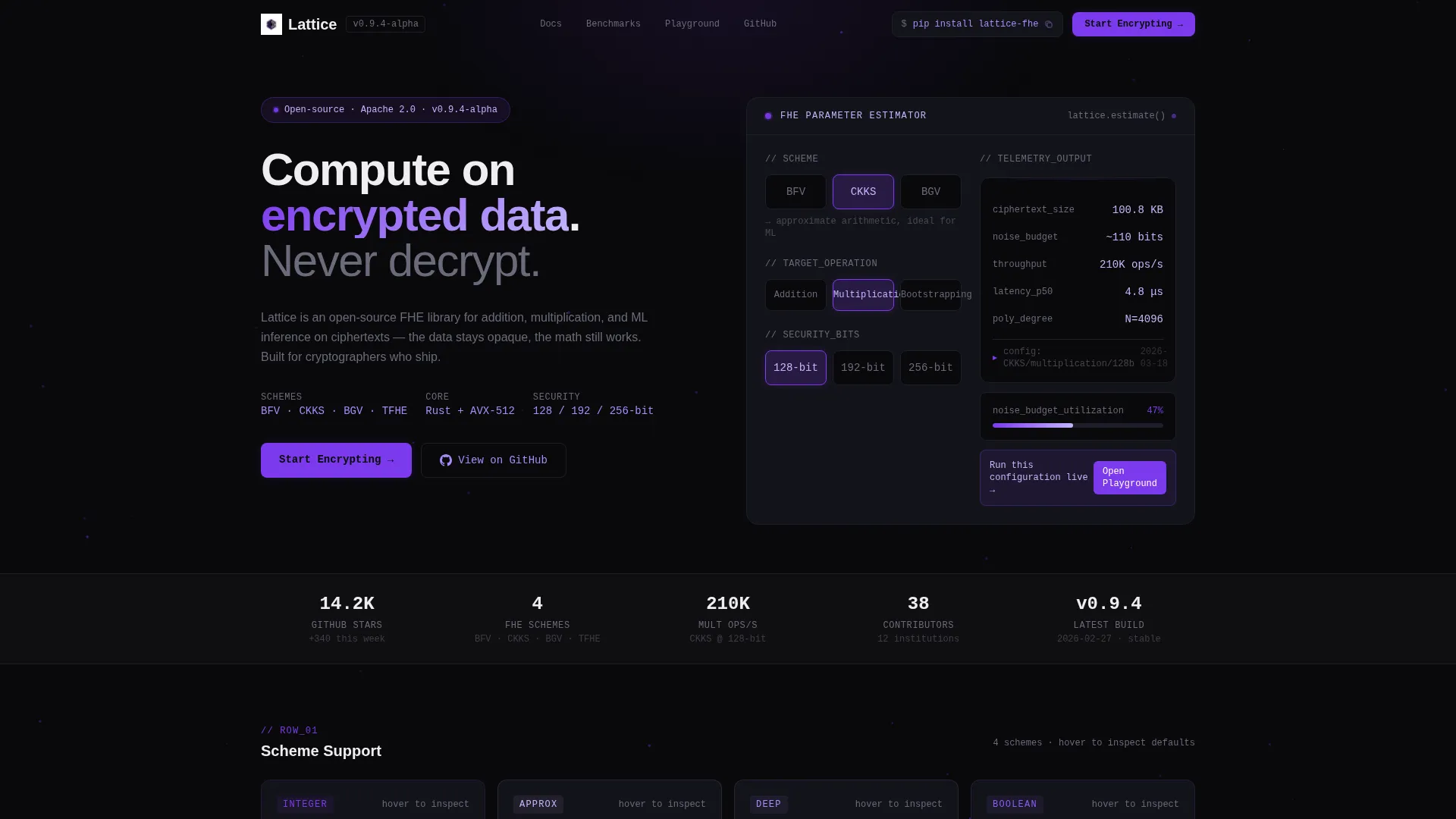
- An interactive calculator widget in the header for scheme, operation, and security parameter selection
- Four distinct card row layers covering scheme support, operation benchmarks, integration options, and a comparison matrix
- A freemium conversion flow anchored by a "Start Encrypting" call to action and a one-click install copy button
Feature list
This section details the core capabilities built into the Lattice landing page template.
Interactive Scheme Estimator Header
The hero section is a live calculator widget. Visitors select a scheme (BFV, CKKS, or BGV), a target operation such as addition, multiplication, or bootstrapping, and a security parameter level of 128-bit, 192-bit, or 256-bit. Estimated ciphertext size, noise budget consumption, and throughput operations per second populate in real time with animated counters that cascade in like telemetry data from a running benchmark.
Flip-on-Hover Scheme Cards
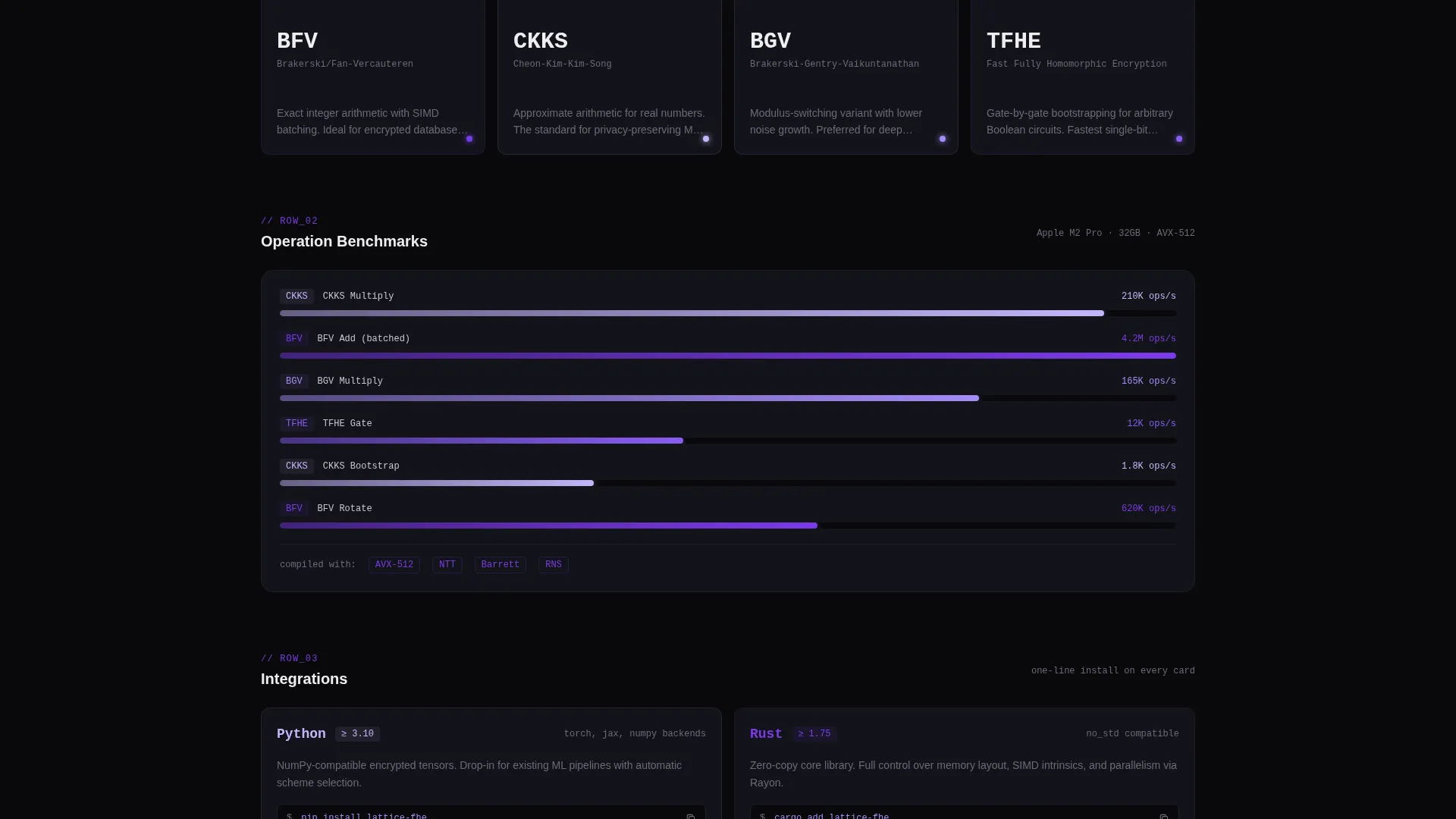
The first card row presents supported encryption schemes. Each card flips on hover to reveal default parameter configurations. The interaction communicates technical depth without cluttering the front face of the card.
Animated Benchmark Bar Charts
The second card row displays operation benchmark results. Animated bar charts race to completion as each card enters the viewport. The motion communicates data arriving and makes performance evidence feel live rather than static.
Integration Install Cards
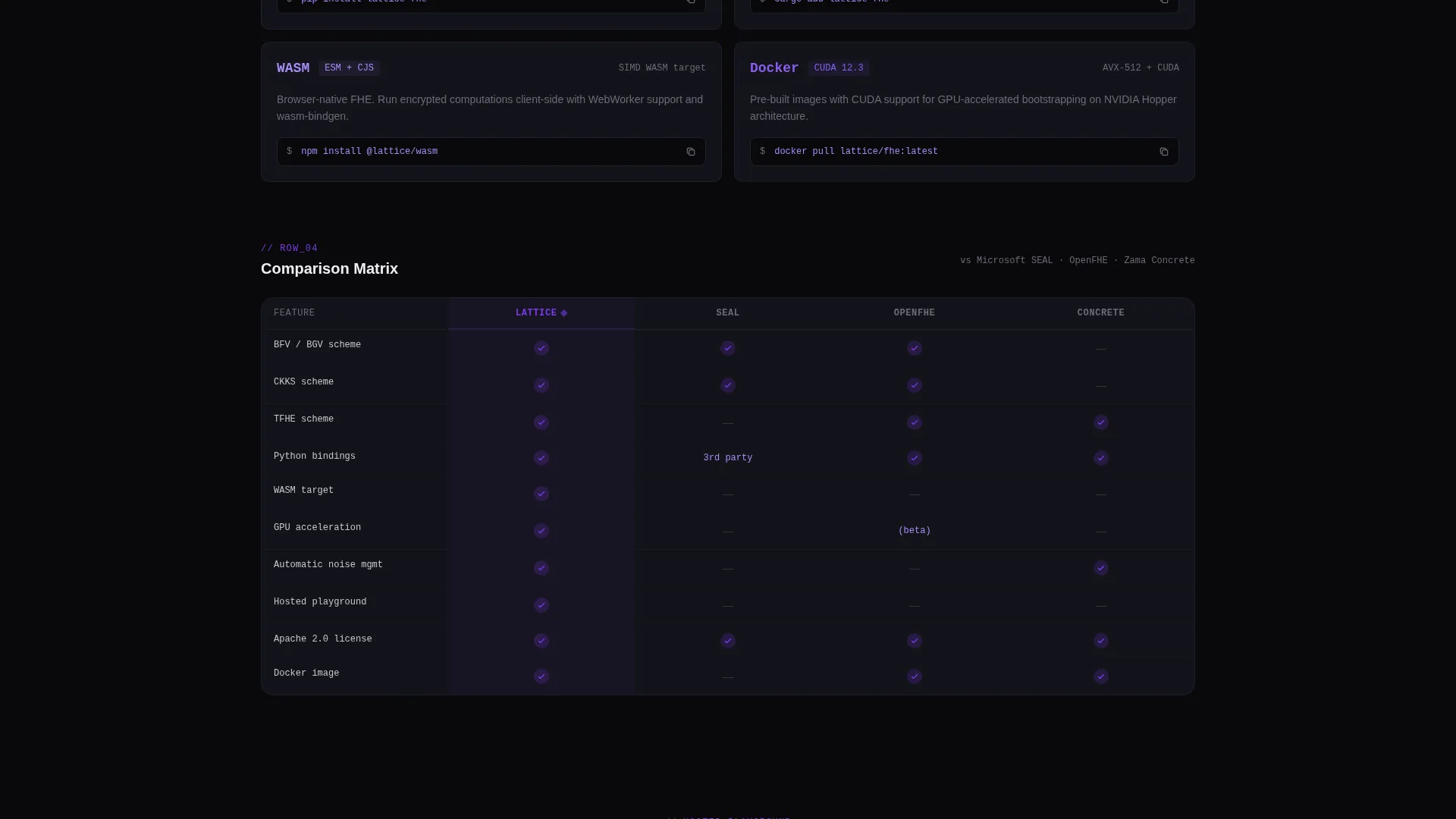
The third card row covers integration options including Python bindings, a Rust core, a WebAssembly (WASM) target, and Docker images. Every card includes a copy-paste install command so a visitor can grab what they need without leaving the page.
Sequential Comparison Matrix
The fourth card row presents a side-by-side comparison matrix with checkmarks that tick in sequentially as the row enters view. The motion reinforces the sense of computed results arriving in real time.
Contextual Playground call to action
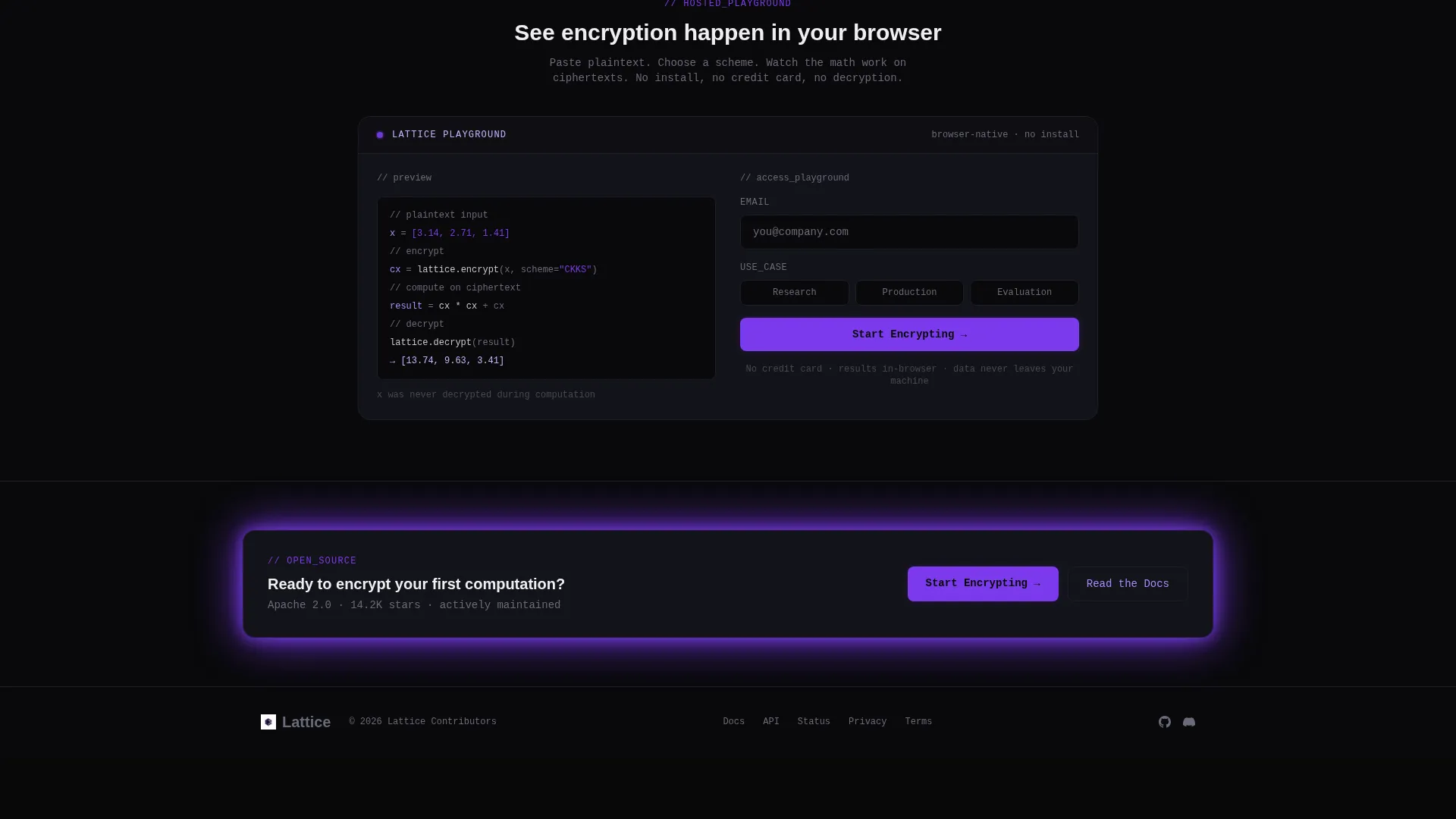
After a visitor configures parameters in the header estimator, a contextual prompt appears inviting them to run the configuration live in the hosted playground. Email collection happens only at the playground gate, asking for address and use case, keeping friction low until intent is high.
Page sections overview
| Section | Purpose |
|---|---|
| Header Estimator Widget | Interactive scheme and parameter calculator as the hero |
| Scheme Support Cards | Flip-on-hover cards revealing parameter defaults per scheme |
| Operation Benchmark Cards | Animated bar charts showing live performance evidence |
| Integration Install Cards | Copy-paste commands for Python, Rust, WASM, and Docker |
| Comparison Matrix Row | Sequential checkmark grid comparing library capabilities |
| Playground Conversion Gate | Email capture with use-case selection before playground access |
Design & branding system
The visual identity follows a Dynamic Motion theme built on the Void & Violet color system. The palette feels clinical and precise, like staring into a particle accelerator tunnel where darkness is punctuated by violet energy arcs.
- Core colors: absolute void black (#09090B), deep orbital violet (#7C3AED), phosphor lilac (#C4B5FD) for secondary text and diagram strokes, and event-horizon white (#EEEEF0) for card surfaces
- Cards float on the void background with subtle 1px lilac borders and violet glow effects on hover states
- Motion is constant but never decorative; every animation communicates a data state such as data arriving, a computation compiling, or a result encrypting
Mobile & speed optimization
The modular card grid layout is built to reflow naturally across screen sizes. Each card row adapts from a multi-column grid to a single-column stack so the layered complexity remains readable on smaller viewports.
- Animated counters and bar charts are triggered on viewport entry, so they fire when visible rather than on page load
- The copy-paste install command on every card remains tappable and functional on touch devices
- The estimator widget controls are sized and spaced for both pointer and touch input
How this template helps you convert
The Lattice template is structured around a progressive commitment model. Visitors invest curiosity in the estimator, build confidence through the evidence cards, and reach the conversion point already motivated.
- The header estimator creates immediate personal engagement by letting visitors configure their own parameters and see real estimated outputs, turning the hero into a proof-of-work rather than a pitch.
- The layered card rows build trust row by row, moving from scheme support to benchmarks to integrations to comparisons, so a visitor who reaches the bottom has already absorbed substantial evidence.
- Email is collected only at the playground gate after the visitor chooses to run a live configuration, meaning the sign-up moment feels like a natural next step rather than an interruption.
Other information about this template
This template is designed specifically for open-source homomorphic encryption projects that need to communicate with a deeply technical audience. A few additional details are worth noting for teams evaluating this template.
- The template supports the freemium and trial conversion model by pairing a zero-friction "Start Encrypting" primary call to action with a secondary "pip install lattice" one-click copy path present on every card
- The comparison matrix row is structured to accommodate multiple library comparisons side by side, making it suitable for projects in a competitive open-source ecosystem
- The playground gate collects two data points: email address and use case category (research, production, or evaluation), giving the project team useful segmentation data without adding excessive form fields
- No stock imagery is used anywhere in the template; the interactive estimator tool serves as the visual hero, keeping the page grounded in functional evidence
Theme
Dynamic Motion
Creative direction
Feature Matrix
Color system
Void & Violet
Style
Card Grid (Modular)
Direction
Freemium/Trial
Page Sections
Live Parameter Estimator Hero
Flip-on-hover Scheme Cards
Viewport-triggered Benchmark Charts
Integration Install Command Cards
Sequential Comparison Matrix
Contextual Playground Conversion Gate
Related questions
What encryption schemes does the estimator support?
Do visitors need to install anything to try the library?
When does the template ask for an email address?
Can the comparison matrix be updated as the project evolves?
Is this template suitable for a research-focused audience?



