Itinerary - Seamless Travel Landing Page Template
The Itinerary landing page template is a dark-user interface travel command center built for scroll-reveal interaction. It combines a live trip-cost calculator, a drag-and-drop timeline builder, a color-coded calendar, and a fare-watch ticker into one cockpit-style layout. The template follows a freemium conversion model and a Dashboard Pro visual theme powered by the Teal Catalyst color system.
by Rocket studio
Quick summary
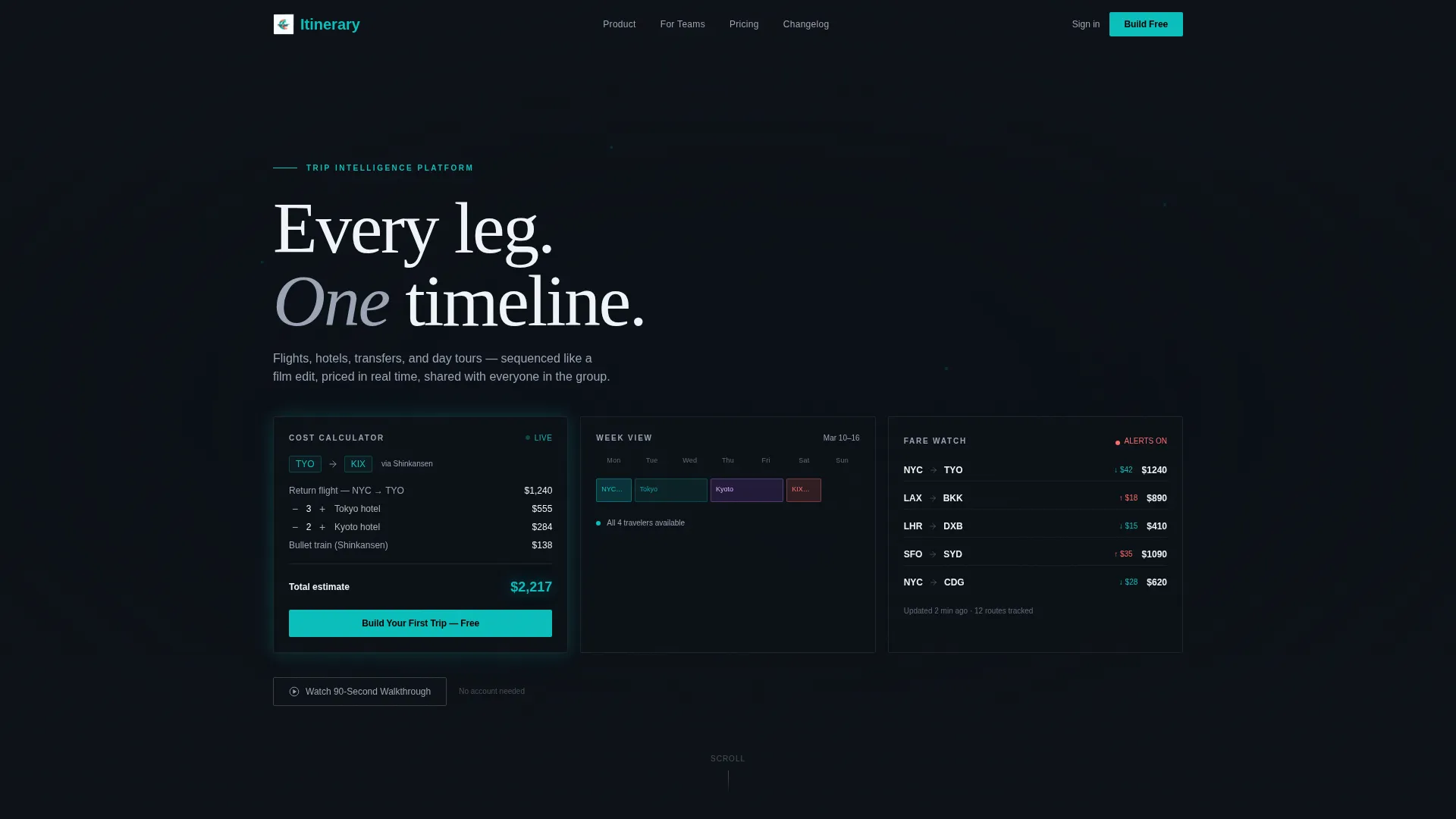
The Itinerary template is a single-page, scroll-reveal travel booking and scheduling experience. It opens as a working tool, not a pitch. Three frosted-glass header panels greet visitors with a live cost calculator, a week-view calendar, and a fare-watch ticker. Progressive scroll reveals deepen the tool, building a full interactive trip-planning dashboard around the visitor as they scroll.
Who this template is for
This template is built for travel-focused teams and individuals who need to communicate a sophisticated scheduling product. The design language speaks directly to power users and professionals who expect the interface to be useful before they have done anything.
- Executive assistants managing multi-city, multi-time-zone itineraries for senior leadership
- Honeymoon and leisure travelers piecing together island-hopping or multi-destination trips from scattered research
- Group-trip organizers who need to align availability across many people and surface cost comparisons clearly
What problem this template solves
Most travel landing pages waste their first impression on headlines and promises. Visitors leave before they see what the product actually does. This template solves the engagement problem by leading with the tool itself, not a description of it.
- Visitors land on a working calculator and calendar, so the value is felt immediately
- The scroll-reveal structure keeps attention building rather than fading as users move down
- The freemium conversion path removes the sign-up barrier until the product has already delivered a live result
What you get with this template
You get a complete, single-page scroll-reveal layout that functions as an interactive product demonstration and a conversion engine at the same time. Every section is designed to show the tool in use, not just describe it.
- A Dark Glass Panels header with three floating frosted-glass cards showing live calculator, calendar, and fare-ticker content
- Four progressive scroll-reveal sections that expand the dashboard from header teaser to full trip builder, calendar detail, and side-by-side comparison
- A freemium call-to-action system with a sticky bottom bar, a ghost button secondary path, and a single-field "Where to?" entry point
Feature list
This template is purpose-built around one idea: the tool is the marketing. Each feature below reflects a specific capability described in the source brief.
Drag-and-Drop Timeline Builder
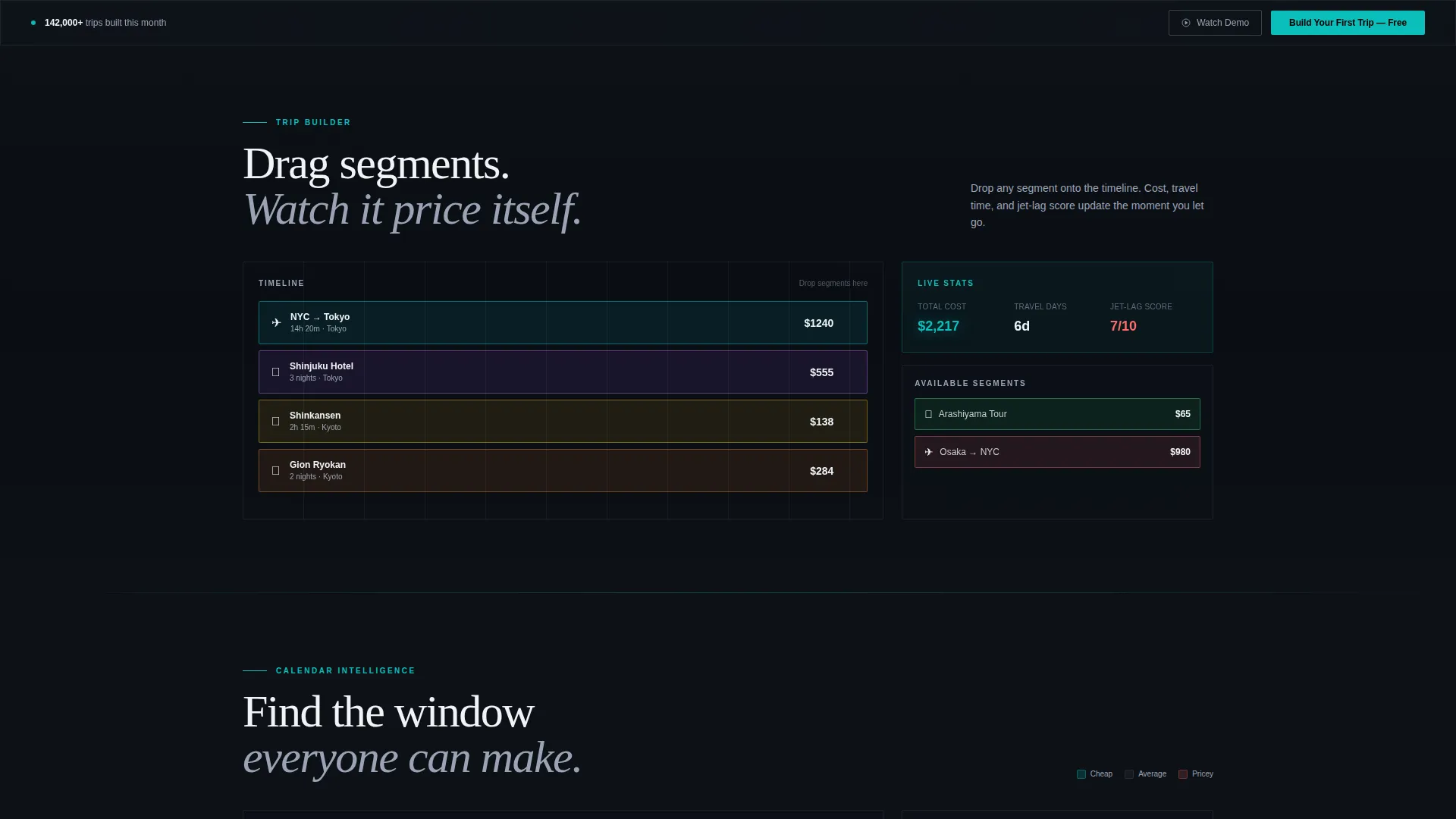
Visitors can drag sample trip segments, including flights, hotels, ground transfers, and day tours, onto a visual timeline. As segments are arranged, the live totals for cost, travel time, and jet-lag score update in real time.
Progressive Scroll-Reveal Layout
The page assembles itself as the visitor scrolls. Each reveal adds a new glass panel sliding in from the screen edges. The experience builds from a compact header tool to a full dashboard without ever feeling like a traditional marketing page.
Live Trip-Cost Calculator
The header calculator arrives pre-loaded with a sample itinerary. Visitors see a calculation already in progress, which immediately signals that the tool is functional. This removes the cold-start hesitation that kills engagement on most travel tools.
Color-Coded Calendar with Overlap Detection
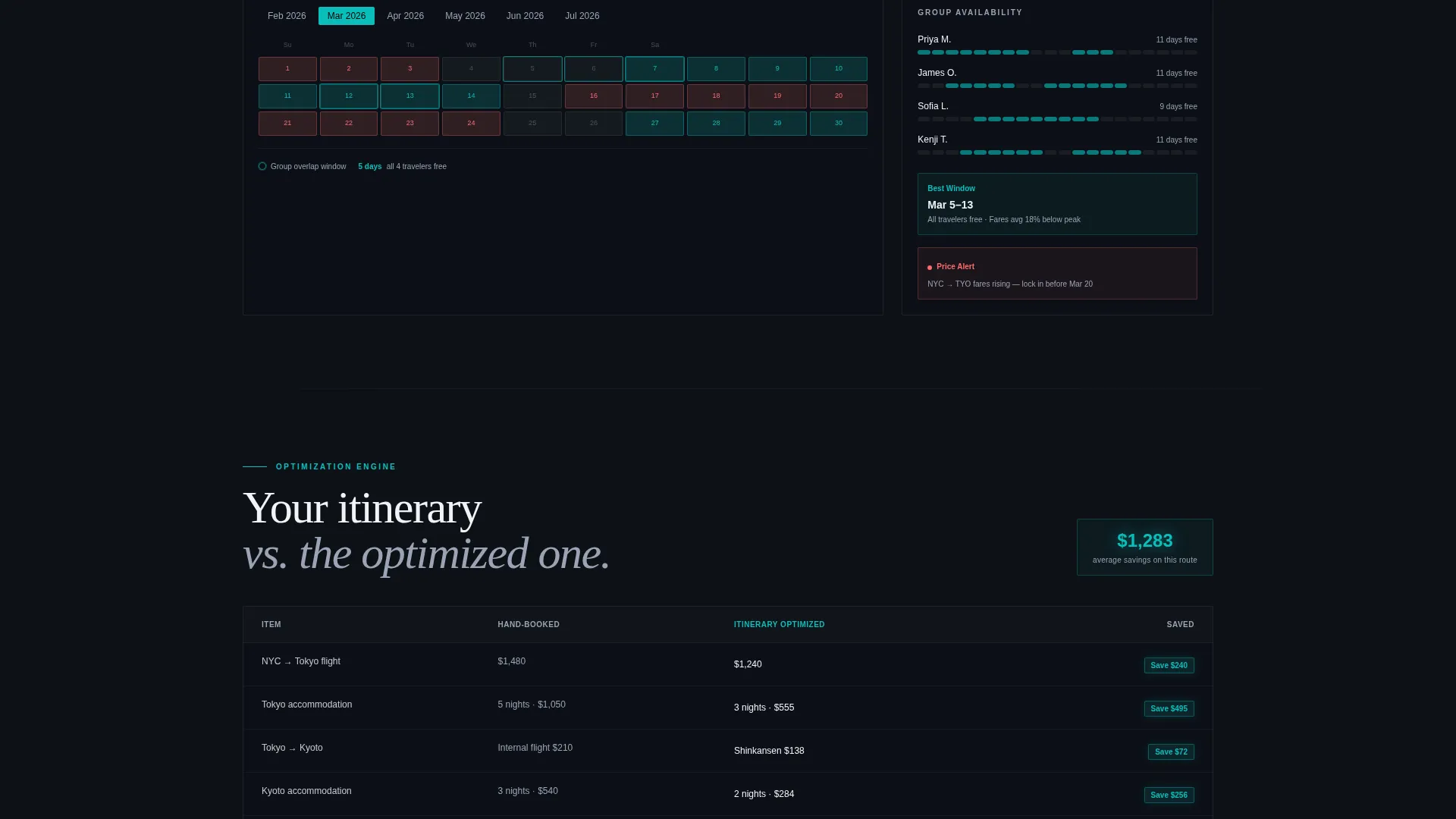
The calendar section shows a week view with color-coded availability blocks. It supports group scheduling by surfacing overlap conflicts. A fare-heatmap overlay shades cheaper travel dates in teal and expensive ones in coral, making the best dates visible at a glance.
Side-by-Side Itinerary Comparison
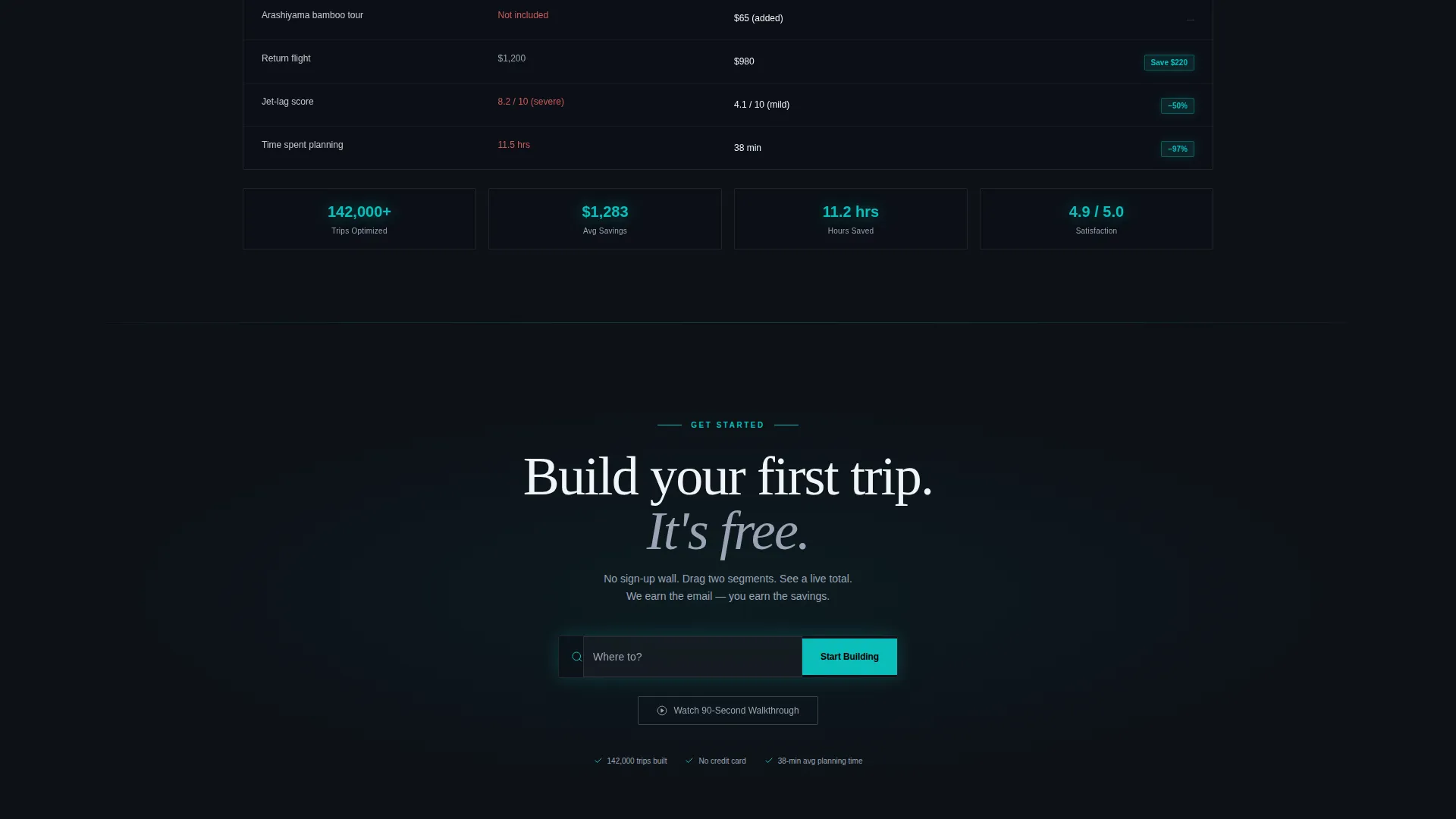
A scroll-triggered section materializes a comparison table showing the visitor's hand-built itinerary next to an optimized version. Savings are highlighted with glowing teal badges, giving users a concrete reason to engage further and create an account.
Freemium Conversion Flow
The primary call to action, "Build Your First Trip, Free," appears inside the header calculator and again as a sticky bottom bar. A ghost button secondary path, "Watch a 90-Second Walkthrough," catches visitors who browse without engaging and routes them back to the same starting prompt.
Page sections overview
| Section | Purpose |
|---|---|
| Dark Glass Header | Opens with live calculator, calendar, and fare-ticker panels |
| Trip Builder Reveal | Expands drag-and-drop timeline with live cost and jet-lag score |
| Calendar Detail Reveal | Shows overlap detection and fare-heatmap date shading |
| Comparison Table Reveal | Displays hand-built versus optimized itinerary with savings badges |
| Sticky call to action Bar | Persistent conversion prompt after the second scroll reveal |
Design & branding system
The template uses the Teal Catalyst color system inside a Dashboard Pro theme. The overall aesthetic is a cockpit at night: dark, precise, and purposeful. Every color has a defined role and is never used interchangeably.
- Core palette: deep cockpit black (#0D1117) for backgrounds, instrument-panel teal (#0ABFBC) for interactive highlights and savings indicators, muted cloud gray (#9BA4B5) for supporting text, and signal white (#F0F4F8) for card surfaces
- Hot coral (#FF6B6B) is used exclusively for price alerts and deadline nudges, so it always carries urgency meaning
- Frosted-glass card surfaces float over a slowly panning aerial night-flight video in the header, reinforcing the dark-glass cockpit atmosphere throughout
Mobile & speed optimization
The scroll-reveal structure and glass-panel aesthetic are designed to translate across screen sizes without losing their sense of depth or interactivity. The layout prioritizes the tool experience whether on desktop or a mobile device.
- Glass panel cards and the drag-and-drop timeline are structured for responsive reflow, keeping the core interactions accessible on smaller viewports
- The progressive reveal approach loads visual weight incrementally as the user scrolls, which helps keep the initial page load feeling light and fast
- The sticky bottom call to action bar is especially effective on mobile, where it stays visible without interfering with the tool panels above
How this template helps you convert
This template treats the conversion funnel as an experience, not a form. Every design decision is built to earn trust before asking for anything.
- The header calculator delivers visible value the moment the page loads, so the visitor's first impression is competence, not a sales pitch.
- The scroll-reveal sections progressively deepen engagement, and the sticky call to action bar appears only after the visitor has already seen the tool work, making the sign-up feel like a natural next step rather than an interruption.
Other information about this template
This template is part of the Travel Digital Presence subcategory within the Technology category. It is suited to any travel booking and scheduling product that wants to lead with a tool-first experience rather than a traditional marketing layout.
- The template style is Scroll Reveal (Progressive), meaning each section activates on scroll rather than loading all at once
- The header concept is Dark Glass Panels, a design pattern that uses translucent, frosted-glass cards layered over a video background
- The creative direction is Calculator/Tool First, which means the interactive components serve as the primary marketing asset
- The conversion model is Freemium/Trial, structured to deliver product value before requesting a user account or email address
- This template is built on the Dashboard Pro theme and the Teal Catalyst color system, making it a strong fit for data-rich or tool-heavy travel products
Theme
Dashboard Pro
Creative direction
Calculator/Tool First
Color system
Teal Catalyst
Style
Scroll Reveal (Progressive)
Direction
Freemium/Trial
Page Sections
Drag-and-drop Timeline Builder
Progressive Scroll-reveal Layout
Live Trip-cost Calculator
Color-coded Calendar with Fare Heatmap
Side-by-side Itinerary Comparison
Freemium Conversion Flow
Related questions
Who is this landing page template designed for?
Does the template include a freemium sign-up flow?
What does the scroll-reveal structure mean in practice?
Can I customize the color palette and sample itinerary data?
What happens if a visitor scrolls past the tool without interacting?



