Powerful Medical Billing Landing Page Template
Ledger is a medical billing CRM landing page template built for revenue cycle professionals who need clarity, not more clutter. It features an interactive claim pipeline, filterable workflow modules, and a progressive lead generation form. The design pairs deep charcoal backgrounds with iridescent violet accents to signal precision and intelligence in equal measure.
by Rocket studio
Quick summary
Ledger is a single-page, card-grid landing page template purpose-built for medical billing CRM platforms. It puts an interactive Kanban claim pipeline front and center, layers in expandable workflow modules, and closes with a three-step qualifier form. Every section is designed to earn visitor trust before asking for a conversion.
Who this template is for
This template speaks directly to the people who live inside billing queues every day. If your audience manages claims, denials, or revenue recovery at any scale, Ledger is built for them.
- Billing managers at multi-provider practices who track aging reports across hundreds of open claims daily
- Revenue cycle directors at regional hospital groups reconciling large denial portfolios across multiple payers
- Solo practitioners frustrated by repeated rejections on the same procedure codes from the same payers
What problem this template solves
Medical billing teams often rely on fragmented spreadsheets, sticky notes, and disconnected reports to track claim status. That approach creates blind spots, missed appeal windows, and revenue that quietly disappears. Ledger gives the product landing page a layout that mirrors the relief of finally seeing every open claim in one organized view.
- Visitors cannot quickly understand the platform value when the page feels as cluttered as the problem it solves
- Passive marketing pages fail billing managers who need to feel the product before they fill out a form
- Generic SaaS layouts do not speak the language of CPT codes, denial reason codes, or payer-level patterns
What you get with this template
Ledger delivers a fully structured, highly interactive landing page with every section pre-built and ready to customize. The layout moves visitors from curiosity to qualified lead through progressive engagement rather than static copy.
- A live-feel interactive claim pipeline hero, filterable workflow card modules, a revenue intelligence section, social proof blocks, and a progressive three-step lead generation form
- An iridescent AI color system with deep charcoal, violet, lavender, and ice blue applied across every component
- DM Sans for data labels and interface copy, paired with Fraunces for the hero headline emotional impact
Feature list
Ledger ships with six tightly scoped features that each address a specific stage in the billing manager's decision journey.
Interactive Claim Pipeline Hero
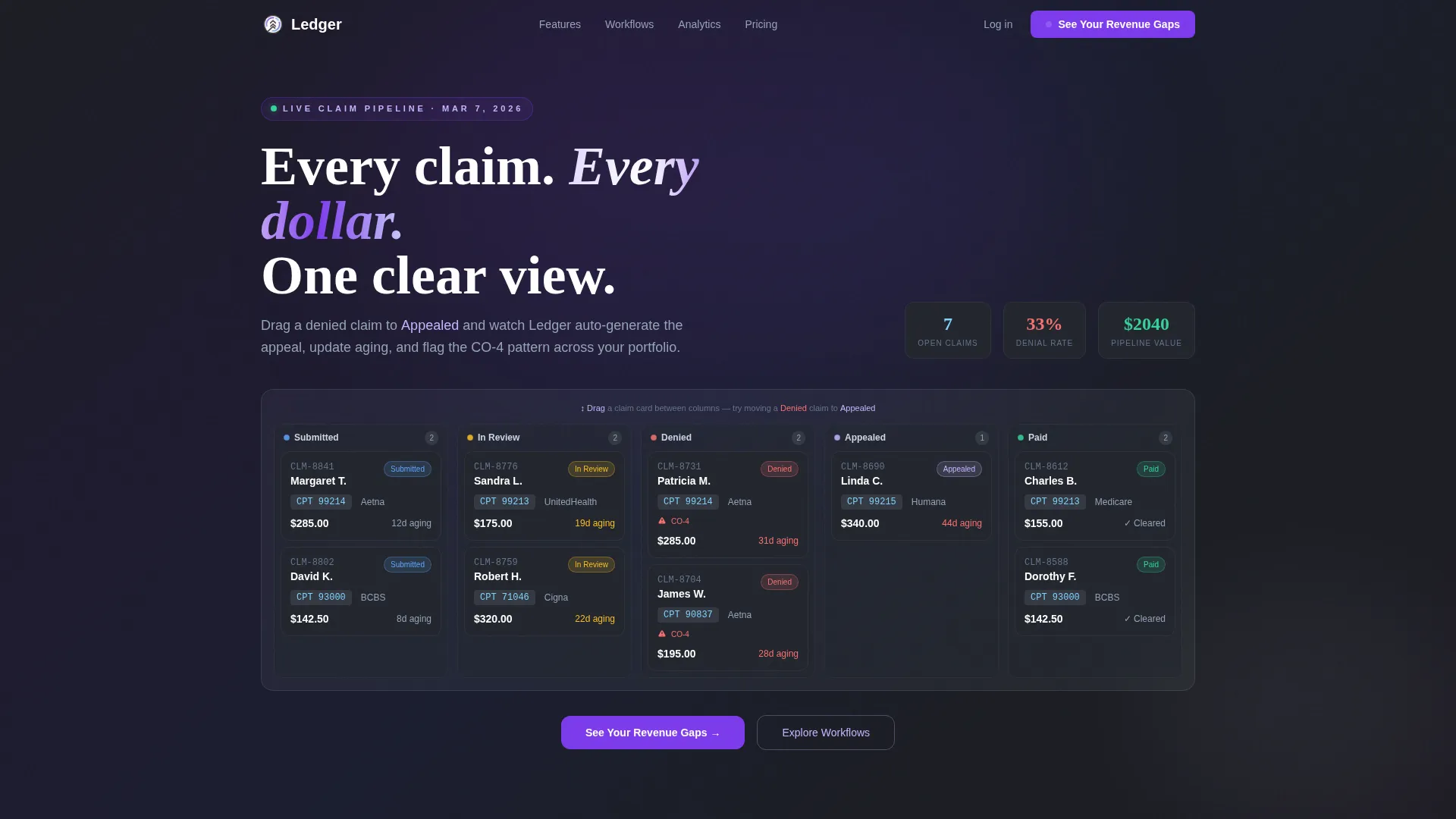
The header fills the full viewport with a mock Kanban dashboard. Columns are labeled Submitted, In Review, Denied, Appealed, and Paid. Visitors can drag a sample claim card from Denied to Appealed and watch the system auto-populate an appeal template, update the aging counter, and flag the denial reason code. The data looks real, with specific payer names, CPT code 99214, and denial code CO-4 visible at a glance.
Filterable Workflow Card Grid
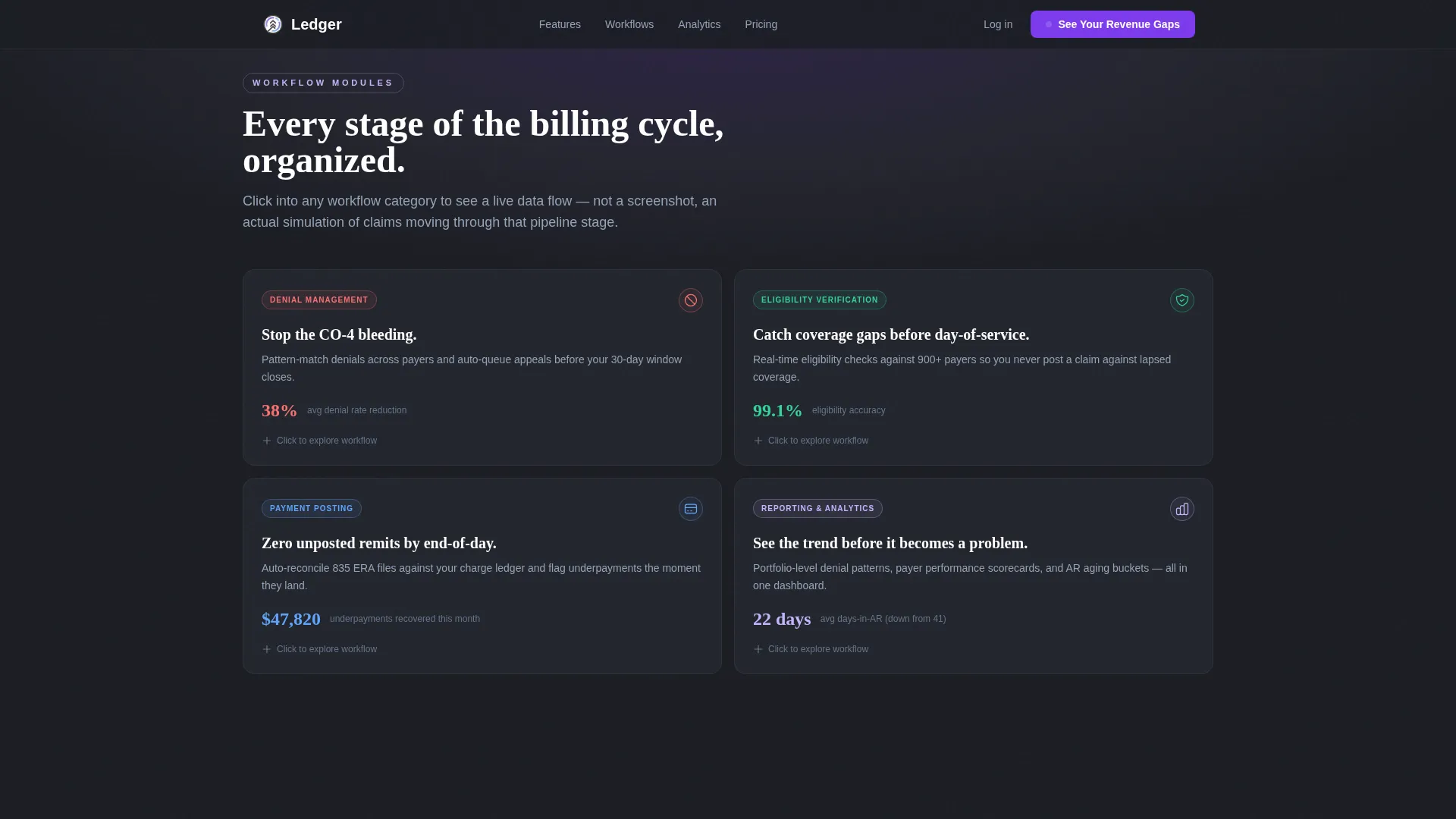
Below the hero, visitors interact with a filterable card grid organized by workflow category. Categories include Denial Management, Eligibility Verification, Payment Posting, and Reporting and Analytics. Each card expands into a mini-demo with animated data flows showing claims moving through that specific pipeline stage.
Revenue Intelligence Narrative
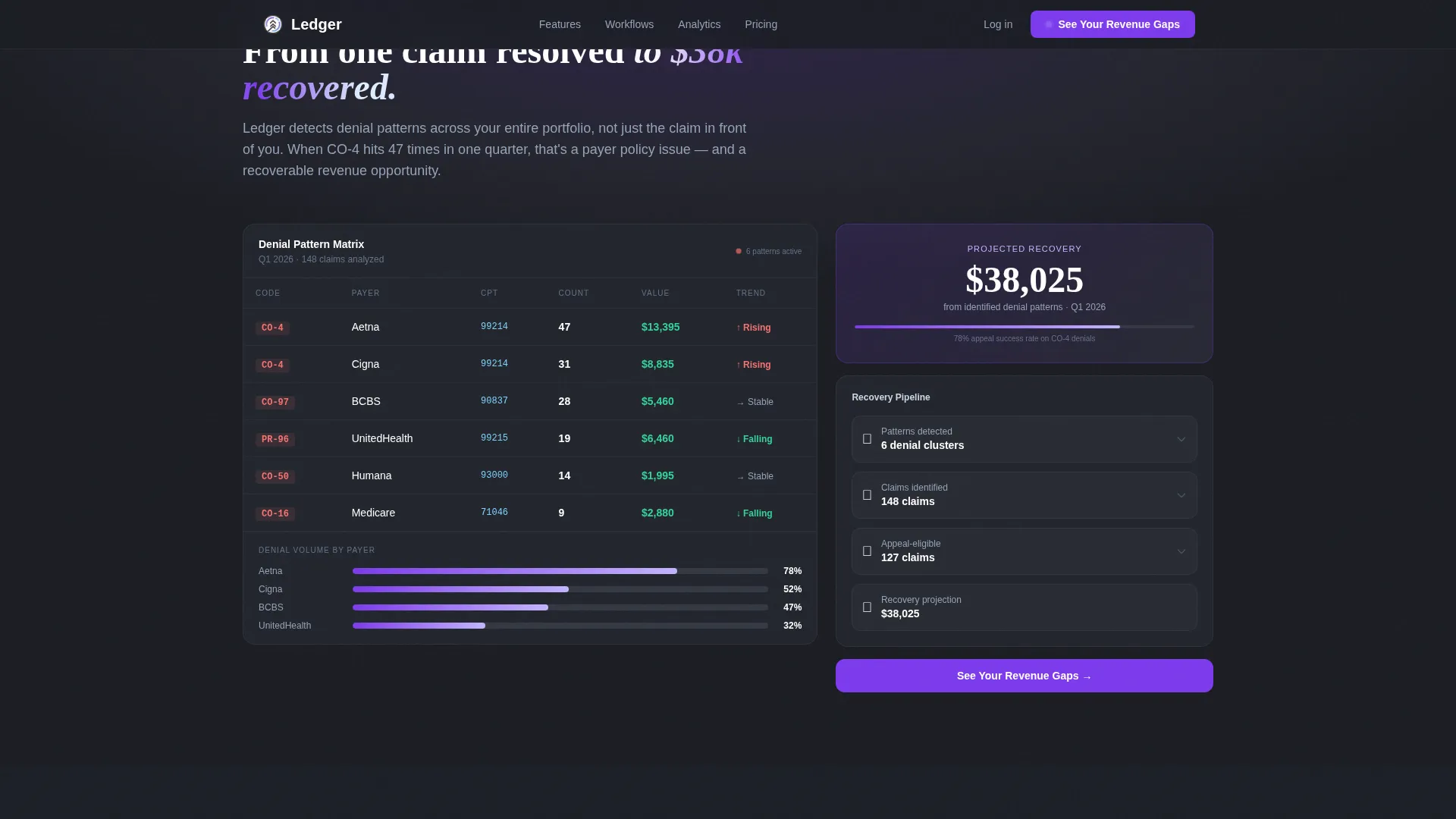
The page escalates from individual claim resolution to portfolio-level insight. Visitors first see one claim resolved, then a denial pattern detected across 200-plus claims, then a revenue recovery projection. This three-beat narrative makes the return on investment visible before the visitor reaches the form.
Progressive Three-Step Qualifier Form
The lead generation form qualifies visitors across three focused steps. Step one asks about practice size and specialty. Step two covers current billing software and monthly claim volume. Step three collects name, email, and an optional checkbox for visitors dealing with a specific payer issue.
Secondary Benchmark Report Conversion Path
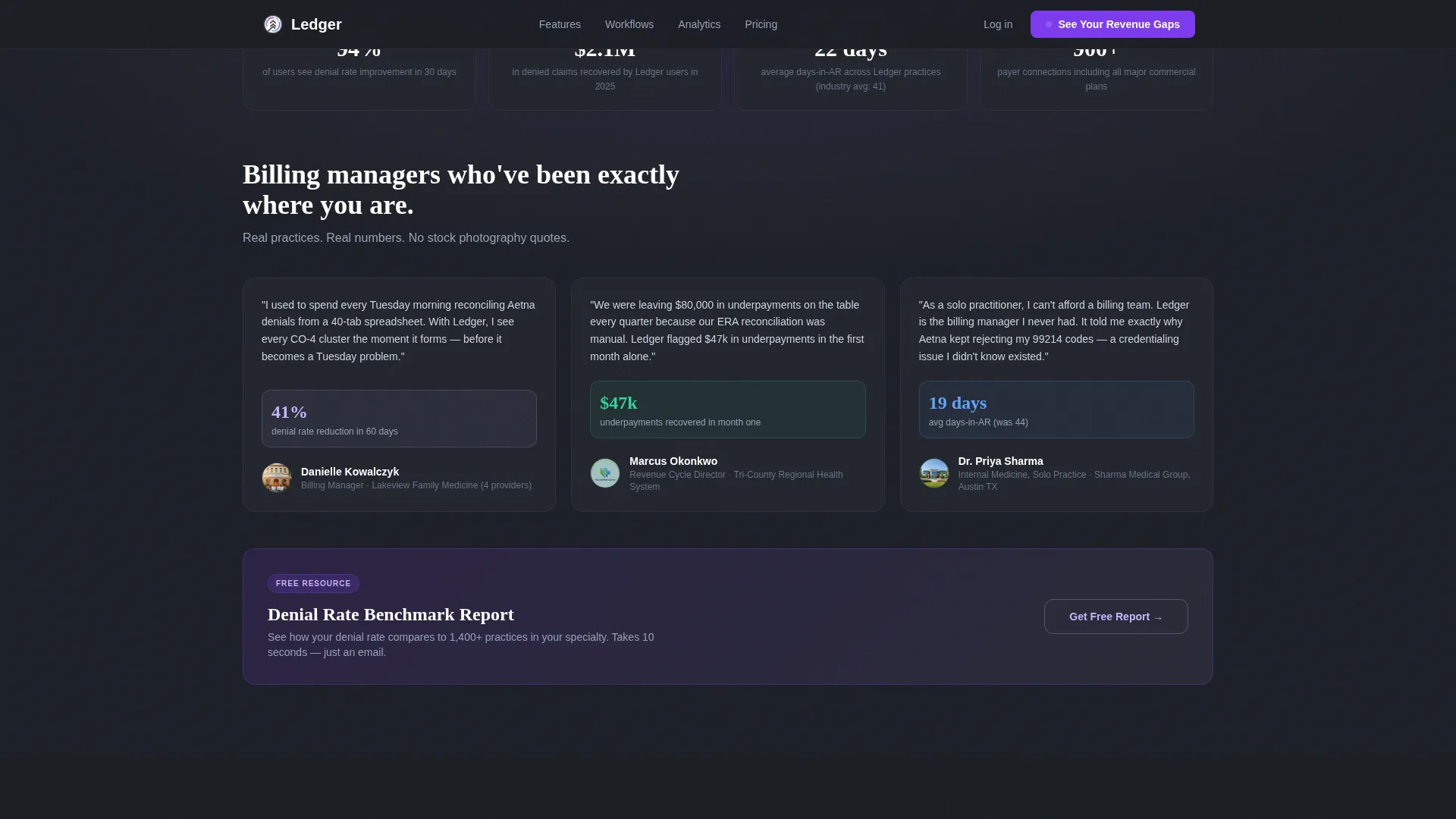
A second conversion route offers a free Denial Rate Benchmark Report gated behind a single email field. This captures visitors who are not yet ready to commit to a demo but are actively researching denial rate performance.
Metric-Forward Social Proof Section
The social proof section features testimonial blocks written with specific numbers, including denial rate reduction percentages and days-in-accounts-receivable improvements. These grounded metrics build credibility for a skeptical, data-literate audience.
Page sections overview
| Section | Purpose |
|---|---|
| Interactive Pipeline Hero | Showcases live claim workflow with draggable cards |
| Workflow Module Grid | Lets visitors explore billing stages via expandable cards |
| Revenue Intelligence Section | Demonstrates portfolio-level denial pattern and recovery data |
| Social Proof Block | Builds trust through metric-forward billing manager testimonials |
| Lead Generation Form | Qualifies leads with a progressive three-step intake process |
| Benchmark Report call to action | Captures early-stage visitors with a low-friction email offer |
| Single-Row Footer | Closes the page with a clean, minimal linear layout |
Design & branding system
The visual identity blends surgical precision with iridescent intelligence. Dark operational surfaces dominate, with shimmer accents that signal a platform built for both accuracy and insight.
- Color system: deep operational charcoal (#1B1D23) for backgrounds and data-dense areas, clinical ice blue (#E0F2FE) for cards and containers, soft holographic lavender (#C4B5FD) for secondary navigation and tags, and iridescent violet (#7C3AED) pulsing on call-to-action buttons, active filters, and real-time status indicators
- Typography pairing: DM Sans handles all interface copy, data labels, and form fields for clean legibility; Fraunces brings emotional weight to the hero headline
- Hover states shift the violet accent to warm violet, giving interactive elements a living, responsive quality
Mobile & speed optimization
Ledger is designed desktop-first, reflecting the reality that billing managers work on large monitors with multi-column data views. The layout remains fully responsive for tablet use cases.
- Static sections use Server Components to keep load weight low while interactive pipeline and form sections use Client Components for smooth drag and animation behavior
- GSAP scroll reveals, animated data flows, pulsing status indicators, and drag interaction simulation are scoped to interactive zones so they do not affect the performance of static content areas
How this template helps you convert
Ledger earns the conversion by letting visitors interact with the product before asking for anything in return. Every section is sequenced to build confidence and lower the friction of the final ask.
- The interactive hero lets a billing manager drag a real-feeling claim card and experience the platform logic firsthand, creating emotional buy-in before a single form field appears
- The escalating narrative from one resolved claim to a portfolio-level recovery projection makes the return on investment concrete and specific, so the "See Your Revenue Gaps" call to action feels like a logical next step rather than a cold ask
Other information about this template
Ledger was built as part of a modular card-grid template family designed for vertical SaaS platforms in the healthcare revenue cycle management space. It fits naturally within a Directory and Discovery theme, where visitors explore capability modules rather than reading a static sales pitch.
- The template style is Card Grid (Modular), making it straightforward to add, remove, or reorder workflow category cards without restructuring the layout
- The creative direction follows an Interactive Explorer pattern, turning each scroll section into an activatable module rather than passive content
- The header concept is an Interactive Preview, a fully functional mock dashboard that replaces the typical hero image with an experience visitors can touch
- The lead generation direction targets qualified demo requests as the primary conversion event, with the Denial Rate Benchmark Report serving as a secondary, lower-commitment conversion path
- Animation fidelity is high throughout, with GSAP powering scroll reveals, drag simulation, and data flow sequences
Theme
Directory & Discovery
Creative direction
Interactive Explorer
Color system
AI Iridescent
Style
Card Grid (Modular)
Direction
Lead Generation
Page Sections
Interactive Kanban Claim Pipeline
Filterable Workflow Module Grid
Portfolio-level Revenue Intelligence
Progressive Three-step Lead Form
Dual Conversion Path Design
Metric-forward Social Proof Blocks
Related questions
Who is this template designed for?
Can I customize the workflow categories in the card grid?
What makes the hero section different from a standard landing page hero?
Does the template include both a primary and a secondary conversion path?
Is the template optimized for desktop or mobile users?



