Integrate - Powerful SDK Landing Page Template
Integrate is a SDK documentation landing page template built around a live interactive code preview and a head-to-head feature comparison table. It is designed for developer-facing products that need to convince engineering teams fast. The template ships with a sticky conversion bar, an ROI calculator section, and expandable case-study rows, all styled in a dark Dashboard Pro theme.
by Rocket studio
Quick summary
Integrate is a single-page SDK documentation landing page template built for developer tools. It opens with an embedded live code editor and a simulated dashboard, then walks visitors through a feature matrix comparing your SDK against build-in-house and two anonymized competitors. Every design decision is tuned for engineering audiences evaluating real build-versus-buy decisions.
Who this template is for
This template is built for teams shipping developer-facing products that need to earn trust in the first scroll. It speaks the language of engineers who read before they click.
- Engineering leads at Series B startups weighing build-versus-buy tradeoffs
- Solo founders assembling their first payment or data stack under time pressure
- Platform teams at mid-market SaaS companies managing costly homegrown integrations
What problem this template solves
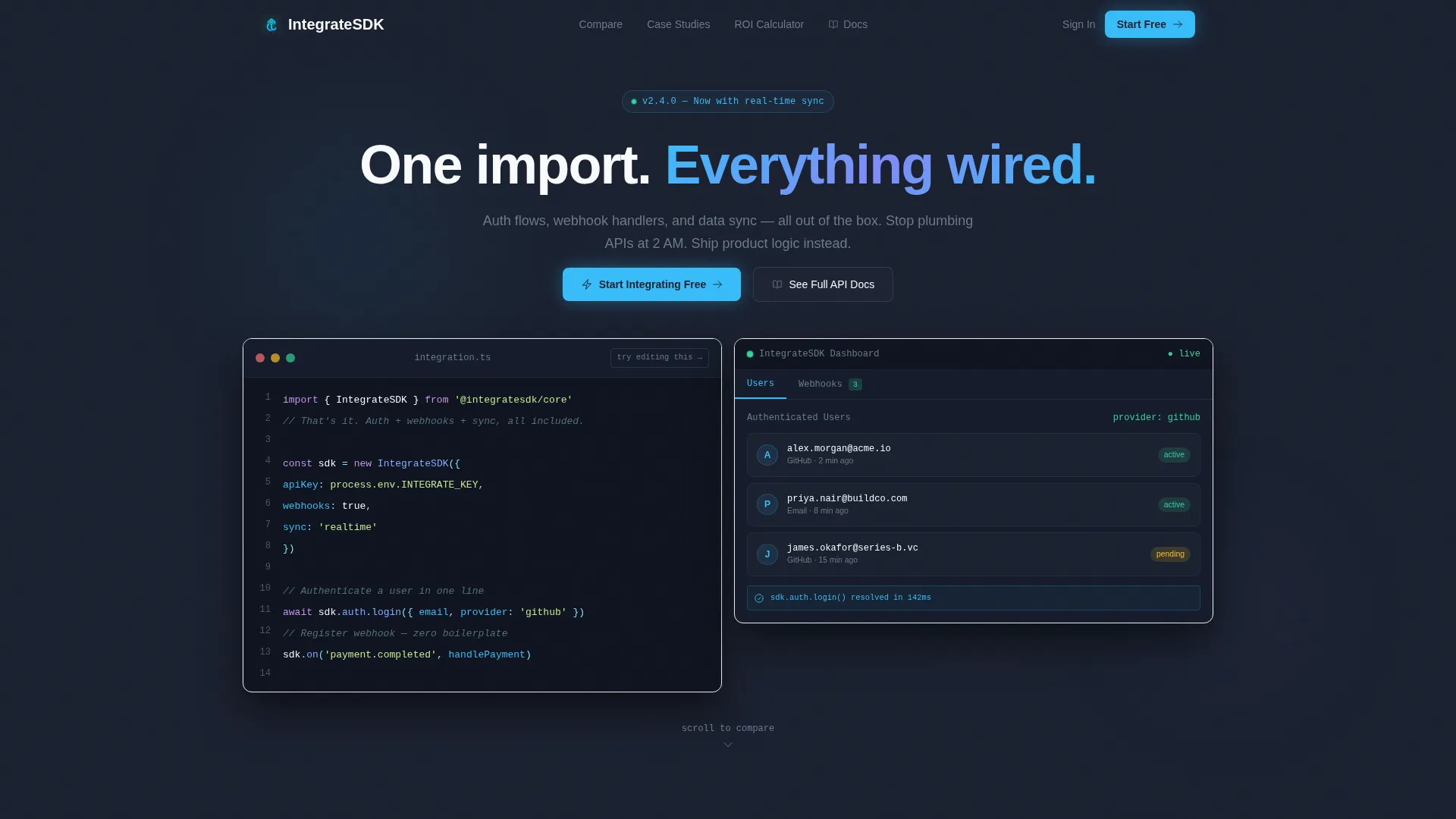
Most SDK marketing pages look like they were written for a sales deck, not a terminal window. Engineers bounce the moment they smell fluff. This template skips the hero image entirely and leads with working code, so the product proves itself before a single word of copy runs.
- Visitors leave before scrolling because generic hero sections fail to show real product value
- Comparison shopping is hard when features are buried in docs rather than shown side by side
- Conversion forms with too many fields push time-pressured engineers toward the back button
What you get with this template
You get a fully structured, single-page layout that takes a developer prospect from first impression to signup without friction. Every section serves a specific job in the evaluation journey.
- An interactive header with a live code editor and a simulated real-time dashboard response
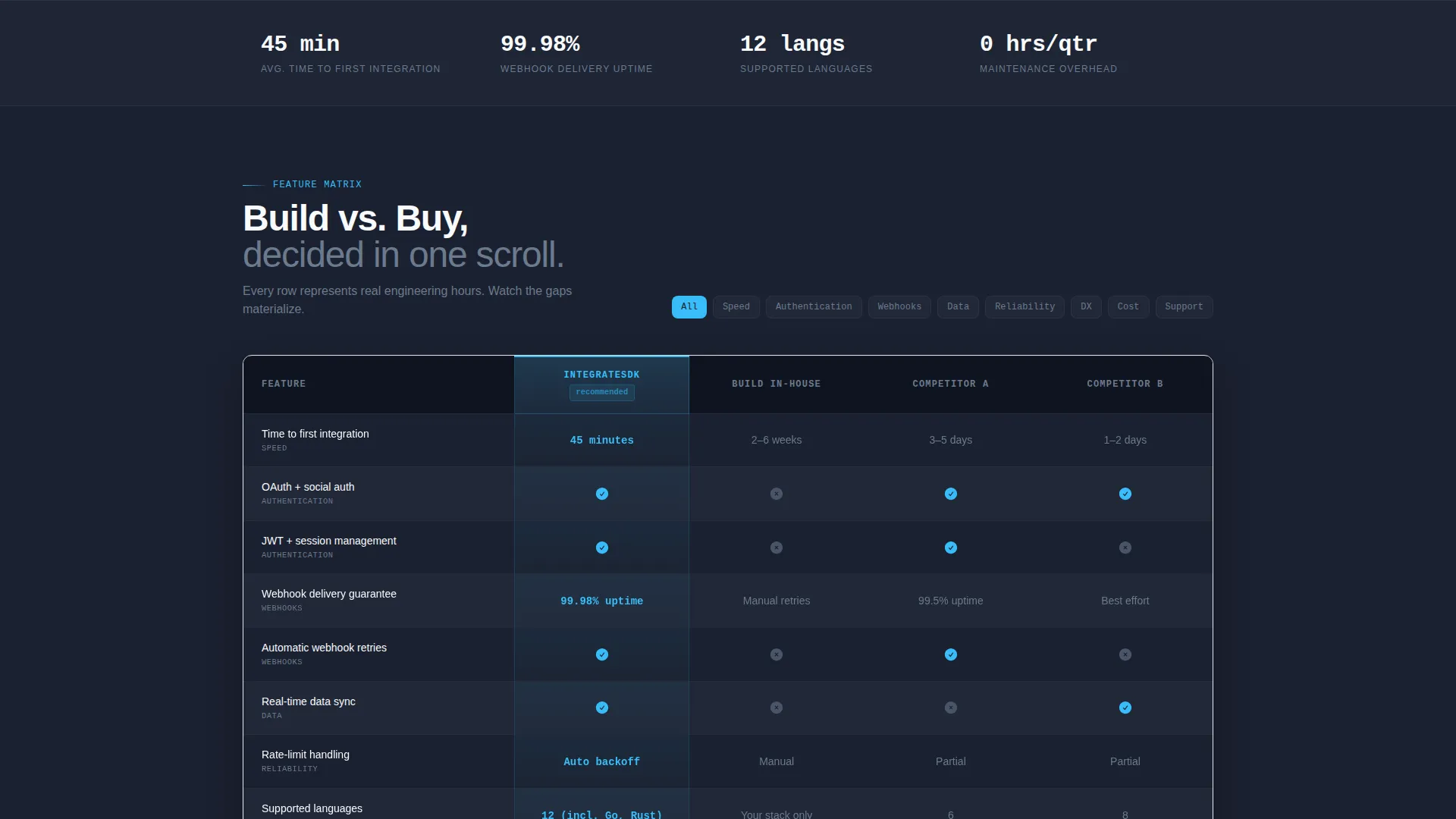
- A head-to-head feature matrix with micro-animations and expandable case-study rows
- A sticky conversion bar, a two-option signup form, and an engineering-hours ROI calculator
Feature list
This template's layout is built around six tightly scoped components, each serving a specific role in moving an engineering audience toward a decision.
Live Interactive Code Preview
The header embeds a code editor on the left showing a twelve-line integration snippet with syntax highlighting. On the right, a simulated dashboard responds as the code "runs", a user table populates, a webhook fires, and a status badge flips green. A subtle "try editing this" prompt invites the visitor to change a parameter and watch the dashboard react.
Animated Feature Comparison Table
The core section pits the SDK against building in-house and two anonymized competitor SDKs. Rows cover authentication methods, webhook reliability, time-to-first-integration, supported languages, rate-limit handling, and maintenance burden. Each row loads with a micro-animation that fills cells left to right, so the visitor watches the feature gaps materialize in real time.
Expandable Case Study Rows
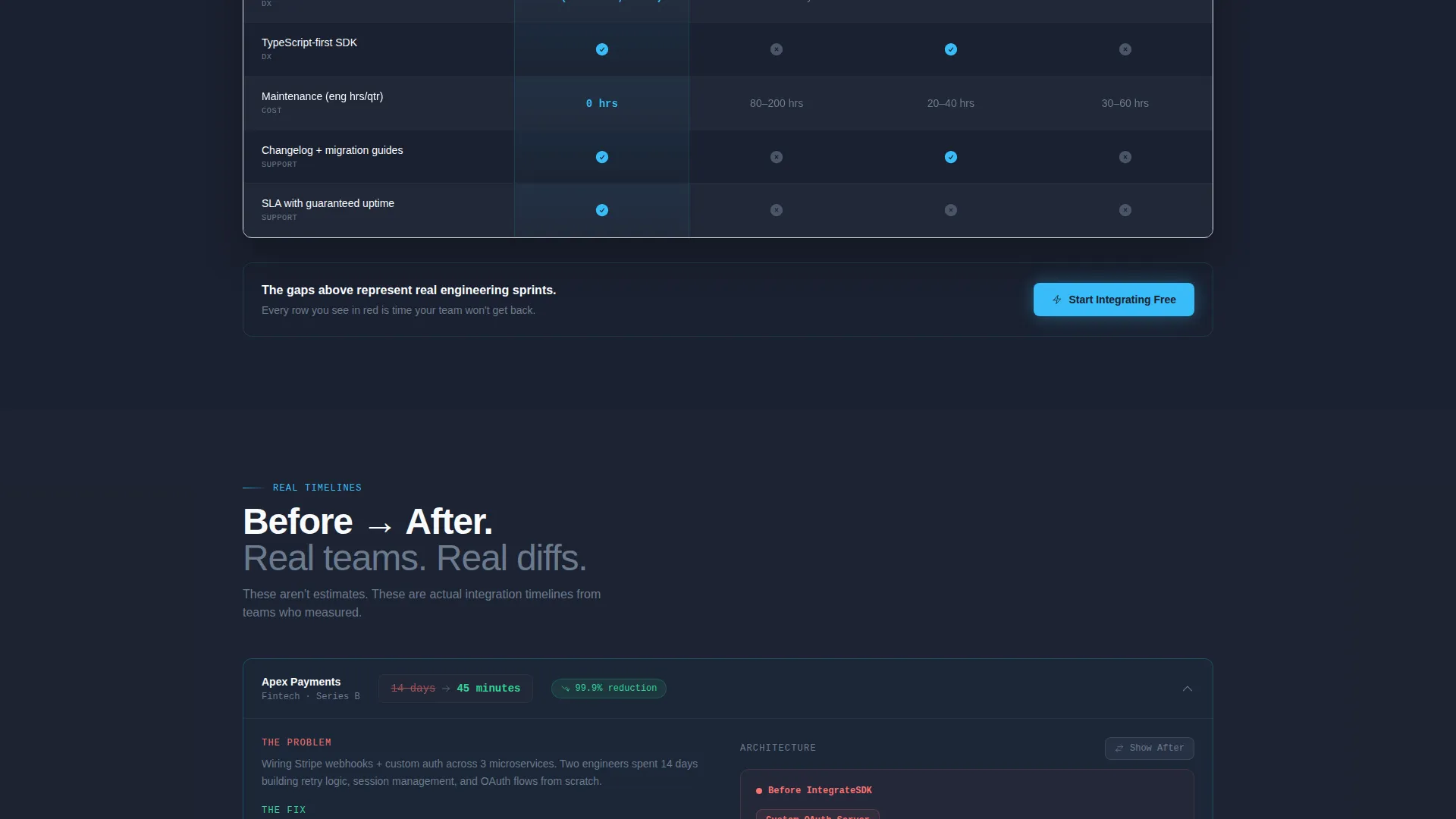
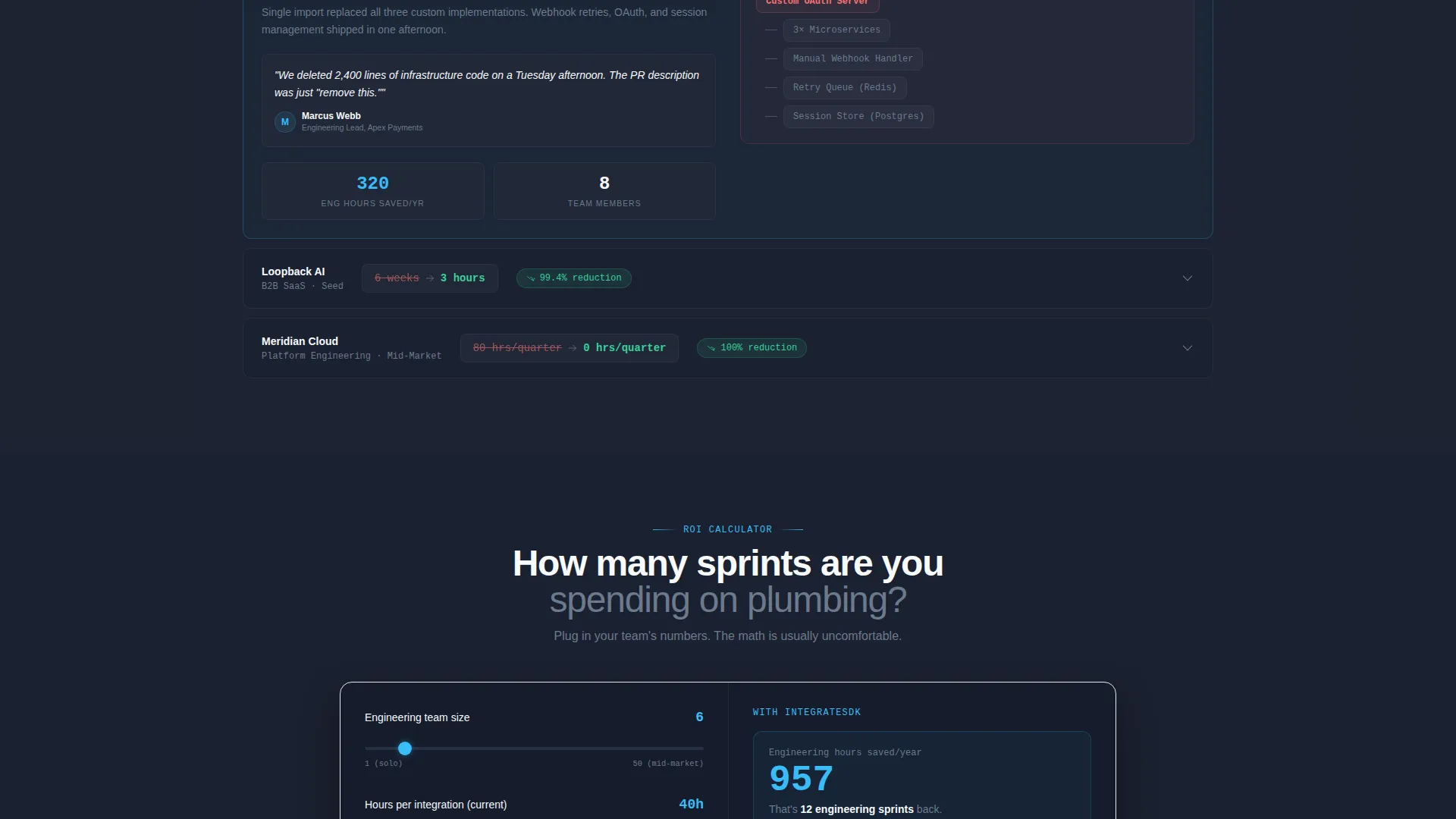
Below the comparison table, three expandable rows show real integration timelines such as "14 days reduced to 45 minutes." Each row includes architecture diagrams that toggle between the before and after topology, giving engineers a concrete picture of what adoption actually changes.
Engineering Hours ROI Calculator
A dedicated section lets the visitor input team size and estimated integration hours. The page returns projected hours saved per year and ends with a contextual call to action: "Save [X] Engineering Hours, Get Your Key." This reframes the decision from a cost to a calculation.
Sticky Conversion Bar
Once the visitor scrolls past the interactive preview, a slim sticky bar appears and stays in view for the rest of the page. The primary call to action is "Start Integrating Free" in sky blue. A secondary link reads "See Full API Docs" for engineers who need to read before they commit.
Frictionless Two-Path Signup
The conversion form offers exactly two options: GitHub sign-in or email. Nothing else is asked. This keeps friction at its lowest possible point for the engineering audience most likely to abandon multi-field forms.
Page sections overview
| Section | Purpose |
|---|---|
| Interactive Code Header | Hook visitors with a live editor and simulated dashboard response |
| Feature Comparison Matrix | Show side-by-side SDK versus build-in-house versus competitor SDKs |
| Case Study Rows | Expand to reveal real before-and-after integration timelines and diagrams |
| ROI Calculator | Let visitors calculate projected engineering hours saved per year |
| Sticky Conversion Bar | Keep the primary call to action visible throughout the entire scroll journey |
| Two-Path Signup | Reduce friction with GitHub or email, and nothing more |
Design & branding system
The visual identity follows a Dashboard Pro theme built on a Slate & Sky color system. The palette feels like a well-configured code editor at dusk: dark enough to work in for hours, with targeted electric blue to guide the eye without overwhelming it.
- Core colors: deep editor charcoal (#1B2130), muted gutter gray (#6B7A8D), sky-blue accent (#38BDF8), and crisp doc-white (#F8FAFC)
- Comparison rows alternate between #1B2130 and #212838, and every checkmark, toggle, and hover state uses sky blue so the visitor always sees where the advantage lands
- No hero image and no stock photography; the product demonstrates itself through the live code preview in the first four seconds
Mobile & speed optimization
The template layout is designed to remain scannable and functional across screen sizes. The comparison table and interactive header are structured to reflow gracefully on smaller viewports.
- The sticky conversion bar and two-path signup form stay accessible throughout the scroll on mobile screens
- The feature matrix is structured to allow horizontal scrolling or stacked row views on narrow displays
- Section-by-section scroll reveals and micro-animations are scoped to individual components rather than full-page transitions, keeping the layout responsive
How this template helps you convert
Every structural decision in this template is aimed at one outcome: turning a skeptical engineer into an active trial user without adding unnecessary steps.
- The live code preview earns attention in the first four seconds, before a visitor has read a single headline, establishing credibility with a working product demonstration rather than a promise.
- The animated comparison table makes the build-versus-buy calculation visible and concrete, so the visitor reaches their own conclusion rather than being told what to think.
- The ROI calculator personalizes the decision with the visitor's own numbers, and the contextual call to action at the end converts that calculation directly into a signup prompt.
Other information about this template
This template sits at the intersection of SDK documentation, API documentation, and developer tool marketing. It is categorized under Documentation and Support, making it a practical fit for teams building or relaunching a public-facing developer platform.
- The template is designed as a single landing page with a section-led scroll flow, not a multi-page documentation site
- The creative direction is Feature Matrix, meaning the comparison table is the structural centerpiece of the page
- The header concept is Interactive Preview, which means the live code editor and simulated dashboard are load-bearing parts of the design, not decorative elements
- The landing page direction is Comparison/Versus, so the primary conversion logic is built around making a side-by-side case rather than a standalone pitch
- The theme is Dashboard Pro with a Slate & Sky color system, which can be adapted to match your own brand colors while keeping the dark-editor visual tone
Theme
Dashboard Pro
Creative direction
Feature Matrix
Color system
Slate & Sky
Style
Comparison Table
Direction
Comparison/Versus
Page Sections
Live Interactive Code Header
Animated Feature Comparison Matrix
Expandable Case Study Rows
Engineering Hours ROI Calculator
Sticky Conversion Bar
Frictionless Two-path Signup
Related questions
Can I customize the comparison table rows for my own SDK features?
Do I need coding experience to edit this template?
Can I replace the ROI calculator inputs with metrics relevant to my product?
What signup options does the conversion form support?
Is this template designed as a single page or a full documentation site?



