Expert Micro-SaaS & Developer Tools Cost Estimator Website Template
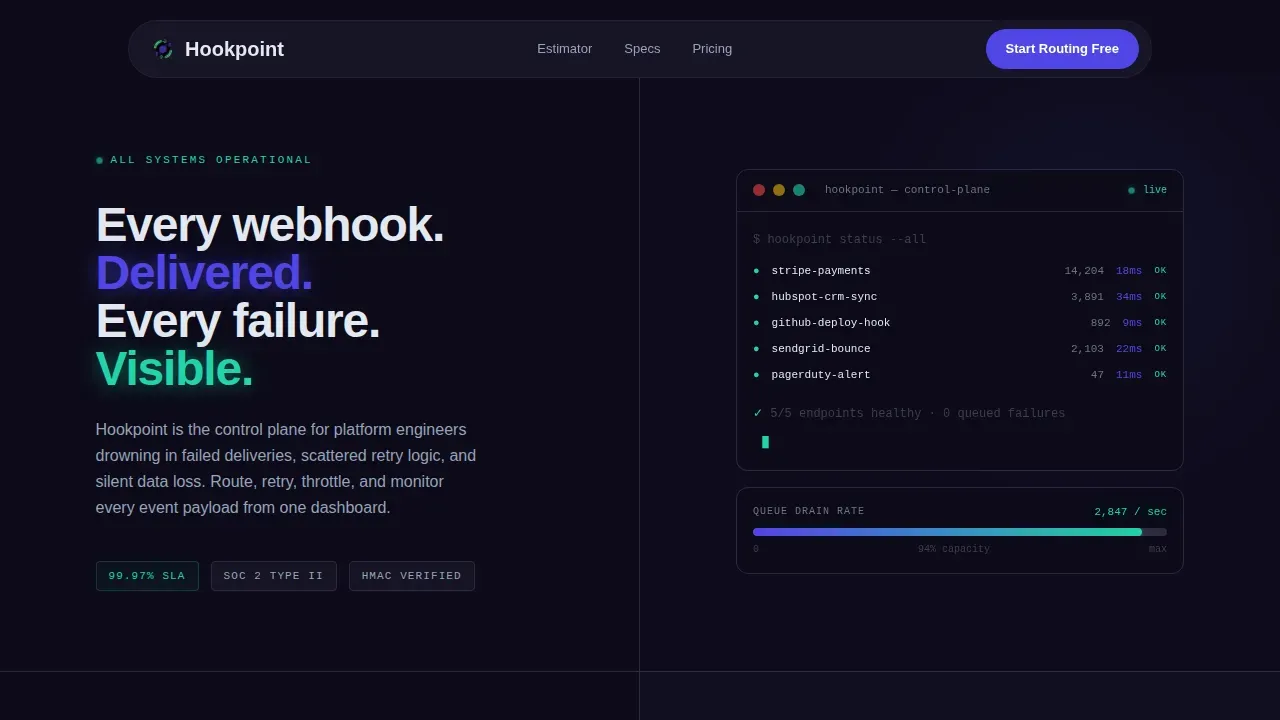
Hookpoint is a dark-mode, split-screen landing page template built for webhook management tools targeting platform engineers. It opens with a live calculator that compares DIY webhook infrastructure against a managed control plane, then walks visitors through spec-by-spec comparisons covering retry policies, observability, and security. The result is a page that builds the case before the call to action ever appears.
by Rocket studio
Quick summary
Hookpoint is a single-page, split-screen (50/50) landing page template designed for webhook management platforms. The page opens with an interactive estimator, escalates through three technical spec comparisons, and closes with dual calls to action. Every section is built around the build-versus-buy decision that platform engineers already have in mind when they arrive.
Who this template is for
This template is purpose-built for SaaS companies and developer tool startups that need to convert technically skeptical visitors. The primary reader is a platform engineer or site reliability engineer who routes, retries, and monitors event payloads across a stack of microservices. A secondary reader is the engineering manager who needs to justify the decision to stop building in-house webhook infrastructure.
- Platform engineers and site reliability engineers at SaaS companies managing incoming webhooks across multiple services
- Engineering managers who need a concrete, data-backed case to circulate internally before approving a build-versus-buy switch
- Developer tool founders who want a credible, terminal-aesthetic landing page that speaks directly to a technical audience
What problem this template solves
Engineering teams often scatter webhook logic across a dozen microservices with no central place to track delivery status, manage retries, or inspect a failed json payload. When a post request fails silently, the on-call engineer has to grep logs, reconstruct the event, and manually re-trigger the flow. This template exists to show prospects exactly how much that costs them, before asking them to do anything.
- Silent data loss from failed webhook deliveries with no centralized visibility into each http request or response code
- Retry logic written and rewritten across services, with no consistent policy for exponential backoff, jitter, or per-endpoint configuration
- No easy way to receive notifications about delivery failures or to inspect incoming webhooks in a structured, queryable format
What you get with this template
You get a complete, production-ready landing page layout built specifically for the webhook management use case. The template is structured to guide a technical visitor from cost awareness, through detailed spec evaluation, to a conversion action without ever relying on stock imagery or vague claims. Every section is a purposeful, data-forward argument.
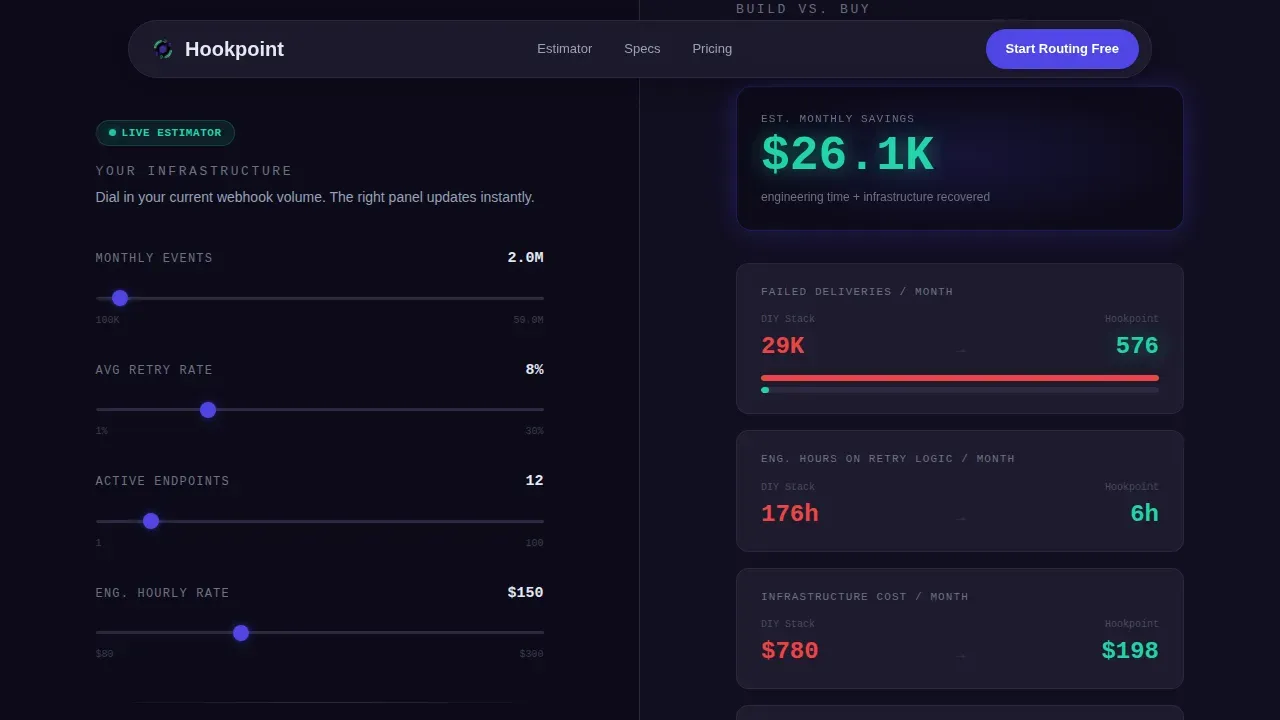
- A hero section with a live, reactive calculator that computes failed deliveries avoided, engineering hours recovered, and dollars saved as the user adjusts inputs
- Three escalating spec comparison sections covering retry policies, observability, and security, each rendered as a left-versus-right split with muted slate for the status quo and electric indigo for the managed solution
- Two conversion paths: a primary "Start Routing Free" call to action and a secondary email-gated "Download the Build versus. Buy Brief" for engineers who need to store the argument for internal review
Feature list
This section describes the specific functional and design capabilities built into this template as defined by the source brief.
Interactive Webhook Volume Estimator
The hero is a 50/50 split calculator. The left panel accepts three inputs: monthly event volume, average retry rate, and number of endpoints. The right panel renders an animated cost and reliability comparison in real time. Animated number counters update every time a user changes a value, so the output always reflects the exact parameters they entered. There is no static illustration here; the calculator is the hero.
Spec Sheet Comparison Layout
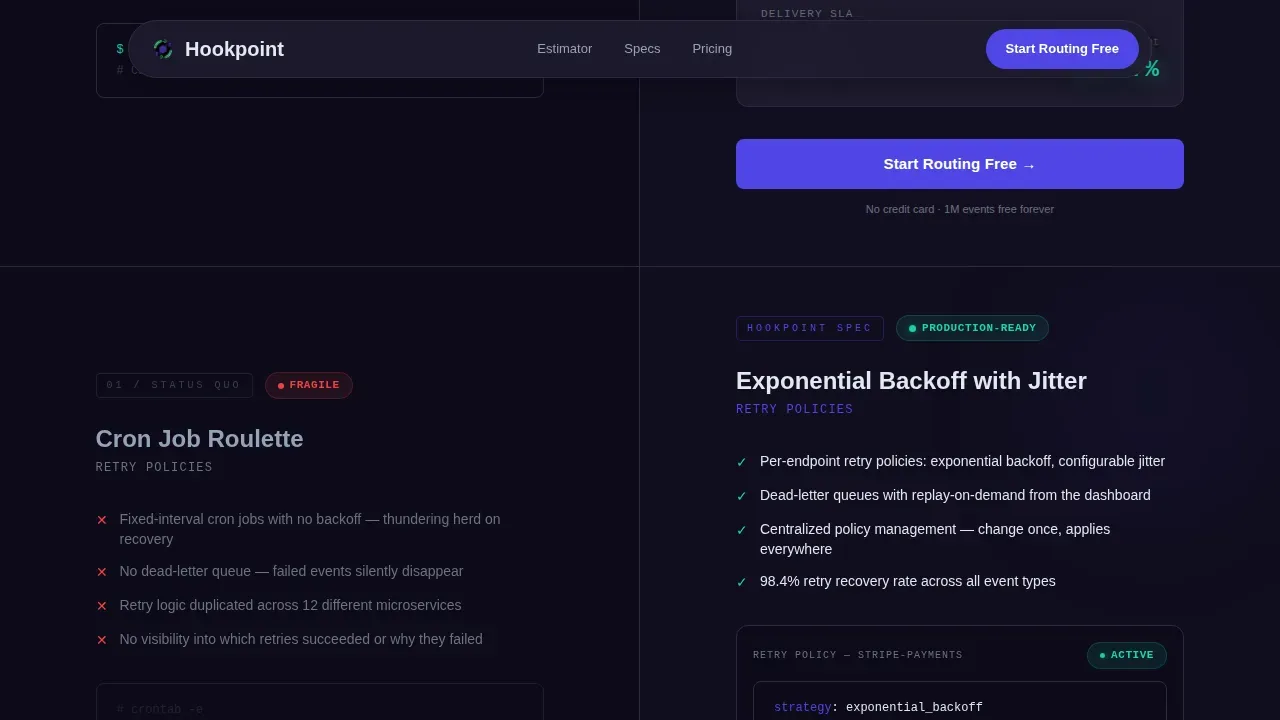
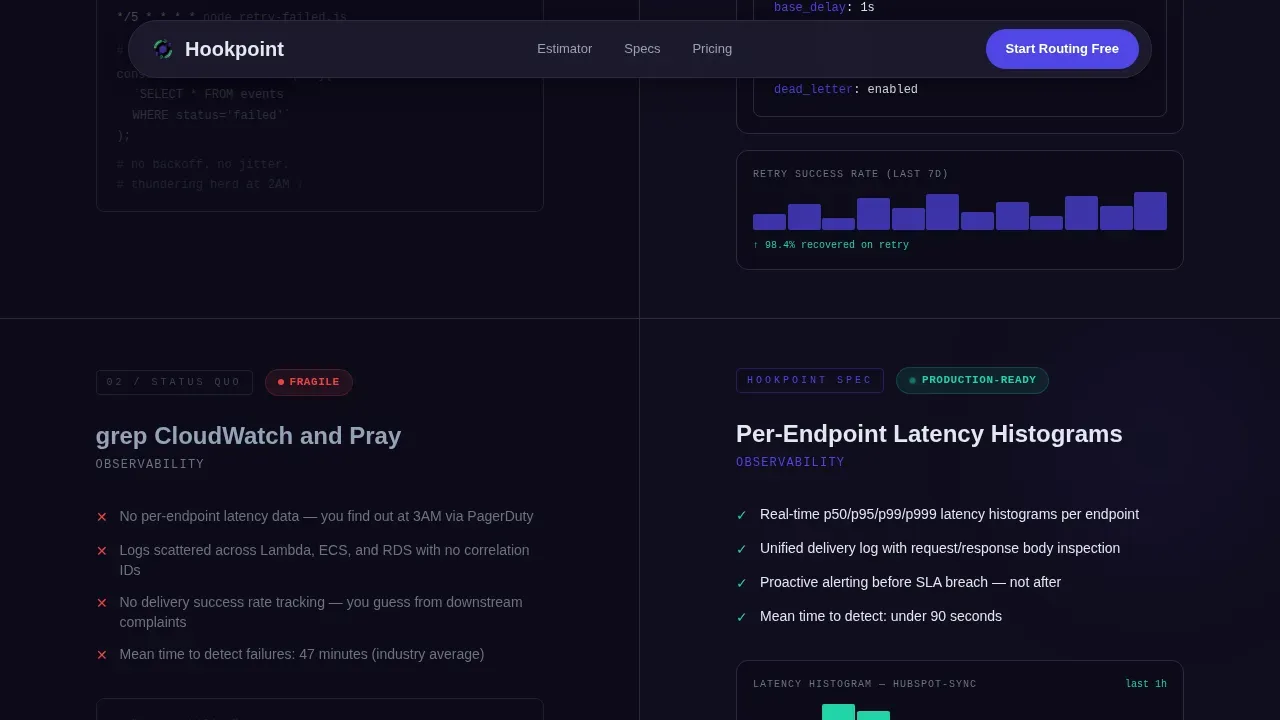
Below the calculator, three full-width comparison rows walk the visitor through a technical evaluation. Each row is a split screen: the left side shows the painful status quo in muted cool slate, the right side shows the managed-solution spec in electric indigo. The sections cover different event types across retry policies (exponential backoff with jitter versus manual cron jobs), observability (per-endpoint latency histograms versus log grepping), and security (HMAC signature verification plus IP allowlisting versus hand-rolled middleware). The scroll is structured as evidence, not narrative.
Dual Conversion Call to Action
Two conversion paths appear at the bottom of the page. The primary call to action, "Start Routing Free", is placed both at the calculator output and again after the final spec row. The secondary path offers a downloadable build-versus-buy brief behind a single work-email field. This gives engineers who need to circulate the decision internally a lightweight solution to share without requiring them to sign up immediately.
Mission Control Visual System
The entire page uses a dark-mode-only design built around a four-color palette with strict semantic meaning. Void black (#0D0B1A) is the background. Electric indigo (#4F46E5) marks primary actions and live-state indicators. Cool slate (#1E1B2E) surfaces card backgrounds and code blocks. Phosphor green (#22D3A7) appears exclusively on success states and uptime metrics. Typography uses DM Sans for body text and JetBrains Mono for all monospace elements such as code snippets, metric values, and terminal strings.
Animation and Interactivity Layer
The template is built with a high animation budget. Animated number counters respond to calculator input changes. Scroll-reveal effects with stagger timing introduce each spec row. Glowing state indicators and a terminal blink cursor reinforce the mission control aesthetic. The calculator is architected as a client component for live reactivity, while the surrounding page shell uses a server component structure.
GitHub Developer Minimal Footer
The footer follows a developer-focused minimal pattern. It avoids decorative elements and instead provides functional links, a concise description of the product, and social or repository links suited to a technical audience. It keeps the page grounded without detracting from the conversion sections above it.
Page sections overview
| Section | Purpose |
|---|---|
| Hero Calculator Split | Capture attention with live cost comparison inputs and animated outputs |
| Retry Policy Comparison | Show exponential backoff with jitter versus manual cron job status quo |
| Observability Comparison | Compare per-endpoint latency histograms versus log-grep workflows |
| Security Comparison | Contrast HMAC plus IP allowlisting versus hand-rolled middleware |
| Final Dual call to action | Deliver primary free-trial action and secondary email-gated brief download |
| Developer Minimal Footer | Provide functional links and product description for technical visitors |
Design & branding system
The visual identity is defined as a Data Command theme built entirely in dark mode. The palette is semantic: each color maps to a specific function, so the user always knows what a color means without reading a label. The typography pairing of DM Sans and JetBrains Mono keeps the page feeling like a development environment rather than a marketing site.
- Four-color semantic palette: void black for backgrounds, electric indigo for actions and live indicators, cool slate for surfaces and code blocks, phosphor green reserved strictly for success states and uptime metrics
- Monospace typography (JetBrains Mono) used for all metric values, code strings, and terminal-style elements to reinforce the engineering aesthetic
- No stock imagery, no illustrations; all visual content is generated from data inputs and outputs, keeping the page honest and specific
Mobile & speed optimization
The template is desktop-first by design. Platform engineers typically evaluate infrastructure tools on workstations, and the split-screen layout is optimized for wide viewports. However, the layout is fully responsive and adapts cleanly down to 768px-wide screens, so the page remains usable when shared via a link on a mobile device.
- Desktop-first layout with responsive breakpoints that restack the 50/50 split into a single-column flow at 768px and below
- Server component shell for the static page structure with a client component scoped to the interactive calculator, reducing unnecessary client-side runtime overhead
- Scroll-reveal animations and stagger effects are defined to trigger on viewport entry, keeping the page feeling responsive without loading all animation logic at once
How this template helps you convert
The page is structured so that the visitor has already done the math before they reach a call to action. By the time the "Start Routing Free" button appears, the calculator has shown them the cost of staying with their current setup.
- The calculator runs first: the user inputs their own numbers and the page produces a personalized cost comparison, making the value argument concrete and self-generated rather than a generic claim from a vendor
- The spec rows escalate in specificity: each comparison section adds another line item to the build-versus-buy checklist the visitor is already running in their head, so the decision feels validated by evidence rather than pushed by copy
- The dual call to action removes friction: engineers who are ready can start immediately, while engineers who need to circulate the decision internally can save and share the brief without committing to a sign-up
Other information about this template
This template is a strong fit for any SaaS product that handles event-driven communication between systems. Webhooks are a way of communicating between two systems via a network, and this template is designed to explain that clearly to both technical buyers and the managers they report to. The page's structure reflects real webhook management best practices: URL generation, event configuration, and payload visualization are all represented in the spec comparison rows.
A hookpoint data command intercepts data at a predefined moment in an application's lifecycle. In this template's context, a hookpoint operates as the conceptual anchor: the moment where an event is captured, serialized into a json object, and delivered to a defined endpoint. The hookpoint data command webhook management landing page template is designed so that even a visitor unfamiliar with the term understands the idea within the first scroll.
The template's calculator section demonstrates how incoming webhooks create compounding operational cost when left unmanaged. Each failed http request, each dropped json payload, each retry loop running on a local machine or an ad-hoc cron job adds up to engineering hours and infrastructure dollars. The estimator makes those numbers personal by letting the visitor query their own event volume and retry rate.
For teams evaluating the template in a development environment, the layout components are straightforward to configure. Route and endpoint parameters are clearly labeled. The template can add support for additional spec rows if the product has more comparison points to make. Changing a webhook destination, for example, can be done by altering the webhook url in settings without modifying any HTML or CSS.
The following implementation-level concepts are surfaced naturally in this template's spec comparison rows and are useful context for buyers evaluating the template for a technical audience:
- Incoming webhooks typically require a server running a web server to handle each http request, a fact the spec rows make explicit when comparing managed versus DIY setups
- A json payload sent to a webhook url typically includes a unique identifier, a content type header, and the main event body; the template's observability section references this structure when describing per-endpoint latency tracking
- Custom header configuration is shown as a managed feature: the platform handles each custom header and validates it, versus a DIY app where the engineer must write and maintain that logic manually
- Asynchronous webhook processing, implemented using a queuing system, is referenced in the retry policy comparison as a capability that removes the need for manual cron jobs
- A docker compose file or docker compose setup is a common way to manage docker services in a local development environment; engineers using the hookpoint tool may also use a working directory with a docker compose file and environment variables to run their webhook infrastructure locally
- The template references the idea of a py file or similar script that a team might write to handle incoming webhook events before adopting a managed platform; this is the "status quo" side of the spec comparison
- A complete code example, such as a simple http endpoint that processes an incoming post request and returns a 200 response, is the kind of test data scenario the spec rows describe as the DIY baseline
- Payload visualization tools, as noted in webhook management best practices, allow teams to examine incoming json data or xml data for debugging; this template surfaces that capability as a built-in feature of the managed platform versus a manual grep workflow
- Commands can filter data to trigger webhooks only under specific conditions, such as by event type or geographic parameters; the template's filtering description reflects this capability
- The hookpoint syntax
{% hook 'name' %}is a template-engine pattern that marks the point where data is captured and serialized; this concept maps directly to how the template frames each hookpoint as a defined trigger within the conversion flow
Theme
Data Command
Creative direction
Spec Sheet
Color system
Electric Indigo
Style
Asymmetric Grid (60/40)
Direction
Comparison/Versus
Page Sections
Live Webhook Volume Calculator
Three-row Spec Comparison Layout
Dual Conversion Call to Action
Mission Control Dark-mode Design System
High-fidelity Animation and Interactivity
Developer Minimal Footer
Related questions
What kind of product is this template designed for?
Can I adjust the calculator inputs and spec comparison sections for my product?
Does the template include the email capture for the downloadable brief?
How does the calculator respond to different event volumes?
Is this template available in a light-mode variant?



