Inbox - High-Performance Hospitality Landing Page Template
Inbox is a scroll-reveal landing page template built for hospitality email newsletter studios. It leads with an interactive revenue estimator, then unfolds industry-report-style data sections that make the case for optimized hotel and restaurant email templates. The design runs on a high-contrast Acid Digital palette, and every call to action drives visitors straight to a template preview gallery.
by Rocket studio
Quick summary
Inbox is a single-page, scroll-reveal landing page template designed for studios selling hospitality-specific email newsletter templates. It opens with a live revenue estimator, builds trust through animated benchmark data, and closes with a click-through call to action. The visual identity pairs void black with phosphor green and scanner-line cyan for an unmistakably data-forward aesthetic.
Who this template is for
This template is built for agencies and design studios that create email newsletter templates for the hospitality industry. It speaks directly to clients who are tired of generic layouts and ready to see measurable results.
- Hospitality email newsletter template studios pitching hotels, resorts, and restaurant groups
- Freelance email designers who need a conversion-focused landing page to showcase their work
- Boutique hotel marketing teams evaluating whether to invest in optimized templates
What problem this template solves
Generic email layouts cost hospitality marketers open rates, revenue, and guest trust. This template makes the business case for switching, doing the persuasion work before the visitor ever sees a contact form.
- It removes skepticism early by surfacing hard benchmark data through animated, scroll-triggered sections
- It quantifies the revenue gap between default templates and hospitality-specific designs with a live estimator
- It replaces the cold-pitch dynamic with a self-guided discovery experience that ends in a warm gallery click
What you get with this template
You get a fully structured, single-page layout with a clear scroll narrative, interactive header component, and repeating contextual calls to action. Every section is designed to build on the one before it.
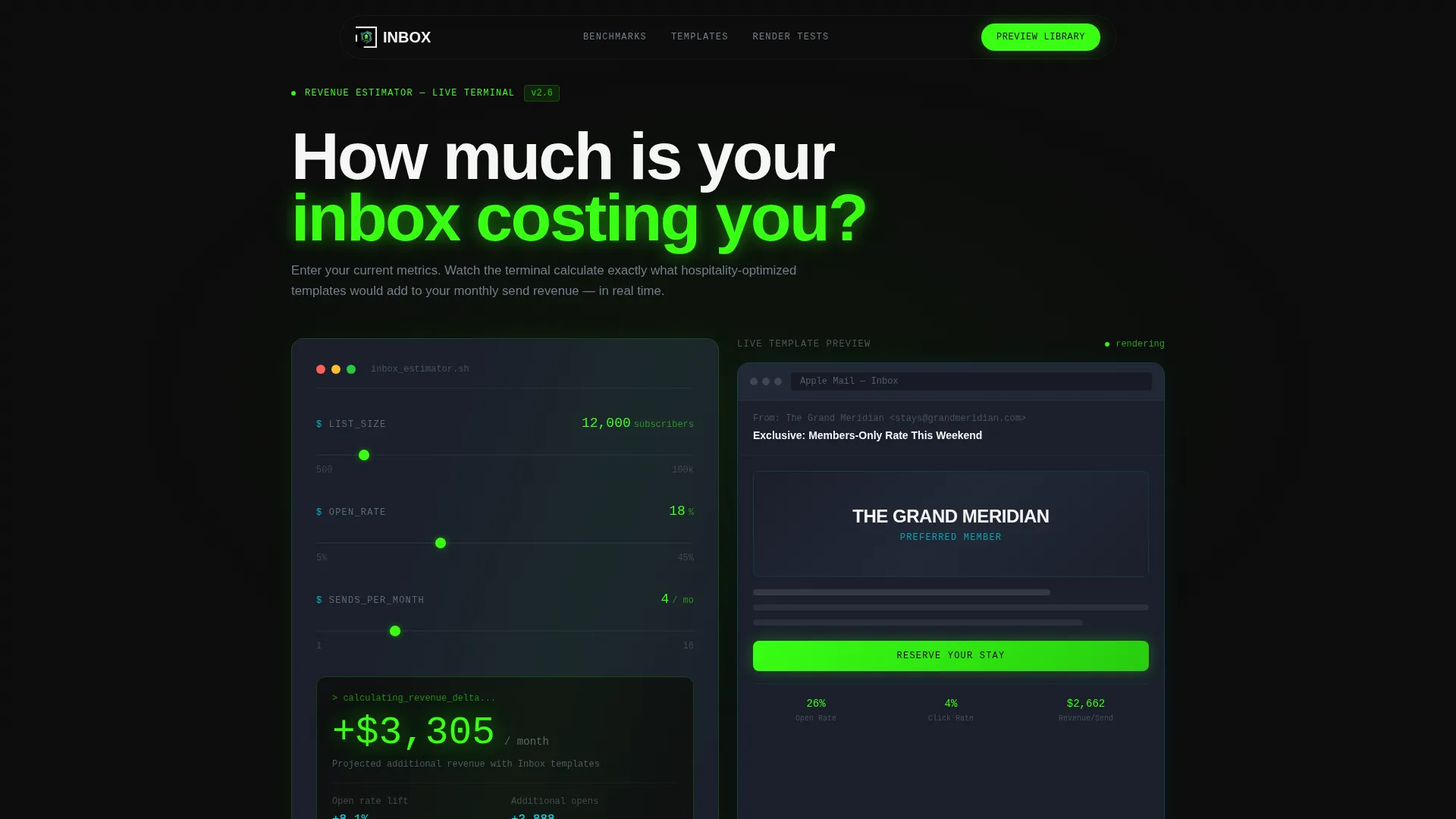
- An interactive revenue estimator as the header, with a live email preview panel beside it
- Scroll-triggered data sections styled as animated industry report findings with bar charts and device mockups
- Contextual click-through calls to action that update their label based on which benchmark section the visitor just viewed
Feature list
This template includes purpose-built components that work together to move a cold visitor toward a confident click.
Interactive Revenue Estimator Header
The header is a calculator that takes three visitor inputs: list size, average open rate, and sends per month. As the visitor adjusts the sliders or fields, the projected revenue from optimized templates animates in real time in phosphor green against void black. A miniature email preview materializes beside the calculator and updates dynamically as inputs change.
Scroll-Reveal Data Sections
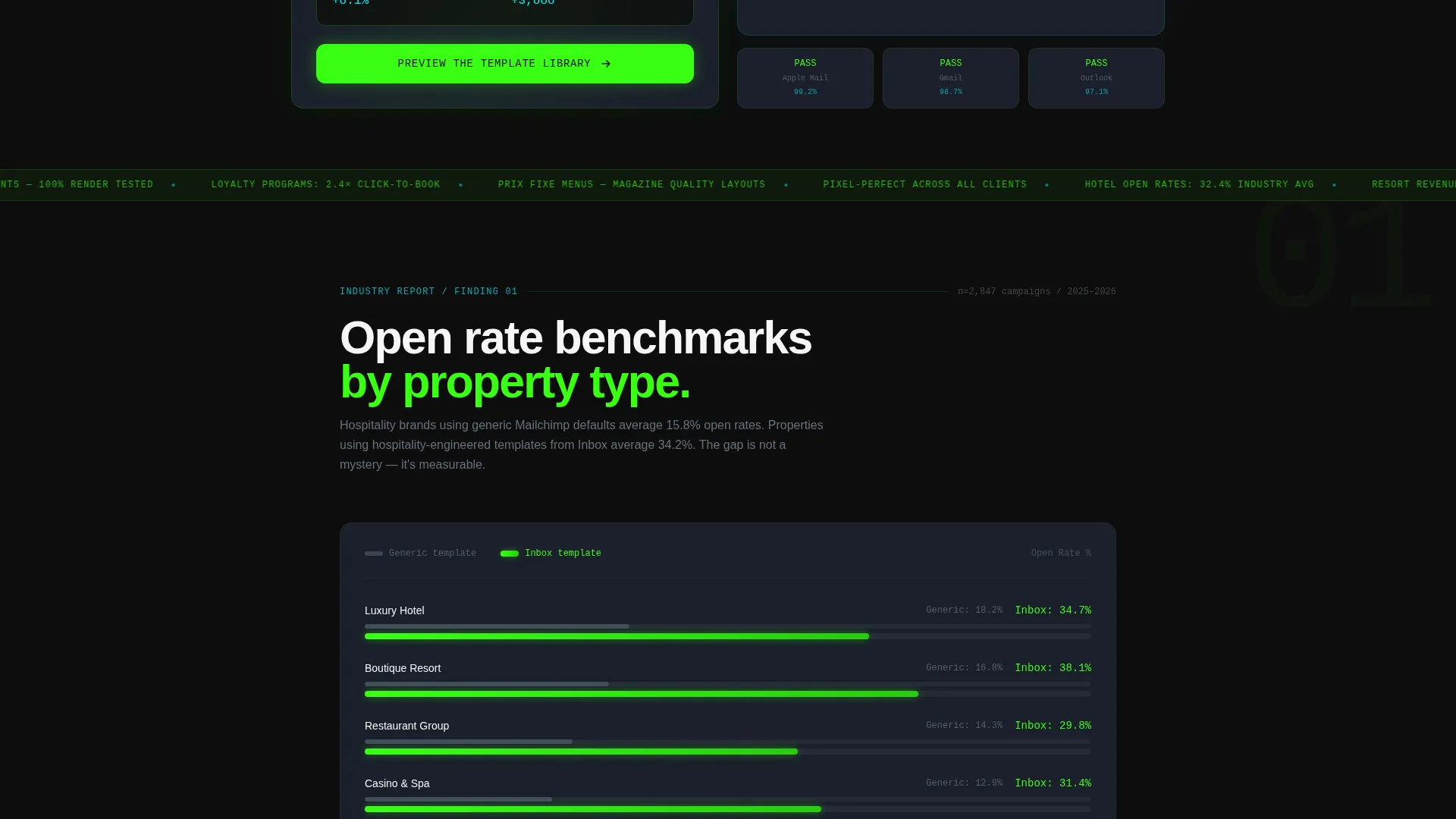
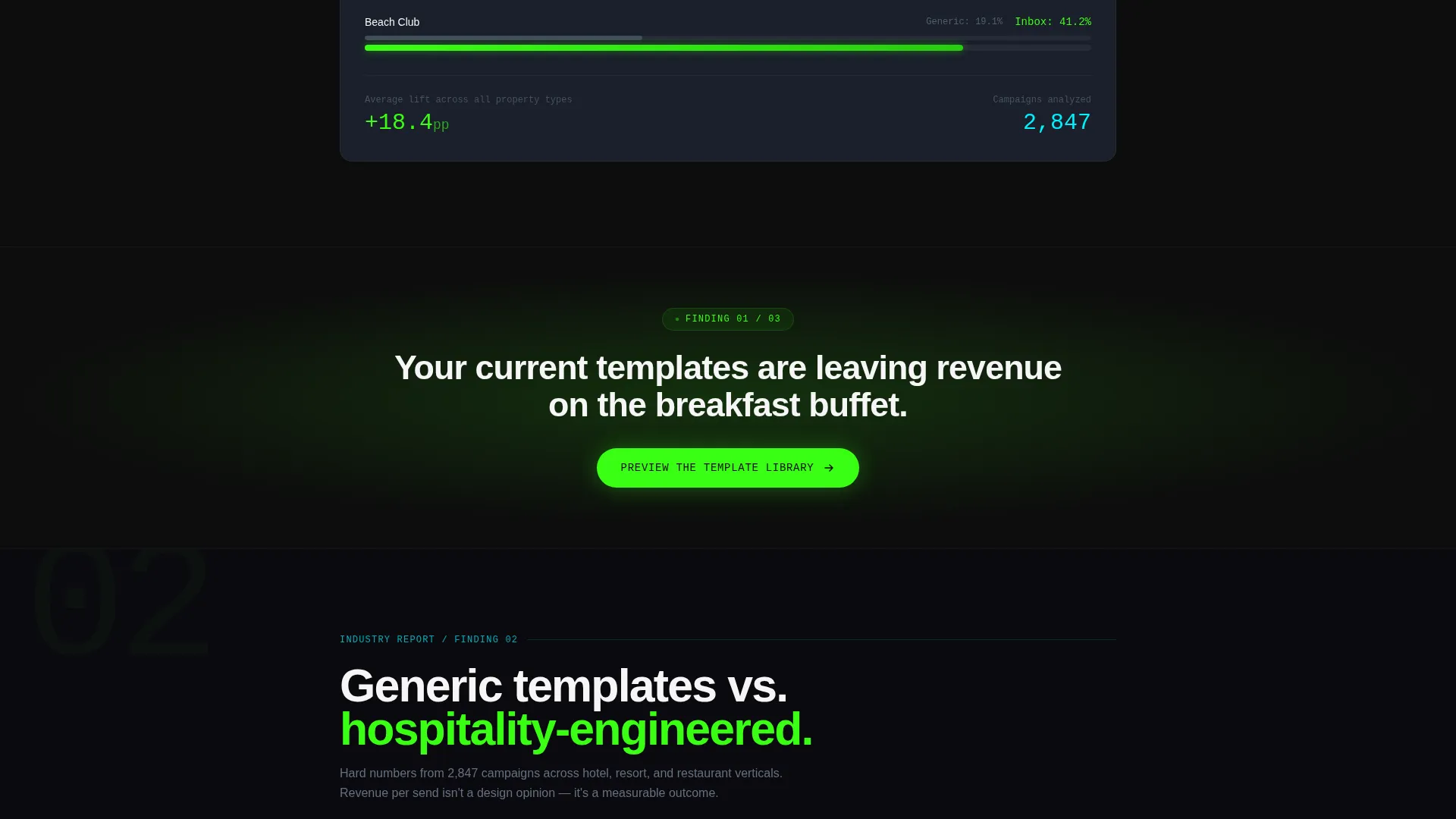
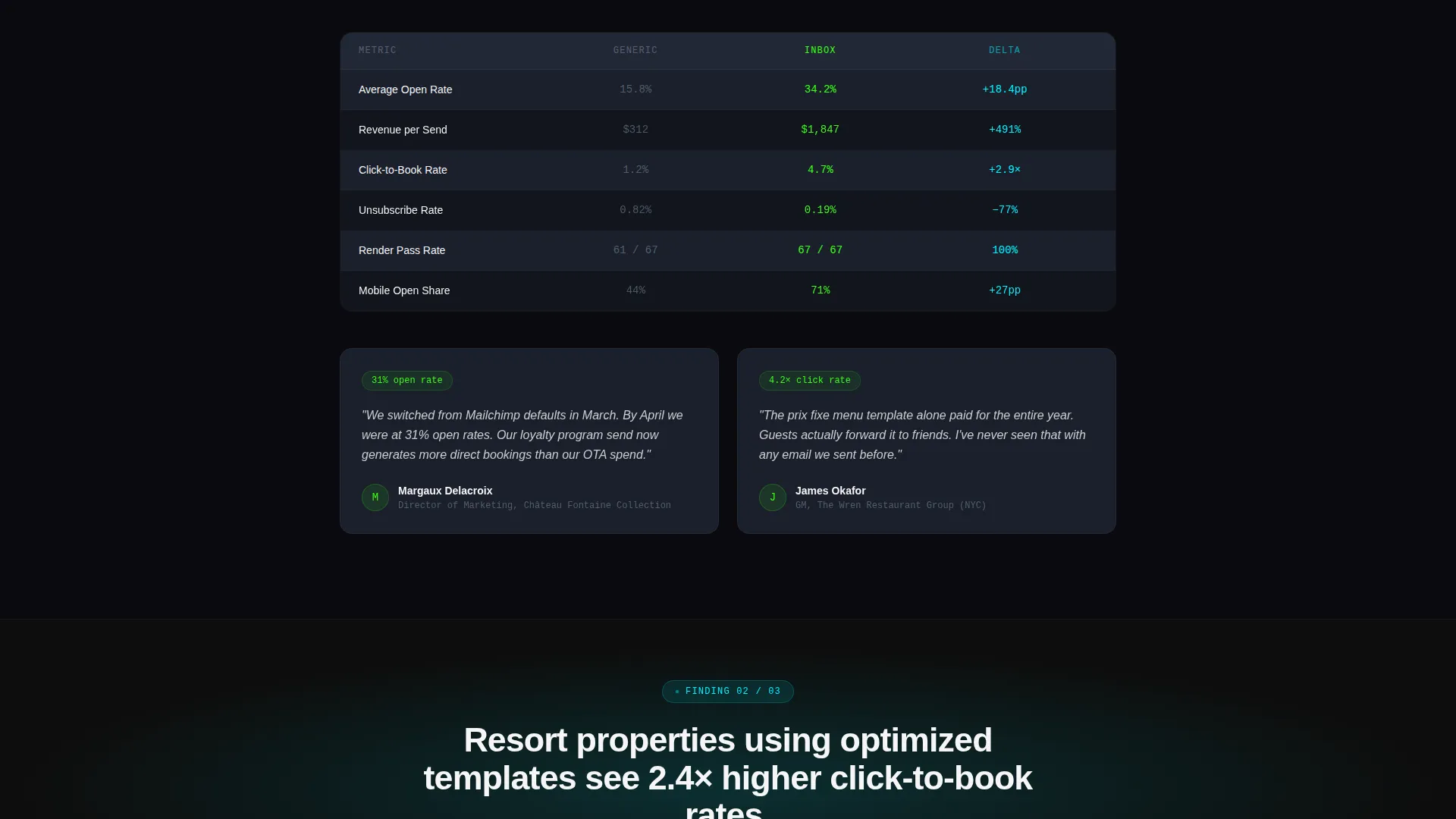
Each major section enters the viewport progressively, styled like a research brief being declassified one finding at a time. Open rate benchmarks by property type fade in with animated bar charts. Revenue-per-send comparisons between generic and hospitality-optimized templates slide into frame with supporting figures.
Animated Benchmark Bar Charts
Bar chart components render open rate comparisons and revenue-per-send data as scroll-triggered animations. The charts are styled within the Dashboard Pro theme, using phosphor green fills and cyan axis lines to keep the data visually urgent and easy to read at a glance.
Interactive Device Mockups
Template render-test results across Apple Mail, Gmail, and Outlook appear as interactive device mockups. Visitors can engage with the mockups to see how the same hospitality template holds up across different email clients, reinforcing confidence in cross-client reliability.
Contextual Repeating Calls to Action
The primary call to action, "Preview the Template Library," appears first after the calculator result. It then repeats after every two data sections. Each repetition carries a contextual modifier such as "See Resort Templates" or "See Restaurant Templates" based on which benchmark section the visitor just consumed.
Dashboard Pro Visual System
The entire layout uses the Acid Digital color system: void black (#0D0D0D) as the base, terminal phosphor green (#39FF14) for live data and hover states, scanner-line cyan (#00F0FF) for card edges and progress bars, and muted interface gray (#1A1F2B) for card surfaces and section dividers. The result feels like a trading terminal built inside a five-star hotel lobby.
Page sections overview
| Section | Purpose |
|---|---|
| Revenue Estimator Header | Hooks visitors with a live, personalized revenue projection |
| Email Preview Panel | Shows a dynamic hotel template render beside the calculator |
| Open Rate Benchmarks | Animates property-type open rate comparisons as bar charts |
| Revenue Per Send | Compares generic versus hospitality-optimized template returns |
| Render Test Mockups | Demonstrates cross-client rendering across major email platforms |
| First call to action Block | Prompts gallery click after the calculator delivers its result |
| Resort Benchmarks Section | Surfaces resort-specific data to qualify that visitor segment |
| Restaurant Benchmarks Section | Surfaces restaurant-specific data to qualify that visitor segment |
| Repeating call to action Blocks | Reinforces the gallery click after each pair of data sections |
Design & branding system
The template runs on the Acid Digital color system paired with the Dashboard Pro theme. The aesthetic is deliberately high-contrast and data-forward, designed to feel modern without losing the polish expected by luxury hospitality buyers.
- Void black (#0D0D0D) as the page base, phosphor green (#39FF14) for live counters and hover pulses, scanner-line cyan (#00F0FF) tracing card borders and progress bars, and muted interface gray (#1A1F2B) on card surfaces and dividers
- Typography and layout follow a terminal-inspired grid that keeps data readable at every scroll depth
- Hover states use the green pulse effect to signal interactivity, while cyan accents guide the eye along the scroll path
Mobile & speed optimization
The scroll-reveal structure and interactive components are built to perform on smaller screens without losing the visual impact of the desktop experience.
- The estimator layout stacks vertically on mobile so the input fields and preview panel remain fully usable without horizontal scrolling
- Animated bar charts and device mockups scale to viewport width, keeping data legible on phone screens
- Progressive reveal triggers are calibrated for touch-scroll behavior so the data sections unfold naturally on mobile devices
How this template helps you convert
The conversion path is engineered as a three-stage journey from curiosity to click, with no form friction standing in the way.
- The revenue estimator personalizes the stakes immediately. Visitors see their own numbers projected in green before they read a single marketing claim, which creates real urgency rather than manufactured pressure.
- The scroll-triggered data sections systematically remove skepticism. Each animated benchmark adds another layer of evidence, so by the time the call to action appears for the second or third time, the visitor is already convinced and looking for a next step.
- The contextual call-to-action labels ("See Resort Templates," "See Restaurant Templates") match the exact segment the visitor just read about, making the click feel like a natural continuation rather than a sales push.
Other information about this template
This section covers additional context that supports confident purchasing decisions for studios and teams evaluating this template.
- The template is categorized under Technology with a subcategory of Hospitality Digital Presence, making it relevant for digital studios serving the hospitality sector
- The scroll-reveal structure supports a progressive storytelling format, meaning content sections load into view as the visitor scrolls rather than all at once
- The click-through landing page direction means there is no form on the page; the sole conversion goal is a gallery click, which reduces friction and keeps the experience clean
- The Industry Report creative direction shapes every section as a data-driven finding rather than a feature list, which suits an analytically minded hospitality marketing audience
- This template is built for studios that need to demonstrate email expertise quickly to skeptical marketing directors and loyalty program managers with specific open-rate targets
Theme
Dashboard Pro
Creative direction
Industry Report
Color system
Acid Digital
Style
Scroll Reveal (Progressive)
Direction
Click-Through
Page Sections
Interactive Revenue Estimator
Scroll-reveal Data Sections
Animated Benchmark Charts
Interactive Device Mockups
Contextual Repeating Ctas
Acid Digital Color System
Related questions
Does this template include a working calculator or just a visual layout?
Is there a contact form included on this page?
Can I replace the benchmark data with my own studio's numbers?
How many times does the call to action appear on the page?
Who is this landing page template designed for?



