Specialist Coworking Digital Presence Cost Estimator Website Template
Hotdesk is a dynamic coworking landing page template built as a live dashboard interface. It opens with an interactive tab switcher showing room availability, café menus, and events in real time. An ROI calculator, integration map, and usage heatmap follow. The result is a single-page experience that lets visitors use the product before they ever read a sales pitch.
by Rocket studio
Quick summary
Hotdesk is a single-page coworking digital menu template built around a live dashboard aesthetic. It leads with an interactive tab switcher, follows with a utility-first ROI calculator, and closes with a clear demo call to action. The template suits coworking operators who want to show their space, not just describe it.
Who this template is for
This template is designed for operators who manage coworking spaces at any scale and need a smarter way to present their offerings online.
- Community managers handling daily room bookings, café services, and event scheduling across a busy member base
- Operations directors at multi-location coworking chains who need consistent, professional digital presence across cities
- Landlords and property developers converting underused lobby or flex spaces into activated, bookable coworking environments
What problem this template solves
Coworking spaces lose time and revenue when their amenities are hard to find, hard to book, or buried in static web pages. Members ask the same questions repeatedly, and staff spend hours on manual coordination instead of building community.
- Visitors cannot quickly see what rooms, passes, or services are available right now
- Operators have no single, visual interface to present day passes, meeting rooms, podcast booths, and event catering together
- Standard landing pages rely on persuasion copy alone, giving prospects no feel for the actual product before they commit
What you get with this template
You get a fully structured, single-page dashboard landing page with interactive components built directly into the layout. Every section is designed to demonstrate the product, not just describe it.
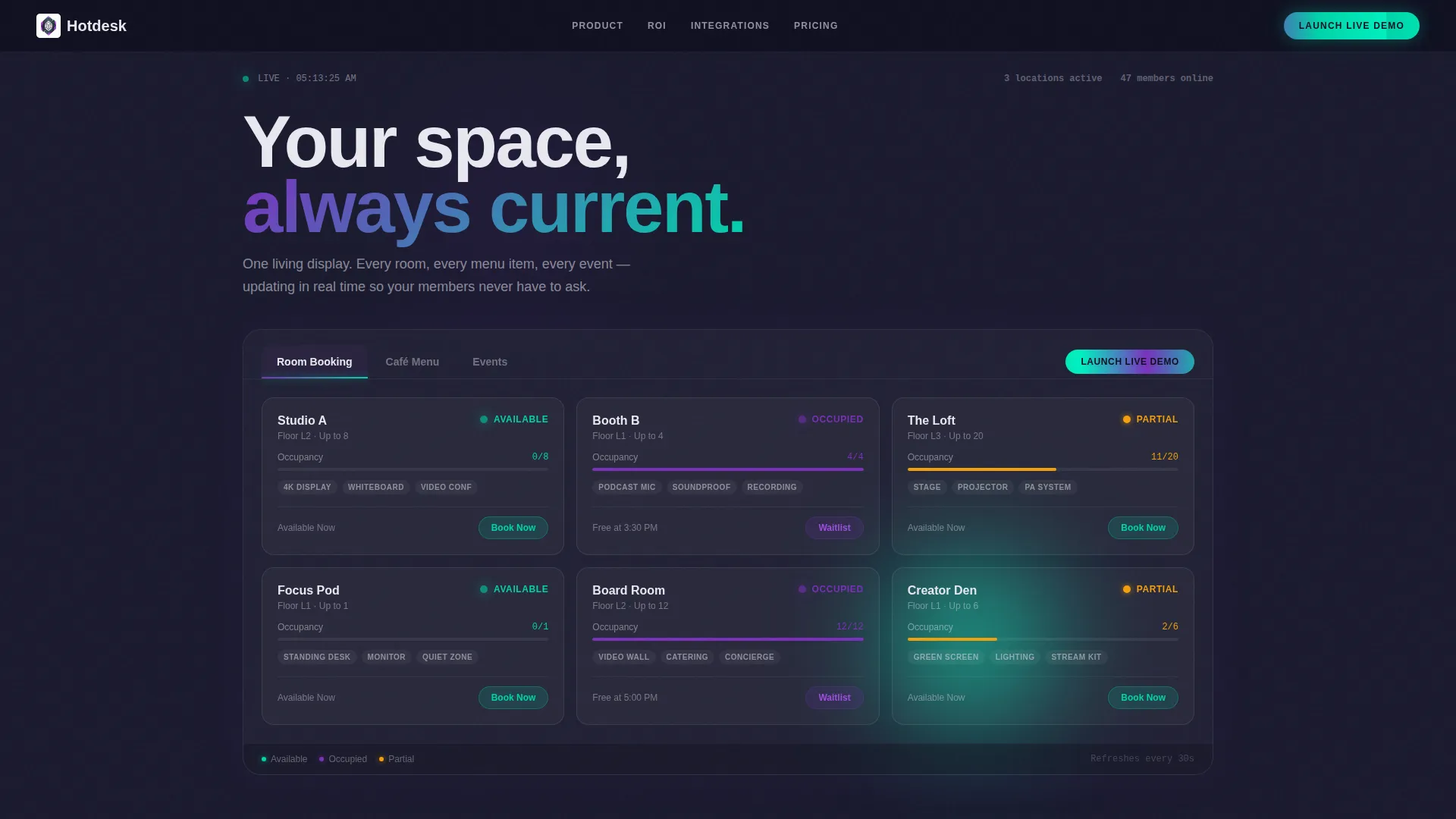
- A live-style header with a three-tab switcher showing room booking, café menu, and events views with animated grid transitions
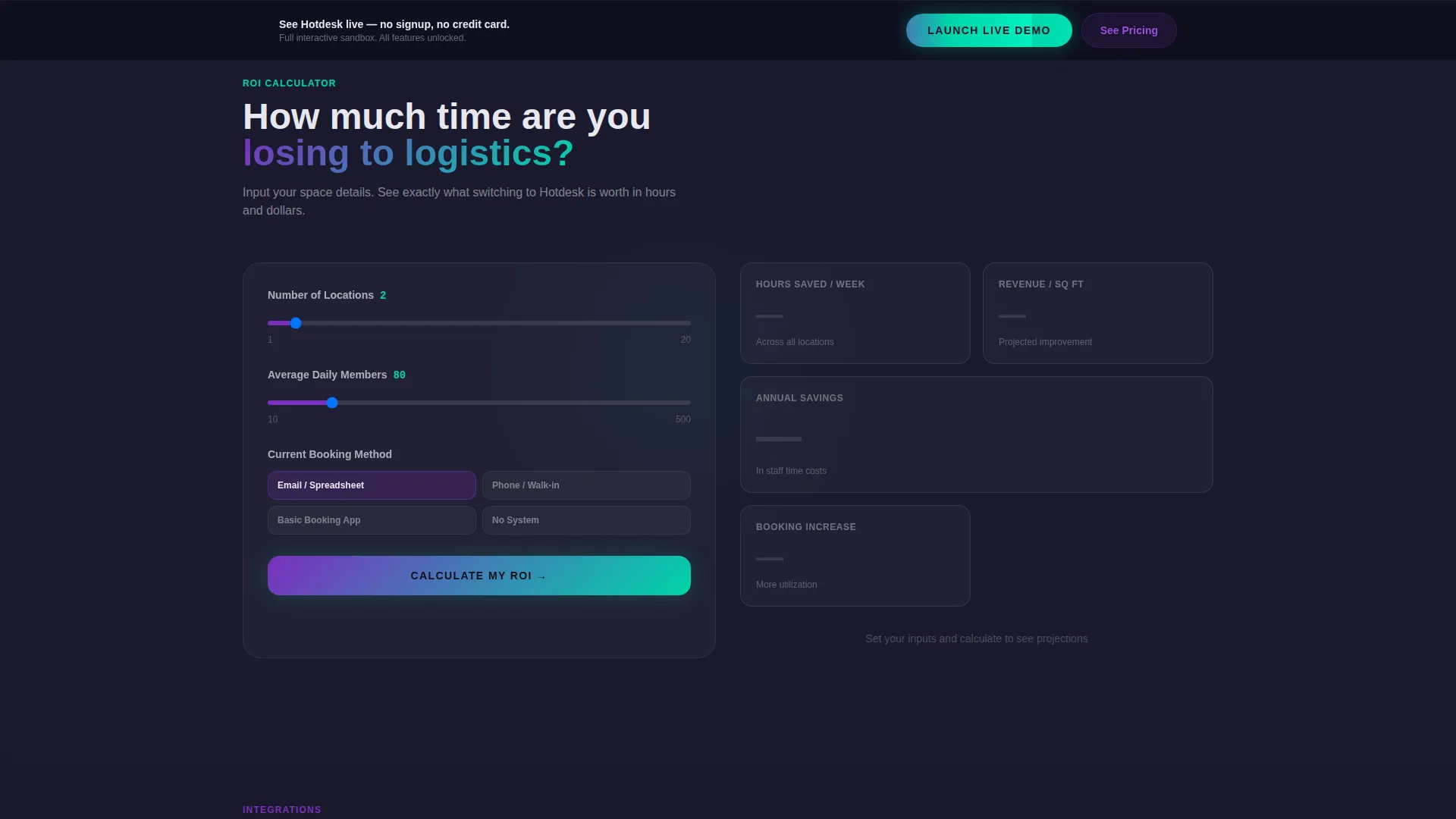
- An ROI calculator that takes visitor inputs and renders projected time savings and revenue-per-square-foot figures in an animated data card
- Visual sections including an integration connector map, a peak-hours heatmap, and a scrolling testimonial ticker
Feature list
This template includes purposeful, interactive components drawn directly from the brief. Each one plays a specific role in moving a visitor from curiosity to demo click.
Interactive Tab Switcher Header
Three labeled tabs sit across the top of a live dashboard mockup. Clicking "Room Booking," "Café Menu," or "Events" swaps the full data grid below with a smooth morphing animation. The default view shows a room availability grid with green and violet status dots, real-time occupancy numbers, and a booking button on each card. No hero image competes for attention here. The product interface IS the header.
ROI Calculator Tool
Below the tab switcher, visitors enter their number of locations, average daily footfall, and current booking method. The template instantly renders a projected time-savings figure and a revenue-per-square-foot improvement in an animated data card. This section earns trust through utility before any marketing copy appears.
Live Integration Connector Map
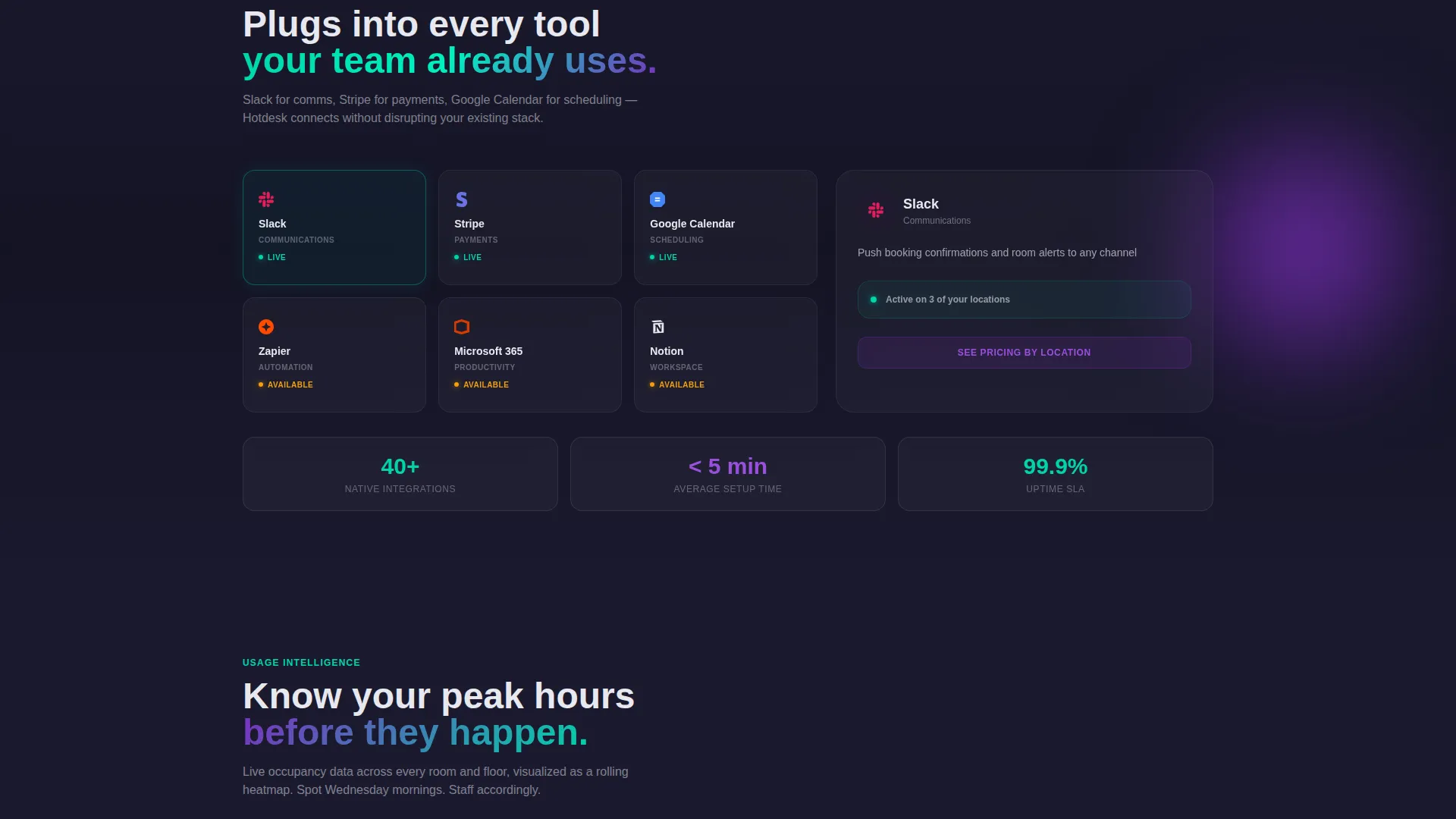
A visual section presents connectors for messaging, payment, and calendar tools in a map-style layout. Each connector is shown as a node in a live-style integration diagram. This section reassures operators that the platform connects to tools already in their workflow.
Peak Usage Heatmap
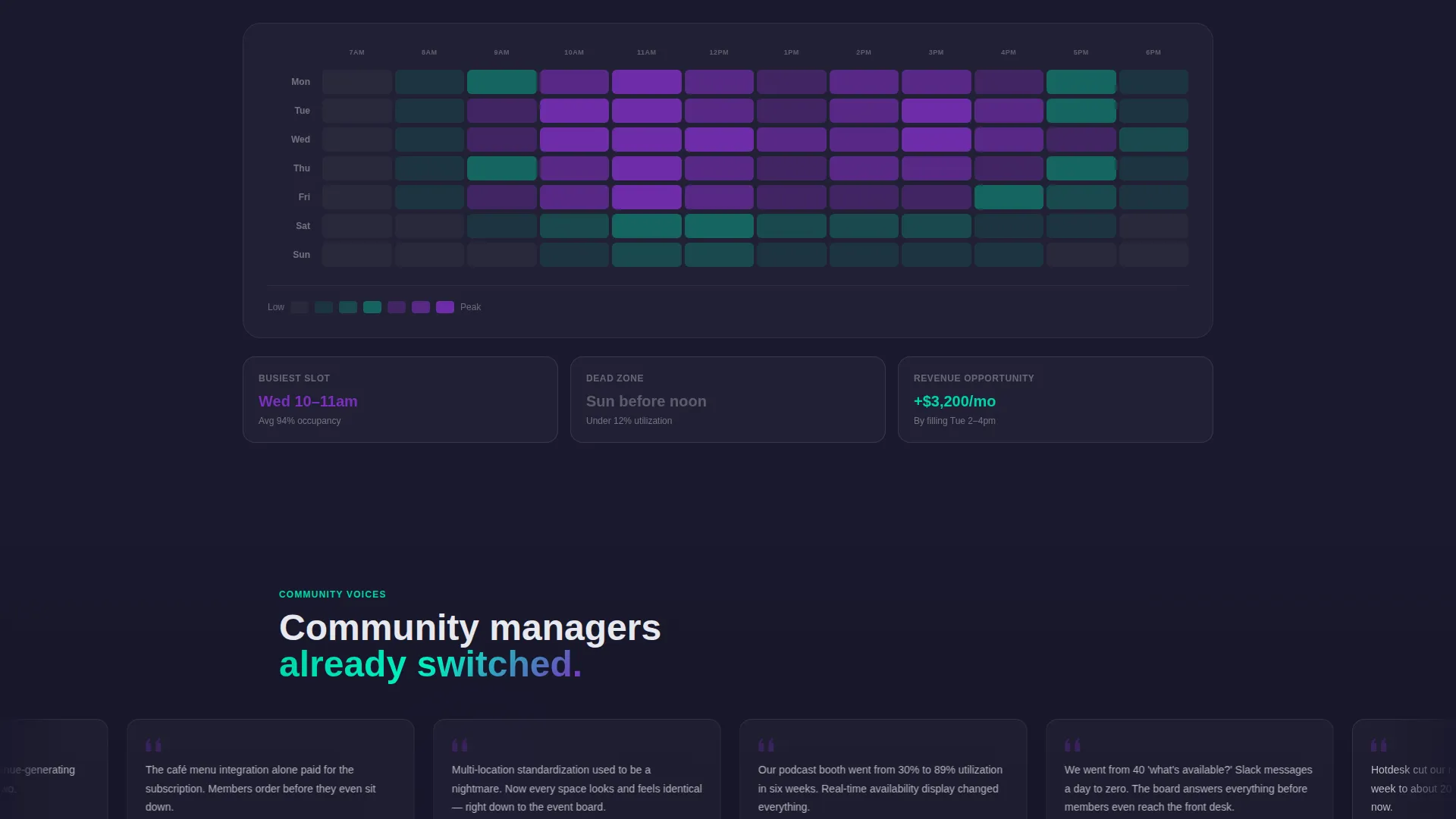
A heatmap visualization displays peak usage hours across the space. The color-coded grid makes it easy to identify busy periods at a glance. This kind of data-forward visual reinforces the product's operational credibility.
Sticky Demo Call to Action
The primary call to action, "Launch Live Demo," appears first inside the header and again as a sticky bottom bar after the calculator section. No form fields are required. The click routes directly to a sandbox environment, removing friction from the conversion path.
Scrolling Testimonial Ticker
Community manager quotes scroll horizontally in a continuous ticker format. The motion keeps the social proof section alive without taking up vertical space. It fits the dashboard's kinetic energy and keeps the page feeling active throughout.
Page sections overview
| Section | Purpose |
|---|---|
| Tab Switcher Header | Show live room, café, and events grids |
| ROI Calculator | Render personalized time and revenue estimates |
| Integration Connector Map | Display workflow tool connections |
| Peak Hours Heatmap | Visualize space usage patterns |
| Testimonial Ticker | Scroll community manager social proof |
| Sticky Demo Bar | Persistent primary call to action |
| Pricing call to action Block | Secondary funnel conversion for pricing |
Design & branding system
The visual identity follows a Dynamic Motion theme with an AI Iridescent color palette. The overall feel is futuristic but grounded, like light refracting through a prism placed on a matte black desk.
- Base layer uses deep graphite (#1A1A2E) as the dominant background, giving every card and widget strong contrast and visual weight
- Shimmering violet (#7B2FBE) pulses through active states and hover animations, while electric teal (#00D4AA) marks live data, availability indicators, and the primary call-to-action button
- Card surfaces use soft holographic white (#E8E8F0) to create a faint pearlescent lift, as if each component is gently glowing from within the interface
Mobile & speed optimization
The template is structured so that its dashboard grid and animated sections translate cleanly across screen sizes. Interactive components are designed to remain usable on smaller viewports without losing the core experience.
- The tab switcher and ROI calculator are the first elements a mobile visitor encounters, keeping utility front and center on any device
- Dashboard widget sections stack vertically on narrow screens, preserving the grid's visual logic without requiring horizontal scrolling
- Kinetic animations use a sliding, counting-up, and snapping-into-grid approach that feels intentional and controlled rather than resource-heavy
How this template helps you convert
This template is built around a single conversion goal: getting visitors into a live demo before they encounter a form or a paywall. Every layout decision serves that goal.
- The tab switcher lets visitors interact with the actual interface in the first few seconds, building familiarity and confidence before any persuasion copy appears
- The ROI calculator delivers a personalized, data-backed output that makes the value of the platform feel concrete and specific to the visitor's own operation
- The sticky "Launch Live Demo" bar stays visible after the calculator section, so the primary call to action is always one tap away regardless of scroll position
Other information about this template
This template sits at the intersection of coworking digital presence and technology-led product marketing. A few additional details are worth knowing before you start customizing.
- The page type is a single landing page, not a multi-page website, so all content flows in one continuous scroll
- The secondary call to action, "See Pricing by Location," appears after the integration map section and targets visitors who are further along in their decision process
- The template uses a Dashboard and Data Grid visual style, which means sections animate into view with elements sliding, counting up, and snapping into grid position as the visitor scrolls
- The creative direction is Calculator and Tool First, meaning utility appears before persuasion throughout the entire page layout
- This template is well suited to operators running the Hotdesk platform or any comparable coworking management system looking for a conversion-focused digital presence
Theme
Dynamic Motion
Creative direction
Calculator/Tool First
Color system
AI Iridescent
Style
Dashboard/Data Grid
Direction
Click-Through
Page Sections
Interactive Tab Switcher Header
ROI Calculator Tool
Integration Connector Map
Peak Usage Heatmap
Sticky Demo Call to Action
Scrolling Testimonial Ticker
Related questions
Does this template require a developer to customize?
Can I change the three tab labels in the header switcher?
Is the ROI calculator connected to a live database?
What is the primary call to action on this landing page?
Can this template work for a single coworking location?



