Headless Enterprise Software Advanced Professional Website Template
Headless is a scroll-reveal landing page template built for API-first master data management platforms. It opens with an animated metrics wall, walks visitors through an architecture diagram and code comparisons, and closes with a progressive lead-capture form. The design follows a dark terminal aesthetic using teal, slate, and chartreuse accents that feel like a live production dashboard.
by Rocket studio
Quick summary
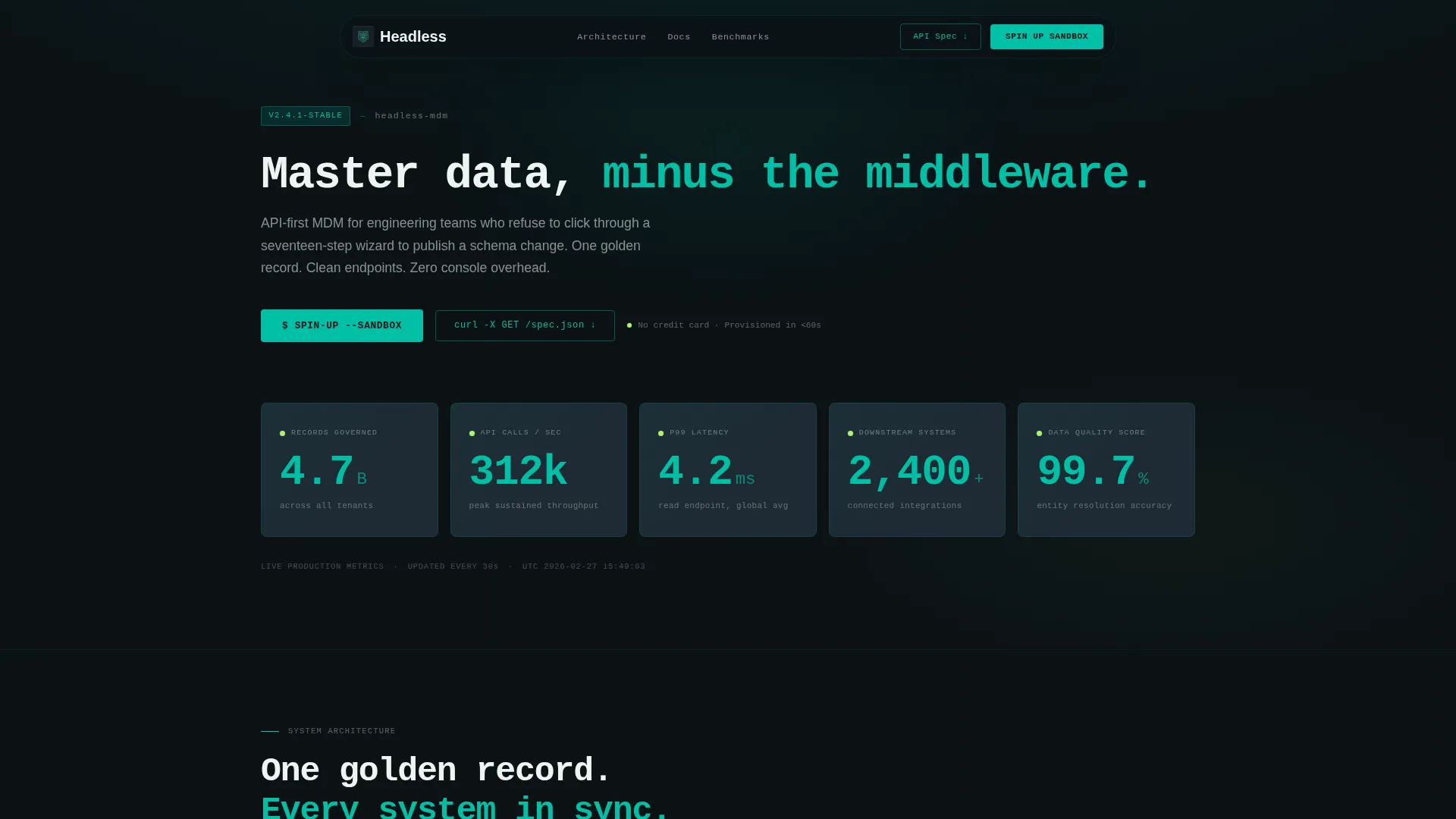
Headless is a single-page, scroll-reveal landing page template designed for headless master data management (MDM) platforms. It skips hero imagery in favor of live-animating KPI tiles, an API architecture diagram, and side-by-side code comparisons. The result is a page that speaks directly to engineers and data architects from the first pixel.
Who this template is for
This template is built for technical go-to-market teams promoting API-first data infrastructure products. It resonates with buyers who think in endpoints, schemas, and latency numbers rather than marketing copy.
- Platform engineers at mid-market SaaS companies evaluating headless MDM tools
- Data architects migrating off legacy enterprise data management stacks
- CTOs who need a provable single source of truth feeding dozens of downstream systems
What problem this template solves
Most software landing pages rely on screenshots and buzzwords. That approach fails when the audience is an engineering team that will call your API before they ever talk to sales. This template replaces vague promises with data and code.
- Generic hero layouts that lose technical buyers in the first scroll
- Unclear value propositions that cannot compete with a competitor's benchmark table
- Lead forms that ask for too much too soon, causing engineers to bounce before converting
What you get with this template
The template delivers a complete, scroll-reveal single-page layout purpose-built for a headless MDM product launch. Every section is structured to build technical credibility progressively as the visitor scrolls.
- An animated stats wall header with five live-counting KPI tiles
- A scroll-triggered architecture diagram and a code-versus-wizard comparison section
- A two-path conversion system: a progressive lead form and a gated API spec download
Feature list
This template includes a carefully sequenced set of layout sections and interactive components. Each feature below is drawn directly from the template brief.
Animated KPI Metrics Header
Five oversized KPI tiles count up from zero on page load. The metrics include records governed, API calls per second, p99 latency in milliseconds, connected downstream systems, and data quality score as a percentage. Each number renders in operational teal against deep black using monospaced typography.
Scroll-Reveal Section Architecture
Every content section enters the viewport with a slide or fade animation triggered by the visitor's scroll position. This progressive reveal creates forward momentum, making the page feel like a product that is already running rather than a pitch deck waiting to be read.
API Architecture Diagram
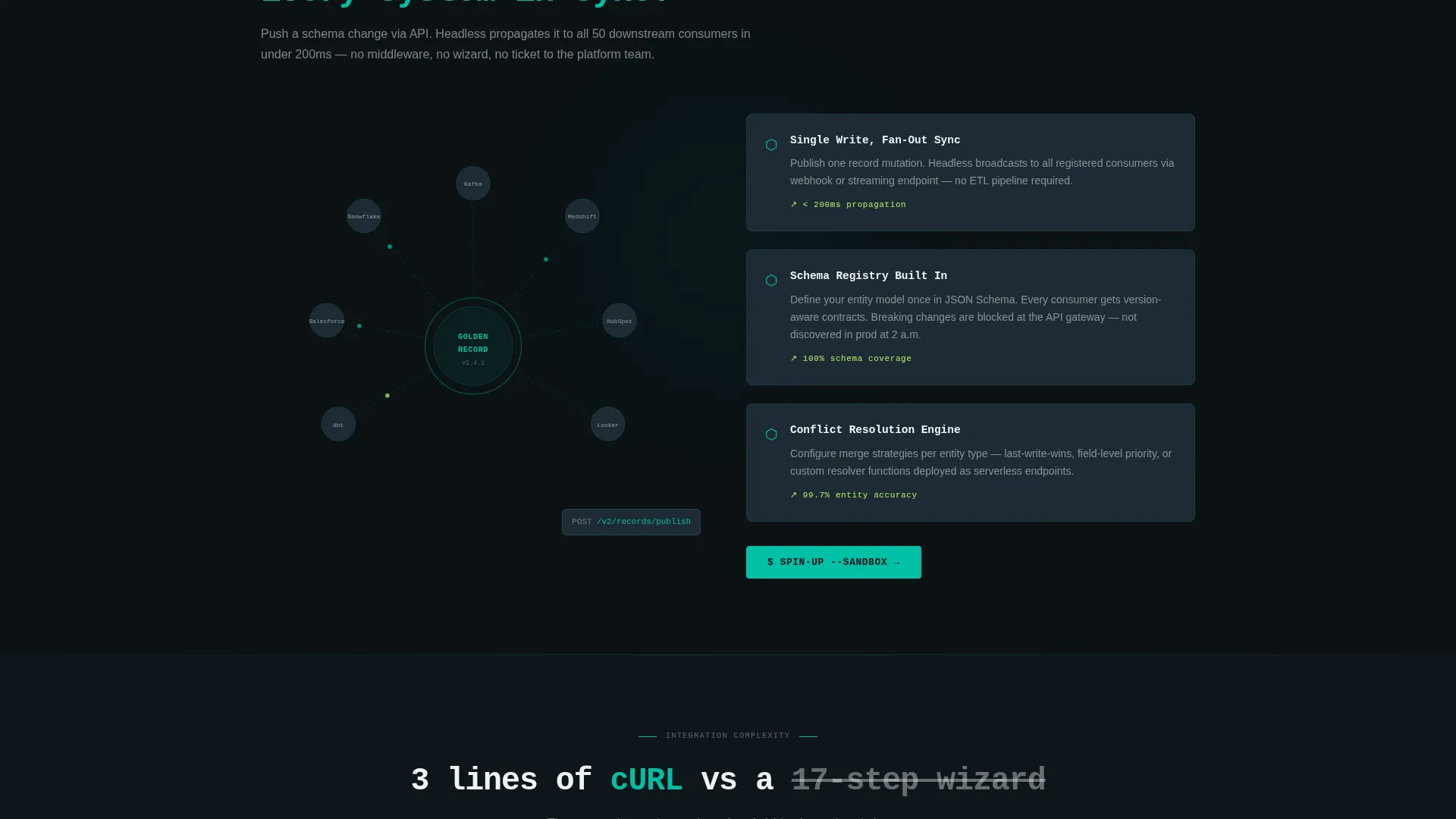
An animated diagram shows API calls fanning out from a central golden record to downstream consumer systems. The visual communicates the platform's core architecture without requiring a single paragraph of explanation.
Code versus. Legacy Comparison Block
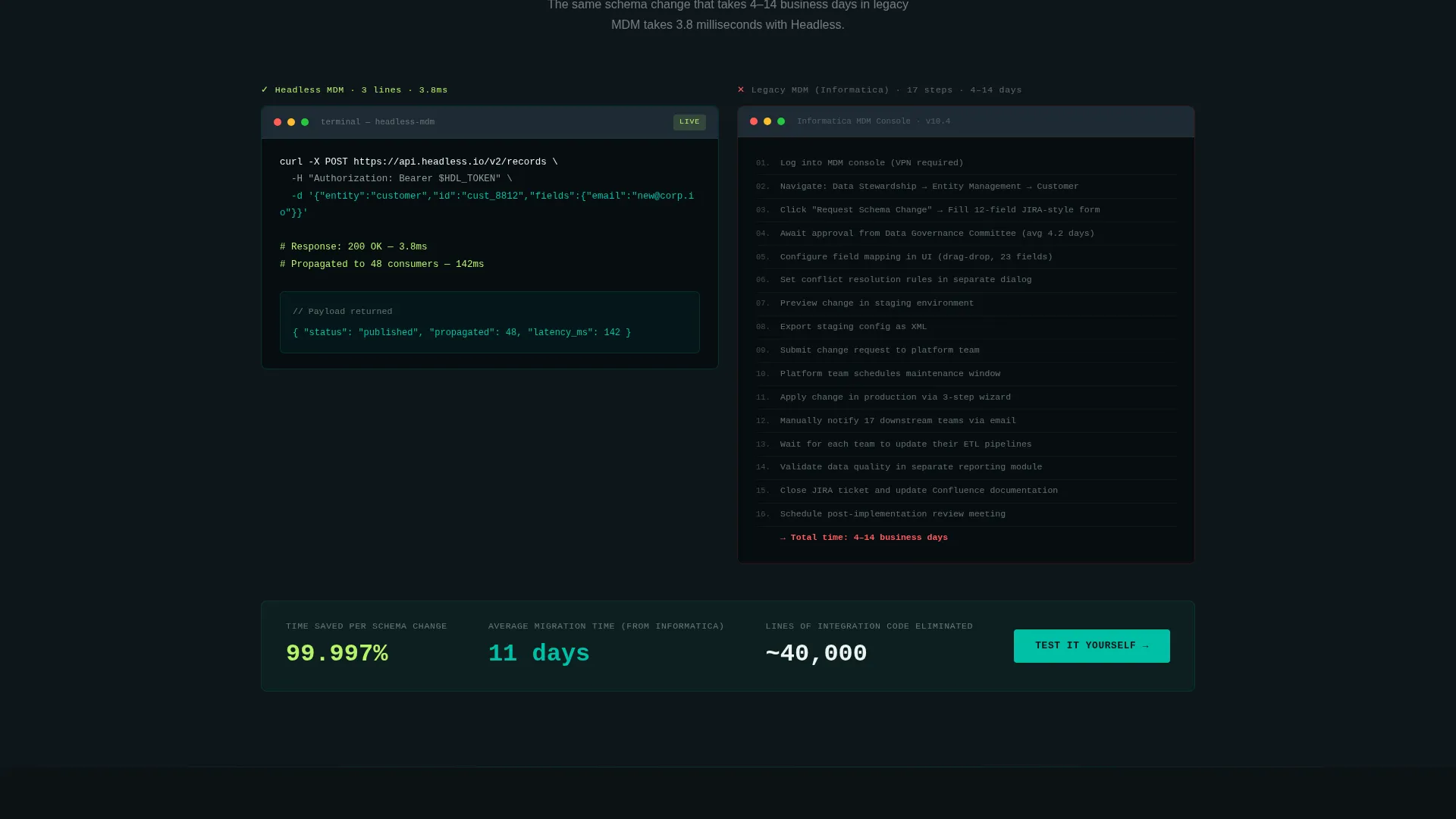
A side-by-side panel shows a three-line cURL request on one side and a screenshot of a legacy MDM wizard's seventeen-step configuration on the other. This section makes the product's simplicity tangible and immediate.
Progressive Lead Capture Form
The primary conversion form starts with a single work email field and then expands to reveal a current MDM tooling dropdown, an estimated record volume slider, and a free-text field asking what breaks first in the visitor's current stack. This staged approach lowers entry friction without sacrificing qualification data.
Gated API Spec Download
A secondary conversion path offers a downloadable API specification document gated behind email only. This captures engineers who want to evaluate the product technically before engaging with a sales conversation.
Page sections overview
| Section | Purpose |
|---|---|
| Stats metrics header | Opens with five animated KPI tiles counting up from zero |
| Sticky navigation bar | Keeps the primary "Spin Up a Sandbox" call to action always visible |
| Architecture diagram reveal | Animates API call paths fanning out from a central golden record |
| Code comparison block | Contrasts a three-line cURL call with a legacy seventeen-step wizard |
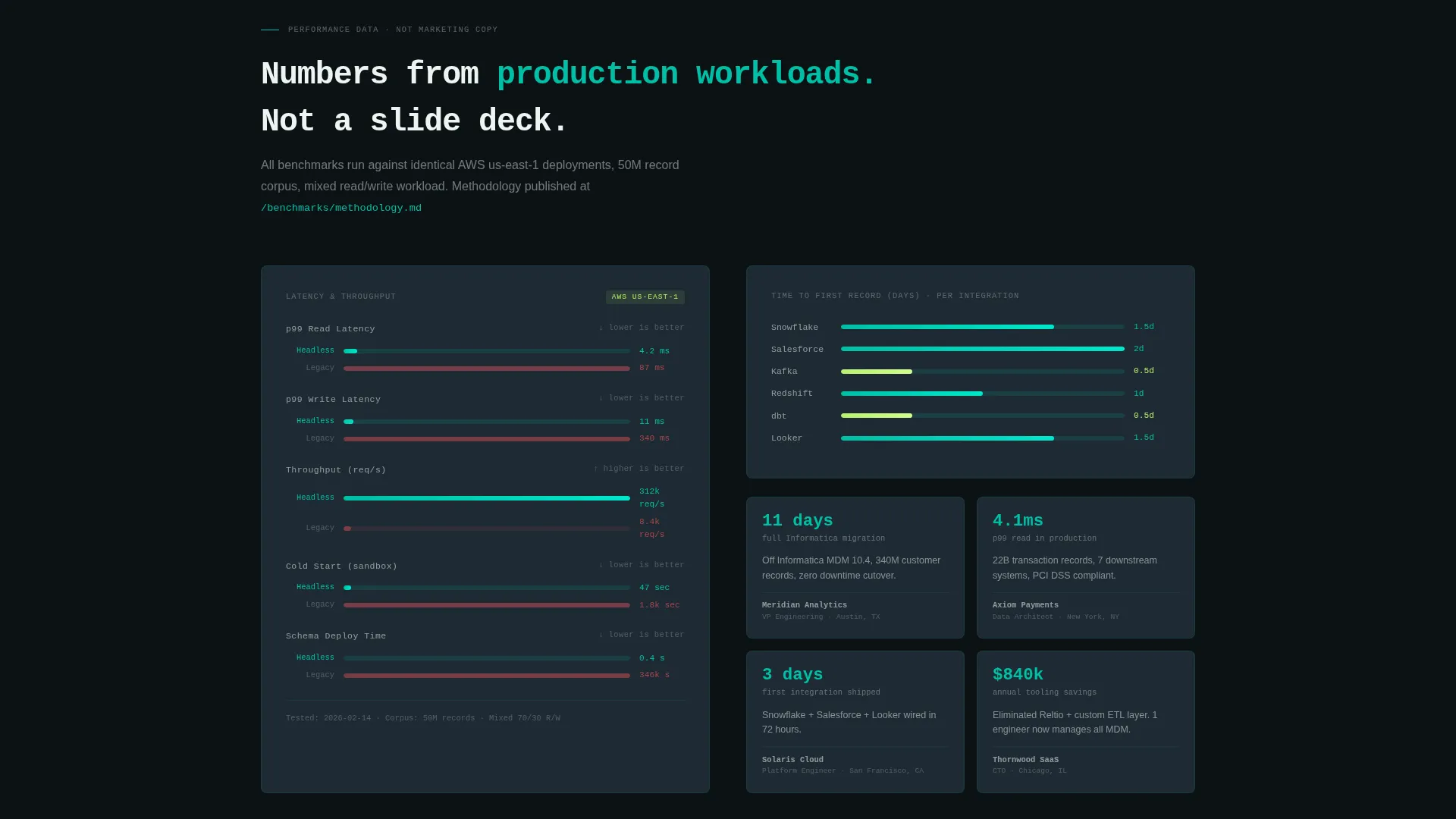
| Proof and benchmarks | Displays real latency benchmarks and integration timelines |
| Progressive lead form | Captures work email first, then expands for deeper qualification |
| API spec download | Offers a gated PDF for engineers evaluating before sales contact |
Design & branding system
The template follows the Dashboard Pro theme using the Teal Catalyst color system. The palette is deliberately restrained and purposeful, modeled after a well-configured dark monitoring dashboard rather than a typical software marketing page.
- Deep command-line black (#0B1215) for backgrounds, operational teal (#00BFA6) for primary data labels and key numbers, and cool slate (#1E2A33) for card surfaces and section dividers
- High-signal white (#EDF5F3) for body typography and data labels, with electric chartreuse (#B6F36B) firing on hover states and live metric ticks
- Monospaced typography throughout the header and code sections to reinforce the terminal and API-native aesthetic
Mobile & speed optimization
The template is structured with a mobile-first layout so the scroll-reveal animations and KPI tiles adapt cleanly to smaller screens. The progressive form collapse also works naturally on touch devices.
- Oversized KPI numbers scale down gracefully without losing readability on narrow viewports
- Scroll-reveal animations are designed to trigger cleanly on mobile scroll events, not only on desktop mouse movement
- The sticky navigation call-to-action bar remains accessible at all viewport sizes throughout the scroll journey
How this template helps you convert
The page is built specifically for lead generation, with two distinct conversion paths and a layout designed to earn trust before asking for commitment.
- The sticky "Spin Up a Sandbox" call to action appears in the navigation bar and again directly after the architecture diagram, capturing visitors at the moment of highest technical interest.
- The progressive form reduces initial friction by asking for a work email first, then expanding qualification fields only after the visitor has already committed their contact information.
- The gated API spec download gives technically minded visitors a low-stakes entry point, converting engineers who are not yet ready to talk to sales but are actively evaluating the product.
Other information about this template
This template is part of the Scroll Reveal (Progressive) template style collection and is categorized under the Headless Enterprise Software subcategory within the Technology category. It is matched to the Headless MDM niche and is driven by the Launch Energy creative direction, which means every section is designed to feel like a product that has already shipped.
- The template is designed to be compatible with headless MDM platforms and API-first data governance tools
- It can serve as a foundation for teams migrating away from platforms such as Informatica, Reltio, or Stibo, as those tool names appear in the built-in form dropdown
- The intersection match score of 13 reflects a highly specific niche alignment, meaning this template is purpose-built rather than adapted from a generic software layout
Theme
Dashboard Pro
Creative direction
Launch Energy
Color system
Teal Catalyst
Style
Scroll Reveal (Progressive)
Direction
Lead Generation
Page Sections
Animated KPI Stats Wall Header
Scroll-triggered Progressive Reveals
API Architecture Diagram
Code Versus. Legacy Comparison Panel
Progressive Lead Capture Form
Gated API Spec Download
Related questions
Who is this landing page template designed for?
Can I customize the KPI metrics shown in the header?
How does the progressive lead capture form work?
What is the secondary conversion path in this template?
Does this template work for a product not yet in general availability?



