Global - Careers Landing page Template
A careers landing page built for a global payroll company hiring across thirty countries. The split-screen layout pairs editorial photography with a live-status role board, guiding senior engineers, People Ops leads, and compliance specialists from first impression to job application. Every section earns the click before a job description is ever shown.
by Rocket studio
Quick summary
This is a single-page recruitment landing page for a distributed payroll provider hiring across thirty countries. It uses a 50/50 split-screen structure, editorial photography, and an inline role browser to turn passive visitors into active applicants. The design feels like a command center at night: dark navy, glowing teal data points, and warm amber calls to action.
Who this template is for
This template is built for fast-scaling startups that need to recruit senior technical and operational talent globally. It works best for teams that want candidates to feel the company mission before they ever read a job description.
- Series A to C startups building distributed engineering and People Ops teams
- Fintech and HR infrastructure companies with open roles across multiple time zones
- Hiring managers and talent leads who want a careers page that does storytelling work
What problem this template solves
Most careers pages list roles and stop there. They give candidates no reason to care. This template solves that by leading with the human side of the company first, so by the time a visitor reaches the role browser, they already feel invested.
- Candidates arrive cold and leave without applying because nothing connects them to the mission
- Startups lose strong applicants to companies with more polished, narrative-driven recruiting pages
- Hiring teams struggle to communicate what working here actually feels like across distributed, global contexts
What you get with this template
You get a fully structured, single-page careers experience with five distinct sections, two conversion entry points, and a consistent visual system. Every section is purpose-built to deepen candidate trust before asking for the application.
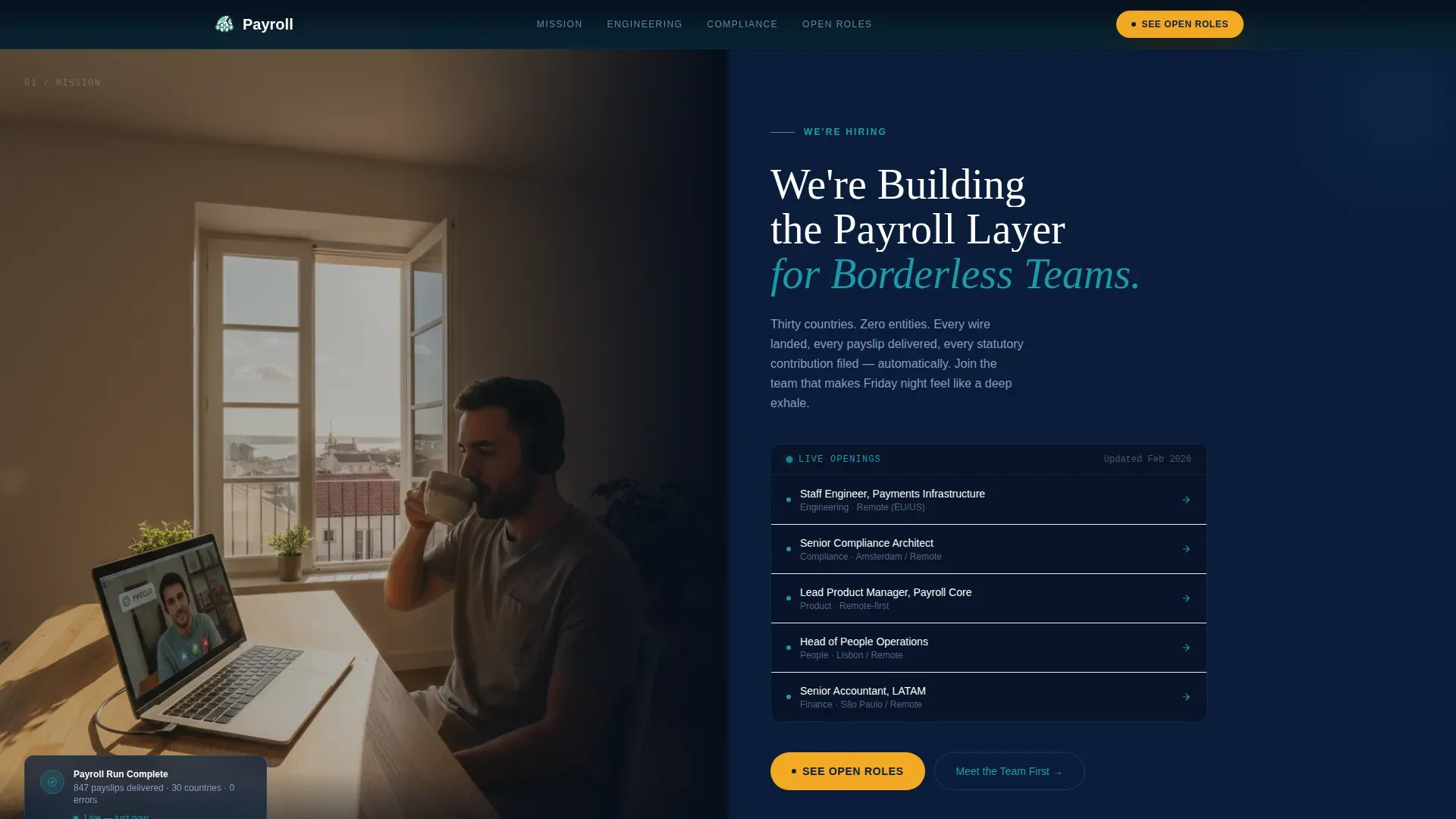
- A 50/50 split-screen hero with an editorial photo panel and a typographic role status board
- An inline role browser with department and location filters, expandable role cards, and team context per role
- Two conversion paths: a primary "See Open Roles" sticky bar and a secondary "Meet the Team First" video intro module
Feature list
This template delivers every element described below as a built-in part of the page structure.
Split-Screen Hero Layout
The hero divides the viewport evenly. The left half holds an editorial photograph of a distributed team member at work, capturing a real, candid moment. The right half is a dark navy typographic panel showing open roles with a pulsing teal status dot beside each, mimicking a live operations board.
Inline Role Browser
The careers module includes a filterable role browser built directly into the page. Candidates can filter by department and location without leaving the page. Each role card shows team size, tech stack, and a one-sentence explanation of why the role matters right now.
Sticky "See Open Roles" Bar
After the second scroll section, a sticky action bar anchors to the top of the viewport. It keeps the primary call to action visible throughout the browsing experience without interrupting the editorial flow of the page.
Editorial Split-Screen Sections
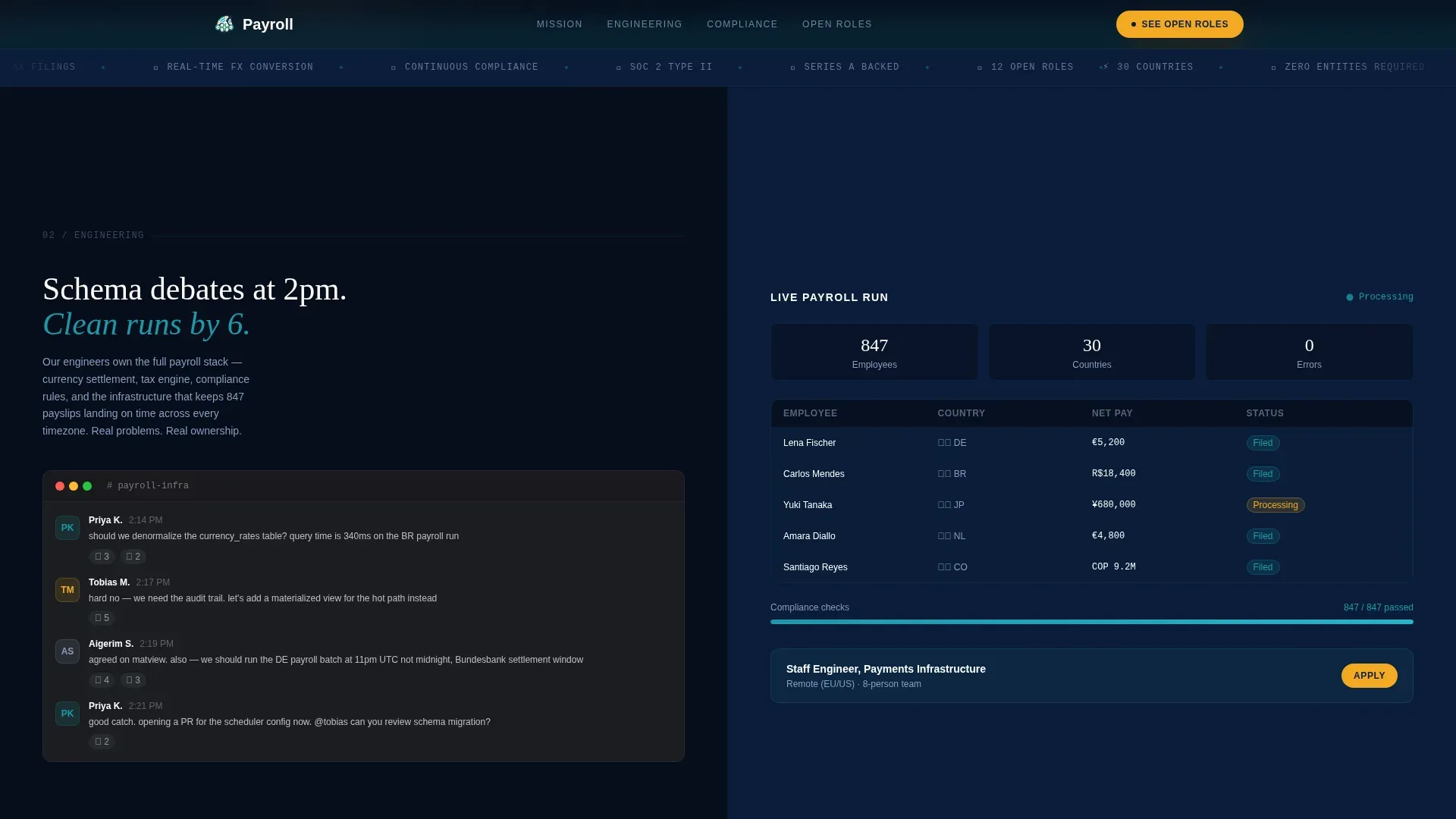
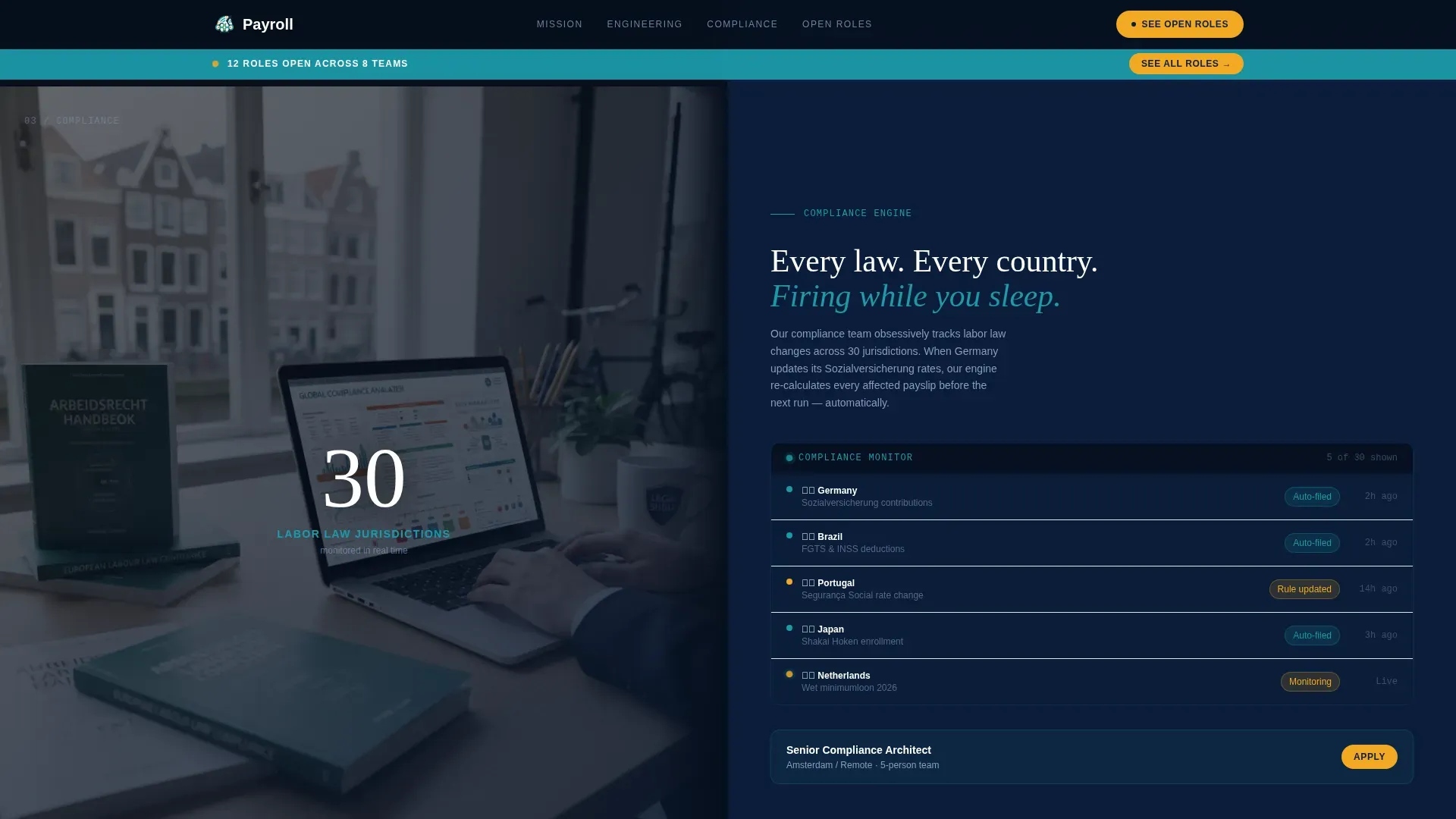
Two mid-page sections use the same 50/50 split logic as the hero. The engineering section pairs a Slack thread debate with a clean payroll run dashboard. The compliance section pairs an Amsterdam team desk with the automated compliance engine view.
Scroll-Linked Mission Statement
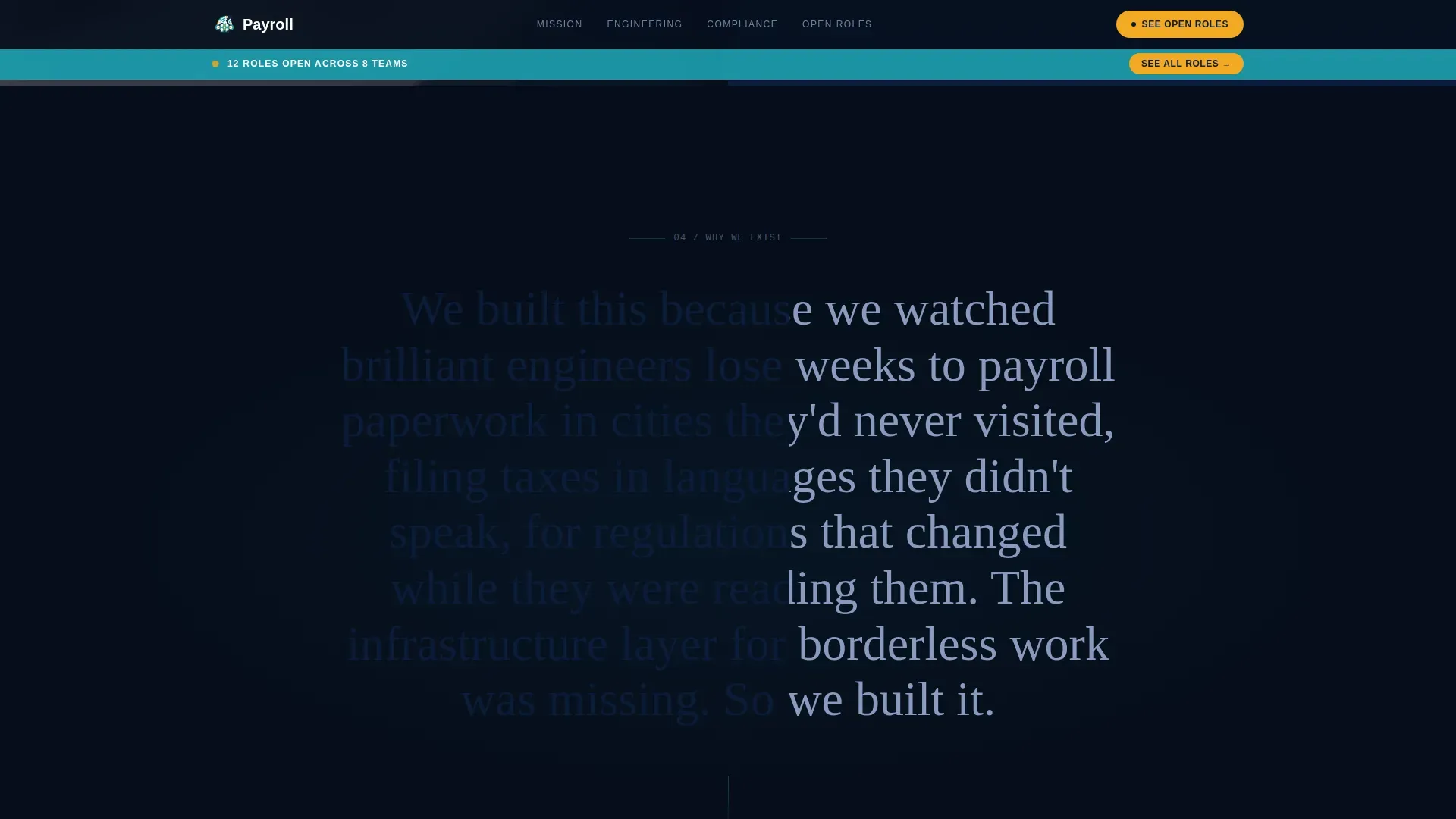
A full-width cinematic section uses scroll-linked text reveal to deliver the company mission as a progressive reading experience. Text animates in as the visitor scrolls, reinforcing emotional investment before the candidate reaches the role browser.
Video Team Introduction Module
A secondary conversion path lets candidates meet team members before applying. Short video intro cards are built into the page, giving candidates a personal connection to the people they would work with.
Page sections overview
| Section | Purpose |
|---|---|
| Hero split screen | Introduce open roles and editorial team photography |
| Engineering split section | Show real team debate alongside product output |
| Compliance split section | Humanize regulatory work through team environment |
| Mission scroll scrub | Reveal company purpose through cinematic scroll animation |
| Careers role browser | Filter and explore open roles with context per card |
| Footer single row | Close the page with a clean, linear brand anchor |
Design & branding system
The visual identity follows a Navy Authority color system inspired by the bridge of a ship at night: instruments glowing against a dark steady background. The palette pairs dark authority with editorial warmth.
- Deep command-center navy (#0B1D3A) as the primary background, crisp operations white (#F4F6FA) for readable surfaces, confident teal (#1B9AAA) for interactive elements and data highlights
- Warm signal amber (#F2A922) reserved exclusively for calls to action and status indicators
- Fraunces as the editorial display typeface paired with DM Sans for interface body copy, creating a contrast between storytelling and function
Mobile & speed optimization
The template is designed desktop-first to match the primary audience of engineers on laptops, while remaining responsive for mobile visitors. Interactive components are structured to load efficiently across devices.
- Static editorial sections use Server Components for faster initial rendering
- The interactive role browser is isolated as a Client Component to keep the rest of the page lightweight
- Scroll animations, stagger reveals, and the parallax dot grid are scoped to avoid blocking the core content experience
How this template helps you convert
Every layout and interaction decision on this page is built around one goal: making candidates feel the mission before they see the job description.
- The pulsing teal role status dots in the hero create immediate urgency and signal active hiring, pulling attention toward the role board before the visitor has scrolled once.
- The editorial split-screen sections build trust progressively, showing real team environments and real product output so candidates self-select based on genuine fit rather than job title alone.
- The sticky "See Open Roles" bar ensures the primary call to action is never more than one glance away, while the "Meet the Team First" secondary path captures candidates who need more warmth before committing to an application.
Other information about this template
This template is part of the Startup Velocity theme family and uses the Navy Authority color system across all visual components. It is suited for remote and distributed payroll providers and HR infrastructure companies positioning for growth hiring.
- The template style is Split Screen (50/50), applied consistently from the hero through the mid-page editorial sections
- The creative direction is Team and People, meaning every section introduces a company function through the humans who run it
- The header concept is Half-Page Photo plus Text, combining a warm editorial photograph with a bold typographic role panel
- The landing page direction is Recruitment and Hiring, optimized for converting visitors into job applicants rather than product sign-ups
- Animation intensity is high throughout: spotlight effect on entry, scroll scrub text reveal, translateY text transitions, stagger reveals, pulsing dots, sticky bar transitions, and a parallax dot grid background
Theme
Startup Velocity
Creative direction
Team & People
Color system
Navy Authority
Style
Split Screen (50/50)
Direction
Recruitment/Hiring
Page Sections
Split-screen Hero with Role Status Board
Filterable Inline Role Browser
Sticky Primary Call to Action Bar
Editorial Mid-page Split Sections
Scroll-linked Cinematic Mission Statement
Team Video Introduction Cards
Related questions
Can I customize the role cards and filter options in the careers module?
Is this template suitable for companies outside of payroll?
How does the 'Meet the Team First' video module work?
Does the sticky 'See Open Roles' bar show on mobile devices?
What animation and interaction features are included?



