API-First Enterprise Software Reviews Website Template
Endpoint is a single-page, API-first CRM landing page built for developer audiences. It uses a glassmorphic dark-terminal visual system, a live dashboard header preview, and scrolling comparison tables to show why code-native teams choose Endpoint over traditional CRM tools. The primary call to action is a frictionless free signup that delivers a usable API key in seconds.
by Rocket studio
Quick summary
Endpoint is a comparison-table landing page designed for developer-led CRM adoption. It opens with a live dashboard preview, walks visitors through data-driven comparison tables, and converts through a work-email-only free signup. The glassmorphic dark aesthetic and monospace typography speak directly to the engineers and technical founders this product is built for.
Who this template is for
This template is built for technical teams who treat their customer data layer as infrastructure, not a spreadsheet. If your audience reads the API docs before the marketing site, this layout speaks their language clearly.
- Seed-stage founders and CTOs building their first sales pipeline directly in code
- Growth engineers piping customer relationship management events into observability and analytics tools
- Developer relations teams who evaluate software products through documentation and direct API calls
What problem this template solves
Traditional CRM marketing pages are built for sales managers, not engineers. They lead with drag-and-drop boards and workflow automation, which immediately signals the wrong product to a technical buyer. This template solves that mismatch.
- Most landing pages fail to show time-to-first-API-call, webhook latency, or schema flexibility upfront
- Developers distrust marketing pages that hide technical limits behind vague feature lists
- A generic signup flow that asks for name, company, and phone number adds friction before the visitor sees any value
What you get with this template
You get a complete, single-page layout structured to move a skeptical technical buyer from first scroll to working API key. Every section is designed to reduce doubt and compress time-to-value.
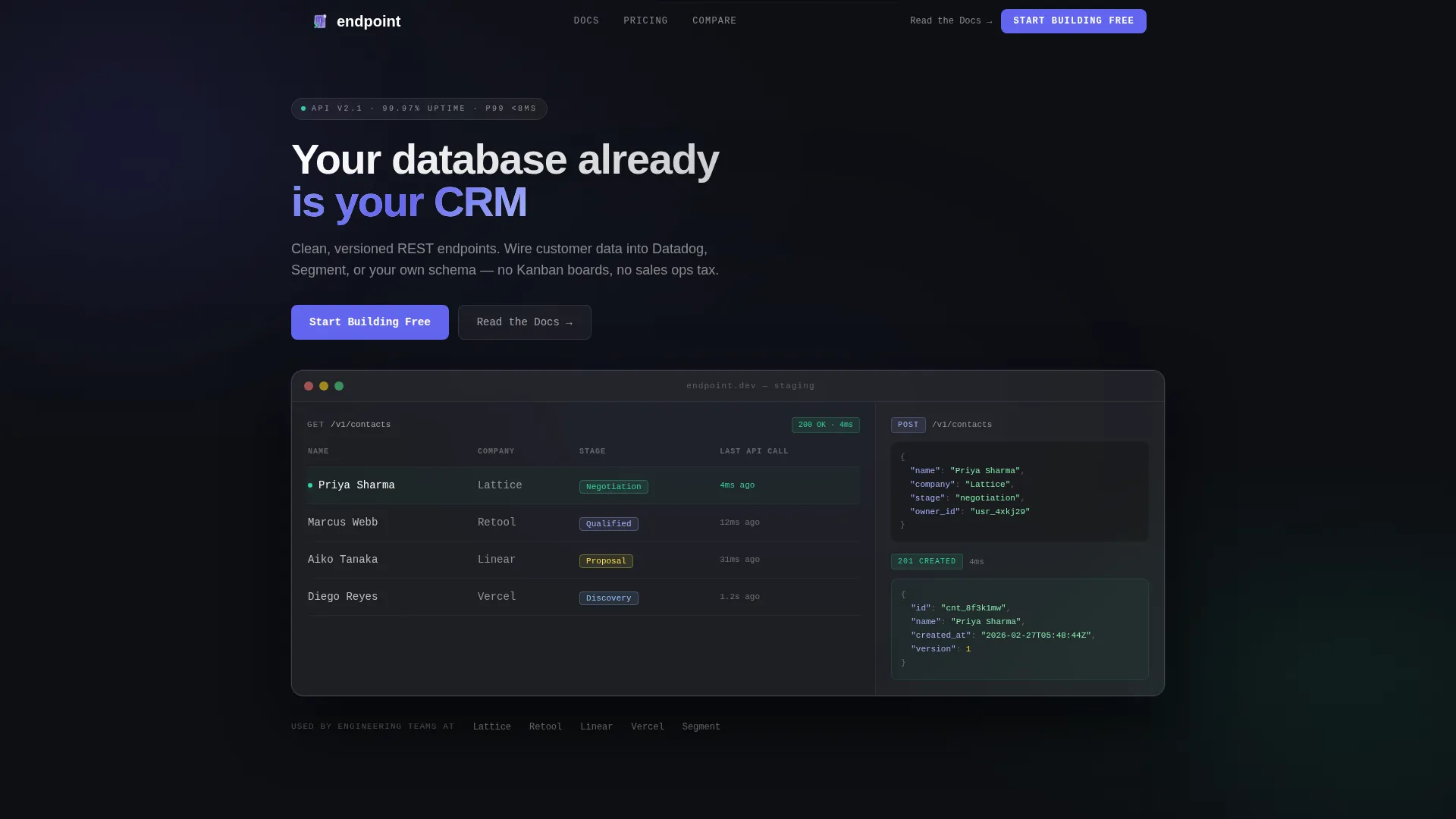
- A frosted glass dashboard header showing a realistic contacts table, a live POST request, and a 200 response highlighted in signal green
- A series of glassmorphic comparison tables scoring Endpoint against other tools across dimensions developers care about
- A freemium signup flow that asks for a work email only and immediately renders a copyable API key with a pre-filled curl command
Feature list
This template includes purpose-built components that serve the technical buyer journey from first impression to first authenticated request.
Live Dashboard Header Preview
The header renders a frosted glass card floating over a deep terminal black background. It shows a plausible contacts table with sample rows, a sidebar with a POST request JSON body, and a highlighted 200 response. The data looks like a real staging environment, not a stock user interface mockup.
Scrolling Comparison Table System
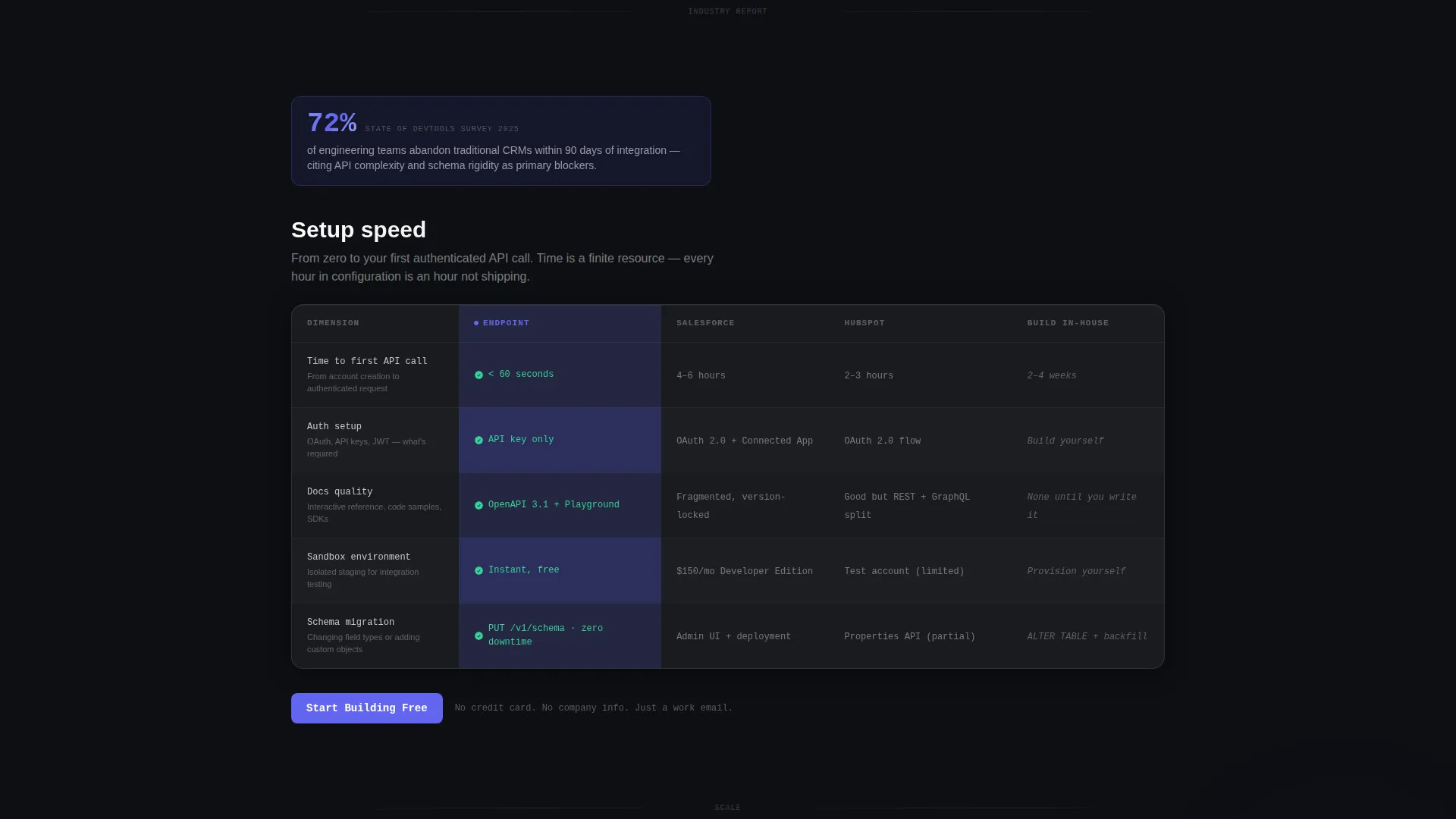
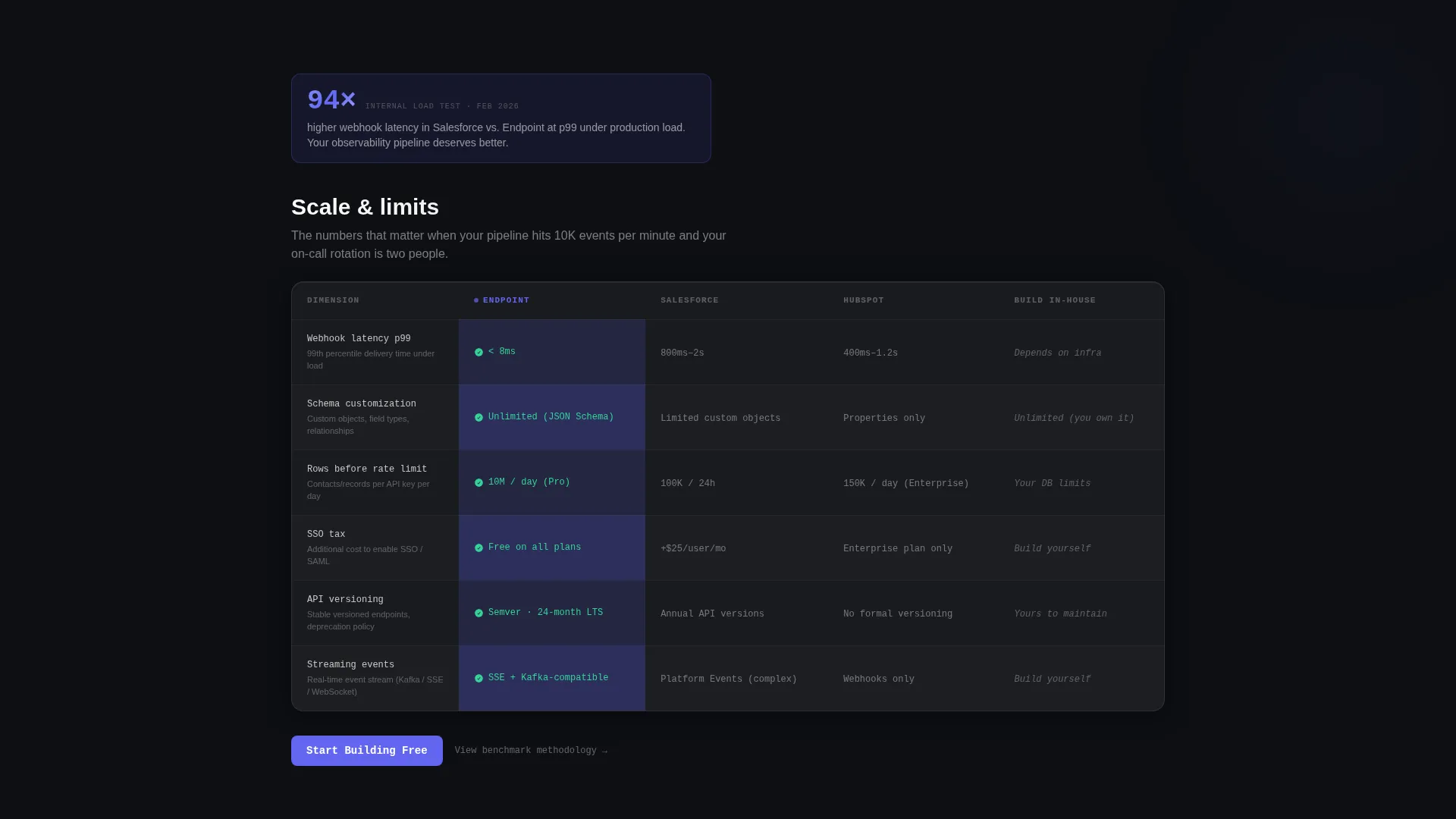
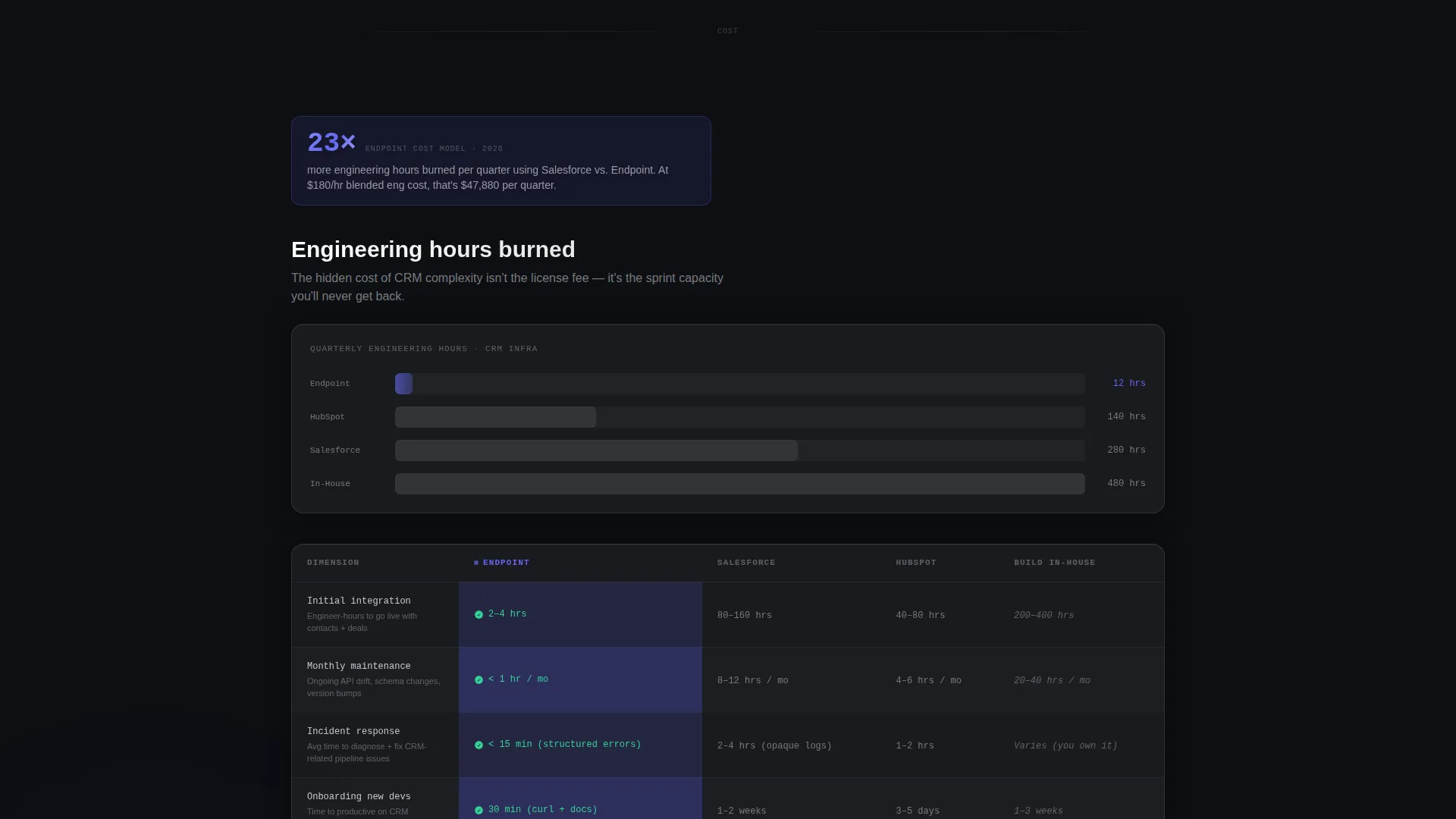
Each comparison section opens with a bold statistic inside a frosted chip, then expands into a structured table. The tables score the product against alternatives across developer-specific dimensions: setup speed, webhook latency at the 99th percentile, schema customization, row limits, and single sign-on pricing. Endpoint's column pulses with an indigo accent to draw the eye without being heavy-handed.
Inline Freemium Signup Flow
The primary call-to-action triggers an inline signup that asks for a work email only. On submit, the page renders a personalized API key inside a copyable code block. A pre-filled curl command lets the visitor create their first contact record within seconds of signing up.
Pinned Frosted Navigation Bar
A slim frosted navigation bar stays visible as the visitor scrolls. It holds the primary "Start Building Free" button so the conversion point is always one click away, regardless of scroll depth.
Secondary Documentation Path
A "Read the Docs" link is available for visitors who want to evaluate the API before committing to a signup. This secondary path captures intent from engineers who are not yet ready to authenticate but are actively learning.
Industry Report Content Structure
The page uses a data-driven narrative format. Each section leads with a bold statistic chip, then unpacks the finding with a comparison table. The structure escalates from setup speed to scale limits to total engineering hours, giving the scroll a logical forward momentum.
Page sections overview
| Section | Purpose |
|---|---|
| Frosted Nav Bar | Keeps primary call to action pinned throughout scroll |
| Dashboard Header Preview | Shows a live CRM workspace to establish instant credibility |
| Statistic Chip Row | Opens each comparison block with a bold data point |
| Comparison Table One | Contrasts setup speed and time to first API call |
| Comparison Table Two | Scores webhook latency and schema customization depth |
| Comparison Table Three | Compares row limits, single sign-on tax, and engineering hours |
| Inline Signup Block | Converts visitors with a work-email-only form |
| API Key Code Block | Delivers immediate value with a copyable key and curl command |
| Docs Secondary call to action | Catches pre-auth visitors with a link to documentation |
Design & branding system
The visual system is built around a glassmorphic dark aesthetic that reads like a developer tool, not a marketing website. Every surface layer suggests depth through translucency and subtle border strokes.
- Color palette: deep terminal black (#0D0F13) as the base, frosted glass panels at 8% white opacity with a 12-pixel blur, electric indigo (#6366F1) reserved strictly for interactive states and code syntax highlights, and soft signal green (#34D399) for success states and uptime indicators
- Typography runs in two weights of a monospace-geometric hybrid, keeping the interface feeling structured and precise without being cold
- Interactive states fire the indigo accent only on hover, focus, and active conditions, so color feels purposeful rather than decorative
Mobile & speed optimization
The layout is designed to translate its layered glassmorphic depth to smaller screens without losing the developer-tool aesthetic. Frosted card components reflow cleanly at mobile widths.
- Comparison tables are structured to remain readable on narrow viewports, with column priority keeping the Endpoint data visible
- The pinned navigation bar collapses to a minimal height on mobile so it does not block content while still surfacing the primary call to action
How this template helps you convert
The entire page is structured as a progressive argument, where each section removes one more reason for a technical buyer to hesitate before signing up.
- The dashboard header establishes credibility in the first three seconds by showing a real-looking API workspace rather than an abstract feature grid, which immediately signals that this product is built by people who understand how developers work.
- The escalating comparison tables give the visitor permission to make a decision with confidence, because each table adds a new technical dimension that confirms the product's positioning before the call to action appears again.
- The inline signup collapses the distance between intent and value to under ten seconds by skipping biographical fields and delivering a working API key with a ready-to-run curl command directly on the page.
Other information about this template
This template is categorized under Technology, specifically the API-first enterprise software and API-first CRM intersection. It is styled with the Startup Velocity theme and uses the Glassmorphic color system. The creative direction follows an Industry Report format, and the header concept is a Dashboard Preview. The landing page direction is Freemium and Trial. The template style is a Comparison Table layout.
- The Startup Velocity theme is designed for high-growth technical products that need to communicate speed, precision, and engineering credibility from the first viewport
- The Glassmorphic color system creates a visual metaphor that resonates with developers: layered, translucent, structured, and never decorative
- This template is a strong fit for any API-first product that needs to convert a technically skeptical audience through proof rather than persuasion
Theme
Startup Velocity
Creative direction
Industry Report
Color system
Glassmorphic
Style
Comparison Table
Direction
Freemium/Trial
Page Sections
Live Dashboard Header Preview
Scrolling Comparison Table System
Inline Freemium Signup Flow
Pinned Frosted Navigation Bar
Secondary Documentation Path
Industry Report Narrative Structure
Related questions
Who is this landing page template designed for?
What does the freemium signup flow look like?
Can I customize the comparison table data?
What is the purpose of the secondary 'Read the Docs' call to action?
Does the template include a live API or CRM backend?



