Gate - Powerful Identity Landing Page Template
Gate is a split-screen identity and access management landing page template built for cybersecurity and developer-focused platforms. It combines a live-action product screenshot header, interactive role and permission explorers, and a freemium conversion flow into one high-intensity single page. The Acid Digital color system and Startup Velocity theme make it feel built for engineering teams shipping under pressure.
by Rocket studio
Quick summary
Gate is a single-page template designed for identity and access management platforms. It uses a 50/50 split-screen layout, an interactive scroll experience, and a freemium trial conversion flow. The Acid Digital palette pairs void black with phosphor green and UV purple to give technical audiences an interface that feels native to their world.
Who this template is for
This template is built for fast-moving technical teams that need to communicate a complex security product without losing engineers in the process.
- Engineering leads at Series A startups shipping quickly and facing their first serious security audit
- DevOps teams managing authentication across multiple microservices who need a credible product presence fast
- CTOs preparing for compliance reviews who need to show a real, polished platform to stakeholders
What problem this template solves
Most identity and access management platforms struggle to explain themselves on a landing page. The product is powerful but the page feels like a whitepaper. Gate solves that mismatch.
- Visitors leave before understanding what the platform actually does because there is nothing to interact with
- Technical buyers distrust pages that describe features without showing them in action
- Conversion stalls because the gap between "reading about auth" and "trying auth" feels too wide
What you get with this template
Gate delivers a complete, conversion-focused landing page layout for an identity and access management platform. Every section is designed to teach a feature through interaction rather than explanation.
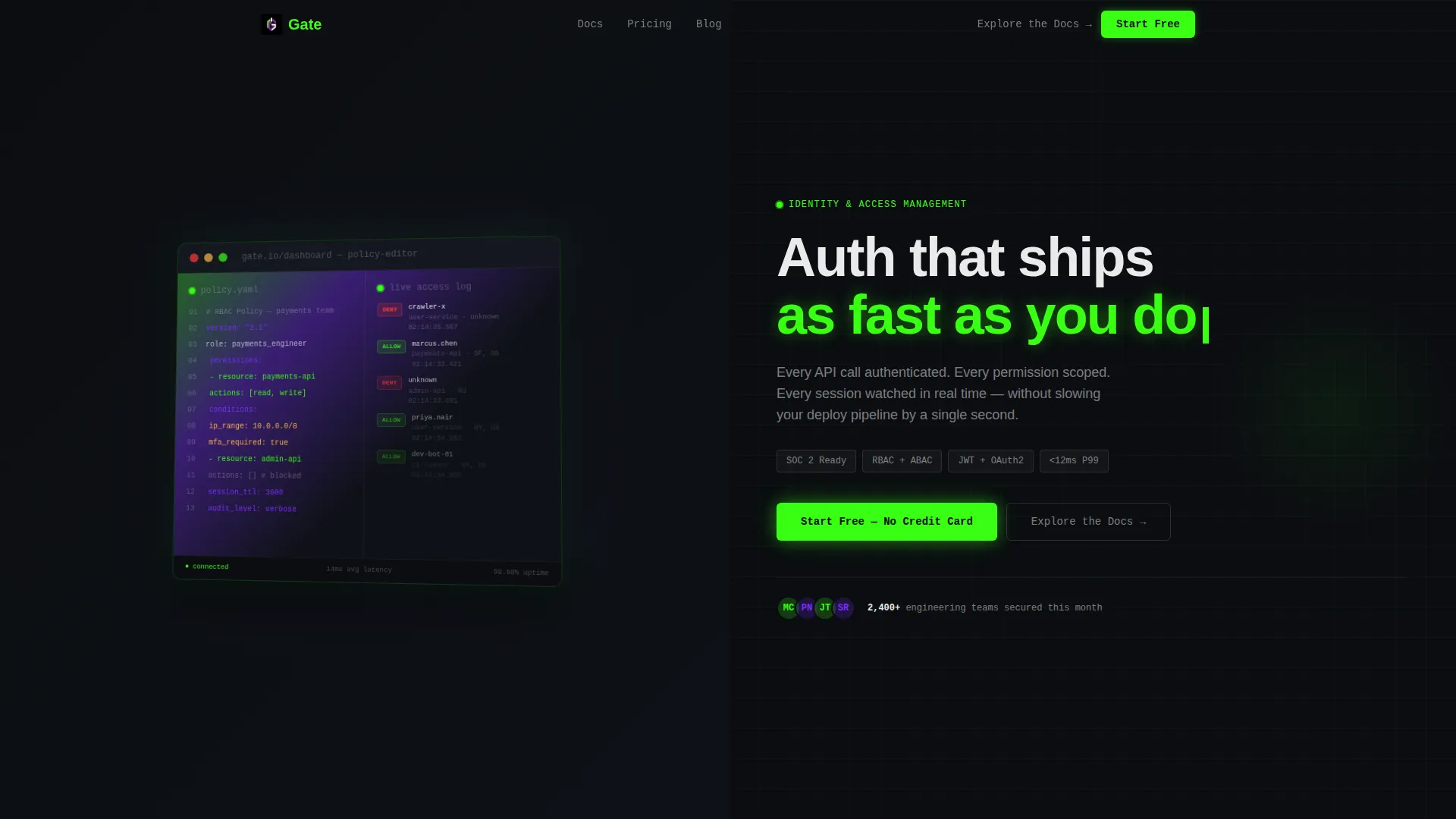
- A split-screen header with a pixel-perfect dashboard screenshot showing a live policy editor and a real-time access log side by side
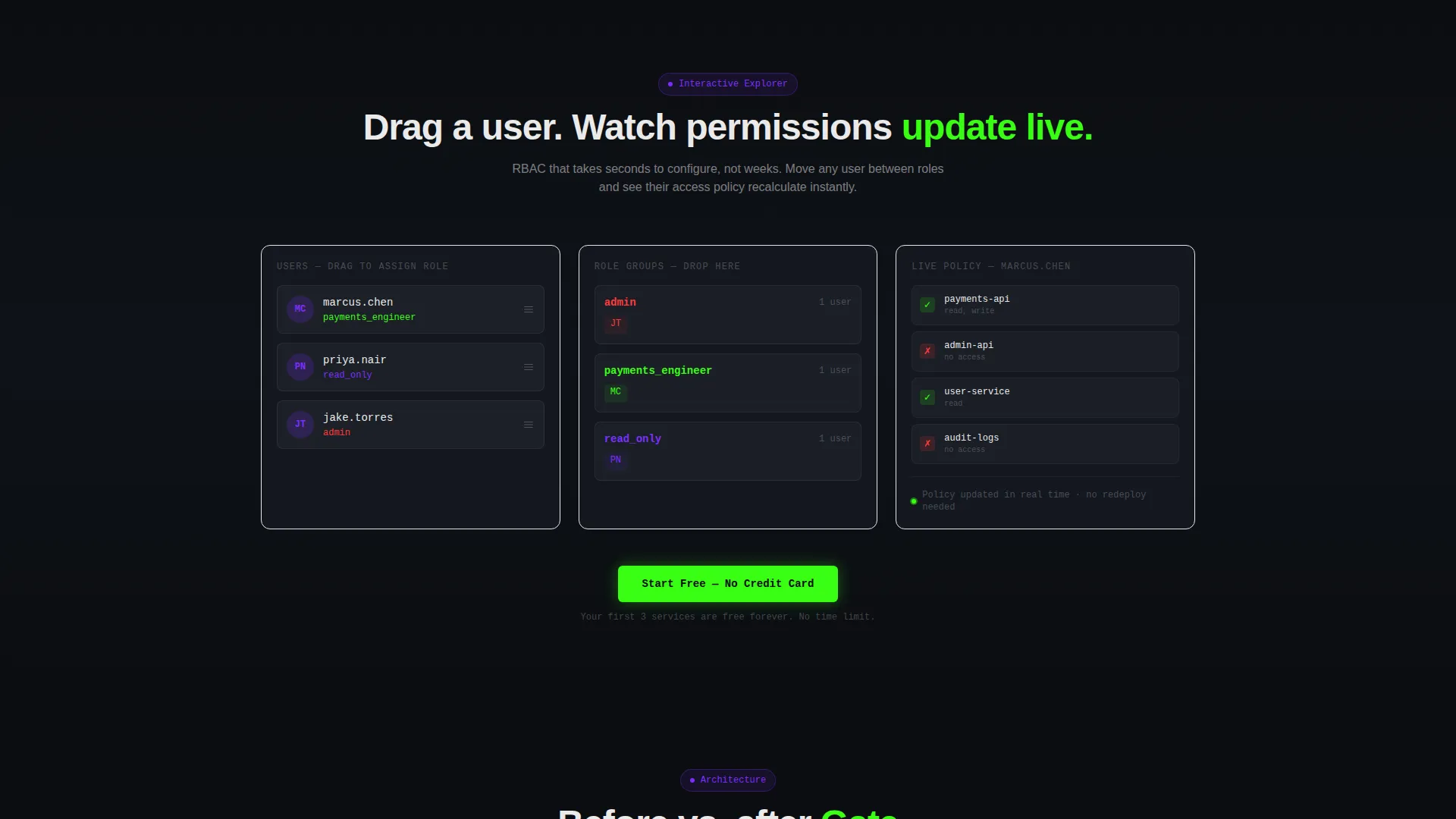
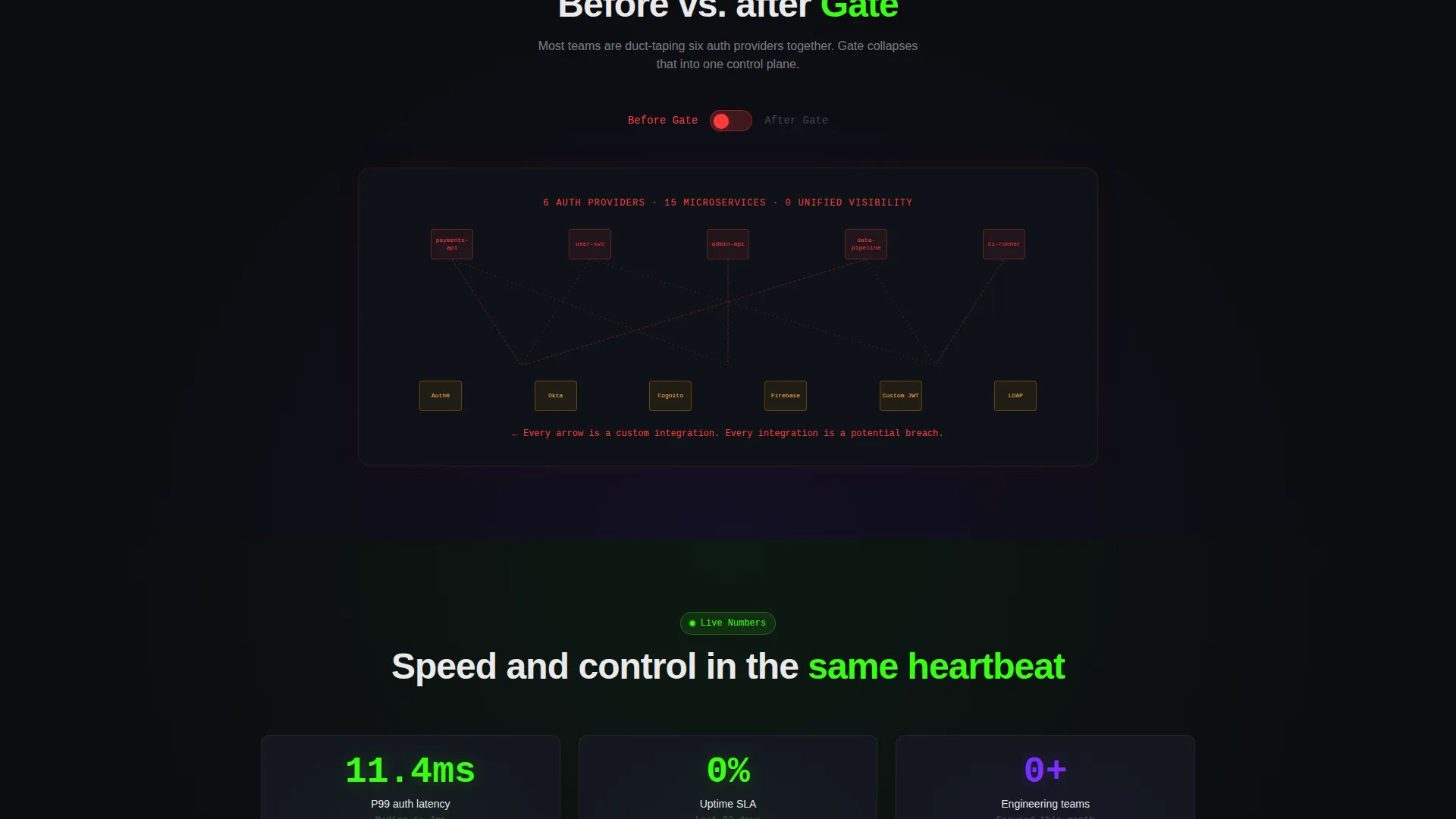
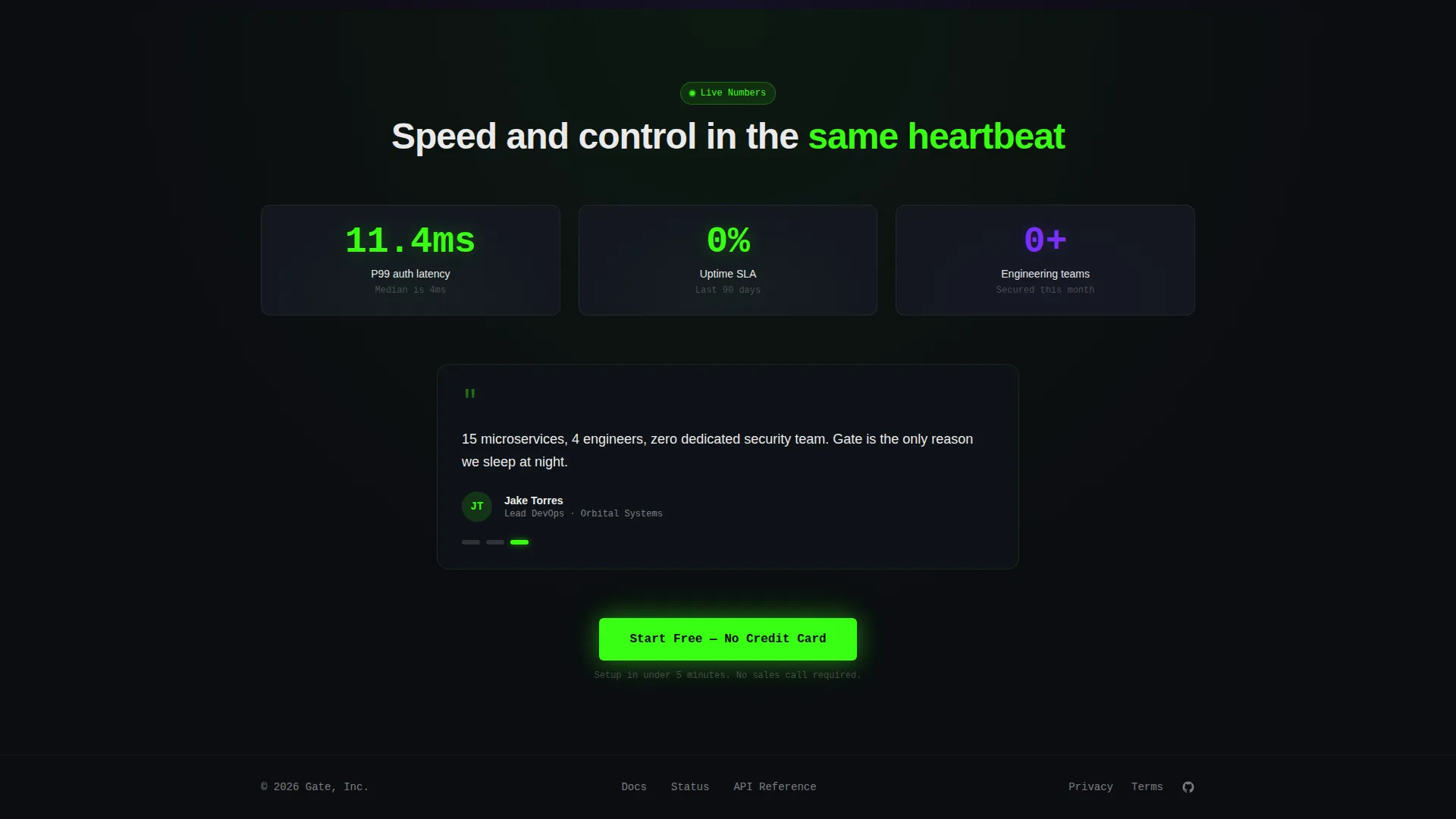
- Three interactive sections covering role-based permission dragging, a before-and-after architecture diagram toggle, and a live latency and uptime display
- A two-step freemium signup flow with a single work email field followed by framework and team size selection to pre-configure a sandbox
Feature list
Gate packs a specific set of interactive and visual components that work together to move technical visitors from curious to converted.
Split-Screen Dashboard Header
The header fills the viewport with a 50/50 product screenshot. The left pane shows a role-based access control rule being authored in YAML inside a live policy editor. The right pane displays a real-time access log scrolling with green ALLOW and red DENY badges, user avatars, IP geolocations, and timestamps. The screenshot sits on a slight 3D tilt with a soft phosphor glow bleeding off its edges.
Interactive Role Permission Explorer
Section one lets visitors drag a user avatar between role groups and watch permissions update live inside a simulated policy table. No paragraph explains the feature. The interaction does the work, giving technical buyers a hands-on sense of how the platform scopes access before they sign up.
Architecture Diagram Toggle
Section two presents a toggleable architecture diagram. Visitors flip between a "before" state showing spaghetti service connections and multiple third-party logos and an "after" state showing a single clean node. The contrast makes the platform's value clear in one click.
Live Latency and Uptime Display
Section three surfaces a live latency counter and an uptime badge pulling real numbers. The numbers are visible without any extra interaction. This signals platform reliability to the engineering and DevOps audience without requiring a separate status page visit.
Freemium Two-Step Signup Flow
The primary call to action is pinned to the header and repeated after each interactive section. It opens a single-field email entry form. A second step asks for framework preference (Next.js, Express, Django, or Go) and team size to pre-configure the sandbox environment before the visitor even logs in.
Secondary Documentation Path
Engineers who need to evaluate before committing have a clear secondary path. An "Explore the Docs" link runs alongside every primary call to action. This keeps technical skeptics in the funnel without forcing them down the trial path before they are ready.
Page sections overview
| Section | Purpose |
|---|---|
| Header screenshot panel | Shows live dashboard with policy editor and access log side by side |
| Role permission explorer | Lets visitors drag avatars between role groups to see permission changes live |
| Architecture diagram toggle | Compares messy pre-Gate setup against a single unified node |
| Latency and uptime panel | Displays real-time performance numbers and live uptime badge |
| Freemium signup flow | Captures work email then collects framework and team size to configure sandbox |
| Secondary docs path | Offers engineers a reading-first path before trial commitment |
Design & branding system
The Acid Digital color system runs on a dark-mode foundation that engineering audiences recognize immediately. Every color choice carries a functional role, not just a visual one.
- Void black (#0B0D11) dominates every background, keeping focus on content and data
- Terminal phosphor green (#39FF14) fires on calls to action, live-data highlights, and success states like ALLOW badges
- UV purple (#7B2FFF) marks interactive hotspots and hover transitions throughout the page
- Signal white (#EAEAEA) handles all body text at readable weight without decorative use
Mobile & speed optimization
The template is structured with a mobile-responsive layout in mind, ensuring the split-screen and interactive sections adapt across screen sizes.
- The 50/50 split stacks vertically on smaller screens so neither panel gets clipped or hidden
- Interactive elements are touch-friendly, allowing mobile visitors to engage with the role explorer and diagram toggle without a mouse
How this template helps you convert
Gate is structured so the page itself acts as a product demo. By the time a visitor reaches the bottom, they have already interacted with the product in miniature form.
- The interactive sections replace passive reading with live product simulation, reducing the cognitive gap between "evaluating" and "using"
- The pinned primary call to action in acid green stays visible at every scroll point, so the decision moment is always one click away
- The two-step onboarding form pre-configures the sandbox to match the visitor's stack and team size, making the first session feel relevant from the start
Other information about this template
Gate is built specifically for the identity and access management category within the broader cybersecurity technology space. It is suited for platforms dealing with API authentication, role-based access control (RBAC), session monitoring, and multi-service permission scoping.
- The template style is Split Screen (50/50), meaning content and product visuals share equal weight on every key section
- The creative direction follows an Interactive Explorer model where scrolling through the page teaches features rather than listing them
- The theme is Startup Velocity, tuned for early-stage companies that need to look production-ready before they technically are
- The landing page direction is Freemium/Trial, optimized for low-friction signup over high-touch sales conversations
Theme
Startup Velocity
Creative direction
Interactive Explorer
Color system
Acid Digital
Style
Split Screen (50/50)
Direction
Freemium/Trial
Page Sections
Split-screen Dashboard Header
Interactive Role Permission Explorer
Architecture Diagram Toggle
Live Latency and Uptime Display
Freemium Two-step Signup Flow
Secondary Documentation Path
Related questions
Who is this template designed for?
Can I customize the color system and branding?
How does the interactive scroll experience work in this template?
Does this template include the two-step signup flow?
Is this template suitable for a product that is still in early development?



