Flyfare - Immersive Budgetairline Landing Page Template
Flyfare is a dark immersive horizontal scroll landing page built for budget airlines. It walks visitors through a traveler's full 24-hour journey, panel by panel, while a running cost ticker makes every cheap fare feel like a dare. A tropical orange search box and a persistent sticky bar keep the booking prompt impossible to ignore.
by Rocket studio
Quick summary
Flyfare is a single-page horizontal scroll template for low-cost carriers. It pairs a cinematic Day-in-the-Life narrative with a click-through funnel that turns browsing into booking. The Rainforest color system keeps the mood immersive and alive, while every interactive element fires in tropical bird orange so no fare goes unnoticed.
Who this template is for
This template speaks directly to budget airlines and no-frills carriers that need a landing page working as hard as their seat-load targets. It is built for marketing teams who want to sell the feeling of travel, not just the ticket price.
- Budget airline brands targeting backpackers, digital nomads, and young families
- Carriers promoting low-fare routes across Southeast Asia and similar high-frequency leisure markets
- Marketing teams who want a visually immersive page without a bloated funnel
What problem this template solves
Most airline landing pages feel transactional and cold. They list prices but never make the traveler lean forward. Flyfare solves the gap between "browsing fares" and "feeling ready to book" by replacing static layouts with a story the visitor lives through panel by panel.
- Visitors leave standard fare pages without booking because the destination never felt real
- Price comparisons stall decisions; a running cost ticker reframes the fare as pocket change
- Generic layouts waste the emotional pull that cheap travel actually creates
What you get with this template
You get a fully designed horizontal scroll landing page with four full-viewport narrative panels, a floating search box header, and a sticky conversion bar. Every element is styled within the Rainforest color system and the Dark Immersive theme.
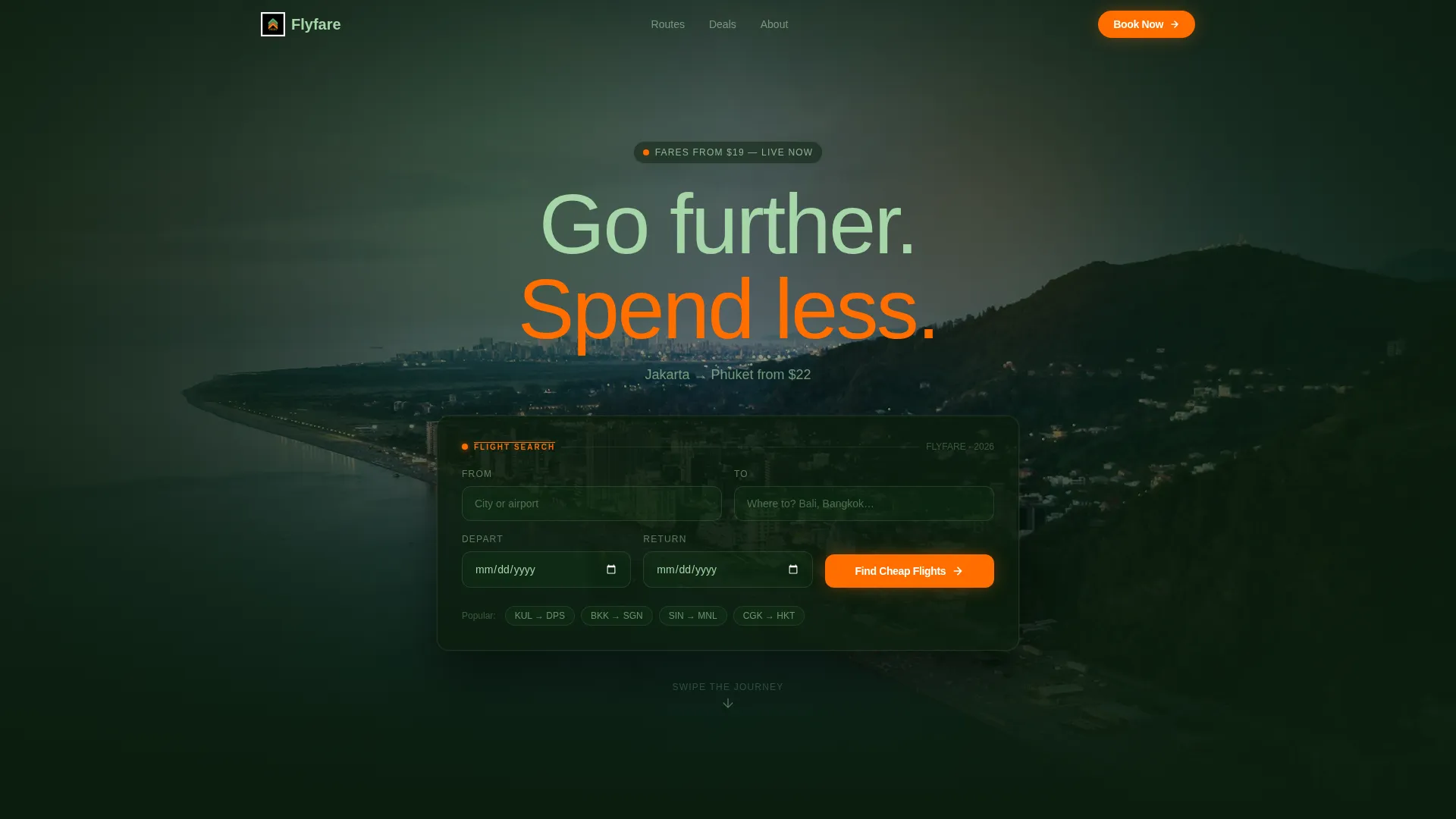
- Full-width aerial night-shot header with a floating flight search box in cockpit-panel style
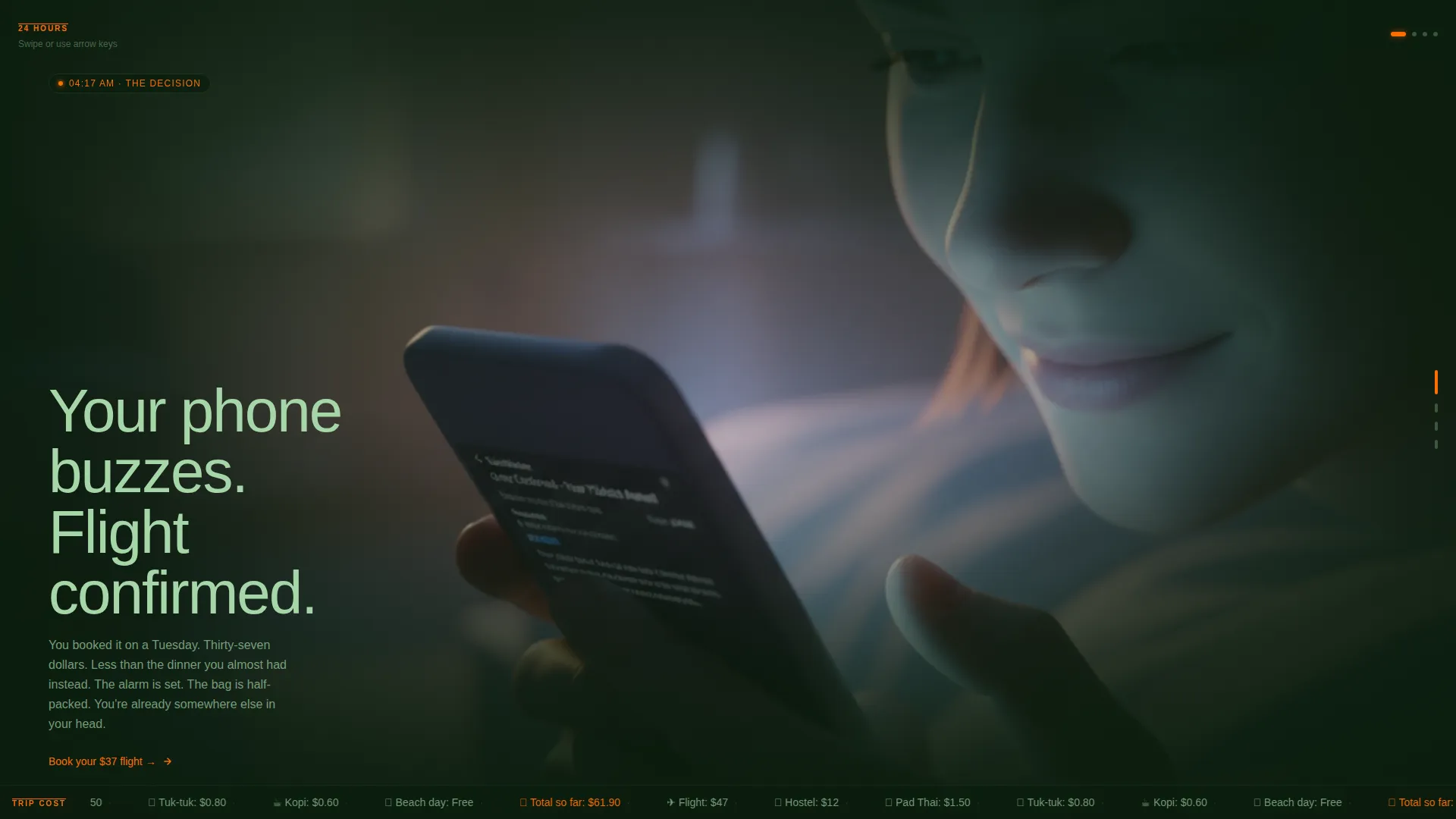
- Four Day-in-the-Life horizontal scroll panels, each a full-viewport photograph with edge-darkening into canopy black
- A running bottom ticker tallying real trip costs across each panel, plus a persistent sticky bar after panel three
Feature list
This section describes each major built-in capability of the Flyfare template.
Horizontal Scroll Narrative Layout
The template uses a horizontal scroll structure to walk visitors through one traveler's 24-hour journey. Each panel fills the full viewport and transitions smoothly into the next, creating a cinematic feel that keeps visitors engaged longer than a standard vertical page.
Immersive Search Box Header
The header floats a full-width search box over a slow-panning aerial night photograph of city lights dissolving into coastline. Fields cover origin, destination, and dates, with a single tropical orange call-to-action button. Placeholder text cycles real routes with real example prices to set expectations immediately.
Emerald Focus Fields with Live Route Placeholders
Each search field glows faintly in humid emerald when a visitor clicks into it. Placeholder text cycles through real-looking route examples such as "Kuala Lumpur to Bali from $34," making the search feel active and credible before the visitor types a single character.
Running Cost Ticker
A ticker runs along the bottom of the horizontal scroll panels and tallies the traveler's real trip costs in real time as the visitor scrolls. It itemizes the flight, accommodation, and food, building a cumulative total that visually argues for the affordability of the trip by the time the final panel loads.
Persistent Sticky Conversion Bar
After the third scroll panel, a sticky bar reappears at the bottom of the viewport reading "Fares from $19, Search Now" in tropical orange. It keeps the primary call to action visible without interrupting the narrative, and it stays on screen through the rest of the page.
Click-Through Funnel Structure
The page is built as a click-through funnel. No forms beyond the search box exist on the page. Every call-to-action click routes the visitor directly to the booking engine with route and date fields pre-filled, reducing friction between inspiration and purchase.
Page sections overview
| Section | Purpose |
|---|---|
| Aerial Search Header | Floating flight search box over a cinematic night aerial photograph |
| Dawn Alarm Panel | Horizontal panel one: traveler wakes to a booking confirmation |
| Boarding Line Panel | Horizontal panel two: airport selfie, overhead bins, window seat |
| Touchdown Tarmac Panel | Horizontal panel three: arrival heat shimmer and unfamiliar signage |
| Night Market Panel | Horizontal panel four: street food scene and final cost tally |
| Sticky Fare Bar | Persistent low-fare prompt that reappears after panel three |
Design & branding system
The Rainforest color system drives every visual decision in this template. The palette is built around four anchors that balance atmosphere with function. Backgrounds occupy the black-to-emerald range, body text breathes in misty fern, and every call to action fires in hot tropical bird orange.
- Deep canopy black (#0B1D0E) and humid emerald (#1B5E20) form the background range, giving the page depth and warmth
- Misty fern (#A5D6A7) carries body text at a comfortable contrast against dark backgrounds
- Hot tropical bird orange (#FF6D00) is reserved exclusively for calls to action, price tags, route pins, and the sticky bar
Mobile & speed optimization
The template is designed with a viewport-filling approach that adapts each horizontal scroll panel to the visitor's screen. The dark, image-forward layout is built to render cleanly on smaller devices where immersive visuals are just as effective.
- Full-viewport panel photography scales responsively without breaking the narrative flow
- The floating search box and sticky conversion bar are positioned to remain accessible on mobile screen sizes
- Lightweight overlay text keeps each panel readable regardless of screen orientation
How this template helps you convert
The Flyfare template is structured as a deliberate click-through funnel. Every design choice moves the visitor from curiosity to conviction before asking for the click.
- The header search box captures high-intent visitors immediately with pre-suggested routes and a single clear action, reducing the number of decisions required to start a search.
- The horizontal scroll narrative builds emotional investment panel by panel, so by the time the night-market image loads, the visitor is mentally committed to the trip rather than weighing airline options.
- The running cost ticker and sticky fare bar work together to answer the price objection before it forms, framing a $47 flight as one line in a $60 holiday rather than a transaction to scrutinize.
Other information about this template
Flyfare fits naturally into the broader ecosystem of travel and hospitality web design. It works as a standalone campaign page or as the front door to an existing booking engine.
- Template style is horizontal scroll, making it distinctive in a category where vertical-scroll pages dominate
- The Dark Immersive theme positions this template differently from the bright, white-heavy layouts common in the airline sector
- The Day-in-the-Life creative direction is transferable to seasonal campaigns by swapping panel photography and ticker copy
- The click-through funnel approach means no back-end form handling is needed on the template itself

Theme
Dark Immersive
Creative direction
Day-in-the-Life
Color system
Rainforest
Style
Horizontal Scroll
Direction
Click-Through
Page Sections
Horizontal Scroll Narrative Layout
Immersive Aerial Search Header
Live Route Placeholder Text
Running Trip Cost Ticker
Persistent Sticky Conversion Bar
Click-through Funnel Structure
Related questions
Can I change the route placeholder text in the search fields?
Does the template include a booking engine?
How does the horizontal scroll experience work on mobile?
Can I replace the panel photography with my own images?
Is the sticky fare bar text editable?