Transparent Plumbing Landing Page Template
Flux is a single-column landing page template built for small plumbing contractors serving single-family homeowners. It leads with an address-input header, walks visitors through a transparent service timeline, and ends with a direct booking form. Every section is designed to replace homeowner anxiety with clarity, showing real pricing ranges, technician details, and a straightforward path to booking.
by Rocket studio
Quick summary
Flux is a single-column flow landing page for a residential plumbing contractor. It opens with an address input, guides visitors through a transparent service process, and converts with a three-field booking form. Real pricing, a visual service timeline, and an SMS photo option work together to turn an anxious homeowner into a booked appointment.
Who this template is for
This template is built for small, owner-operated plumbing businesses that serve single-family homes. It suits contractors who want to stand out by being upfront about pricing and process rather than hiding behind a generic contact form.
- Plumbing contractors running one or two service trucks
- Businesses targeting homeowners, renovation couples, and residential landlords
- Operators who want to book jobs directly from their landing page without a phone call first
What problem this template solves
Most plumbing service pages leave homeowners guessing. No prices, no timeline, no face behind the business. That uncertainty pushes people to call three competitors before choosing anyone. Flux solves this by doing what a good plumber does in person: explaining exactly what happens, how long it takes, and what it costs.
- Homeowners abandon service pages when they can't find a price range
- Vague "call for a quote" layouts lose visitors who prefer to book on their own terms
- Generic contractor pages fail to build the trust needed for someone to invite a stranger into their home
What you get with this template
Flux delivers a complete single-page layout that moves a visitor from first impression to booking confirmation in one uninterrupted scroll. Every section is purposeful and grounded in what a homeowner actually needs to feel confident.
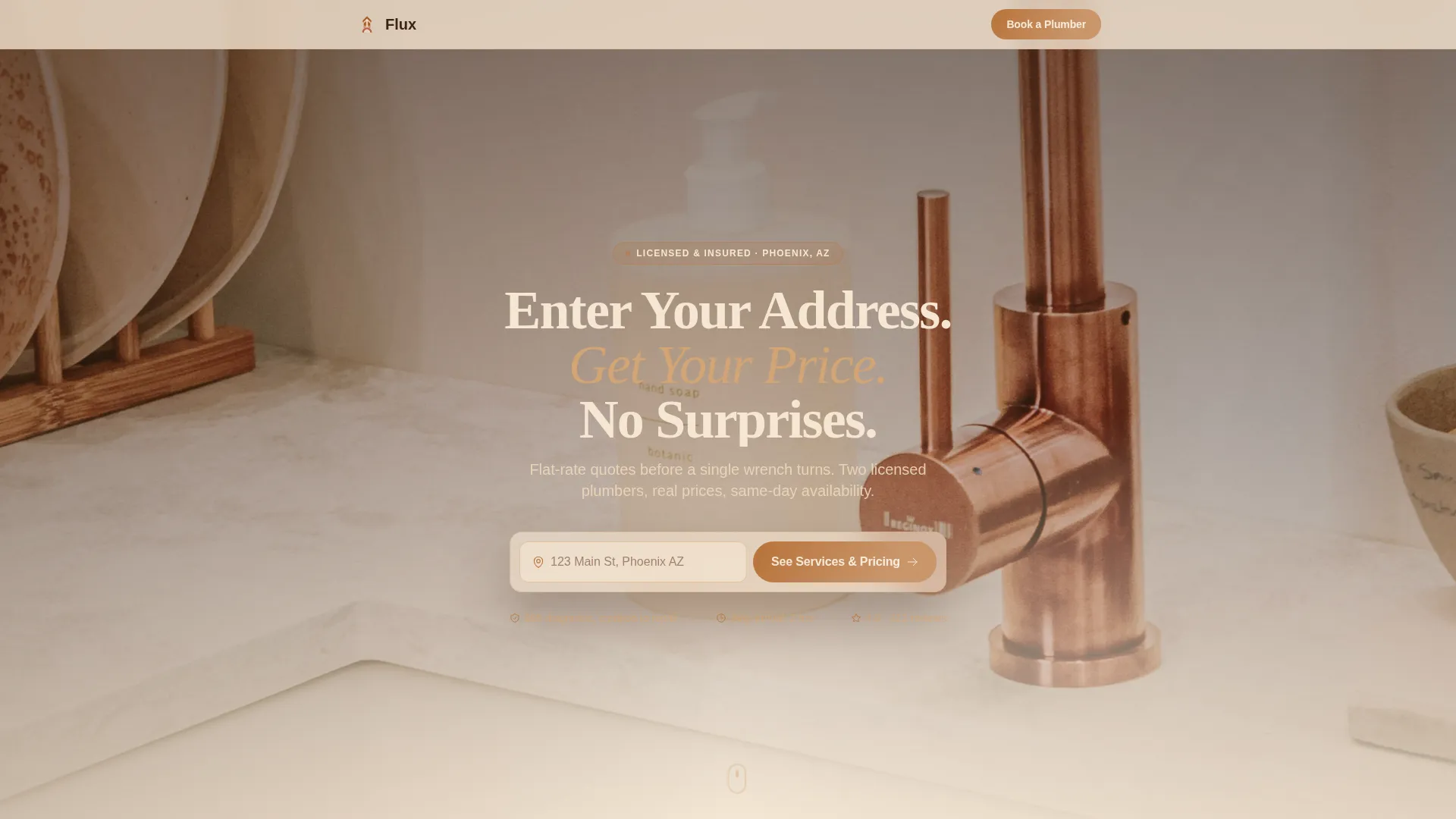
- An address-input header with a hero background photograph and copper call-to-action button
- A six-step visual service timeline with real diagnostic fees, price ranges, and a labor guarantee statement
- A three-field booking form with address pre-fill, service type dropdown, and preferred arrival window selector
Feature list
A single paragraph introduces the feature set before the individual items below.
Flux packs its conversion power into a small number of well-placed components. Each one reflects a real moment in the homeowner decision process, from "what's going on with my pipes" to "I've booked someone I trust."
Address-Input Hero Header
The header places an oversized address field over a softly blurred kitchen-sink photograph. Morning light catches the faucet in the background image. The headline "Enter Your Address. Get Your Price. No Surprises." sets the tone immediately. A single copper-colored button reads "See Services & Pricing."
Transparent Service Timeline
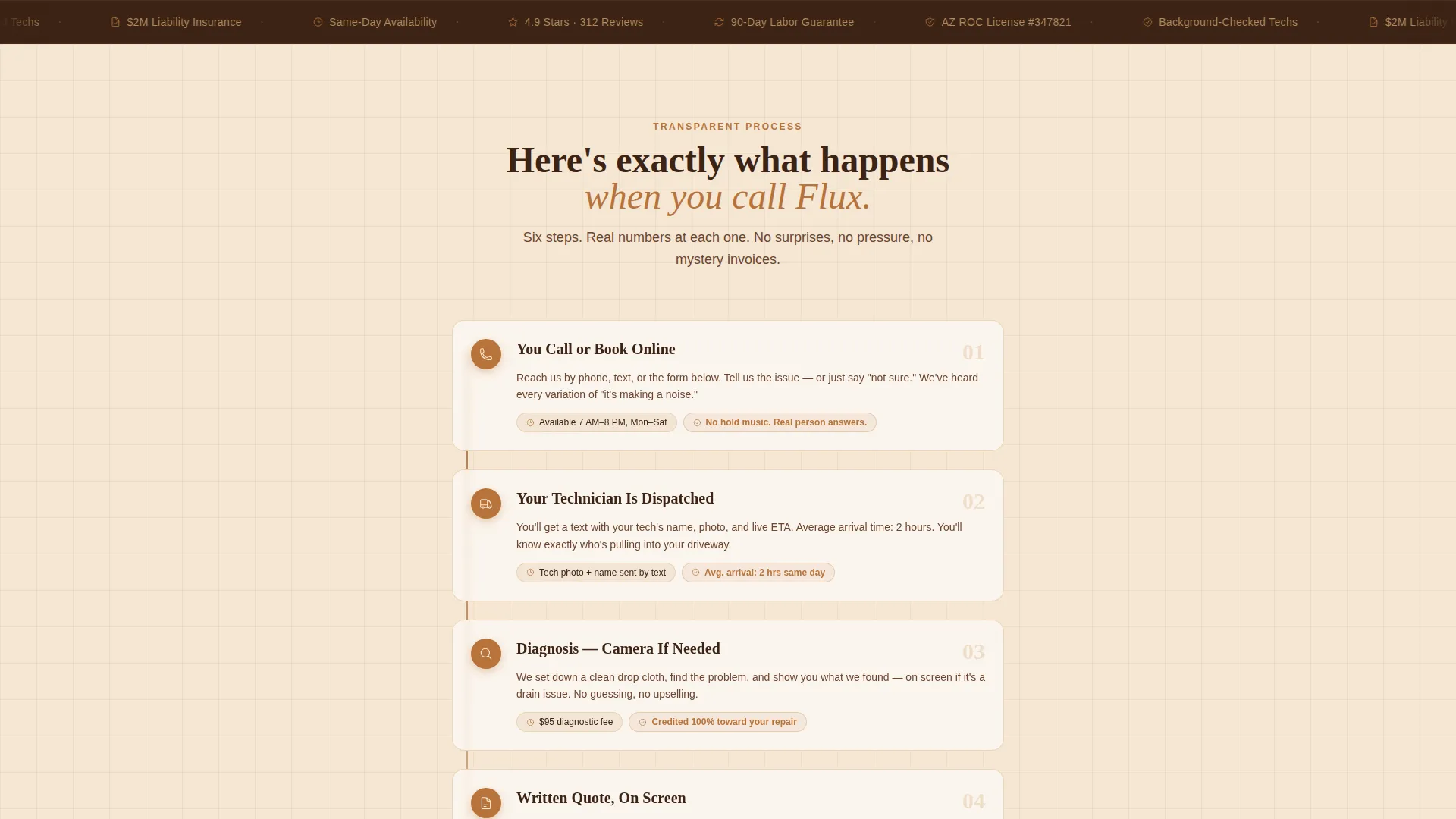
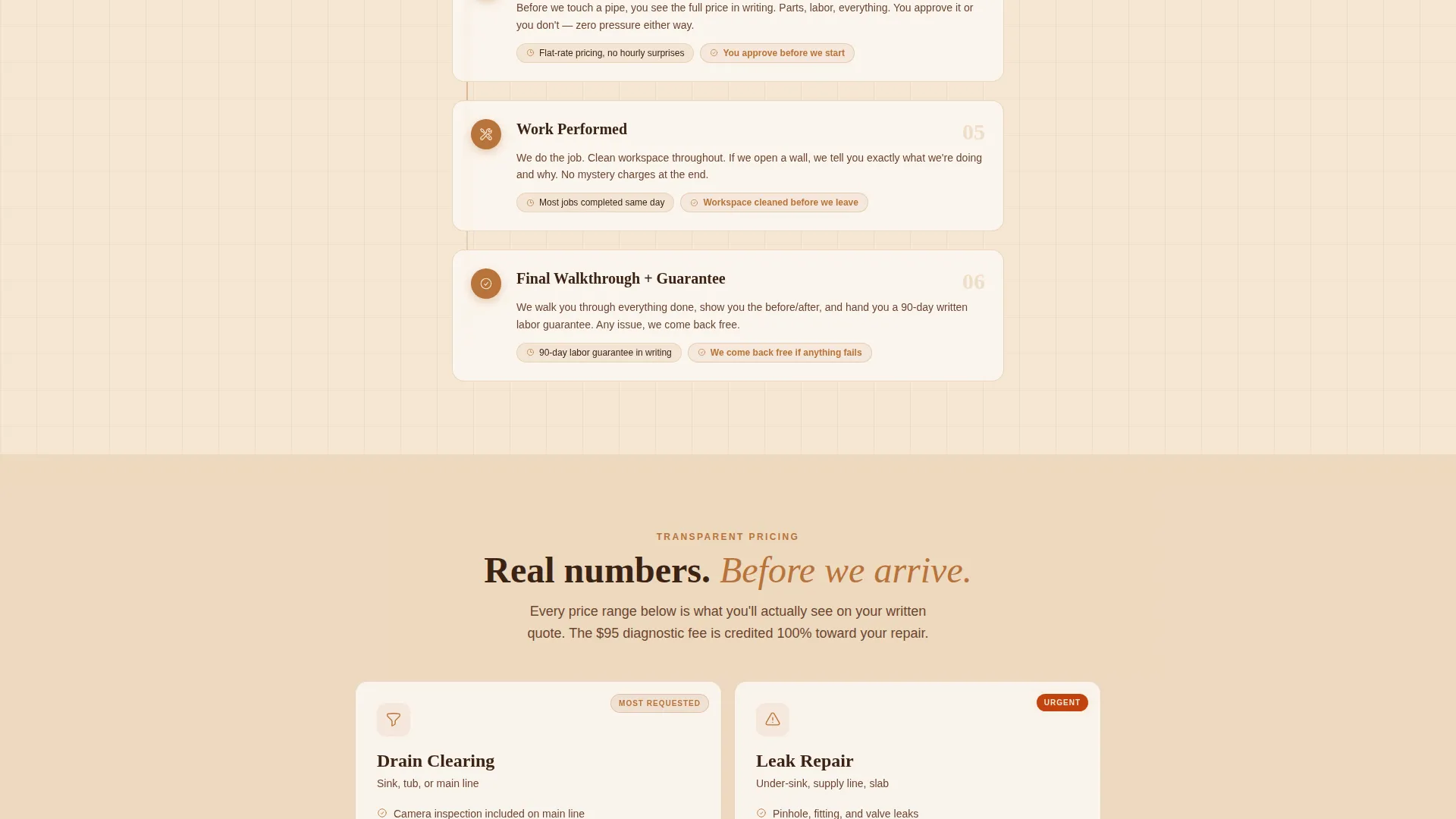
A six-step visual timeline walks visitors through a real service call: call placed, technician dispatched with photo and name, camera diagnosis, written on-screen quote, work performed, and final walkthrough. Specific numbers anchor each step so nothing feels vague.
Upfront Pricing Display
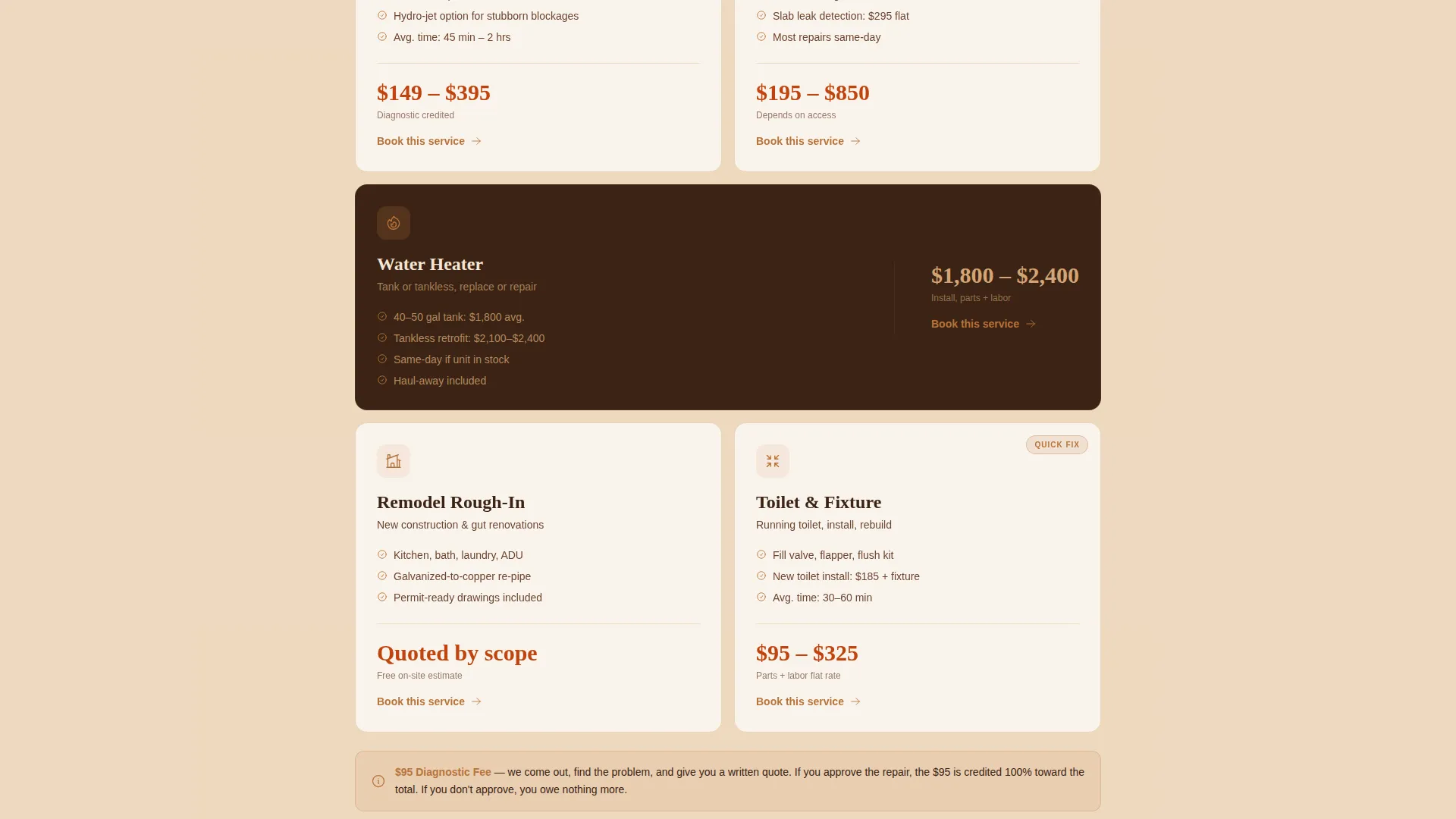
Real price ranges appear inline throughout the scroll. The diagnostic fee ($95, credited toward repair), average water heater install ($1,800 to $2,400), and a 90-day labor guarantee are stated directly on the page, not hidden behind a form.
Three-Field Booking Form
The primary call-to-action form asks for three things: address (pre-filled from the header input), service type from a dropdown (drain clearing, leak repair, water heater, remodel rough-in, or "not sure"), and a preferred arrival window (today, tomorrow, or this week).
SMS Photo Path
A secondary conversion option lets visitors tap "Text Us a Photo" to open a direct SMS link. This serves homeowners who find it easier to show the problem than describe it in a form field.
Technician Identity Block
The timeline includes a dispatched-technician section with a photo and name. Seeing a real person's face before the appointment reduces the hesitation that comes with inviting a contractor into your home.
Page sections overview
| Section | Purpose |
|---|---|
| Address Input Header | Captures location and sets transparent tone |
| Service Call Timeline | Shows each step of a real job |
| Diagnostic Fee Block | States the $95 fee and credit policy |
| Pricing Range Display | Lists ballpark costs for common jobs |
| Labor Guarantee Badge | Highlights the 90-day guarantee |
| Technician Profile Block | Displays name and photo of the assigned tech |
| Booking Form | Collects address, service type, arrival window |
| SMS Photo Option | Offers a direct text link as a secondary path |
Design & branding system
The visual identity follows a Service Utility theme built around the Sunset Mesa color system. The palette feels like a desert evening when the heat finally breaks: warm, grounded, and honest without overdesign.
- Warm sandstone (#D4A574) and soft dusk sky (#F5E6D3) dominate page backgrounds, keeping the layout calm and readable
- Deep arroyo shadow (#3B2314) anchors all body text for strong contrast against the light backgrounds
- Sun-baked terracotta (#C1440E) marks prices and urgent service badges, while honest copper (#B8733A) lights up every button and call-to-action element
Mobile & speed optimization
The single-column flow layout is naturally well-suited for small screens. Visitors arriving from a Google search on a mobile device can enter their address, scroll the timeline, and tap the booking form without needing to navigate anywhere else.
- Single-column structure eliminates horizontal scrolling and keeps thumb-friendly tap targets in a vertical stack
- The SMS photo path is a tap-to-text link, which works directly from a mobile browser without extra steps
- Pre-filled address carry-forward between the header input and the booking form reduces friction for mobile users completing the flow
How this template helps you convert
Flux earns the booking click by removing every common reason a homeowner hesitates. Pricing transparency builds trust early. The timeline answers process questions before they form. The form is short enough to complete in under a minute.
- The address-input header creates an immediate sense of personalization, making the page feel relevant to the visitor's specific home rather than a generic service site
- Inline pricing ranges and the technician photo resolve the two biggest homeowner concerns (cost and who's showing up) before they reach the booking form
- Two conversion paths (the booking form and the SMS photo link) give different visitor types a comfortable way to take the next step
Other information about this template
Flux is a ready-to-customize single-column flow landing page template designed specifically for residential plumbing contractors. It is part of a broader library of service-industry templates built around the Transparent Process creative direction.
- The template style is Single Column Flow, making it straightforward to adapt content without restructuring the layout
- The Sunset Mesa color system is fully represented in the template's background, text, badge, and button layers
- This template is well-suited for a single family home plumbing contractor looking to move beyond a phone-only booking model
- The Direct Sales landing page direction means every design decision points toward one outcome: a confirmed appointment
Theme
Service Utility
Creative direction
Transparent Process
Color system
Sunset Mesa
Style
Single Column Flow
Direction
Direct Sales
Page Sections
Address-input Hero Header
Six-step Visual Service Timeline
Inline Pricing Transparency
Three-field Direct Booking Form
SMS Photo Conversion Path
Technician Identity Block
Related questions
Can I change the pricing numbers shown in the template?
Does the SMS photo option require any special setup?
Is this template designed for a single-service plumbing business?
Can I replace the header photograph with my own image?
What is the purpose of the address field in the header?