Exhibit - Vibrant Tradeshow Landing Page Template
Exhibit is a masonry-style trade show landing page template built for event venues that need to earn a booking before the first conversation. A Desert Rose color palette, a timeline-driven scroll experience, and a pinned scheduling module work together to turn venue browsing into genuine booking intent, ideal for event planners, marketing directors, and trade association coordinators.
by Rocket studio
Quick summary
Exhibit is a single-page masonry layout designed for trade show event venues. It walks visitors through the full arc of an event, from empty hall to packed show floor, using a timeline-progression scroll. The Desert Rose palette and a pinned booking module make the experience feel purposeful. It is built to convert venue browsers into confirmed bookings.
Who this template is for
This template is made for venue operators and event professionals who need a landing page that does real selling work. If your audience makes decisions based on atmosphere and trust, this layout delivers both.
- Event planners coordinating multiple exhibitors and vendor logistics
- Marketing directors launching products who need the venue presentation to feel like an event itself
- Trade association coordinators running annual shows who want this year's edition to stand out
What problem this template solves
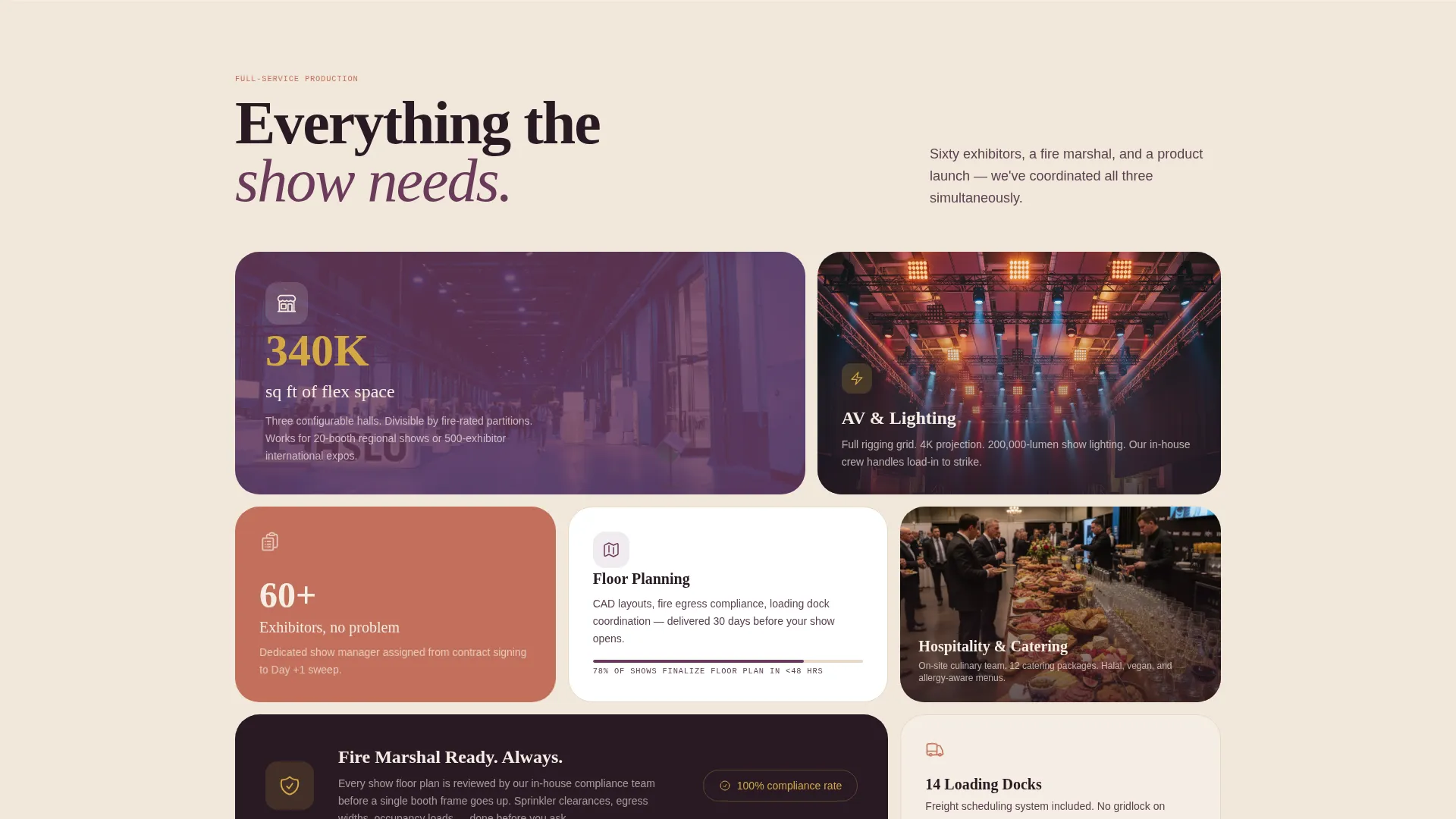
Most venue pages show a photo gallery and a contact form. That format does not communicate scale, energy, or story. Exhibit solves the credibility gap that exists between "we have the space" and "we can stage your entire production."
- Visitors leave generic venue pages without a clear sense of what show day actually feels like
- Booking forms appear too early, before trust is established
- The gap between venue capacity and event vision is rarely bridged visually
What you get with this template
You get a complete, production-ready landing page layout that takes the visitor on a structured journey. Every section has a defined role, and the design system is cohesive from header to footer.
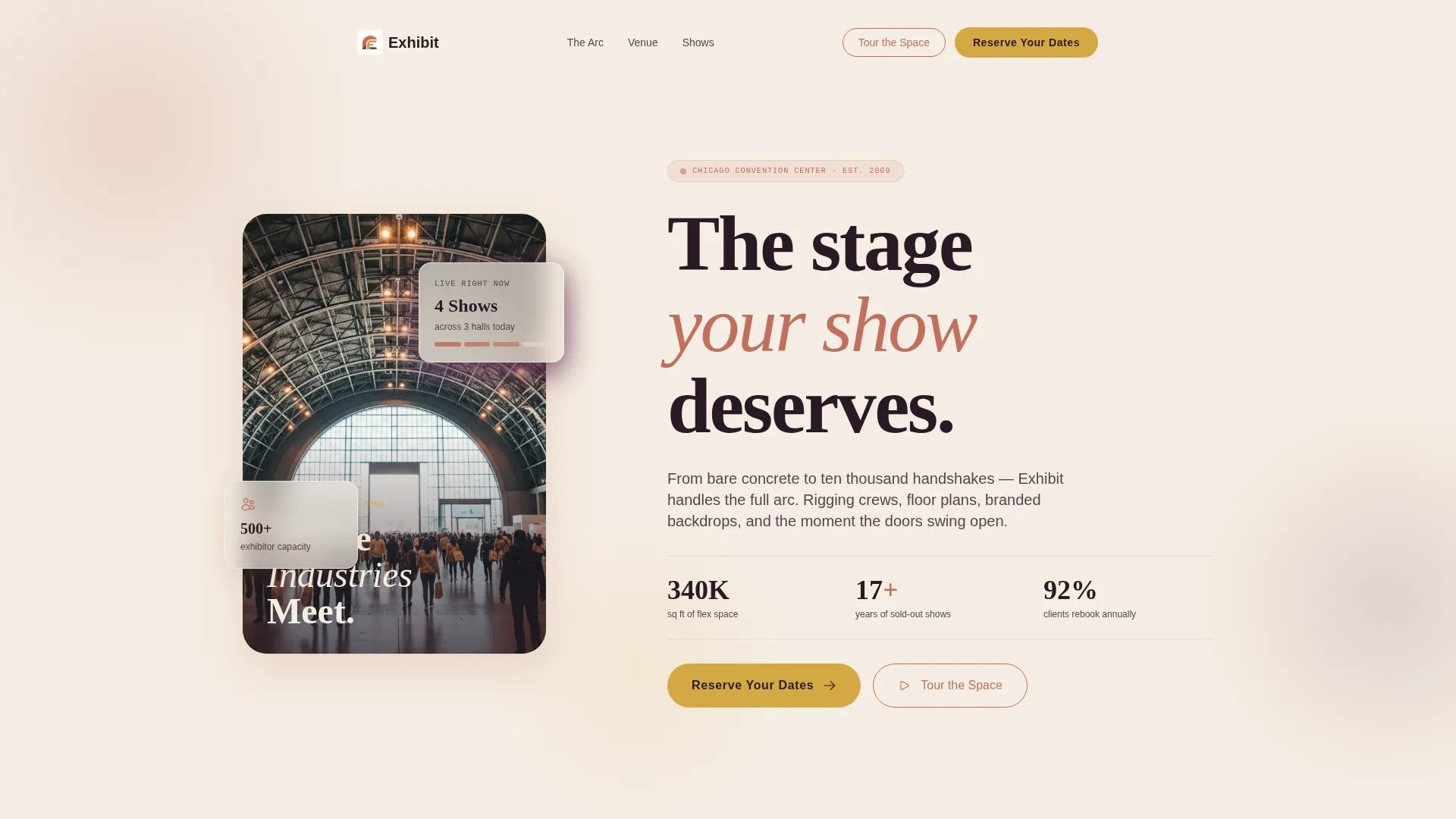
- A tall portrait header with a converging-perspective hall shot and a fade-in headline
- A masonry grid that accelerates in density and color as the timeline progresses toward show day
- A pinned scheduling module with event name, exhibitor count slider (20 to 500+), preferred month, and a freeform text field
Feature list
This section highlights the built-in capabilities that make Exhibit a purpose-built tool for trade show event venues.
Timeline Progression Masonry Grid
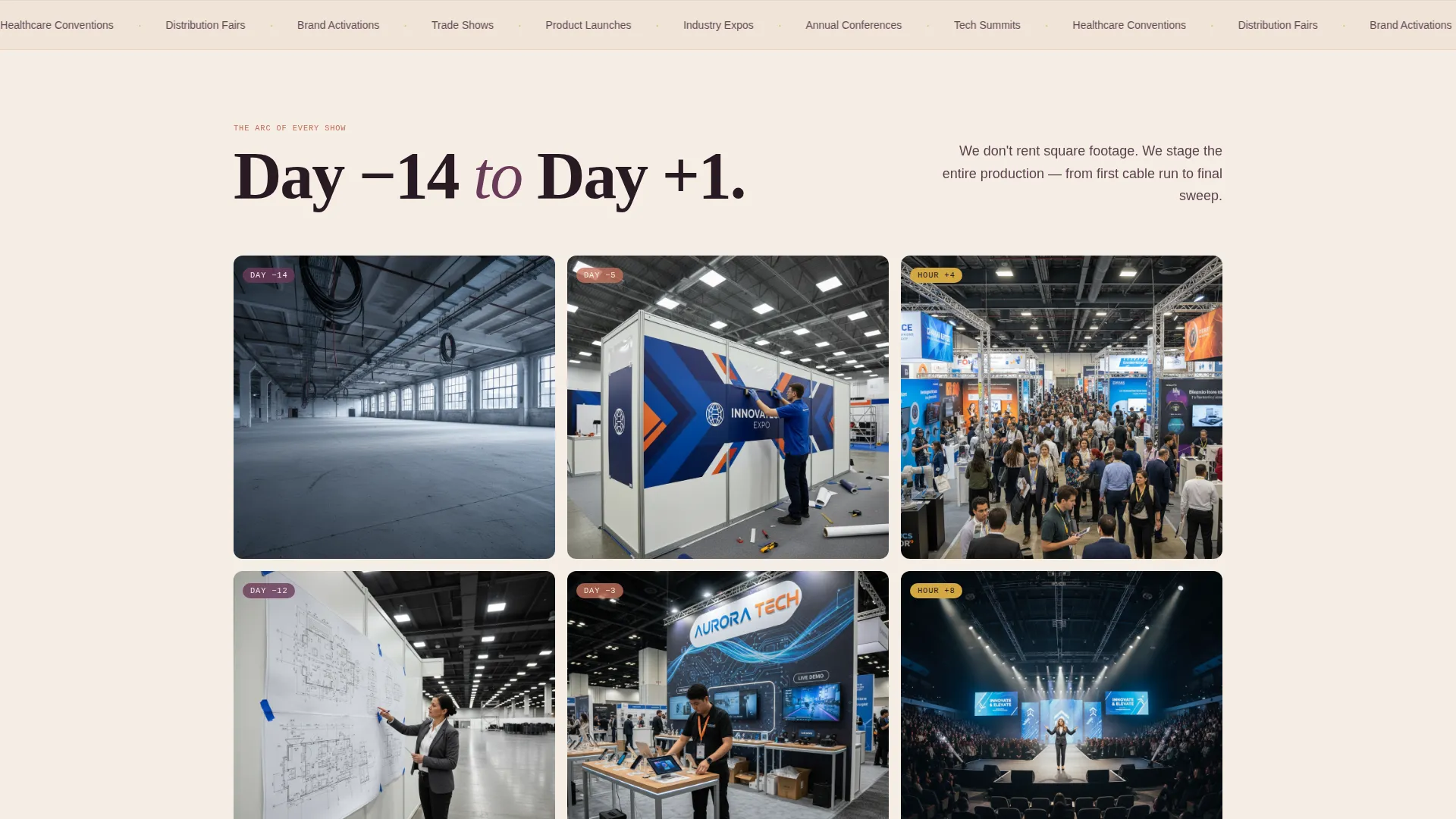
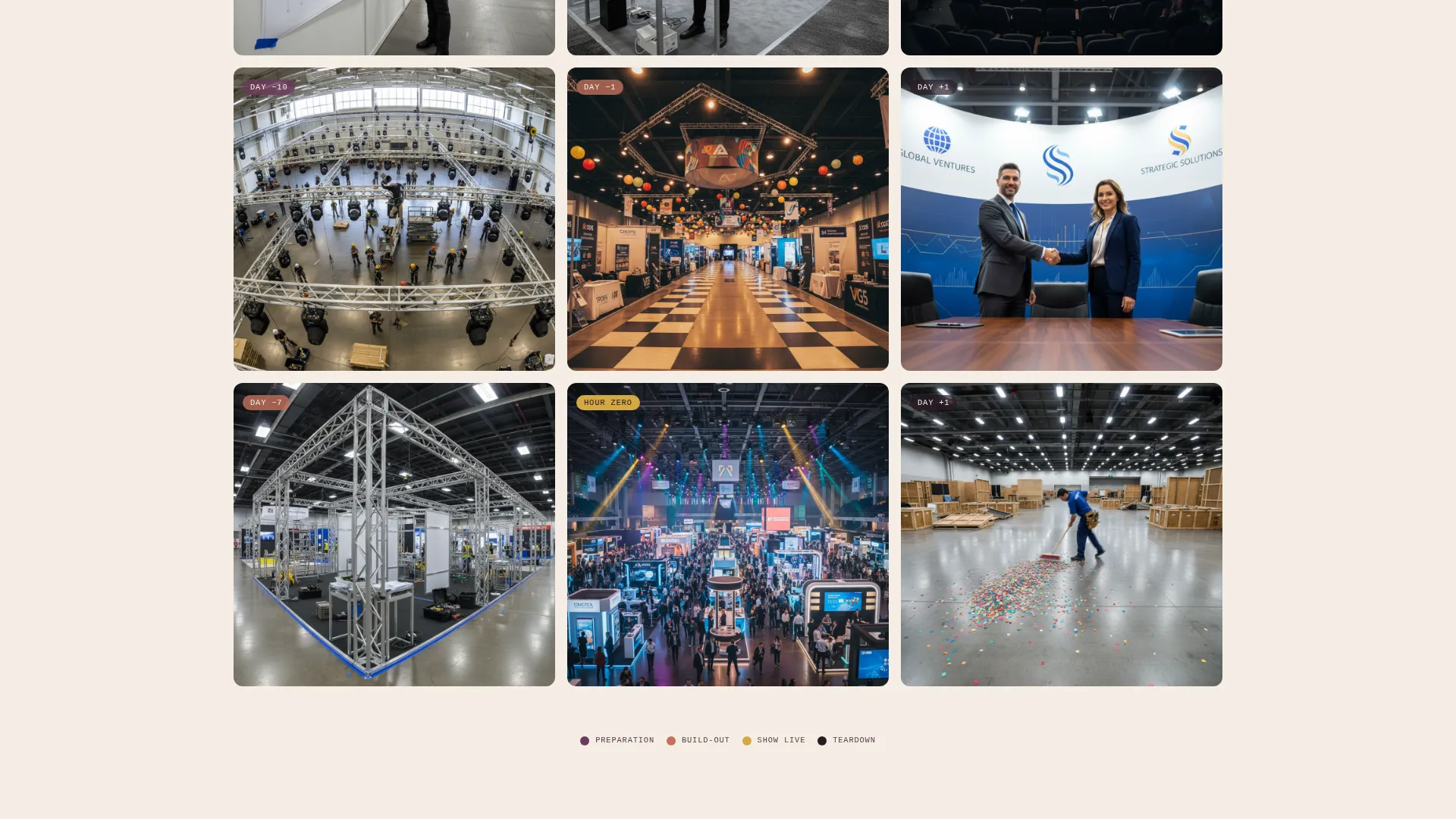
The masonry grid is the centerpiece of the layout. Tiles are captioned with timestamps such as "Day -14," "Hour Zero," and "Day +1," walking the visitor through the entire lifecycle of an event. The grid grows denser and more vibrant as show day approaches, then slows into a quiet teardown sequence.
Pinned Booking and Scheduling Module
After the first scroll, a "Reserve Your Dates" call-to-action button pins to the page and remains accessible throughout the browsing experience. The attached scheduling module collects event name, an exhibitor count via a slider from 20 to 500+, preferred month, and an open text field labeled "Tell us about your show."
Portrait Header with Fade-In Headline
The header uses a tall vertical composition looking down the main exhibition hall. Perspective lines draw the eye toward a light-flooded arched entrance. Silhouetted figures mid-stride with lanyards and branded tote bags set the scene. The headline "Where Industries Meet" fades in at the bottom third of the frame.
Secondary Virtual Tour Path
A secondary call-to-action labeled "Tour the Space" links to a guided virtual walkthrough. This gives hesitant visitors an exploration path before they are ready to commit to a booking conversation.
Desert Rose Color System
The full palette is built in: sun-warmed terracotta (#C2705B), deep dusk mauve (#6B3A5B), sand-white (#F5EDE3), and festive gold (#D4A843). Gold is reserved for call-to-action elements, hover states, and date highlights, keeping the visual hierarchy clean and intentional.
Page sections overview
| Section | Purpose |
|---|---|
| Portrait Hall Header | Establishes venue scale and atmosphere with a converging-perspective hero image and fade-in headline |
| Raw Space Tiles | Opens the timeline at Day -14 with empty-venue concrete and cable imagery |
| Setup Progression Cluster | Shows rigging crews and floor plans, building anticipation mid-scroll |
| Booth Build Tiles | Displays branded vinyl installation and half-assembled booths as the grid densifies |
| Live Show Floor | Peak masonry density, full color, crowds, stage lighting, and product demos |
| Teardown Close | Final slow tiles: handshakes, packed crates, and post-show stillness |
| Pinned Booking Module | "Reserve Your Dates" scheduling form, always accessible after first scroll |
| Virtual Tour call to action | Secondary path linking to a guided space walkthrough |
Design & branding system
The visual identity follows a Celebration & Joy theme expressed through a Desert Rose palette. The result feels like a desert sunset catching a glass pavilion wall: warm, refined, and quietly festive.
- Terracotta (#C2705B) and mauve (#6B3A5B) anchor the core palette with depth and warmth
- Sand-white (#F5EDE3) provides breathing room across the masonry grid and text backgrounds
- Festive gold (#D4A843) is used exclusively for call-to-action buttons, hover states, and date callouts
Mobile & speed optimization
The masonry layout is designed to reflow naturally for smaller screens without losing the timeline narrative. Tile density adjusts per viewport so the progression remains readable on mobile devices.
- The portrait header crops and scales to keep the arched entrance and headline visible on phone screens
- The pinned booking button remains sticky and accessible on mobile throughout the scroll experience
How this template helps you convert
The template earns the booking click by building trust through story before asking for a commitment. Each scroll section does a specific conversion job.
- The timeline progression demonstrates production capability, shifting the visitor's question from "does this venue have space?" to "how do I get on the calendar?"
- The pinned "Reserve Your Dates" call-to-action keeps the booking path available at every scroll depth, reducing friction at the moment a visitor decides to act.
Other information about this template
Exhibit sits within the Wedding & Events category under the Trade Show Event subcategory. It is purpose-built for the trade show event venue niche and is a strong fit for venue operators who compete on experience and production value, not just square footage.
- The template style is Masonry/Pinterest, making it well suited for visual storytelling across a range of event types beyond trade shows, including product launches and industry expos
- The Intersection Match Score for this template within its category and niche context is 13, indicating a strong alignment between template style and audience intent
- The single-page layout means all content, navigation, and calls to action live within one scrollable experience with no additional pages required
Theme
Celebration & Joy
Creative direction
Timeline Progression
Color system
Desert Rose
Style
Masonry/Pinterest
Direction
Booking/Scheduling
Page Sections
Timeline Progression Masonry Grid
Pinned Booking and Scheduling Module
Portrait Hall Header with Fade-in Headline
Secondary Virtual Tour Path
Desert Rose Color System
Related questions
Can I customize the timeline captions and tile images in the masonry grid?
What does the exhibitor count slider do in the booking form?
Is the 'Tour the Space' button connected to a virtual walkthrough by default?
Who is this landing page template best suited for?
Does the pinned booking button stay visible while scrolling through the masonry grid?



