Estimate - Precision Itservices Landing Page Template
Estimate is a split-screen landing page template built for IT services companies that need a real pricing tool, not a "contact us" placeholder. A live calculator lets visitors configure managed IT, cloud infrastructure, and security packages by seat count and endpoint scale. The right panel renders cost totals instantly, then captures leads through a focused three-field form.
by Rocket studio
Quick summary
Estimate is a single-page pricing template designed for IT services companies. It puts an interactive cost calculator front and center, splitting the viewport 50/50 so visitors configure services on the left and watch real numbers build on the right. Below the fold, benchmark data, tier matrices, and case-study cards guide confident buying decisions.
Who this template is for
This template is built for IT services businesses that sell to technically minded buyers. It removes the friction of opaque pricing and replaces it with a self-service estimating experience that qualifies leads before a single conversation.
- Managed service providers offering tiered IT support, cloud migration, or cybersecurity packages
- IT consultancies and solution vendors whose buyers include CTOs, IT directors, and procurement leads
- Startups and mid-market operators who need to show clear, configurable pricing to cost-conscious stakeholders
What problem this template solves
Most IT services pricing pages force visitors to fill out a form before they see any numbers. That friction drives away the exact buyers who are ready to decide. Estimate removes the wall and replaces it with a tool.
- Buyers comparing vendors at midnight need real cost breakdowns, not a callback promise
- Mid-market ops managers juggling multiple vendor contracts need scope clarity before board presentations
- Founders who lost their sysadmin need to understand consolidated service costs fast, without a sales cycle
What you get with this template
You get a complete, single-page layout structured around a live pricing calculator and an analyst-style content flow beneath it. Every section is designed to move a technically literate visitor from curiosity to commitment.
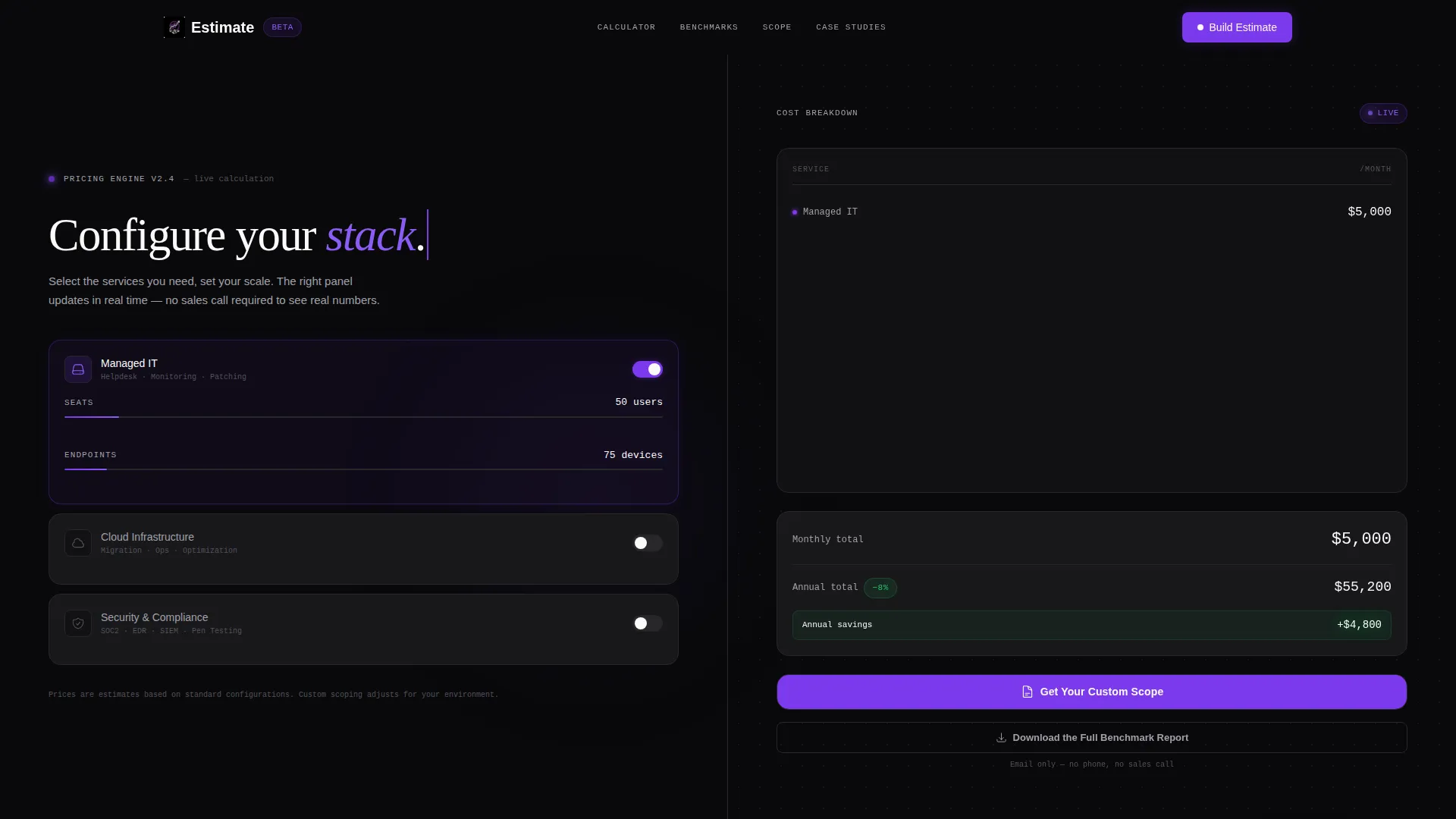
- A 50/50 split-screen header with a functional cost estimator and a real-time right-panel breakdown
- An industry-report scroll experience featuring benchmark comparisons, a scope matrix, and split-screen case-study cards
- A dual lead capture path: a pinned "Get Your Custom Scope" form and a secondary "Download the Full Benchmark Report" gate
Feature list
This template is built around purposeful components that serve a technically minded audience. Each section earns its place by making the pricing decision clearer.
Live Split-Screen Calculator
The header divides the viewport equally. The left side holds three toggle-able service pillars: Managed IT, Cloud Infrastructure, and Security and Compliance. Sliding controls let visitors set seat counts and endpoint scales. The right panel updates cost totals in real time, stacking monthly and annual figures like log entries in a terminal.
Real-Time Cost Breakdown Panel
The right panel does not just display totals. It formats the estimate as a structured cost breakdown that updates as each dial moves. This gives buyers a clear record of their configuration before any form appears.
Benchmark Comparison Section
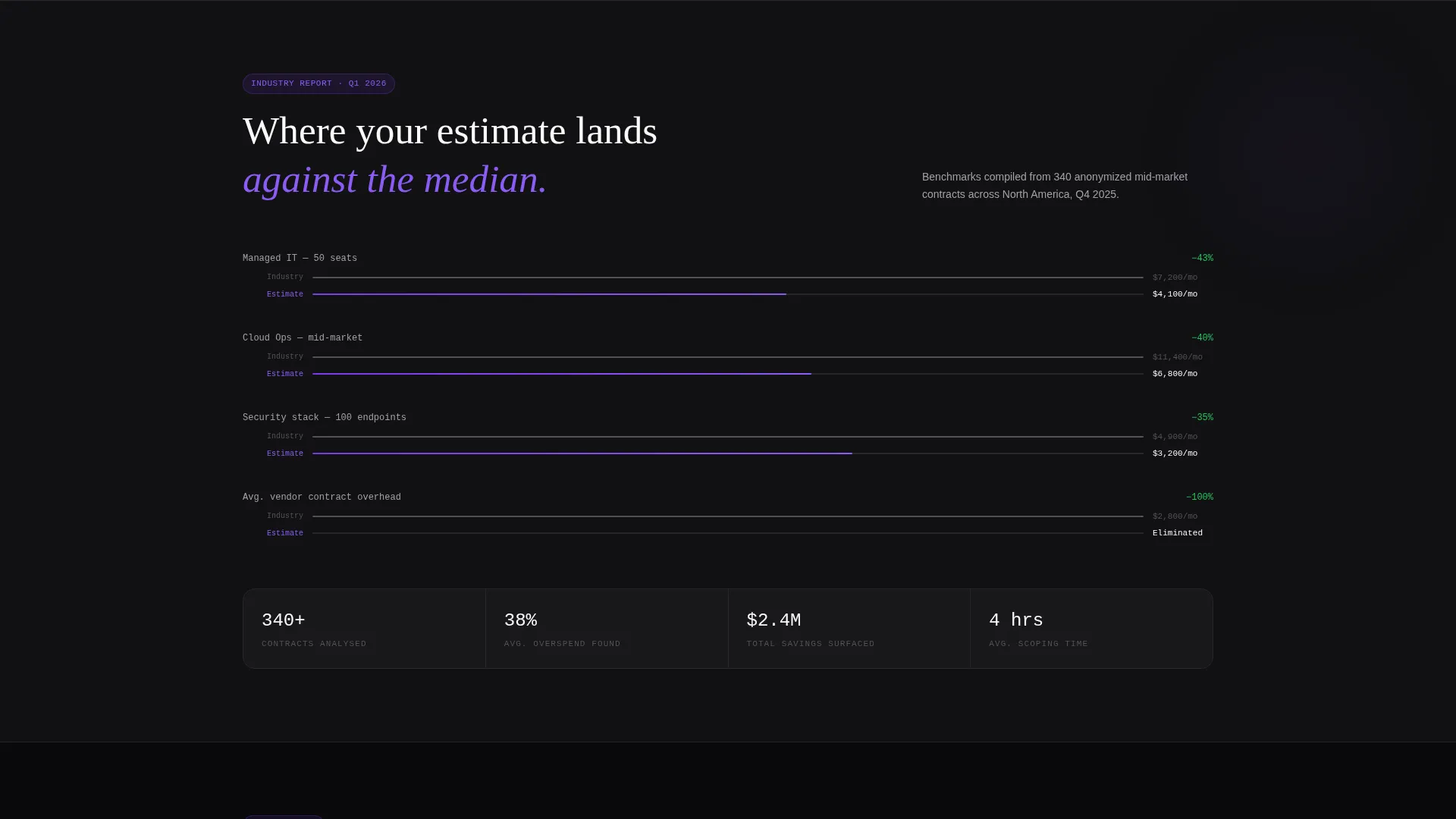
A dedicated scroll section frames the visitor's estimate against anonymized industry median pricing. This positions the offer with data rather than persuasion, letting the numbers make the case.
Scope Matrix with Tier Checkmarks
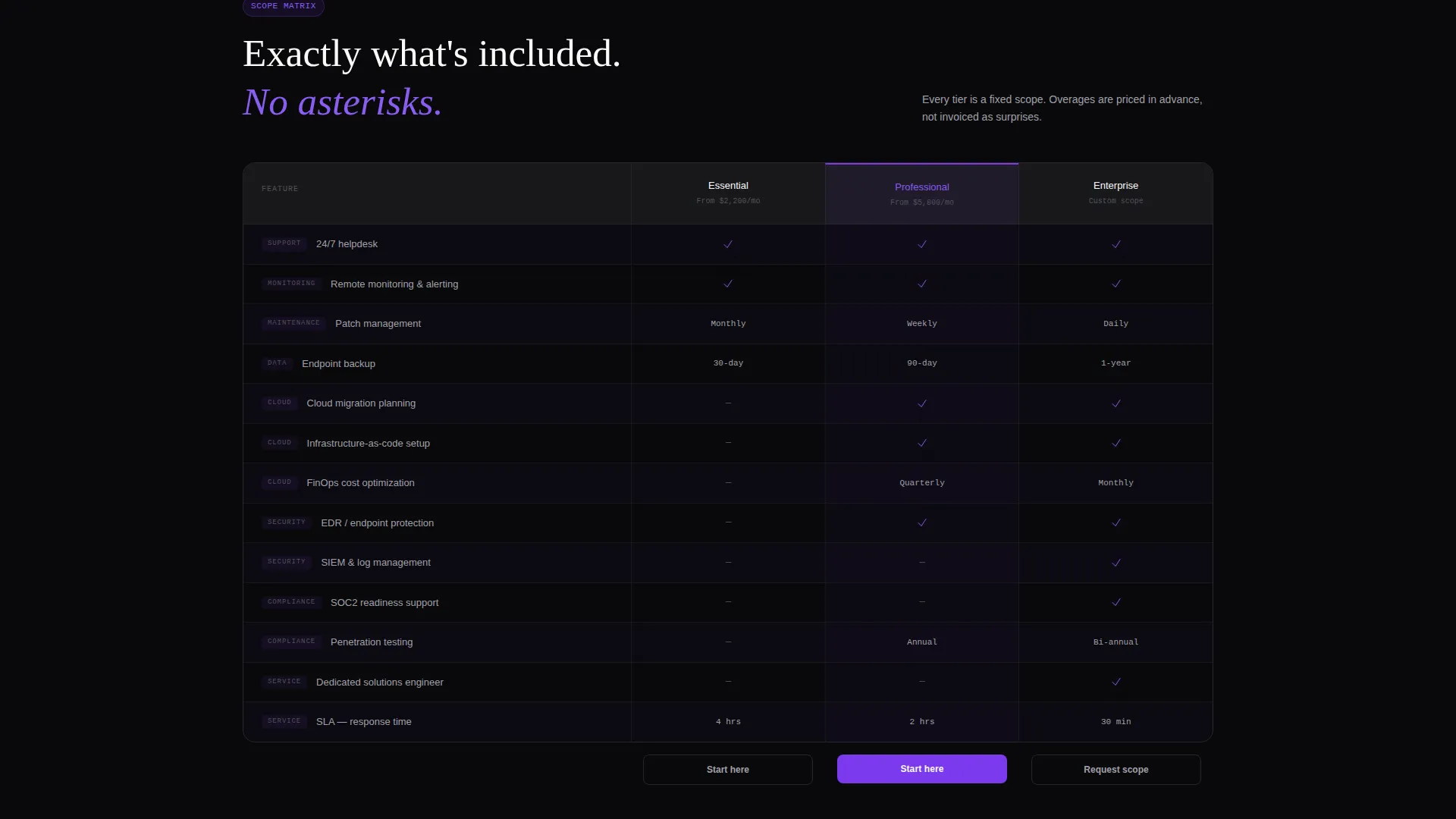
A visual matrix reveals exactly what is included at each service tier. Checkmarks pulse in violet to draw attention to coverage differences, helping buyers understand scope without reading dense spec sheets.
Case Study Cost Audit Cards
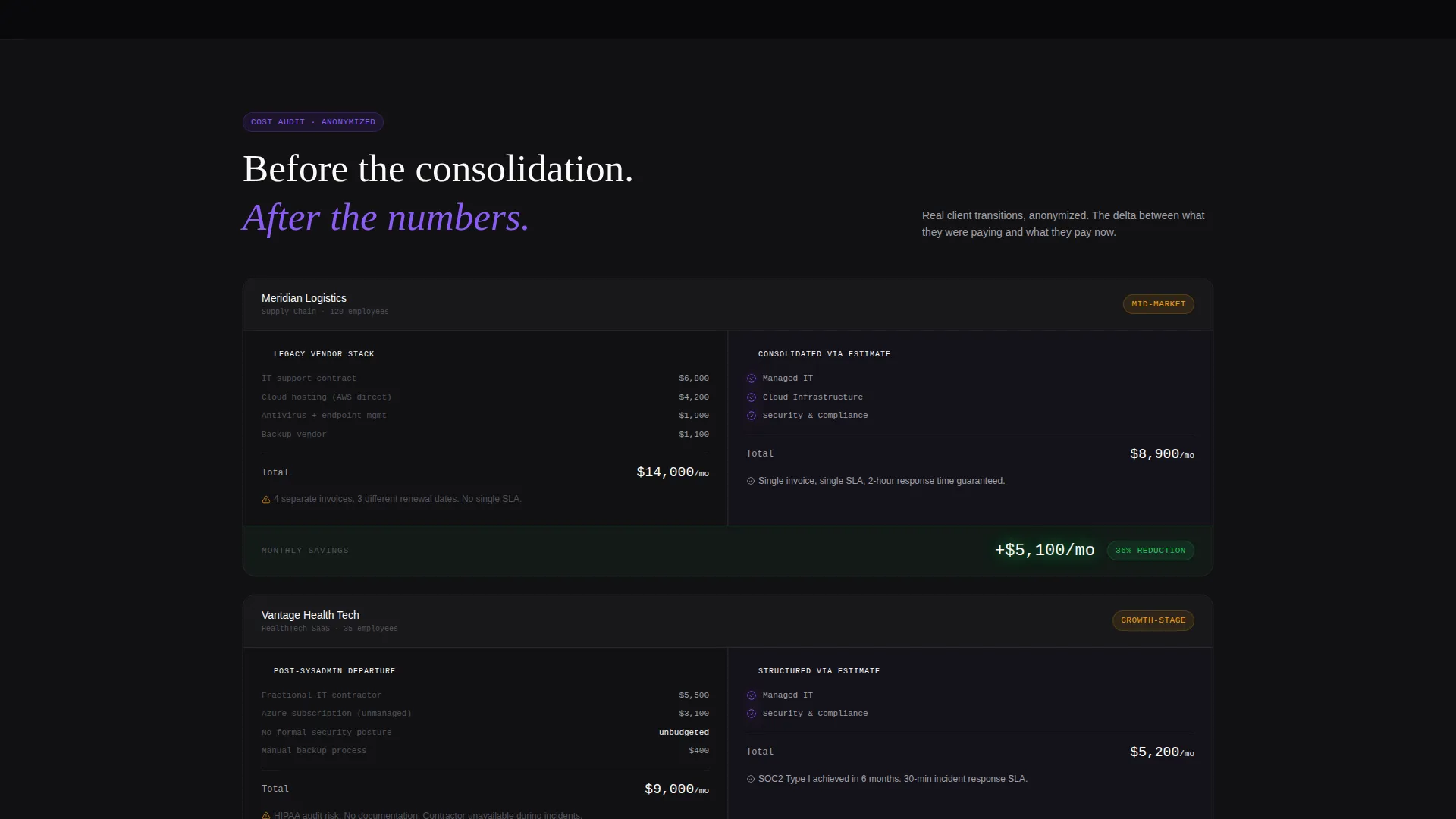
Split-screen cards show a before-and-after cost comparison. The legacy vendor invoice sits on the left, the consolidated service cost on the right, and the savings delta is highlighted between them. Each card reads like a concise analyst brief.
Progressive Lead Capture Forms
The primary call to action, "Get Your Custom Scope," pins itself to the right panel once an estimate is built. It expands into a three-field form asking for work email, company name, and project timeline. A secondary path gates the benchmark report behind email only, capturing researchers who are not yet ready to speak with sales.
Page sections overview
| Section | Purpose |
|---|---|
| Split-screen calculator header | Let visitors configure and price services instantly |
| Real-time cost panel | Display live monthly and annual cost totals |
| Benchmark comparison block | Show estimate against industry median data |
| Tier scope matrix | Clarify what each service tier includes |
| Case study audit cards | Demonstrate before-and-after cost savings |
| Primary call to action form | Capture qualified leads with a three-field form |
| Benchmark report gate | Collect researcher emails via single-field download |
Design & branding system
The visual identity uses a Void and Violet color system that feels like a dark-mode operations dashboard. The palette is disciplined and purposeful, keeping the focus on numbers and data rather than decoration.
- Core colors: absolute void black (#09090B) for backgrounds, deep terminal violet (#7C3AED) for active states and interactive highlights, muted console gray (#A1A1AA) for secondary labels, and phosphor white (#FAFAFA) for body text
- The Directory and Discovery theme strips away stock photography and hero illustrations entirely; the calculator tool is the visual hero from the first pixel
- Violet glows on interactive elements like scope checkmarks and savings deltas, reinforcing a live-dashboard aesthetic without relying on decorative imagery
Mobile & speed optimization
The template is designed to keep the estimator experience functional and readable at any screen size. The dark-mode palette and minimal asset load contribute to a clean rendering experience across devices.
- The 50/50 split-screen layout is structured to reflow cleanly on smaller viewports so the calculator remains usable on a tablet or phone
- No stock photography or heavy hero illustrations means the page carries minimal image weight, keeping the visual experience fast and intentional
- The scroll sections use data-forward layouts with tables and card components rather than large background assets
How this template helps you convert
The template is built around progressive commitment, a strategy where each interaction captures intent without demanding it upfront. Visitors give information gradually, and the value exchange feels fair at every step.
- The calculator captures service type, scale, and budget range through dial interactions alone, qualifying the visitor before any form field appears
- The pinned "Get Your Custom Scope" call to action appears only after the estimate is built, so the form feels like a natural next step rather than an interruption
- The secondary benchmark report download offers a low-commitment path for researchers still in comparison mode, broadening the lead pool without diluting intent
Other information about this template
This template belongs to the IT Services Company Website Templates category within the Technology vertical. It is designed specifically for the IT services company pricing page use case, where transparency and configurability are competitive advantages.
- The template follows an Industry Report creative direction, meaning every scroll section presents information as structured data rather than marketing copy
- The theme is Directory and Discovery, which prioritizes clarity, scannability, and self-service navigation over visual storytelling
- The header concept is a Calculator and Estimator, making this template well suited for any IT services business that wants to replace vague pricing language with a genuine self-service tool
- The lead generation direction is baked into the page architecture, with two distinct capture paths designed to convert both decision-ready buyers and early-stage researchers
Theme
Directory & Discovery
Creative direction
Industry Report
Color system
Void & Violet
Style
Split Screen (50/50)
Direction
Lead Generation
Page Sections
Live Split-screen Cost Calculator
Real-time Cost Breakdown Panel
Benchmark Comparison Section
Tier Scope Matrix
Before-and-after Case Study Cards
Progressive Dual Lead Capture
Related questions
Can I customize the service pillars in the calculator?
Does the template include the form layout for lead capture?
Is this template suitable for a company that only offers one service type?
What makes this different from a standard pricing page template?
Who is the intended buyer for this type of pricing page template?



