Equip — Reliable School Readiness Landing Page Template
The Supply: Find Your District Coverage Readiness landing page template is built for K-12 education staffing agencies. It guides district administrators through a five-step readiness assessment, delivers a personalized coverage report, and converts visitors into qualified leads using a sidebar companion layout, navy and golden-yellow branding, and zero friction at every early step.
by Rocket studio
Quick summary
The Supply: Find Your District Coverage Readiness landing page template is a sidebar companion page designed for education temp staffing agencies. It leads district administrators through a five-step quiz, reveals a personalized coverage estimate, and captures only a work email and district name at the final step. The layout is calm, capable, and built for people making coverage decisions at dawn.
Who this template is for
This template is intended for K-12 education staffing agencies and the district administrators they serve. It works best for organizations that need to convert high-stress school staff into qualified leads without demanding upfront contact information.
- Assistant principals and building secretaries managing same-day sub deployment
- District HR coordinators handling chronic staffing shortages across multiple buildings
- Education staffing agencies ready to deploy vetted substitute teachers, paraprofessionals, and lunch monitors
What problem this template solves
District administrators do not have time to fill out long forms at 5:47 AM. They need to assess their coverage gaps quickly and get a clear answer. Standard lead pages create friction before they build trust, which drives people away before the conversation starts.
- No early contact-info gates, so visitors can prepare and engage without pressure
- Sidebar companion layout keeps support resources and social proof visible at every step
- Assessment-first flow builds reciprocity before the agency asks for anything in return
What you get with this template
This template gives you a complete five-step assessment experience with a persistent sidebar, animated network section, social proof blocks, and a process walkthrough. Every section is designed to guide planning decisions and reduce drop-off.
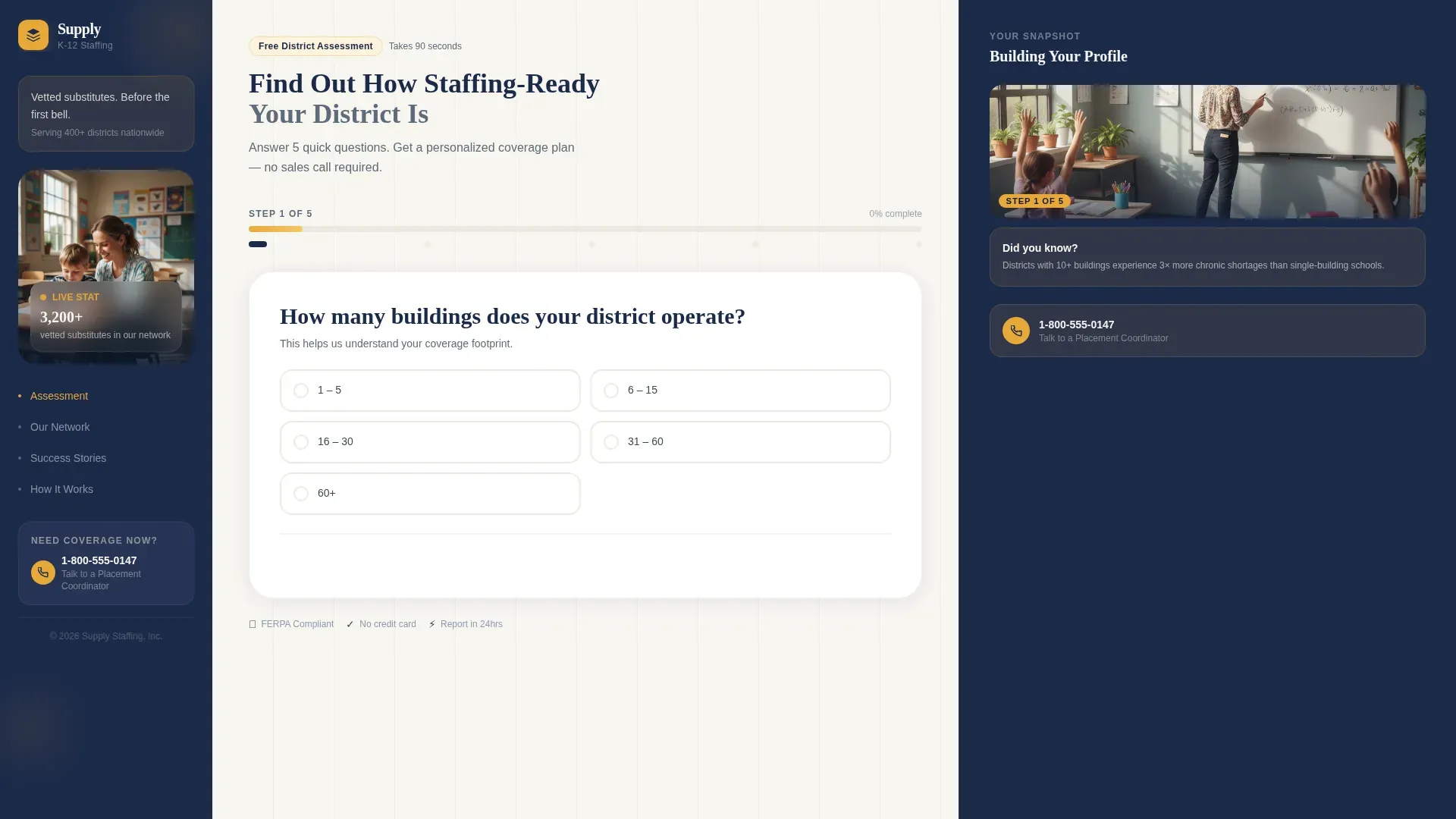
- A multi-step quiz with progress bar, tappable answer buttons, and real-time sidebar evolution
- A personalized coverage estimate section that forms as the visitor answers each question
- A sidebar with rotating stats, a staff photo, testimonial display, and a direct-dial phone number
Feature list
This page uses a focused set of interactive and structural features. Each one is intended to build confidence and reduce friction as administrators work through their coverage readiness assessment.
Five-Step Readiness Assessment
The quiz opens immediately in the main content area with the headline "Find Out How Staffing-Ready Your District Is." A progress bar shows all five steps at a glance. Early steps collect zero contact information, so visitors can assess their situation safely before committing.
Evolving Sidebar Companion
The sidebar does not stay static. It changes with each step, moving from a staff photo and a rotating stat to an animated node map, then to a size-matched principal testimonial, then to a live coverage estimate preview. This sidebar guides planning and builds trust in sequence.
Personalized Coverage Estimate
By step four, the page displays a forming coverage estimate based on the visitor's answers. This real-time preview gives administrators a concrete way to see their deployment readiness before they download a full report.
Social Proof and Trust Signals
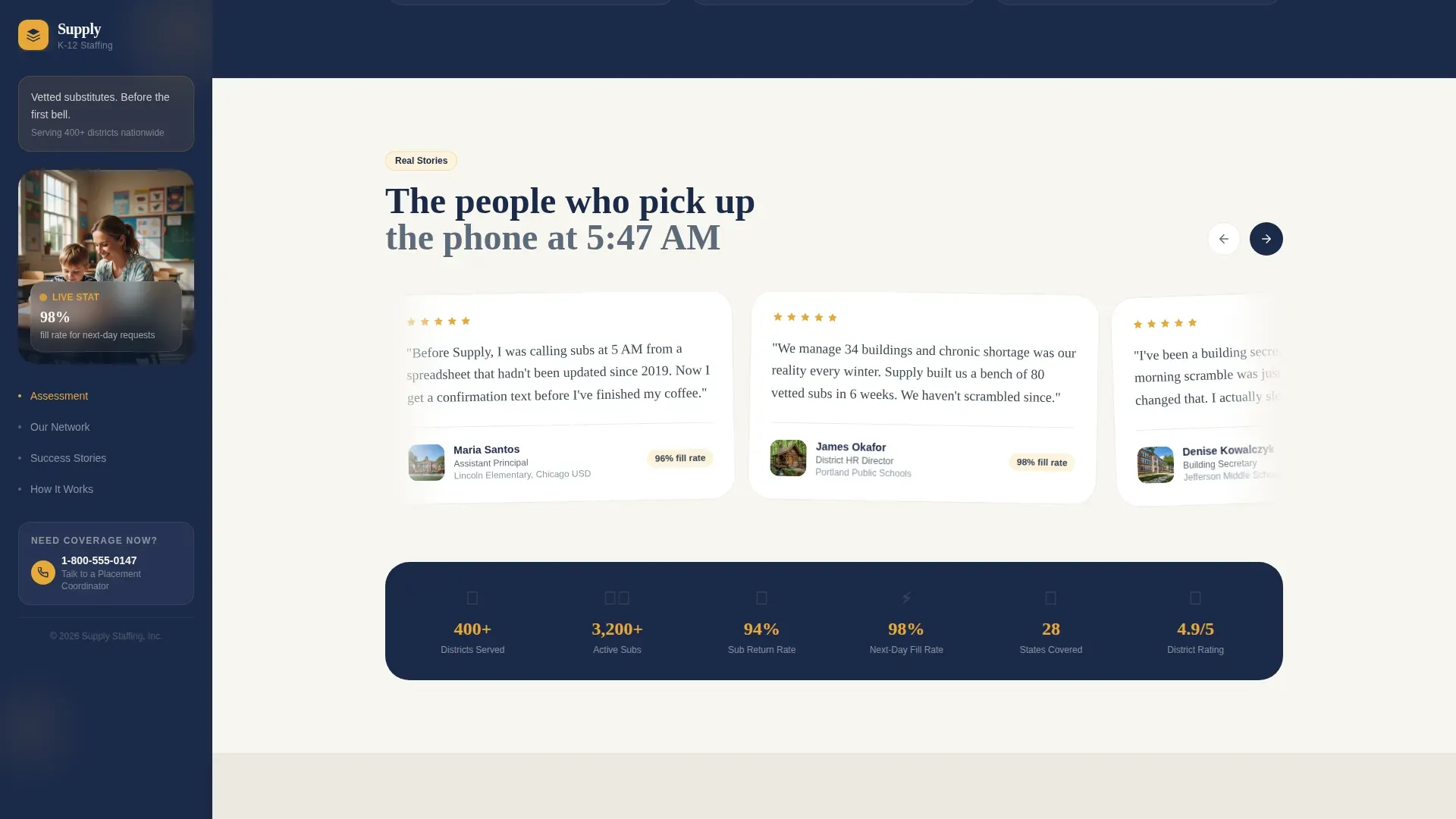
The page includes principal testimonials, a 94-percent sub return-rate stat, and fill-rate information. Trust signals such as testimonials and consistent branding elements enhance the legitimacy of the coverage readiness page, helping organizations make confident decisions.
Direct-Access Secondary Path
A "Talk to a Placement Coordinator" link with a visible phone number is displayed in the sidebar at every step. This gives building secretaries and assistant principals a direct communication path when they need an answer immediately.
Network Effect Node Map
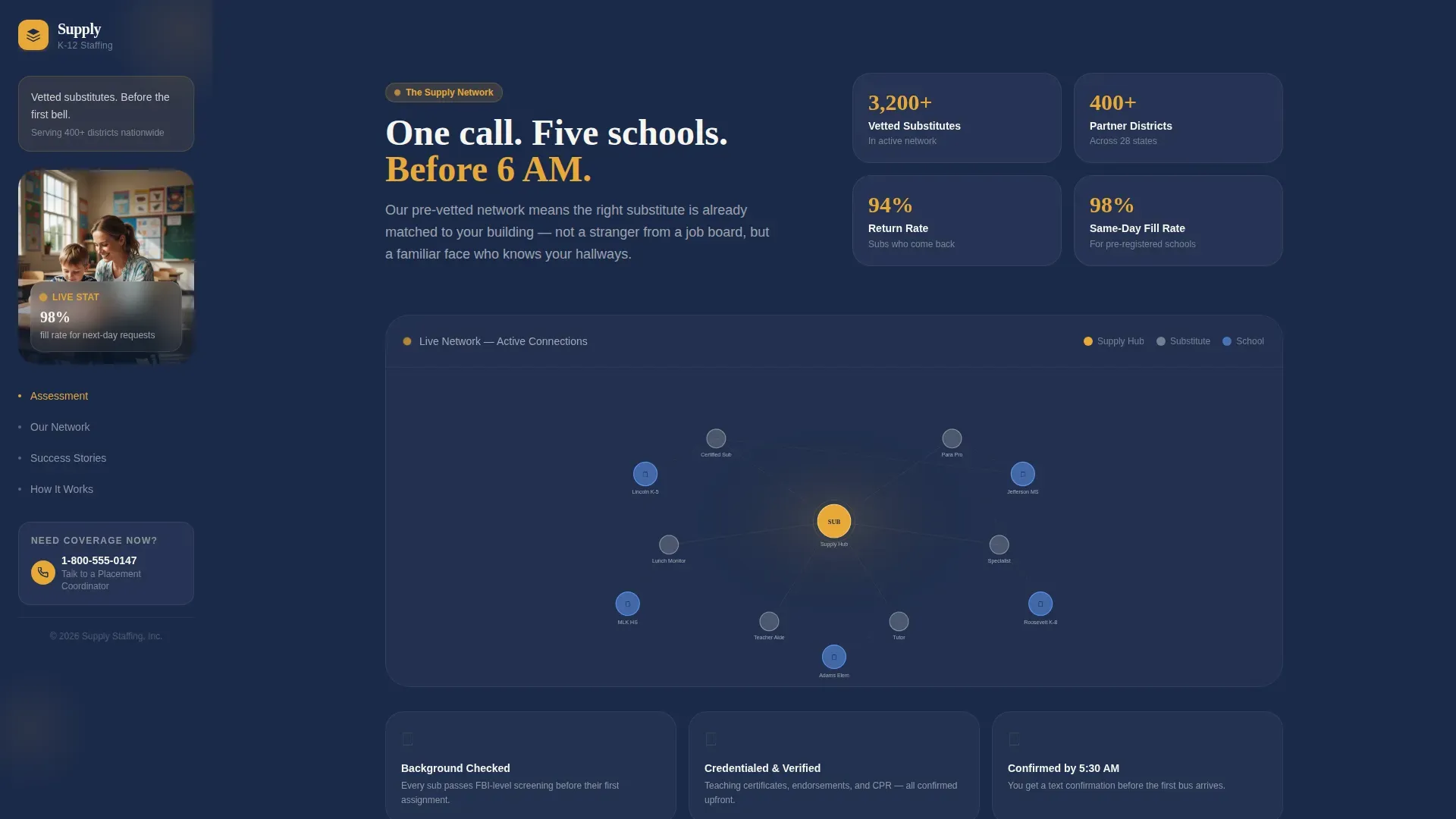
Step two of the sidebar swaps in an animated node map showing how one vetted sub connects to five buildings. This visual supports the agency's network story and shows how deployment services scale across a district.
Page sections overview
| Section | Purpose |
|---|---|
| Hero Assessment Quiz | Opens five-step readiness quiz with progress bar |
| Persistent Sidebar | Displays photo, stat, testimonials, and phone link |
| Network Node Map | Shows how one sub connects multiple buildings |
| Social Proof Block | Lists principal testimonials and fill-rate stats |
| Coverage Estimate Preview | Builds personalized readiness report in real time |
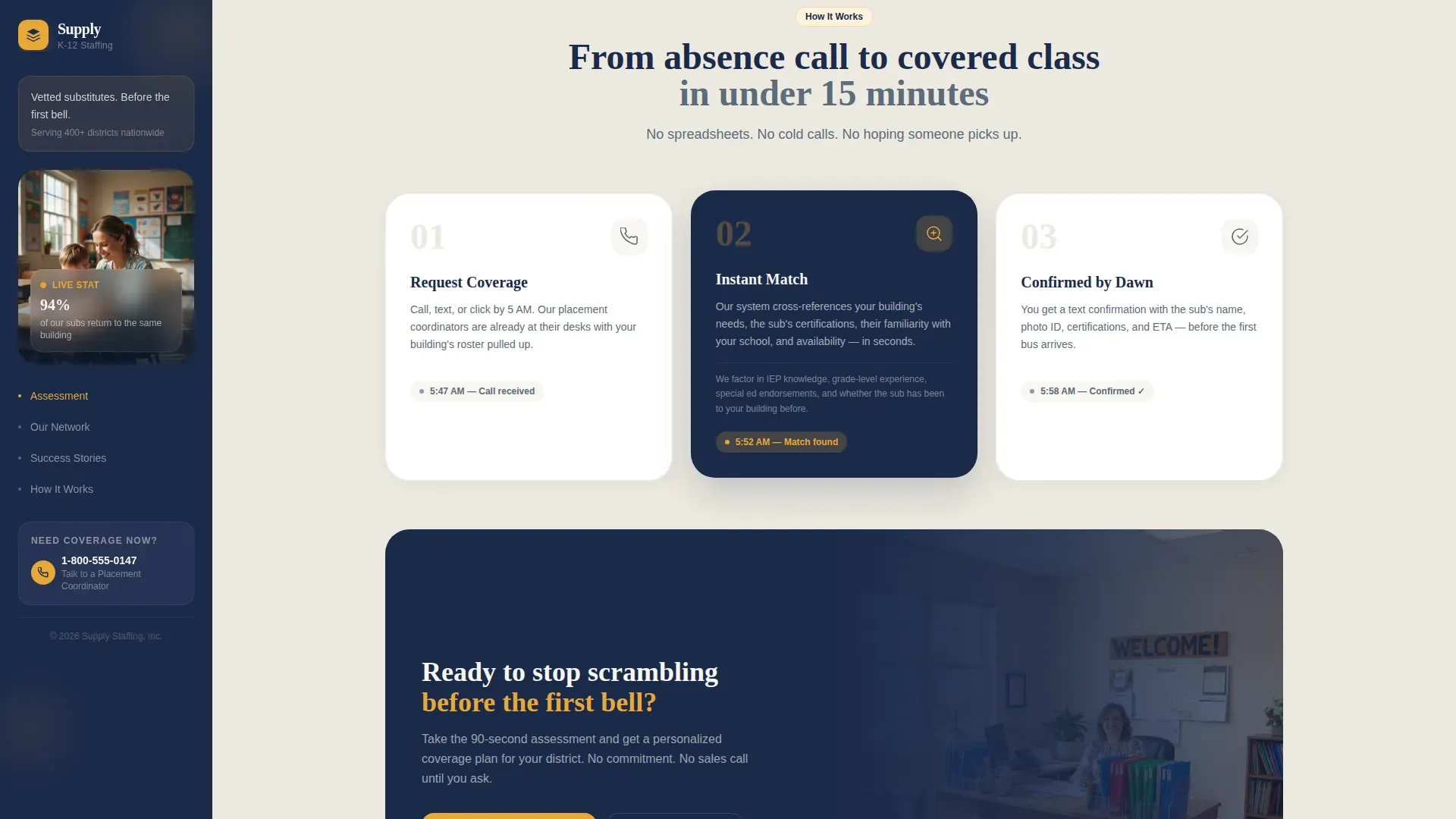
| How It Works | Explains three-step request, match, confirm process |
| Minimal Footer | Single-row footer with essential links and date |
Design & branding system
The design follows a Family First theme through a Navy Authority color system. The palette feels like a well-run elementary school front office, organized and calm, with every color doing a specific job.
- Deep institutional navy (#1B2A4A) anchors the persistent sidebar and all primary headers
- Warm chalk-dust white (#F7F5F0) fills the main content panels so the page breathes between steps
- Golden yellow (#E8A838) is displayed only on buttons and progress indicators, drawing the eye exactly where action is needed
Mobile & speed optimization
The layout is desktop-first, designed for administrators who are at their desk managing coverage spreadsheets before the first bell. A mobile fallback is also included for people who are already holding their phone at dawn.
- Large tappable buttons on each quiz step ensure the assessment works well on smaller screens
- Server-side components handle static sections to keep load time predictable
- Client-side logic runs the quiz steps, sidebar transitions, and real-time estimate updates
How this template helps you convert
The assessment flow is built around a single conversion principle: give before you ask. Each step adds value, and the final call to action feels like a natural reward rather than a gate.
- Zero friction in early steps lets visitors prepare their answers and complete the full quiz without sharing any contact information until step five.
- The personalized coverage estimate creates a concrete reason to enter a work email and district name, so the final "See My Coverage Plan" button converts on genuine intent.
- The sidebar phone number gives a direct communication path for administrators who prefer to talk rather than fill out a form, capturing leads through both channels.
Other information about this template
This template is useful beyond its core quiz flow. It also serves as a practical guide for how education staffing organizations can use structured checklists and templates to improve planning across their operations.
- Readiness checklists are essential for pre-implementation review and help ensure compliance with internal practices before a deployment goes live
- Using templates to create structured checklists can streamline operations and serve as a quality control mechanism for organizations managing multiple buildings
- The page layout supports clear navigational paths and high-speed scannability, minimizing friction when administrators need to find specific district information fast
- Emergency preparedness practices follow a similar structure: being informed, making a plan, and building resources that are updated regularly to prepare for different types of hazards that could impact a community
- Safeguarding critical documents and maintaining updated records are important habits for any business managing coverage planning across many sites
- Supply chain planning concepts also apply here: fill rate, coverage days, and deployment lead times are all ways to assess district readiness using the same logic that supply chain tools use to manage resources
- The Supply Find Your District Coverage Readiness landing page template is a focused, practical starting point for any company building an education staffing lead-generation page
- Administrators can download a personalized readiness report after completing the assessment, giving them a shareable document to support internal planning conversations
- Note that all design tabs, color tokens, and content blocks are fully editable so you can change branding to match your agency's identity
Theme
Family First
Creative direction
Network Effect
Color system
Navy Authority
Style
Sidebar Companion
Direction
Quiz/Assessment
Page Sections
Five-step Readiness Assessment Quiz
Evolving Sidebar Companion Panel
Real-time Coverage Estimate Display
Trust-building Social Proof Section
Direct-dial Coordinator Access Link
Animated Network Node Map
Related questions
What information does a visitor need to provide to complete the assessment?
Can the sidebar content be updated to match my agency's actual testimonials and stats?
Is this template intended only for large districts?
How does the personalized coverage estimate section work?
Can we add a direct phone number for our placement coordinator?



